 SMSC SMPP
User Guide
SMSC SMPP
Modified: 2022-01-10
Version: 1.5
Author: Kenny Colliander Nordin, KCN
This document is for the designated recipient only and may contain privileged, proprietary, or otherwise private information. If you have received it in error, please notify the sender immediately and delete the original. Any other use of the document by you is prohibited.
Change history
| Rev | Date | By | Changes from previous release |
| 1.0 | 2010-03-16 | KCN | Created |
| 1. | 2019-06-11 | TPE | Updated LINK logos |
| 1. | 2019-09-27 | PNI | Added reference to SMPP 3.4 specification |
| 1. | 2019-10-31 | EP | Observation about the validity period tag |
| 1. | 2020-08-28 | KCN | Added information regarding supported TLS versions |
| 2. | 2022-01-10 | KCN | Added additional information regarding delivery reports Updated information regarding TLS 1.3 |
Introduction
LINK Mobility has been a SMS distributor since 2001 and has much experience in working with both operators and connection aggregators. This platform is designed to handle large traffic volumes, maintain a high availability and make it easy to route traffic via multiple connections.
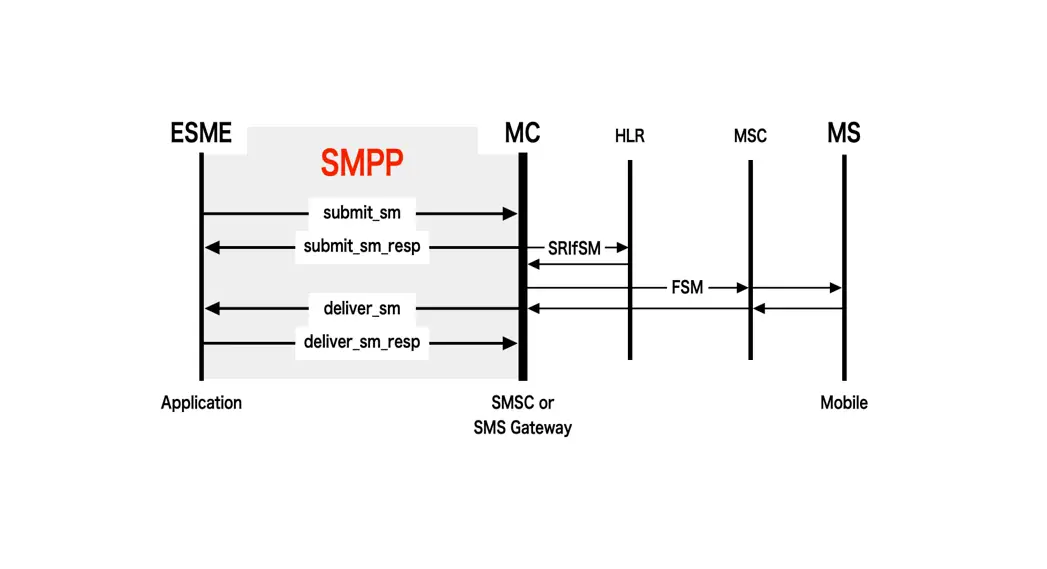
This is document describes the SMPP interface to the SMSC-platform and which parameters and commands that are required and which parameters are supported. This document will not handle specific use cases as concatenated messages, WAPpush, Flash SMS, etc. More information about those cases can be provided by contacting support.
Supported commands
LINK Mobility’s server should be treated as SMPP 3.4. The official specification can be found at https://smpp.org/SMPP_v3_4_Issue1_2.pdf.
All methods are not supported, and all differences are specified below.
4.1 Bind
The following bind commands are supported.
- Transmitter
- Transciever
- Receiver
Required parameters:
- system_id – obtained from support
- password – obtained from support
Optional parameters:
- addr_ton – default value if TON is set to Unknown during submit.
- addr_npi – default value if NPI is set to Unknown during submit.
Unsupported parameters:
- address_range
4.2 Unbind
The unbind command is supported.
4.3 Enquire link
The enquire link command is supported and should be called every 60 seconds.
4.4 Submit
The submit method should be used for delivering messages.
Required parameters:
- source_addr_ton
- source_addr_npi
- source_addr
- dest_addr_ton
- dest_addr_npi
- dest_addr
- esm_class
- data_coding
- sm_length
- short_message
Unsupported parameters:
- service_type
- protocol_id
- priority_flag
- schedule_delivery_time
- replace_if_present_flag
- sm_default_msg_id
Note that the payload tag is not supported and only one SMS may be delivered per call and it is recommended that the validity_period tag has a value of 15 minutes long at least.
4.4.1 Recommended TON and NPI
The following TON and NPI should be used when sending messages using submit command.
4.4.1.1 Source
The following TON and NPI combinations are supported for source address. All other combinations will be treated as invalid. The default TON from bind command will be
used if TON is set to Unknown (0). The default NPI from bind command will be used if NPI is set to Unknown (0).
| TON | NPI | Description |
| Alphanumeric (5) | Unknown (0) ISDN (1) | Will be treated as Alphanumeric sender text |
| International (1) | Unknown (0) ISDN (1) | Will be treated as MSISDN |
| National (2) Network specific (3) Subscriber number (4) Abbreviated (6) | Unknown (0) ISDN (1)National (8) | Will be treated as country specific short number. |
4.4.1.2 Destination
The following TON and NPI combinations are supported for destination address. All other combinations will be treated as invalid. The default TON from bind command will be used if TON is set to Unknown (0). The default NPI from bind command will be used if NPI is set to Unknown (0).
| TON | NPI | Description |
| International (1) | Unknown (0) ISDN (1) | Will be treated as MSISDN |
4.4.2 Supported encodings
The following encodings are supported. X may contain any value.
| DCS | Encoding |
| 0xX0 | Default GSM Alphabet with extension |
| 0xX2 | 8-bit binary |
| 0xX8 | UCS2 (ISO-10646-UCS-2) |
Delivery report
Only none or final delivery with successful/failure result are supported.
Format on delivery report: id: xxxxxxxxxxxxxxxxxxxxxxxxxxxxxxxxxxx done date: yyMMddHHmm stat: <status>
Available values in status:
- DELIVRD
- EXPIRED
- REJECTD
- UNDELIV
- DELETED
5.1 Extended delivery report format
Extended information in delivery reports may be requested in contact with your sales representative.
Format on delivery report:
id: xxxxxxxxxxxxxxxxxxxxxxxxxxxxxxxxxxx sub:000 dlvrd:000 submit date: yyMMddHHmm done date: yyMMddHHmm stat: <status> err: <error code> text:
Available values in status:
- DELIVRD
- EXPIRED
- REJECTD
- UNDELIV
- DELETED
“sub” and “dlvrd” fields will always be set to 000, and “text” field will always be empty.
See chapter Error codes for values for the “err” field.
Supported TLS versions
TLS 1.2 or TLS 1.3 is required for all TLS connections over SMPP.
Support for TLS 1.0 and 1.1 is discontinued since 2020-11-15. Versions 1.0 and 1.1 of TLS are older protocols that have been deprecated and are considered as security risks in the Internet community.
LINK strongly recommend to use TLS if unencrypted SMPP connections are being used today. Unencrypted SMPP connections are deprecated as of 2020-09-01 by LINK, and will be removed in the future. Date for unencrypted connections removal is not yet decided.
Connections towards the SMPP server for TLS is at port 3601 instead of unencrypted at port 3600.
You may still use TLS even if your SMPP implementation doesn’t support TLS using stunnel, see https://www.stunnel.org/
Error codes
The following error codes may be replied in the err field if the field is enabled.
| Error code | Description |
| 0 | Unknown error |
| 1 | Temporary routing error |
| 2 | Permanent routing error |
| 3 | Maximum throttling exceeded |
| 4 | Timeout |
| 5 | Operator unknown error |
| 6 | Operator error |
| 100 | Service not found |
| 101 | User not found |
| 102 | Account not found |
| 103 | Invalid password |
| 104 | Configuration error |
| 105 | Internal error |
| 200 | OK |
| 1000 | Sent |
| 1001 | Delivered |
| 1002 | Expired |
| 1003 | Deleted |
| 1004 | Mobile full |
| 1005 | Queued |
| 1006 | Not delivered |
| 1007 | Delivered, charge delayed |
| 1008 | Charged, message not sent |
| 1009 | Charged, message not delivered |
| 1010 | Expired, absence of operator delivery report |
| 1011 | Charged, message sent (to operator) |
| 1012 | Remotely queued |
| 1013 | Message sent to operator, charging delayed |
| 2000 | Invalid source number |
| 2001 | Short number is not supported as source |
| 2002 | Alpha is not supported as source |
| 2003 | MSISDN is not supported as source number |
| 2100 | Short number is not supported as destination |
| 2101 | Alpha is not supported as destination |
| 2102 | MSISDN is not supported as destination |
| 2103 | Operation blocked |
| 2104 | Unknown subscriber |
| 2105 | Destination blocked |
| 2106 | Number error |
| 2107 | Destination temporarily blocked |
| 2200 | Charging error |
| 2201 | Subscriber has low balance |
| 2202 | Subscriber barred for overcharged (premium) messages |
| 2203 | Subscriber too young (for this particular content) |
| 2204 | Prepaid subscriber not allowed |
| 2205 | Service rejected by subscriber |
| 2206 | Subscriber not registered in payment system |
| 2207 | Subscriber has reached max balance |
| 2208 | End user confirmation needed |
| 2300 | Refunded |
| 2301 | Could not refund due to illegal or missing MSISDN |
| 2302 | Could not refund due to missing messageId |
| 2303 | Queued for refund |
| 2304 | Refund timeout |
| 2305 | Refund failure |
| 3000 | GSM encoding is not supported |
| 3001 | UCS2 encoding is not supported |
| 3002 | Binary encoding is not supported |
| 4000 | Delivery report is not supported |
| 4001 | Invalid message content |
| 4002 | Invalid tariff |
| 4003 | Invalid user data |
| 4004 | Invalid user data header |
| 4005 | Invalid data coding |
| 4006 | Invalid VAT |
| 4007 | Unsupported content for destination |
 stunnel: Home