 00 186418
Weather Station
“Black Line Plus”
Operating Instructions
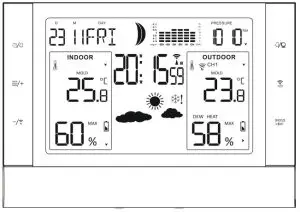
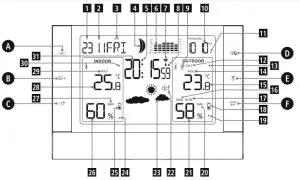
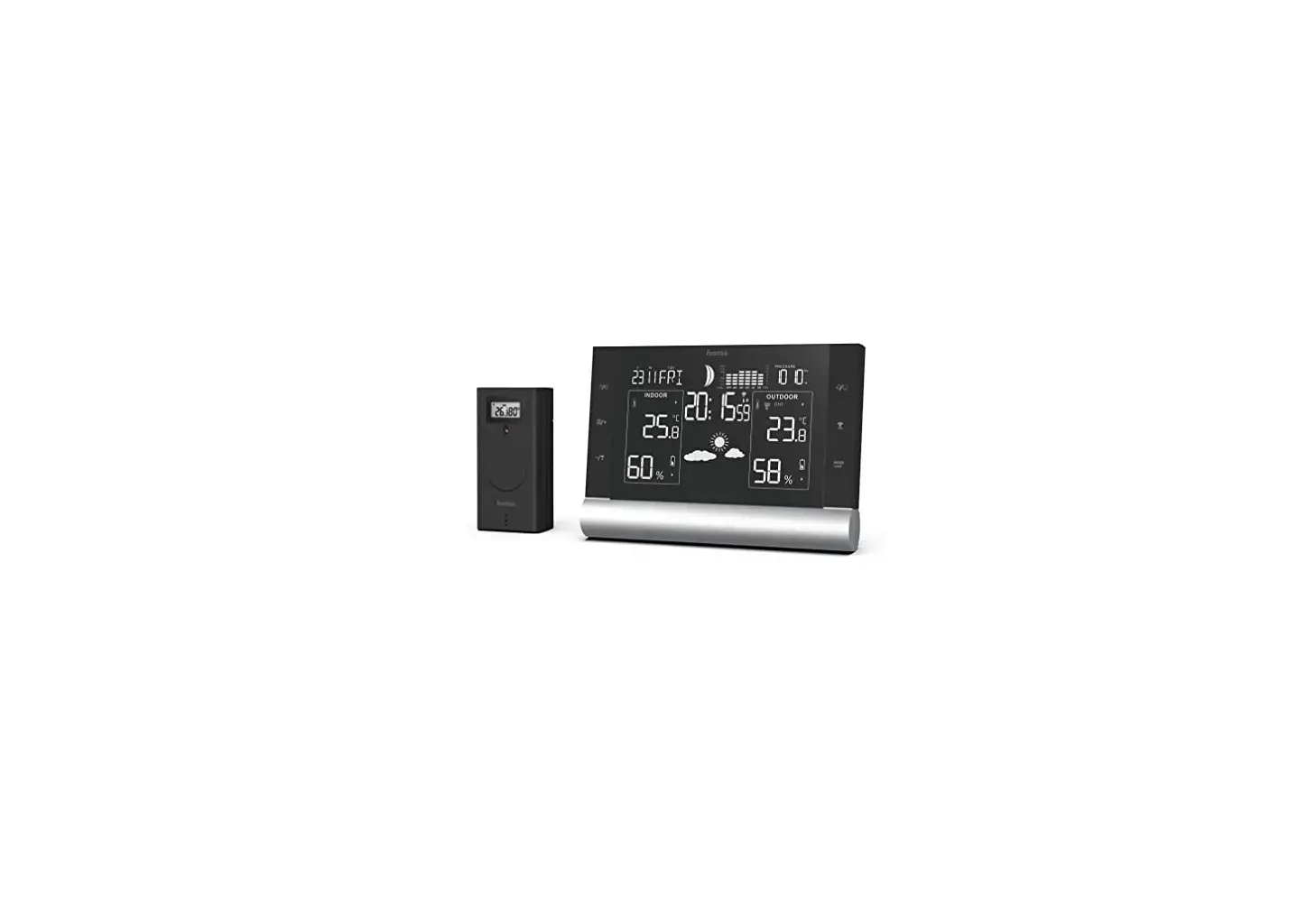
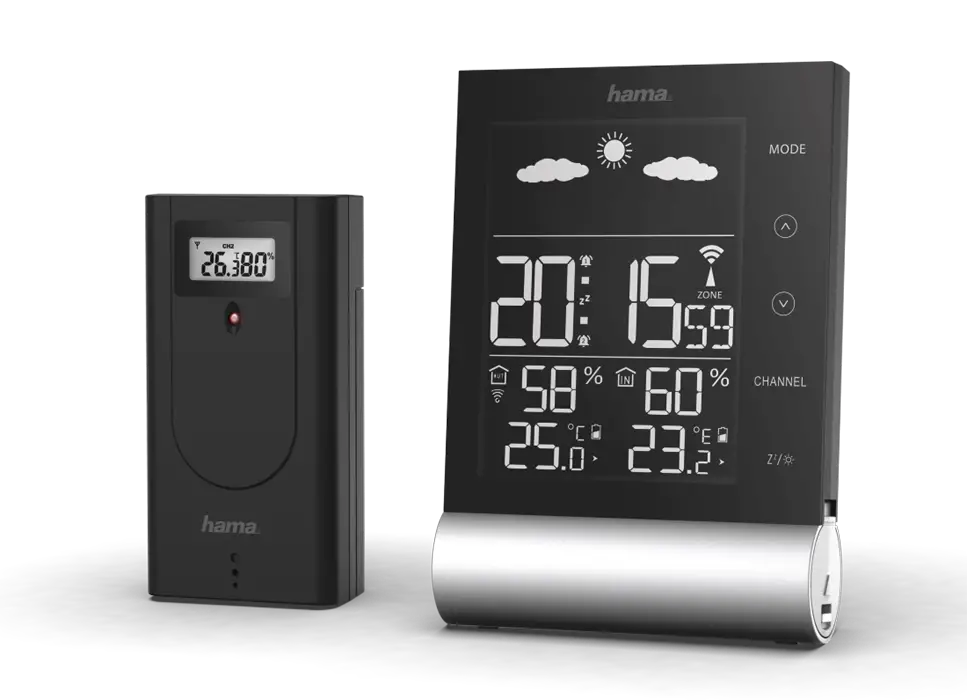
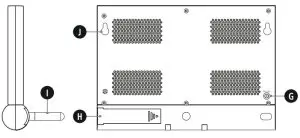 Controls and Displays
| 1. Day 2. Month 3. Day of the week 4. Moon phase 5. Alarm symbols (displayed when alarm is active) 6. 12-hour atmospheric pressure history 7. DCF signal radio symbol 8. Summertime 9. Outdoor sensor radio symbol 10. Atmospheric pressure 11. Atmospheric pressure trend 12. Outdoor sensor radio channel display 13. Outdoor temperature trend 14. Outdoor mould risk 15. Outdoor temperature 16. DEW –dew point 17. HEAT–heat index 18. Display for low battery level in the outdoor sensor | 19. Outdoor humidity trend 20. Display of max./min. outdoor temperature/ humidity 21. Outdoor humidity 22. Frost display 23. Weather forecast symbol 24. Room humidity trend 25. Low battery level display for the base station 26. Room humidity 27. Display of max./min. room temperature/humidity 28. Room temperature 29. Indoor mould risk 30. Room temperaturetrend 31. Time |
A  key =settings /confirms the setting
B  key =increases the current set value /recalls thesaved maximum/minimum values (MAX/MIN)
C -/  key =Reduction in the current setting value /Activation /Deactivation of manual DCF radio signal reception /Mould risk display
D key =activates/deactivates the alarm
E  key =Manual search for the outdoor sensor signal /channel selection
F SNOOZE/LIGHT button =temporarily interrupts
the alarm /activates the backlight
G 5-V power supply connection
H Battery compartment
I Base
J Recess for wall mounting
Thank you for choosing a Hama product.
Take your time and read the following instructions and information completely. Please keep these instructions in a safe place for futurereference. If you sell the device, please pass these operating instructions on to the new owner.
Explanation of Warning Symbols and Notes
 Risk of electric shock
This symbol indicates product parts energized with a dangerous voltage of sufficient magnitude to constitute arisk of electric shock. Warning
This symbol is used to indicate safety instructions or to draw your attention to specifichazards and risks. Note
Note
This symbol is used to indicate additional information or important notes.
Package Contents
- Weather station (base station for indoors /outdoor sensor for outdoors)
- 2AAbatteries for the outdoor sensor
- Power supply unit
- These operating instructions
Safety Notes
- The product is intended for private, non-commercial use only.
- Use the product for its intended purpose only.
- Protect the product from dirt, moistureand overheating, and only use it in adry environment.
- Do not use the product in the immediate vicinity of heaters or other heat sources or in direct sunlight.
- Keep this product, as all electrical products, out of the reach of children!
- Use the item only in moderate climatic conditions.
- Do not operate the product outside the power limits given in the specifications.
- Do not use the product in areas where the use of electronic devices is not permitted.
- Do not use the product in moist environments and avoid splashes.
- Do not place the product near interference fields, metal frames, computers, TVs, etc. Electronic devices and window frames can negatively affect the product’s functionality
- Do not drop the product and do not expose it to any major shocks.
- Do not modify the product in any way. Doing so voids the warranty.
- Keep the packaging material out of the reach of children due to the risk of suffocation.
- Dispose of packaging material immediately according to locally applicable regulations.
- Lay all cables so that they do not pose a tripping hazard.
- Do not bend or crush the cable.
Risk of electric shock
- Do not open the device or continue to operate it if it becomes damaged.
- Do not use the product if the AC adapter, adapter cable or power cable is damaged.
- Do not attempt to service or repair the product yourself. Leave any and all service work to qualified experts.
Warning –Batteries
- When inserting batteries note the correct polarity (+ and -markings) and insert the batteries accordingly. Failuretodosocould results in the batteries leaking or exploding.
- Only use batteries (or rechargeable batteries) that match the specified type.
- Before you insert the batteries, clean the battery contacts and the polar contacts.
- Do not allow children to change batteries without supervision.
- Do not mix old and new batteries or batteries of a different type or make.
- Remove the batteries from products that aren’t being used for an extended period (unless these are being kept ready for an emergency).
- Do not short-circuit batteries.
- Do not charge batteries.
- Do not throw batteries in a fire.
- Keep batteries out of the reach of children.
- Never open, damage or swallow batteries or allow them to enter the environment. They can contain toxic, environmentally harmful heavy metals.
- Immediately remove and dispose of dead batteries from the product.
- Avoid storing, charging or using the device in extreme temperatures and extremely low atmospheric pressure (for example, at high altitudes).
Getting Started
Note
Please remember, during commissioning, to always insert the batteries into the outdoor sensor first and then into the base station.
Insert batteries /connect the power supply
Outdoor sensor
- Remove the screen protector from the display.
- Open the battery compartment and remove the contact breaker.
- Then close the battery compartment cover.
Base station Warning
- Connect the product only to a socket that has been approved for the device. The socket must be installed close to the product and must be easily accessible.
- When using an amulti-socket power strip, make sure that the sum power draw of all the connected devices does not exceed its maximum throughput rating.
- If you will not be using the product for a long period of time, disconnect it from mains power.
- Remove the screen protector from the display.
- Connect the power supply unit to the power supply unit connection socket (G) on the back of the base station.
- Connect the weather station’s power supply unit to a correctly installed mains socket.
- Alternatively, open the battery compartment (H), insert three AA batteries with the correct polarity, and close the battery compartment cover.
Note
If the batteries are inserted correctly and you connect the power supply unit to the station, the base station will automatically switch to the external power supply.
Replacing the batteries
Note –Replacing the batteries
- Be awarethat, after every battery change on the outdoor sensor or base station, the stations will need to be resynchronized.
- To do this, remove the batteries from the other station and then reinsert them, or change them as required.
Outdoor sensor
- If the
 symbol (18) appears, replace the 2AA batteries in the outdoor sensor with 2new batteries.
 - Open the battery compartment, remove and properly dispose of the dead batteries and insert 2new AA batteries with the correct polarity. Then close the battery compartment cover.
 symbol (18) appears, replace the 2AA batteries in the outdoor sensor with 2new batteries.
Base station
- When the symbol (25) appears, replace the three AA batteries for the base station with three new ones.
- Open the battery compartment (H), remove and properly dispose of the depleted batteries and insert three new AA batteries with the correct polarity. Then close the battery compartment cover.
Installation
Note –Installation
- We recommend initially positioning the base station and outdoor sensor at the preferred setup locations without assembling them and carrying out all the settings -as described in 6. Operation – first.
- Only install the stations once the appropriate settings have been made and an astable wireless connection is established.
Note
- The range of the radio transmission between the outdoor sensor and the base station is up to 50 min unobstructed areas.
- Before installation, ensure that wireless transmission will not be disrupted by interference or obstacles like buildings, trees, vehicles, high-voltage lines, etc.
- Before the final installation, ensure that there’s sufficient reception between the intended installation locations.
- When assembling the outdoor sensor, take care to ensure it is positioned so that it is protected from direct sunlight and rain.
- The international standard height for measuring air temperatureis1.25 m(4ft) above ground.
Warning
- Buy special or suitable installation material from a specialized dealer for wall-mounting.
- Ensure that no faulty or damaged parts are installed.
- Never apply force during installation. This could damage the product.
- Before installation, ensure that the chosen wall is suitable for the weight to be mounted, and make sure that there are no electrical wires, water, gas or other lines at the installation site on the wall.
- Do not mount the product above locations where persons might linger.
Base station
- Use the base (I) to position the base station on a level surface.
- Alternatively, you can install the base station on the wall using the opening (J)on the back.
Outdoor sensor
- You can also set the outdoor sensor up on an even surface outdoors.
- We recommend mounting the outdoor sensor securely and firmly on an outdoor wall.
- Install an anchor, screw, nail, etc. in the wall of your choice.
- Hang the outdoor sensor onto it using the cut-out provided.
Operation
Note –Input
- Hold the
 button (B) or the-/
 button (C) to select the values faster.
Connection to the outdoor sensor
- After the batteries are inserted, the base station automatically searches for a connection to the outdoor sensor and carries out the initial setup routine.
Note
- Initial setup takes approximately 3minutes.
- During the connection attempt, the radio signal on the outdoor sensor (9) flashes.
- Do not press any buttons during setup. Otherwise, values may not be transmitted correctly and there is a risk of value errors and inaccuracies.
- The setup process is completed when the indoor and outdoor measurement data (15/21/26/28) is displayed.
- If no signal is received from the outdoor sensor on a repeated basis, press and hold the
 key (E) for approx. 3seconds to start the manual search for the signal.
Note –Faulty transfer of measured values
- In some cases, interference caused by the wifi network, computer, TV, etc., for example, may cause the transmission of measurement values between the base station and the outdoor sensor to fail.
- In this case, you must resynchronize the stations by briefly removing the batteries from both stations and reinserting them.
- If the measured values are not transferred again once the batteries are inserted, replace the batteries with new ones.
- If necessary, select a new location for the base station in order to avoid possible interference in the future.
Channel selection /Additional outdoor sensors
Note
- You can install two further outdoor sensors in addition to the outdoor sensor supplied. When doing so, ensure the same channel setting on the base station and each outdoor sensor.
- Suitable outdoor sensors can be found at www.hama.com
- Press the key (E) repeatedly to set the same channel as on the outdoor sensor in question. Channel 1, 2or 3isdisplayed.
- If the
 symbol is displayed, the weather station will automatically switch the displayed channel every five seconds.
 symbol is displayed, the weather station will automatically switch the displayed channel every five seconds.
| Display | Searching for the DCF signal |
| Display flashing | Active |
| Displayed continuously | Successful –signal is being received |
| No display | Inactive |
- If the station still does not receive a signal, press and hold the -/button (C) for approx. 3seconds to start the manual search for the DCF signal. The wireless symbol (7) will start to flash.
Note –Time settings
- The search process takes about 7minutes. If the search fails, it ends and is repeated at the next clock hour.
- In the meantime you can, however,set the time and the date manually.
- The clock automatically continues to search for the DCF signal on a daily basis (between 1:00 a.m. and 5:00 a.m.). If the signal is received successfully,the manually set time and date are overwritten.
- Press and hold the-/ button (C) again for approximately 3seconds to stop the manual search.
Note –Summertime
The clock automatically switches to summertime. S (8) appears on the display as long as summertime is activated.
(Manual) settings
- Press and hold the
 button (A) for approximately 3 seconds to make the following settings one after the other:
 - Year
- Month and date display
- Month
- Day
- Hour
- Minute
- 12-/24-h format
- Time zone
- °C and °F display
- Language
- hPa and inHg display
- To select the individual values, press the button (B) or the -/button (C), and confirm each selection by pressing the button (A).
- Press the button (A) immediately to adopt the set value displayed and skip ahead.
- If you do not make an entry for 20 seconds, Settings mode is exited automatically.
Note –Time zone
- The DCF signal can be received over long distances, but always transmits the current Central European Time in Germany. Make sure you account for the time difference in countries with another time zone.
- If you are in Moscow, the time is 3hours later than in Germany. This means that you should set +3 for the time zone. The clock then automatically sets the time to 3hours after the DCF signal is received or relative to the manually set time.
Note –Day of the week
You can choose from German (GER), English (ENG), French (FRE), Italian (ITA), Spanish (SPA), Dutch (DUT), and Danish (DAN) for the day of the week display.
Alarm
- You can set two separate alarm times,
 and.
and. - Press the button (A) to display the alarm time.
- Press and hold the button (A) for approx. 3seconds to set the signal time of the alarm displayed. The hour’s display begins to flash.
- Press the button (B) or the button (C) to select the hour for the alarm time and confirm your selection by pressing the button (A). The minute’s display begins to flash.
- Repeat the process to set the minutes for the alarm time.
- Repeat this process for the second alarm time.
- If you do not make an entry for 20 seconds, Settings mode is exited automatically.
- If the alarm is triggered, the alarm symbol will begin to flash and an alarm will sound.
- Press any button (except the SNOOZE/ LIGHT button (F)) to stop the alarm. Otherwise, it will stop automatically after 2minutes.
- The alarm does not need to be reactivated. It will trigger again at the set alarm time 24 hours later.
 and
andEnabling/disabling the alarm
- To select and activate or deactivate the appropriate alarm, press the button (D) repeatedly to select or. An active alarm is isplayed by the alarm symbol or. When an active alarm is deactivated, the corresponding alarm symbol or disappears.
- When the alarm is triggered, the active alarm symbol (5) begins to flash and an alarm sounds. Press any button (except the SNOOZE/LIGHT sensor (F) to stop the alarm. Otherwise, it will stop automatically after 2 minutes.
Note –Snooze function
- While the alarm signal is sounding, press the SNOOZE/LIGHT button (F) to activate the snooze function. The alarm signal will stop for 5minutes, after which it will sound again.
- Press any button (except the SNOOZE/LIGHT button (F)) to stop the snooze function and the alarm.
Weather forecast
- Based on changes in the atmospheric pressure and the data saved, the base station is able to make weather forecasts for the next 12 to 24 hours.
Note –Weather forecast
The weather forecast function is not available during the first few hours of operation because it requires data that is collected during operation.
The weather station shows the trend of the weather for the next 8hours using the following weather symbols: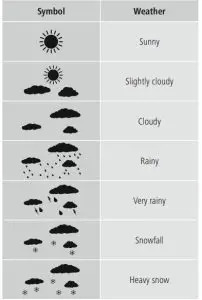
Temperature, humidity and atmospheric pressure trends
Note
The trend displays are not available during the first few hours of operation because they require data that is collected during operation. Note
All measurement values are subject to a certain amount of measurement error. The weather station indicates a trend as to how the values for the outdoor temperature/humidity (15/21), room temperature/humidity (28/26) and atmospheric pressure (10) are likely to develop over the next few hours.
| Display | Trend |
 | Increasing |
 | Constant |
 | Decreasing |
Air pressure record
- The air pressure recorded in the last 12 hours is displayed (6).
Maximum and minimum temperature and humidity values
- The base station automatically stores the maximum and minimum outdoor/indoor temperature and humidity values.
- Repeatedly press the button (B) briefly to switch between the current temperature and humidity, minimum temperature and humidity (MIN), and maximum temperature and humidity (MAX).
- Press and hold the button (B) for approx. 3seconds to reset the stored maximum and minimum values.
Moon phases
The base station displays the current moon phase (4) using the following symbols: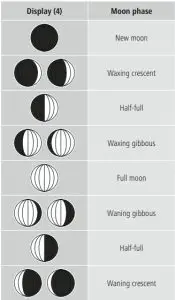
Dew point
- To view the current dew point temperature, press the button (C) until DEW appears in the outdoor data display.
- LL.L is displayed if the dew point is below 0°C, and HH.H is displayed if the dew point is above 60°C.
- The display automatically switches back to the current temperature and humidity display.
- The relationship between temperature and relative humidity is expressed through the dew point: If air is continuously cooled and absolute humidity remains the same, relative humidity increases up to 100%. If the air cools further, the excess water vapor is precipitated as droplets.
Heat index
- The heat index is a value specified in the unit of temperature. This value describes how hot it feels based on the measured outdoor temperature and, above all, the relative outdoor humidity.
- If the temperature is below 26.7 degrees, the heat index shows the currently measured values.
- If the temperature is above 26.7°C, the weather station in HEATmode displays the apparent temperature; this is calculated by taking into account the outdoor humidity and outdoor temperature.
Frost alarm
- The snowflake symbol
 (22) flashes if the outdoor temperature is between +1 and -1°C.
 - The snowflake symbol (22) remains displayed if the outdoor temperature is below -1.1°C.
 (22) flashes if the outdoor temperature is between +1 and -1°C.
Mould risk
- The weather station has a display that allows the risk of mold to be measured and presented with four different values.
- Press -/(C) to briefly display the mould risk for indoors instead of the date.
- The following values can be displayed: 0=Norisk of mold, LOW=Low risk of mold, MED =Increased risk of mould (up to 56 digits), HI =High risk of mold (measurement value up to 160 digits).
- After pressing the-/ key (C) again, the measured risk of mould for outdoors is displayed above the outdoor temperature.
- Press the -/key (C) one last time to view the days of the week again and to reset the weather station to DEW mode. If you do not subsequently press the button, the mould display will automatically disappear after a short time.
Backlight
- If you press the SNOOZE/LIGHT button (F), the display will light up.
- During battery operation, the display is illuminated for approximately 10 seconds.
Note –Permanent backlight
Permanent backlight mode is only possible when the base station is plugged into mains power.
Care and Maintenance
Note
Disconnect the device from the power supply before cleaning it or if it is not going to be used for a long period of time.
- Only clean this product with a slightly damp, lint-free cloth and do not use aggressive cleaning agents.
- Make sure that water does not get into the product.
Warranty Disclaimer
Hama GmbH &CoKGassumes no liability and provides no warranty for damage resulting from improper installation/ mounting, improper use of the product or from failure to observe the operating instructions and/or safety notes.
Technical Data
Specifications in accordance with Regulation (EU) 2019/1782
| Manufacturer’sname or trade mark, commercial registration number and address | Hama, HRA12159, Dresdner Str. 9, 86653 Monheim |
| Model identifier | HX075-0500500AG-001 |
| Input voltage | 100 –240 V |
| Input AC frequency | 50 /60Hz |
| Output voltage / Output current / Output power | 5.0 VDC/ 0.5 A/ 2.5 W |
| Average active efficiency | 73.6 % |
| Efficiency at low load (10 %) | 60.4 % |
| No-load power consumption | 0.04 W |
| Base station | Outdoor sensor | |
| Power supply | 4.5 V 3xAAbatteries Power supply unit: IN: 100-240 V~ 50/60 Hz OUT:5.0V 0,5A | 3.0 V 2xAAbatteries |
| Measuring range Temperature(°C) Humidity | 0°C –+50°C / 32°F –+122°F 20% –95% | -20°C –+60°C 20% –95% |
| Measurement increments Temperature Humidity | 0.1°C/ 0.2°F 1% | 0.1°C 1% |
| DCF radio-controlled clock | Yes | No |
| Hygrometer | Yes | Yes |
| Thermometer | Yes | Yes |
| Barometer | 850 hPa~ 1050 hPa/ 25.07 inHg ~ 30.97 inHg | No |
| Alarm function | Yes | No |
| Max. number of outdoor sensors | 3 | |
| Range | ≤ 50 m | |
Recycling Information
Note on environmental protection: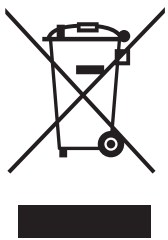 After the implementation of the European Directive 2012/19/EU and 2006/66/EU in the national legal system, the following applies: Electric and electronic devices, as well as batteries, must not be disposed of with household waste. Consumers areobliged by law to return electrical and electronic devices as well as batteries at the end of their service lives to the public collecting points set up for this purpose or point of sale. Details to this are defined by the national law of the respective country. This symbol on the product, the instruction manual or the package indicates that a product is subject to these regulations. By recycling, reusing the materials or other forms of utilizing old devices/batteries, you aremaking an important contribution to protecting our environment.
Declaration of Conformity
Hereby, Hama GmbH &CoKGdeclares that the radio equipment type [00186418] is in compliance with Directive 2014/53/EU. The full text of the EU declaration of conformity is available at the following internet address: www.hama.com -> 00186418 -> Downloads.
| Frequency band(s) | 433 MHz |
| Maximum radio-frequency power transmitted | 0.222 mW |

Hama GmbH &CoKG
86652 Monheim /Germany
Service &Support www.hama.com
 +49 9091 502-0
All listed brands are trademarks of the corresponding companies.
Errors and omissions excepted, and subject to technical changes.
Our general terms of delivery and payment are applied.
00186418/10.20