Details
Modem InformationDOCSIS 3.0 Dual Band 802.11-AC WiFi Modem 32×8 channel bonding To achieve Gigablast or Ultimate Classic speeds, a DOCSIS 3.1 modem is required | Highest Service LevelUltimate 500 |
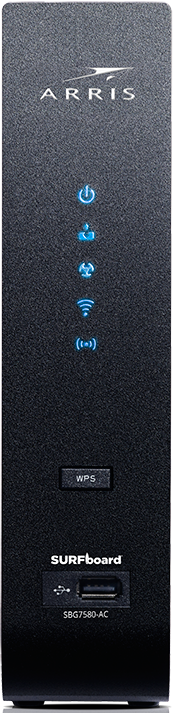
Front View
| After the cable modem is successfully registered on the network, the Power, Send/Receive, and Online indicators illuminate continuously to indicate that the cable modem is online and fully operational. | |
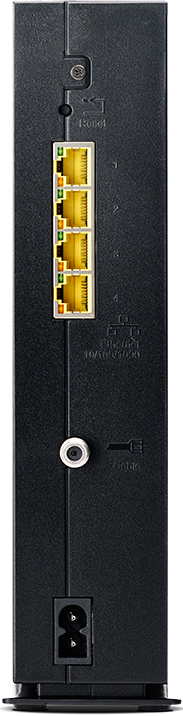
Back View
| The following ports are available on the back of the modem.
| |
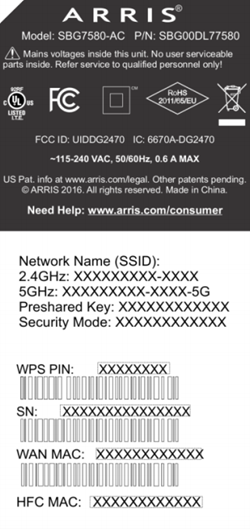
MAC Address / WiFi Network Label
| This label is located on the bottom of the device.
|
Troubleshooting
The lights indicate the current status of your modem. To troubleshoot any connection problems, use the table below.
| Modem Light | Status | Problem |
|---|---|---|
| Power
| Off | No Power. Verify all cable connections and try resetting the modem. |
| On | None. Device is powered on. | |
| Send/Receive
| Blinking | Scanning for downstream and upstream channels. Verify all cable connections and try resetting the modem. |
| On | None. Connected to the Internet. | |
| Online
| Off | Internet is not available. Verify all cable connections and try resetting the modem. |
| Blinking | Downstream and upstream channel acquisition in progress. Verify all cable connections and try resetting the modem. | |
| On | None. Internet is available. | |
| 2.4 GHz
| On | None. Activity with a connected device on the 2.4 GHz wireless network. |
| Blinking | None. WiFi is enabled on the 2.4 GHz frequency. | |
| 5 GHz
| On | None. Activity with a connected device on the 5 GHz wireless network. |
| Blinking | None. WiFi is enabled on the 5 GHz frequency. | |
| WPS LED | Blinking | None. WPS pairing is in progress with a WPS-enabled wireless device. |
| On | None. A WPS-enabled wireless device is connected. | |
| USB Port | N/A | There is no LED on the port. |


Rear Panel Modem Lights
The lights below indicate the connection status of your WiFi cable modem. To troubleshoot any connection problems, use the table below.
| Light | Status | Problem |
|---|---|---|
| Ethernet | Off | Device is not connected to the port. Verify all cable connections and try resetting the modem. |
| Blinking or Solid Green | None. A device is connected to the port at 1000 Mbps speeds and data is passing between cable modem and connected device. | |
| Blinking or Solid Amber | None. A device is connected at 10/100 Mbps speeds and data is passing between cable modem and connected device. |
Manufacturer Resources
For more detailed technical information on the SBG7580, see the following manufacturer resources.
- ARRIS_SBG780_QSG [PDF]
- ArrisSBG7580_User_Guide [PDF]