 505 S Maple Road – Ann Arbor, MI 48103 – USA
TEL (800) 422-2558 – FAX (734) 665-9099
www.Eberbachlabtools.com
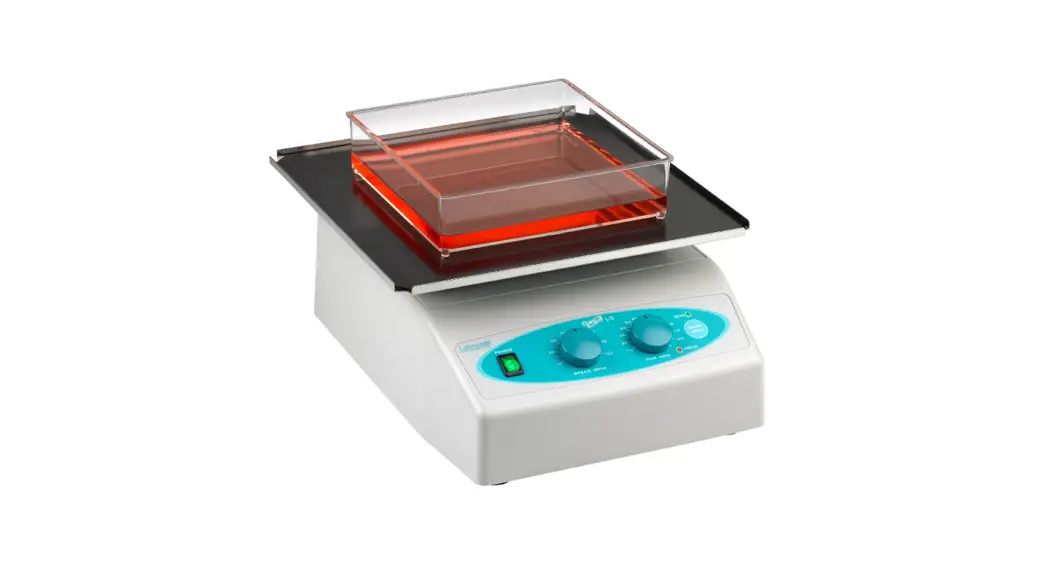
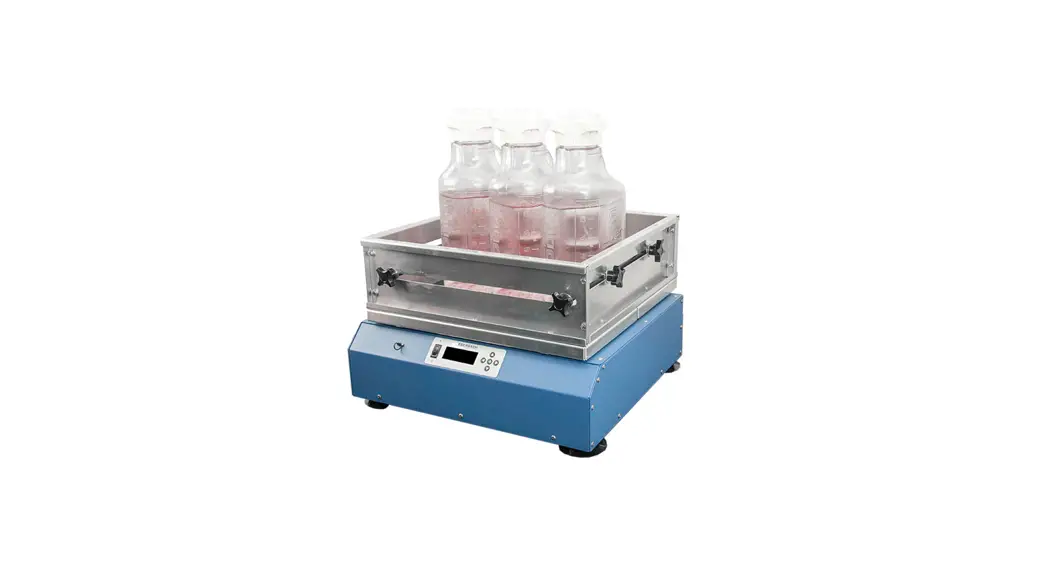
E6140.00 Orbital Shaker
Variable Speed with Timer and Tachometer
30-320 rpm, 230/115 V, 50/60 Hz
USE AND CARE FOR CATALOG NUMBER:
- E6140.00 Orbital Shaker Power Unit
Variable Speed 30-350 rpm with Timer and Tachometer 230/115V 50/60Hz
GENERAL INFORMATION
- Handle this unit with care. Unpack and check that the contents coincide with the packing-list. If any part is damaged or missing, please advise the distributor immediately.
- Do not install or use this equipment without first reading this manual.
- This manual should always be attached to the equipment and made available to all users.
- If you have any doubts or inquiries, please contact your supplier or Eberbach Corporation technical service.
Weight/Speed Considerations:
Maximum load and maximum speed specifications for Eberbach shakers are established both as a guide to ensure long operational life of the units and as safety parameters for the operator. When shaking heavy loads at higher speeds always monitor the progress of the shaking action for a few minutes.
Pay particular attention to the stability of the load as objects may shake loose from the platform/box carrier if not properly secured. Always turn the shaker off before adding, adjusting or removing items. Be mindful that solid masses will affect the shaker differently than will the same mass of a fluid. If you have any concerns about your shaking protocol please call Eberbach technical support.
OPERATION
The Eberbach orbital shaker catalog # E6140.00 features:
- A continuously variable speed range, adjustable between 30 and 350 rpm/min with stock orbit set to .75” (19.0mm).
- An Oriental BLDC Motor Drive for quiet operation and low maintenance.
- A digital tachometer and timer for simple and accurate use.
- A maximum shaking weight of 50lbs (23kg) at high speed (with stock .75” (19.0mm) orbit diameter).
Contact Eberbach Corporation Technical Support for other stroke setting weight limits.
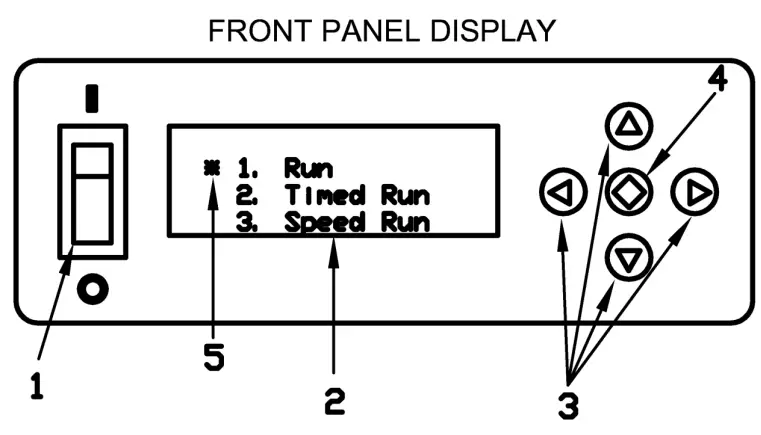
- Power Switch
- Liquid Crystal Display (LCD)
- Directional Pad (D-Pad)
- Enter Button
- Cursor
Operation: Press the Power Switch down into the ON position. The LCD should light up and show the main menu. There are three different run modes to choose from. Select a run mode by moving the Cursor (using the D-PAD) and press the Enter Button.
Run Mode: The shaker will begin the run mode at its lowest speed.
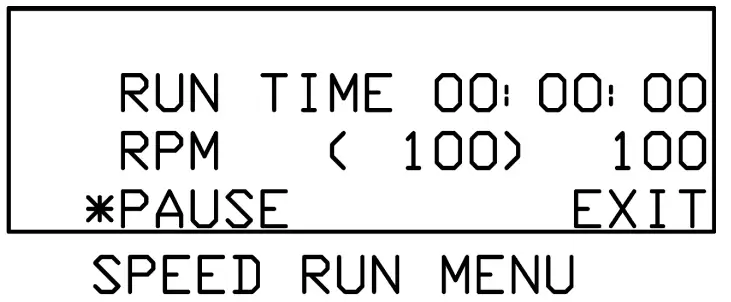
The speed shown in parenthesis (xxxx) is the set speed controlled by the user. The speed listed to the right is the tachometer read out or the actual speed of the shaker in real time. The speed can be increased/decreased by pressing and holding the up/down arrows on the D-PAD. The longer the button is held down the faster the speed will increase/decrease. Once engaged the timer will begin counting all the way up to 999 hours before the timer overflows back to zero. To pause the shaker move the Cursor to the PAUSE item by pressing the left arrow on the D-PAD and press the Enter Button. The clock will pause at its current time and the shaker will gradually come to a complete stop.
The clock and shaker can be resumed at its current time and speed by selecting RESUME and pressing the Enter Button. To go back to the main menu move the Cursor to the EXIT item by pressing the right arrow on the D-PAD and then press the Enter Button. 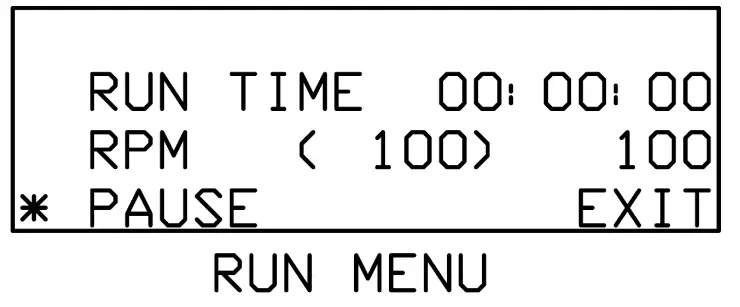
Timed Run Mode: The timed run mode features a count down timer that automatically shuts the shaker off when the time runs out. When selected the user will be taken to the Timed Run Setup Menu and will need to input the run time in hours, minutes, seconds and select the speed for the run. The left/right arrows on the D-PAD can be used to move the cursor between hours, minutes or seconds and the up and down arrows can be used to set the time. The longest run time allowed is 999:59:59. Once the time is set move the Cursor down by pressing the right arrow on the D-PAD until the Cursor is next to the RPM line item. The speed can be set using the up and down arrows on the DPAD. Now that the data is set navigate the Cursor to the START line item using the left/right arrows on the D-PAD and press the Enter Button.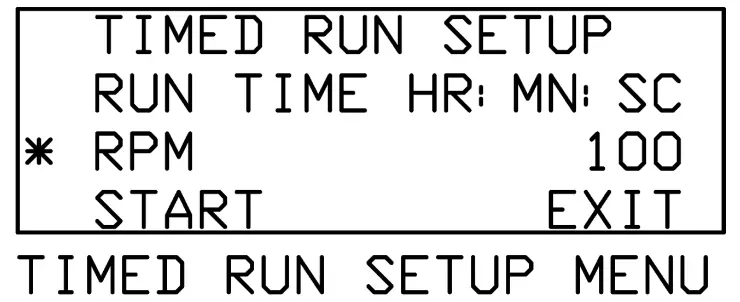
After selecting START the shaker will begin at the selected speed and the timer will begin counting down. The speed can be adjusted in real time using the up/down arrows on the D-PAD. The speed shown in parenthesis is the target speed controlled by the user and the speed listed to the right is the actual speed as read by the tachometer. The shaker and countdown timer can be paused and resumed. Move the Cursor to the line item PAUSE by pressing the left arrow on the D-PAD and then press the Enter Button. Exiting the Timed Run Menu will bring the user back to the Timed Run Setup Menu. 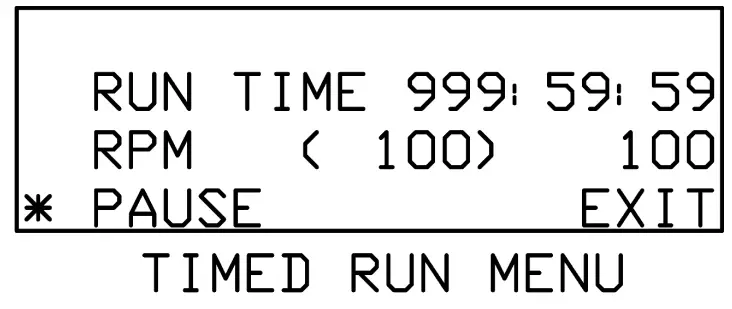
Speed Run Mode: The speed run allows the user to program in a set run speed. Once engaged the timer will begin counting all the way up to 999 hours before the timer overflows back to zero. Select the speed run mode from the main menu and press the Enter Button. The user will be prompted with the speed run setup menu. Set the desired speed using the up/down arrows on the D- PAD. The left/right arrows can be used to move the Cursor between START and EXIT. EXIT will take the user back to the main menu. Keep the Cursor next to the START line item and press the Enter Button. 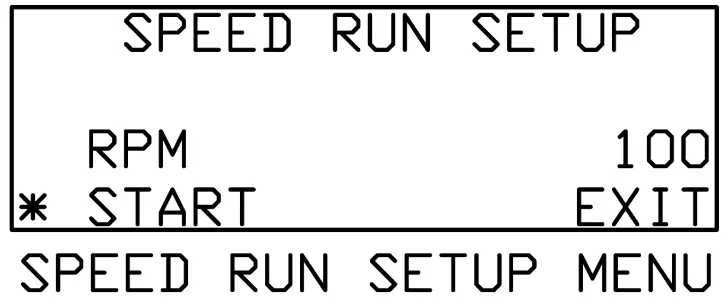
The user will now be taken to the speed run menu. The shaker will begin at the speed selected in the setup menu. The speed run menu behaves in the same way as the run menu with one exception. Pressing EXIT will not take the user back to the main menu instead pressing EXIT will take the user back to the speed run setup menu.
Restoring the Factory Settings:
During the course of operation the machine may need to be reset to its factory settings. To do so the user must press and hold the green Enter Button. Next the user must turn the Power Switch on, while continuing to hold the Enter Button. After a few seconds the user will be presented with the utilities menu.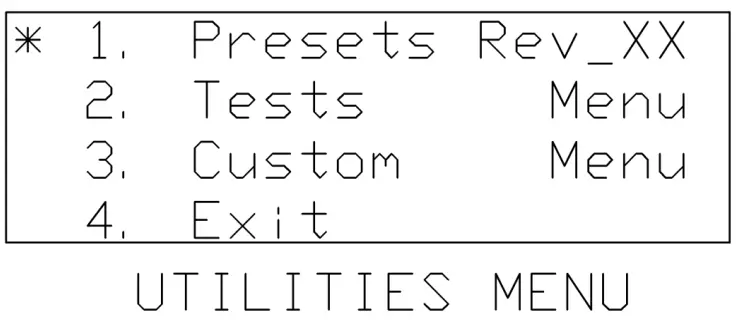
Navigate the Cursor to the top line item marked “1. Presets Rev_XX” and press the Enter Button. The user will now be presented with the presets menu.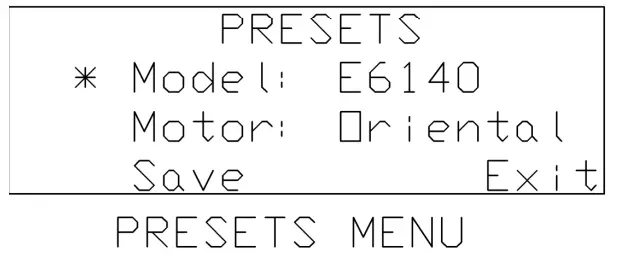
The Cursor should be next to the line item “Model : xxxx” use the up/down arrow buttons, on the D-PAD, to select E6140. The models are listed numerically with the smallest numbers at the bottom and the largest numbers at the top. If the line reads “Model: Empty” then press and hold the down arrow button to get back into the model numbers.
Once the user has selected the correct model number, press the right arrow button on the D-PAD. Use the up arrow button on the D-PAD to change the motor setting to “Oriental.” Navigate the Cursor down to the save line item by pressing the right arrow button on the D-PAD. Press the Enter Button to save the preset settings. The user will now be back at the utilities menu. Navigate the Cursor down to the last line item “4. Exit” and press the Enter Button. The machine has now been reset to its factory settings.
Note: There may be instances when the memory can become corrupt even though the presets menu appears to be correct. The problem can result in false speed values during run operation. If the user navigates to the preset menu and the settings match the picture shown above, navigate the Cursor down to save and press the Enter Button anyways. This will ensure that the maximum and minimum speed values are correct.
Note: All run menus will have two speeds listed. The leftmost speed will be displayed inside parenthesis. This is the target speed controlled by the user. The shaker will attempt to match this speed and should do so within ten seconds after making an adjustment. The rightmost speed is the tachometer reading, which shows the user what the shaker is actually running at. The tachometer reading will not necessarily match the target speed at all times, but is guaranteed to be within +/- 1% RPM.
Note: Reciprocating shakers will display OSC (oscillations) instead of RPM (revolutions per minute).
Note: Use slowest speed necessary to produce required shaking action.
Note: Do not rotate machine by hand as doing so may corrupt the digital memory and require a factory reset.
If you have any doubts or inquiries concerning operation contact your supplier or Eberbach Corporation technical service.
LOADING:
It is impossible to outline the exact limitations for loading a shaker, as resulting shaking action is dependent upon several factors. Principal among these is the size and shape of the containers, speed, orbit radius, and the amount and type of material being shaken.
Basic considerations should be:
- Use lowest speed consistent with the required shaking action.
- At higher speed use less weight on platform.
- When using a tiered platform (one platform above the other), place equal load on each or, if possible, place heavier mass on lower platform and lighter on the top. If shaking action imparts a “whip” to the upper platform, then either the speed is too high or the load is too heavy on that platform.
- If shaker has tendency to “walk” on floor, then rubber feet should be secured to the floor using rubber or contact cement.
Good judgment in the selection of the factors will contribute to proper use of the shaker.
BELT INSPECTION:
Remove top plate and inspect belt annually and replace if actually broken or if the cords are exposed and frayed. In the case of a high duty cycle inspect every 6 months. Small outer fabric breaks are not harmful.
BELT REPLACEMENT AND ADJUSTMENT:
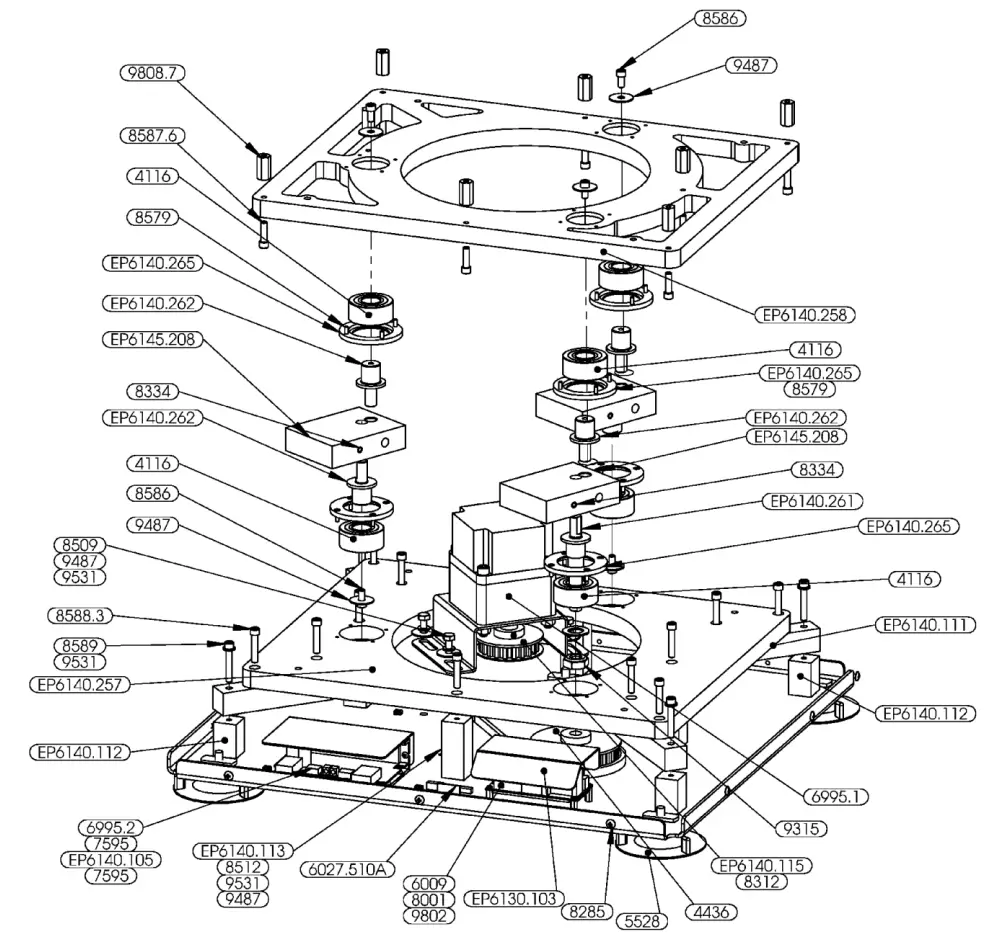
To replace belt, loosen motor mount screws and drop belt below both pulleys.
Install new belt (Stock #4304) and tighten the motor screws but do not tighten belt to the point where the bearings will be overloaded. When belt is tight, the operator should be able to press lightly on the middle of the belt and cause it to bow in an amount equal to the width of the belt.
REPLACEMENT PARTS LIST FOR 6140.00
| Part No | DESCRIPTION | QTY. |
| 4116 | BEARING NTN 1.85″ DIA | 6 |
| 4303.5 | TIMING BELT | 1 |
| 4436 | 30 L PULLEY X 1/2 BORE, 30 TEETH, WITH SETSCR | 1 |
| 5528 | 3.75″ SUCTION CUP W/ 5/16-18 THREADED POST | 6 |
| 6009 | 175W POWER SUPPLY 24V/12V RAILS | 1 |
| 6027.510A | 5V VOLTAGE REGULATOR | 1 |
| 6063.1 | CABLE TIE MOUNT, HOLE DIA (.025 – .125″) | 5 |
| 6100 | OVERLAY, NO ENCODER | 1 |
| 6113 | FUSE, TIME DELAY 3A | 2 |
| 6278 | AC INLET | 1 |
| 6507.5 | ROCKER SWITCH RED ILLUMINATED | 1 |
| 6649 | CORD AND PLUG | 1 |
| 6850 | DISPLAY BOARD | 1 |
| 6855 | USB BOARD | 1 |
| 6995.500A | 100W MOTOR AND CONTROLLER KIT | 1 |
| 7397 | #2-56 X 1/4″ S/S PAN HD MACHINE SCREW | 1 |
| 7398 | #2-56 X 5/16″ S/S PAN HD MACHINE SCREW | 1 |
| 7595 | #6-32 X 1/4″ 18-8 S/S MACHINE SCREW | 5 |
| 7954 | #5-40 X 3/8″ FLAT HEAD CAP SCREW | 2 |
| 8001 | #4-40 X 9/32″ NYLON BINDING HD SCREW | 12 |
| 8285 | #8-32 X 1/4″ TRUST HEAD SCREW | 38 |
| 8312 | #10-24 X 1/2 DOG POINT SET SCREW | 1 |
| 8334 | 5/16″-18 X 3/8″ CUP POINT SET SCREW | 6 |
| 8509 | 1/4″-20 X 5/8″ HEX HD. CAP SCREW | 4 |
| 8512 | 1/4″-20 X 3/4″ HEX HD. CAP SCREW | 8 |
| 8579 | #6-32 x 3/8″ SOCKET CAP SCREW | 24 |
| 8586 | 1/4-20 X 1/2″ SOCKET HD CAP SCREW | 5 |
| 8587.6 | 1/4″-20 X 7/8″ SOCKET HD CAP SCREW | 8 |
| 8588.3 | 1/4″-20 X 1.25″ SOCKET HD CAP SCREW | 12 |
| 8589 | 1/4-20″ x 1.5″ SOCKET HD CAP SCREW | 4 |
| 8598.5 | 5/16″-18 X 2-3/4″ SOCKET HEAD CAP SCREW | 4 |
| 9207 | #5-40 NYLON-INSERT HEX LOCKNUT | 2 |
| 9235 | #8-32 18-8 S/S MACHINE SCREW NUT | 3 |
| 9275.1 | 5/16″-18 STEEL HEX NUT | 4 |
| 9315 | 5/8″-18 LOCK NUT W/ NYLON INSERT | 1 |
| 9487 | WASHER, 1/4″ X <MOD-DIAM>1″ FENDER | 17 |
| 9518 | #6 STEEL SPLIT LOCK WASHER | 1 |
| 9525 | 5/16″ ZINC PLATED SPLIT WASHER | 4 |
| 9531 | 1/4″ ZINC PLATED SPLIT LOCK WASHER | 16 |
| 9799 | #4-40 x 5/8″ STAND OFF MALE-FEMALE | 4 |
| 9802 | #4-40 X 5/8″ NYLON STANDOFF | 4 |
| 9808.7 | 1″ ALUMINIUM STANDOFF | 8 |
| EP6130.103 | SPLASH GUARD POWER SUPPLY | 1 |
| EP6140.105 | SPLASH GUARD MOTOR CONTROLLER | 1 |
| EP6140.111 | SUPPORT BLOCK | 4 |
| EP6140.112 | SHORT STANDOFF | 4 |
| EP6140.113 | TALL STANDOFF | 4 |
| EP6140.115 | TIMING PULLEY | 1 |
| EP6140.120 | MOTOR MOUNT | 1 |
| EP6140.132 | RIGHT SIDE PANEL | 1 |
| EP6140.133 | LEFT SIDE PANEL | 1 |
| EP6140.134 | TOP PANEL | 1 |
| EP6140.254 | BEARING WASHER | 1 |
| EP6140.257 | LOWER BEARING LADDER | 1 |
| EP6140.258 | UPPER BEARING LADDER | 1 |
| EP6140.261 | SPINDLE | 1 |
| EP6140.262 | ECCENTRIC PIN | 5 |
| EP6140.265 | BEARING RETAINER | 6 |
| EP6140.511A | FRONT PANEL ASSEMBLY | 1 |
| EP6140.512A | BACK PANEL ASSEMBLY | 1 |
| EP6140.515A | BASE ASSEMBLY | 1 |
| EP6140.650A | WIRING HARNESS | 1 |
| EP6145.208 | ECCENTRIC BLOCK |
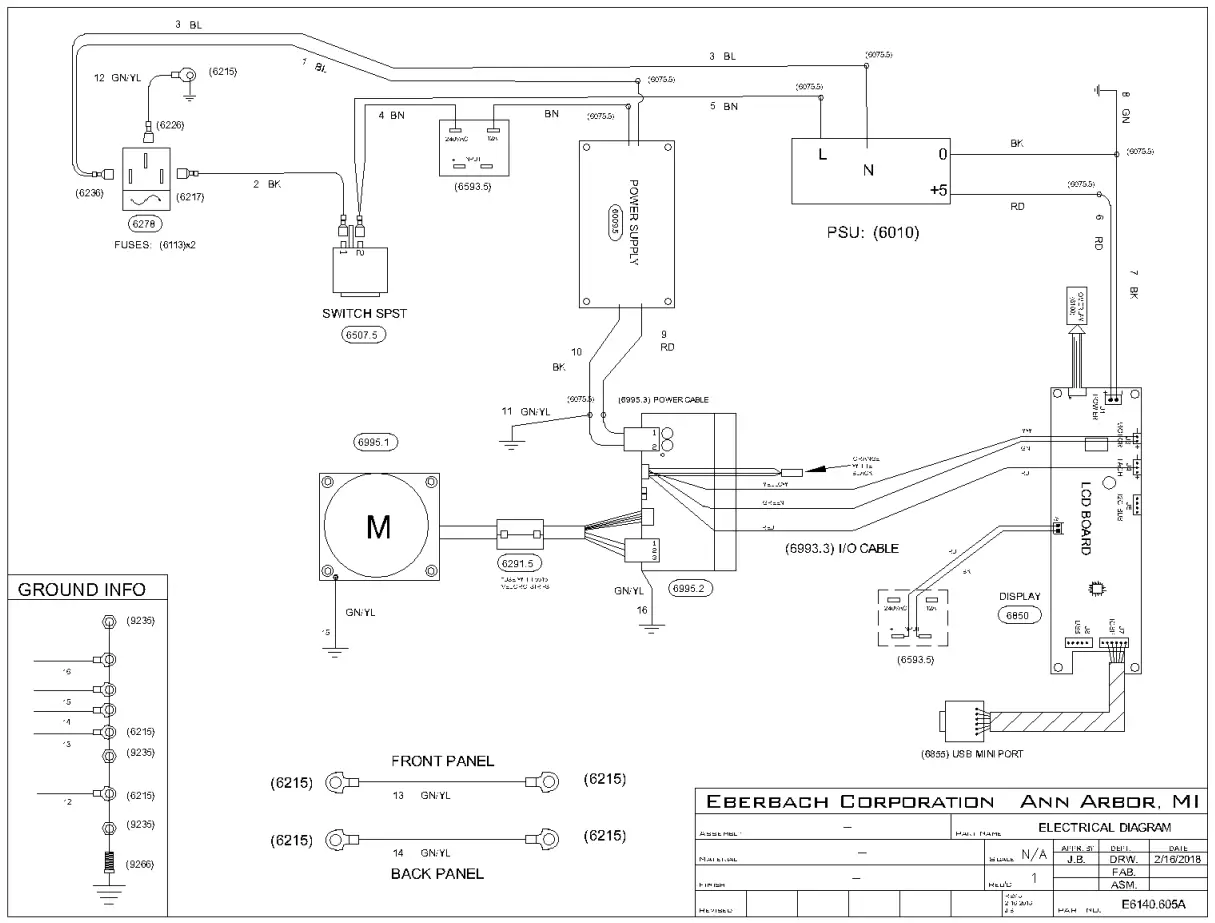
Contact your supplier or Eberbach Corporation technical support with any inquiries concerning replacement parts and installation.
 Eberbach Corporation | Eberbach