 Outlaw 30MP 4G 4K Video Wireless Camera
User Manual
Declaration of Conformity to Directive 2014/53/EU
CE Caution: Hereby The Manufacturer declares that this NITEforce Outlaw Wireless Trail Camera is in compliance with the essential requirements and other relevant provisions of Directive 2014/53/EU. A copy of the DOC, Declaration of Conformity to Directive 2014/53/EU, may be obtained thru the local distributor.
PLEASE READ CAREFULLY BEFORE USING CAMERA
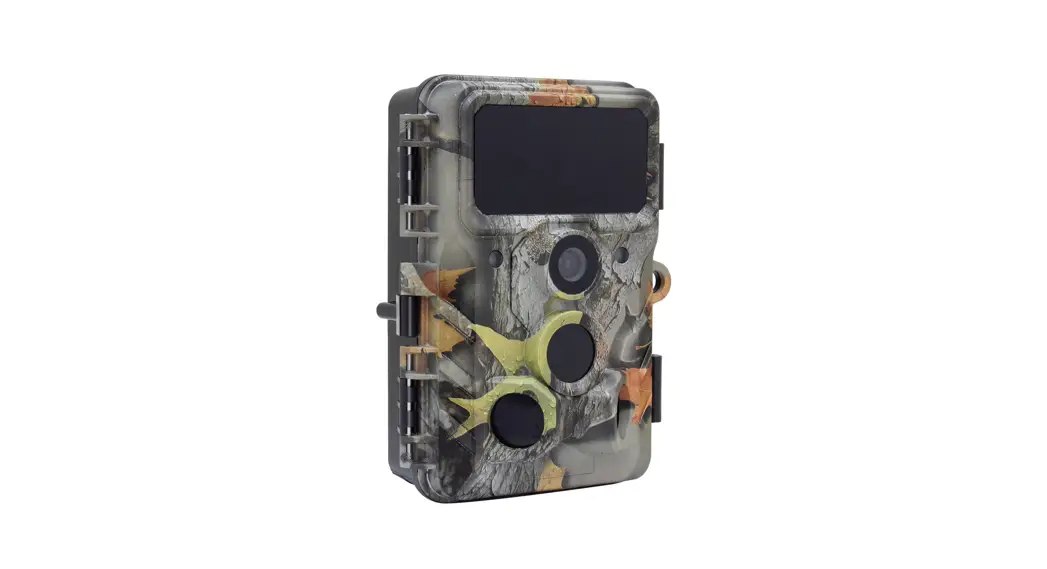
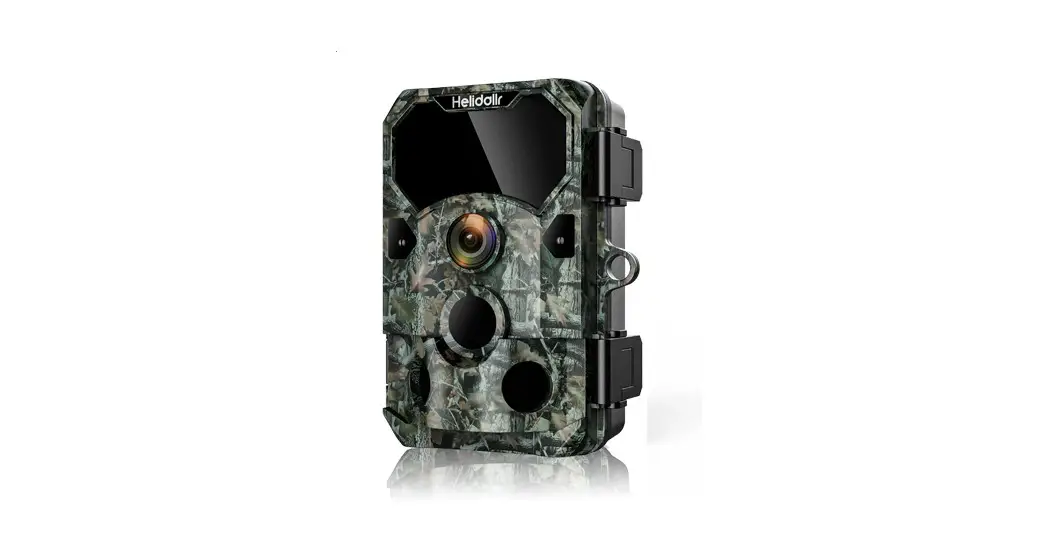
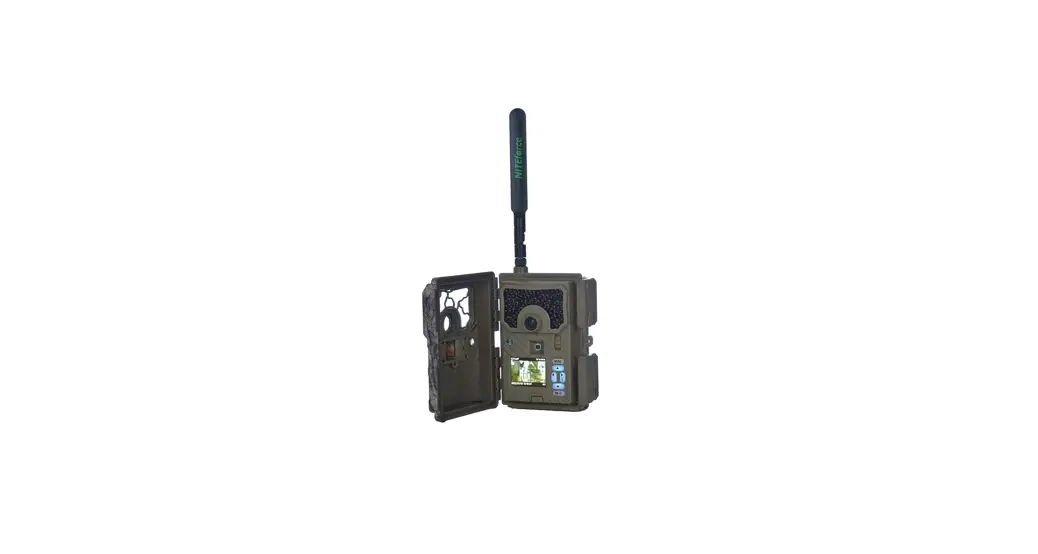
Thank you for Purchasing your NITEforce Trail Camera! The NITEforce Outlaw is a high-quality digital wireless trail camera. It has been precisely engineered and tuned to provide you with optimal and consistent performance. This camera will provide high quality digital pictures and video for applications such as home, cabin and business surveillance and animal monitoring for hunting and research. It features a highly sensitive Passive Infra-Red (PIR) motion sensor and numerous mobile APP setting options to tailor the camera to your particular needs. Camera offers you high quality product using many useful features.
- Take photos & videos – transmit over wireless network
- Allow users to view photos & videos, monitor camera status and modify parameter settings via the mobile APP
Before use, you need to install SD card, antenna, own SIM card, 12 x AA alkaline batteries, and install LinckEazi mobile APP (Android & iOS) to use it. LinckEazi APP are able to find from Google Play and iOS Store.
Each camera has a unique serial number and IMEI code number, which can be seen from the product box.
First time registration: You will need to enter both codes to LinckEazi APP inorder pair the camera and APP service.
SPECIAL HANDLING PRECAUTIONS
The camera has been fine tuned. Avoid dropping and physical shock. This camera is designed for typical weather conditions (IP66). It is not waterproof for use underwater. Carefully clean debris from camera lens, PIR, and LED platform.
Avoid use of cleaning solvents. Camera contains precise electronic equipment. Do not attempt to open camera case yourself. Fog condensation may form on lens and electrical components when bringing into warm room from cold. To avoid this, first place camera inside a sealed plastic bag before bringing into warm room temperature. If condensation forms, remove SD card and batteries until camera is dry. Remove batteries when storing camera. Removing batteries from the camera during storage reduces the risk of battery acid leakage and battery drain. Battery leaks are not covered by the warranty. When using the camera, Do Not mix old and new batteries together in the camera.
Use only High Quality AA alkaline batteries.
CELLULAR INFORMATION
This camera contains LTE 4G cellular module to transmit pictures & videos directly from the camera to your mobile phone LinckEazi APP. Its capable to support 3G and 2G in areas where no 4G network present. Under 2G network only small thumbnail picture sending possible, no original pics nor videos due the network small data upload speed. Operator SIM card costs and payment plans are between camera user and operator.
NOTE: Remember disable (take off) the PIN code from the SIM card, before inserting SIM card into camera.
HOW THE CAMERA WORKS
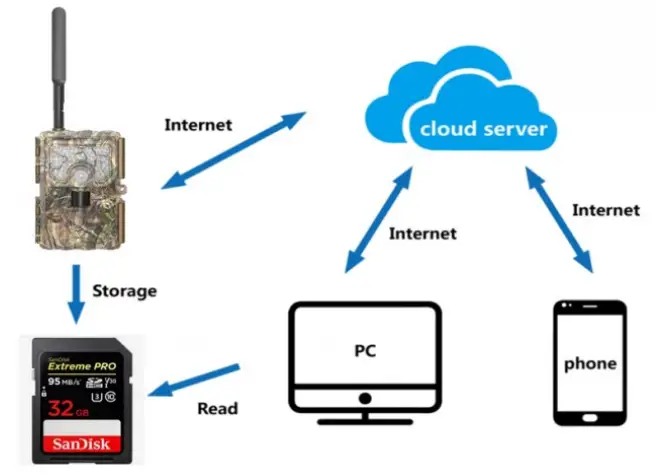
Camera is using 4G LTE connection thru the LinckEazi cloud platform. It has max 30MP resolution and max 4K video with audio. Camera is having small compact size and it is easy to use. User can review the photos and videos via LinckEazi Cloud platform. Setting changes are done also using cloud platform.
CAMERA OVERVIEW
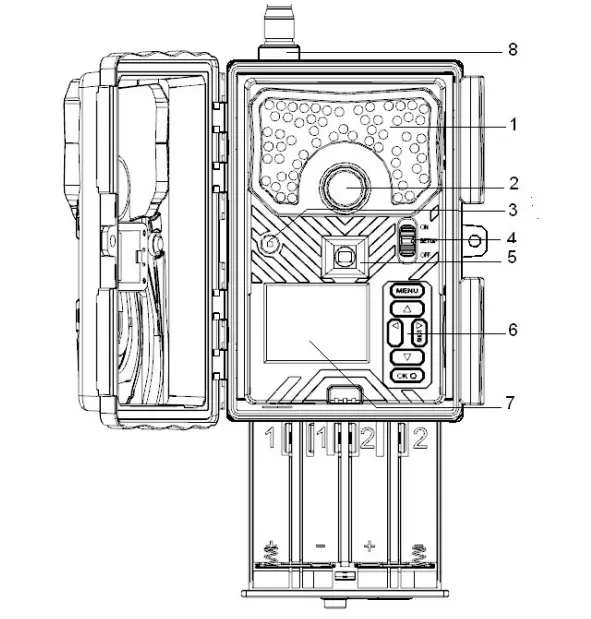
- InfraBlack Flash
- Lens
- Light Sensor
- ON/OFF/SETUP
- PIR Sensor
- Menu
- LCD screen
- Antenna
BUTTON INSTRUCTION
Power Switch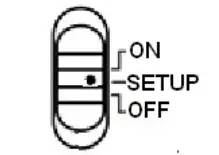
OFF: Power off (Please remove batteries when not in use)
SETUP: Setting the camera
ON: Working mode (the screen will power off)
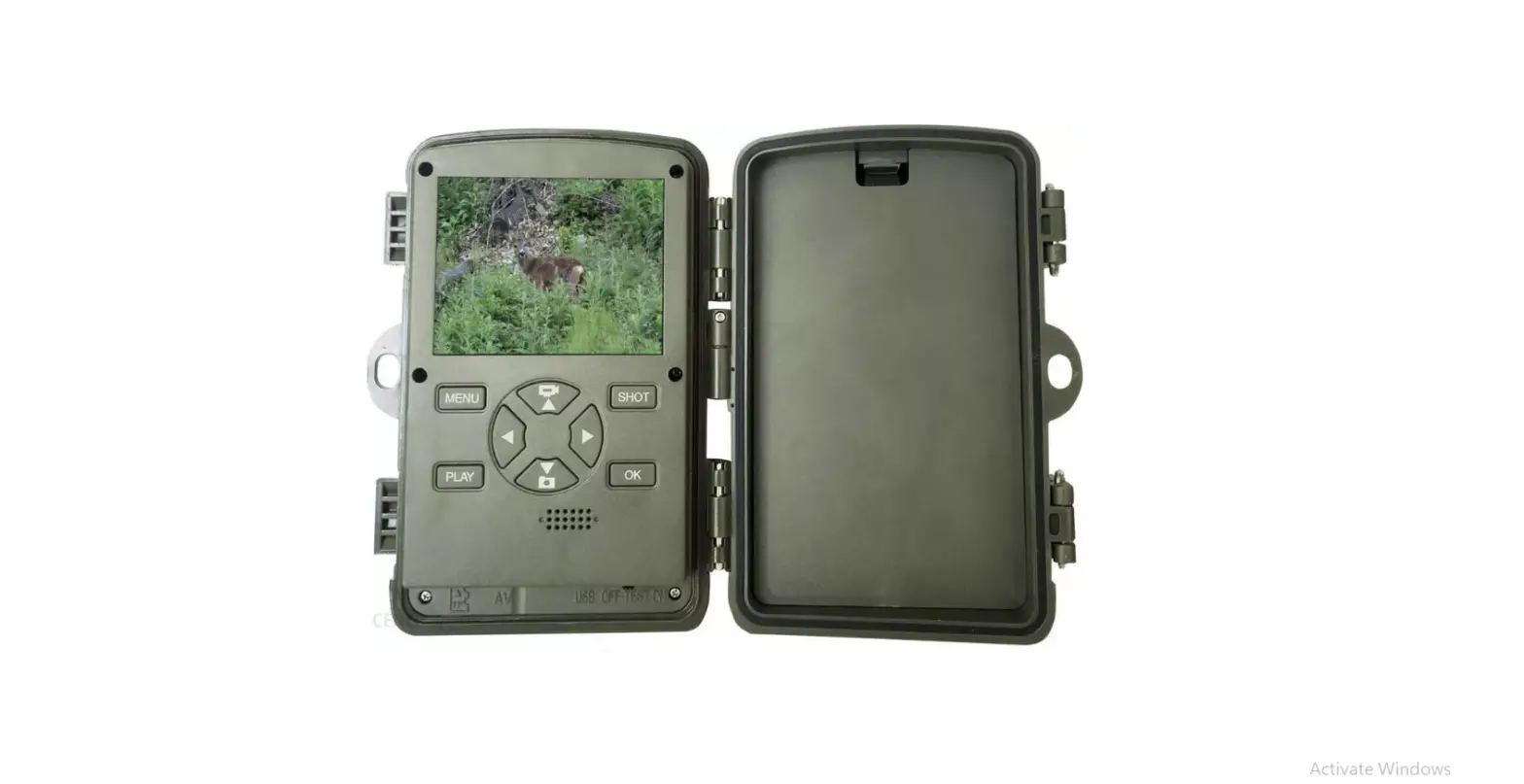
Menu buttons:
MENU: Enter menu
▲▼◄ ►: Navigation buttons
OK: Confirm operation /Playback photos or video clips
►: To manually take photo or video. (Click again to stop the video)
GETTING STARTED
INSTALL BATTERIES
Camera operates with 12pcs of 1.5V AA alkaline batteries. Pay attention to the (+) or (-) battery polarization when you insert batteries. Negative battery terminal always contacts the spring.
- Do not mix different types of batteries
- Do not mix the old and new batteries
- Recommend high-performance (1.5V) batteries, such as Alkaline or Lithium batteries
- Remove batteries when not in use to prevent leakage
Camera accepts External 6V – 12V Power sources (max 2A). Use only manufacturer approved external power sources.
INSERT SD CARD
Always ensure that the camera is turned OFF before inserting SD card. Insert SD card into the SD card port. You will hear “click” when pushed SD card into port. Please make sure to enter MENU->SYS->Format SD to format the SD card before use.
- Use 2GB – 128GB capacity SD cards. Prefer “slow” write/read speed SD cards fex Class 10. Do not use “micro” SD cards with adapter. Incompatible SD card may cause saving and sending errors & high power consumption.
INSERT SIM CARD
This product support following Networks
FDD-LTE:B1/B3/B5/B7/B8/B20;
TDD-LTE: B38/B40/B41;
WCDMA: B1/B5/B8;
GSM: 900/1800
- PIN code of the SIM card needs to be disable (OFF)
- Secure that SIM card has enough data upload transmission speed
- 5MB/s upload speed needed for original picture sending or video sending
- SIM card should support SMS text message receiving
SETTING CAM WITH WEB PORTAL OR APP
DOWNLOAD THE APP
Search “LinckEazi”in your Google Play Store or Apple Store. You can also scan below QR code and install the APP to your smart phone:

Accessing to LinckEazi Cloud Web Portal by computer, open your web browser: https://www.linckeazi.com
LOGIN
Open your web browser and access the address: https://www.linckeazi.com
If you already have an account just login in. If not, click ‘Sign up’ on the page to pop up the registration page. Please register your account with an email address, and fill out the necessary information. 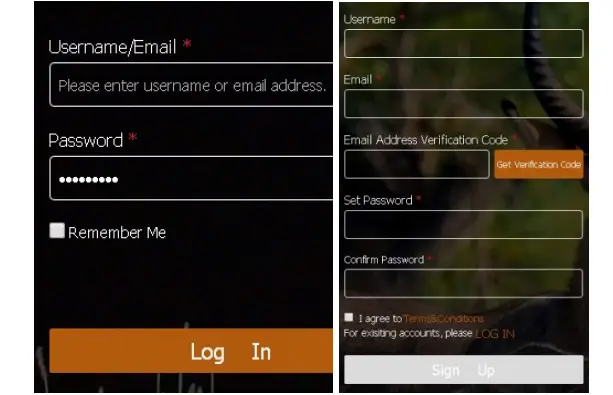
Then, add the camera to your cloud account. Please click ‘Add Device’, a form will pop out and request basic information for your CAM. 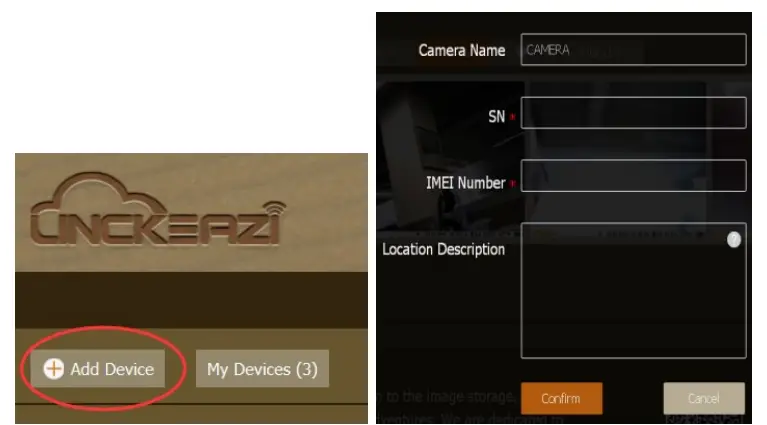
Name your CAM, and add location description if necessary. The Serial Number and IMEI code can be found inside your Camera or box: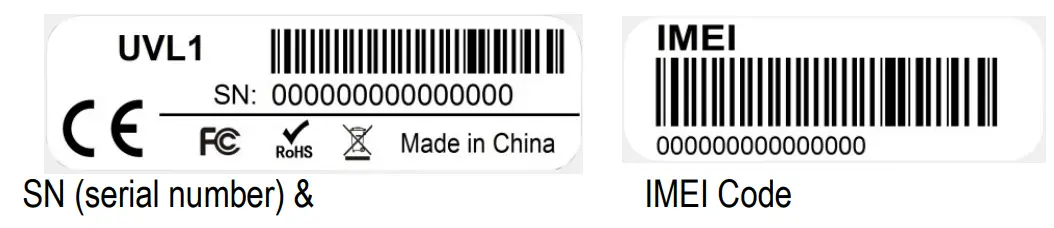
CHOOSE A PLAN
Click “Choose a plan” button to select the type of plan you’d like to add. Free Plan provides recent 10 days pictures and videos. 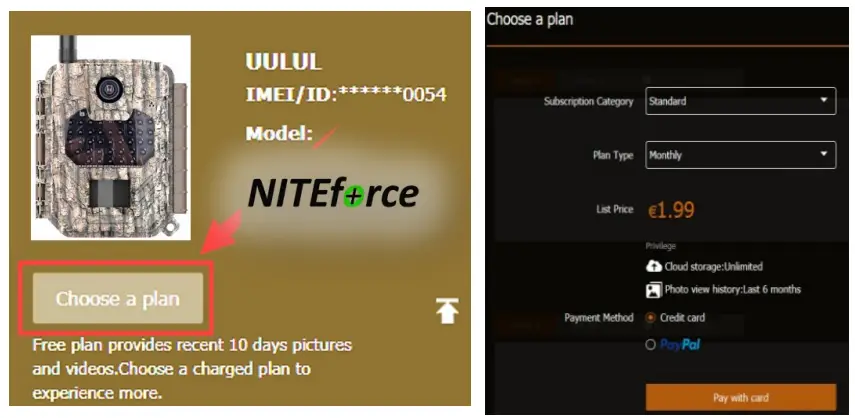
CAMERA SETTINGS
The Camera can be set up conveniently with either website or APP.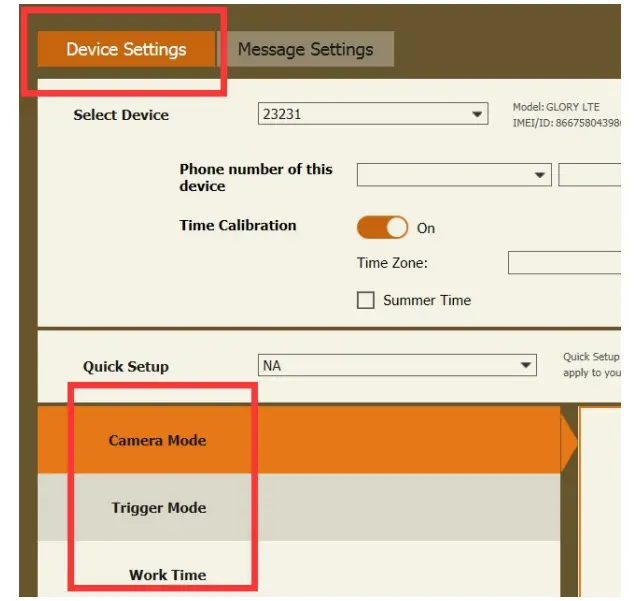
Please click ‘Apply to Device’ when you finish the settings.
You can get the camera status from the main screen info. 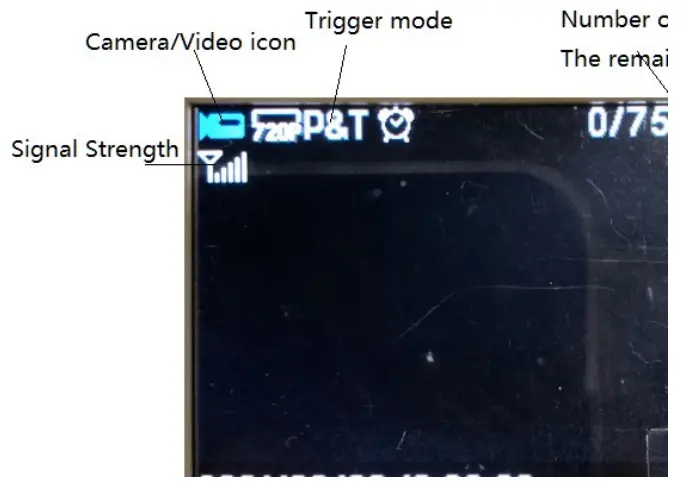
SETTINGS
| CAMERA MODE | ||
| Photo | Photo Size | 30MP/24MP/20MP/16MP/8MP/5MP |
| Camera Mode | Photo / Video / Photo & Video | |
| Photo Burst | 1-10 | |
| Photo Flash Power | Low/ Medium/ High | |
| Video | Video Size | 4K 10fps/ 2.7K 20fps/ 1080p 30fps/ 720p 30fps/ WVGA 30fps |
| Video Length | 5s-60s (default 10sec) | |
| Video Flash Power | Low/ High | |
Photo Burst: It’s the taken number of pictures when a triggering. If photo burst is 3, it means the camera will take 3 pictures after one triggering.
| TRIGGER MODE | ||
| PIR Trigger | PIR Sensitivity | Low / High |
| PIR Interval | 5s – 60min (default 30 sec) | |
| Time Lapse | 1Min-24Hour (default 1h) | |
| PIR Mode | PIR Trigger/ Time Lapse/ Both | |
| WorkTime table 1-4 sets | ON/OFF | |
PIR Interval: It means how often the PIR sensor can be allowed to work. This prevents the card from filling up with too many redundant images.
Time Lapse: When choose time lapse, camera takes photos or videos by time, not by triggering. It’s useful for continuously monitoring of an area.
Work Time table: The camera can work at a preset time and preset days. In the rest of the time the camera is not work. If the settings is cross the day, for example: Start: 20:00 Stop: 10:00 means 00:00-10:00 am and 20:00-24:00 of the chosen day.
| NETWORK | |
| Send Mode | Off/On(Max NumberUnlimited,01-99) |
| Remote Control | Real Time/Delay 0.5H/1H/2H/3H/4H/6H/12H/24H ( Default:Delay 2H) |
| Upload Settings | Confirm/Cancel |
| Download Settings | Confirm/Cancel |
| 4G Info | IMEI,ICCID,PLMN,APN |
| QR Code | IMEI,ICCID |
| FW Update | |
Send Mode: Enable the instant transmission. 0-99 means the number of photos which is allowed to send out per day.
Remote Control: You can remote control your camera via mobile phone or web-portal. Please note if you choose Real Time, the power consumption will be higher as the wireless module will stay awake. Delay 24H means the wireless module will automatically wake up after 24 hours. This means your command will be carried out after 24 hours.
| SYSTEM | |
| Set Clock | Set date and time |
| Password | On/Off |
| Rename | On/Off |
| Over Write | On/Off |
| Format SD Card | Format SD |
| Default | Restore default settings |
| Software Version | Show the software version |
Password:Make sure to write down your password or save it to your mobile phone, so you can access your camera if you ever forget your password. The origin password is 0000.
Over Write: It will save new photos over the old photos on your SD card if it becomes full.
Sending Test Photo
Step1: Please make sure this camera’s data plan is valid before sending test photos.
Step2: After confirming that the network signal is good, press ► (SHOT) button to manually take a photo.
Step3: Press OK to view the photo and press the MENU button, choose Send.
Step4: You will see sending prompt shown on the LCD screen. Click Send. Once you see “File uploading”, check your
LinckEazi account. You will find the photo uploaded to LinckEazi 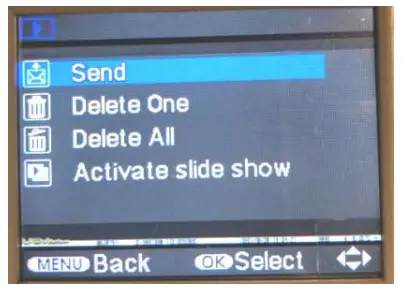
TECHNICAL SPECIFICATIONS
| Wireless Support | LTE 4G (3G & 2G supported) |
| MegaPixels | 30MP (24MP, 20MP, 16MP, 8MP, 5MP) |
| Video Resolution with Audio | 4K, 2.7K, 1440P, 1080P, 720P, WVGA |
| Video Clip Lenghts | 5 – 60 Sec |
| Max Send Video Lenght | 15 Sec |
| Multi Shot | 1-10 pics |
| Invisible No-Glow Flash 940nm | Yes |
| Flash Max Range | 18m |
| PIR Max Detecting Range | 18m |
| PIR Trigger Speed | 0.2 Sec |
| PIR Sensitivity Adjustment | Yes |
| Adjustable PIR Delay | 0 Sec – 60 Min |
| Lens | F1.8 |
| FOV (Diagonal Field of View) | 58° |
| FOV at 10 meters | 7.72 m |
| Time-Lapse Capturing | 1 min – 24h |
| Color LCD Display | 2″ |
| 4 Work-Time Settings | Yes |
| Color Daytime Pic & Vid | Yes |
| Black/White Night Pic & Vid | Yes |
| Time & Date Stamp | Yes |
| Camera Name Stamp | Yes |
| Moon Phase Stamp | Yes |
| Temperature Stamp | Yes (°C / °F) |
| Camera Color | Camo / Olive |
| Mounting | Strap / Cable |
| Tripod Thread | 1/4″-20 |
| Battery Power Source | 12 AA Alkaline Batteries (not incl) |
| External 6V – 12V Power input | Yes (6V or 12V /2A) |
| SD Card Support | 2GB – 128GB |
| Weather Proof | IP66 |
| Operation Temperatures | -20°C … +60°C |
| Operation Humidity | 5% – 90% |
| Includes | Wireless LTE 4G Trail Camera x 1 |
| LTE 4G Antenna x 1 | |
| Free Cloud APP (Android & iOS) | |
| Mounting Strap x 1 | |
| User Manual x 1 | |
| Warranty | 1 Year |
| Languages: Eng, DE, DK, FI, SW, NO, FR, CZ, IT, MA | |
Basic operations via LinckEazi APP
- Check camera Status
- Take a photo command
- Request original HQ photo or Video
- View photos or Videos
- Change camera settings
- Turn camera ON/OFF remotely (PIR Mode > Time Lapse setting 24h makes camera OFF)
External Power Port (6V – 12V / 2A)
Your camera comes with external power port. If you want to extend the operation time of your trail camera, you can connect it to 6V-12V (2A) external power source such as 6V / 12V battery or AC/DC adapter with 2A. DC adapter 2.1mm size. Use only manufacturer recommended AC/DC external power adaptors. You can leave AA batteries inside the camera during the external power use.
1 YEAR WARRANTY
This product is warranted to be free from defects in material and workmanship for 1 year from the original date of purchase when purchased through an authorized dealer. NITEforce will, at its option, repair or replace your product with the same or comparable model, free of charge (shipping charges may apply) for a period of (1) one year from the original date of purchase in the event of a defect in materials or workmanship occurring with normal use. This warranty only extends to the original retail purchaser. Purchase receipt or other proof of date of original purchase is required before warranty performance. The warranty on any replacement product provided under this warranty shall be for the unexpired portion of the warranty period applicable to the original product. This warranty extends solely to failures due to defects in materials or workmanship occurring during normal use. It does not cover normal wear of the product.
This warranty is void if:
- The unit has been used incorrect, dropped, opened or punctured
- The unit has been immersed in water or other liquids, allowed to be filled with dirt or dust or physically misused
- The 1year warranty period has expired
- If the product fails to function properly as a result of accident, misuse, abuse, neglect, mishandling, misapplication, noncompatible batteries, faulty installation, setup, adjustments, improper maintenance, alteration, maladjustment of controls, modification, power surges, service by anyone other than NITEforce or NITEforce authorized service center or acts beyond the manufacturer’s control.
CAMERA REPAIR
Repairs for damages not covered by the warranty will be subject to a charge. Please contact nearest NITEforce sales agency shop to discuss repair options not covered under warranty.
WARRANTY WARNING
Changes or modifications to this unit not expressly approved by the party responsible for compliance could void the user’s authority to operate the equipment.
Copyright © 2022 NITEforce International
www.niteforce.mobi
 NITEforce - NITEforce Webshop
 LinckEazi Cloud