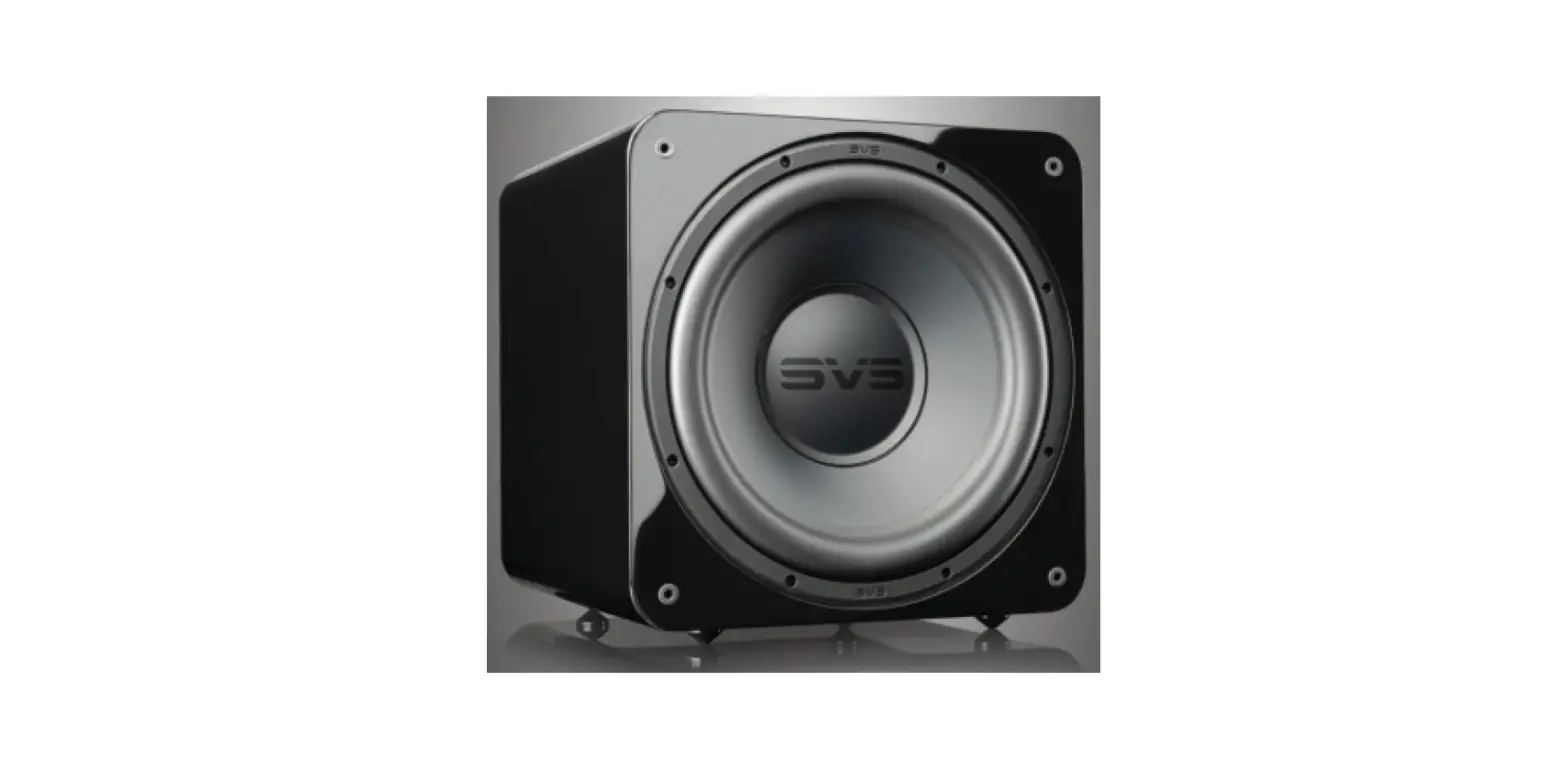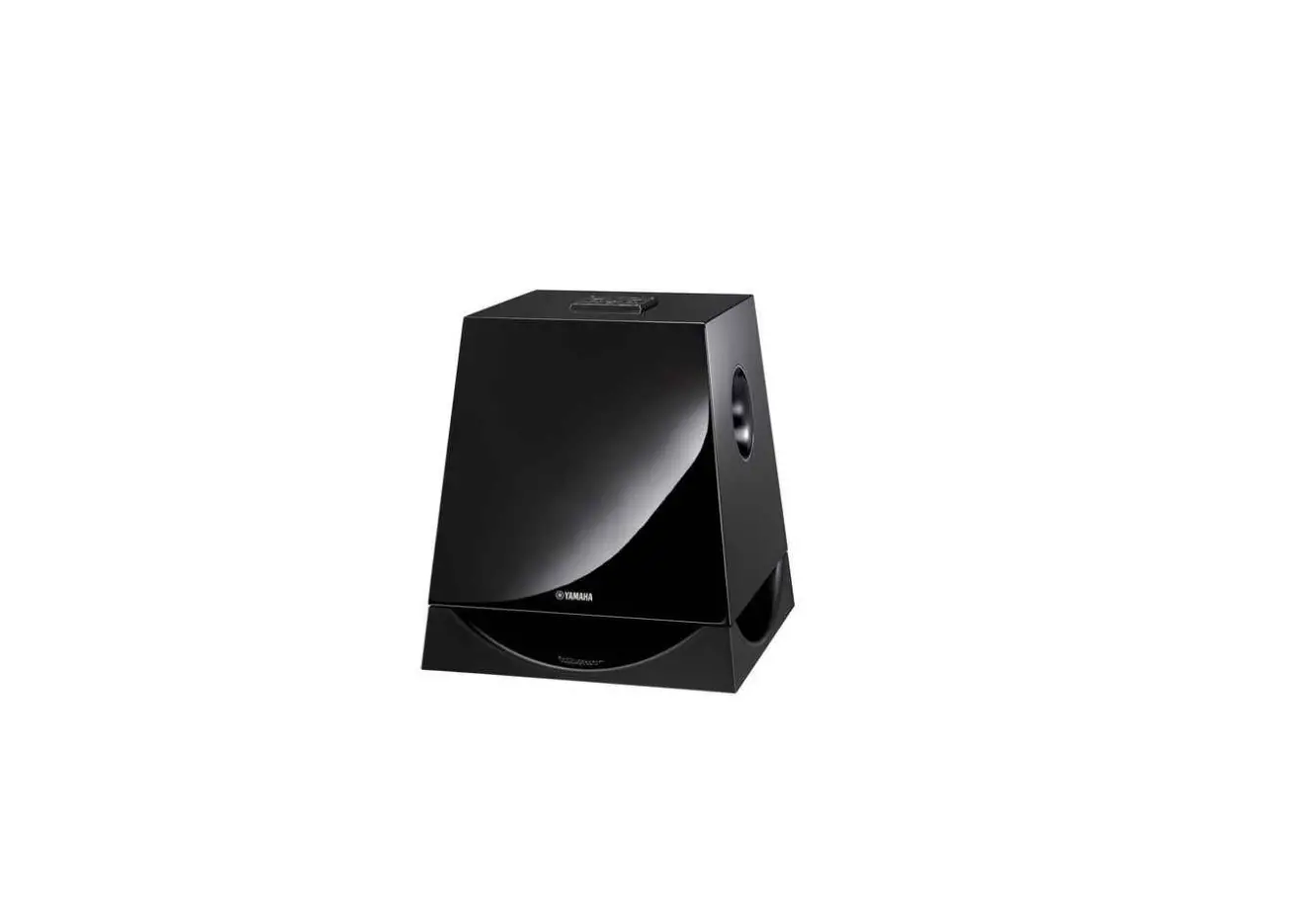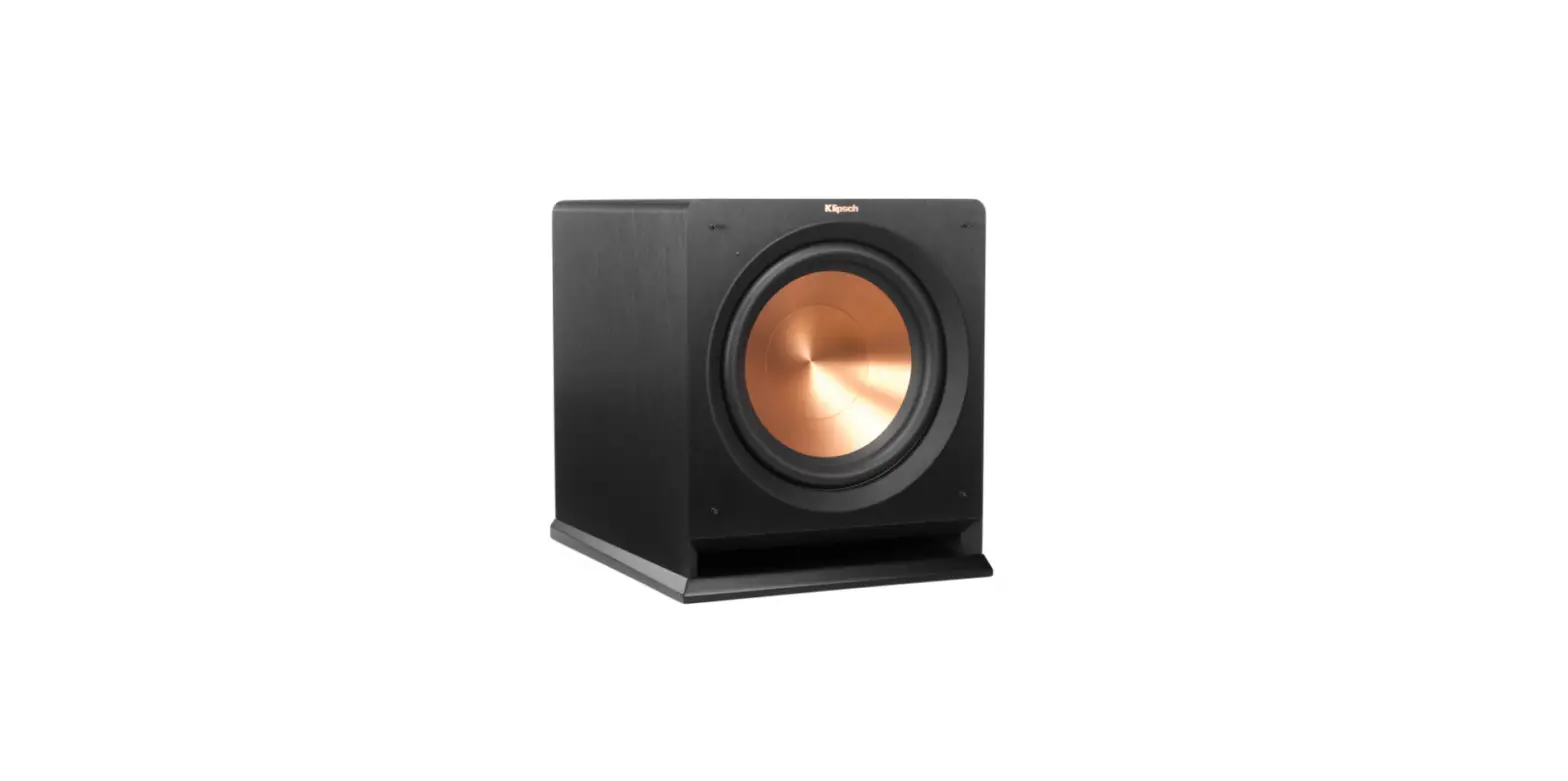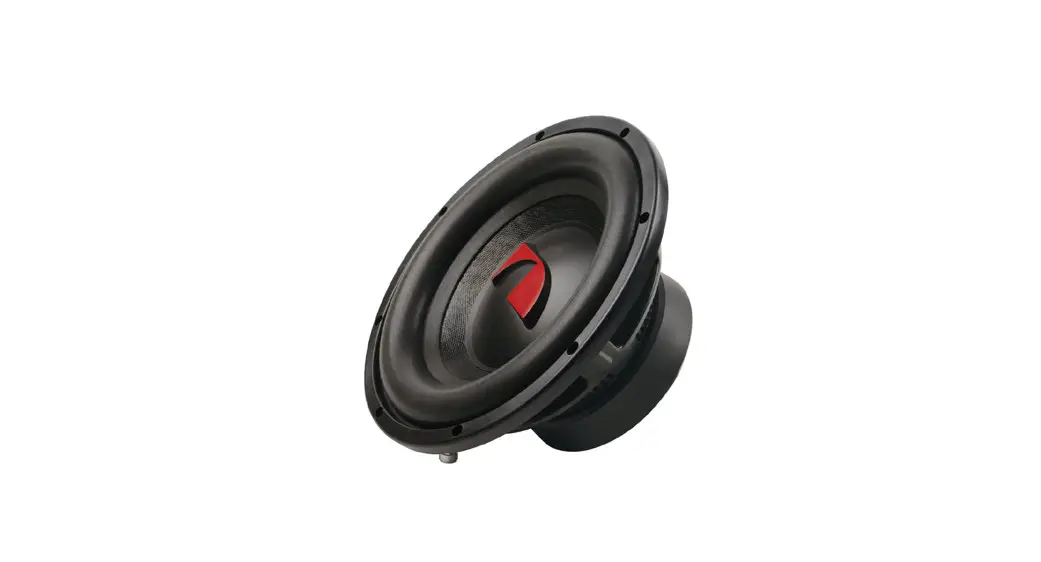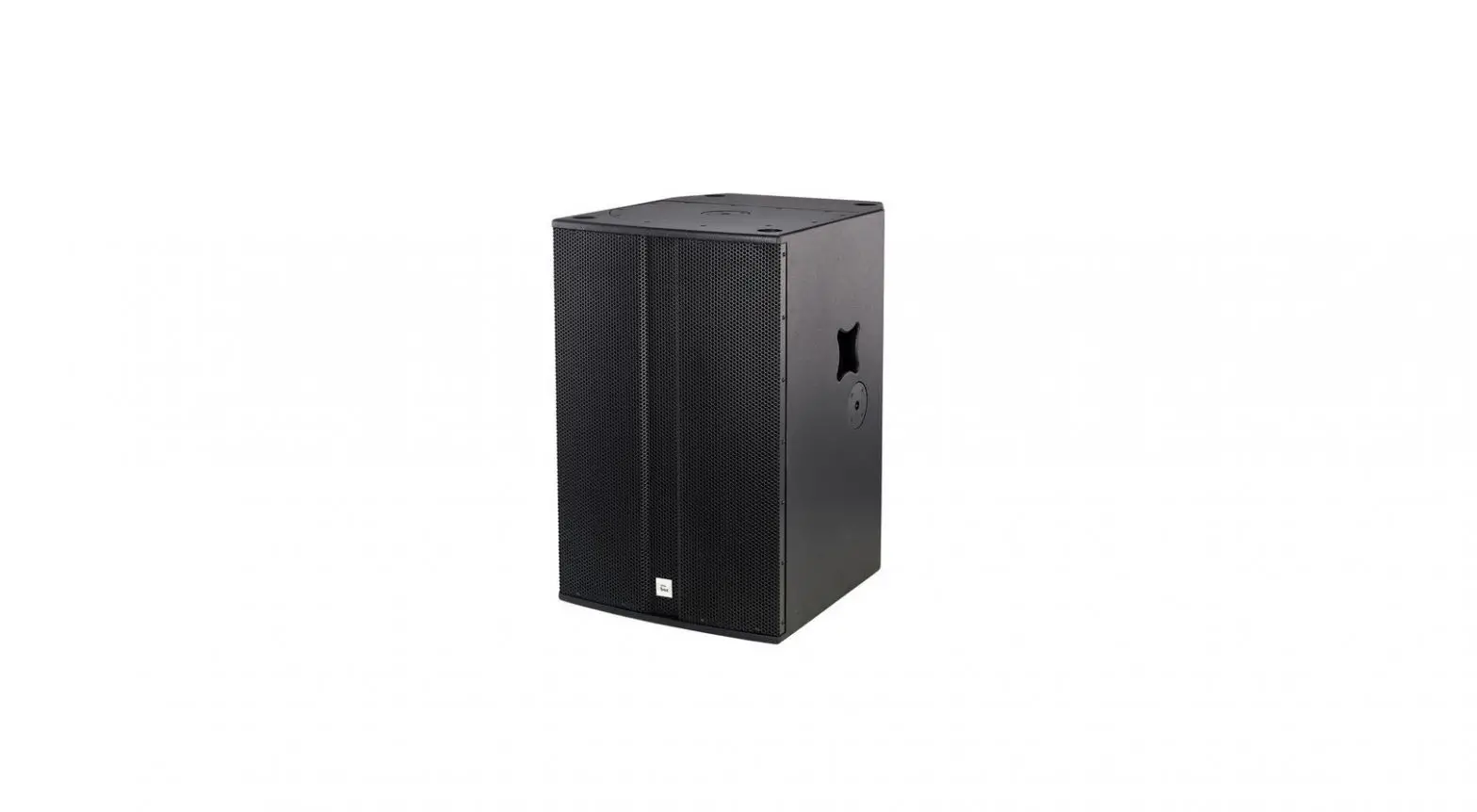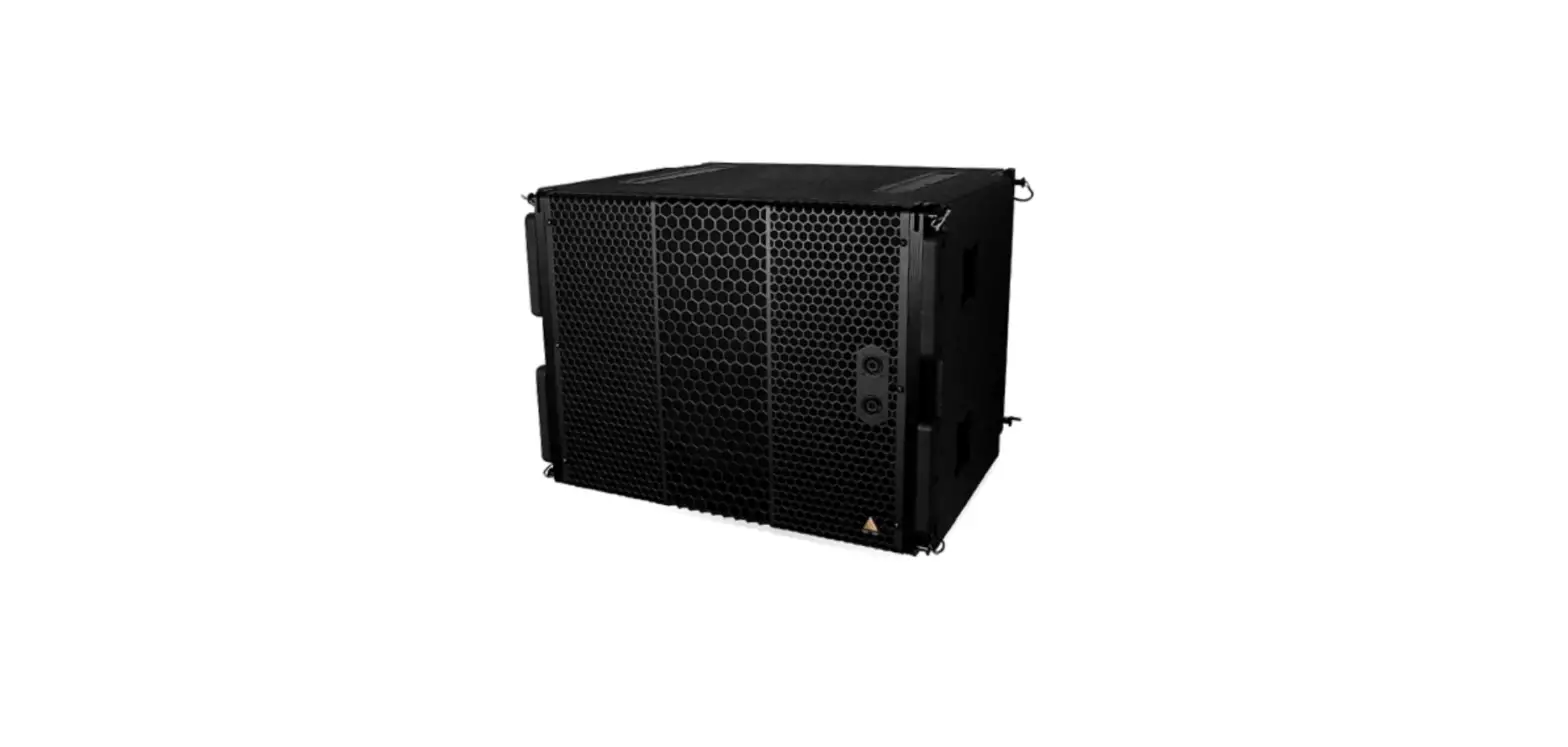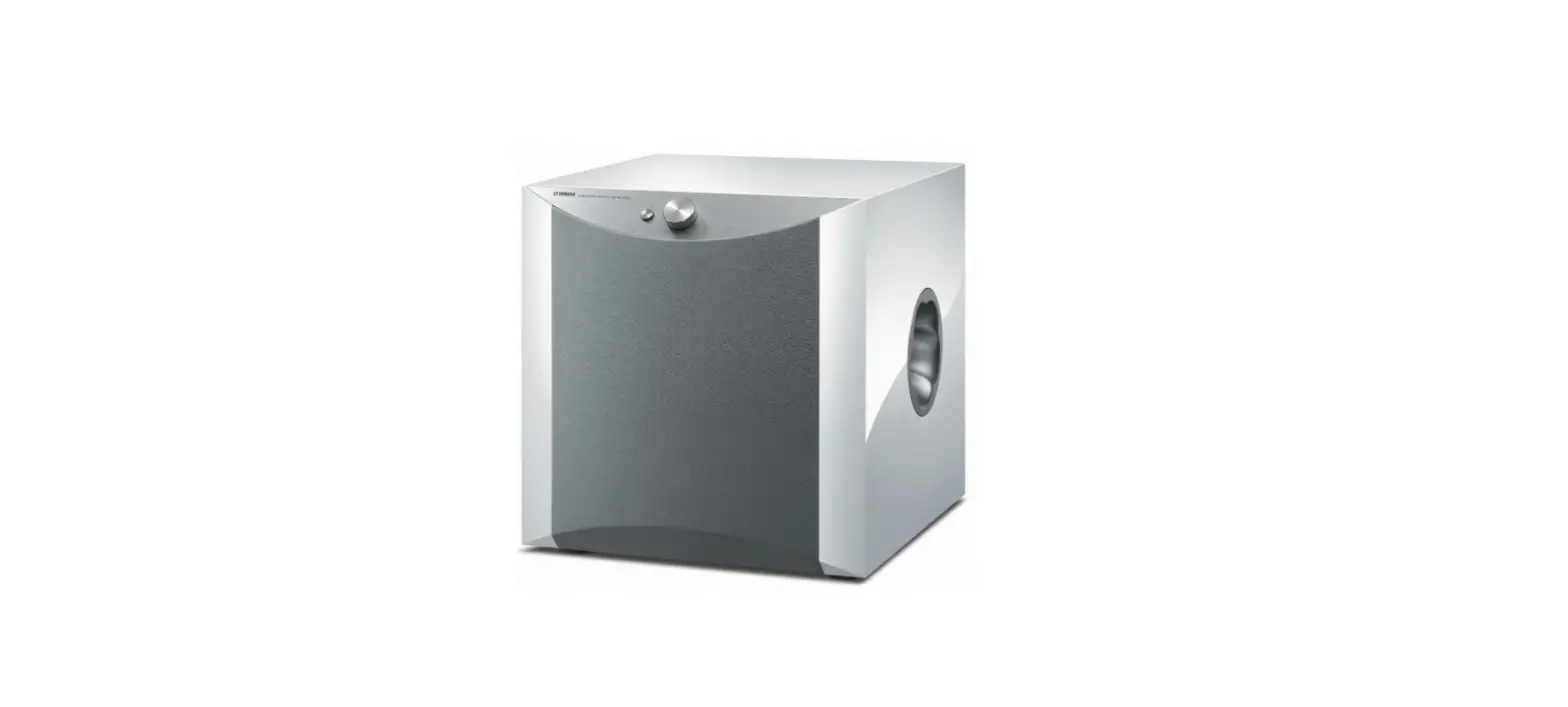

YAMAHA NS-SW1000 Subwoofer Black Piano Finish
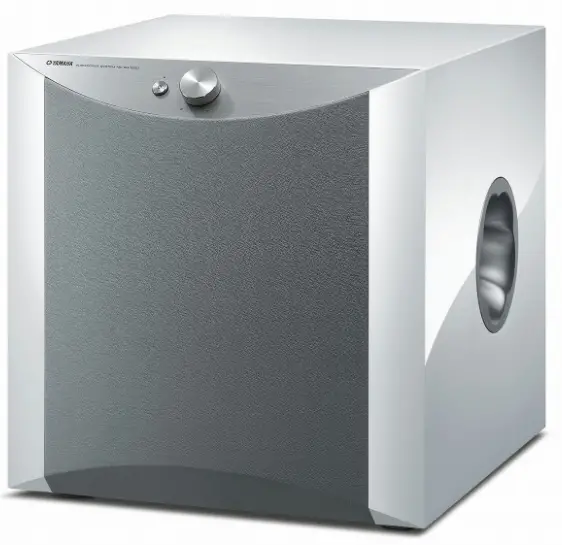
IMPORTANT INSTRUCTION
- Yamaha will not be held responsible for any damage and/or injury caused by not following the cautions below.
To assure the finest performance, please read this manual carefully. Keep it in a safe place for future reference. - Install this unit in a cool, dry, clean place – away from windows, heat sources, sources of excessive vibration, dust, moisture and cold. Avoid sources of humming (transformers, motors). To prevent fire or electrical shock, do not expose this unit to rain or water.
- The voltage to be used must be the same as that specified on the rear panel. Using this unit with a higher voltage than specified is dangerous and may cause a fire and/or electric shock.
- Do not use force on switches, controls or connection wires.
- When moving the unit, first disconnect the power plug and the wires connected to other equipment. Never pull the wires themselves.
- When not planning to use this unit for a long period (ie., vacation, etc.), disconnect the AC power plug from the wall outlet.
- To prevent lightning damage, disconnect the AC power plug when there is an electric storm.
- Since this unit has a built-in power amplifier, heat will radiate from the rear panel. Place the unit apart from the walls, allowing at least 20 cm of space above, behind and on both sides of the unit to prevent fire or damage.
- Furthermore, do not position with the rear panel facing down on the floor or other surfaces.
- Do not cover the rear panel of this unit with a newspaper, a tablecloth, a curtain, etc., in order not to obstruct heat radiation. If the temperature inside the unit rises, it may cause fire, damage to the unit and/or personal injury.
- Do not place the following objects on this unit:
- Glass, china, small metallic, etc.
- If glass, etc., falls as a result of vibrations and breaks, it may cause bodily injury.
- A burning candle etc.
- If the candle falls as a result of vibration, it may cause fire and bodily injury.
- A vessel containing water
- If the vessel falls as a result of vibration and water spills, it may cause damage to the speaker, and/or you may get an electric shock.
- Do not place this unit where foreign material, such as dripping water. It might cause fire, damage to this unit, and/ or personal injury.
- Never put a hand or a foreign object into the YST port located on the right side of this unit. When moving this unit, do not hold the port, as it might cause personal injury and/or damage to this unit.
- Never place a fragile object near the YST port of this unit. If the object falls or drops as a result of the air pressure, it may cause damage to the unit and/or personal injury.
- Never open the cabinet. It might cause an electric shock, since this unit uses a high voltage. It might also cause personal injury and/or damage to this unit. If something drops into the set, contact your dealer.
- When using a humidifier, be sure to avoid condensation inside this unit by allowing enough space around this unit or avoiding excess humidification. Condensation might cause fire, damage to this unit, and/or electric shock.
- Super-bass frequencies reproduced by this unit may cause a turntable to generate a howling sound. In such a case, move this unit away from the turntable.
- This unit may be damaged if certain sounds are continuously output at high volume level. For example, if 20 Hz-100 Hz sine waves from a test disc, bass sounds from electronic instruments, etc., are continuously output, or when the stylus of a turntable touches the surface of a disc, reduce the volume level to prevent this unit from being damaged.
- If you hear distortion (i.e., unnatural, intermittent “rapping” or “hammering” sounds) coming from this unit, reduce the volume level. Extremely loud playing of a movie soundtrack’s low frequency, bass-heavy sounds or similarly loud popular music passages can damage this speaker system.
- Vibration generated by super-bass frequencies may distort images on a TV. In such a case, move this unit away from the TV set.
- Do not attempt to clean this unit with chemical solvents as this might damage the finish. Use a clean, dry cloth.
- Be sure to read the “TROUBLESHOOTING” section regarding common operating errors before concluding that the unit is faulty.
- Install this unit near the wall outlet and where the AC power plug can be reached easily.
- Secure placement or installation is the owner’s responsibility. Yamaha shall not be liable for any accident caused by improper placement or installation of speakers.
For U.K. customers
If the socket outlets in the home are not suitable for the plug supplied with this appliance, it should be cut off and an appropriate 3 pin plug fitted. For details, refer to the instructions described below.
Note: The plug severed from the mains lead must be destroyed, as a plug with bared flexible cord is hazardous if engaged in a live socket outlet.
Information for Users on Collection and Disposal of Old Equipment
This symbol on the products, packaging, and/or accompanying documents means that used electrical and electronic products should not be mixed with general household waste. For proper treatment, recovery and recycling of old products, please take them to applicable collection points, in accordance with your national legislation and the Directives 2002/96/EC. By disposing of these products correctly, you will help to save valuable resources and prevent any potential negative effects on human health and the environment which could otherwise arise from inappropriate waste handling. For more information about collection and recycling of old products, please contact your local municipality, your waste disposal service or the point of sale where you purchased the items. [Information on Disposal in other Countries outside the European Union] This symbol is only valid in the European Union. If you wish to discard these items, please contact your local authorities or dealer and ask for the correct method of disposal.
Taking care of the speaker
To maintain the spotless glossy surface of the polished finish, wipe it with a soft, dry cloth. To avoid damage to the finish, do not apply chemical solvents, such as alcohol, benzine, thinner, insecticide, etc. Also, do not use a damp cloth, or any type of cloth that contains chemical solvents, or place a plastic or vinyl sheet on top of the speaker. Otherwise, the finish may peel, the color may fade, or the sheet may stick to the surface. Yamaha recommends that you use a Yamaha Unicon cloth (sold separately). For heavy dirt, use a Yamaha Piano Unicon (sold separately). You can purchase a Yamaha Unicon cloth and Piano Unicon at your nearest Yamaha dealer.
FEATURES
- Equipped with the high 1,000 W dynamic power Yamaha digital amplifier
- This subwoofer system employs Advanced Yamaha Active Servo
- Technology II for a higher quality super-bass sound.
- Connect with 2 types of input terminals
- The subwoofer can be connected through the subwoofer output terminal or the speaker output terminal, enabling unlimited audio system combinations.
- Achieve the best super-bass sound through controls
- For effective use of the subwoofer, the subwoofer’s super-bass sound should be matched to the sounds of your front speakers. You can create the best sound quality for various listening conditions by using the HIGH CUT control and the PHASE switch.
- Automatically switch the power to ON/STANDBY
- With the AUTO STANDBY (HIGH/LOW/OFF) switch setting, automatically switches
- ON/STANDBY by deciphering whether there are signals output from the amplifier.
- Automatic power-switching function saves you the trouble of pressing the ON/ STANDBY button to turn the power on and off.
- The subwoofer can be linked to a Yamaha component for simultaneous power on/off operation.
- Use the supplied system control cable to connect the subwoofer to a Yamaha component that features a system connector jack. When you turn on or off the power of the connected component, the subwoofer will also be turned on or off.
- Equipped with the smooth super-bass reproducing Twisted Flare Port
- The flared, gently twisting shape diffuses the vortex of air generated around the edge of the port, creating a smooth flow of air. This reduces extraneous noise not present in the original input signal, and provides clear, accurate low frequency reproduction.
- Reproduces bass sounds appropriate for the source
- The subwoofer can also reproduce a bass sound that is appropriate for the source.
- It features a B.A.S.S. switch that enables you to select a bass effect that is suitable for the source.
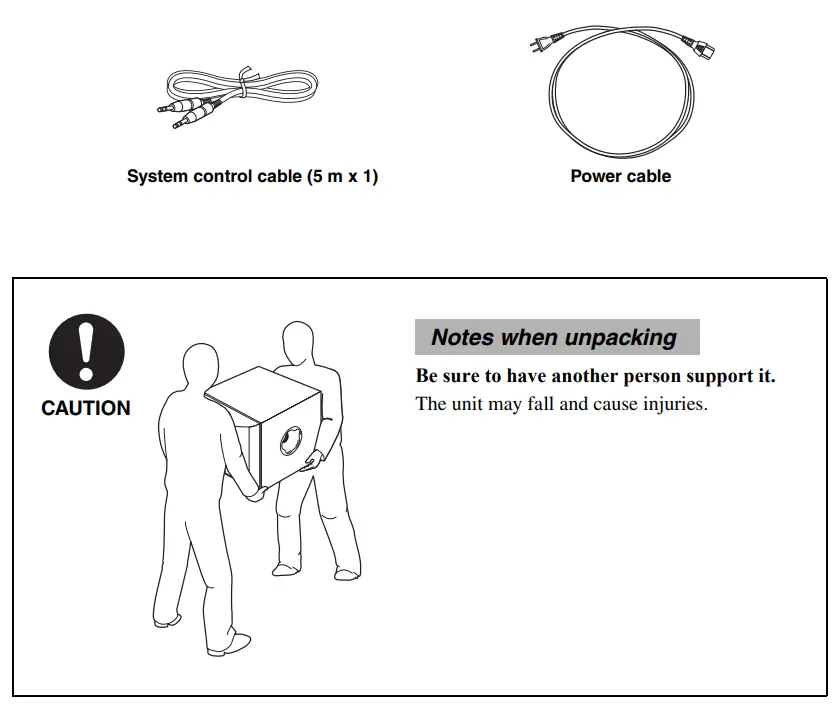
SUPPLIED ACCESSORY
PLACEMENT
Since the low-end frequencies of audio signals feature long wavelengths, they are almost non-directional to human ears. The super-bass range does not create a stereo image. Therefore, a single subwoofer may be enough to produce a high-quality super-bass sound. However, using two subwoofers (similarly to L and R front speakers) can enhance your acoustic experience
Subwoofer orientation
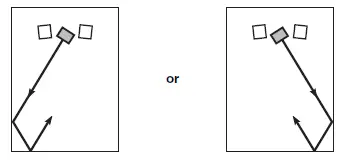
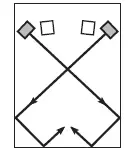
Place the subwoofer as shown in fig. A,B,C or for the optimum effect
Using one subwoofer
Place the subwoofer on the outside of either the left or right front speaker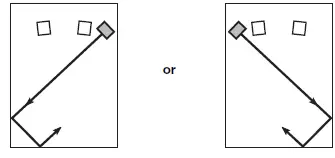
Placing the subwoofer in between the left and right front speakers
If you are placing the subwoofer in between the left and right front speakers, position it slightly at an angle toward the wall for better effect.
Using two subwoofers
Place them on the outside of each front speaker.
CONTROLS AND THEIR FUNCTIONS
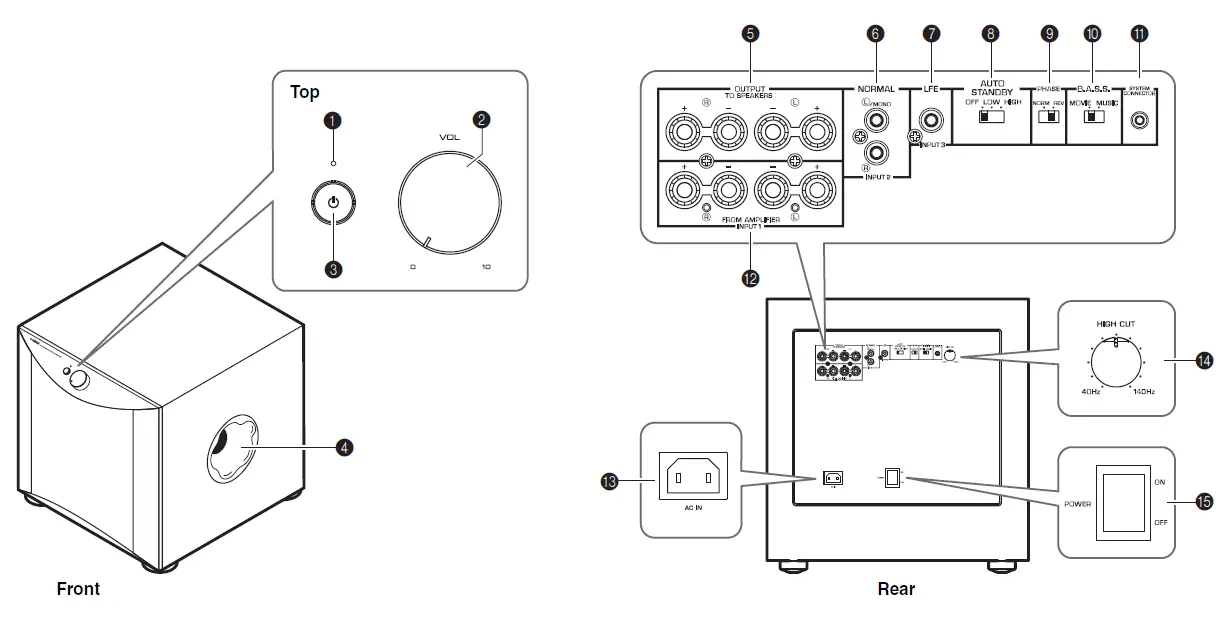
- Indicator
- Green: The subwoofer is turned on.
- Red: The Automatic power-switching function has activated, and the subwoofer is in standby mode
- Off: The subwoofer is turned off.
- VOLUME control
- Adjusts the volume level. Turn the control clockwise to increase the volume, and counterclockwise to decrease the volume.
- STANDBY/ON switch
- While the POWER switch is ON, press this switch to turn on the power to the subwoofer. The indicator will light up green. Press the switch again to turn off the power to the subwoofer. The indicator will turn off.
- Twisted Flare Port
- Outputs super-bass sound.
- OUTPUT (TO SPEAKERS) terminals
- Can be used for connecting to the main speakers. Signals at the INPUT1 terminals are sent to these terminals.
- INPUT2 (NORMAL) terminals
- Used to input line level signals from the amplifier.
- INPUT3 (LFE) terminal
- If your amplifier (or receiver) can cut off high frequencies from signals sent to the subwoofer, connect the amplifier to the subwoofer’s INPUT3 (LFE) terminal. The HIGH CUT control D has no effect on signals input to the INPUT 3 LFE terminal.
- AUTO STANDBY (HIGH/LOW/OFF) switch
- This switch is originally set to the OFF position. By setting this switch to the HIGH or LOW position, the subwoofer’s automatic power-switching function operates. If you do not need this function, leave this switch in the OFF position.
- PHASE switch
- This switch is to be set to the REV (reverse) position. However, depending on your speaker system or listening conditions, there may be a case when better sound quality is obtained by setting this switch to the NORM (normal) position. Select the best position by ear.
- B.A.S.S. (Bass Action Selector System) switch
- When this switch is set to MUSIC, the bass sound in audio software is well reproduced. When the switch is set to MOVIE, the bass sound in video software is well reproduced.
- SYSTEM CONNECTOR jack
- Connect the supplied system control cable here. If you use the system control cable to connect a subwoofer to a Yamaha component (that features a system connector jack), turning on or off the power to the connected component automatically turns the subwoofer on or off.
- INPUT1 (FROM AMPLIFIER) terminals
- Used to connect the subwoofer with the speaker terminals of the amplifier.
- AC IN
- Connects the supplied power cable.
- HIGH CUT control
- Adjusts the high frequency cut off point. Frequencies higher than the frequency selected by this control are all cut off (and not output).
- POWER switch
- During normal usage, set this switch to ON. If you plan not to use the subwoofer for a long period of time, set the switch to OFF.
CONNECTIONS
- Choose this method if your amplifier has line output (pin jack) terminal(s).
- Choose this method if your amplifier has no line output (pin jack) terminals.
Connecting to line output (pin jack) terminal(s) of the amplifier
Note: Audio signals input from the /MONO and INPUT 2 terminals on the subwoofer will not be output from the OUTPUT (TO SPEAKERS) terminals.
Connecting one subwoofer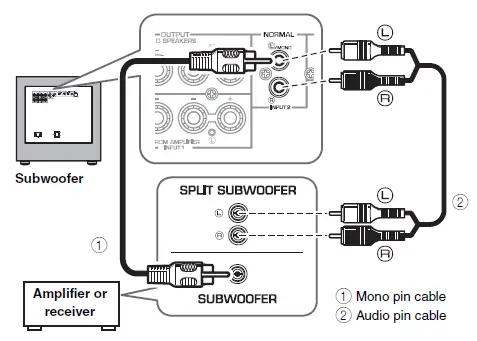 Connect the SUBWOOFER (or LOW PASS, etc.) terminal on the rear of the amplifier (or AV receiver) to the /MONO INPUT2 terminal of the subwoofer using a commercially available Mono pin cable (1). Alternatively, When connecting the subwoofer to the SPLIT SUBWOOFER terminals (featuring L and R channels) on the rear panel of the amplifier, use a commercially-available Audio pin cable (2) to connect the /MONO INPUT2 terminal to the “L” side, and the INPUT2 terminal to the “R” side of the SPLIT SUBWOOFER terminals
Connecting two subwoofers
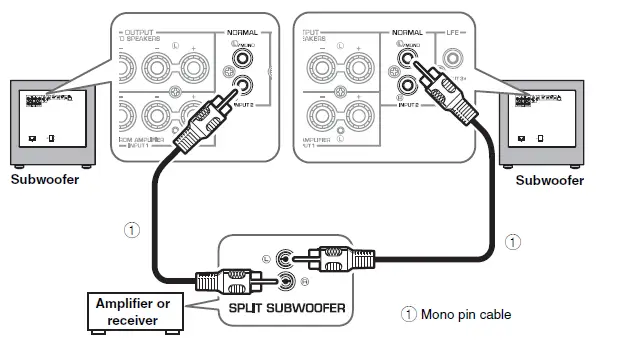
Connecting to the INPUT3 (LFE) terminal
If your amplifier (or receiver) can cut off high frequencies from signals sent to the subwoofer, connect the amplifier to the subwoofer’s INPUT3 (LFE) terminal. This will promote higher sound quality because the signal routing in the subwoofer is shortened by bypassing the builtin HIGH CUT circuit.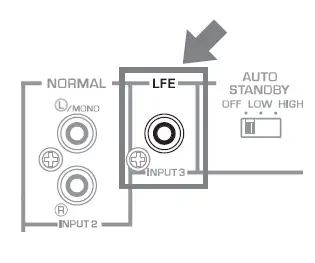
Connecting to speaker output terminals of the amplifier
Example: Connecting the subwoofer to an amplifier that features one set of speaker output terminals
Use speaker cables to connect the speaker output terminals of the amplifier to the subwoofer’s INPUT 1 (FROM AMPLIFIER) terminals. Connect the front speakers to the subwoofer’s OUTPUT (TO SPEAKERS) terminals. Although the subwoofer is connected between the front speakers and the amplifier, the sound volume or quality will not be affected.
Connecting one subwoofer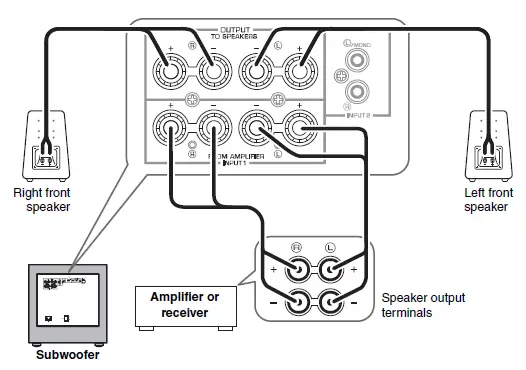 Connecting two subwoofers
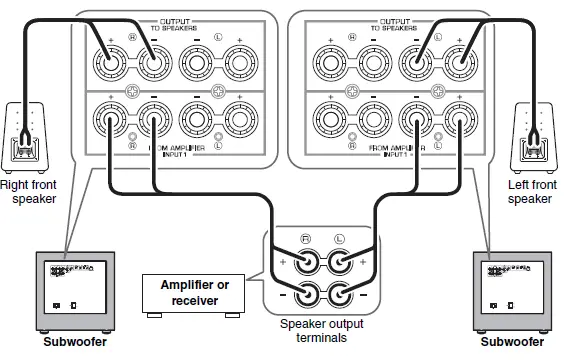
Connecting to the INPUT1/OUTPUT terminals of the subwoofer
Note
- Make sure that the “+” and “–” polarity markings of the speaker cables are observed and set correctly. If these cables are reversed, the sound will be unnatural and lack bass.
- Do not let the bare speaker wires touch each other, because this could damage the subwoofer or the amplifier.
- If the connections are faulty, no sound will be heard from the subwoofer or the speakers. Do not insert the insulation into the hole. Sound may not be produced.
- To avoid accidents resulting from tripping over loose speaker cables, fix them to the floor.
Before connecting
Remove the insulation at the tip of the speaker cable, then twist the core wires together so that they will not become disarrayed and short-circuited.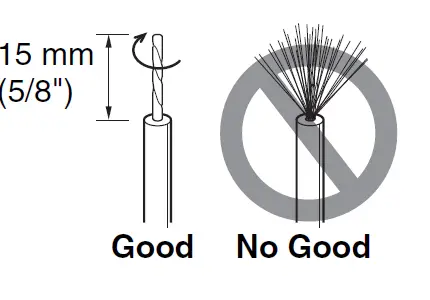
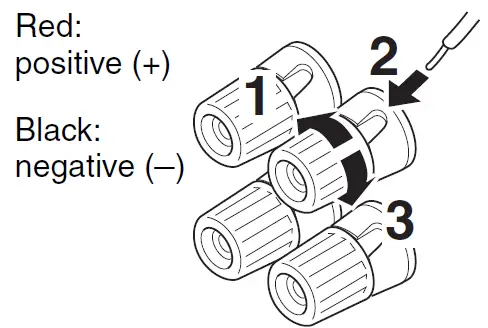
How to connect
- Loosen the terminal’s knob, as shown in the figure.
- Insert the bare wire.
- Tighten the knob.
- Test the firmness of the connection by pulling lightly on the cable at the terminal.

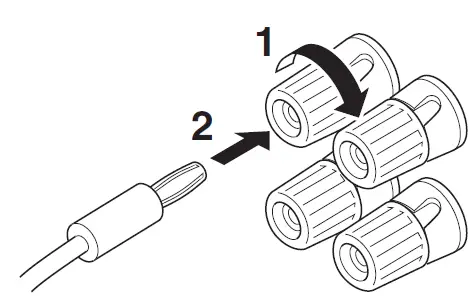
Connecting the banana plug
- Tighten the terminal knob.
- Simply insert the banana plug into the terminal.

System connections
If you use the included system control cable to connect a subwoofer to a Yamaha component (that features a system connector jack such as a YSP series component or Yamaha receiver), turning on or off the power to the connected component automatically turns the subwoofer on or off.
Connection example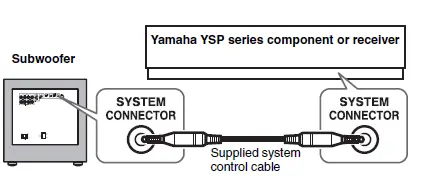
How the System Connection works
- The POWER switch on the rear panel must be set to ON in advance.
- To modify the settings of the connected components, please refer to the owner’s manual that came with the respective component.
- If the unit is turned off by pressing the STANDBY/ON switch on the front panel during system connection, the indicator (green) gently flashes and notifies you that the connected device is ON. Pressing the STANDBY/ON switch again or turning the power of the connected component on again turns the unit power ON and the indicator (green) is lit.
The indicator during the system connection
| Indicator status | Green light | Red light* | Green light (gentle flashing) | Off |
| Power of connected component | ON | ON | ON | Off |
| Power of the unit | ON | ON
(standby) | Off | Off |
Connecting the power cable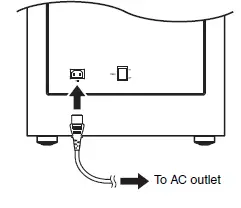
AUTOMATIC POWER-SWITCHING FUNCTION
This function automatically places the subwoofer in standby mode if the subwoofer does not detect a signal from the amplifier for a certain period of time. The subwoofer automatically turns on as soon as it detects a signal from the amplifier. The Automatic power-switching function works as follows when the AUTO STANDBY (HIGH/LOW/OFF) switch is set to LOW or HIGH. (Normally, set the switch to LOW.)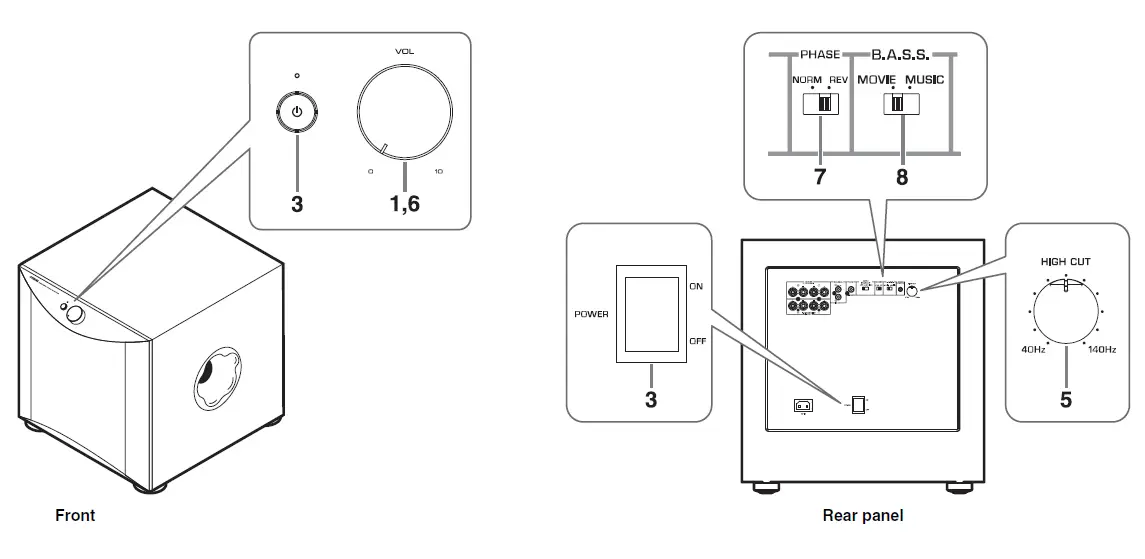
How the Automatic power-switching function works
- The POWER switch on the rear panel must be set to ON in advance.
- The Automatic power-switching function can be activated when the following conditions are met:
- The unit is powered ON
- The AUTO STANDBY switch is set to LOW or HIGH
- If the STANDBY/ON switch on the front panel is pressed and the unit is turned OFF while the unit is in standby
mode (the indicator is lit in red), the Automatic power-switching function is canceled. Pressing the STANDBY/ON switch again or turning the power of the component connected via system connection on again turns the unit power ON and the Automatic power-switching function can be activated again.
Setting the AUTO STANDBY switch
LOW: The Automatic power-switching function activates at a certain level of input signal. To enable the function, select this position.
HIGH: If the Automatic power-switching function does not work well when the AUTO STANDBY switch is set to LOW, select this position. If the function still does not work, slightly raise the LFE LEVEL on the amplifier.
OFF: The Automatic power-switching function may unexpectedly activate due to the system environment, for example, if the subwoofer detects noise generated from the peripheral components. In this case, select this position to disable the Automatic power-switching function, and manually turn the unit on or off by using the POWER switch or the STANDBY/ON switch
ADJUSTING THE BALANCE
To achieve natural sound with an effective super-bass component, you must adjust the volume and tone balance between the subwoofer and the front speakers. Follow the procedure described below. If your amplifier or other component connected to the system features subwoofer settings, make the appropriate settings on that component
ADJUSTING THE BALANCE
- Set the VOLUME control to minimum (0).
- Turn on the power to the component(s) connected to the subwoofer. If the component is connected to the subwoofer’s SYSTEM CONNECTOR jack, turn on the power to that component.
- Turn the POWER switch ON or press the STANDBY/ON switch to turn on the unit.
- The indicator lights green.
- Play a source that contains low-frequency components and adjust the output level of the front speakers using the amplifier’s volume control to the desired listening level. (Set all tone controls to flat.)
- Adjust the HIGH CUT control to the position where the desired response can be obtained.
- Normally, set the control to a level a little higher than the front speaker’s rated minimum reproducible frequency*.
- The front speaker’s rated minimum reproducible frequency can be looked up in the speakers’ catalog or owner’s manual.
- The HIGH CUT control has no effect on signals input to the INPUT 3 LFE terminal. ( page 5)
- Increase the volume gradually to adjust the volume balance between the subwoofer and the front speakers.
- Normally, set the control to a level where you can obtain a little more bass effect than when the subwoofer is not used.
- Set the PHASE switch to the position which yields the more natural (or preferable) phasing.
- Set the B.A.S.S. switch to “MOVIE” or “MUSIC” according to the played source.
- MOVIE:
- When a movie type source is played, the low-frequency effects are enhanced to allow listeners to enjoy a more powerful sound. (The sound will be richer and deeper.)
- MUSIC:
- When an ordinary music source is played, the excessive low-frequency components are cut off to make the sound clearer. (The sound will carry less bass and reproduce the melody line more clearly.)
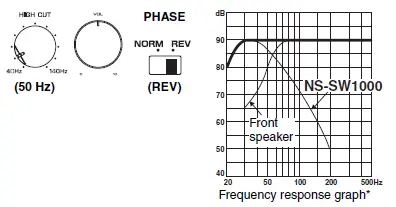
Subwoofer frequency characteristics
The figures below show the optimum adjustment of each control and the frequency characteristics when the subwoofer is combined with a typical front speaker system.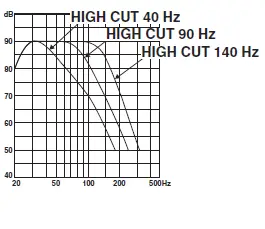
When combined with 10 cm (4″) or 13 cm (5″) acoustic suspension, 2-way system front speakers
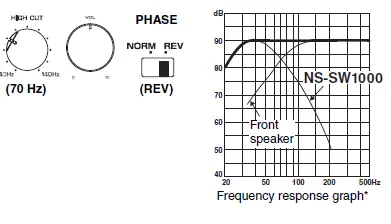
When combined with 20 cm (8″) or 25 cm (10″) acoustic suspension, 2-way system front speakers
ADVANCED YAMAHA ACTIVE SERVO TECHNOLOGY II
In 1988, Yamaha brought to the marketplace speaker systems utilizing YST (Yamaha Active Servo Technology) to give powerful, high quality bass reproduction. This technique uses a direct connection between the amplifier and speaker, allowing accurate signal transmission and precise speaker control. As this technology uses speaker units controlled by the negative impedance drive of the amplifier and resonance generated between the speaker cabinet volume and port, it creates more resonant energy (the “air woofer” concept) than the standard bass reflex method. This allows for bass reproduction from much smaller cabinets than was previously possible. Yamaha’s newly developed Advanced YST II adds many refinements to Yamaha Active Servo Technology, allowing better control of the forces driving the amplifier and speaker. From the amplifier’s point of view, the speaker impedance changes depending on the sound frequency. Yamaha developed a new circuit design combining negative-impedance and constant-current drives, which provides a more stable performance and clear bass reproduction, without any murkiness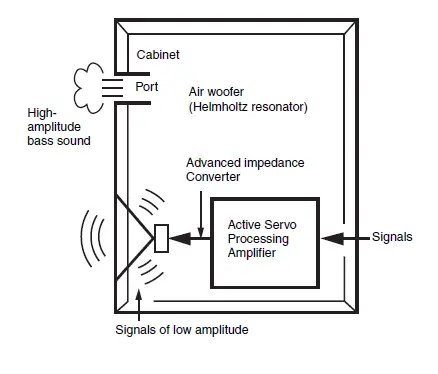
Twisted Flare Port
Today’s bass reflex speakers use a Helmholtz resonator to improve their bass reproduction. However when reproducing bass that is in the frequency region of this Helmholtz resonator, air moves violently in and out through the port between the interior and exterior of the speaker, sometimes producing noise due to the turbulent air flow at the end of the port. 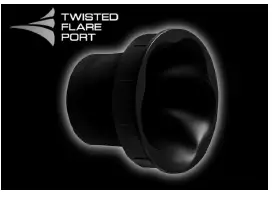 The port and the cabinet resonate at a frequency that is determined by their dimensions and shape. On the other hand, turbulence in the air flow at the end of the port contains a broad range of frequency components that are not present in the input signal. This noise occurs because the broad range of frequency components includes components that match the resonant frequencies of the port and cabinet, causing strong resonance. The Twisted Flare Port developed by Yamaha changes the way in which the port widens toward its end, and also adds a “twist” to suppress airflow turbulence at each end of the port and thus prevent noise from occurring. This eliminates the “muddy sound” and “wind noise” that until now have been characteristic of bass reflex speakers, allowing bass to be reproduced clearly.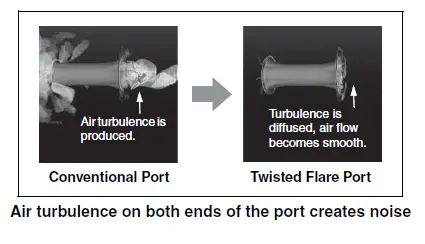
TROUBLESHOOTING
| Problem | Cause | What to Do |
| Power is not supplied even though the STANDBY/ON switch is set the ON position. | The power plug is not securely connected. | Connect it securely. |
| The POWER switch is set to the OFF position. | Set the POWER switch to the ON position. | |
| The subwoofer does not turn on automatically via the system connection. | The system control cable is not connected properly or securely. | Connect the system control cable properly. |
| The POWER switch is set to OFF. | Set the POWER switch to ON. | |
| No sound. | The volume is set to minimum. | Increase the volume. |
| Speaker cables are not connected securely. | Connect speaker cables securely. | |
| Low range sound is too soft or not heard. | Speaker cables are not connected correctly. | Connect them correctly, that is L (left) to L; R (right) to R; “+” to “+” and “–” to “–”. |
| The PHASE switch is not set correctly. | Set the PHASE switch to the other position. | |
| A source sound with little bass frequency content is being played. | Play a source sound with bass frequencies.
Set the HIGH CUT control to a higher position. | |
| The sound is influenced by standing waves. | Relocate the subwoofer or change its positioning angle. | |
| No bass frequency content is being output from the amplifier. | Check the bass output setting of the amplifier. | |
| The subwoofer does not turn on automatically. | The POWER switch is set to the OFF position. | Set the POWER switch to the ON position. |
| The STANDBY/ON switch is set to the STANDBY position. | Set the STANDBY/ON switch to the ON position. | |
| The AUTO STANDBY switch is set to the OFF position. | Set the AUTO STANDBY
switch to the HIGH or LOW position. | |
| The level of input signal is too low. | Set the AUTO STANDBY switch to the HIGH position, and increase the output level of the amplifier. |
| Problem | Cause | What to Do |
| The subwoofer does not turn on
automatically. | No bass frequency content is being output from the amplifier. | Check the bass output setting of the amplifier. |
| The subwoofer does not enter standby mode automatically. | Noise generated from external appliances etc., is activating the subwoofer. | Move the subwoofer farther away from such appliances, and/or reposition the connected speaker cables.
Set the AUTO STANDBY switch to the HIGH or LOW position. |
| The AUTO STANDBY switch is set to the OFF position. | Set the AUTO STANDBY
switch to the HIGH or LOW position. | |
| The subwoofer enters standby mode unexpectedly. | The level of input signal is too low. | Set the AUTO STANDBY
switch to the HIGH position, and increase the output level of the amplifier. |
| The subwoofer turns on unexpectedly. | Noise generated from external appliances etc., is activating the subwoofer. | Move the subwoofer farther away from such appliances, and/ or reposition the connected speaker cables.
If the AUTO STANDBY switch is set to HIGH, set it to LOW. Alternatively, set the AUTO STANDBY switch to the OFF position. |
| The household breaker goes off. | This unit consumes much electricity when a high level signal is input to this unit. | Turn down the volume on the amplifier etc. connected to this unit or cut off the power of other unused equipment. |
| An object has fallen into the port. | Do not try to remove the object. Attempting to remove the object may cause a malfunction. | Contact an authorized Yamaha dealer or service center. |
SPECIFICATIONS
- Type………………………………………………….Advanced Yamaha Active Servo Technology II
- Driver …………………………………………………………………..30 cm (11-3/4″) cone type woofer Non magnetic shielding type
- Amplifier Output (100 Hz, 4 ohms, 10% THD) …………………………………………. 1,000 W
- Frequency Response ………………………………………………………………………. 18 Hz – 160 Hz
- Power Supply
- U.S.A. and Canada models …………………………………………………………AC 120 V, 60 Hz
- U.K. and Europe models …………………………………………………………….AC 230 V, 50 Hz
- Australia model …………………………………………………………………………AC 240 V, 50 Hz
- China model ……………………………………………………………………………..AC 220 V, 50 Hz
- Asia model …………………………………………………………………….AC 220-240 V, 50/60 Hz
- Taiwan model…………………………………………………………………………… AC 110 V, 60 Hz
- Power Consumption……………………………………………………………………………………. 170 W
- Standby Power Consumption ……………………………………………………………..0.3 W or less
- Dimensions (W × H × D)………………. 443 × 463 × 522 mm (17-1/2″ × 18-1/4″ × 20-1/2″)
- Weight ………………………………………………………………………………………..42.6 kg (93.9 lbs.)
FAQS
It’s the speaker that delivers the lower frequencies – specifically 20-200 Hz – that a traditional two-channel or surround sound setup can’t reproduce on its own. These low frequencies come from instruments such as the kick drum, bass guitar, and pipe organ, as well as movie sound effects like explosions.
Subwoofers add bass and clarity to your stereo’s sound. And they can also add to a system’s performance in a variety of ways. A quality subwoofer will add depth and realism to your music that you would otherwise miss out on with a factory car stereo system.
The difference between subwoofers and speakers pertains only to the frequency range. Subwoofers are used for lower frequencies, also called the sub-bass response, while the speakers cover mid and high range frequencies.
While subwoofers are all but required for home theater, the role subs play in music systems is almost as crucial. So even if you have a pair of bookshelf or tower speakers with 5-inch or smaller woofers and are perfectly satisfied with the bass, you literally don’t know what you’re missing
Subwoofers are known for the higher and rich bass sound waves. Even though their sound output is improved, you may need an amplifier
Subwoofers take up too much space. Subwoofers don’t blend well with mains. There’s no music down there (20 – 80 Hz) Subwoofers are hard to hook up right.
For most people , 10-inch and 12-inch subwoofers are the best, as they are affordable and can deliver decent sound quality. If you like listening to music at higher volumes, then 15” subwoofers are the perfect choice because they will give you the best performance overall
subwoofer can generally deliver a deeper, more powerful bass than a standalone bar, which helps you feel the deep thump and rumble in bass-heavy content. Since subwoofers can be fairly large, you may want to confirm that you have enough space for the whole setup in your TV room
Yes, most likely as long as the sub has speaker level inputs with a built in crossover. Give it a try and see how it sounds. If you can hear sound other than bass coming from the sub woofer with the A speakers off, then the sub likely doesn’t have a crossover and the sound will be very muddy and unsatisfactory
A soundbar doesn’t need a subwoofer to sound good. Soundbars include multiple internal speakers that can sound great on their own, but a subwoofer helps produce low frequencies that many soundbars cannot
The power is determined by the wattage of the subwoofer in question, where a higher wattage demonstrates a more powerful subwoofer.
In nearly all cases, the answer is yes. Unless you have a system in your car or boat that is already powering a subwoofer, you’ll need to find an amplifier that will power your sub.
You should plan on spending at least $200 on a high-quality, average-sized subwoofer. This includes the subwoofer enclosure, speaker, and amplifier. It is possible to find small, compact subwoofers for less. These will not sound as good as the larger subwoofers, though, but they often work better for smaller cars.
Placing a subwoofer in the corner of a room can increase its output, making it sound louder. The great thing about a subwoofer (especially a wireless subwoofer) is it can be situated almost anywhere on your floor space. There is no formula for locating the best spot
A subwoofer (or sub) is a loudspeaker designed to reproduce low-pitched audio frequencies known as bass and sub-bass, lower in frequency than those which can be (optimally) generated by a woofer