
USER MANUAL
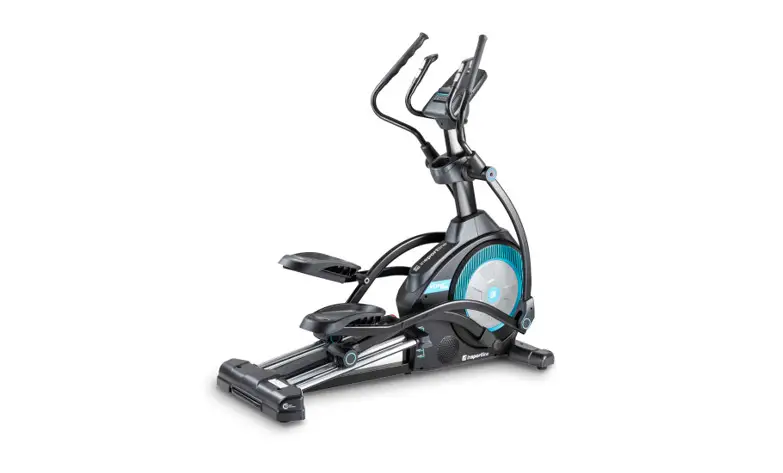
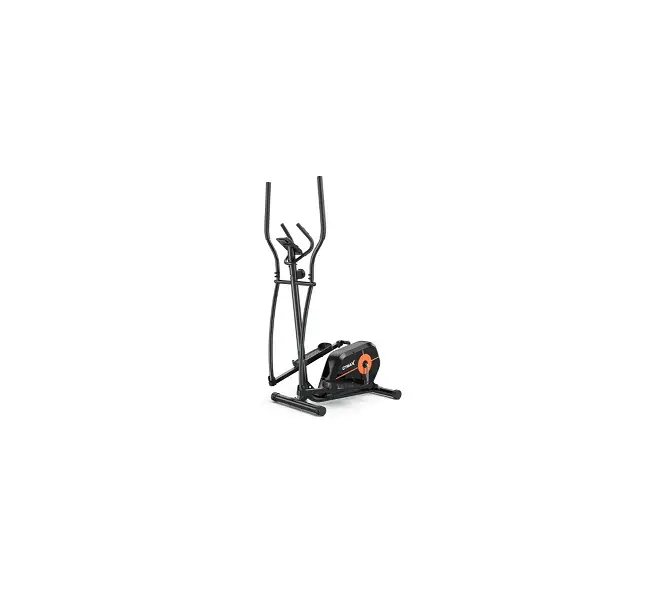
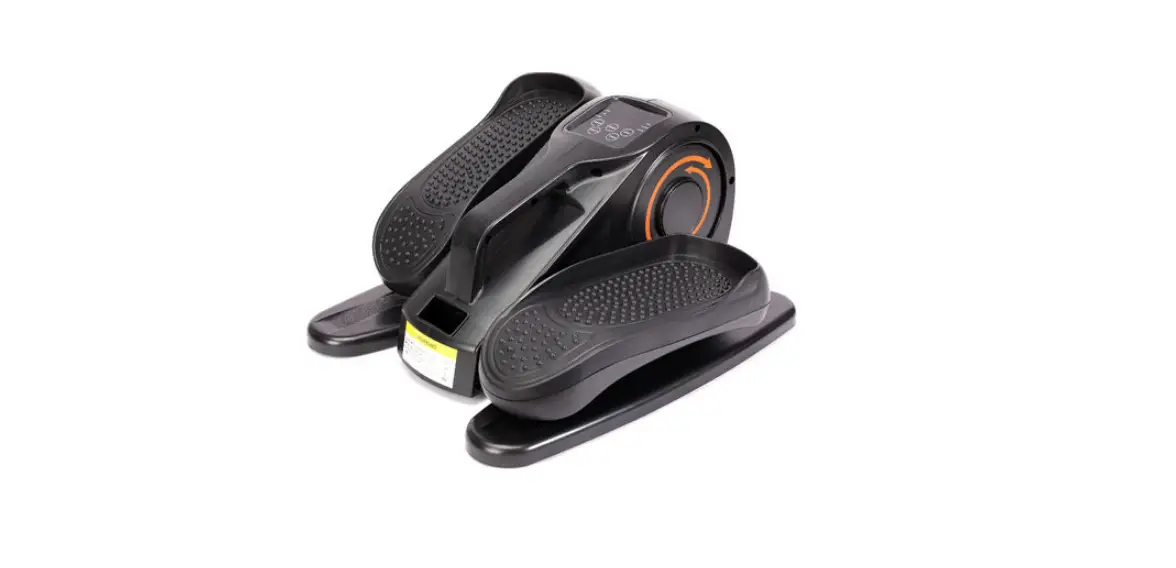
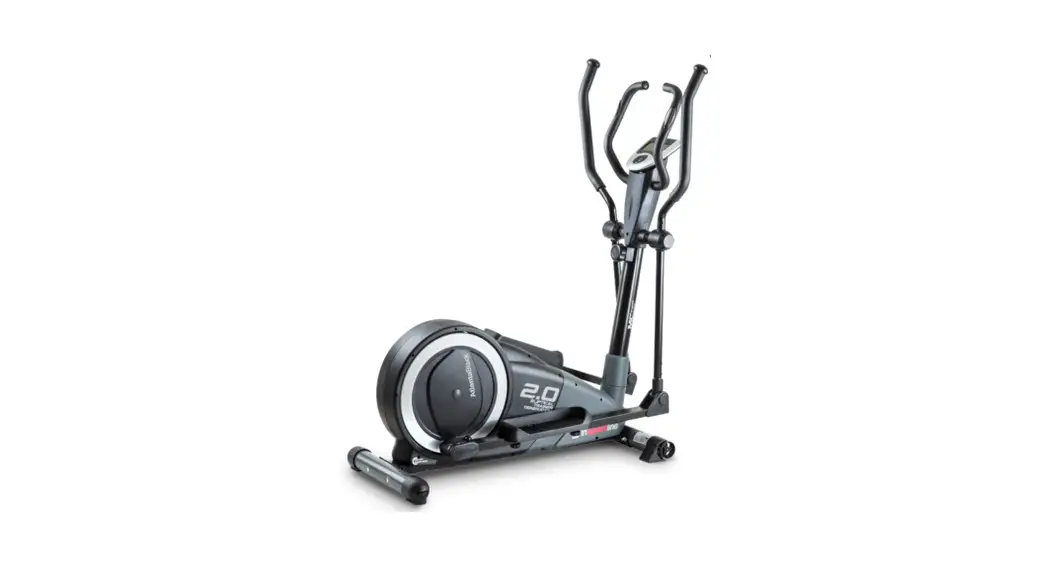
IN 3651 Elliptical Trainer inSPORTline Atlanta Black
SAFETY INSTRUCTIONS
- To ensure the best safety of the exerciser, regularly check it on damaged and worn parts.
- If you pass on this exerciser to another person or if you allow another person to use it, make sure that that person is familiar with the content and instructions in these instructions.
- Only one person should use the exerciser at a time.
- Before the first use and regularly make sure that all screws, bolts, and other joints are properly tightened and firmly seated.
- Before you start your workout, remove all sharp-edged objects around the exerciser.
- Only use the exercise for your workout if it works flawlessly.
- Any broken, worn or defective part must immediately be replaced, and/or the exerciser must no longer be used until it has been properly maintained and repaired.
- Parents and other supervisory persons should be aware of their responsibility, due to situations that may arise for which the exerciser has not been designed and which may occur due to children’s natural play instinct and interest in experimenting.
- If you do allow children to use this exerciser, be sure to take into consideration and assess their mental and physical condition and development, and above all their temperament. Children should use the exerciser only under adult supervision and be instructed on the correct and proper use of the exerciser. The exerciser is not a toy.
- For your own safety, always ensure that there is at least 0.6 meters of free space in all directions around your product while you are exercising.
- To avoid possible accidents, do not allow children to approach the exerciser without supervision, since they may use it in a way for which it is not intended due to their natural play instinct and interest in experimenting.
- Please note that an improper and excessive work-out may be harmful to your health.
- Please note that levers and other adjustment mechanisms are not projecting into the area of movement during the workout.
- When setting up the exerciser, please make sure that the exerciser is standing in a stable way and that any possible unevenness of the floor is evened out.
- Always wear appropriate clothing and shoes which are suitable for your workout on the exerciser. The clothes must be designed in a way so that they will not get caught in any part of the exerciser during the work-out due to their form (for example, length). Be sure to wear appropriate shoes which are suitable for the work-out, firmly support the feet, and are provided with a non-slip sole.
- Be sure to consult a physician before you start any exercise program. He may give you proper hints and advice with respect to the individual intensity of stress for you as well as to your workout and sensible eating habits.
- Weight limit: 150kg
- Dimensions: L137 x W54 x H150cm
Weight: 51kg - WARNING! The heart rate monitor may not be accurate. Overloading during training may cause serious injury or death. If you feel any discomfort, immediately stop the exercise!
- Category: HC (EN957 standard) suitable for home use.
IMPORTANT NOTES
- Assemble the exerciser as per assembly instructions and be sure to only use the structural parts provided with the exerciser and designed for it. Prior to the assembly, make sure the contents of the delivery is complete by referring to the parts list of the assembly and operating instructions.
- Be sure to set up the exerciser in a dry and even place and always protect it from humidity. If you wish to protect the place particularly against pressure points, contamination, etc., it is recommended to put a suitable, non-slip mat under the exerciser.
- The general rule is that exercisers and training devices are no toys.
- Therefore, they must only be used by properly informed or instructed persons.
- Stop your workout immediately in case of dizziness, nausea, chest pain or any other physical symptoms. In case of doubt, consult your physician immediately.
- Children, disabled and handicapped persons should use the exercise only under supervision and in presence of another person who may give support and useful instructions.
- Be sure that your body parts and those of other persons are never close to any moving parts of the exerciser during its use.
- When adjusting the adjustable parts, make sure they are adjusted properly and note the marked, maximum adjusting position, for example of the saddle-support, respectively.
- Do not work out immediately after meals!
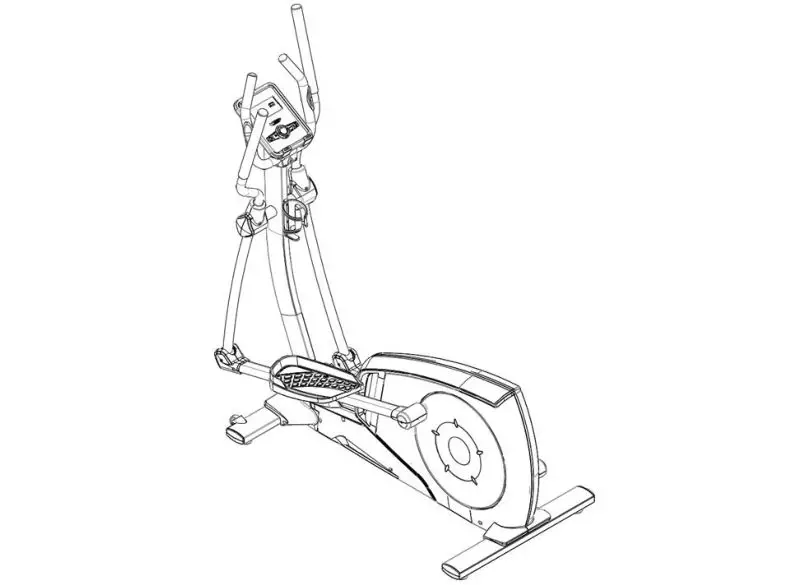
EXPLODED DRAWING
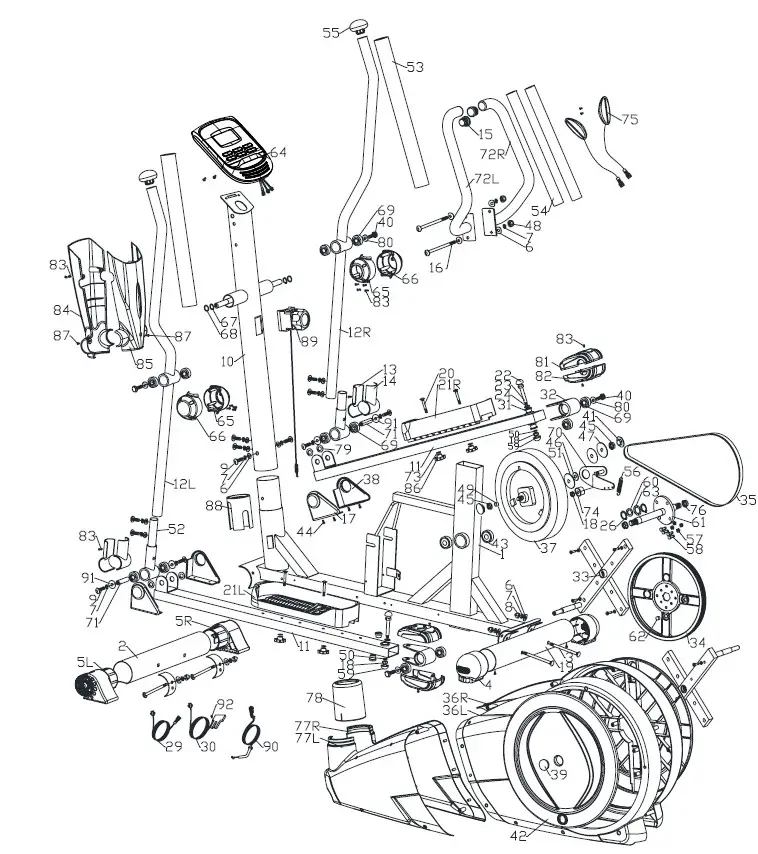
PARTS LIST
| No. | Description | Specification | Qty |
| 1 | Mainframe | 1 | |
| 2 | Stabilizer | D76x1.5Tx480L | 1 |
| 3 | Carriage bolt | M8x1.25x9OL | 4 |
| 4 | Adjustable foot cap (D76) | D76.86 | 2 |
| 5L | Left transfer foot cap (D76) | D76.120L | 1 |
| 5R | Right transfer foot cap (D76) | D76.120L | 1 |
| 6 | Curve washer | D22xD8.5×1.5T | 12 |
| 7 | Spring washer | D15.4*D8.2’2.0T | 10 |
| 8 | Domed nut | M8x1.25x15L | 4 |
| 9 | Allen bolt | M8x1.25x20L | 4+4 |
| 10 | Handlebar post | 1 | |
| 11 | Pedal welding set | 2 | |
| 12L | Left swing support | 1 | |
| 12R | Right swing support | ||
| 13 | Front foot cover (out) | 100x54x27 | 2 |
| 14 | Front foot cover (inner) | 100x54x24 | 2 |
| 15 | Round end cap | D1″*17.5L | 2 |
| 16 | Allen bolt | M8x1.25x100L | 2 |
| 17 | Left upper foot cover | 115x95x43 | 2 |
| 18 | Nylon nut | M10-1.5*10T | 3 |
| 19 | Stabilizer | D76x1.5Tx480L | 1 |
| 20 | Carriage bolt | M6’11145L | 4 |
| 21L\R | Pedals | 395x120x70 | 1 |
| 22 | Cap for bolt | D30.17(M12) | 2 |
| 23 | Ladder bolt | M10.1.5*66L | 2 |
| 24 | Flat washer | D24*D13.5*2.5T | 2 |
| 25 | Round cross screw | ST4.2×1.4x20L | 4 |
| 26 | C ring | S-16 (1T) | 2 |
| 27 | X | X | X |
| 28 | X | X | X |
| 29 | Computer cable (upper) | 1000L | |
| 30 | Computer cable (lower) | 1250L | |
| 31 | Bushing | D29’D11.9*9T | |
| 32 | Pedal bearing welding set | 2 | |
| 33 | Crank welding set | 2 |
| 34 | Pulley | D310x19 | 1 |
| 35 | Poly belt | 1321 PJ6 | 1 |
| 36L | Left chain cover | 1 | |
| 36R | Right chain cover | 1 | |
| 37 | Magnetic system | D260*132L | 1 |
| 38 | Right upper foot cover | 115x95x43 | 2 |
| 39 | Side cap | D36*14 | 2 |
| 40 | Bolt | M8x1.25×20 | 4 |
| 41 | Bolt cover | D35.8 | 2 |
| 42 | Round cover | 2 | |
| 43 | Bearing | #6004ZZ | 2 |
| 44 | Round cross screw | ST4x1.41x2OL | 8 |
| 45 | Lock-nut | 3/8″-26UNFx6.5T | 2 |
| 46 | Flat washer | D3O`D10*4.1T | 1 |
| 47 | Flat washer | D5O’D10•2T | 1 |
| 48 | Domed nut | M8’1.25″8T | 2 |
| 49 | Spacer ring | D1O*D14*3T | 1 |
| 50 | Flat washer | D20*D11*2T | 2 |
| 51 | Plastic flat washer | D5O’D10.1.0T | 2 |
| 52 | Swing support welding set | 2 | |
| 53 | Foam | D30x7Tx550L | 2 |
| 54 | Foam | D23x7Tx530L | 2 |
| 55 | Mushroom cap | D1 1/4″*45 L | 2 |
| 56 | Spring | D4.0xD20x82L | 1 |
| 57 | Nylon nut | M6x1.0x6T | 4 |
| 58 | Bolt | M6x1.0x15L | 4 |
| 59 | Bolt cover | D28*17(M10) | 2 |
| 60 | Flat washer | D26″*D21*1.5T | 1 |
| 61 | Crank welding set | 1 | |
| 62 | Round magnet | S10042 | 1 |
| 63 | Waved washer | D27*D21*0.3T | 1 |
| 64 | Computer | B-11851 | 1 |
| 65 | Right cover | 80x50x87 | 2 |
| 66 | Left cover | 80x50x87 | 2 |
| 67 | C ring | S-16 (1T) | 2 |
| 68 | Waved washer | D21xD16x0.3T | 2 |
| 69 | Bearing | #99502ZZ | 12 |
| 70 | Idle fixed plate | 1 | |
| 71 | Front pedal axle | D15.85×63.2L | 2 |
| 72L | Left handlebar | 1 | |
| 72R | Right handlebar | 1 | |
| 73 | Flat washer | D14xD6.5×0.8T | 4 |
| 74 | Idle wheel | D43.25L | 1 |
| 75 | Handle pulse | 2 | |
| Pulse cable | 500L | 2 | |
| 76 | Anti-loose nut | M10’1 .25.10T | 2 |
| 77L | Left front chain cover | 1 | |
| 77R | Right front chain cover | ||
| 78 | Upper cover | 1 | |
| 79 | Flat washer | D23*D17*1.2T | 4 |
| 80 | Flat washer | D21*D8.5*1.5T | 2 |
| 81 | Upper universal cover | 125*90*39 | 2 |
| 82 | Lower universal cover | 125*90*39 | 2 |
| 83 | Round cross screw | ST4x1.41x15L | 16 |
| 84 | Front computer cover | 380*150*50 | |
| 85 | Rear computer cover | 340*150*50 | . |
| 86 | Knob | 4 | |
| 87 | Round cross screw | M5*0.8.10L | 2 |
| 88 | Inner tube | D71.5*100L | |
| 89 | Tension cable (upper) | 465L | |
| 90 | Tension cable (lower) | 500L | |
| 91 | Flat washer | D25*D8.5*2T | |
| 92 | Cross screw | M5x98x12L |
CHECKLIST (CONTENTS OF PACKAGE)
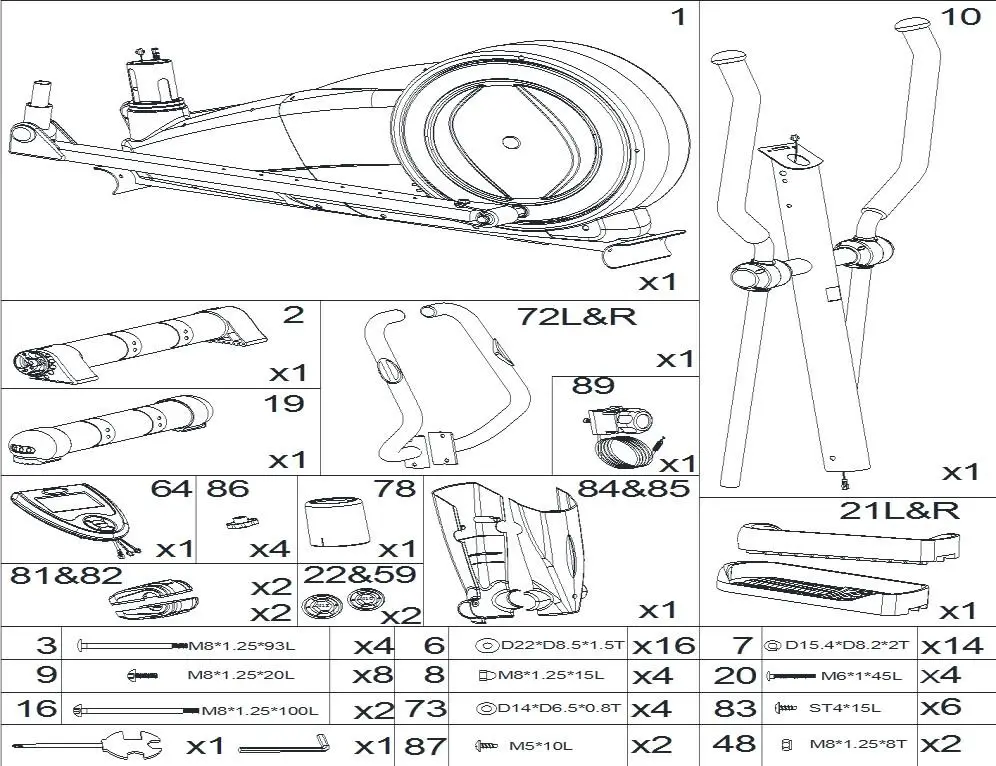
ASSEMBLY
STEP 1
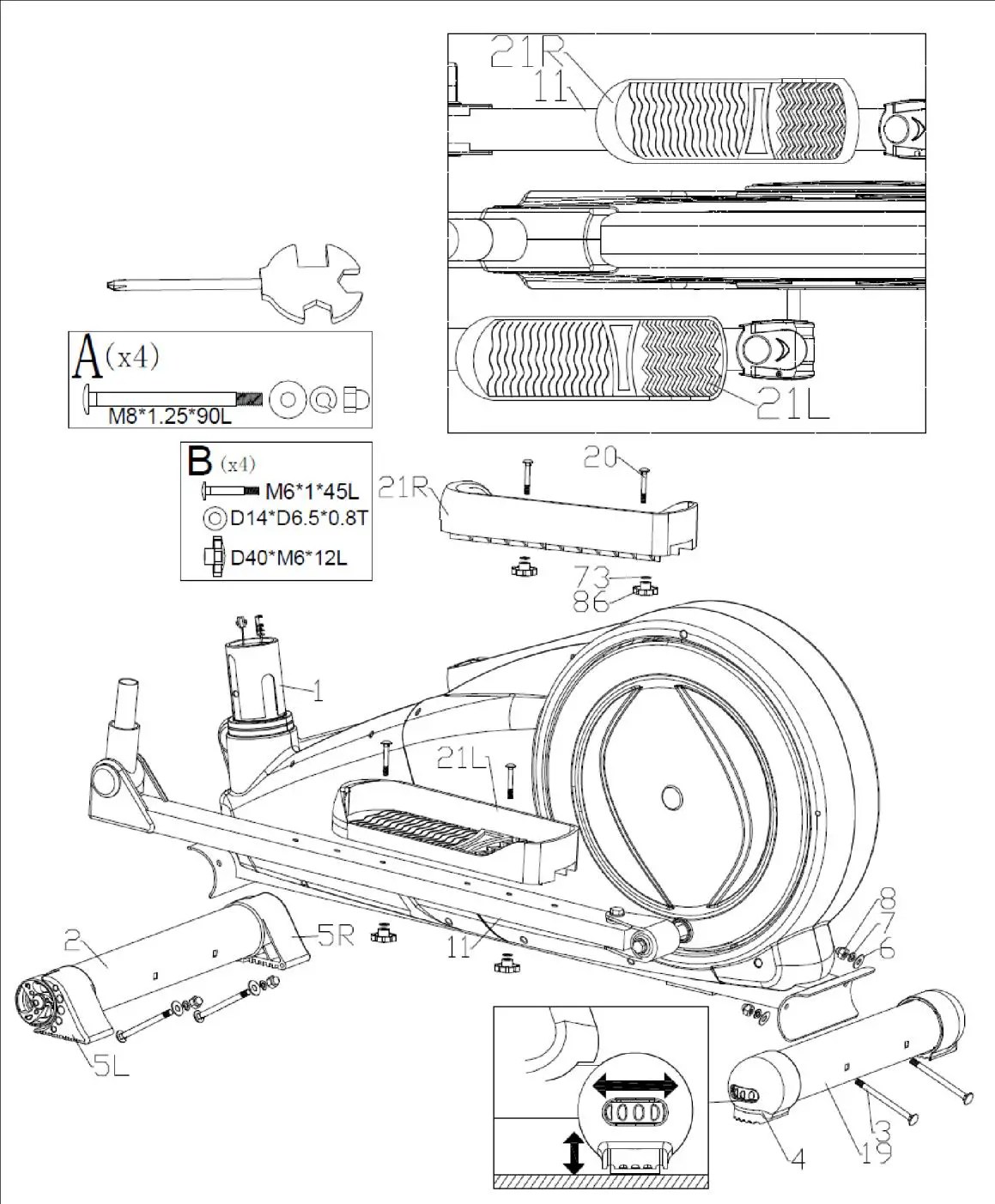
- Assemble the front stabilizer (2) and rear stabilizer (19) onto the mainframe (1) by using the square neck bolts (3), the curved washers (6), the spring washers (7), and domed nuts (8).
- Adjust the proper height by turning the wheel of the rear foot caps (4).
- Assemble the left and right pedal (21L&21R) on the pedal supporting tube (11) by using the screws (20), flat washers (73) and knobs (86).
- There are 3 optional positions for the pedals on the pedal supporting tube (11) with three holes.
STEP 2
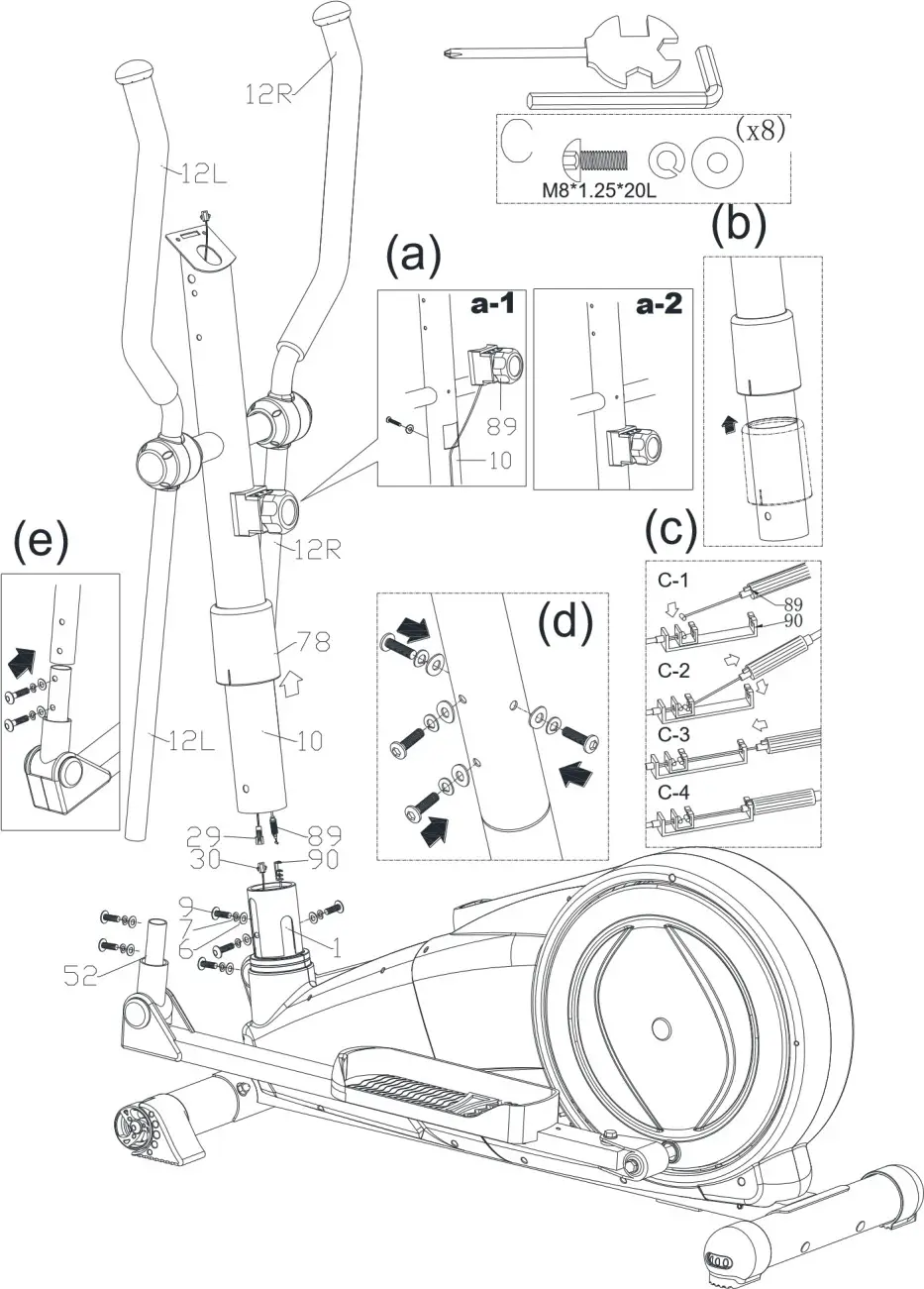
- Suggest assembling this step by two persons.
- First, insert the upper tension cable (89) into the hole of the handlebar post (10), remove the preassembled screw and waved washer from the tension cable, then use the spanner to tighten like fig. (a)
- Lift up the cover for handlebar post (78) like fig. (b), then connect computer cable (29) with the cable of motor (30), and connect the end of the upper tension cable (89) and the lower tension cable (90) like fig. (c)
- Insert the handlebar post (10) on the mainframe and tighten it like fig. (d) by using the curved washers (6), the spring washers (7), and the Allen bolts (9). Then, place down the cover for the handlebar post (78) and make it tight on the mainframe.
- Assemble the left and right movable handlebar (12L&12R) on the movable handlebar support (52) by using hardware like fig. (e).
STEP 3
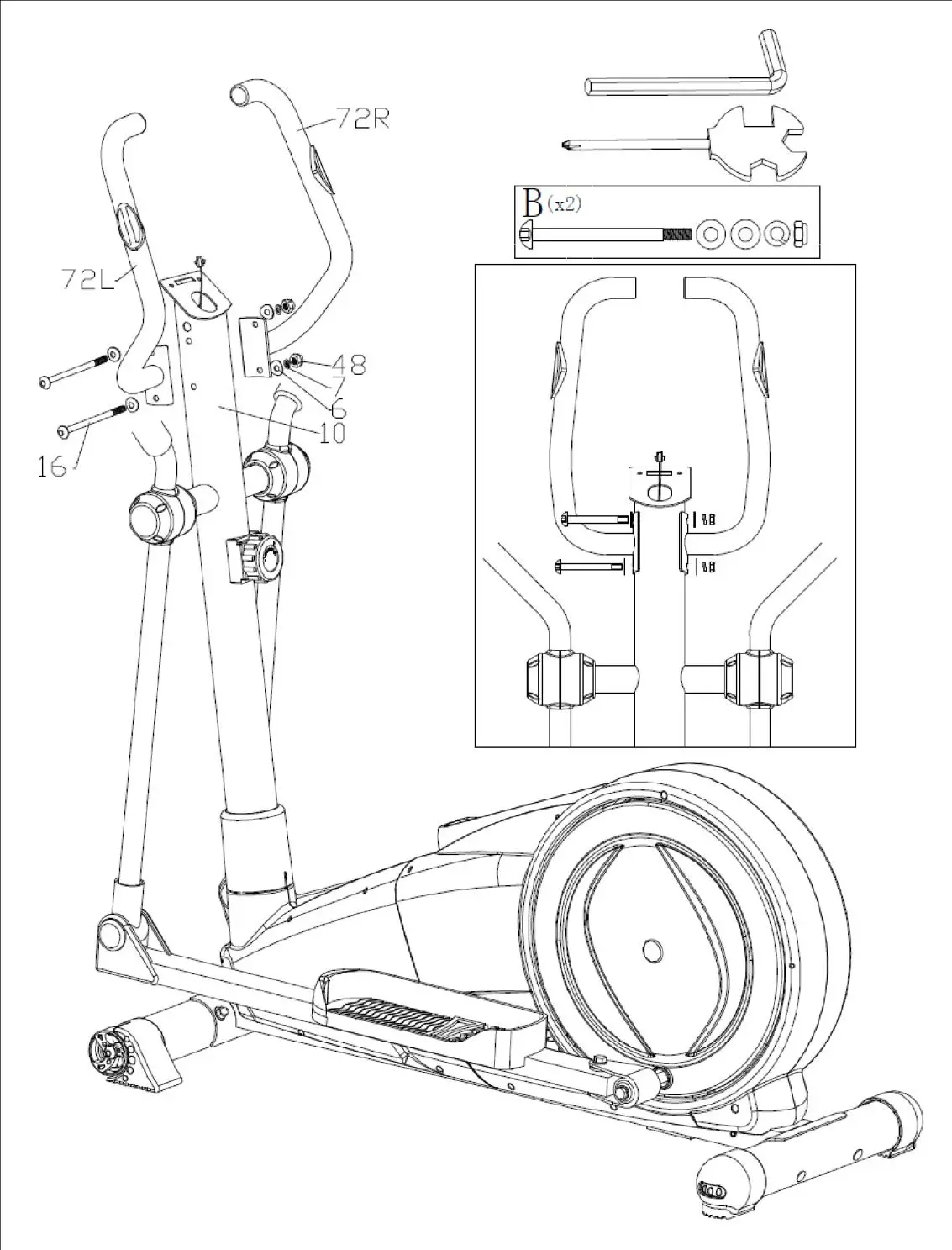 Assemble the left and right fixed handlebar (72L &72R) on the handlebar post (10) by using the Allen bolts (16), the curved washers (6), the spring washers (7), and the domed nuts (48).
STEP 4
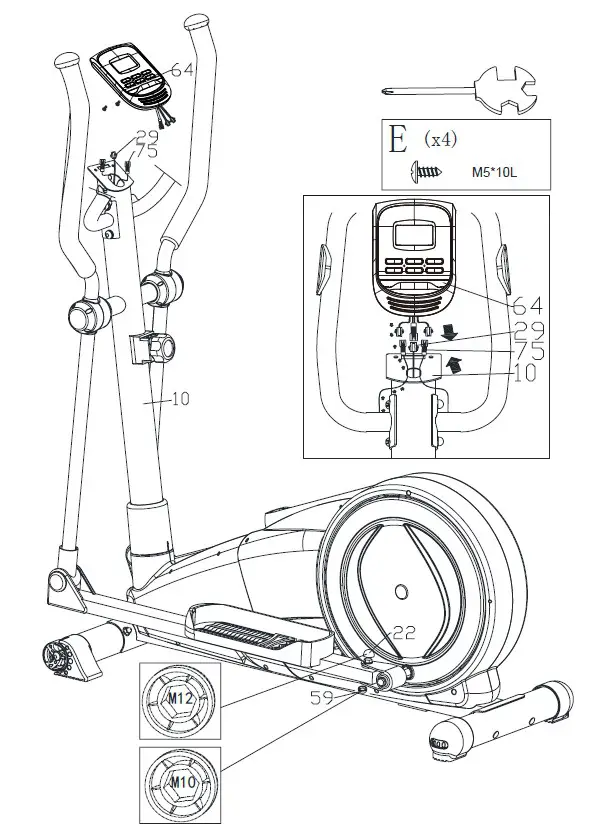
- Connect the computer cable (29) and cable of the hand pulse sensor (75) with the computer (64), then fix the computer (64) on the handlebar post (10) by using the screws.
- Put the bolt cover (22) and bolt cover (59) on the bolt.
STEP 5
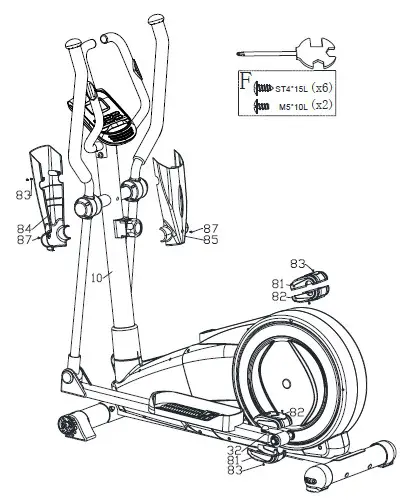
- Fix the upper and lower cover for the universal joint (81&82) on the universal joint (32) by using the screws (83).
- Fix the front and rear cover for the handlebar post (84&85) on the handlebar post (10) by using the screws (83&87).
COMPUTER
A. User information
Enter your personal information before the workout. Use the BODY FAT button to enter information about gender, age, height and weight. The data are saved until the battery is removed.
B. Clock
a. The console will enter clock display mode if it does not detect any signal or keypress for 4 min.
Press ENTER to toggle between clock and temperature, press any key to exit clock mode.
b. Press the ENTER button for 2s to set the time (TIME) and alarm (ALARM) using the up (UP) and down (DOWN) keys.
c. Hold ENTER and UP for 2 seconds to display the current time.
FUNCTION
- Clock: Displays the current time hh: mm
- Alarm: You can set the alarm; at which time you will hear a beep for 1 minute.
- Temperature: Displays the current room temperature.
- Scan: Automatically displays time, speed, distance, calories, pulse and RPM every 6 seconds until you press ENTER and turn off auto scan. When the auto-scan function is turned off, SCAN is displayed for 2 seconds and then restarted.
- Time: Displays the training time in mm: ss (from 00:00 to 99:59). You can also set the countdown using the UP and DOWN buttons. If you continue training after the set time has been reached, a beep sounds and the time is reset.
- Speed: displays the training speed in KM / h or MIL / h. If no signal is received, NO SPEED is displayed.
- Distance: Displays the distance traveled up to 99.9 km/mi. Calories: Displays burned calories during training.
- Pulse: Displays the pulse during exercise. Displays NO PULSE if not detected.
- RPM: Speed of the pedals.
- Age: Displays the age range from 10 to 99 years. The original value is 35 years.
- Recovery function (pulse recovery): During the START phase, keep both hands on the handrails or chest belt and then press PULSE RECOVERY. The countdown starts from 1 min. After 1 minute the result F1.0 – F6.0 is displayed
| 1.0 | outstanding |
| 1.0 < F < 2.0 | excellent |
| 2.0 ≤ F ≤2.9 | good |
| 3.0 ≤ F ≤ 3.9 | fair |
| 4.0 .≤ F ≤ 5.9 | below average |
| 6.0 | poor |
Buttons
- UP – During setup, press to increase time, distance, calories, age, height and gender. You can set the time and alarm while setting the CLOCK.
- DOWN – During setup, press to decrease time, distance, calories, age, height and gender. You can set the time and alarm while setting the CLOCK.
Press UP and DOWN to reset the value. - ENTER/RESET:
Press to confirm.
If the console displays NO SPEED, press and holds the button for 2s to restart the console - BODY FAT: Press to enter data before body fat measurement.
- MEASURE: Press to see the ratio of body fat, BMI, and BMR.
FAT%: Displays the body fat%. - BMI: Body mass index displays the ratio of body fat to height/weight BMR: Displays the number of calories required for basic body functions
- PULSE RECOVERY: Heart rate recovery function.
HOW TO REPLACE THE BATTERIES
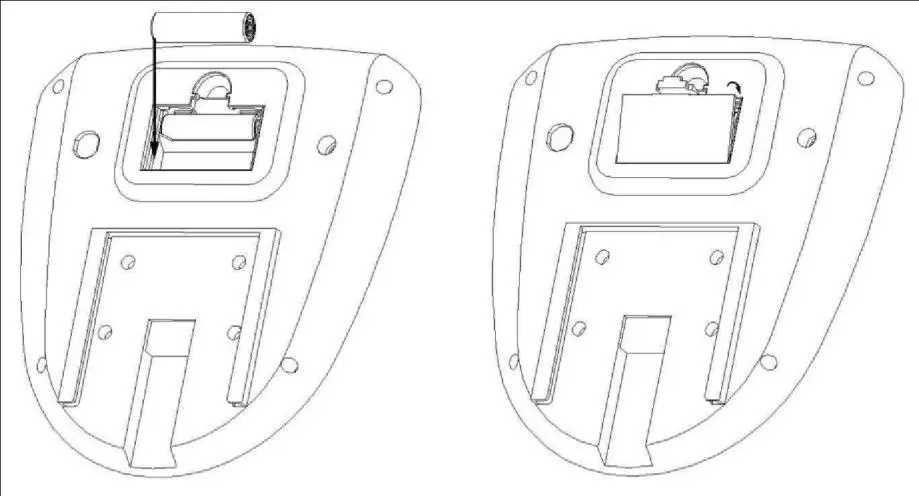
Please move out the battery cover from the bottom housing then replace the batteries. The instruction as below.
USE OF ELLIPTICAL TRAINER
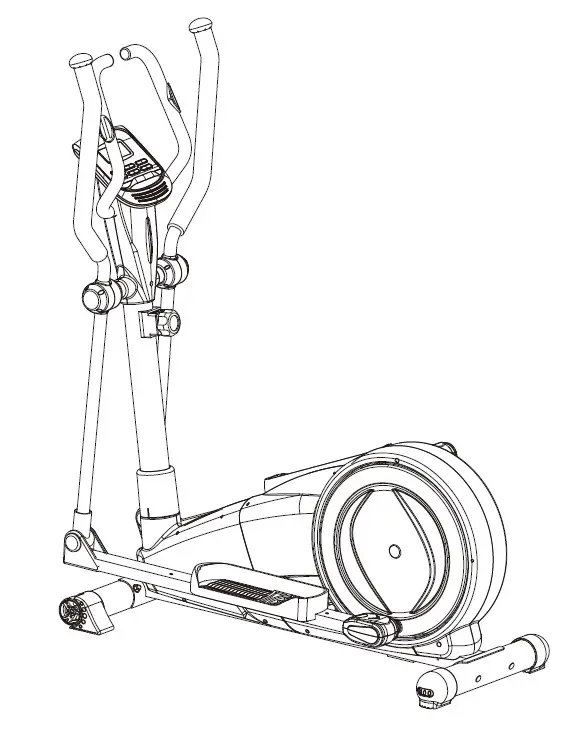
The elliptical trainer is a popular fitness machine, one of the newest and most effective home training machines.
When you are exercising on an elliptical treadmill, your feet move along the elliptical curve.
The elliptical treadmill is a frequent replacement for exercise bikes and treadmills because it is gentler for your joints. With the handles, you are also exercising the upper half of your body.
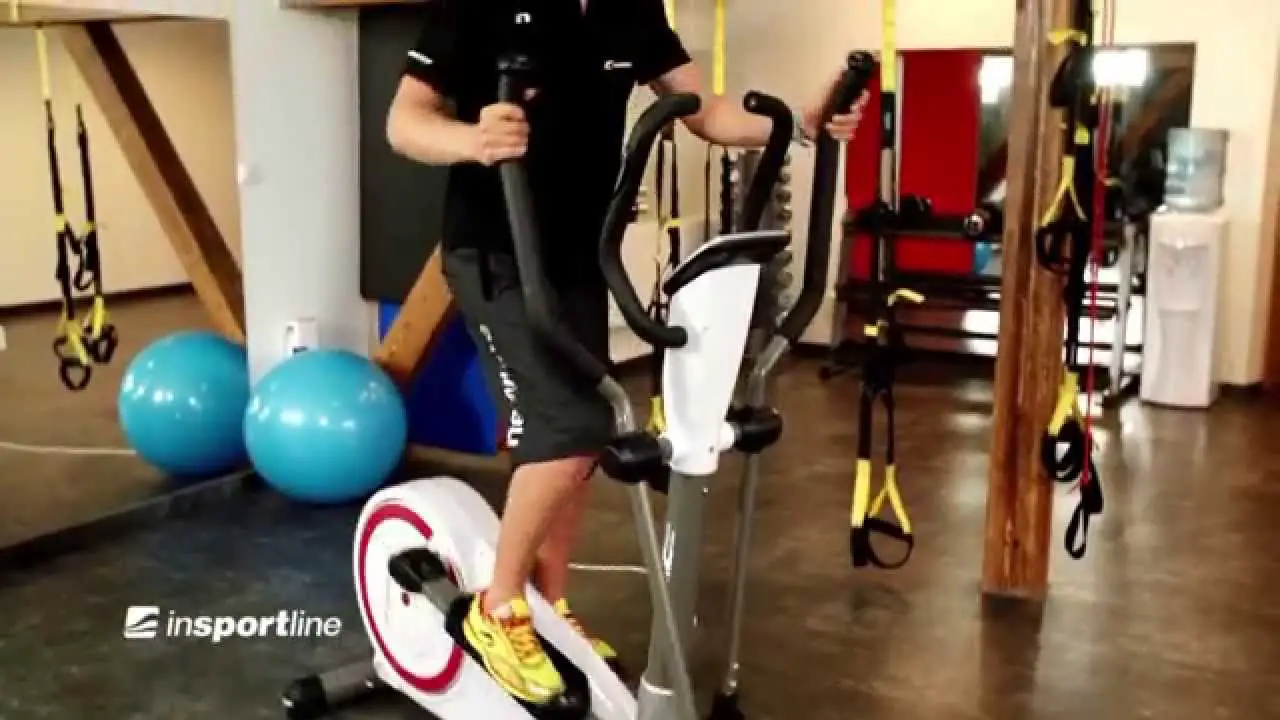
During exercise, you transfer the weight from one foot to the other. Try to maintain an upright and natural position. Handlers will help you. Find the perfect place to hold the grip and try to move as naturally as possible.
EXERCISE INSTRUCTIONS
Using your ELLIPTICAL TRAINER provides you with several benefits, it will improve your physical fitness, tone muscle, and in conjunction with a calorie-controlled diet help, you lose weight.
THE WARM-UP PHASE
This stage helps get the blood flowing around the body and the muscles working properly. It will also reduce the risk of cramps and muscle injury. It is advisable to do a few stretching exercises as shown below. Each stretch should be held for approximately 30 seconds, do not force or jerk your muscles into a stretch – if it hurts, STOP.
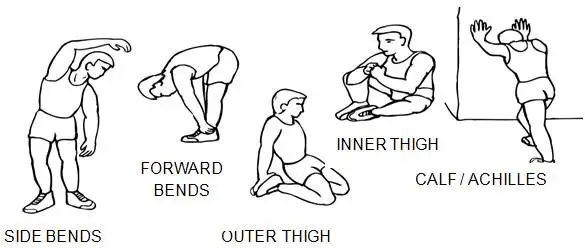
THE EXERCISE PHASE
This is the stage where you put the effort in. After regular use, the muscles in your legs will become stronger. Work to your own pace but it is very important to maintain a steady tempo throughout. The rate of work should be sufficient to raise your heartbeat into the target zone shown on the graph below.
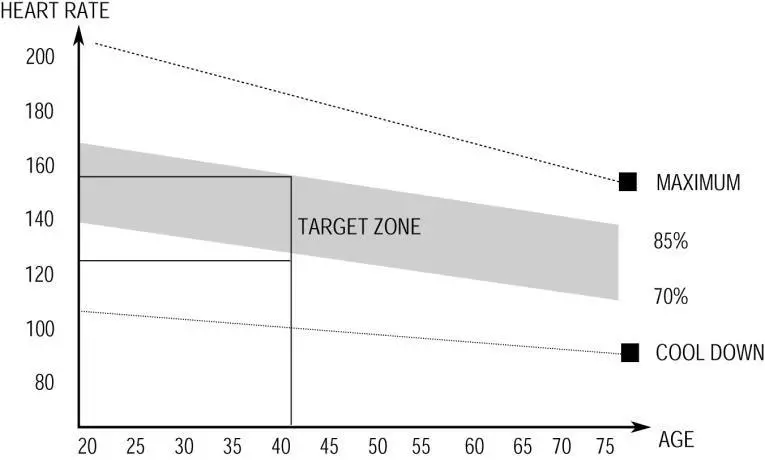 This stage should last for a minimum of 12 minutes for most people though most people start at about 15-20 minutes.
THE COOL-DOWN PHASE
This stage is to let your cardiovascular system and muscles wind down. This is a repeat of the warm-up exercise e.g. reduce your tempo, continue for approximately 5 minutes. The stretching exercises should now be repeated, again remembering not to force or jerk your muscles into the stretch.
As you get fitter you may need to train longer and harder. It is advisable to train at least three times a week, and if possible space your workouts evenly throughout the week.
MUSCLE TONING
To tone muscle while on your ELLIPTICAL TRAINER you will need to have the resistance set quite high.
This will put more strain on our leg muscles and may mean you cannot train for as long as you would like. If you are also trying to improve your fitness you need to alter your training program. You should train as normal during the warm-up and cool-down phases, but towards the end of the exercise phase you should increase resistance, making your legs work harder than normal. You will have to reduce your speed to keep your heart rate in the target zone.
WEIGHT LOSS
The important factor here is the amount of effort you put in. The harder and longer you work the more calories you will burn. Effectively this is the same as if you were training to improve your fitness, the difference is the goal.
MAINTENANCE
- Use only a soft cloth and a mild detergent.
- Do not clean the plastic parts with abrasives or solvents.
- Wipe the sweat after each use.
- Protect the device from moisture and extreme temperatures.
- Protect your device, computer and console from direct sunlight.
- Check the tightening of all bolts and nuts regularly.
- Store in a dry and clean place away from children.
- Do not lubricate moving joints, the machine has maintenance-free industrial bearings
ENVIRONMENT PROTECTION
After the product lifespan expired or if the possible repairing is uneconomic, dispose of it according to the local laws and environmentally friendly in the nearest scrapyard.
By proper disposal, you will protect the environment and natural sources. Moreover, you can help protect human health. If you are not sure about incorrect disposing of, ask local authorities to avoid law violation or sanctions.
Don’t put the batteries among house waste but hand them in to the recycling place.
TERMS AND CONDITIONS OF WARRANTY, WARRANTY CLAIMS
General Conditions of Warranty and Definition of Terms
All Warranty Conditions stated hereunder determine Warranty Coverage and Warranty Claim Procedure. Conditions of Warranty and Warranty Claims are governed by Act No. 89/2012 Coll. Civil Code, and Act No. 634/1992 Coll., Consumer Protection, as amended, also in cases that are not specified by these Warranty rules.
The seller is SEVEN SPORT s.r.o. with its registered office in Strakonická street 1151/2c, Prague 150 00, Company Registration Number: 26847264, registered in the Trade Register at Regional Court in Prague, Section C, Insert No. 116888.
According to valid legal regulations, it depends whether the Buyer is the End Customer or not.
“The Buyer who is the End Customer” or simply the “End Customer” is the legal entity that does not conclude and execute the Contract in order to run or promote his own trade or business activities.
“The Buyer who is not the End Customer” is a Businessman that buys Goods or uses services for the purpose of using the Goods or services for his own business activities. The Buyer confirms to the General Purchase Agreement and business conditions.
These Conditions of Warranty and Warranty Claims are an integral part of every Purchase Agreement made between the Seller and the Buyer. All Warranty Conditions are valid and binding unless otherwise specified in the Purchase Agreement, in the Amendment to this Contract or in another written agreement.
Warranty Conditions
Warranty Period
The Seller provides the Buyer a 24 months Warranty for Goods Quality unless otherwise specified in the Certificate of Warranty, Invoice, Bill of Delivery or other documents related to the Goods. The legal warranty period provided to the Consumer is not affected.
By the Warranty for Goods Quality, the Seller guarantees that the delivered Goods shall be, for a certain period of time, suitable for regular or contracted use and that the Goods shall maintain its regular or contracted features.
The Warranty does not cover defects resulting from (if applicable):
- User’s fault, i.e. product damage caused by unqualified repair work, improper assembly, insufficient insertion of seat post into the frame, insufficient tightening of pedals and cranks
- Improper maintenance
- Mechanical damages
- Regular use (e.g. wearing out of rubber and plastic parts, moving mechanisms, joints, wear of brake pads/blocks, chain, tires, cassette/multi-wheel etc.)
- The unavoidable event, natural disaster
- Adjustments made by an unqualified person
- Improper maintenance, improper placement, damages caused by low or high temperature, water, inappropriate pressure, shocks, intentional changes in design or construction etc.
Warranty Claim Procedure
The Buyer is obliged to check the goods delivered by the Seller immediately after taking the responsibility for the Goods and its damages, i.e. immediately after its delivery. The Buyer must check the Goods so that he discovers all the defects that can be discovered by such check.
When making a Warranty Claim the Buyer is obliged, on request of the Seller, to prove the purchase and validity of the claim by the Invoice or Bill of Delivery that includes the product’s serial number, or eventually by the documents without the serial number. If the Buyer does not prove the validity of the Warranty Claim by these documents, the Seller has the right to reject the Warranty Claim.
If the Buyer gives notice of a defect that is not covered by the Warranty (e.g. in the case that the Warranty Conditions were not fulfilled or in the case of reporting the defect by mistake etc.), the Seller is eligible to require compensation for all the costs arising from the repair. The cost shall be calculated according to the valid pricelist of services and transport costs.
If the Seller finds out (by testing) that the product is not damaged, the Warranty Claim is not accepted.
The Seller reserves the right to claim compensation for costs arising from the false Warranty Claim.
In case the Buyer makes a claim about the Goods that is legally covered by the Warranty provided by the Seller, the Seller shall fix the reported defects by means of repair or by the exchange of the damaged part or product for a new one. Based on the agreement of the Buyer, the Seller has the right to exchange the defected Goods for fully compatible Goods of the same or better technical characteristics. The Seller is entitled to choose the form of the Warranty Claim Procedures described in this paragraph.
The Seller shall settle the Warranty Claim within 30 days after the delivery of the defective Goods unless a longer period has been agreed upon. The day when the repaired or exchanged Goods is handed over to the Buyer is considered to be the day of the Warranty Claim settlement. When the Seller is not able to settle the Warranty Claim within the agreed period due to the specific nature of the Goods defect, he and the Buyer shall make an agreement about an alternative solution. In case such agreement is not made, the Seller is obliged to provide the Buyer with financial compensation in the form of a refund.
CZ
SEVEN SPORT s.r.o.
Registered Office: Strakonická 1151/2c, Praha 5, 150 00, ČR
Headquaters: Dělnická 957, Vítkov, 749 01
Warranty & Service: Čermenská 486, Vítkov 749 01
CRN: 26847264
VAT ID: CZ26847264
Phone: +420 556 300 970
E-mail: [email protected]
[email protected]
[email protected]
Web: www.inSPORTline.cz
 inSPORTline - největší výrobce a prodejce fitness v ČR
 inSPORTline - najväčší výrobca a predajca fitness v SR