seeedstudio MR60BHA1 mmWave Breathing and Heartbeat Module User Manual
Description of the protocol
This protocol is applied to the communication between the company’s radar and the host computer.
This protocol includes the definition of a number of operational commands for the control, testing, upgrading and information query of the radar equipment, as well as a clear definition of the data format and command definitions for the transmission between the radar and the host computer.
The protocol outlines the radar workflow, provides a brief introduction to the interface protocol component architecture, and gives the control commands and data required for the relevant radar operation.
Scope of application of the protocol
This protocol is applicable to the 24G, 60G and 77G series of radar equipment developed by the company.
Explanation of relevant terms
- Uplink transmission: transmission of data and commands from the radar to the host computer.
- Downlink transmission: transmission of commands or other content from the upper computer to the radar.
- Uplink: the communication target corresponding to the radar terminal for radar data reception, radar control and other operations, the uplink may be in the form of a computer, embedded device or web server etc.
- Heartbeat packet: a command word that the radar device sends to the application terminal to notify the other party of its status at regular intervals, the default time interval is 1 minute.
- OTA: shorthand for remote upgrade.
- Data frames: The transmission between the radar and the host computer takes place in data frame mode.
Overview
Radar system organisation
A block diagram of the interface between the radar and the application equipment is shown in the diagram below.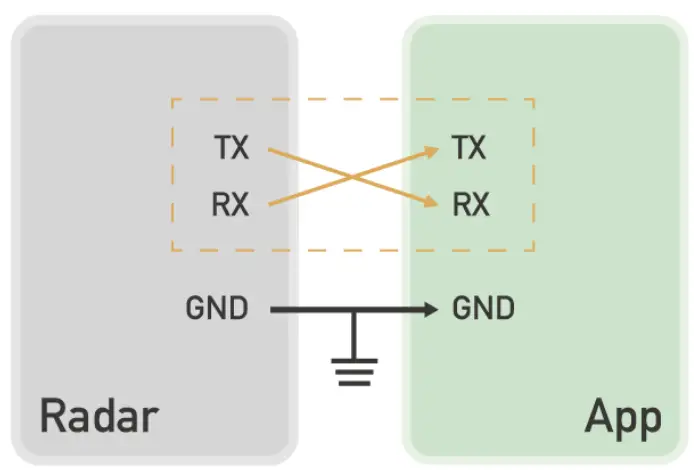
The radar interface is a serial communication (UART) with a TTL (3.3V) interface level. The interface is converted via an external RS485 interface circuit if required by the user, but the format of the transmitted data remains unchanged.
interface protocol
The interface between the radar module and the application side includes a data interface and a control interface with the following interface parameters.
| Function | Control interfaces | Notes | |
| 1 | Interface level | TTL | |
| 2 | Baud rate | 9600bps | |
| 3 | Data bits | 8 | |
| 4 | Stop bits | 1 | |
| 5 | Parity Check | None |
Definition of transmission
Radar data transmission classification
The data transfer between the radar and the host computer includes commands for radar detection, radar testing, parameter queries, OTA upgrades, etc. The categories in turn include two-way interactive communication between the host computer and the radar, respectively.
The main data transmission between the radar and the host computer is shown in the diagram below.
Fig. 1 Radar information transmission architecture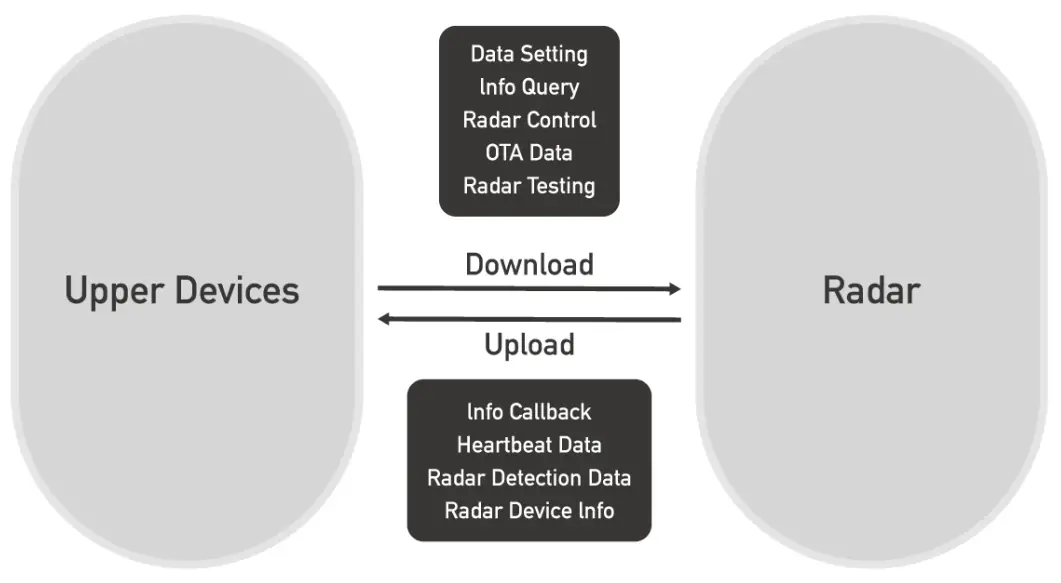
Frame format definition
The frame format is defined as shown below.
Of which:
| Serial No. | Fields | Marking | Length(B) | Description |
| 1 | Frame headers | FH | 2 | Fixed to “0x53 0x59″ //”S Y” |
| 2 | Control characters | CD | 1 | 0x01 – heartbeat pack identification; 0x02 – product information; 0x03 – OTA upgrade; 0x04 – radar test; 0x05 – operating status; 0x06 – radar location information; 0x80 – human presence; 0x81 – respiratory heartbeat. |
| 3 | Command words | OD | 1 | Identification of the current data content, to be defined |
| 4 | Length marking | L1 | 2 | Equal to DA data length |
| 5 | Data | DA | – | 0~2048Byte |
| 6 | Checksum fields | CH | 1 | Checksum |
| 7 | End of frame | FT | 2 | Fixed to “0x54 0x43″ //”T C” |
Note: In the above table, the OD content may be defined differently in different radar applications.
Detailed agreement definitions
Parameter classification and address correspondence table
| Serial No. | Product categories | Function descriptions | Direction of transmission | Frame headers | Control characters | Command words | Length marking | Data | Check -sum | End of frame | Notes |
| 1 | Heartbeat package parameters | Heartbeat Packet Enquiry | Issuing 0x53 0x59 Response 0x53 0x59 | 0x53 0x59 0x53 0x59 | 0x01 0x01 | 0x01 0x01 | 0x0001 0x0001 | 0x0f 0x0f | sum | 0x54 0x43 0x54 0x43 | |
| 2 | Product Information | Product Model Lookup | Issuing 0x53 0x59 Response 0x53 0x59 | 0x53 0x59 0x53 0x59 | 0x02 0x02 | 0x01 0x01 | 0x0001 len | 0x0f Product information | sum | 0x54 0x43 0x54 0x43 | |
| 3 | Product Model Setting | Issuing 0x53 0x59 Response 0x53 0x59 | 0x53 0x59 0x53 0x59 | 0x02 0x02 | 0x02 0x02 | len len | Product information Product information | Sum | 0x54 0x43 0x54 0x43 | ||
| 4 | Product ID lookup | Issuing 0x53 0x59 Response 0x53 0x59 | 0x53 0x59 0x53 0x59 | 0x02 0x02 | 0x03 0x03 | 0x0001 len | 0x0f Product ID | Sum | 0x54 0x43 0x54 0x43 | ||
| 5 | Product ID settings | Issuing 0x53 0x59 Response 0x53 0x59 | 0x53 0x59 0x53 0x59 | 0x02 0x02 | 0x04 0x04 | len len | Product ID Product ID | Sum | 0x54 0x43 0x54 0x43 | ||
| 6 | Hardware Model Lookup | Issuing 0x53 0x59 Response 0x53 0x59 | 0x53 0x59 0x53 0x59 | 0x02 0x02 | 0x05 0x05 | 0x0001 len | 0x0f Hardware model | sum | 0x54 0x43 0x54 0x43 | ||
| 7 | Hardware Model Setting | Issuing 0x53 0x59 Response 0x53 0x59 | 0x53 0x59 0x53 0x59 | 0x02 0x02 | 0x06 0x06 | len len | Hardware model Hardware model | Sum | 0x54 0x43 0x54 0x43 | ||
| 8 | Firmware Lookup | Issuing 0x53 0x59 Response 0x53 0x59 | 0x53 0x59 0x53 0x59 | 0x02 0x02 | 0x07 0x07 | 0x0001 len | 0x0f Firmware model | Sum | 0x54 0x43 0x54 0x43 | ||
| 9 | Firmware model setting | Issuing 0x53 0x59 Response 0x53 0x59 | 0x53 0x59 0x53 0x59 | 0x02 0x02 | 0x08 0x08 | len len | Firmware model Firmware model | Sum | 0x54 0x43 0x54 0x43 | ||
| 10 | Protocol Information Lookup | Issuing 0x53 0x59 Response 0x53 0x59 | 0x53 0x59 0x53 0x59 | 0x02 0x02 | 0x09 0x09 | 0x0001 len | 0x0f Protocol information | Sum | 0x54 0x43 0x54 0x43 | ||
| 11 | Protocol information setting | Issuing 0x53 0x59 Response 0x53 0x59 | 0x53 0x59 0x53 0x59 | 0x02 0x02 | 0x0a 0x0a | len len | Protocol information Protocol information | sum | 0x54 0x43 0x54 0x43 | ||
| 12 | OTA parameters | Starting OTA upgrade | Issuing 0x53 0x59 Response 0x53 0x59 | 0x53 0x59 0x53 0x59 | 0x03 0x03 | 0x01 0x01 | 0x0013 0x0001 | 4Byte firmware package size + 15Byte firmware version number 0x01:Consent to upgrade 0x02:Refuse to upgrade | Sum |
0x54 | |
| 13 | Upgrade package transmissio n | Issuing 0x53 0x59 Response 0x53 0x59 | 0x53 0x59 0x53 0x59 | 0x03 0x03 | 0x02 0x02 | 0x0404 0x0001 | 4Byte packet offset address + 1024Byte data packet 0x01:Received successfully 0x02:Reception failure | sum | 0x54 0x43 0x54 0x43 | ||
| 14 | Ending OTA upgrades | Issuing 0x53 0x59 Response 0x53 0x59 | 0x53 0x59 0x53 0x59 | 0x03 0x03 | 0x03 0x03 | 0x0001 0x0001 | 0x01:Firmware packet delivery completed 0x02:Firmware packet delivery | Sum | 0x54 0x43 0x54 0x43 | ||
| not completed 0x0f | |||||||||||
| 15 | Operating status parameters | Working mode settings | Issuing 0x53 0x59 Response 0x53 0x59 | 0x53 0x59 0x53 0x59 | 0x05 0x05 | 0x01 0x01 | 0x0001 0x0001 | 1Byte operating mode 1Byte operating mode | sum | 0x54 0x43 0x54 0x43 | |
| 16 | Working mode enquiry | Issuing 0x53 0x59 Response 0x53 0x59 | 0x53 0x59 0x53 0x59 | 0x05 0x05 | 0x02 0x02 | 0x0001 0x0001 | 0x0f 1Byte operating mode | Sum | 0x54 0x43 0x54 0x43 | ||
| 17 | Hours of Work Enquiry | Issuing 0x53 0x59 Response 0x53 0x59 Response 0x53 0x59 | 0x53 0x59 0x53 0x59 0x53 0x59 | 0x05 0x05 0x06 | 0x03 0x03 0x09 | 0x0001 0x0004 0x0002 | 0x0f Working hours 2Byte FOV angle | Sum | 0x54 0x43 0x54 0x43 0x54 0x43 | ||
| 18 | Human presence radar | Existence information | Issuing 0x53 0x59 | 0x50 x59 | 0x80 | 0x01 | 0x0001 | 0x00:Nobody 0x01:occupied | sum | 0x54 0x43 | Report on status changes |
| 19 | Campaign information | Issuing 0x53 0x59 | 0x53 0x59 | 0x80 | 0x02 | 0x0001 | 0x00:None 0x01:Close 0x02:away 0x03:Disorderly motion | sum | 0x54 0x43 | Report on status changes | |
| 20 | Body motion parameters | Issuing 0x53 0x59 | 0x53 | 0x80 | 0x03 | 0x0001 | 1Byte body motion parameter | sum | 0x54 0x43 | Periodical reporting | |
| 21 | Number of people in the current environment | Issuing 0x53 0x59 | 0x53 0x59 | 0x80 | 0x04 | 0x0001 | 1Byte Number of people information | Sum | 0x54 0x43 | Report when numbers change | |
| 22 | Respiratory Heartbeat Radar | Heart rate information | Issuing 0x53 0x59 | 0x53 0x59 | 0x81 | 0x01 | 0x0006 | 1Byte heart rate information + 1Byte heart rate value + 4Byte | sum | 0x54 0x43 | Heart rate information 0x01:Normal 0x02:Heart rate too high |
| heart rate waveform | 0x03:Heart rate too low | ||||||||||
| 23 | Respiratory information | Issuing 0x53 0x59 | 0x53 0x59 | 0x81 | 0x02 | 0x0006 | 1Byte respiratory information + 1Byte respiratory values + 4Byte respiratory waveforms | sum | 0x54 0x43 | Breathing information 0x01:Normal 0x02: Hyperventilation 0x03: Hypopnea | |
| 24 | Respiratory information | Issuing 0x53 0x59 | 0x53 0x59 | 0x81 | 0x03 | 0x0005 | 1Byte position warning + 2Byte standstill distance + 2Byte standstill angle | sum | 0x54 0x43 | Warning when a target is detected out of detection range | |
| 25 | Respiratory information | Issuing 0x53 0x59 | 0x53 0x59 | 0x81 | 0x04 | 0x0001 | 1 Byte Respiratory information | sum | 0x01:Normal 0x02: Hyperv entilati on 0x03: Hyperv entilati on 0x04:D etectio n in progre ss | ||
| 26 | Respiratory values | Issuing 0x53 0x59 | 0x53 0x59 | 0x81 | 0x05 | 0x0001 | 1 Byte Respiratory values | sum | |||
| 27 | Respiratory waveforms | Issuing 0x53 0x59 | 0x53 0x59 | 0x81 | 0x06 | 0x0001 | 1 Byte | Sum | 0x54 0x43 | ||
| 28 | Location detection anomalies | Issuing 0x53 0x59 | 0x53 0x59 | 0x81 | 0x07 | 0x0001 | 1 Byte | Sum | 0x54 0x43 | ||
| 29 | Resting distance | Issuing 0x53 0x59 | 0x53 0x59 | 0x81 | 0x08 | 0x0002 | 1 Byte | Sum | 0x54 0x43 | ||
| 30 | Stationary angle | Issuing 0x53 0x59 | 0x53 0x59 | 0x81 | 0x09 | 0x0002 | 1 Byte | sum | 0x54 0x43 |
Note: The Breathing Heartbeat Radar protocol has only been completed for Human Presence Radar and Breathing Heartbeat Radar (29-36), with subsequent functionality to be improved
Data description
Heartbeat data
The total length of the data is 4Byte, temporarily reserved.
Feedback on product models
Equipment complete information query, feedback information including equipment hardware information, firmware information, protocol information, etc., respectively, according to the hardware information feedback, firmware information feedback, protocol information feedback in order to report.
Product model query, feedback the product model, the length is 10Byte.
Product ID feedback
Product ID query to feed back the product ID, 12bit in length.
Hardware information feedback
The length of the hardware feedback is 12Byte and the message specification is given in the Device Coding Specification.
firmware information feedback
The firmware information is 15Byte in length and the information specification is described in the Device Coding Specification.
protocol information feedback
The protocol message length is 8Byte and the message specification is given in the Device Coding Specification.
OTA content transmission
The first 4Byte is the firmware package offset address, followed by 1024Byte of firmware content.