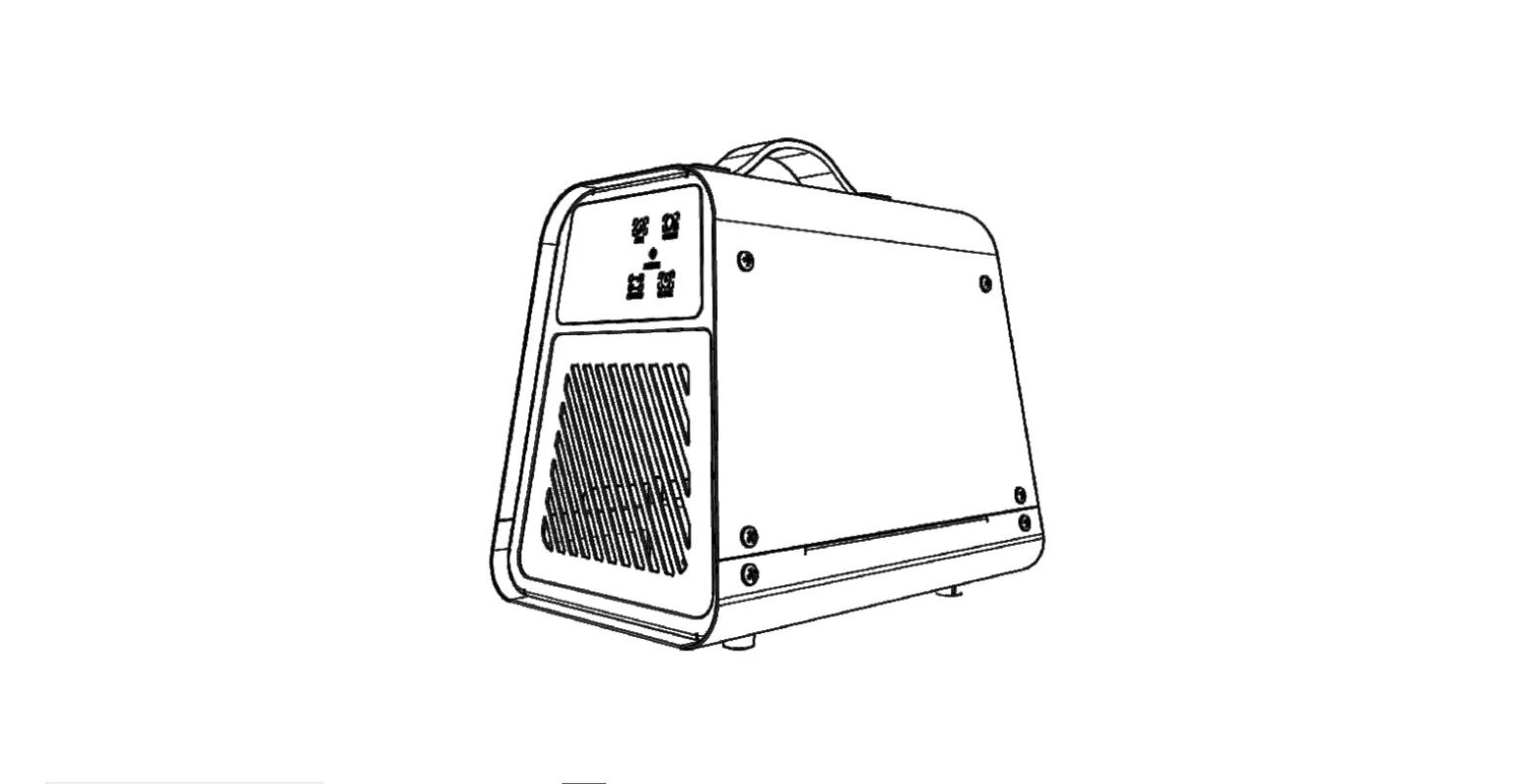
AIM PCS 200 Ozone Generator
Ozone Generators – AIM PCS 200 Ozone Generator Operation &
Maintenance Manual
Congratulations on your purchase of the AIM Series ozone
generator! This user manual was created to help you get the most
out of your new device and to assist you with the initial set up.
Please visit www.ozotech.com to learn
more about this and other products. Thank you for choosing Ozotech
products!
SAFETY FIRST
Read the following safety guidelines thoroughly before
attempting to install or operate your equipment:
Table of Contents
- 1.0 Installation and Operation
- 1.1 Operating Environment
- 1.2 Installation
- 1.3 Operation
- 2.0 Maintenance
- 2.1 Ozone Generator Maintenance
- 3.0 Spare/Replacement Parts
- 4.0 Specifications
- 5.0 Component Replacement
- 5.1 CD Cell Replacement
- 6.0 Troubleshooting Guide
- 7.0 Illustrations
- 8.0 Limited Warranty
- 9.0 Service Returns
1.0 Installation and Operation
Your ozone generator requires special operating conditions in
order to maintain performance and reliability. Your ozone generator
is designed to be operated under a negative or positive pressure
situation. Your ozone generator has been factory tested to operate
at a maximum positive pressure of 5 psi.
The use of an air preparation device is essential to increase
your ozone generator performance and service life. Ozotech Inc.
provides several air preparation options, based on application.
Contact your distributor, an Ozotech, Inc. sales representative, or
visit www.ozotech.com for more
information.
Warranty coverage of your equipment is contingent upon strict
compliance with the operating conditions specified in this
manual.
1.1 Operating Environment
External: It is most important to choose a
cool, clean external operating environment. Consideration of these
factors should be a priority. Mount your ozone generator in the
best possible operating environment that is available at the chosen
site. If possible, mount in an area that is free of airborne
moisture particles.
Internal: Keep the inside of the generator
chassis clean and dry. Dust particles and condensation pose a
challenge to the consistent operation of all ozone generators. Make
a note to inspect the internal cleanliness of the equipment when
you perform scheduled maintenance. For further information refer to
section 2.0.
1.2 Installation
The AIM PCS 200 is designed to be mounted vertically or
horizontally on a wall, panel, or framework. There are three (3)
keyhole mounting features within the chassis, sized for #8 screws.
The use of wall anchors is recommended when stud(s) are not
available. A minimum of six (6) inches clearance is required around
the top, bottom and sides of the unit to ensure access and proper
air flow. Choose a mounting location that permits power connection
without the use of extension cords.
1.3 Operation
Your ozone generator is designed for simple and easy use. Follow
the below steps:
- Connect your air preparation device to the air input tubing of
the ozone generator. - Connect your ozone output tubing, with inline check valve, to
your appropriate ozone injection device. - Connect power to the DC jack to turn on your ozone
generator. - Adjust and balance air flow using Ozotech’s ‘Venturi
Calibration Guide’.
2.0 Maintenance
2.1 Ozone Generator Maintenance: Refer to the
user manual for detailed maintenance instructions. It is
recommended to perform scheduled maintenance regularly to ensure
optimal performance and longevity of the equipment.
3.0 Spare/Replacement Parts
Contact your distributor, an Ozotech, Inc. sales representative,
or visit www.ozotech.com for
information on spare/replacement parts.
4.0 Specifications
Refer to the user manual for detailed specifications of the AIM
PCS 200 ozone generator.
5.0 Component Replacement
5.1 CD Cell Replacement: Refer to the user
manual for detailed instructions on replacing the CD cell.
6.0 Troubleshooting Guide
Refer to the user manual for a troubleshooting guide to assist
in identifying and resolving any issues that may arise during
operation.
7.0 Illustrations
The user manual includes illustrations to assist in the
installation, operation, and maintenance of the AIM PCS 200 ozone
generator.
8.0 Limited Warranty
Refer to the user manual for information on the limited warranty
provided by Ozotech, Inc.
9.0 Service Returns
Contact your distributor, an Ozotech, Inc. sales representative,
or visit www.ozotech.com for
information on service returns.
Ozone Generators
AIM PCS 200 Ozone Generator Operation & Maintenance Manual
M43-31332 REV A OZOTECH, Inc. · 1015 South Main Street, Yreka, CA 96097 · Ph. 530.842.4189 · ozotech.com
Dear Valued Customer: Congratulations on your purchase of the AIM Series ozone generator! This user manual was created to help you get the most out of your new device and to assist you with the initial set up. Please visit www.ozotech.com to learn more about this and other products. Thank you for choosing Ozotech products!
OZOTECH, Inc. · 1015 South Main Street, Yreka, CA 96097 · Ph. 530.842.4189 · ozotech.com
SAFETY FIRST
Read the following safety guidelines thoroughly before attempting to install or operate your equipment:
As with all electrical devices, this equipment should never be allowed to come in contact with water. Only qualified personnel should be allowed to set up, operate and maintain this equipment. Do not use an extension cord to supply power to this equipment. Use a power conditioner if line voltage fluctuates outside of specified range. Unit must be disconnected from power prior to performing service or repair. *Ozotech, Inc., assumes no liability for damages or injuries incurred by misuse of this product.
OZOTECH, Inc. · 1015 South Main Street, Yreka, CA 96097 · Ph. 530.842.4189 · ozotech.com
Table of Contents
1.0 Installation and Operation
1
1.1 Operating Environment
1.2 Installation
1.3 Operation
2.0 Maintenance
2
2.1 Ozone Generator Maintenance
3.0 Spare/Replacement Parts
3
4.0 Specifications
4
5.0 Component Replacement
4
5.1 CD Cell Replacement
6.0 Troubleshooting Guide
5
7.0 Illustrations
6
8.0 Limited Warranty
8
9.0 Service Returns
9
4
OZOTECH, Inc. · 1015 South Main Street, Yreka, CA 96097 · Ph. 530.842.4189 · ozotech.com
1.0 Installation and Operation
Your ozone generator requires special operating conditions in order to maintain performance and reliability. Your ozone generator is designed to be operated under a negative or positive pressure situation. Your ozone generator has been factory tested to operate at a maximum positive pressure of 5 psi.
The use of an air preparation device is essential to increase your ozone generator performance and service life. Ozotech Inc. provides several air preparation options, based on application. Contact your distributor, an Ozotech, Inc. sales representative, or visit www.ozotech.com for more information
Warranty coverage of your equipment is contingent upon strict compliance with the operating conditions specified in this manual.
1.1 Operating Environment
External It is most important to choose a cool, clean external operating environment. Consideration of these factors should be a priority. Mount your ozone generator in the best possible operating environment that is available at the chosen site. If possible, mount in an area that is free of airborne moisture particles.
Internal Keep the inside of the generator chassis clean and dry. Dust particles and condensation pose a challenge to the consistent operation of all ozone generators. Make a note to inspect the internal cleanliness of the equipment when you perform scheduled maintenance. For further information refer to section 2.0.
1.2 Installation
The AIM PCS 200 is designed to be mounted vertically or horizontally on a wall, panel, or framework. There are three (3) keyhole mounting features within the chassis, sized for #8 screws. The use of wall anchors is recommended when stud(s) are not available. A minimum of six (6) inches clearance is required around the top, bottom and sides of the unit to ensure access and proper air flow. Choose a mounting location that permits power connection without the use of extension cords.
OZOTECH, Inc. · 1015 South Main Street, Yreka, CA 96097 · Ph. 530.842.4189 · ozotech.com
1
1.3 Operation
Ozotech, Inc., offers the AIM PCS 200 ozone generator with a variety of electrical input configurations to accommodate a wide range of applications. Configurations include a standard AC to DC wall transformer (included with purchase), a cigarette lighter adapter or twisted wire for connection to a hard 12 VDC source such as a car, boat or RV battery circuit. Most supply voltages fluctuate, so it is necessary to monitor your voltage and assure it is within acceptable variance values listed in section 4.0.
Your ozone generator is designed for simple and easy use.
1. Connect your air preparation device to the air input tubing of the ozone generator.
2. Connect your ozone output tubing, with inline check valve, to your appropriate ozone injection device.
3. Connect power to the DC jack to turn on your ozone generator. 4. Adjust and balance air flow using Ozotech’s `Venturi Calibration Guide’,
available for download at www.ozotech.com/support.
2.0 Maintenance
The AIM series generators are delivered factory tested, calibrated, and adjusted for maximum efficiency and long life. Simple maintenance and appropriate operating conditions are the only requirements to keep the unit functioning within manufacturer’s specifications.
Performing any modifications or adjustments to internal components will cause the unit to function outside of manufacturer’s specifications and will cause damage to the unit not covered under terms of warranty.
2.1 Ozone Generator Maintenance
Frequency of Maintenance: Every 4800 hours or 6 months of operation:
CAUTION: Disconnect ozone generator from power supply before performing maintenance.
1. Remove the 4 press-in clips that secure cover and remove cover.
2. Clean or replace the Corona Discharge (CD) cells. a. A CD cell cleaning kit may be purchased from Ozotech, Inc. Reference section 3.0 for
more information. b. Refer to section 5.1 for CD cell replacement. 3. Clean interior and exterior of chassis. 4. Replace ozone resistant check valves on the air in or ozone gas outlet lines.
2
OZOTECH, Inc. · 1015 South Main Street, Yreka, CA 96097 · Ph. 530.842.4189 · ozotech.com
3.0 Spare/Replacement Parts
Part #
Description
33217-BR
Corona Discharge Cell* (1)
47018-304
Ozone Resistant In-line Check Valve* (2)
40080-01
Wall Transformer, 230/115 VAC to 12 VDC/2A
47044-1
CD Cell Maintenance Kit
44140-1
Ozone Resistant Tubing, 1/4″ ID x 3/8″ OD
44077
Clear PVC Tubing, 1/4″ ID x 3/8″ OD
30078
DI Dryer 2.0 (Desiccant indicating air dryer)
(*) Denotes recommended spare maintenance parts with initial purchase. Followed by additional quantity, recommended for one year’s scheduled maintenance.
OZOTECH, Inc. · 1015 South Main Street, Yreka, CA 96097 · Ph. 530.842.4189 · ozotech.com
3
4.0 Specifications
Input Power Requirements: · Operating Voltage (specified): 11.7 VDC to 13.9 VDC
· Power consumption: 600mA @ 12VDC (7.2 watts) nominal
Product Size (L x W x H): 7″ x 4.5″ x 2″ Shipping Weight: 2 lbs. Ozone Output: 220 mg/hr. Enclosure: Aluminum
5.0 Component Replacement
Electrical failure is usually the result of a mechanical failure. For example, should the CD cell become plugged with nitric byproducts or should water back into the cell, it could cause a catastrophic electrical failure. Proper air preparation can usually avoid the build-up of nitric byproducts.
5.1 CD Cell Replacement
Should a CD cell need to be replaced, refer to the following procedure and figure 3, in section 7.0.
CAUTION: Disconnect ozone generator from power supply before performing service.
1. Remove the 4 screws that secure cover and remove cover. 2. Pull the CD cell out of the retaining clips, then disconnect tubing and the high
voltage wire connection. 3. Reverse steps 1 & 2, reconnect power to the ozone generator, and return to
service.
4
OZOTECH, Inc. · 1015 South Main Street, Yreka, CA 96097 · Ph. 530.842.4189 · ozotech.com
6.0 Troubleshooting Guide
System Unit doesn’t turn on
Possible Cause
Unit is not connected to power source, or is connected to improper power source
Solution
Refer to Input Power Requirements, section 4.0, for proper electrical r equirements
Red light on power supply will not illuminate
Improper outlet voltage
Verify power at outlet
Damaged or defective power Replace power supply supply
Green light on ozone generator will not illuminate
Damaged or defective power Check power supply
supply
operation; replace if
necessary
Loose or disconnected internal wiring
Check internal wiring; remedy any loose connections
Unit turns on, but no ozone output
High voltage lead not connected to CD cell.
Connect frequency driver HV lead to CD cell
Water has backed up into CD Clean or replace CD cell. cell
Cell is plugged with nitric byproduct buildup or particulate matter
Clean or replace CD cell.
If not installed, install an air dryer onto ozone generator air inlet
CD cell not seated in retaining clips
Re-install CD cell into retaining clips
Moisture in the inlet and/or outlet tubing Yellow discoloration in the outlet tubing
Improper air preparation
Nitric byproduct buildup in CD cell and/or tubing
Install an air dryer onto ozone generator air inlet
Clean or replace CD cell and/ or tubing
Water has backed up into the ozone unit
Failed or missing inline check Clean or replace CD cell. valve on ozone output tubing Replace or install new inline
check valve.
OZOTECH, Inc. · 1015 South Main Street, Yreka, CA 96097 · Ph. 530.842.4189 · ozotech.com
5
7.0 Illustrations
Figure 1. Typical well application w/contact tank and EOG filter
Figure 2. Typical well application w/EOG filter
6
OZOTECH, Inc. · 1015 South Main Street, Yreka, CA 96097 · Ph. 530.842.4189 · ozotech.com
Figure 3. AIM PCS 200 internal diagram
OZOTECH, Inc. · 1015 South Main Street, Yreka, CA 96097 · Ph. 530.842.4189 · ozotech.com
7
8.0 Limited Warranty
Ozotech, Inc., warrants, to the original purchaser, the A.I.M. series ozone generators to be free from defects in workmanship and material for (12) months from date of purchase. The corona discharge cell is warrantied against catastrophic electrical failure for (2) years from date of purchase. All parts, repaired or replacement, will be warranted only for the balance of the original warranty period. Ozotech, Inc.’s warranty obligation with regard to equipment not of its own manufacture is limited to the warranty actually extended to the Ozotech, Inc. by its supplier. Ozotech, Inc. will refund the purchase price, perform repairs or replace equipment, at the option of Ozotech, Inc.
The warranty shall be null, void, and non-binding upon Ozotech, Inc. if Ozotech, Inc. (or authorized service center) determines the cause of malfunction or defect to be a result of:
1) Failure to perform proper maintenance as defined and recommended in this manual.
2) Failure to adhere to and provide proper operating conditions, as defined in this manual, including operation outside of temperature range, operating in wet or dirty environment, operation outside of manufacturer’s specifications.
3) Adjustments made by user other than product output flow rate within ranges specified by manufacturer.
Ozotech, Incorporated assumes no liability for damages incurred by deliberate or incidental misuse of this product, or damages incurred in transit.
8
OZOTECH, Inc. · 1015 South Main Street, Yreka, CA 96097 · Ph. 530.842.4189 · ozotech.com
9.0 Returns
If the need arises to return your equipment for service, the following procedure must be followed to ensure accurate and timely processing of repairs.
Obtain the serial number, model number and model name of unit to be
returned.
Contact Ozotech, Inc. and request a Return Material Authorization (RMA)
form. Make sure to give the factory representative an accurate and current shipping address.
Provide a description detailing the problem with the unit. Be as specific as
possible.
After receipt of RMA form, package unit for shipment. Enclose the RMA
form with the unit. Use the original packaging materials if possible. If not possible, please package the product to ensure against shipping damage.
Clearly write the RMA number on the outside of the shipping package.
Verify that the address is correct and current.
Shipments that are not factory authorized will be refused.
It is recommended that you ship with a reputable and reliable shipping company, and that the contents of the package are insured. Ozotech, Inc., accepts no responsibility for damage or loss of equipment in transit.
ALL FREIGHT CHARGES INTO THE FACTORY MUST BE PREPAID. If the repair is covered under warranty, the factory will pay return shipping charges (surface rates only) to the address listed on the RMA, within the continental United States.
If the repair is not covered under warranty, the returning party is responsible for payment of return shipping and handling charges, as well as labor and equipment costs associated with the repair.
OZOTECH, Inc. · 1015 South Main Street, Yreka, CA 96097 · Ph. 530.842.4189 · ozotech.com
9
 Ozotech, Inc. – Applied Ozone Technologies
 Ozotech, Inc. – Applied Ozone Technologies