Troubleshoot startup errors on Xbox
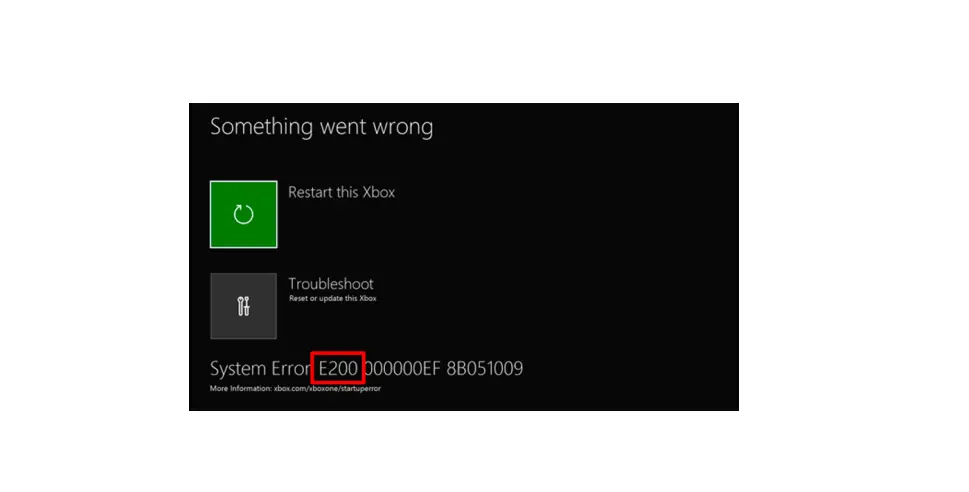
If you’re seeing the Something went wrong screen with an “E” error code when your Xbox console restarts after a system update, use the three digits that follow the “E” to find the correct troubleshooting steps below.
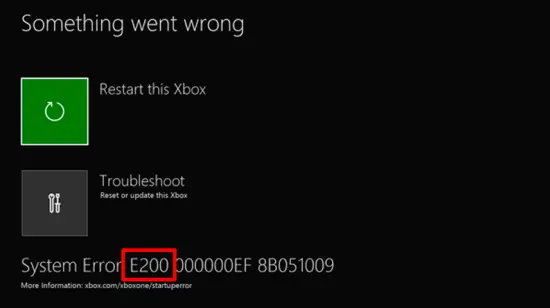
Note This solution covers “E” startup codes like the one shown above. If you are not seeing a Something went wrong screen that looks like the one above, or if you are getting a startup error that is not listed below, go to:
E100, E200, E204, or E207
Step 1: Restart your console
 and A button
  on your controller to select Restart this Xbox on the Something went wrong screen.
Step 2: Reset your console
and A button on your controller to select Troubleshoot to open the Xbox Startup Troubleshooter.- Power off your console, and then unplug the power cord to ensure that the console is completely powered off.
- Wait 30 seconds, and then plug the power cord back in.
- Press and hold the Pair button and the Eject button on the console, and then press the Xbox button
 on the console.
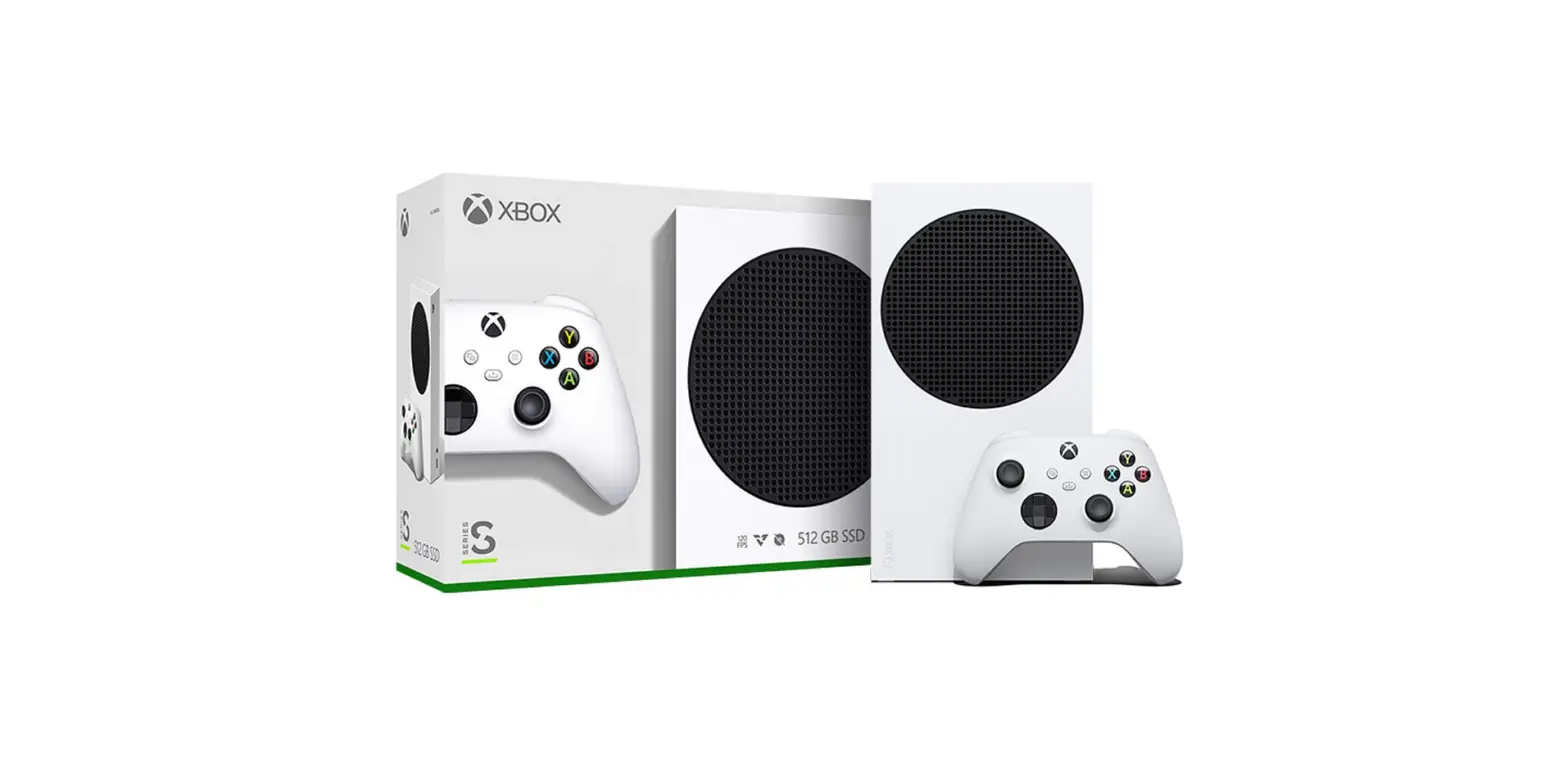
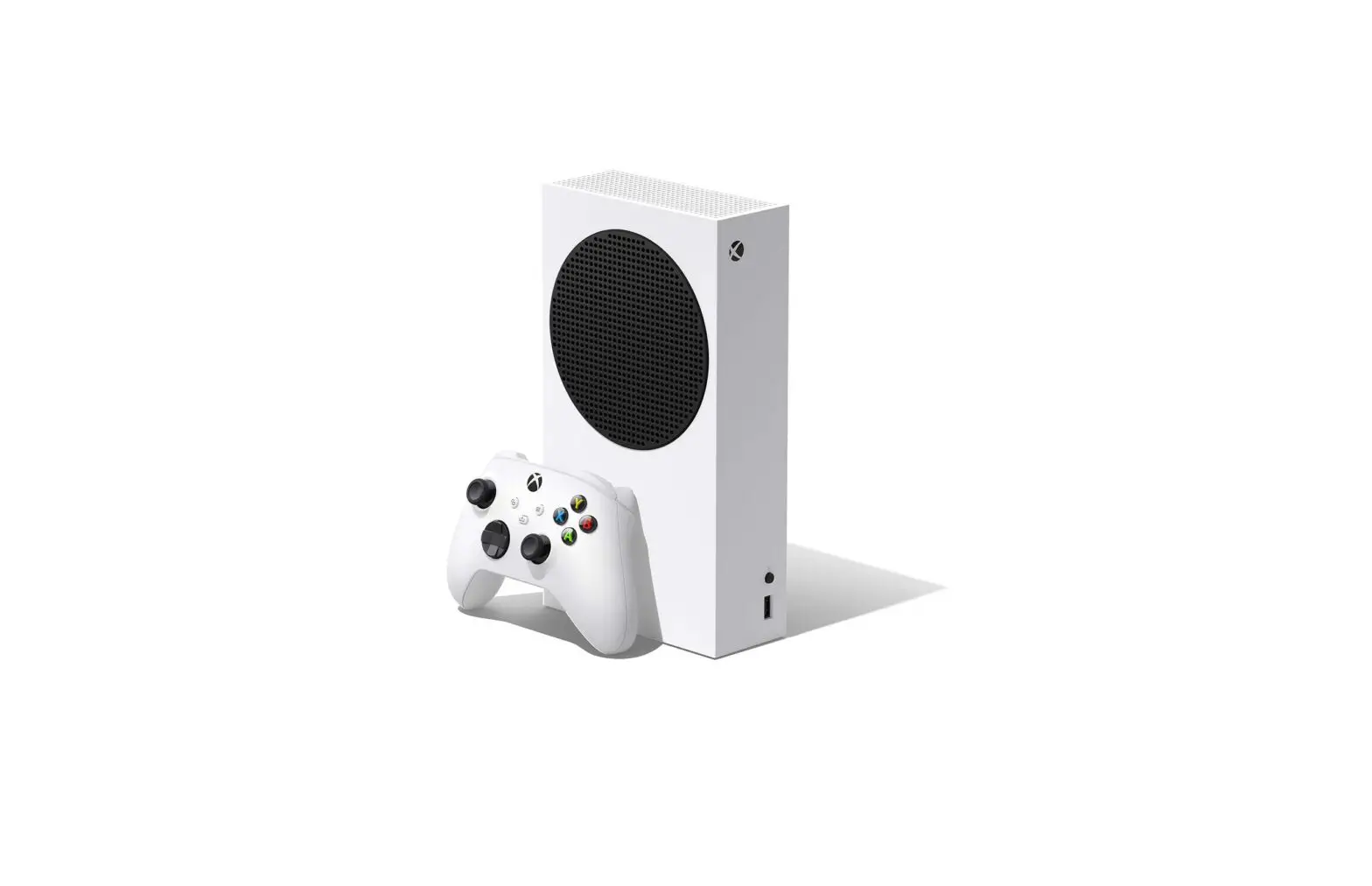
Note The Xbox Series S and the Xbox One S All-Digital Edition do not have Eject buttons. You can bring up the Xbox Startup Troubleshooter on this console by holding only the Pair button (steps 3 and 4) and then pressing the Xbox button
. - Continue holding the Pair and Eject buttons for 10-15 seconds.
- Listen for two “power-up” tones a couple of seconds apart. You can release the Pair and Eject buttons after the second power-up tone.
- The console should power up and take you directly to the Xbox Startup Troubleshooter.
Step 3: Download the Offline System Update file (OSU1)
You need to perform an offline system update. To do this, you’ll need:
- A Windows-based PC with an internet connection and a USB port
- A USB flash drive with a minimum 6 GB of space formatted as NTFS
- Plug your USB flash drive into a USB port on your computer.
- Open the Offline System Update file OSU1.
- Click Save to save the console update .zip file to your computer.
- Unzip the file by right-clicking on the file and selecting Extract all from the pop-up menu.
- Copy the $SystemUpdate file from the .zip file to your flash drive. The files should be copied to the root directory, and there shouldn’t be any other files on the flash drive.
- Unplug the USB flash drive from your computer.
- Continue to the next step to complete the update on your console.
Step 4: Update your system
- Power off your console, and then unplug the power cord to ensure that the console is completely powered off.
- Wait 30 seconds, and then plug the power cord back in.
Press and hold the Pair button (located below the Xbox button on the console) and the Eject button (located on the front of the console), and then press the Xbox button
on the console.Note The Xbox Series S and the Xbox One S All-Digital Edition do not have Eject buttons. You can bring up the Xbox Startup Troubleshooter on this console by holding only the Pair button (steps 3 and 4) and then pressing the Xbox button
.- Continue holding the Pair and Eject buttons for 10-15 seconds.
- Listen for two “power-up” tones a couple of seconds apart. You can release the Pair and Eject buttons after the second power-up tone.
- The console should power up and take you directly to the Xbox Startup Troubleshooter.
 Plug the USB flash drive with the Offline System Update files into a USB port on your Xbox console. When the flash drive is inserted, the Offline System Update option on the Xbox Startup Troubleshooter becomes active. Use the D-pad
  and A button
  on your controller to select Offline System Update to initiate the update using the files saved on your flash drive.
 on your controller to select Offline System Update to initiate the update using the files saved on your flash drive.
Note The console restart may take several minutes. If you were using a wired connection, plug your network cable back into the console. If you have never connected your console to the internet, you will need to connect at least once during your system setup process.
Step 5: Restore your console to factory defaults
If resetting the console does not return you to the Home screen, you can use the Xbox Startup Troubleshooter to completely restore your console to its factory settings.
Warning Resetting your console to its factory defaults erases all accounts, saved games, settings, and home Xbox associations. Anything not synchronized with the Xbox network will be lost. You should only use this option as a last resort.
- Power off your console, and then unplug the power cord to ensure that the console is completely powered off.
- Wait 30 seconds, and then plug the power cord back in.
Press and hold the Pair button and the Eject button on the console, and then press the Xbox button  on the console.
Note The Xbox Series S and the Xbox One S All-Digital Edition do not have Eject buttons. You can bring up the Xbox Startup Troubleshooter on this console by holding only the Pair button (steps 3 and 4) and then pressing the Xbox button
- Continue holding the Pair and Eject buttons for 10-15 seconds.
- Listen for two “power-up” tones a couple of seconds apart. You can release the Pair and Eject buttons after the second power-up tone.
- The console should power up and take you directly to the Xbox Startup Troubleshooter.
To restore your console from the Xbox Startup Troubleshooter, select Reset this Xbox. When prompted, select Remove everything. This will delete all user data, and all games and apps.If you are returned to the Home screen after the console restores and restarts, your console should function correctly now.
Note If the console restore is successful, you will be prompted to repeat some general console setup steps before you are returned to the Home screen. You will also need to re-download your games and apps.
Step 6: Your console needs to be repaired
E101
Step 1: Download the Offline System Update file (OSU1)
- A Windows-based PC with an internet connection and a USB port
- A USB flash drive with a minimum 6 GB of space formatted as NTFS
- Plug your USB flash drive into a USB port on your computer.
- Open the Offline System Update file OSU1.
- Click Save to save the console update .zip file to your computer.
- Unzip the file by right-clicking on the file and selecting Extract all from the pop-up menu.
- Copy the $SystemUpdate file from the .zip file to your flash drive. The files should be copied to the root directory, and there shouldn’t be any other files on the flash drive.
- Unplug the USB flash drive from your computer.
- Continue to the next step to complete the update on your console.
Step 2: Update your system
and A button on your controller to select to open the Xbox Startup Troubleshooter.If you need to manually bring up the Xbox Startup Troubleshooter, follow these steps:
- Power off your console, and then unplug the power cord to ensure that the console is completely powered off.
- Wait 30 seconds, and then plug the power cord back in.
- Press and hold the Pair button (located below the Xbox button on the console) and the Eject button (located on the front of the console), and then press the Xbox button on the console.
Note The Xbox Series S and the Xbox One S All-Digital Edition do not have Eject buttons. You can bring up the Xbox Startup Troubleshooter on this console by holding only the Pair button (steps 3 and 4) and then pressing the Xbox button
. - Continue holding the Pair and Eject buttons for 10-15 seconds.
- Listen for two “power-up” tones a couple of seconds apart. You can release the Pair and Eject buttons after the second power-up tone.
- The console should power up and take you directly to the Xbox Startup Troubleshooter.
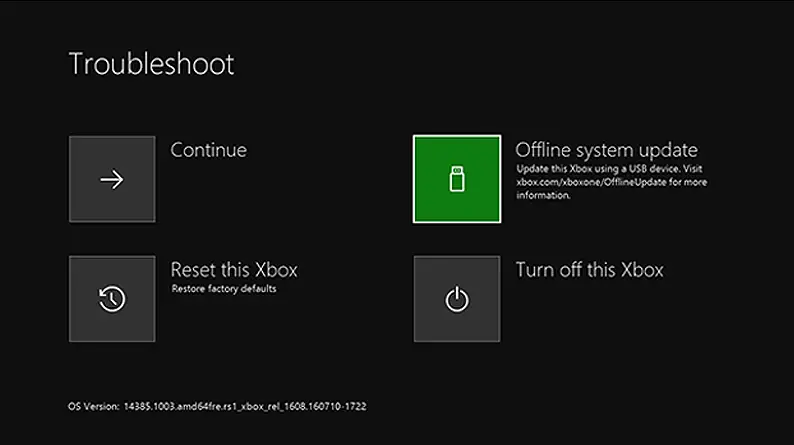
and A button on your controller to select Offline System Update to initiate the update using the files saved on your flash drive.Step 3: Your console needs to be repaired
E102
Step 1: Can you bring up the Xbox Startup Troubleshooter?
- Power off your console, and then unplug the power cord to ensure that the console is completely powered off.
- Wait 30 seconds, and then plug the power cord back in.
- Press and hold the Pair button and the Eject button on the console, and then press the Xbox button on the console.
Note The Xbox Series S and the Xbox One S All-Digital Edition do not have Eject buttons. You can bring up the Xbox Startup Troubleshooter on this console by holding only the Pair button (steps 3 and 4) and then pressing the Xbox button
. - Continue holding the Pair and Eject buttons for 10-15 seconds.
- Listen for two “power-up” tones a couple of seconds apart. You can release the Pair and Eject buttons after the second power-up tone.
- The console should power up and take you directly to the Xbox Startup Troubleshooter.
Step 2: Restore your console to factory defaults
Step 3: Try an offline factory reset
Step 4: Your console needs to be repaired
E105
Step 1: Restore your console to factory defaults
and A button on your controller to select Troubleshoot to open the Xbox Startup Troubleshooter.If you need to manually bring up the Xbox Startup Troubleshooter, follow these steps:
- Power off your console, and then unplug the power cord to ensure that the console is completely powered off.
- Wait 30 seconds, and then plug the power cord back in.
- Press and hold the Pair button and the Eject button on the console, and then press the Xbox button on the console.
Note The Xbox Series S and the Xbox One S All-Digital Edition do not have Eject buttons. You can bring up the Xbox Startup Troubleshooter on this console by holding only the Pair button (steps 3 and 4) and then pressing the Xbox button
. - Continue holding the Pair and Eject buttons for 10-15 seconds.
- Listen for two “power-up” tones a couple of seconds apart. You can release the Pair and Eject buttons after the second power-up tone.
- The console should power up and take you directly to the Xbox Startup Troubleshooter.
Step 2: Your console needs to be repaired
E106, E203, E208, or E305
Step 1: Reset your console
and A button on your controller to select Troubleshoot to open the Xbox Startup Troubleshooter.- Power off your console, and then unplug the power cord to ensure that the console is completely powered off.
- Wait 30 seconds, and then plug the power cord back in.
- Press and hold the Pair button and the Eject button on the console, and then press the Xbox button on the console.
Note The Xbox Series S and the Xbox One S All-Digital Edition do not have Eject buttons. You can bring up the Xbox Startup Troubleshooter on this console by holding only the Pair button (steps 3 and 4) and then pressing the Xbox button
. - Continue holding the Pair and Eject buttons for 10-15 seconds.
- Listen for two “power-up” tones a couple of seconds apart. You can release the Pair and Eject buttons after the second power-up tone.
- The console should power up and take you directly to the Xbox Startup Troubleshooter.
Step 2: Download the Offline System Update file (OSU1)
- A Windows-based PC with an internet connection and a USB port
- A USB flash drive with a minimum 6 GB of space formatted as NTFS
- Plug your USB flash drive into a USB port on your computer.
- Open the Offline System Update file OSU1.
- Click Save to save the console update .zip file to your computer.
- Unzip the file by right-clicking on the file and selecting Extract all from the pop-up menu.
- Copy the $SystemUpdate file from the .zip file to your flash drive. The files should be copied to the root directory, and there shouldn’t be any other files on the flash drive.
- Unplug the USB flash drive from your computer.
- Continue to the next step to complete the update on your console.
Step 3: Update your system
- Power off your console, and then unplug the power cord to ensure that the console is completely powered off.
- Wait 30 seconds, and then plug the power cord back in.
- Press and hold the Pair button (located below the Xbox button on the console) and the Eject button (located on the front of the console), and then press the Xbox button on the console.
Note The Xbox Series S and the Xbox One S All-Digital Edition do not have Eject buttons. You can bring up the Xbox Startup Troubleshooter on this console by holding only the Pair button (steps 3 and 4) and then pressing the Xbox button
. - Continue holding the Pair and Eject buttons for 10-15 seconds.
- Listen for two “power-up” tones a couple of seconds apart. You can release the Pair and Eject buttons after the second power-up tone.
- The console should power up and take you directly to the Xbox Startup Troubleshooter.
and A button on your controller to select Offline System Update to initiate the update using the files saved on your flash drive.Step 4: Restore your console to factory defaults
- Power off your console, and then unplug the power cord to ensure that the console is completely powered off.
- Wait 30 seconds, and then plug the power cord back in.
- Press and hold the Pair button (located below the Xbox button on the console) and the Eject button (located on the front of the console), and then press the Xbox button on the console.
Note The Xbox Series S and the Xbox One S All-Digital Edition do not have Eject buttons. You can bring up the Xbox Startup Troubleshooter on this console by holding only the Pair button (steps 3 and 4) and then pressing the Xbox button
. - Continue holding the Pair and Eject buttons for 10-15 seconds.
- Listen for two “power-up” tones a couple of seconds apart. You can release the Pair and Eject buttons after the second power-up tone.
- The console should power up and take you directly to the Xbox Startup Troubleshooter.
Step 5: Your console needs to be repaired
E206
Step 1: Restart your console
and A button on your controller to select Restart this Xbox on the Something went wrong screen.Step 2: Reset your console
and A button on your controller to select Troubleshoot to open the Xbox Startup Troubleshooter.- Power off your console, and then unplug the power cord to ensure that the console is completely powered off.
- Wait 30 seconds, and then plug the power cord back in.
Press and hold the Pair button and the Eject button on the console, and then press the Xbox button
on the console.Note The Xbox Series S and the Xbox One S All-Digital Edition do not have Eject buttons. You can bring up the Xbox Startup Troubleshooter on this console by holding only the Pair button (steps 3 and 4) and then pressing the Xbox button
.- Continue holding the Pair and Eject buttons for 10-15 seconds.
- Listen for two “power-up” tones a couple of seconds apart. You can release the Pair and Eject buttons after the second power-up tone.
- The console should power up and take you directly to the Xbox Startup Troubleshooter.
Step 3: Restore your console to factory defaults
- Power off your console, and then unplug the power cord to ensure that the console is completely powered off.
- Wait 30 seconds, and then plug the power cord back in.
- Press and hold the Pair button (located below the Xbox button on the console) and the Eject button (located on the front of the console), and then press the Xbox button on the console.
Note The Xbox One S All-Digital Edition and the Xbox Series S do not have Eject buttons. You can bring up the Xbox Startup Troubleshooter on this console by holding only the Pair button (steps 3 and 4) and then pressing the Xbox button
. - Continue holding the Pair and Eject buttons for 10-15 seconds.
- Listen for two “power-up” tones a couple of seconds apart. You can release the Pair and Eject buttons after the second power-up tone.
- The console should power up and take you directly to the Xbox Startup Troubleshooter.