
Sensor (Gen4)
User Manual
Assembly

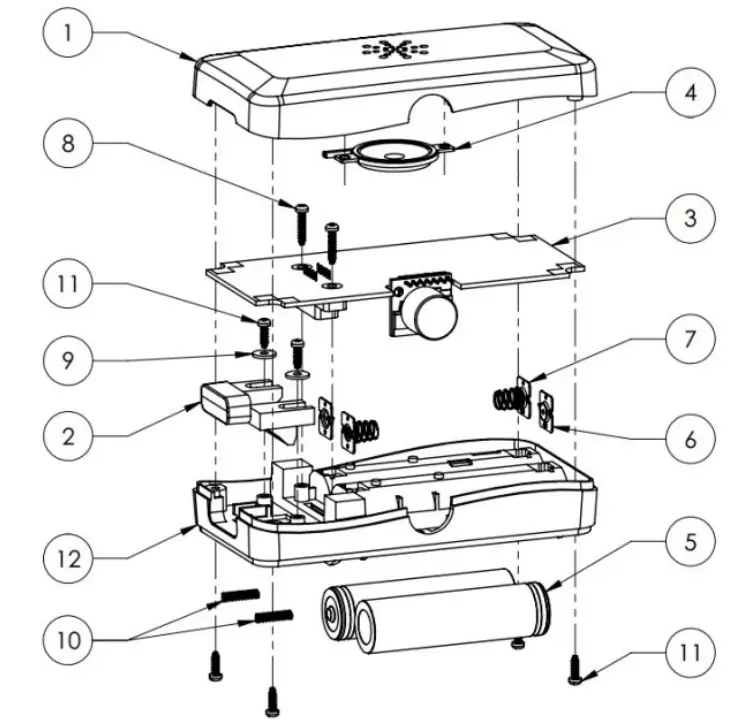
| ITEM 1 2 3 4 5 6 7 8 9 10 11 12 | PART # CHS-1102 CHS-1103 CHS-1110 SM300608-1 Batteries Keystone 5221 Keystone 5222 96817A899 91116A110 LC018AA04S 96817A894 CHS-1101 | DESCRIPTION Top Housing Button Gen4 Sensor PCBA 30mm Speaker 18650 Cells w/Protection PCB Battery Contact, Positive Battery Contact, Negative M2.5 Thread Forming Screw, 12m M2.5 Washer Spring M2.5 Thread Forming Screw, 8mm Bottom Housing |
Getting Started
Clean Hands Safe Hands Sensors are an integral part of the Clean Hands Safe Hands hand hygiene solution that play a critical role of collecting dispensing information, and when hand hygiene opportunities occur.
Sensors are uniquely addressed devices that are commissioned during installation and associated with a particular dispenser or location in your facility. Adding additional Sensors to the system requires elevated system access, so if you find yourself needing to monitor additional points, please reach out to your customer success representative.
Variations
There are two primary build variants of the CHSH Sensor; the “Prox” version that includes a range sensor to monitor for threshold events, and a“Non-Prox” version that only monitors dispense. Every normal room will have a single “Prox” sensor that creates entry/exit events and plays the audio reminder, and a “Non-Prox” sensor to monitor each sanitizer or soap dispenser in the room.
If one of the hygiene product dispensers (sanitizer or soap) is in an ideal location, a “Prox” sensor can be installed to monitor both dispenses and entry/exit activity.
If none of the hygiene product dispensers are in an ideal location, a “Prox” sensor can be installed as a standalone device above or beside the doorframe.
Installation
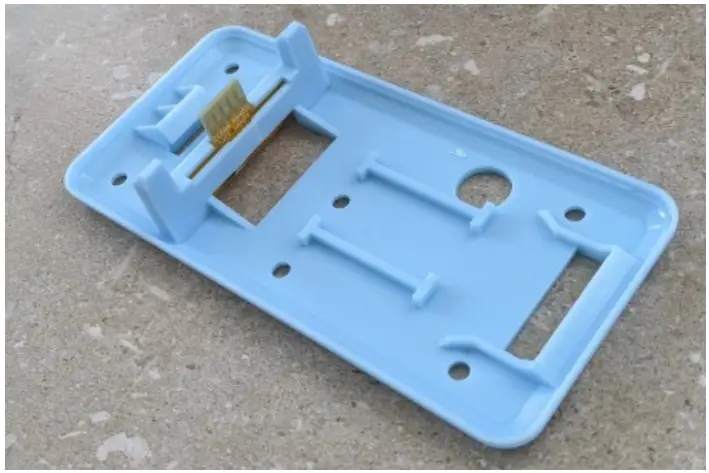
For Sensors that will be installed on a hygiene product dispenser, the installation starts with the placement of a CHS-1101 Backplate that has a magnetic sensor installed in the “T-Board” slot (image to the right). T-Boards with magnetic sensors can be identified by their gold color.
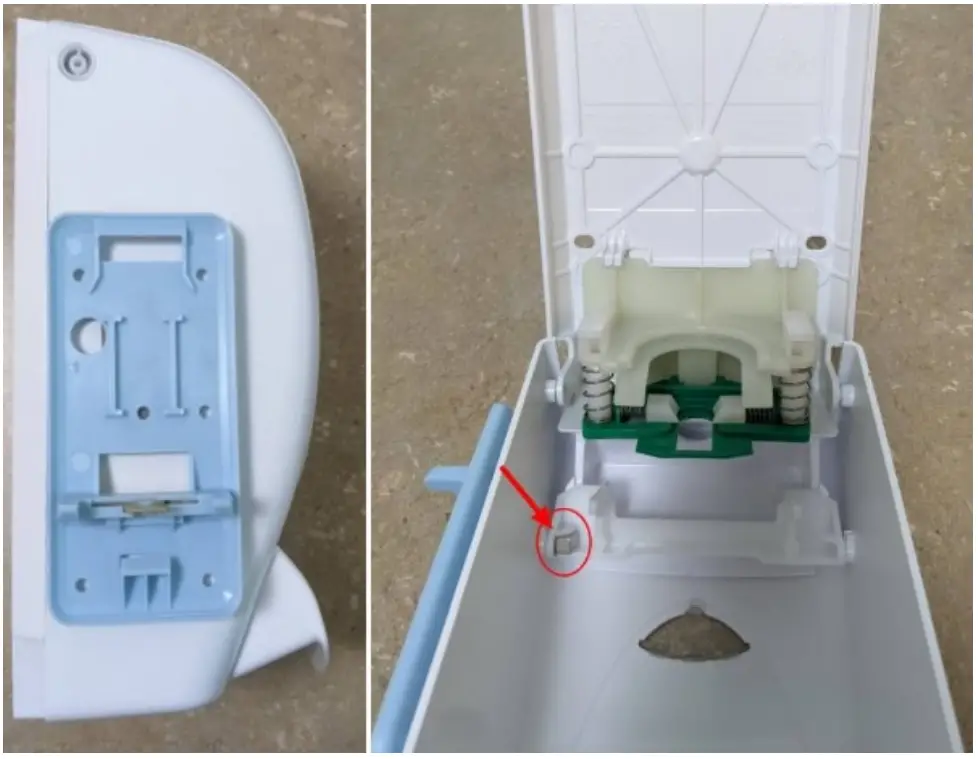
The Backplate is then attached with VHB tape to the hygiene product dispenser at a designated location with a specific orientation that is coupled with a small magnet installed inside the moving parts of the dispenser housing. The example to the left shows the positions on an SCJ Professional dispenser, but the exact placement varies from dispenser to dispenser. For all dispensers that there is a solution for, there is a dedicated “build doc” that describes the Backplate and magnet positioning.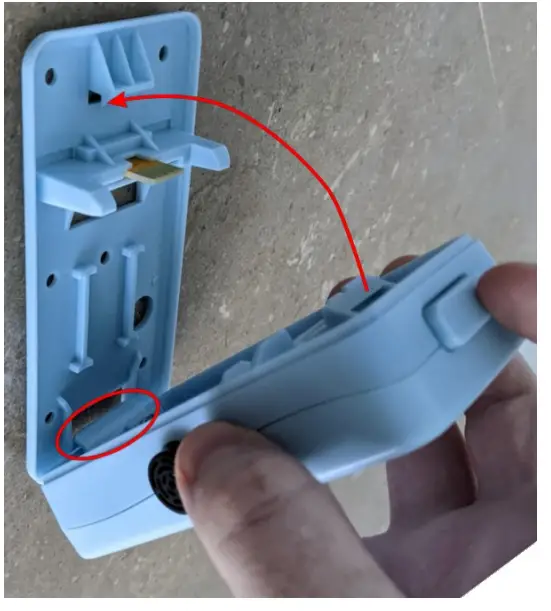 If you need the “build doc” for a specific dispenser at your facility, please reach out to your Success Team representative. For room layouts where there is no Sensor in a good location to create an entry/exit threshold, a “Prox” Sensor can be installed on a Backplate that is mounted above or beside the door frame. These Sensors do not monitor any dispenses and have no associated magnet.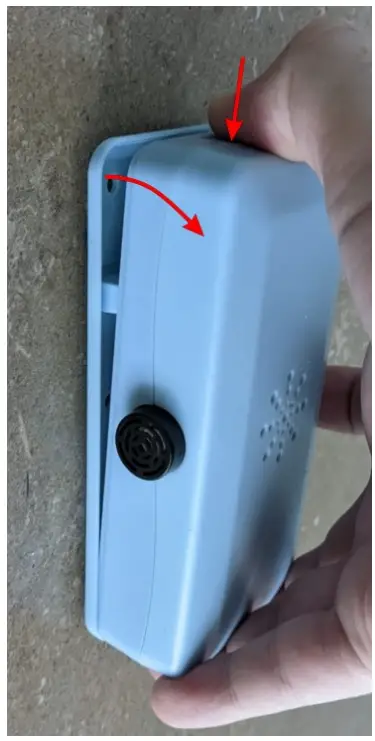
To “clip” a Sensor into a Backplate align the hook at the bottom of the Sensor with the pocket on the Backplate, then rotate in towards the Backplate until the Sensor locks into lace (see right). To remove a Sensor from a Backplate, press the button on the top of the Sensor to move the latch out of the way, then pull away from the Backplate rotating around the bottom hook (see left). The “T-Board” is pressed into an edge connector on the Sensor, so it can take a firm pull to start moving. Once rotated enough to clear the board connector, the Sensor can be completely removed.
NOTE: Sensors need to be registered with an active customer and configured so they are recognized by our system nd unction correctly for their installed role. This can only be done by Clean Hands Safe Hands personnel, so please contact your Success Team representative to coordinate any changes or new Sensors you would like to install.
Normal Use
In normal use, in everyday use you should be able to ignore the Sensors. They will record when you use a hand hygiene dispenser, and when you enter or exit a room, but does not require any intentional interaction.
If a provider enters a monitored patient room, and they have not dispensed on a crediting dispenser within a predefined time window, a Natural Language Real-Time Voice Reminder will play back from the “Prox” Sensor in the room reminding the provider to sanitize their hands.
Battery Changes
Every Sensor contains two protected 18650 cells that need to be periodically changed to keep the device online. Sensor voltages are all monitored in the cloud, and battery changes are forecast and managed by CHSH. On a periodic basis, usually, weekly, the App will generate a list of batteries that need to be changed in the next week and send that off to your designated battery changers. In addition to basic scheduling, the forecaster also looks ahead over the next 12 months and tries to predict and proactively avoid any upcoming problems.
Cleaning
If a Sensor becomes dirty you can clean the outside with a damp cloth or mild detergent. The plastic enclosure is made of ABS and not reactive to most cleaners. Be careful not to allow moisture to enter the device as this can damage the internal electronics.
Recycling / Replacement
Should you need to dispose of a Sensor, do not throw it in the trash. Reach out to your customer success representative to coordinate returning the damaged device and having a replacement sent to you.
RF Exposure Considerations
This equipment complies with FCC mobile radiation exposure limits set forth for an uncontrolled environment. This equipment should be installed and operated with a minimum distance of 20cm between the radiator and your body.
Certification
This device complies with part 15 of the FCC Rules. Operation is subject to the following two conditions:
- This device may not cause harmful interference, and
- this device must accept any interference received, including interference that may cause undesired operation.
Warning: Changes or modifications not expressly approved by the party responsible for compliance could void the user’s authority to operate this equipment.
Note: This equipment has been tested and found to comply with the limits for a Class B digital device, pursuant to part 15 of the FCC Rules. These limits are designed to provide reasonable protection against harmful interference in a residential installation. This equipment generates, uses, and can radiate radio frequency energy and, if not installed and used in accordance with the instructions, may cause harmful interference to radio communications. However, there is no guarantee that interference will not occur in a particular installation. If this equipment does cause harmful interference to radio or television reception, which can be determined by turning the equipment off and on, the user is encouraged to try to correct the interference by one or more of the following measures:
- Reorient or relocate the receiving antenna.
- Increase the separation between the equipment and receiver.
- Connect the equipment into an outlet on a circuit different from that to which the receiver is connected.
- Consult with your customer success representative.