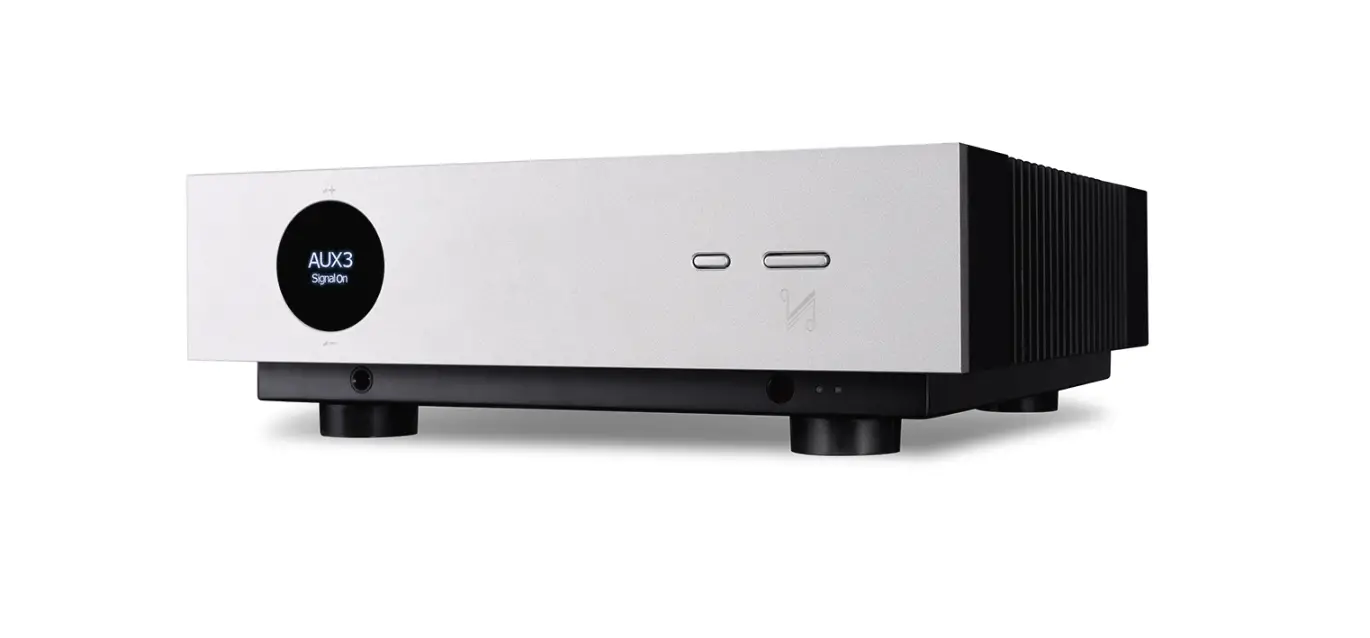
C200 Tube Preamplifier
Product Information:
The Qualiton C200 is an audio amplifier designed to enhance your
audio experience. It is equipped with various features to ensure
optimal performance and user safety. The amplifier comes with a
remote control for convenient operation. The user manual provides
important safety instructions that must be followed to prevent any
accidents or damage to the equipment.
Product Usage Instructions:
- Read the user manual carefully and familiarize yourself with
the safety instructions before operating the Qualiton C200. - Keep the user manual in a safe place for future reference.
- Insert or replace the battery of the remote control as needed.
Refer to page 33 of the user manual for detailed instructions. - If the fuse needs to be replaced, follow the instructions
provided on page 34 of the user manual. Ensure that the replacement
fuse has the correct rating. - Dispose of the product and its components responsibly. Follow
the waste management guidelines on page 35 of the user manual. - Ensure that the Qualiton C200 is not installed near heat
sources such as radiators, stoves, or amplifiers that produce heat.
This can cause malfunction. - Avoid using the amplifier near water to prevent any electrical
hazards. - Use a dry cloth to clean the amplifier. Do not use any liquid
or cleaning agents. - Do not block any ventilation openings of the amplifier, as this
may lead to fire. Install the amplifier according to the
manufacturer’s instructions. - Do not modify or tamper with the polarized or grounding-type
plug of the amplifier. If the provided plug does not fit into your
outlet, consult an electrician for replacement. - Connect the mains power supply cord only to a mains socket
outlet with a protective earthing connection. - Avoid placing appliance cables across sharp surfaces, clamping
them together, or leaving them in a hanging position. Protect the
power cord from being walked on or pinched. - Ensure that all protective covers, ports, plugs, and cables are
intact before powering up the amplifier. - Only use attachments and accessories specified by the
manufacturer. - If the apparatus has been damaged in any way, such as power
supply cord or plug damage, exposure to liquid, or dropping,
servicing is required. Refer to qualified service personnel. - Avoid touching the appliance or its mains cable with wet hands
to prevent electric shock. - In case of fire, do not use water to extinguish it, even if the
amplifier is switched off.
Qualiton C200 User’s Manual
CONTENTS
IMPORTANT SAFETY INSTRUCTIONS …………………………..5 MARKINGS …………………………………………………………………….9 PREFACE ………………………………………………………………………. 10 BASIC INFORMATIONS ………………………………………………… 11 TECHNICAL ASSISTANCE AND SERVICE INFORMATION ..12 GENERAL SPECIFICATIONS…………………………………………. 13 ELECTRICAL SPECIFICATIONS …………………………………… 14 FRONT PANEL ……………………………………………………………… 16 REAR PANEL…………………………………………………………………. 18 CONTENTS OF PACKAGE …………………………………………….. 20 PLACEMENT ………………………………………………………………… 21 INSTALLATION OF VACUUM TUBES ……………………………. 22 USING THIRD PARTY VACUUM TUBES ………………………. 25 BLOCK DIAGRAM ………………………………………………………… 26 CONNECTION DIAGRAM ……………………………………………… 27 CONNECTION DIAGRAM – STEREO MODE ………………….. 28 CONNECTION DIAGRAM – MONOBLOCK MODE ………… 29 AC MAINS CONNECTION ……………………………………………. 30
GOOD TO KNOW …………………………………………………………..31 REMOTE CONTROL ……………………………………………………..32 INSERTING / REPLACING BATTERY ……………………………33 REPLACEMENT OF FUSE ……………………………………………..34 WASTE MANAGEMENT ………………………………………………..35
USER’S MANUAL IMPORTANT SAFETY INSTRUCTIONS
PLEASE READ THEM BEFORE OPERATING THIS EQUIPMENT!
1. Read these instructions. 2. Keep these instructions.
5
9. Do not install near any heat sources such as radiators, heat registers, stoves, or other apparatus (including amplifiers) that produce heat.
3. Heed all warnings.
4. Follow all instructions.
5. Improper installation may cause malfunction!
6. Do not use this apparatus near water.
7. Clean only with a dry cloth.
8. Do not block any ventilation openings since this may lead to fire. Install in accordance with the manufacturer’s instructions.
10. Do not defeat the safety purpose of the polarized or grounding-type plug. A polarized plug has two blades with one wider than the other. A grounding type plug has two blades and a third grounding prong. The wide blade or the third prong are provided for your safety. If the provided plug does not fit into your outlet, consult an electrician for replacement of the obsolete outlet.
11. Connect mains power supply cord only to a mains socket outlet with a protective earthing connection.
6
QUALITON C200
IMPORTANT SAFETY INSTRUCTIONS
PLEASE READ THEM BEFORE OPERATING THIS EQUIPMENT!
12. Be careful with appliance cables! Do not lead them across sharp surfaces, do not clam them together and do not leave them in a hanging position.
Protect the power cord from being walked on or pinched particularly at plugs, convenience receptacles, and the point where they exit from the apparatus.
16. Use only with the cart, stand, tripod, bracket, or table specified by the manufacturer, or sold with the apparatus. When a cart is used, use caution when moving the cart/apparatus combination to avoid injury from tipover.
13. You must not operate the appliance with 17. Unplug this apparatus during lightning storms or
damaged cables.
when unused for long periods of time.
14. Before powering up your amplifier, make sure 18. No userserviceable parts inside. Improper
protective cover, ports, plugs and cables are checked repair may lead to loss of warranty! Refer servicing
for intactness.
to qualified service personnel.
15. Only use attachments/accessories specified by the manufacturer.
USER’S MANUAL
7
IMPORTANT SAFETY INSTRUCTIONS
PLEASE READ THEM BEFORE OPERATING THIS EQUIPMENT!
19. Servicing is required when the apparatus has been damaged in any way, such as power supply cord or plug is damaged, liquid has been spilled or objects have fallen into the apparatus, the apparatus has been exposed to rain or moisture, does not operate normally, or has been dropped.
23. Do not touch the appliance or its mains cable with wet hands.
24. In case of fire, you must not use water to extinguish the fire, even if the amplifier is switched off.
20. You must not start up damaged or faulty 25. The appliance may only be used by qualified
appliance. In case of any malfunction, unplug your adults or children above 14 years of age if
amplifier immediately.
supervised by a qualified adult.
21. In case of a malfunction, the protective cover must not be opened or removed.
22. Do not expose this equipment to dripping or splashing and ensure that no objects filled with liquids, such as vases, are placed on the equipment.
26. Keep the appliance out of the reach of children.
27. Make sure your domestic animal does not lie or sit on the top of the appliance.
28. If you do not use your amplifier for a long time, unplug the appliance carefully.
8
IMPORTANT SAFETY INSTRUCTIONS
PLEASE READ THEM BEFORE OPERATING THIS EQUIPMENT!
29. To completely disconnect this equipment from the AC mains, disconnect the power supply cord plug from the AC receptacle.
30. The mains plug of the power supply cord shall remain readily operable.
31. Do not expose batteries to excessive heat such as sunshine, fire or the like.
32. WARNING! To reduce risk of fire or electrical shock, do not expose this equipment to rain or moisture.
33. CAUTION! To reduce the risk of electric shock, do not remove cover.
QUALITON C200
USER’S MANUAL
9
MARKINGS
The exclamation point within an equilateral triangle is intended to alert the user to the presence of important operating and maintenance instructions in the literature accompanying the appliance.
CAUTION: Hot Surface! Do Not Touch! Protective cover of the product may become hot when operating this product continuously.
The product meets the relevant directives and standards of the European Union.
Supplied with alternating current (AC).
115 V / 230 V Nominal supply voltage.
50 Hz / 60 Hz Nominal supply frequency.
The crossed-out wheeled bin is the European Union symbol for indicating separate collection for electrical and electronic equipment. This product contains electrical and electronic equipment which should be reused, recycled or recovered and should not be disposed of with unsorted regular waste. Please return the unit or contact the authorised dealer from whom you purchased this product for more information.
10
PREFACE
Before installing the Qualiton C200 preamplifier, please study this User’s Manual carefully!
Operating your preamplifier in a manner it is designed for, ensures you an utmost musical experience and a reliable operation.
If you have any questions on our products or services, please do not hesitate to contact us on our website www.audiohungary.com
QUALITON C200
USER’S MANUAL
11
BASIC INFORMATIONS
For your convenience, please fill out the following lines to facilitate any future technical assistance and repair service:
Serial Number: _______________________________
Date of purchase: _______________________________
Dealer Name: _______________________________
Vacuum tubes used: _______________________________ _______________________________ _______________________________
12
TECHNICAL ASSISTANCE AND SERVICE INFORMATION
If at any time you have any questions about your Qualiton product, do not hesitate to contact your local Qualiton dealer, who is at your disposal. If you or your dealer need more help, you can receive technical assistance at:
Audio-Hungary Ltd. 132 Derkovits Street 4400, Nyíregyháza, Hungary Phone: +36 42 446-688 Fax: +36 42 446-688 E-mail: [email protected]
If it becomes clear that your Qualiton product needs service, you should still contact your local dealer first. You can also contact us directly for more instructions at one of the contact details above.
QUALITON C200
USER’S MANUAL GENERAL SPECIFICATIONS
Number of input ports
Number of output ports Tubes required Weight Dimensions
13
4 unbalanced line level inputs (LINE 1-4), 2 balanced line level inputs (BALANCED INPUTS 1-2),
1 PHONO level input (PHONO MM)
2 unbalanced line level outputs (LINE; SUB), 1 balanced line level output (BALANCED OUTPUTS),
1 headphone output per channel
8 x ECC83/12AX7 10.4 kg
43 x 40 x 16 cm
14 ELECTRICAL SPECIFICATIONS
Nominal output level – Line Input sensitivity – Line Input sensitivity – Phono Max. input signal – Line
Max. input signal – Phono Gain – Line Gain – Phono
Total harmonic distortion – Line Total harmonic distortion – Phono
QUALITON C200
4V 1 V, to nominal output level 5,7 mV, to nominal output level
10 V 70 mV +12 dB +57 dB < 0.05%, (f = 1 kHz) < 0.1%, (f = 1 kHz)
USER’S MANUAL ELECTRICAL SPECIFICATIONS
Frequency response – Line Frequency response – Phono
Input impedance – Line Input impedance – Phono Signal-to-noise ratio – Line Signal-to-noise ratio – Phono
15
4 Hz – 300 kHz, (-1 dB) 20 Hz – 20 kHz, (-0.5 dB)
10 kOhm 47 kOhm > 100 dB > 70 dB
16 FRONT PANEL
QUALITON C200
1
2
3
4
5
USER’S MANUAL
17
FRONT PANEL
1. STANDBY (RED) / ON (WHITE) switch
2. INPUT SELECTOR rotary switch allows selection of preamplifier channel used. From left to right: PHONO, LINE 1, 2, 3 and 4, BALANCED INPUTS 1 and 2
3. INPUT LEDs indicating the selected input port. From left to right: PHONO, LINE 1, 2, 3 and 4, BALANCED INPUTS 1 and 2
4. VOLUME control allows adjustment of the stereo listening level
5. HEADPHONE connection for dynamic headphones
18 REAR PANEL
QUALITON C200
4
1
2
3
4
5
6
78
9
USER’S MANUAL
19
REAR PANEL
1. GND terminal accepts a ground wire from a 7. LINE OUTPUTS – Connections for an external
turntable
power amplifier
2. PHONO INPUT accepts signals from a moving 8. SUBWOOFER OUTPUT – Connection for an active
magnet phono cartridge
subwoffer
3. LINE 1, 2, 3 and 4 INPUTS accept high level 9. IEC appliance AC INLET with main switch. program source signals
4. BALANCED INPUTS 1 accept high level program source signals.
5. BALANCED INPUTS 2 accept high level program source signals.
6. BALANCED OUTPUTS – Connections for an external power amplifier
20
CONTENTS OF PACKAGE
Once you have unpacked the entire contents of the package, you can now check that you have received all the accessories.
– 1 pc Qualiton C200 – 1 pc Remote Control – 1 pc User’s Manual – 8 pcs ECC83 or 12AX7 vacum tubes – 1 pc Standard Mains Cable – 1 pc Torx Wrench (TX10)
QUALITON C200
USER’S MANUAL
21
PLACEMENT
· Please read the following carefully to select a correct location for your amplifier.
· IMPORTANT! Due to the vacuum tube construction of the amplifier, it may heat up during use. Thus, choose a location for installation where the appliance can be well ventilated.
· The ventilation holes of the amplifier must not be covered (by tablecloth, curtain, newspaper, book, etc.). Impairing ventilation can lead to overheating and irregular operation conditions.
· The aforesaid applies to the very first installation of the amplifier as well. Prior to the first installation, leave the amplifier at its place of operation at least for 2 hours. Once this time is over, the amplifier can be powered up, according to this guide.
· The appliance is designed for indoor use. Do not operate it in wet, humid environment.
200mm
200mm
200mm
· Do not stack multiple units on top of each other.
· Avoid relocating the appliance from a cold to a warm environment. Sudden temperature changes can lead to moisture condensation. Please wait until moisture is evaporated before putting your amplifier into operation.
· Do not store any electrical device or object in a perimeter of 200 millimetres around your amplifier. Do not use the appliance next to heating sources and radiators. Keep it away from hot or dusty environment and flame.
22
INSTALLATION OF VACUUM TUBES
1. You have to remove the protective cover to prepare for the insertion of the electron tubes. The protective cover locks in place with relatively high resistance, be careful not to scratch the device while removing it. See the figure below.
2. Remove a tube from one of the boxes labeled ECC83 and carefully place it in one of the positions labeled ECC83 / 12AX7 on the amplifier. Make sure that the holes in the electron tube socket fit the pins of the electron tube correctly. See the figure below.
3. Repeat the previous step with the other ECC83 tubes.
4. Carefully put the protective cover back in place. See the figure below.
QUALITON C200
USER’S MANUAL
23
INSTALLATION OF VACUUM TUBES
12AX7 / ECC83 12AX7 / ECC83 12AX7 / ECC83 12AX7 / ECC83
24 INSTALLATION OF VACUUM TUBES
QUALITON C200
12AX7 / ECC83
USER’S MANUAL
25
USING THIRD PARTY VACUUM TUBES
· Audio-Hungary Ltd. does not recommend the use of any other electron tubes in the C200 preamplifier other than those supplied with the device.
· Audio-Hungary Ltd. cannot and does not warrant against, and shall have no liability of any kind for any defects resulting from the use of vacuum tubes from third parties and such defects will void the warranty.
26 BLOCK DIAGRAM
QUALITON C200
USER’S MANUAL
27
CONNECTION DIAGRAM
4
TURNTABLE (MM) (OPTIONAL)
MAGNETOFON (OPTIONAL)
CD PLAYER (OPTIONAL)
RADIO (OPTIONAL)
MEDIA SERVER (OPTIONAL)
MONO AMPLIFIER
(RIGHT)
MONO AMPLIFIER
(LEFT)
STEREO AMPLIFIER
ACTIVE SUB BASS (OPTIONAL)
28 CONNECTION DIAGRAM – STEREO MODE
QUALITON C200
P200 POWER AMPLIFIER
4
UNBALANCED CONNECTION
OR
BALANCED CONNECTION
USER’S MANUAL CONNECTION DIAGRAM – MONOBLOCK MODE
P200 POWER AMPLIFIER – RIGHT CHANNEL
4
29
P200 POWER AMPLIFIER – LEFT CHANNEL
30 AC MAINS CONNECTION
QUALITON C200
· The Qualiton C200 is factory configured for one of the following AC Mains Voltages:
~ 115 V/60 Hz at 2 Amps ~ 230 V/50 Hz at 1 Amps
WARNING! Do not connect any external source to the appliance until you have connected it to a mains socket outlet with a protective earthing connection.
· Make sure you want to operate the C200 at the AC mains voltage and frequency marked on the back.
· The standard IEC power inlet with fuse holder are placed on the rear panel.
· The amplifier is of Class 1 construction and must be connected to a mains socket outlet with a protective earthing connection.
· The appliance can be operated safely only with the supplied standard IEC mains cable.
USER’S MANUAL
31
GOOD TO KNOW
· After pressing the STANDBY / ON button, a circuit provides 1 minute of wake-up / warm-up time for the tubes. After this time, the outputs of your C200 will become active and ready for use.
· If you connect your headphone to the HEADPHONE output of the C200, all other outputs will be muted automatically.
32 REMOTE CONTROL
1. POWER ON / STANDBY
POWER
2. VOLUME UP
VOLUME
3. VOLUME DOWN
MUTE
4. MUTE
QUALITON C200
USER’S MANUAL
33
INSERTING / REPLACING BATTERY
PLEASE NOTE: C200’s remote control comes without battery. The remote control operates with type A23 battery. Battery should be installed by the user before first use:
1. Unscrew the screws on the back (a., b., c.) with the torx wrench, included in the package, then remove the cover. (d.)
2. Insert an A23 battery, as shown in the diagram.
3. Place back the cover and fasten it tightening the screws.
34 REPLACEMENT OF FUSE
The IEC power inlet features a builtin fuse holder. The specification of replacement fuses are: 1 A for 230 V AC mains and 2 A for 115 V AC mains.
1. Open the fuse holder with a screwdriver.
2. Change the used main fuses (a.) (b.)
QUALITON C200
a. b.
USER’S MANUAL
35
WASTE MANAGEMENT
· The appliance and its packaging are made of recyclable materials.
· The appliance contains repairable or recyclable components and materials. Waste separation makes their recycling possible.
· A faulty appliance or an appliance meant to be discarded has to be sent or brought to an adequate waste collection place or to our company site.
· For further information on waste disposal please contact our company or local authorities.
Audio-Hungary Ltd. Hungary 132 Derkovits Street 4400 Nyíregyháza
WWW.AUDIOHUNGARY.COM
 Audio Hungary