 USER´S MANUAL
Includes Wireless microphone system
Adam Hall GmbH.
Model: LDU300/LDU500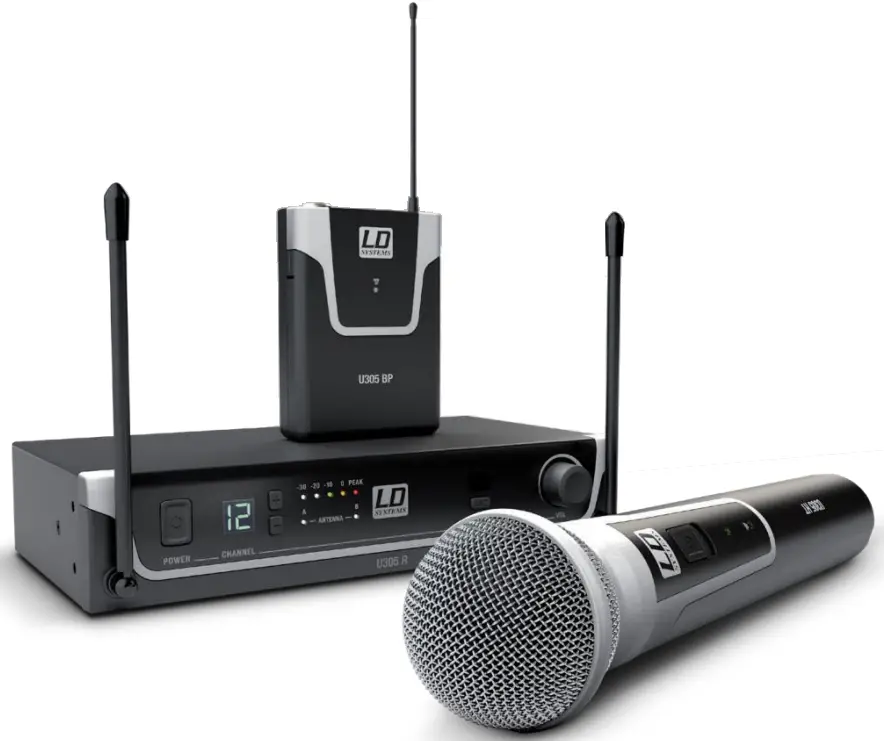
YOU‘VE MADE THE RIGHT CHOICE!
We have designed this product to operate reliably over many years. LD Systems stands for this with its name and many years of experience as a manufacturer of high-quality audio products. Please read thisUser‘sManual carefully, so that you can begin making optimum use of your LD Systems product quickly.
You can find more information about LD-SYSTEMS at our Internet site WWW.LD-SYSTEMS.COM
PREVENTIVE MEASURES
- please read these instructions carefully.
- Keep all information and instructions in a safe place.
- Follow the instructions.
- Observe all safety warnings. Never remove safety warnings or other information from the equipment.
- Use the equipment only in the intended manner and for the intended purpose.
- Use only sufficiently stable and compatible stands and/or mounts (for fixed installations). Make certain that wall mounts are properly installed and secured. Make certain that the equipment is installed securely and cannot fall down.
- During installation, observe the applicable safety regulations for your country.
- Never install and operate the equipment near radiators, heat registers, ovens, or other sources of heat. Make certain that the equipment is always installed so that is cooled sufficiently and cannot overheat.
- Never place sources of ignition, e.g., burning candles, on the equipment.
- Ventilation slits must not be blocked.
- Keep a minimum distance of 20 cm around and above the device.
- Do not use this equipment inthe immediate vicinity of water (does not apply to special outdoor equipment -in this case, observe the special instructions noted below. Do not expose this equipment to flammable materials, fluids or gases. Avoid direct sunlight!
- Make certain that dripping or splashed water cannot enter the equipment. Do not place containers filled with liquids, such as vases or drinking vessels, on the equipment.
- Make certain that objects cannot fall into the device.
- Use this equipment only with the accessories recommended and intended by the manufacturer.
- Do not open or modify this equipment.
- After connecting the equipment, check all cables in order to prevent damage or accidents, e.g., due to tripping hazards.
- During transport, make certain that the equipment cannot fall down and possibly cause property damage and personal injuries.
- If your equipment is no longer functioning properly, if fluids or objects have gotten inside the equipment or if it has been damaged in her way, switch it off immediately and unplug it from the mains outlet(if it is a powered device). This equipment may only be repairedby authorized, qualified personnel.
- Clean the equipment using a dry cloth.
- Comply with all applicable disposal laws in your country. During disposal of packaging, please separate plastic and paper/cardboard22. Plastic bags must be kept out of reach of children
- Please note that changes or modifications not expressly approved by the party responsible for compliance could void the user´s authority to operate the equipment.
FOR EQUIPMENT THAT CONNECTS TO THE POWER MAINS - CAUTION: If the power cord of the device is equipped with earthing contact, then it must be connected to an outlet with a protective ground. Never deactivate the protective ground of a power cord.
- If the equipment has been exposed to strong fluctuations in temperature (for example, after transport), do not switch it on immediately.
Moisture and condensation could damage the equipment. Do not switch on the equipment until it has reached room temperature. - Before connecting the equipment to the power outlet, first, verify that the mains voltage and frequency match the values specified on the equipment. If the equipment has a voltage selection switch, connect equipment to the power outlet only the equipment values and the mains power values match. If the included power cord or the power adapter does not fit in your wall outlet, contact your electrician.
- Do not step on the power cord. Make certain that the power cable does not become kinked, especially the main outlet and/or power adapter and the equipment connector.
- When connecting the equipment, make certain that the power cord or power adapter is always freely accessible. Always disconnect the equipment from the power supply if the equipment is not in use or if you want to clean the equipment. Always unplug the power cord and power adapter from the power outlet at the plug or adapter and not by pulling on the cord. Never touch the power cord and power adapter with wet hands.
- Whenever possible, avoid switching the equipment on and off in quick succession because otherwise, this can shorten the useful life of the equipment.
- IMPORTANT INFORMATION: Replace fuses only with fuses of the same type and rating. If a fuse blows repeatedly, please contact an authorized service center.
- Todisconnect the equipment from the power mains completely, and unplug the power cord or power adapter from the power outlet.
- If your device is equipped with a Volex power connector, the mating Volex equipment connector must be unlocked before it can be removed.
However, this also means that the equipment can slide and fall down if the power cable is pulled, which can lead to personal injuries and/or other damage. For this reason, always be careful when laying cables. - Unplugthepowercord and power adapter from the power outlet if there is a risk of a light non-striker before an extended period of disuse.
 | CAUTION: To reduce the risk of electric shock, do not remove the cover (or back). There are no user-serviceable parts inside. Maintenance and repairs should be exclusively carried out by qualified service personnel. |
 | The warning triangle with the lightning symbol indicates dangerous uninsulated voltage inside the unit, which may cause an electrical shock. |
 | The warning triangle with the exclamation mark indicates important operating and maintenance instructions. |
 | Warning! This symbol indicates a hot surface. Certain parts of the housing can become hot during operation. After use, wait for a cool-down period of at least 10 minutes before handling or transporting the device. |
 | Warning! This device is designed for use below 2000 meters in altitude. |
 | Warning! This product is not intended for use in tropical climates. |
CAUTION! HIGH VOLUMES IN AUDIO PRODUCTS!
This device is meant for professionals. Therefore, commercial use of this equipment issues objects to the respectively applicable national accident prevention rules and regulations. As a manufacturer, Adam Hall is obligated to notify you formally about the existence of potential health risks.
Hearing damage due to high volume and prolonged exposure: When in use, this product is capable of producing high sound-pressure levels (SPL)that can lead to irreversible hearing damage to performers, employees, and audience members. For this reason, avoid prolonged exposure to volumes in excess of 90 dB.
NOTE: This equipment has been tested and found to comply with the limits for a Class B digital device, pursuant to Part 15 of the FCC Rules. These limits are designed to provide reasonable protection against harmful interference in a residential installation. This equipment generates, uses, and can radiate radio frequency energy and, if not installed and used in accordance with the instructions, may cause harmful interference to radiocommunications. However, there is no guarantee that interference will not occur in a particular installation. If this equipment does cause harmful interference to radio or television reception, which can be determined by turning the equipment off and on, the user is encouraged to try to correct the interference by one or more of the following measures:
- Reorient or relocate the receiving antenna.
- Increase the separation between the equipment and receiver.
- Connect the equipment into an outlet on a circuit different from that to which the receiver is connected.
- Consult the dealer or an experienced radio/TV technician for help.
INTRODUCTION
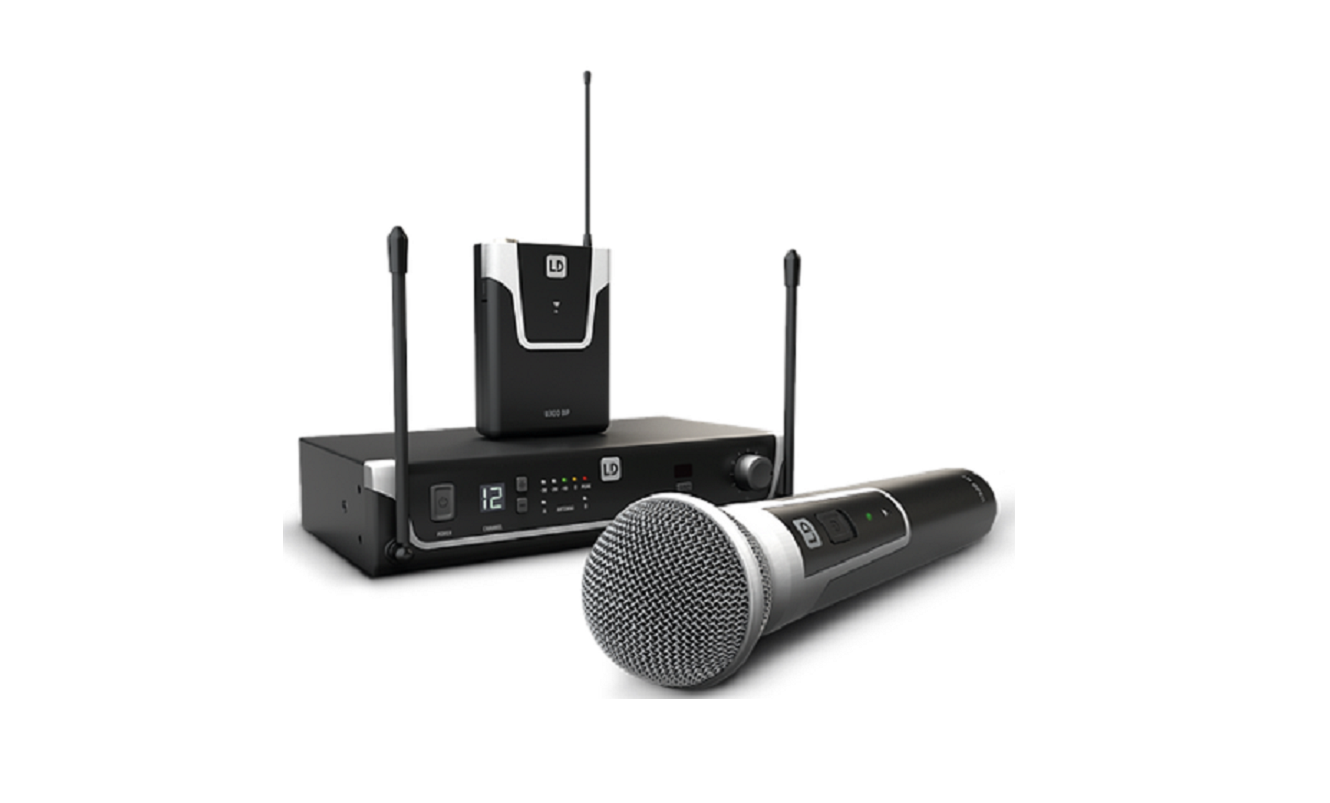
Developed in Germany, the UHF Diversity wireless systems from the U300® series deliver excellent audio performance. They achieve a range of 100 meters in ideal conditions and are available in three frequency bands: 470-542MHz. Up to six U300® systems can be used simultaneously for each frequency band. Convenient one-touch synchronization of transmitter and receiver via infra-red facilitates fast, trouble-free wireless connection and the squelch function with pilot tone ensures fail-safe operation.
- Available with hand or pockettransmitter
- Infra-red frequency synchronisation
- The fail-safe operation provided by the pilot tone
- 12 channels
- Up to 6 systems can be used simultaneously
- Belt-pack transmitter with gain control and status LED
- Dynamic hand-held microphone with status LED
- U500® microphone heads are also suitable for U300® hand-held transmitter
- Long battery life
- Available in the following frequencies:470-542MHz (LDU 504.7/LDU 505.1/LDU 305.1/LDU 304.7)
Please note: The use of the wireless microphone system may require a license, depending on the country of use. For detailed information please contact the relevant authority in your country.
Pilot tone
The pilot tone function protects a wireless microphone system against interference, for example, unwanted signals from other radio transmission systems. The transmitter adds a second, inaudible signal (the pilot tone) to the actual signal which is to be transmitted. The receiver identifies it as the matching pilot tone and frees the associated signal. Signals without a matching pilot tone remain muted.
Included
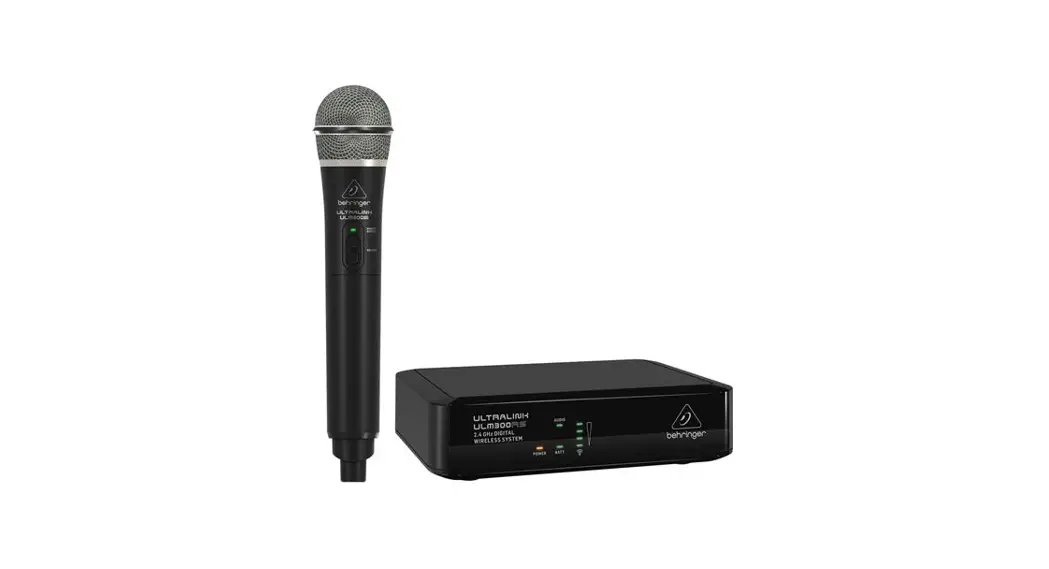
LDU30xHHD: Receiver plus hand-held transmitter with dynamic capsule (cardioid), power supply, 2 x AA batteries, audio cable, manual
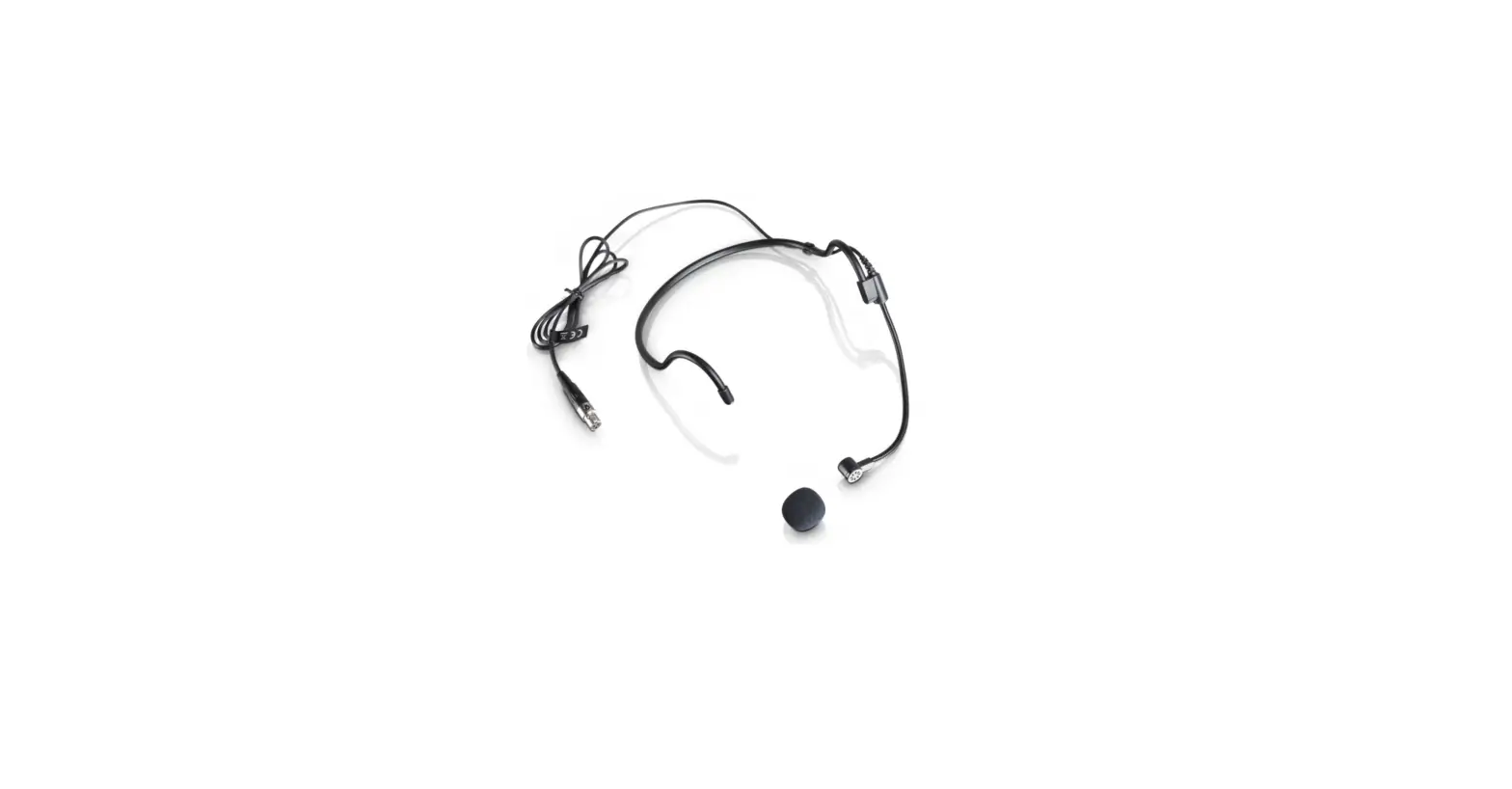
LDU30xBPH:Receiverplus pockettransmitterandheadset(black),powersupply,2xAA batteries,audio cable,manual
LDU50xHHD: Receiver plus pocket transmitter and guitar cable, power supply, 2 xAA batteries, audio cable, manual
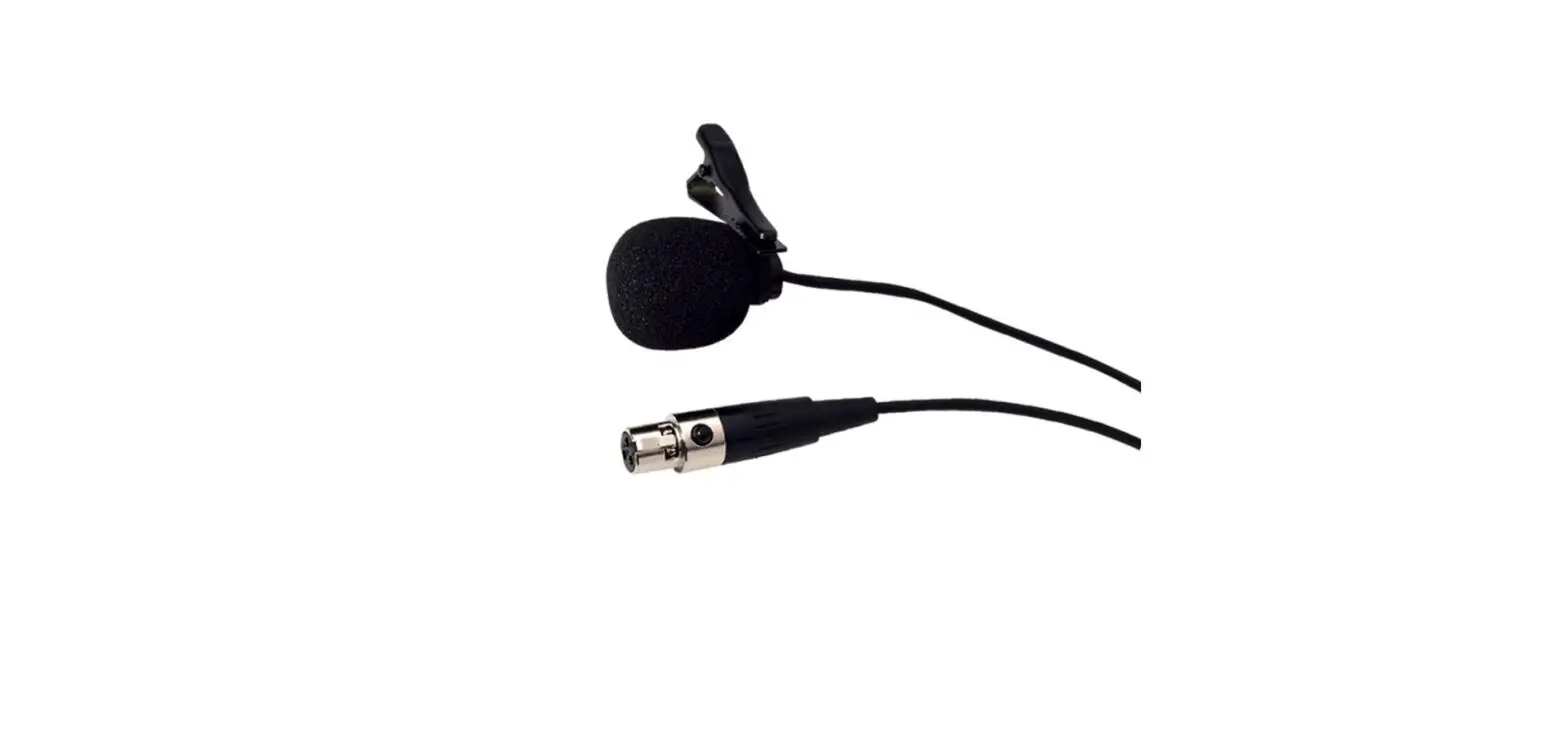
LDU50xBPH: Receiver plus pocket transmitter and Lavalier microphone, power supply, 2 x AA batteries, audio cable, manual
CONNECTIONS, OPERATING AND DISPLAY ELEMENTS
RECEIVER
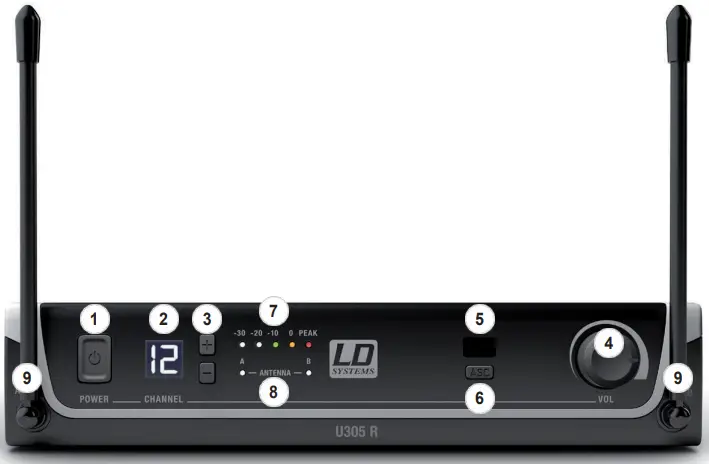
- POWER
On/off switch. Press and hold the button for approximately 1 second to turn the device on or off. - CHANNEL DISPLAY
Illuminated LC display to show the radio channel. - CHANNEL + / –
Push buttons to select the radio channel 01 to 12. To establish a wireless connection between the transmitter and the receiver, the radio frequency on both machines must match (synchronization process as described under point 6. ASC). - VOL
Rotary knob to adjust the output volume. - IR INTERFACE
Infra-red interface for synchronizing the receiver’s radio channel with the transmitter. - ASC
To synchronize the transmitter with the radio channel set in the receiver, position the infrared port of the transmitter directly in line with the infra-red interface of the receiver and switch on the transmitter and receiver(distance about10cm, IRinterfaceof the hand transmitters
below the status LED, IR interface of the pocket transmitter on the front side). Now press the button to start the synchronization process. A red LED indicator will light up in the window of the IR interface during the process. After a few seconds, the process is completed and one of the LED indicators ANTENNA A and B will light up (= wireless connection exists). - LEVEL INDICATOR
5-segment LED chain to display the audio signal level. - ANTENNA A – B
Indicator LEDs for the antenna systems A and B. The antenna system with the stronger radio signal is activated and the corresponding indicator LED lights up. - RECEPTION ANTENNAS A – B
For optimum reception, please position the antennas in an upward-facing V-position.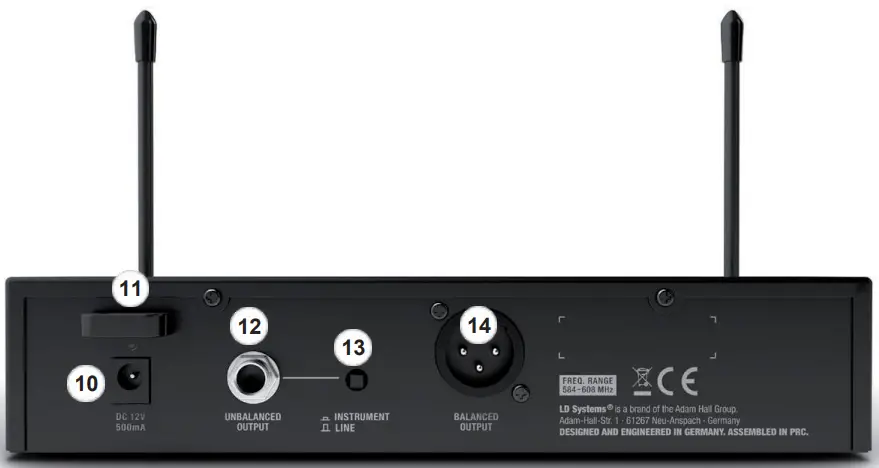
- DC SOCKET
Low-voltage socket for the power supply to the device. Please use only the supplied mains adapter. - CABLE STRAIN-RELIEF
Cable strain relief for power adapter cable. - UNBALANCED OUTPUT
Unbalanced audio output via 6.3mm jack socket. - INSTRUMENT/LINE (UNBALANCED OUTPUT)
Switch for level and impedance-matching to instruments or line inputs of an amplifier or mixer. Using a suitable tool (e.g.a ballpoint pen), push the switch into the depressed INSTRUMENT position for connection to the input of an instrument amplifier (guitar or bass amp), and for connection to the line input of a mixer or amplifier, select the non-depressed position LINE. - BALANCED OUTPUT
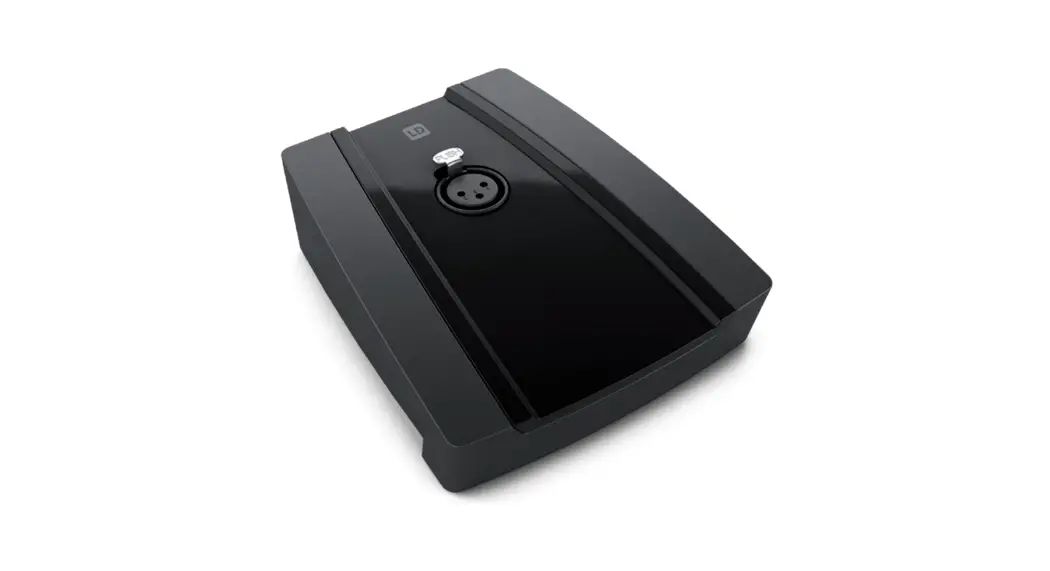
Balanced audio output via 3-pin XLR jack.
HAND-HELD TRANSMITTER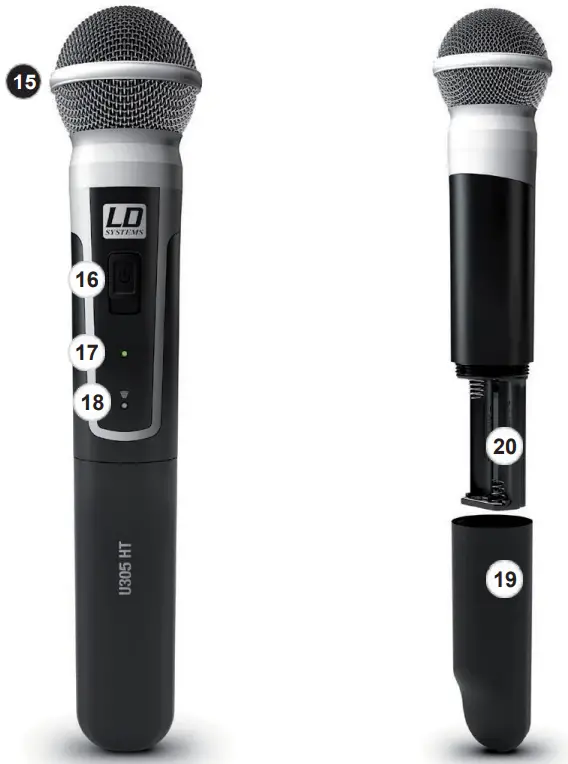
- MICROPHONE HEAD
The microphone head is interchangeable, the hand-held transmitter is compatible with the microphone heads from the LD U500® series, available separately. - ON / OFF
On/off switch. Move the switch to the ON position to turn on the hand-held transmitter, and to the OFF position to turn it off. - STATUS LED
If the charge status of the batteries is sufficient, the LED lights up green when the hand transmitter is switched on. If the LED lights up red, the
charge status is weak. In this case, replace the batteries (2 x AA/LR6 type, alkaline). During the synchronization process, the LED flashes green
and amber. - IR INTERFACE
Infra-red interface for synchronizing the radio channel from receiver and transmitter. - BATTERY COMPARTMENT COVER
To replace the batteries, open the hand transmitter battery compartment by rotating it anti-clockwise and pulling it from the housing. Remove the used batteries and replace them with new batteries (AA), following the diagram in the battery compartment. Replace the battery compartment cover and rotate it clockwise to closethe battery compartment. If the transmitter is not used for a long period, remove the batteries to avoid damage to the transmitter from leaking batteries. - BATTERY COMPARTMENT
For 2x AA, Mignon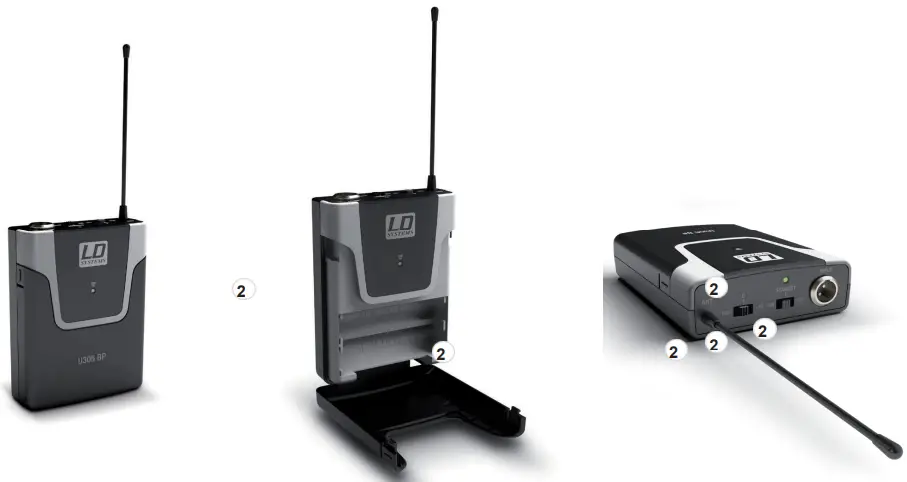
- Antenna Pocket transmitter antenna. For optimum reception, do not cover or kink.
- IR INTERFACE
Infra-red interface for synchronizing the radio channel from receiver and transmitter. - INPUT
3-pin mini XLR socket to connect a headset, Lavalier or instrument microphone, and guitar cable. - ON / STANDBY / OFF
Switch to activate or deactivate the pocket transmitter (ON = transmitter is switched on, OFF = transmitter is switched off). In the STANDBY
position, the transmitter is in operation but the audio signal is muted. - STATUS LED
If the charge status of the batteries is sufficient, the LED lights up green when the pocket transmitter is switched on. If the LED lights up red, the charge status is weak. In this case, replace the batteries (2x AA/LR6type, alkaline). During the synchronization process, the led flashes green and amber. - MIC / 0dB / -10dB
Forgetting the input sensitivity. Adjust the sensitivity so that an active signal (speech, vocals, guitar…)causes the amber-colored level-LED on the receiver to light up. If the red PEAK LED lights up or flashes, reduce the sensitivity on the 3-position switch MIC/0dB/-10dB to the next lower value to prevent otherwise unwanted distortion. (Examples: Headset = MIC, guitar with passive pickups = 0dB, guitar with active pickups = -10dB). - BATTERY COMPARTMENT
To replace the batteries, open the battery compartment of the pocket transmitter by simultaneously pressing both markers on the sides of the battery cover and opening it forwards. Remove the used batteries and replace them with new batteries (AA/LR6, alkaline), following the diagram in the battery compartment. Replace the battery compartment cover on the housing and click it into place. If the transmitter is not used for a long period, remove the batteries to avoid damage to the transmitter from leaking batteries.
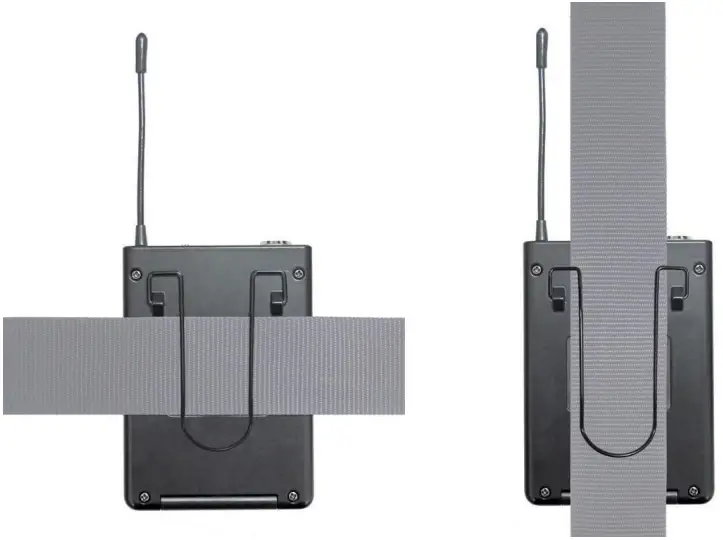
ATTACHING THE POCKET TRANSMITTER
Attach the transmitter to a belt or strap as shown.
PIN ALLOCATION FOR MINI XLR CONNECTOR (POCKET TRANSMITTER)
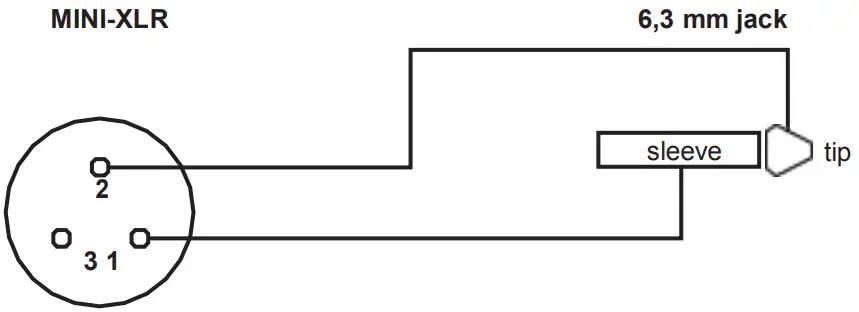 Guitar, bass, and other high-impedance signal sources. Guitar, bass, and other high-impedance signal sources. | 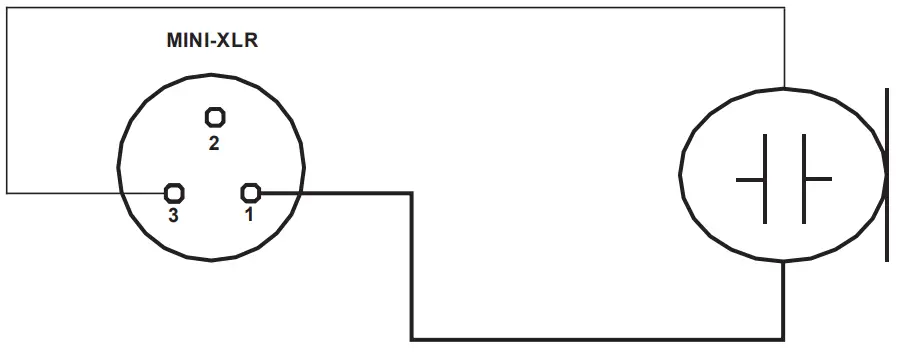 Condenser microphone with an internal pull-up resistor. Condenser microphone with an internal pull-up resistor. |
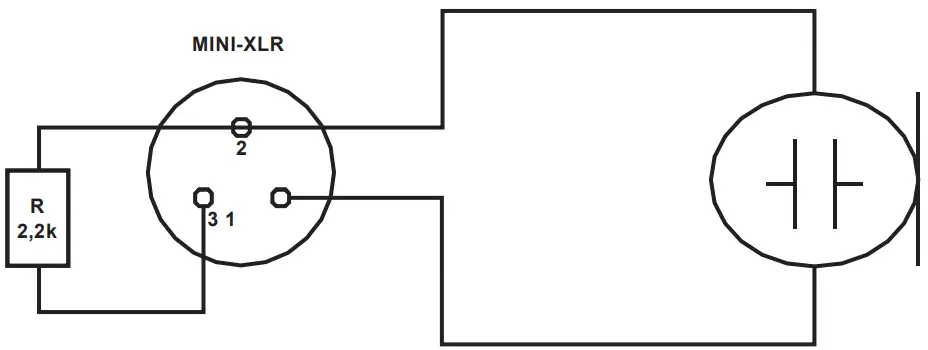 Condenser microphone without internal pull-up resistor. Condenser microphone without internal pull-up resistor. | |
TROUBLESHOOTING
| PROBLEM | SYMPTOM | SOLUTION |
| No audio signal or level too low | Receiver: No reception displayed on either antenna A or B. | Check if the transmitter is turned on. Check the batteries in the transmitter. |
| Receiver: Display lighting is switched off | Checkthepowersupplyforthereceiverandwhether the receiver is switched on. | |
| Receiver: No reception displayed on either antenna A or B. Transmitter: The device is switched on. The charge status of the batteries is ok. | Checkwhetherradiofrequencyofthetransmitterand the receiver are matching. Reduce the distance between transmitter and receiver. Ensure that there is a direct line of sight between the transmitter and the receiver. Ensure that the antennas on the receiver are positioned in an upward V-shape. | |
| Receiver Reception on antenna A or B is displayed. | Increase the signal level or increase the input sensitivity on the pocket transmitter. | |
| Distortion and interference | Receiver: Radio signal is displayed | Remove possible sources of interference (digital devices, other radio systems). |
| Distorted sound | Transmitter: Status LED is lit up red. Receiver: Peak LED on the receiver is lit. | Replace the batteries in the transmitter. Reduce the signal level or reduce the input sensitivity on the pocket transmitter. |
OPTIONAL ACCESSORIES
LDU 504.7– microphone head with a condenser capsule and hypercardioid pickup pattern (for hand-held transmitters, matt black)
LDU 505.1– microphone head with dynamic capsule and hypercardioid pickup pattern (for hand-held transmitters, matt black)
LDU 305.1– microphone head with a condenser capsule and cardioid pickup pattern (for hand-held transmitters, matt silver)
LDU 304.7– microphone head with dynamic capsule and cardioid pickup pattern (for hand-held transmitters, matt silver)
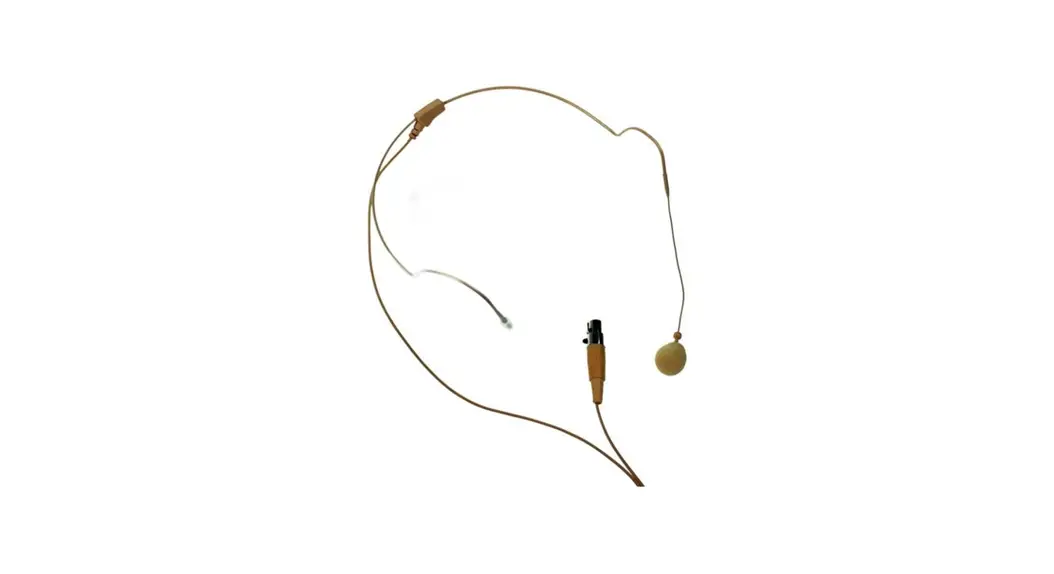
LDWS100MH3 – beige-colored headset with condenser microphone (for pocket transmitters)
LDWS100MH1 – black headset with condenser microphone (for pocket transmitters)
LDWS1000MW – clip microphone for wind instruments (for pocket transmitters)
LDWS100ML – Lavalier microphone (for pocket transmitters)
LDWS100GC – guitar cable (for pocket transmitters)
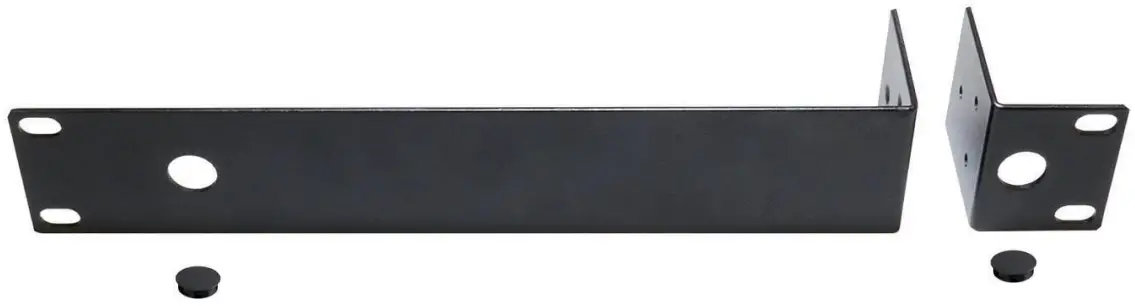
LDU300RK – 19″ rack mounting kit for the installation of a single receiver (2 rack-mount brackets, 2 caps, and 1 set of screws included).
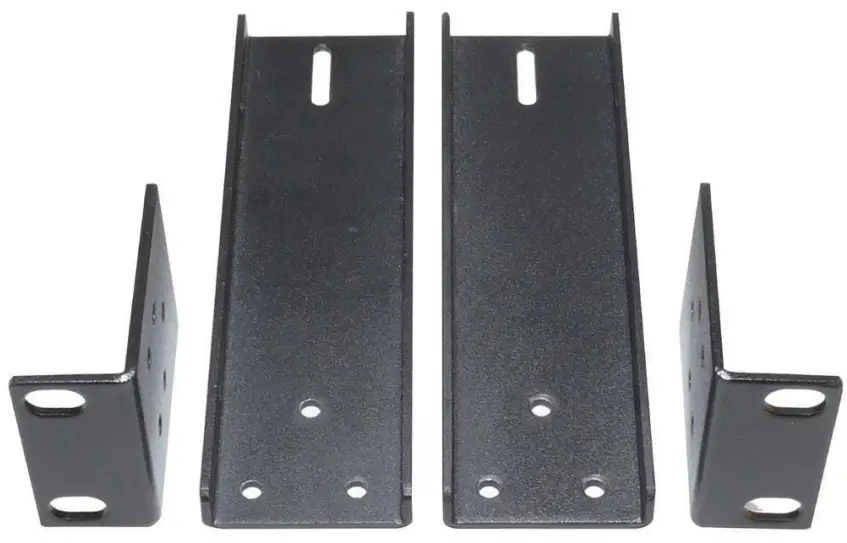
LDU500RK2– 19″rackmountingkitfortheinstallationoftwosinglereceivers(2rack-mountbrackets,2connectorsand1setofscrews included).
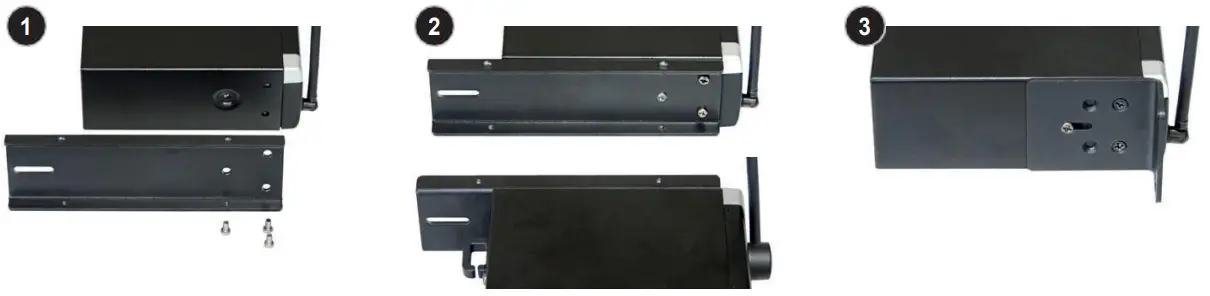
Installation
- Attach connectors (receiver A on the right-hand side, receiver B on the left-hand side).
- Screw both receivers together.
- Attach brackets (receiver A on the left-hand side, receiver B on the right-hand side).
TECHNICAL DATA
RECEIVER
| Item number: | LDU 500 | LDU 300 | L |
| Receiver type: | UHF diversity | UHF diversity | |
| Modulation: | FM | FM | |
| Frequency range: | 470-542MHz | 470-542MHz | |
| Channels: | 12 | 24 | |
| Antenna connectors: | 2 x fixed antennas | 2 x fixed antennas | |
| Antenna gain: | 2.15 dBi | 2.15 dBi | |
| Frequency response: | 25-16,000 Hz | 25-16,000 Hz | |
| Noise reduction: | Squelch, fixed level | Squelch, fixed level | |
| THD (system): | <0.3% | <0.3% | |
| Signal-to-noise ratio (system): | >104dB | >104dB | |
| Balanced output: | XLR | XLR |
| Item number: | LDU 500 | LDU 300 | L |
| Unbalanced output: | 6.3 mm jack | 6.3 mm jack | |
| Audio output level (balanced): | +10dBu | +10dBu | |
| Audio output level (unbalanced): | +7dBV/+2.5dBV (switchable line/instrument) | +7dBV/+2.5dBV (switchable line/instrument) | |
| Controls: | POWER, + / – channel select, ASC, VOL volume control, switch INSTRUMENT/LINE | POWER, + / – channel select, ASC, VOL volume control, switch INSTRUMENT/LINE | |
| Indicators: | 2-digit LC display, 5-segment LED level meter, antenna NB LEDs | 2-digit LC display, 5-segment LED level meter, antenna NB LEDs | |
| Operating voltage: | 12V DC, 500 mA | 12V DC, 500 mA | |
| Ambient temperature (in operation): | 5°C to 40°C | -10°C to 45°C | |
| Relative humidity: | 20% to 80% (non-condensing) | 20% to 80% (non-condensing) | |
| Dimensions (W x H x D): | 211 x 43 x 120 mm | 211 x 43 x 120 mm | |
| Weight: | 0.7 kg | 0.7 kg | |
| Accessories included: | power adapter | power adapter | |
| Features: | infra-red frequency synchronization, pilot tone | infra-red frequency synchronization, pilot tone |
HAND-HELD TRANSMITTER
| Item number: Modulation: | LDU 305.1 HT/ LDU 304.7 HT FM | LDU 504.7 HT / LDU 505.1 HT FM | |
| Frequency range: | 4 /0-542MHz | 470-542MHz | |
| Channels: | 12 | 24 | |
| Microphone type: | Dynamic | Dynamic | |
| Polar pattern: | Cardioid | Cardioid | |
| Frequency response: | 55-16,000 Hz | 55-16,000 Hz | |
| RF output power: | 10 mW PEP | 0.42 mW PEP | |
| Antenna gain: | 0.5 dBi | 0.5 dBi | |
| Controls: | Power on/off | Power on/off | |
| Indicators: | Status LED | Status LED | |
| Power supply: | 2 x M batteries | 2 x AA batteries | |
| Operating time: | up to 10 h (depending on batteries) | up to 10 h (depending on batteries) | |
| Ambient temperature (in operation): | 5°C to 40°C | -10°C to 45°C | |
| Relative humidity: | 20% to 80% (non- condensing) | 20% to 80% (non-condensing) | |
| Dimensions (L x 0): | 257 x 50 mm | 257 x 50 mm | |
| Weight (without batteries): | 0.235 kg | 0.235 kg | |
| Accessories included: | 2 x AA batteries | 2 x AA batteries | |
| Features: | infra-red frequency synchronization, pilot tone, microphone head interchangeable | infra-red frequency synchronization, pilot tone, microphone head interchangeable |
BODY PACK TRANSMITTER
Item number: : | LDU 305.1 BP/ LDU 304.7 BP | LDU 504.7 BP / LDU 505.1 BP |
| Modulation | FM | FM |
| Frequency range: | 470-542MHz | 470-542MHz |
| Channels: | 12 | 24 |
| Input: | 3-pin mini-XLR (low-Z + phantom power/high-Z) | 3-pin mini-XLR (low-Z + phantom power/high-Z) |
| Frequency response: | 25-16,000 Hz | 25-16,000 Hz |
| RF output power: | 10 mW PEP | 0.42 mW PEP |
| Antenna gain: | 0.5 dBi | 0.5 dBi |
| Controls: | ON/STANDBY/OFF, MIC/0/-10 | ON/STANDBY/OFF, MIC/0/-10 |
| Indicators: | Status LED | Status LED |
| Power supply: | 2 x AA batteries | 2 x AA batteries |
| Operating time: | Up to 10 h (depending on batteries) | Up to 10 h (depending on batteries) |
| Ambient temperature (in operation): | 5°C to 40°C | -10°C to 45°C |
| Relative humidity: | 20% to 80% (non-condensing) | 20% to 80% (non-condensing) |
| Dimensions (W x H x D): | 65 x 91 x 25 mm | 65 x 91 x 25 mm |
| Weight (without batteries): | 0.085 kg | 0.085 kg |
| Accessories included: | 2 x AA batteries | 2 x PA batteries |
| Features: | infra-red frequency synchronization, pilot tone | infra-red frequency synchronization, pilot tone |
MICROPHONES FOR BODYPACK TRANSMITTER
| Item number: | LDWS100MH1 | LDWS100ML | LDWS1000MW |
| Microphone type: | Headset | Lavalier microphone | Wind instrument microphone |
| Capsule: | Back-electret condenser | Back-electret condenser | Back-electret condenser |
| Polar pattern: | Cardioid | Cardioid | Cardioid |
| Frequency response: | 20-20,000 Hz | 20-20,000 Hz | 50-18,000 Hz |
| Connector: | 3-pin mini-XLR | 3-pin mini-XLR | 3-pin mini-XLR |
| Accessories included: | Foam windscreen | Foam windscreen | Foam windscreen |
GUITAR CABLE FOR BODY PACK TRANSMITTER
| Item number: | LDWS100GC | |
| Connector 1: | 3-pin mini-XLR | |
| Connector 2: | 6.3 mm jack | |
| Cable length: | 1.5 m |
MANUFACTURER´S DECLARATIONS
MANUFACTURER‘S WARRANTY & LIMITATIONS OF LIABILITY
You can find our current warranty conditions and limitations of liability at:
https://cdn-shop.adamhall.com/media/pdf/MANUFACTURERS-DECLARATIONS_LD_SYSTEMS.pdf.
To request warranty service for a product, please contact Adam Hall GmbH, Adam-Hall-Str. 1,
61267 Neu Anspach / Email: [email protected] / +49 (0)6081 / 9419-0.
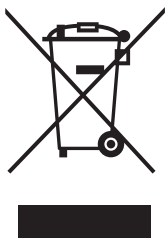 CORRECT DISPOSAL OF THIS PRODUCT
(valid in the European Union and other European countries with a differentiated waste collection system)
This symbol on the product, or on its documents indicates that the device may not be treated as household waste. This is to avoid environmental damage or personal injury due to uncontrolled waste disposal. Please dispose of this product separately from other waste and have it recycled to promote sustainable economic activity. Household users should contact either the retailer where they purchased this product, or their local government office, for details on where and how they can recycle this item in an environmentally friendly manner. Business users should contact their suppliers and check the terms and conditions of the purchase contract. This product should not be mixed with other commercial waste for disposal.
FCC STATEMENT
This device complies with Part 15 of the FCC Rules. Operation is subject to the following two conditions:
- This device may not cause harmful interference, and
- This device must accept any interference received, including interference that may cause undesired operation
CE Compliance
Enping Pasgao Electronic Company Limited states that this product meets the following guidelines (where applicable): R&TTE (1999/5/EC) or RED (2014/53/EU) from June 2017
Low voltage directive (2014/35/EU)
EMC directive (2014/30/EU)
RoHS (2011/65/EU)
The complete declaration of conformity can be found at www.adamhall.com.
Furthermore, you may also direct your inquiry to [email protected].
 LD-SYSTEMS.COM
Adam Hall GmbH | Adam-Hall-Str. 1 | 61267 Neu-Anspach | Germany
Phone: +49 6081 9419-0 | adamhall.com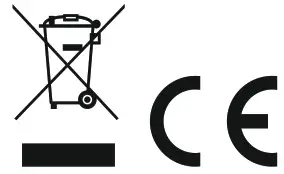
REV: 04
 Eventtechnik Lösungen | Adam Hall Group
 LD Systems® | Your Sound. Our Mission.
 Eventtechnik Lösungen | Adam Hall Group
 LD Systems® | Your Sound. Our Mission.