Kosy Electronic Learning Toys
Product Information
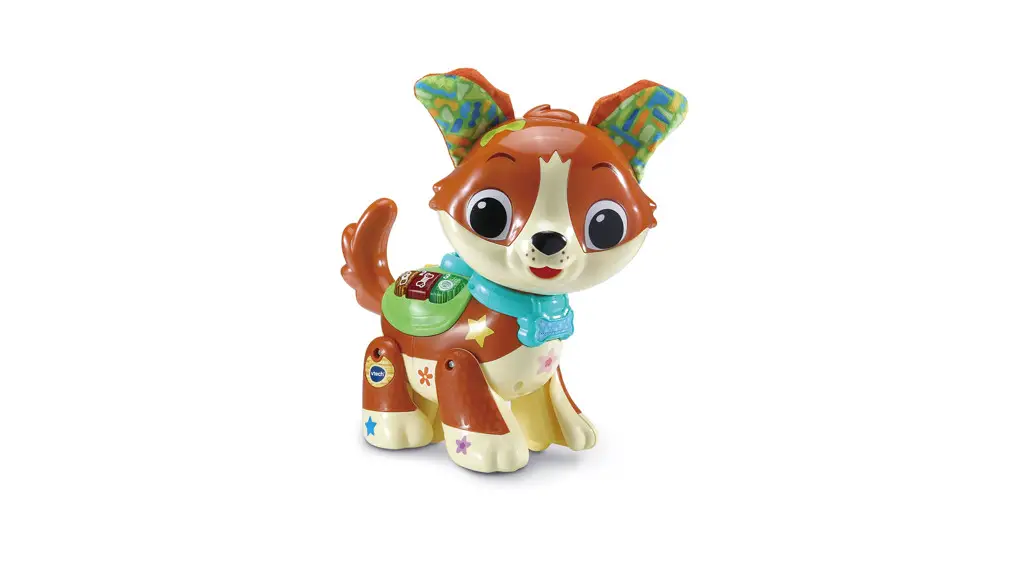
The Kosy the Kissing Puppy is an interactive toy that resembles
a puppy. It is designed to be your child’s best friend and provides
various features for interaction and play. The toy responds to
touch and has buttons for singing, chatting, and playing music. It
also has a charm button for recording your voice and a nose sensor
that triggers a licking action when touched. The toy operates on 4
AA batteries (not included) and has an Off/Low/High Volume Switch
for power control. It is recommended to use alkaline batteries or
fully charged Ni-MH rechargeable batteries for optimal
performance.
Product Usage Instructions
- To exit Try-Me Mode, slide the Off/Low/High Volume Switch to
the Off position. Then, turn Kosy back on to disable Try-Me
mode. - Battery Removal and Installation:
- Make sure the unit is turned OFF.
- Locate the battery cover on the back of the unit.
- Use a screwdriver to loosen the screw and open the battery
cover. - If used batteries are present, remove them by pulling up on one
end of each battery. - Install 4 new AA (LR6/AM-3) batteries following the diagram
inside the battery box. Use alkaline batteries or fully charged
Ni-MH rechargeable batteries for best performance. - Replace the battery cover and tighten the screw to secure.
Note: Adult assembly is required for battery installation. Keep
batteries out of reach of children. - Disposal of batteries and product:
The crossed-out wheelie bin symbols on products and batteries
indicate that they must not be disposed of in domestic waste. They
contain substances that can be damaging to the environment and
human health.The chemical symbols Hg, Cd, or Pb, where marked, indicate that
the battery contains more than the specified value of mercury (Hg),
cadmium (Cd), or lead (Pb) set out in the Batteries and
Accumulators Regulation. The solid bar indicates that the product
was placed on the market after 13th August, 2005.Help protect the environment by disposing of your product or
batteries responsibly. In the UK, visit www.recyclenow.com to see a
list of collection points near you. In Australia & New Zealand,
check with your local council for kerbside collections. - Product Features:
- Off/Low/High Volume Switch: Slide the switch to either
Low or High to turn the unit On. Slide to Off to turn the unit
Off. - Nose Sensor: Trigger the Nose Sensor by touching Kosy’s
nose when she is in a sitting position, and she will give you a
puppy lick. - Charm Button: Press the Charm Button when Kosy is in a
sitting position to record your voice. Kosy will repeat what you
say. Sing to Kosy when she is lying down. - Chat Button: Press the Chat Button to talk to Kosy.
- Music Button: Press the Music Button when Kosy is in a
sitting position to hear fun songs. Press when Kosy is lying down
to hear relaxing melodies. - Motion Sensor: [No information provided in the text
extract]
- Off/Low/High Volume Switch: Slide the switch to either
Instruction Manual Kosy the Kissing Puppy
INTRODUCTION
Meet Kosy, your very own puppy! She’s a beautiful puppy who wants to be your best friend! Give her a cuddle and she will show you how much she loves you by giving you a great big puppy lick! Press her paws to sing or chat with her. Her Heart Charm Button helps you interact with her! When she feels tired, lay her down and sing to her.
Nose Sensor Charm Button Chat Button
Mic Music Button
3
INCLUDED IN THIS PACKAGE
· One VTech® Kosy the Kissing Puppy · Quick Start Guide WARNING: All packing materials such as tape, plastic sheets, packaging locks, removable tags, cable ties, cords and packaging screws are not part of this toy and should be discarded for your child’s safety. NOTE: Please save this Instruction Manual as it contains important information. Removing the Packaging Locks:
Rotate the packaging locks 90 degrees anticlockwise. Pull out the packaging locks and discard.
4
GETTING STARTED
How to Exit Try-Me Mode
Kosy is in Try-Me Mode in the packaging. Slide the Off/Low High Volume Switch to the Off position to turn Kosy Off. Then, turn Kosy back on and Try-Me mode will be disabled.
Note: The batteries included in the unit are for demo purposes only. Please replace with new batteries for the best performance.
BATTERY REMOVAL AND INSTALLATION
1. Make sure the unit is turned OFF. 2. Locate the battery cover on the back of
the unit. Use a screwdriver to loosen the screw and then open the battery cover. 3. If used batteries are present, remove these batteries from the unit by pulling up on one end of each battery. 4. Install 4 new AA (LR6/AM-3) batteries following the diagram inside the battery box. (For best performance, alkaline batteries or fully charged Ni-MH rechargeable batteries are recommended). 5. Replace the battery cover and tighten the screw to secure.
WARNING:
Adult assembly required for battery installation. Keep batteries out of reach of children.
· Insert batteries with the correct polarity (+ and -).
· Do not mix old and new batteries.
· Do not mix alkaline, standard (carbon-zinc) or rechargeable
batteries.
· Only batteries of the same or equivalent type as recommended
are to be used.
· Do not short-circuit the supply terminals.
5
· Remove batteries during long periods of non-use. · Remove exhausted batteries from the toy. · Dispose of batteries safely. Do not dispose of batteries in fire.
RECHARGEABLE BATTERIES: · Remove rechargeable batteries from the toy before charging. · Rechargeable batteries are only to be charged under adult
supervision. · Do not charge non-rechargeable batteries.
Disposal of batteries and product The crossed-out wheelie bin symbols on products and batteries, or on their respective packaging, indicates they must not be disposed of in domestic waste as they contain substances that can be damaging to the environment and human health.
The chemical symbols Hg, Cd or Pb, where marked, indicate that the battery contains more than the specified value of mercury (Hg), cadmium (Cd) or lead (Pb) set out in the Batteries and Accumulators Regulation. The solid bar indicates that the product was placed on the market after 13th August, 2005. Help protect the environment by disposing of your product or batteries responsibly.
VTech® cares for the planet: Care for the environment and give your toy a second life by disposing of it at a small electricals collection point so all its materials can be recycled.
In the UK: Visit www.recyclenow.com to see a list of collection points near you.
In Australia & New Zealand: Check with your local council for kerbside collections.
6
Product Features
1. Off/Low/High Volume Switch
Slide the Off/Low/High Volume Switch to either Low ( ) or High ( ) to turn the unit On. To turn the unit Off, slide the switch to Off ( ).
2. Nose Sensor
Trigger the Nose Sensor by touching Kosy’s nose when she is in a sitting position and she will give you a puppy lick.
3. Charm Button
Press the Charm Button when Kosy is in a sitting position to record your voice and Kosy will repeat what you say. Sing to Kosy when she is lying down.
4. Chat Button
Press the Chat Button to talk to Kosy.
5. Music Button
Press the Music Button when Kosy is in a sitting position to hear fun songs. Press the Music Button when Kosy is lying down to hear relaxing melodies.
6. Motion Sensor
When Kosy is lying down or sitting, the motion sensor is triggered and Kosy will respond accordingly.
7
7. Microphone
Kosy’s microphone is below her Charm Button. The closer to Kosy you are, the clearer she can hear you.
8. Automatic Shut Off
To preserve battery life, Kosy will automatically power off after several seconds without input. Kosy can be turned on again by pressing her Charm Button, Chat Button or Music Button.
Low batteries The Charm will flash 3 times and Kosy will shut off when the batteries are weak. If the batteries are low or it has any abnormal response, please insert new batteries and try again.
ACTIVITIES
1. Pretend Mode
In Pretend Mode, Kosy will ask you to make different sounds. Press the Charm Button when Kosy is in a sitting position to record words or phrases and listen as Kosy repeats them.
2. Chat Mode
Talk with Kosy in Chat Mode. Press the Chat Button when Kosy is in a sitting position to talk with Kosy.
3. Music Mode
Press the Music Button when Kosy is in a sitting position to listen to fun sing-along songs.
4. Nap Time Mode
Lay Kosy down to enter Nap Time. Press the Charm Button and
Kosy will ask you to sing to her. Press the Chat Button and Kosy will
speak to you. Press the Music Button to hear soothing melodies.
8
SING-ALONG SONG LYRICS
SONG 1
Let`s go on an adventure, Just you and me! We can play all day long, You will see!
SONG 2
Boop my nose and you will see, I like to give kisses so happily. Doggie licks are so much fun, For you and me and everyone!
SONG 3
We are best friends, Friends who play together, Playing with you is so much fun, We will be friends forever!
SONG 4
We’ll play together and have a great time singing and cuddling! Wont you play with me, You’re the very best at snuggling.
SONG 5
We spend the best days running, We’ve got the best days coming. Let’s laugh and play, then have a rest. You are the best!
9
TROUBLESHOOTING
If for some reason the program/activity stops working, please follow these steps: 1. Please turn the unit OFF. 2. Interrupt the power supply by removing the batteries. 3. Let the unit stand for a few minutes, then replace the batteries. 4. Turn the unit ON. The unit should now be ready to play with
again. 5. If the product still does not work, please install a brand new set
of batteries. If the problem persists, please contact our Consumer Services Department and a service representative will be happy to help you.
CONSUMER SERVICES
Creating and developing VTech® products is accompanied by a responsibility that we at VTech® take very seriously. We make every effort to ensure the accuracy of the information, which forms the value of our products. However, errors sometimes can occur. It is important for you to know that we stand behind our products and encourage you to call our Consumer Services Department with any problems and/or suggestions that you might have. A service representative will be happy to help you.
UK Customers: Phone: 0330 678 0149 (from UK) or +44 330 678 0149 (outside UK) Website: www.vtech.co.uk/support
Australian Customers: Phone: 1800 862 155 Website: support.vtech.com.au
NZ Customers: Phone: 0800 400 785 Website: support.vtech.com.au
10
PRODUCT WARRANTY/ CONSUMER GUARANTEES
UK Customers: Read our complete warranty policy online at vtech.co.uk/warranty. Australian Customers: VTECH ELECTRONICS (AUSTRALIA) PTY LIMITED CONSUMER GUARANTEES Under the Australian Consumer Law, a number of consumer guarantees apply to goods and services supplied by VTech Electronics (Australia) Pty Limited. Please refer to vtech.com.au/ consumerguarantees for further information.
11
Visit our website for more information about our products, downloads, resources and more.
www.vtech.co.uk www.vtech.com.au
TM & © 2023 VTech Holdings Limited. All rights reserved. IM-563600-000 Version: 0
References
 Support : VTech Electronics
 Electronic Learning Toys | Best Learning Toys | VTech UK
-
VTech Toys Australia - Electronic Learning Toys - Best Learning Toys - VTech Australia and New Zealand
-
Electronic Learning Toys | Best Learning Toys | VTech UK
-
Electronic Learning Toys | Best Learning Toys | VTech UK
-
VTech Toys Australia - Electronic Learning Toys - Best Learning Toys - VTech Australia and New Zealand
 Support : VTech Electronics
 Electronic Learning Toys | Best Learning Toys | VTech UK
 VTech Toys Australia - Electronic Learning Toys - Best Learning Toys - VTech Australia and New Zealand
 Electronic Learning Toys | Best Learning Toys | VTech UK
 VTech Toys Australia - Electronic Learning Toys - Best Learning Toys - VTech Australia and New Zealand