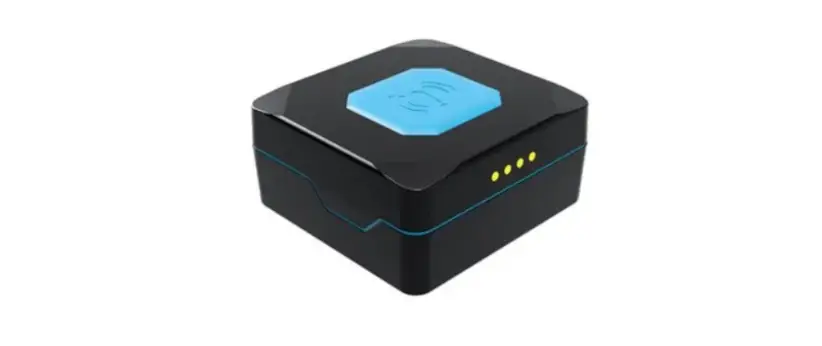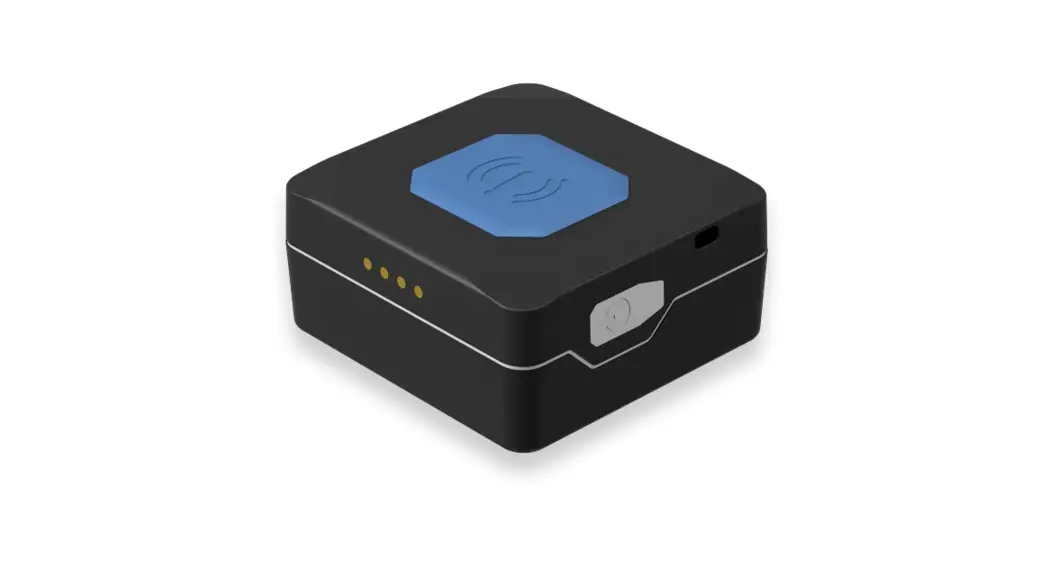
 TMT250
Mini Tracker Easy
User Manual
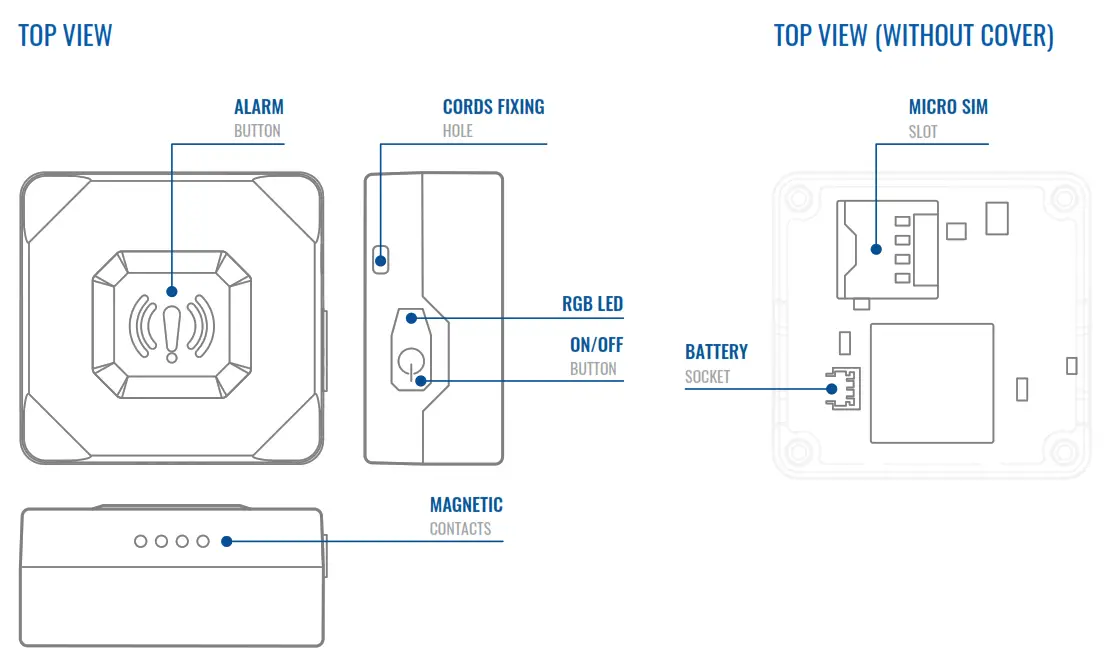
KNOW YOUR DEVICE
SET UP YOUR DEVICE
HOW TO INSERT MICTO-SIM CARD AND CONNECT THE BATTERY
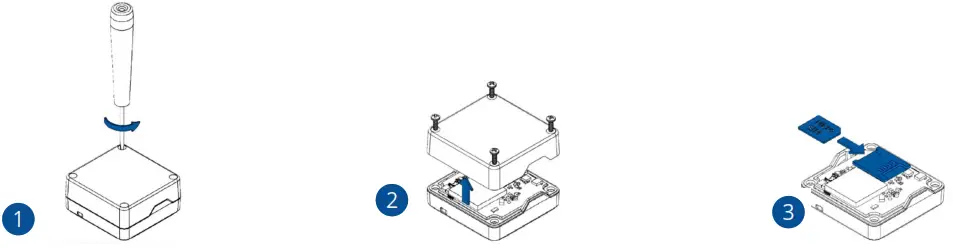
- COVER OPENING
Unscrew 4 screws counterclockwise - COVER REMOVAL
Remove the cover. - REMOVING PROTECTION
Insert Micro-SIM card as shown with PIN request disabled or read Wiki¹ how to enter it later in Teltonika Configurator² . Make sure that Micro-SIM card cut-off corner is pointing forward to slot.
¹wiki.teltonika-mobility.com/view/TMT250_Security_info#SIM_Card
²wiki.teltonika-mobility.com/view/Teltonika_Configurator
- BATTERY CONNECTION
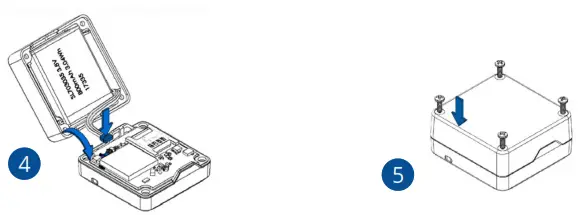
Connect the battery as shown to the device.
After configuration, see PC Connection (WINDOWS)¹. When it is done, reattach the cover and push it in place.
¹Page 5, “PC Connection (Windows)” - ATTACHING COVER BACK
Attach device cover back and screw in all 4 screws.
PC CONNECTION (WINDOWS)
- Connect device to computer using Magnetic USB cable or Bluetooth connection:
• Using Magnetic USB cable
• You will need to install USB drivers, see “How to install USB drivers (Windows)¹ ”
• Using Bluetooth
• TMT250 Bluetooth is enabled by default. Turn on Bluetooth on your PC, then select Add Bluetooth or other device > Bluetooth. Choose your device named – “TMT250_last_7_imei_digits”, without LE in the end. Enter default password 5555, press Connect and then select Done. - You are now ready to use the device on your computer.
HOW TO INSTALL USB DRIVERS (WINDOWS)
- Please download COM port drivers from here
- Extract and run TeltonikaCOMDriver.exe.
- Click Next in driver installation window.
- In the following window click Install button.
- Setup will continue installing the driver and eventually the confirmation window will appear. Click Finish to complete the setup.
¹wiki.teltonika-mobility.com/images/d/d0/TeltonikaCOMDriver.zip
CONFIGURATION (WINDOWS)
At first the device will have default factory settings set, unless pre-configured device settings are ordered. These settings should be changed according to the user’s needs. Main configuration can be performed via Teltonika Configurator¹ software. Get the latest Configurator versions from here². Configurator operates on Microsoft Windows OS and uses prerequisite MS .NET Framework. Make sure you have the correct version installed.
¹wiki.teltonika-mobility.com/view/Teltonika_Configurator
²wiki.teltonika-mobility.com/view/TMT250_Stable_firmware
MS .NET REQUIREMENTS
| Operating system | MS .NET Framework version | Version | Links |
| Windows Vista Windows 7 Windows 8.1 Windows 10 | MS .NET Framework 4.6.2 | 32 and 64 bit | www.microsoft.com¹ |
¹dotnet.microsoft.com/en-us/download/dotnet-framework
Downloaded Configurator will be in compressed archive.
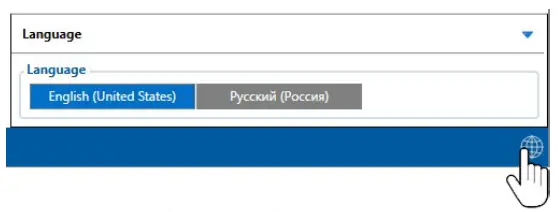
Extract it and launch Configurator.exe. After launch software language can be changed by clicking in the right bottom corner. Turn On device by connecting Magnetic USB cable or pressing Power On button for 2 sec. When device is turned on LED should start blinking. Then connect device to computer using Magnetic USB cable. For configuration also can be used Bluetooth (Device Bluetooth is enabled by default, default password 5555) connection.
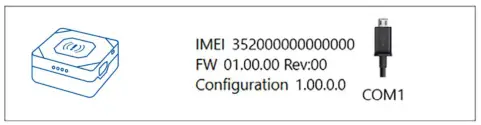
Configuration process begins by pressing on connected device.
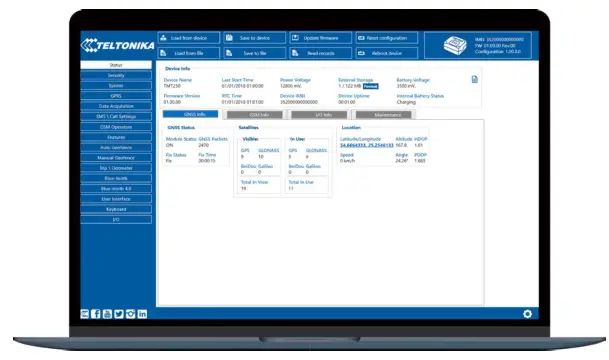
After connection to Configurator Status window will be displayed.
Various Status window 1 tabs display information about GNSS 2 , GSM 3 , I/O 4 , Maintenance 5 and etc. TMT250 has one user editable profile, which can be loaded and saved to the device. After any modification of configuration the changes need to be saved to device using Save to device button. Main buttons offer following functionality:
 | Load from device – loads configuration from device. |
| Save to device – saves configuration to device. | |
| Load from file – loads configuration from file. | |
| Save to file – saves configuration to file. | |
| Update firmware – updates firmware on device. | |
| Read records – reads records from the device. | |
| Reboot device – restarts device. | |
| Reset configuration – sets device configuration to default. |
Most important configurator section is GPRS – where all your server and GPRS settings 6 can be configured and Data Acquisition 7 – where data acquiring parameters can be configured. More details about TMT250 configuration using Configurator can be found in our Wiki8
1wiki.teltonika-mobility.com/view/TMT250_Status_info
2wiki.teltonika-mobility.com/view/TMT250_Status_info#GNSS_Info
3wiki.teltonika-mobility.com/view/TMT250_Status_info#GSM_Info
4wiki.teltonika-mobility.com/view/TMT250_Status_info#I.2FO_Info
5wiki.teltonika-mobility.com/view/TMT250_Status_info#Maintenance
6wiki.teltonika-mobility.com/view/TMT250_GPRS_settings
7wiki.teltonika-mobility.com/view/TMT250_Data_acquisition_settings
8wiki.teltonika-mobility.com/view/TMT250_Configuration
QUICK SMS CONFIGURATION
Default configuration has optimal parameters present to ensure best performance of track quality and data usage.
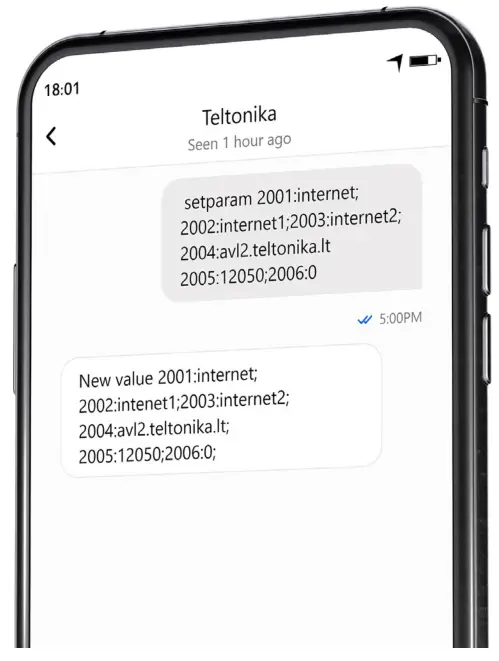
Quickly set up your device by sending this SMS command to it:

Note: Before SMS text, two space symbols should be inserted.
GPRS SETTINGS:
- 2001 – APN
- 2002 – APN username (if there are no APN username, empty field should be left)
- 2003 – APN password (if there are no APN password, empty field should be left)
SERVER SETTINGS: - 2004 – Domain
- 2005 – Port
- 2006 – Data sending protocol (0 – TCP, 1 – UDP)
DEFAULT CONFIGURATION SETTINGS
MOVEMENT AND IGNITION DETECTION:
 | MOVEMENT will be detected by accelerometer |
DEVICE MAKES A RECORD ON MOVING IF ONE OF THESE EVENTS HAPPEN:
 | 120 seconds passes |
 | TRAVELED DISTANCE 100 meters |
 | ANGLE DIFFERENCE between last coordinate and current position is greater than 10° degrees |
 | SPEED DIFFERENCE between last coordinate and current position is greater than 10 km/h |
DEVICE MAKES A RECORD ON STOP IF:
 | 1 Hour passes |
RECORDS SENDING TO SERVER:
 | IF DEVICE HAS MADE A RECORD 120 sec on move and 600 send on stop |
After successful SMS configuration, TMT250 device will synchronize time and update records to configured server. Time intervals
and default I/O elements can be changed by using Teltonika Configurator¹ or SMS parameters².
¹wiki.teltonika-mobility.com/view/Teltonika_Configurator_Introduction
²wiki.teltonika-mobility.com/view/TMT250_Parameter_list
TROUBLESHOOTING
TMT250 DOESN’T SEND DATA TO YOUR CONFIGURED SERVER:
- Check if the device is turned on.
- Check if the SIM card is properly inserted.
- Check if the device has registered to the network.
- Data Acquisition settings are configured correctly.
- Check if your APN, Domain and Port are entered correctly and GPRS
IF THE DEVICE IS NOT DETECTED BY THE PC OR CONFIGURATOR WHILE PLUGGED IN:
- Check if the device is turned on and the battery is charged to a
- sufficient level.
- Try using a different COM port.
- Try different Micro-USB cable.
- Reinstall Teltonika COM Driver.
- Reinstall MS .NET Framework.
More information about troubleshooting can be found in here¹:
¹wiki.teltonika-mobility.com/view/FAQ
If these recommendations did not help, please contact your sales manager or contact us directly through Teltonika VipHelpDesk.
Find recommendations on how to fill in a query in our FAQ page in the Teltonika Wiki Knowledge base.
MOUNTING RECOMMENDATIONS
We recommend using the device in such a way, that device buttons an LEDs are easily and quickly accessible.
When using the Man-down feature, the device must be stably fixed in the configured base position.
LED INDICATIONS
DEFAULT STATUS LED INDICATIONS
| BEHAVIOUR | MEANING |
| Red LED flashes frequently | GSM Error |
| Green LED flashes frequently | No GPS Fix |
| Green LED flashes rarely | GPS Fix |
| Red LED and vibration on for 2 sec | Device off |
| Green LED and vibration on for 2 sec | Device on |
| Green LED flashes periodically | I Am Alive |
| Green LED flashes periodically | Charging |
| Green LED on all the time | Fully Charged |
| Red LED flashes | Charger Error |
| Red LED flashes when the level of the battery is 10% | Battery Low |
MODULE
| Name | Teltonika TM2500 |
| Technology | 2G (GSM/GPRS) / GNSS/Bluetooth (4.0 + LE) |
GNSS
| GNSS | GPS, GLONASS, GALILEO, BEIDOU |
| Receiver | Tracking: 33 |
| Tracking sensitivity | -165 dBM |
| Position accuracy | < 3 m |
| Velocity accuracy | < 0.1m/s (within +/- 15% error) |
| Hot start | < 1 s |
| Warm start | < 25 s |
| Cold start | < 35 s |
CELLUAR
| Technology | GSM/GPRS |
| 2G bands | Quad-band GSM 850 / 900 / 1800 / 1900 MHz |
| Data transfer | GPRS: Max 107Kbps (DL)/Max 85.6Kbps (UL) |
| Data support | SMS (Text/Data) |
POWER
| Internal battery | 3.8 V 800 mAh rechargeable Lithium-ion polymer battery |
BLUETOOTH
| Specification | Bluetooth 4.0 + LE |
| Supported peripherals | Bluetooth LE Movement sensors, LE Magnet sensors, LE Temperature and Humidity sensors and LE Temperature sensors support, iBeacon and Eddystone beacon support |
PHYSICAL SPECIFICATION
| Dimensions | 44 x 43 x 20 mm (L x W x H) |
| Weight | 40 g |
INTERFACE
| GNSS antenna | Internal High Gain |
| Cellular antenna | Internal GSM High Gain |
| USB | 4 pin magnetic USB Cable |
| LED indication | 1 RGB LED |
| SIM | Micro-SIM |
| Memory | 128 MB internal flash memory |
OPERATING ENVIRONMENT
| Operating humidity | Under 85% non-condensing |
| Ingress Protection Rating | IP67 |
| Battery charge temperature | 0 °C to +45 °C |
| Battery discharge temperature | -20 °C to +58 °C |
| Battery storage temperature | -20 °C to +45 °C for 3 months |
FEATURES
| Sensors | Accelerometer |
| Scenarios | Alarm button, Man-down detection, Inside tracking, Movement/No Movement Events, 50 Manual Geofence zones, Over Speeding, Action on call feature, on Demand Tracking, Smart algorithm of GPRS data sending for GPRS traffic saving, Asset tracking |
| Sleep modes | Online Deep Sleep, Deep Sleep, Ultra Deep Sleep, GPS Sleep, Low power mode |
| Configuration and firmware update | FOTA Web, Teltonika Configurator (USB, Bluetooth) |
| SMS | Configuration, Events, Debug |
| GPRS commands | Configuration, Debug |
| Time | |
| Synchronization | GNSS, NITZ, NTP |
CERTIFICATION & APPROVALS
| Regulatory | CE/RED, EAC, Anatel, UKCA, RoHS, REACH, IP67 |
SAFETY INFORMATION
This message contains information on how to operate TMT250 safely. By following these requirements and recommendations, you will avoid dangerous situations. You must read these instructions carefully and follow them strictly before operating the device!
Limit the use of device in vehicles Please follow all restrictions. Wireless devices can interfere with other electronic equipment in vehicles.
Interference All wireless devices are sensitive to electromagnetic interference, as a result wireless devices affect the performance of each other.
Road safety first Comply with local traffic laws, always hold your hands on a steering wheel when using a device. Your safety is of importance when you drive.
Operate the device in suitable conditions Do not use the device where mobile connectivity is forbidden.
Limit the use of device in hospitals Please follow all restrictions. Turn off the device in the vicinity of medical devices when required
 Be cautious near flammable materials and liquids
Charging precautions SELV LPS chargers, personal computers or laptops that device will be connected to must comply with the requirements of IEC 60950:2005 standard.
Use only original batteries Using uncertified manufacturer or different type batteries may cause the device to malfunction or even explode
Use batteries safely Protect batteries from moisture. Place them in a cool and dry place when storing. Avoid extensive operation at high temperatures. Do not attempt charging battery directly from the electrical mains. All utilised batteries shall comply with IEC 62133.
Power supplies Power supply circuits used to charge the device connection must have safeguards, which prevent power leakage, short circuits or in- correct electrical grounding. Any used switches ought to be installed in a readily accessible location. Power must be uninterrupted and the distance between the contacts must be 3 mm or larger.
Other In order to prevent device from mechanical damage it is advisable to transport it in a shock–resistant packaging. If device stopped working properly regardless of the settings only a qualified specialist can help. It is recommended to contact your local seller or your UAB Teltonika manager in such a case.
Use the right screwdriver In order to prevent device’s cover from mechanical damage it is recommended to use screwdriver, which is included in the package. Do not use electrical screwdrivers.
Remove device safely Device must be disconnected from computer or charger by unplugging the magnetic USB cable from the device. Do not short circuit the battery or charging contacts. Exposing the metal strips of the battery to a close contact with a metallic object, such a coin, a clip or a set of keys can cause accidental short-circuiting and damage battery and other components. To be able to disconnect the charging cable from the mains as quickly as possible in the event of a failure, connect the power supply unit where it is easily accessible.
Charging precautions Do not attempt to charge a wet device. If you notice any visible damage to your GPS tracker or charging cable, do not use it
Battery should not be disposed of with general household waste. Bring damaged or worn-out batteries to your local recycling center or dispose them to the battery recycle bin found in stores. Never place the GPS tracker near an open fire or hot surfaces. Do not immerse the device in any liquids including salt water, ionized water, or soapy water, or alcoholic beverage. Liquid damage not covered under warranty. If you carry out repairs yourself, connect the GPS tracker incorrectly or operate it incorrectly, liability and warranty claims are excluded. Make sure that the GPS tracker (also when charging the battery) is kept away from heat sources and high temperatures, such as direct sunlight in a vehicle. Disregarding of this instruction may result in destruction of the battery and overheating, explosion and fire. Do not remove the battery with sharp or pointed objects. Do not drop, disassemble or modify it. Use only Teltonika Telematics approved batteries for replacement. Using uncertified manufacturer or different type batterie may cause the device to malfunction or even explode. If device is stored for a longer time, we recommend to remove battery from the device to prevent damage to battery life. Only use the original accessories or accessories with approved by technical support for the charging process. If the battery is charged otherwise, this may result in overheating, explosion or fire. Use only the original parts supplied to charge the GPS tracker. If the charging cable is damaged, replace it only with original accessories from the manufacturer or parts approved by our support team.
CERTIFICATION AND APPROVALS
 This sign on the package means that it is necessary to read the User‘s Manual before your start using the device. Full User‘s Manual version can be found in our Wiki¹
¹wiki.teltonika-mobility.com/view/TMT250 This sign on the package means that all used electronic and electric equipment should not be mixed with general household waste.
CHECK ALL CERTIFICATES
All newest certificates may be found in our Wiki¹
²wiki.teltonika-mobility.com/view/TMT250_Certification_%26_Approvals
WARRANTY
We guarantee our products 24-month warranty¹ period.
All batteries carry a 6-month warranty period.
Post-warranty repair service for products is not provided.
If a product stops operating within this specific warranty time, the product can be:
- Repaired
- Replaced with a new product
- Replaced with an equivalent repaired product fulfilling the same functionality
- Replaced with a different product fulfilling the same functionality in case of EOL for the original product
¹Additional agreement for an extended warranty period can be agreed upon separately.
WARRANTY DISCLAIMER
- Customers are only allowed to return products as a result of the product being defective, due to order assembly ormanufacturing fault.
- Products are intended to be used by personnel with training and experience.
- Warranty does not cover defects or malfunctions caused by accidents, misuse, abuse, catastrophes, improper maintenance or inadequate installation – not following operating instructions (including failure to heed warnings) or use with equipment with which it is not intended to be used.
- Warranty does not apply to any consequential damages.
- Warranty is not applicable for supplementary product equipment (i. e. PSU, power cables, antennas) unless the accessory is defective on arrival.
- More information on what is RMA¹
¹wiki.teltonika-gps.com/view/RMA_guidelines
Quick Manual v1.0 // TMT250
References
 Download .NET Framework | Free official downloads
-
wiki.teltonika-gps.com/view/RMA_guidelines
-
wiki.teltonika-mobility.com/view/
-
wiki.teltonika-mobility.com/view/FAQ
-
wiki.teltonika-mobility.com/view/Teltonika_Configurator
-
wiki.teltonika-mobility.com/view/TMT250
-
wiki.teltonika-mobility.com/view/TMT250_Certification_%26_Approvals
-
wiki.teltonika-mobility.com/view/TMT250_Configuration
-
wiki.teltonika-mobility.com/view/TMT250_Data_acquisition_settings
-
wiki.teltonika-mobility.com/view/TMT250_GPRS_settings
-
wiki.teltonika-mobility.com/view/TMT250_Stable_firmware
-
wiki.teltonika-mobility.com/view/TMT250_Status_info
-
wiki.teltonika-mobility.com/view/TMT250_Status_info#GNSS_Info
-
wiki.teltonika-mobility.com/view/TMT250_Status_info#GSM_Info
-
wiki.teltonika-mobility.com/view/TMT250_Status_info#I.2FO_Info
-
wiki.teltonika-mobility.com/view/TMT250_Status_info#Maintenance
 Download .NET Framework | Free official downloads
 wiki.teltonika-gps.com/view/RMA_guidelines
 wiki.teltonika-mobility.com/view/