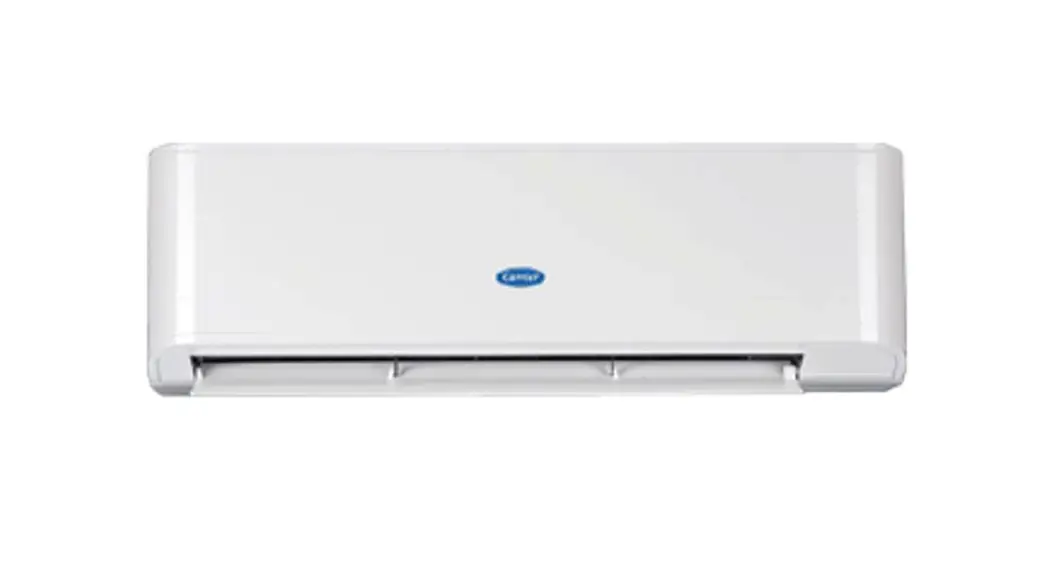
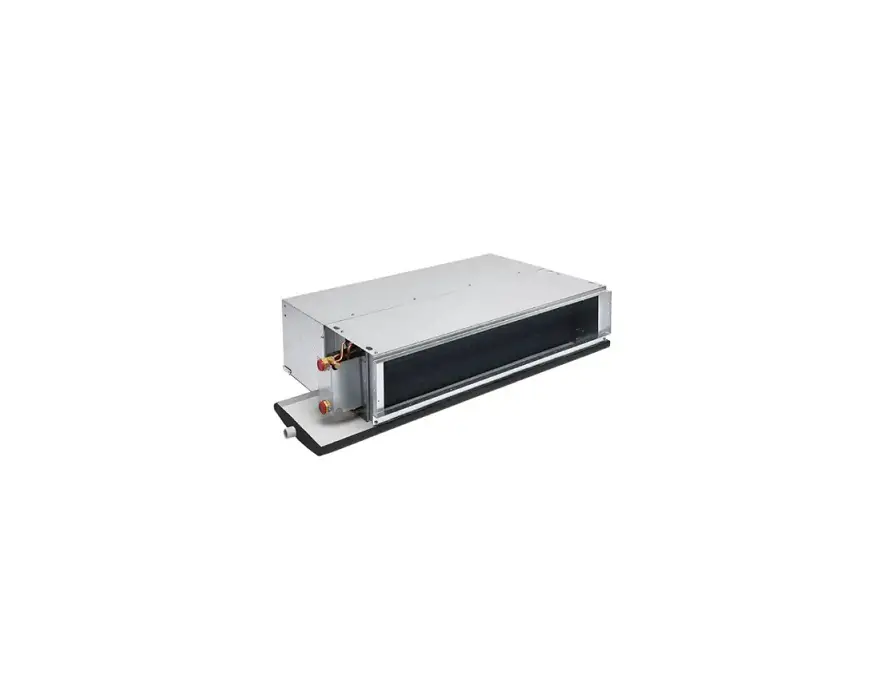
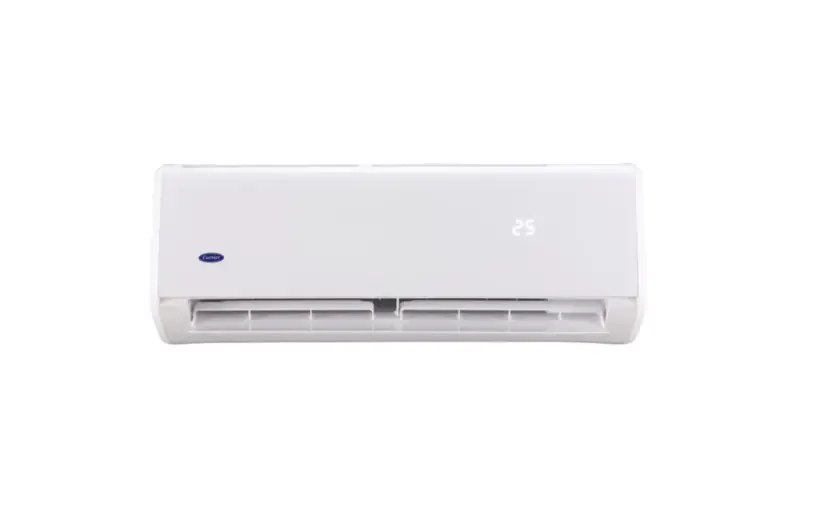
 42VLJ Fan Cool Unit Air Conditioner
User Manual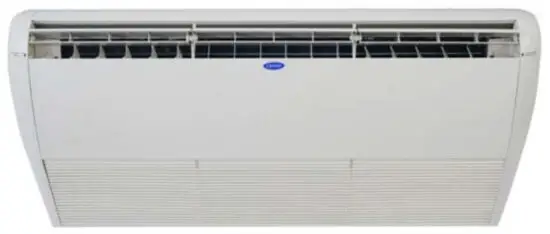
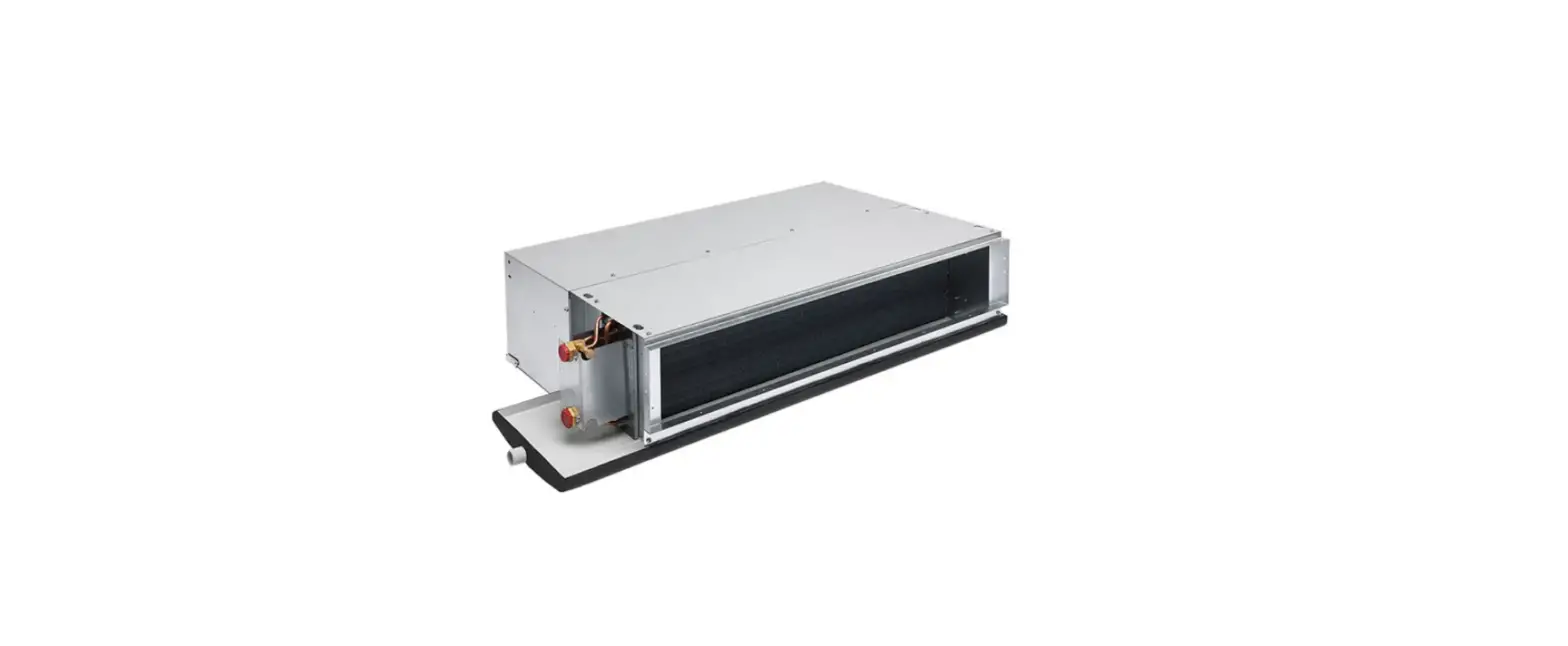
Fan Coll Unit
Model Name:
Floor/ Ceiling Type
42VLJ 42VLY 42VLG
42VLU 42VFS
Safety Precautions
Caution
- Read the operation and maintenance manual carefully before using the air conditioner. There are many important things to keep in mind during daily use.
- Do not use any refrigerant that is different from what is indicated on the label for supplyment or replacement. Otherwise, it may cause abnormally high pressure to build up in the cooling cycle which could cause an operation failure or an explosion or personal injury.
- Ask the installer about the circuit breaker switch position if there is any problem with the unit. Tum the breaker switch to the OFF position and contact the service.
- Only use accessories and installation parts must be as described.
Otherwise, it may result in a water leak, electrical shock, or fire. - Before opening the intake grille of the indoor unit or service panel of the outdoor unit, tum the circuit breaker to the OFF position. Otherwise, a short circuit may occur or you may get injured from touching the rotating parts. Only a qualified Installer or qualified service person Is allowed to do this work.
- Do not move the unit by yourself due to the high voltage inside the unit you may get an electric shock while removing the cover.
- Do not touch the aluminum heatsinks inside the unit as this may cause injury.
- Do not expose the body to direct cold air for a long time and do not expose the body to too much cold as it can cause physical decline and illness.
- Consult your dealer that have you purchased the air conditioner if the unit does not cool properly it may be caused by a refrigerant leak. Be sure to double-check with maintenance service when they charge refrigerant costs.
- Before cleaning the unit you should tum off the unit and cut off the power supply otherwise you may get injured from touching the rotating parts.
If there is any problems (e.g. display error, burning smell, unusual sound, water leak … ) in the air conditioner. Do not touch the unit by yourself, you should cut off power supply and call maintenance service to check. If you still use the unit in problematic conditions it may damage the unit operating mechanism or electric shock or other problems. - Do not customize the unit by yourself as this could result in a fire, electric shock, or other problems.
- When relocating the unit do not it by yourself, contact the installer or a qualified service. Improper relocation can cause electric shock and/or a fire.
Wireless remote
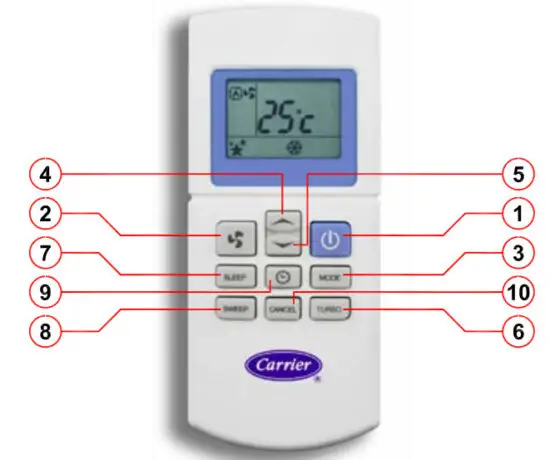
The wireless remote has 10 buttons as follows:
 | POWER: Press to turn on/off the air conditioner. FAN: Press to adjust the fan speed. MODE: Press to select the operation mode. FAN->COOL->DRY. UP: Press to increase set point temperature or TIMER. DOWN: Press to decrease set point temperature or TIMER. TURBO: Press to operate turbo function, press again to cancel. SLEEP: Press to operate the sleep function, press again to cancel. SWEEP: Press to operate the sweep function, press again to cancel. CLOCKfTIMER: Press to set time function and turn on/off TIMER. CANCEL: Press to cancel TIMER. |
Receiver display
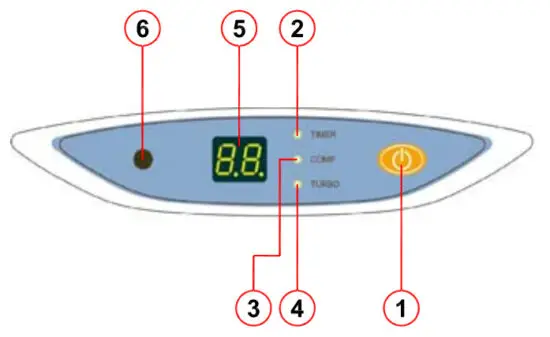
The wireless remote has 10 buttons as follows:
 Power oaten on the e-tray is only used to tom on/off the air conditioner in case of emergency (in the absence of a wireless remote) the unit will operate at 24°C and the fan will be in automatic mode.
- O TIMER: show the status of TIMER operation (tum on/off the power). The TIMER led will light up.
- O MP: show the status of COMPRESSOR operation.
The COMP led will light up. - O TURBO: show the status of TURBO operation.
The TURBO led will light up. - Digits show temperature
1. Showroom temperature
2. Show the set temperature when it is set by the user. - The remote control receiver position
 Power oaten on the e-tray is only used to tom on/off the air conditioner in case of emergency (in the absence of a wireless remote) the unit will operate at 24°C and the fan will be in automatic mode.
How to use the controller
- When the air conditioner receives a correct signal from the remote control, a “peep” sound will sound.
- When the signal from the remote control is blocked by an obstruction, the command will not respond.
- If you press 2 buttons at the same time, the operation may fail.
 POWER
POWER
Pressto turn on/off the air conditioner. It will run according to the last program which is set on the remote and display the room temperature at ºc. FAN
FAN
Pressto adjust the fan speed in the following sequence : Auto fan
• If the difference is ≥ 3°C, the fan will operate at high speed.
• If the difference is 2°C, the fan will operate at medium speed.
• If the difference is s 1 ºC, the fan will operate at a low speed.
 MODE
MODE
Press to select the operation mode. FAN->COOL->DRY.
FAN MODE: The unit will operate a fan only and display show fan status. can not set and
and .
.
COOL MODE: The display shows cool status and operation.
• Compressor will start when the room temperature is higher than the set point + 1°C.
• Compressor will stop when room temperature s set point and need 3 minutes delay for starting run again.
DRY MODE: The display shows the dry status (Select this mode when you want to reduce the humidity in the room).- 5 TEMPERATURE SETTING
Press to adjust room temperature (Setting range 18-30°C).  TURBO
TURBO
Pressdisplay shows turbo status and operates at maximum fan speed.
• cancel by pressingagain or press
• When canceling the turbo function, fan speed will come to the previous setting.
• When operating at DRY MODE, the Turbo function will not operate.- SLEEP
Pressdisplay show symbol
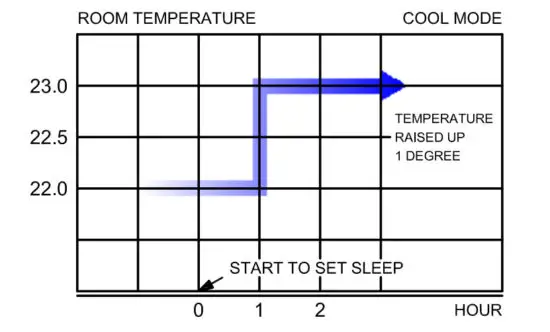
• Setting temperature will increase 1 ºC in every 1 hour automatically. • Cancel the SLEEP function by pressing again.
• When operating in sleep mode, if the temperature is adjusted, the temperature will increase or decrease 1 ºC different from the last temperature.
• Sleep mode will cancel automatically when you tum off or black out. - SWEEP
Pressthen louver will swing for air distribution, press again for cancel. The louver will tum on/off automatically when the unit is turned on/off.  CLOCK/TIMER
Pressto set the time at remote or set timer on-off by Set CLOCK
• Pressthen the symbol on the remote will bink.
• Pressto set the time.
• Pressagain to confirm. Walt for about 10 seconds then the display will show the main menu. CANCEL
Press to El previous setting
• Press land hold when symbol ON or OFF blinks and disappears.
• Press then symbol ON or OFF will close.
 POWER
POWER FAN
FAN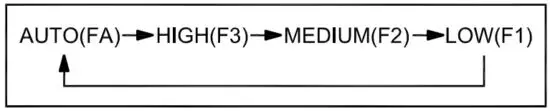 Auto fan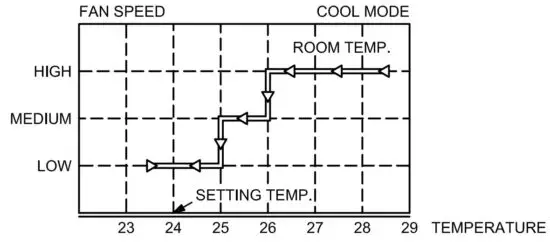
 MODE
MODE and
and .
. TURBO
TURBO
 • Cancel the SLEEP function by pressing
 CLOCK/TIMER
 on the remote will bink.
 CANCEL
How to turn on/off the air conditioner in case of the remote loss and error lights show up
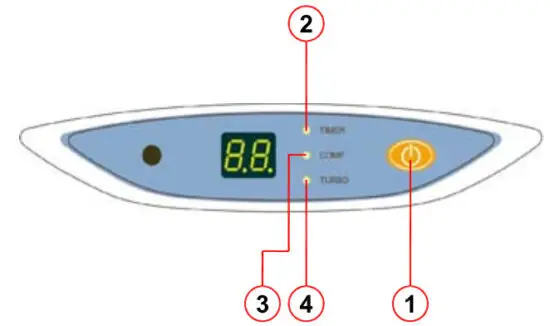
- EMERGENCY BUTTON
• Emergency button on the display is used to tum on/off the unit in
case of the remote loss.
• The unit will operate at the set temperature of 24°C and the fan is
in automatic mode.
• When you press this button it will deactivate the timer and sleep
function automatically.
• When you press this button it will deactivate the turbo function and
the fan is in automatic mode. - O TIMER LED
TIMER led on the display will blink when there Is a lack of power/
a short circuit at ROOM SENSOR. - O COMP LED
COMP led on the display will blink when there is a lack of power/
a short circuit at SENSOR FREEZE. - O TURBO LED
TURBO led on the display will blink when there is a FREEZE.
Wire remote
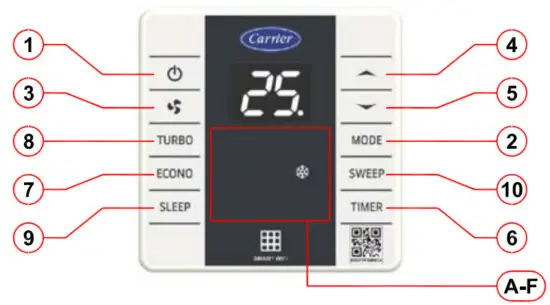
The wired remote has 10 buttons as follows:
  | POWER: Press to tum on/off the air conditioner. MODE: Press to select the operation mode. FAN->COOL->DRY. FAN: Press to adjust fan speed (AUTO->HIGHT->MEDIUM-> LOW MODE). UP: Press to Increase set point temperature or TIMER. DOWN: Press to decrease set point temperature or TIMER. TIMER: Press to set time function and tum on/off TIMER. ECONO: Press to operate the Econo function, and press again to cancel. TURBO: Press to operate turbo function, press again to cancel. SLEEP: Press to operate the sleep function, press again to cancel. SWEEP: Press to operate the sweep function, press again to cancel. |
Indicator light: there are 6 LEDs divided into:
 | FAN LED: show status of FAN operation. COOL LED: show status of COOL MODE or DRY MODE. TIMER LED: show status of TIMER operation. ECONO LED: show the status of ECONO MODE. TURBO LED: show the status of TURBO operation. SLEEP LED: Show the status of setting automatic temperature while sleeping. |
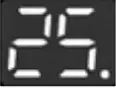 LED 7-SEGMENT: show room temperature and show SETTING TEMPERATURE/ FAN SPEED/TIMER when the user sets it. (Decimal point show status of compressor operation)
- POWER
Press the button (when power is off) then the air conditioner will run according to the last program which is set on the remote and display the room temperature at ºC. When the unit is off the display shows nothing except TIMER (if it is set). - MODE
Press MODE to select operation mode (FAN and COOL MODE)
– FAN MODE: The unit will operate fan only and the display show fan status.
– COOL MODE: The unit will operate in cool mode as follows:
• Compressor will start when room temperature higher than set point > 1°C
• Compressor will stop when room temperature s set point and need 3 minutes delay for starting run again. - FAN
Pressthe button (only In FAN MODE and COOL MODE) to adjust fan speed In the following sequence: When the unit operates in FAN MODE and COOL MODE, the FAN AUTO will operate as follows:
• If the difference is ≥ 3C, the fan will operate at high speed.
• If the difference is 2°C, the fan will operate at medium speed.
• If the difference is s 1 ºC, the fan will operate at a low speed.
 5
5  TEMPERATURE SETTING
Press/ to adjust room temperature(Setting range 18-30°C)TIMERTIMER
PressTIMERbutton to set the time tum on/off the power.
How to set TIMER
• PressTIMERbutton, when the TIMER led, Is off to set TIMER (press this button when power off to set time to tum on and vice versa).
• Press/to set the time.
• Wait about 5 seconds then the display will show the main menu.
How to cancel TIMER
• PressTIMERbutton again to cancel.ECONOECONO
PressECONObutton when the unit operates in COOL MODE to set ECONO function then ECONO led on the display will be displayed and the system will operate in the energy saving mode (The unit will operate at 25°C and AUTO FAN). PressECONOthe button again to cancel.TURBOTURBO
Press theTURBObutton when the unit operates in FAN MODE or COOL MODE to tum on the TURBO function then TURBO led will be displayed and the fan will operate at a special speed (TURBO SPEED). PressTURBOthe button again to cancel the TURBO function or press thebutton to adjust the fan speed.SLEEPSLEEP
PressSLEEPbutton (in COOL MODE only) to tum on the SLEEP function.
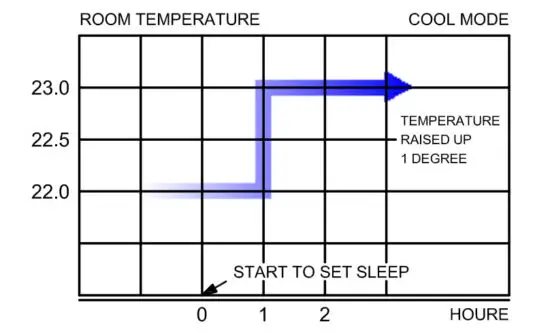
The system will control temperature while we are sleeping. In COOL MODE the temperature will increase 1 ºC after we have slept for 1 hour then the unit Is back to normal operation and the SLEEP symbol disappeared.• Press SLEEPthe button again to cancel.
• In SLEEP FUNCTION if you adjust the temperature, SLEEP will operate according to the last temperature.
• In SLEEP FUNCTION if you change another mode, SLEEP will be canceled.
• In SLEEP FUNCTION if the unit stops working (short circuit or on/off power) SLEEP will be canceled.SWEEPSWEEP
PressSWEEPthen the louver will swing for air distribution, and press again for cancel. The louver will tum on/off automatically when the unit is turned n/off.
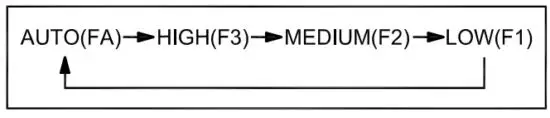 When the unit operates in FAN MODE and COOL MODE, the FAN AUTO will operate as follows: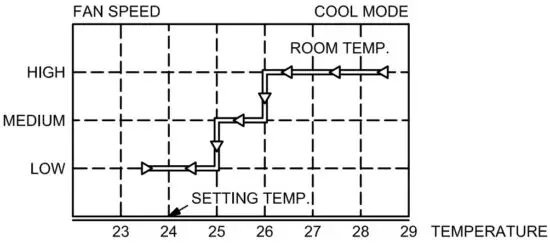
 5
5  TEMPERATURE SETTING
 • Press
 Alarm indication when there is a crash
 | TIMER LED will blink when there is a lack of power/a short circuit at the ROOM SENSOR and the Led 7 segment will show ES ECONO LED will blink when there Is a lack of power/a short circuit at SENSOR FREEZE and the Led 7 segment will show E9 TURBO LED will blink when there Is a FREEZE and the Led 7 segment will show E1 |
More detail
- In the control system when there is an error due to the computer system which may be caused by unstable voltage or interference, the system will prompt the computer to restart (RESET) immediately.
- In case of power failure when the power returns to normal operation, the system will run according to the last program which is set including swing value and without remembering SLEEP and TIMER values.
If any value has changed it must be stored in memory for at least 5 seconds before the power failure occurs when the power returns the system will run according to the values in memory. - In the case of compressor stops working there must always be 3 minutes delay before resuming again and in case of disconnecting the power supply system and then re-supplying the power there must be 3-4 minutes delay in compressor operation at random.
- In the case of compressor starts to work it must work for at least 24 seconds before It can stop or even change mode or tum off the power.
The brightness of LED and 7-SEGMENT can be adjusted by pressing and holding the button sue» and — for 5 seconds. Press again to back to normal. The adjustments are memorized In the air conditioner. - WIFI ENABLE/DISABLE: Press and hold the button and set wifi enable or disable.
- The minimum temperature can be set to 21 ºC by pressing and holding the button and IC for 5 seconds. Press again for cancel.
Maintenance
When using the air conditioner for a certain distance, the air conditioner may produce less cooling, it should be maintained as follows.
- Tum off the main power switch to cut off the power to the unit.
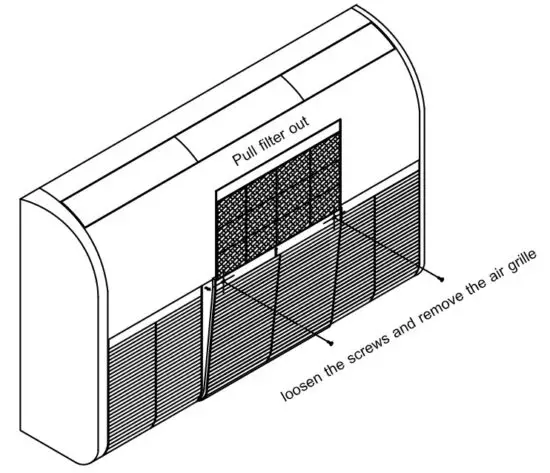
- Remove the air filter and clean it with soap or detergent, rinse with clean water, and dry under the sun at least once a month.

- Cooling coil cleaning can be done by using a sponge with liquid soap to rub over the fan coil and brush it with a soft metal brush. (Only trained and certified technicians do this work)
Crash check
Please check the following items before calling maintenance service.
Because you may be able to fix it. If after checking still malfunctions please shut off the air conditioner and consult with your distributor.
| Malfunction | Preliminary Checking |
| The air conditioner not working | >Check wires that missing or not. >Check the electric current crash or not. >Check remote control that set up time is correct or not. |
| Cooling capacity drop | >Check Temp. set up suitable or not. >Check that the sunlight is in the room directly or not. >Check the door and windows it open or not. >Check condensing unit and fan coil unit whether there is anything to block the airflow or not. >Check whether there are too many heat sources in the room or not. >Check whether the ventilator is working or not. >Check the air filter that dirty or not. |
| There is vapor or smoke out of the air conditioner while working | >Cause may be from the heat in the room reacting with the cold out of the air conditioner. |
| Remote control not working | >Battery expired. >Check pole of battery that put it right or not. |
Note
Carrier (Thailand) Co., Ltd
1858/63-74 FI. 14-15
Debaratana KM. 4.5 Str., South Bangna Ward,
Bangna Dist., Bangkok 10260
Carrier Call Center
Tel: 02-090-9900  http://www.carrier.co.th/register/ewarranty.asp