
Portable Charger Guide
SEPTEMBER 2021
PRODUCT NUMBER PT00045331
© 2021 Rivian Automotive, LLC. All rights reserved.
All information in this document and all vehicle software is subject to copyright and other intellectual property rights of Rivian Automotive, LLC, its affiliates, or its licensors. This material may not be modified, reproduced, or copied, in whole or in part, without the prior written permission of Rivian Automotive, LLC, its affiliates, or its licensors. Unless indicated otherwise, all trademarks are owned and registered by Rivian Automotive, LLC, its affiliates, or its licensors in the United States and/or other countries. Please visit https://www.rivian.com/legal/brand for Rivian’s trademarks and service marks. Software embedded or accessed by the vehicle may utilize open source software. Please visit https://www.rivian.com/legal/open-source for more information.
IMPORTANT SAFETY INSTRUCTIONS

SAVE THESE INSTRUCTIONS
Before you use the Portable Charger, read all the instructions. Follow the safety instructions and warnings in this guide to reduce the risk of fire, electrical shock, serious injury, or death.
Precautions
INSTRUCTIONS PERTAINING TO A RISK OF FIRE OR ELECTRIC SHOCK
WARNING — When using electric products, basic precautions should always be followed, including the following. This guide contains important instructions for model PT00045331 that shall be followed during installation, operation, and maintenance of the unit.
- Don’t use the Portable Charger outside of the guidelines detailed in this guide.
- The Portable Charger works with Rivian vehicles only. Don’t use the Portable Charger for any other purpose or to charge any other vehicle.
- Don’t use the Portable Charger if it is defective or damaged in any way or if it doesn’t work.
- Don’t use the Portable Charger if the controller, the plug, the flexible power cord or EV cable is broken, cracked, or open or shows any other damage.
- Don’t tamper with or try to service the Portable Charger by taking it apart. It’s not user-serviceable. Contact Rivian for repair.
- Don’t twist or place significant strain on the Portable Charger. Don’t apply excess force to or impact the Portable Charger controller.
- Don’t expose the Portable Charger to flammable or harsh chemicals or vapors.
- Don’t use or store the Portable Charger in a recessed area or below floor level. When using the Portable Charger inside, such as in a garage, position the Portable Charger controller at least 18 in (450 mm) above floor level.
- Don’t attempt to attach Portable Charger adapters to electrical outlets not listed in this guide.
- Don’t plug the Portable Charger adapter into an extension cord, power converter, power strip, or any type of power adapter.
- Don’t plug the Portable Charger adapter into a damaged, loose, or worn electrical outlet. Fit the Portable Charger adapter snugly into the electrical outlet socket.
- Only plug the Portable Charger adapter into an electrical outlet that is properly grounded (page 7).
- Only unplug the Portable Charger adapter from the electrical outlet after charging is complete.
- Don’t plug the Portable Charger into an electrical outlet or unplug it from a power outlet that is underwater or in snow. If the charger is plugged into an electrical outlet, turn off the breaker before unplugging it.
- Don’t charge the vehicle if you, the vehicle, or the Portable Charger is exposed to severe weather.
- Don’t expose the electrical connectors on the Portable Charger plug, adapter, or controller to moisture or water.
- Don’t use the Portable Charger if there is water damage or corrosion.
- Don’t allow unsupervised children in the area while the Portable Charger is charging a vehicle.
- Don’t place fingers in the vehicle charge port.
- Maximum operating ambient temperature is 122°F (50°C).
- Read all instructions before using this product.
Grounding Instructions
This product must be grounded. If it should malfunction or break down, grounding provides a path of least resistance for electric current to reduce the risk of electric shock. This product is equipped with a cord having an equipment grounding conductor and grounding plug. The plug must be plugged into an appropriate electrical outlet that is properly installed and grounded in accordance with all local codes and ordinances.
 Improper connection of the equipment-grounding conductor is able to result in a risk of electric shock. Check with a qualified electrician or serviceman if you are in doubt as to whether the product is properly grounded. Do not modify the plug provided with the product — if it will not fit the outlet, have a proper outlet installed by a qualified electrician.
Safety Symbols on Hardware Labels
The following symbols may appear on labels on the Portable Charger.
 | Risk of Electric Shock |
 | Danger |
 | Equipment Ground |
 | Instruction Manual |
 | UL Logo |
Parts Diagram
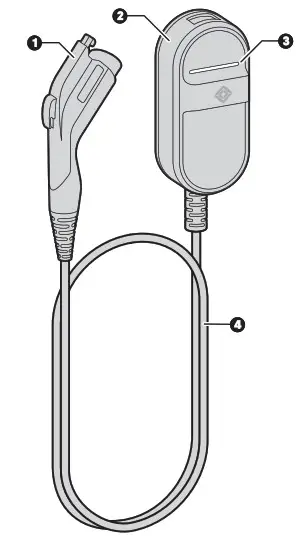
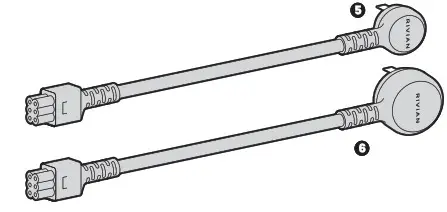
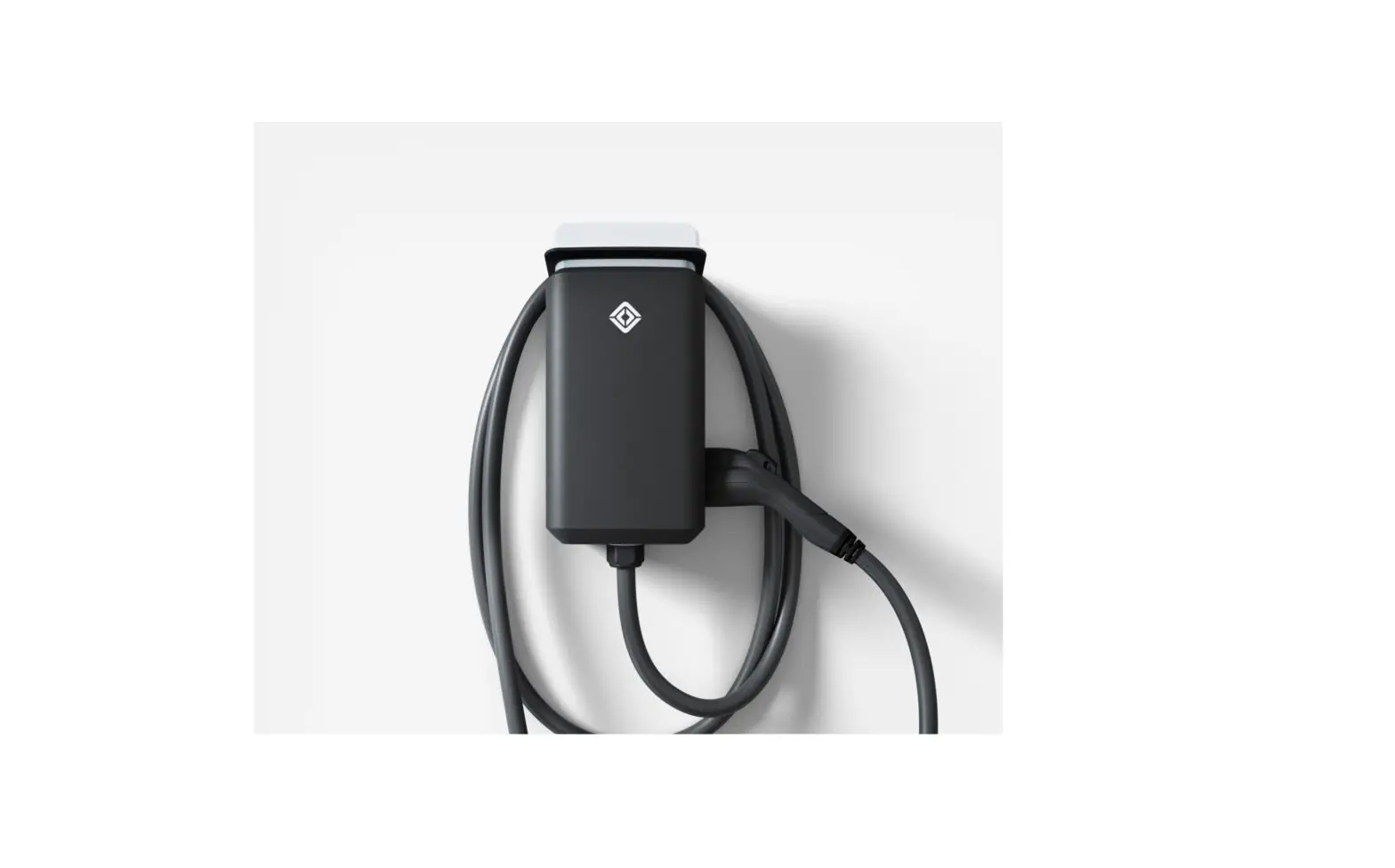
Rivian Portable Charger (PT00045331)
| 1. Plug 2. Controller 3. Light bar | 4. Cable 5. 120 V AC charge adapter 6. 240 V AC charge adapter |
Attach or Remove an Adapter
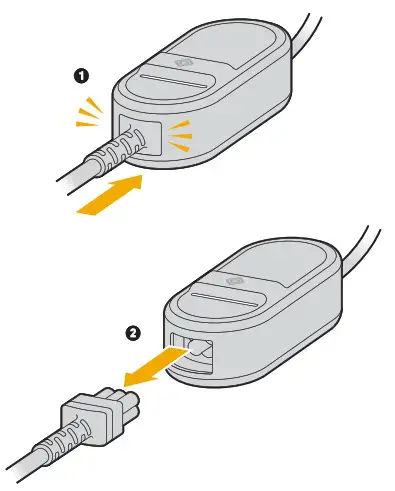
- To attach an adapter to the Portable Charger, push the adapter connector into the cable controller port until the adapter connector clicks into place.
- To remove an adapter, pull the adapter connector out of the cable controller port.
NOTE
To carry or move the Portable Charger, lift the controller carefully. Don’t carry it by the cable or adapter.
OPERATING INSTRUCTIONS
- Before you attach the Portable Charger to an electrical outlet, check the Portable Charger and the electrical outlet for damage. If either is damaged, don’t attach the Portable Charger to the electrical outlet.
- Use only a 120 V, 208 V, or 240 V AC power supply with a 50/60 Hz wall outlet with a dedicated and properly grounded circuit rated for the adapter you’re using. Follow the grounding instructions (page 7).
Attach and Charge
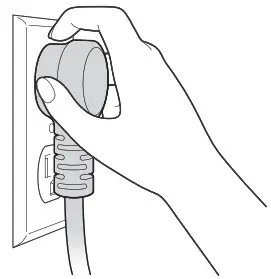
- Plug the Portable Charger adapter all the way into a grounded electrical outlet until it’s securely connected and pushed all the way in.
NOTE
If possible, use a dedicated outlet with a single socket. If the outlet has two sockets, don’t plug anything else into the other socket. - Open the charge port door on the vehicle. The light ring around the vehicle charge port glows white.
- Plug the Portable Charger into the vehicle’s charge port.
Track Duration of Charge
Charge time can change depending on:
- Power voltage and current
- Battery temperature
- Ambient temperature
During a charge session, you can see data such as charge progress, time remaining to charge, and mileage estimates on the driver display or in the mobile app. Use the information in the table below to help calculate charge rates.
| Adapter | Current | Voltage | Power |
| 5-15 120 V | 12:00 AM | 120 V | 1.3 kW |
| 14-50 240 V | 32 A | 240 V | 7.6 kW |
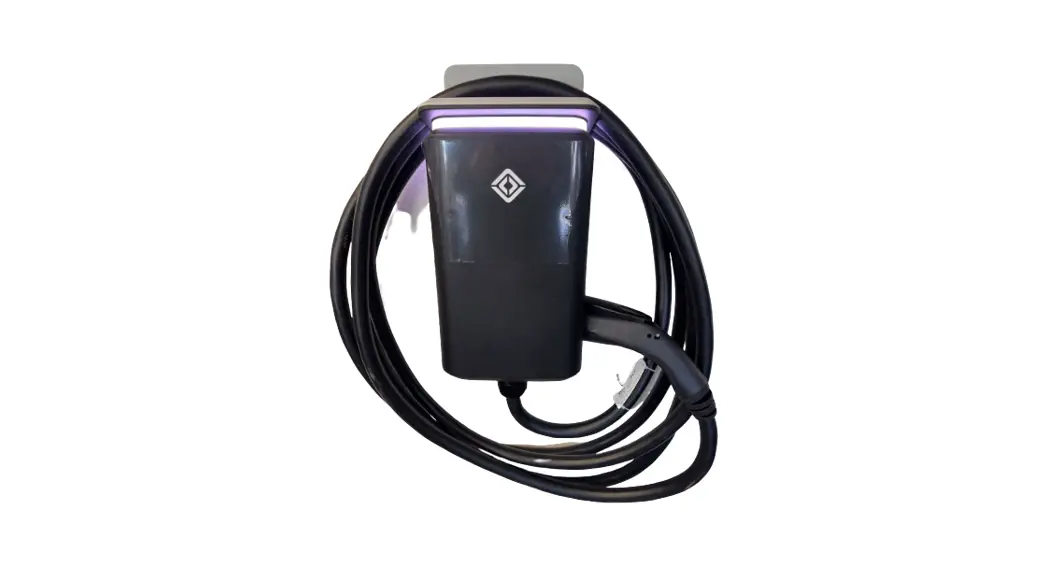
Light Bar States
| Light Bar State | Meaning |
| White (solid) | Available |
| Green (pulsing) | Charging |
| Green (solid) | Charging complete |
| Red (pulsing) | Error |
| Red (solid) | Error |
If the charger displays an error, troubleshoot the issue (page 16).
Detach the Portable Charger
When the vehicle is done charging, the light ring around the vehicle charge port turns solid green. Press the button on the Portable Charger plug then pull to remove the Portable Charger plug from the vehicle.
USER MAINTENANCE INSTRUCTIONS
When you need to clean the Portable Charger, wipe it with a damp cloth. Don’t use abrasive substances or materials.
NOTE
Ensure that you don’t get water in the Portable Charger connection points. Follow the safety instructions (page 4).
MOVING AND STORAGE INSTRUCTIONS
To store the Portable Charger in a single, safe location, such as a home garage:
- Plug the cable into a dedicated electrical outlet close to the vehicle parking spot so that the cable easily reaches the vehicle’s charge port.
- Secure the cable by hanging the controller (page 15) on a hook or screw installed on the wall near the outlet.
- Keep the cable plugged into the electrical outlet when not in use to help prevent wear on the Portable Charger plug and the outlet.
For portable cable storage, unplug the cable from the electrical outlet, coil the cable (avoid sharp bends), and place it in the storage bag. To move or carry the Portable Charger, lift the controller carefully. Don’t carry it by the cable or adapter. Try not to drag the cable.
INSTALLATION INSTRUCTIONS
Holes in the back of the Portable Charger controller provide a way to hang the controller on a wall.
- Find a location on the wall near an electrical outlet.
• For outdoor use, select a location between 24 in (600 mm) and 4 ft (1.2 m) above the ground.
• For indoor use, select a location between 18 in (450 mm) and 4 ft (1.2 m) above the ground. - Install a hook or anchor screw on the wall.
Follow these steps for an anchor screw:
• Select a screw with a head that will fit into one of the openings on the back of the Portable Charger controller.
• Install the screw so that the head is far enough away from the wall that it slides easily into the mounting hole when you hang the Portable Charger controller onto it. - Hang the Portable Charger controller onto the hook or screw.
Troubleshoot Your Portable Charger
Don’t tamper with or try to service the Portable Charger by taking it apart. It’s not user-serviceable. Contact Rivian for repair.
| If this happens | It may be caused by this | Try this |
| The light bar on the Portable Charger flashes red | Power interruption | 1. Unplug the Portable Charger from the electrical outlet. 2. Plug the Portable Charger back into the electrical outlet. |
| The light bar on the Portable Charger displays solid red | Charger error | Contact Rivian. |
Specifications
| Specification | Description |
| Operating voltage range | 90–264 (120–240 V nominal) AC single-phase |
| Operating grid frequency | 45–65 Hz |
| Maximum current | 32 A; limited by adapter selected |
| Cable length | 18 ft (5.5 m) |
| Mechanical and environmental load | UL 2231-1, -2, UL 2594 regulatory standard |
| Operating temperature range | -30°C to +50°C |
| Storage temperature range | -40°C to +85°C |
| Connector housing dimensions | Height: 2.63 in (6.7 cm) / Width: 4.34 in (10.0 cm) / Depth: 8.86 in (22.5 cm) |
| Weight | 7.1 lb (3.2 kg) |
| Maximum operating altitude | 14,108 ft (4,300 m) |
| Enclosure type | NEMA Type 6 |
| Ventilation | Not required |
| Compatible vehicle inlet | J1772 |
| Adapters | NEMA 5-15 120 V / NEMA 14-50 240 V |
| UL file number | E520745 |
| Product number | PT00045331 |
Customer Service
Still need help? Connect with us.
Customer Engagement Center
(888) RIVIAN1 / (888) 748-4261
[email protected]
rivian.com Support Center and Chat
Insurance
(888) RIVIAN8 / (888) 748-4268
Roadside Assistance 24/7
(844) RIVIAN4 / (844) 748-4264
Service 24/7
(855) RIVIAN5 / (855) 748-4265
Page left intentionally blank.
PART NUMBER PT00262083-A
 📧
📧 Rivian Trademark Guidelines - Legal - Rivian