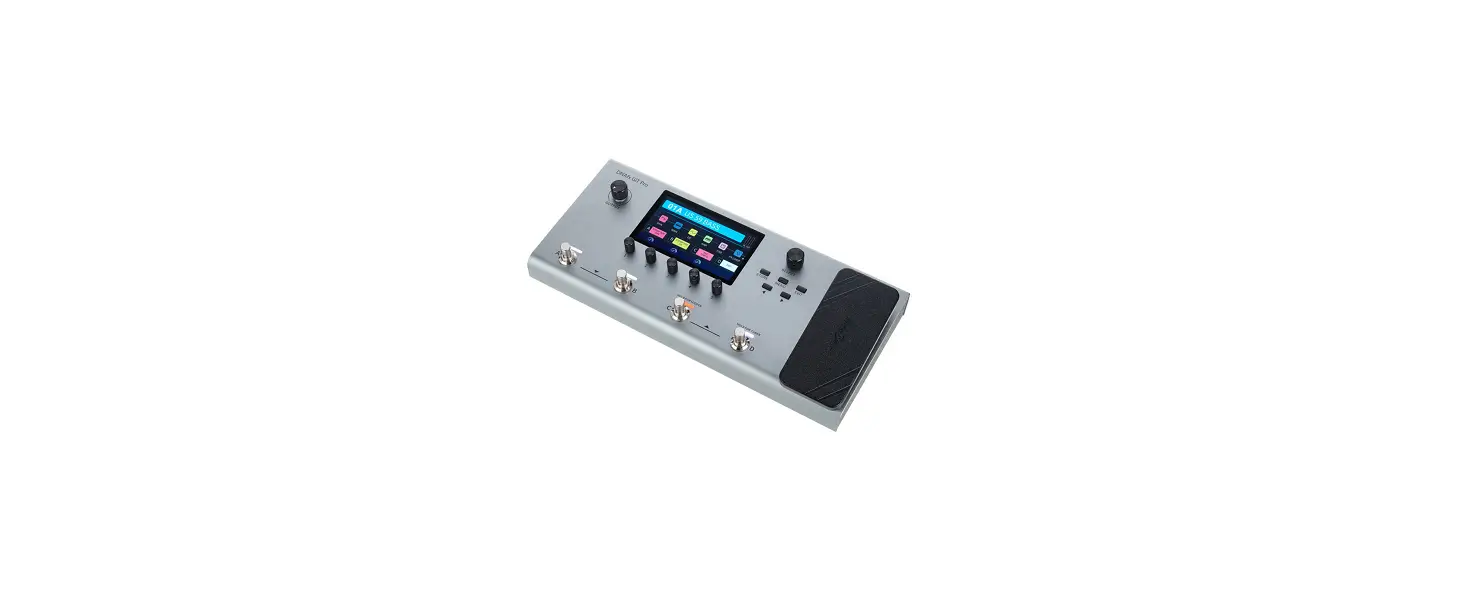

Harley Benton DNAfx GiT Pro multi effects unit
Quick Start Guide
This quick start guide contains important information on the safe operation of the product. Read and follow the safety advice and instructions given. Retain the quick start guide for future reference. If you pass the product on to others please include this quick start guide.
Safety instructions
Intended use
This device is intended to be used for sound processing of signals from musical ins-truments with electromagnetic pickups. Any other use or use under other operating conditions is considered to be improper and may result in personal injury or property damage. No liability will be assumed for damages resulting from improper use.
Danger for children
Ensure that plastic bags, packaging, etc. are disposed of properly and are not within reach of babies and young children. Choking hazard! Ensure that children do not detach any small parts (e.g. knobs or the like) from the unit. They could swallow the pieces and choke! Never let unattended chil-dren use electrical devices.
Where to use the product , Never use the product
- in direct sunlight
- in conditions of extreme temperature or humidity
- in extremely dusty or dirty areas
General handling - To prevent damage, never use force when operating the switches and controls.
- Never immerse the appliance in water. Just wipe it with a clean dry cloth. Do not use liquid cleaners such as benzene, thinners or flammable cleaning agents.
Features
- Professional Amp Modelings
- IR cabinet simulations
- 153 guitar effects
- Digital and analogue effects, even in stereo
- 3 footswitch control modes
- Stereo FX Loop for external effects
- 80 drum rhythms and 10 metronome rhythms
- Looper with 52 seconds recording time
- 256 presets
- Native Expression Pedal and support for external Expression Pedal
- AMP control for channel switching
- USB connectivity for connecting a PC or MAC
- Playback of files from smartphones or other audio devices
- Audio interface for recording and playback via USB
- Editor software
Operating elements and connections
Top side 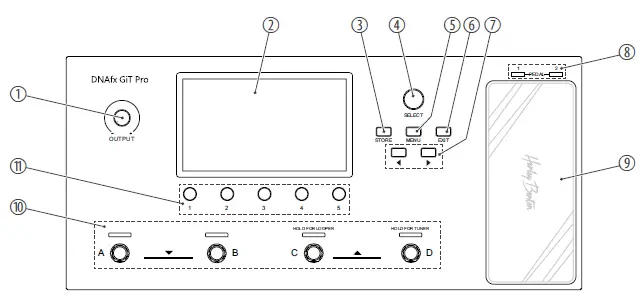
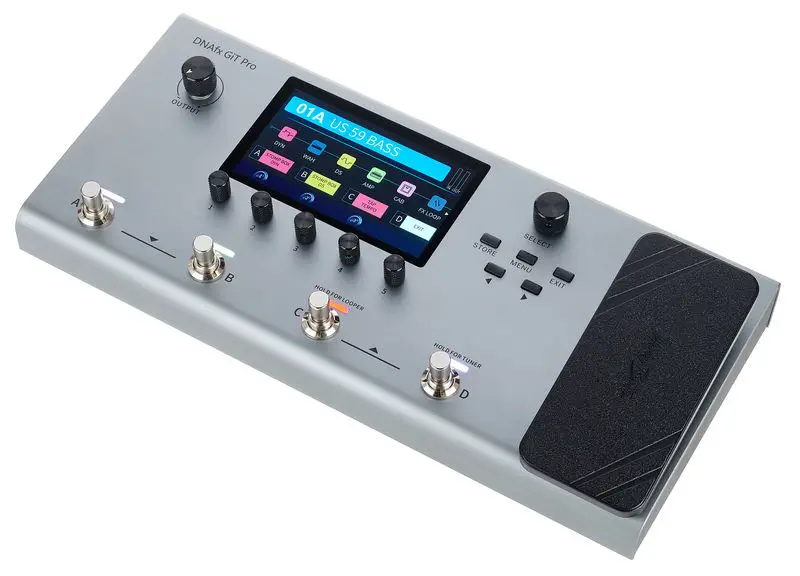
- OUTPUT Rotary volume control
- Display
- STORE Button to enter save menu
- SELECT Rotary control to switch between preset patches, to select a module in the effects chain, or to navigate in the settings menu
- MENU Button to enter the system settings
- EXIT Button to quit the current page and return to home display
- Buttons to navigate in the display parameters and the current effect modules
- PEDAL / 1 / 2 Expression Pedal indicator LEDs
- Expression Pedal
- A / B / C / D Footswitches to switch between preset patches, preset banks and other control functions
- 1 … 5 Rotary controls to adjust settings/parameters in the menus
- AUX IN 1/8″ jack socket (stereo) for connecting an audio device (e.g. MP3 player or smartphone)
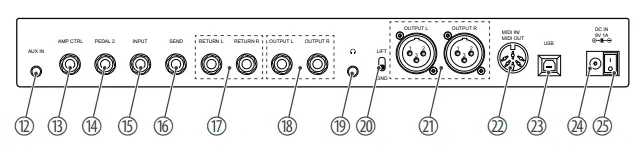
Rear panel
- AMP CTRL 1/4″ jack socket (mono) for connecting a footswitch or amplifier
- PEDAL 2 1/4″ jack socket (mono) for connecting an external Expression
- INPUT 1/4″ jack socket for connecting a guitar or output of other pedals
- SEND 1/4″ jack socket (mono) for effect looper
- RETURN L 1/4″ jack socket (mono) for effect looper return
- OUTPUT L 1/4″ jack sockets (mono), unbalanced
- Headphone socket (1/8″ jack socket, stereo)
- LFT / GND Ground/Lift switch for XLR output, balanced
- OUTPUT L XLR output socket, 3-pin, mono, balanced
- MIDI IN MIDI OUT socket, 5-pin
- USB USB port type B for a PC or MAC or audio device
- DC IN Connection socket for external power adapter
- Main switch
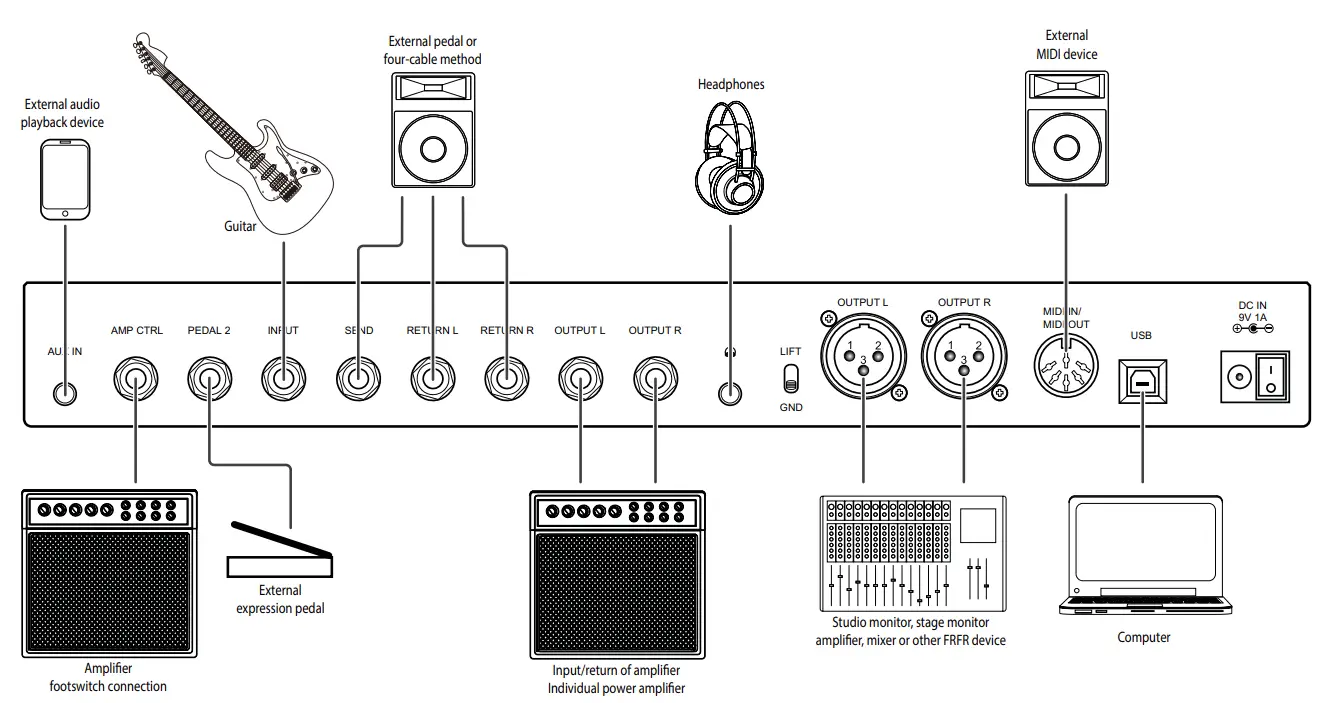
Connection options 
The detailed user manual and the included editor software are available to download on the product website on our homepage www.thomann.de and the website www.harleybenton.com.
We recommend uninstalling the outdated software version before installing the current software version.
Software update
- Install the current software version on your computer.
- Press and hold [SELECT] and switch on the device.
- Connect your computer to the device via the USB socket of the device.
- Open the software on your computer and start the software update.
Technical specifications
- Impulse Response IR format WAV
- IR sampling rate 44.1 kHz
- IR sampling accuracy 24 bit
- IR sampling points 512
- Power supply external power adapter, 100 – 240 V 50/60 Hz
- Operating voltage 9 V / 1000 mA, centre negative
- Dimensions (W × H × D) 346 mm × 58 mm × 162 mm
- Weight 1.8 kg
- Ambient conditions Temperature range 0 °C…40 °C Relative humidity 20 %…80 % (non-condensing)
For the transport and protective packaging, environmentally friendly materials have been chosen that can be supplied to normal recycling. Ensure that plastic bags, packag-ing, etc. are properly disposed of. Do not just dispose of these materials with your nor-mal household waste, but make sure that they are collected for recycling. Please follow the notes and markings on the packaging.
Remove replaceable lithium batteries from the device before disposal. Protect used lith-ium batteries from short circuits, for example by covering the poles with adhesive tape. Permanently installed lithium batteries must be disposed of together with the device. Please inquire about a suitable acceptance point.
This product is subject to the European Waste Electrical and Electronic Equipment Direc-tive (WEEE) in its currently valid version. Do not dispose of your old device with your normal household waste. Dispose of this product through an approved waste disposal firm or through your local waste facility. Comply with the rules and regulations that apply in your country. If in doubt, consult your local waste disposal facility.
 Home of Harley Benton - Harley Benton
 Welcome – Thomann United States