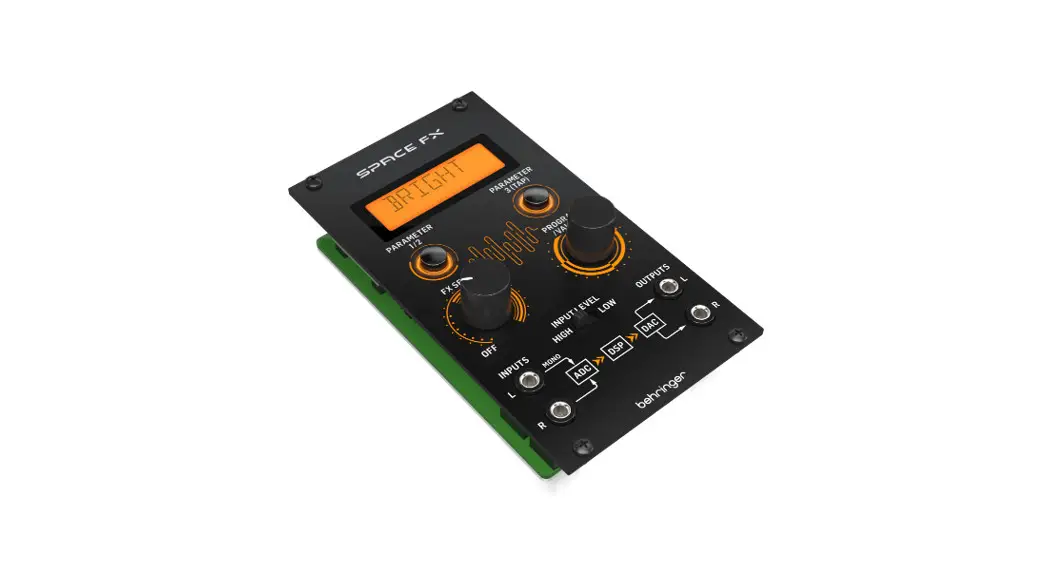
 SPACE FX 24 Bit Stereo Multi Effects Module
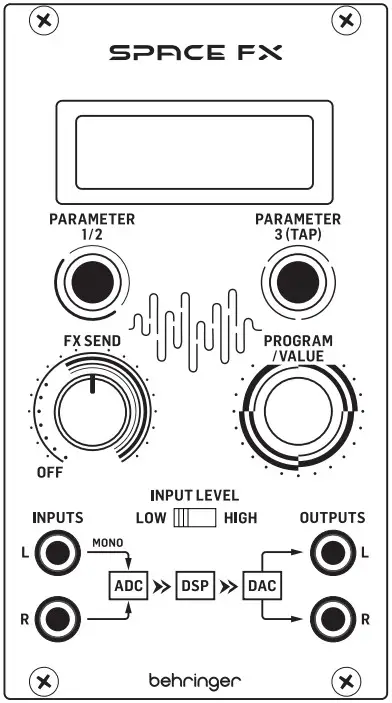 User Guide
LEGAL DISCLAIMER
Music Tribe accepts no liability for any loss which may be suffered by any person who relies either wholly or in part upon any description, photograph, or statement contained herein. Technical specifications, appearances and other information are subject to change without notice. All trademarks are the property of their respective owners. Midas, Clark Teknik, Lab Gruppe, Lake, Annoy, Turbosound, TC Electronic, TC Helicon, Behringer, Berea, Aston Microphones and Cool audio are trademarks or registered trademarks of Music Tribe Global Brands Ltd. © Music Tribe Global Brands Ltd. 2023 All rights reserved.
LIMITED WARRANTY
For the applicable warranty terms and conditions and additional information regarding Music Tribe’s Limited Warranty, please see complete details online at community.musictribe.com/pages/support warranty.
SPACE FX Controls
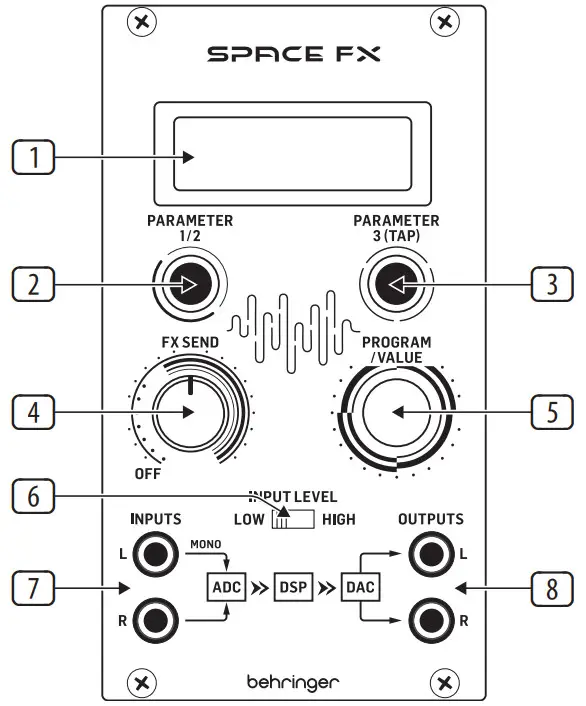
Controls
- DISPLAY SCREEN – this screen shows the parameters for the effects programs and their respective settings.
- PARAMETER 1 & 2 CONTROL – this button switches between adjustment of parameters 1 and 2. By default parameter 1 is adjusted, pressing the control switches to adjustment of parameter 2.
- PARAMETER 3 & TAP CONTROL – this button selects parameter 3 for adjustment, and can be used as a Tap control where appropriate (see parameter table below).
- FX SEND – Use this control to adjust the amount of FX added, from minimum to maximum effect when fully clockwise.
- PROGRAM/VALUE – use this control to select the required program and to adjust parameter values in conjunction with buttons 2 and 3.
- INPUT LEVEL – use this switch to select low level input for Euro rack signals or high level for line level.
- INPUTS – the Space FX can process a stereo input or mono input to the left socket.
- OUTPUTS – stereo output of the processed signal.
SPACE FX Euro Connection
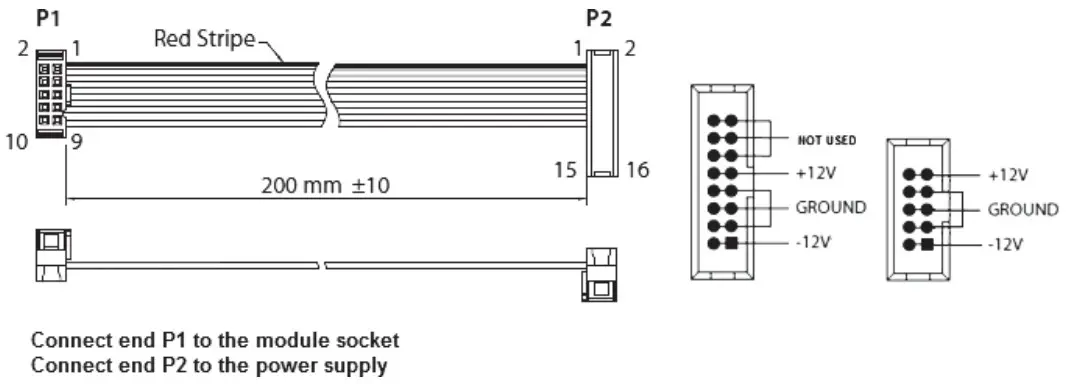
Power Connection
The module comes with the required power cable for connecting to a standard Eurorack power supply system. Follow these steps to connect power to the module. It is easier to make these connections before the module has been mounted into a rack case.
- Turn the power supply or rack case power off and disconnect the power cable.
- Insert the 16-pin connector on the power cable into the socket on the power supply or rack case. The connector has a tab that will align with the gap in the socket, so it cannot be inserted incorrectly. If the power supply does not have a keyed socket, be sure to orient pin 1 (-12 V) with the red stripe on the cable.
- Insert the 10-pin connector into the socket on the back of the module. The connector has a tab that will align with the socket for correct orientation.
- After both ends of the power cable have been securely attached, you may mount the module in a case and turn on the power supply.
Installation
The necessary screws are included with the module for mounting in a Euro rack case. Connect the power cable before mounting.
Depending on the rack case, there may be a series of fixed holes spaced 2 HP apart along the length of the case, or a track that allows individual threaded plates to slide along the length of the case. The free-moving threaded plates allow precise positioning of the module, but each plate should be positioned in the approximate relation to the mounting holes in your module before attaching the screws.
Hold the module against the Euro rack rails so that each of the mounting holes are aligned with a threaded rail or threaded plate. Attach the screws part way to start, which will allow small adjustments to the positioning while you get them all aligned. After the final position has been established, tighten the screws down.
SPACE FX Effects and Parameters
| Effect | Parameter1 | Values | Parameter2 | Values | Parameter3 | Values |
| Church | Decay | 1 – 10 s | Shape | 1 – 50 | Damping | Bright, Dark |
| Concert 1 | Decay | 0.5 – 5 s | Chorus | 1 – 30 | Damping | Bright, Dark |
| Concert 2 | Decay | 1 – 5 s | Early Level | -12 – +12 | Damping | Bright, Dark |
| Theatre | Decay | 0.4 – 3 s | Depth | 0 – 9 | Damping | Bright, Dark |
| Room 1 | Decay | 0.5 – 5 s | Density | 0 – 100% | Damping | Bright, Dark |
| Room 2 | Decay | 0.3 – 2.5 s | Pre-Delay | 0 – 50 ms | Damping | Bright, Dark |
| Room 3 | Decay | 0.2 – 10 s | Pre-Delay | 0 – 200 ms | Position | Front, Rear |
| Chamber | Decay | 0.1 – 0.4 s | Size | 1 – 30 | Damping | Bright, Dark |
| Digi verb | Decay | 0.4 – 4.5 s | High Damping | x 0.25, 0.33, 0.5, max | Out Select | Front, Rear |
| Plate 1 | Decay | 0.5 – 3 s | Pre-Delay | 0 – 40 ms | Damping | Bright, Dark |
| Plate 2 | Decay | 0.3 – 4 s | Pre-Delay | 0 – 40 ms | Damping | Bright, Dark |
| Spring | Decay | 1 – 4 s | Pre-Delay | 0 – 150 ms | Type | Modern, Vintage |
| Gated 1 | Decay | 1 – 12 s | Pre-Delay | 0 – 400 ms | Type | Alive, Gated |
| Gated 2 | Decay | 1 – 20 s | Pre-Delay | 0 – 30 ms | Damping | Bright, Dark |
| Reverse | Decay | 1 – 20 s | Pre-Delay | 0 – 30 ms | Damping | Bright, Dark |
| Delay | Feedback | 0 – 100% | Mode | Mono, Spread, Ping-Pong | Tempo | 72 – 500 bpm or Tap |
| Echo | Feedback | 0 – 100% | Damping | 0 – 50 | Tempo | 72 – 500 bpm or Tap |
| Ambience | Size | 1 – 30 | Tail Gain | 0 – 100% | Damping | Bright, Dark |
| Early Reverb | Size | 1 – 30 | Diffuse | 1 – 20 | Damping | Bright, Dark |
| Chorus | Depth | -20 – +20 | LFO Speed | 0.05 – 5 Hz | LFO Wave | Sine, Triangle |
| Flinger | Depth | -20 – +20 | Resonance | -100 – +100% | Tempo | 5 – 400 bpm or Tap |
| Phaser | Depth | -20 – +20 | Resonance | 1 – 50 | Tempo | 5 – 400 bpm or Tap |
| Pan/ Tremolo | Depth | -100 – +100% | LFO Wave | Triangle, Ramp, Square | Tempo | 5 – 400 bpm or Tap |
| Detune | Detune | -99 – +99% | Pre-Delay | 0 – 300 ms | Damping | Bright, Dark |
| Pitch 1 | Shift | -12 – +12 | Pre-Delay | 0 – 300 ms | Detune | 0 – 20% |
| Pitch 2 | Shift A | -12 – +12 | Shift B | -12 – +12 | Spread | Narrow, Wide |
| Delay + Chorus | Balance | -50 – +50% | Chorus Depth | -20 – +20 | Tempo | 75 – 500 bpm or Tap |
| Delay + Reverb | Balance | -50 – +50% | Reverb Decay | 1 – 5 s | Tempo | 114 – 500 bpm or Tap |
| Chorus + Reverb | Balance | -50 – +50% | Reverb Decay | 1 – 5 s | Chorus Depth | Soft, Deep |
| LFO Filter | Vowel 1 | A, E, I, O, U | Vowel 2 | A, E, I, O, U | Tempo | 5 – 400 bpm or Tap |
| Talk box | Decay | 0.4 – 3 s | Depth | 0 – 9 | Tempo | 5 – 400 bpm or Tap |
| Clipper | Distort | 1 – 100 | Low Cut | 50 – 500 Hz | Damping | Bright, Dark |
Specifications
| Inputs | 2 x 3.5 mm unbalanced jack Input Impedance >22 kΩ |
| Outputs | 2 x 3.5 mm unbalanced jack Output Impedance 330 Ω |
| Display | Custom 8 character display |
| Controls | |
| Knobs | Parameter 1/2 Parameter 3/tap FX Send Program/Value |
| Switches | High/Low Gain High Gain: +2 dB Low Gain: -6 dB |
| Power Consumption | 90 mA (+12 V) / 25 mA (-12 V) |
| Unit size | 71 x 129 x 41 mm / 2.8 x 5.08 x 1.6″ 14 hop |
| Unit Weight | 0.125 kg (0.276 lb) |
| Packaged Weight | 0.218 Kg (0.481 lb) |
- Register online. Please register your new Music Tribe equipment right after you purchase it by visiting musictribe.com. Registering your purchase using our simple online form helps us to process your repair claims more quickly and efficiently.
Also, read the terms and conditions of our warranty, if applicable. - Malfunction. Should your Music Tribe Authorized Reseller not be located in your vicinity, you may contact the Music Tribe Authorized Fulfiller for your country listed under “Support” at musictribe.com. Should your country not be listed, please check if your problem can be dealt with by our “Online Support” which may also be found under “Support” at musictribe.com. Alternatively, please submit an online warranty claim at musictribe.com BEFORE returning the product.
- Power Connections.
Before plugging the unit into a power socket, please make sure you are using the correct mains voltage for your particular model. Faulty fuses must be replaced with fuses of the same type and rating without exception.
FEDERAL COMMUNICATIONS COMMISSION COMPLIANCE INFORMATION
Behringer SPACE FX
| Responsible Party Name | Music Tribe Commercial NV Inc. |
| Address: | 122 E. 42nd St.1, 8th Floor NY, NY 10168, United States |
| Email Address: | [email protected] |
This equipment has been tested and found to comply with the limits for a Class B digital device, pursuant to part 15 of the FCC Rules. These limits are designed to provide reasonable protection against harmful interference in a residential installation.
This equipment generates, uses and can radiate radio frequency energy and, if not installed and used in accordance with the instructions, may cause harmful interference to radio communications. However, there is no guarantee that interference will not occur in a particular installation. If this equipment does cause harmful interference to radio or television reception, which can be determined by turning the equipment off and on, the user is encouraged to try to correct the interference by one or more of the following measures:
- Reorient or relocate the receiving antenna.
- Increase the separation between the equipment and receiver.
- Connect the equipment into an outlet on a circuit different from that to which the receiver is connected.
- Consult the dealer or an experienced radio/TV technician for help.
This equipment complies with Part 15 of the FCC rules. Operation is subject to the following two conditions:
(1) this device may not cause harmful interference, and
(2) this device must accept any interference received, including interference that may cause undesired operation.
Important information:
Changes or modifications to the equipment not expressly approved by Music Tribe can void the user’s authority to use the equipment.
Hereby, Music Tribe declares that this product is in compliance with Directive 2014/30/EU, Directive 2011/65/EU and Amendment 2015/863/EU, Directive 2012/19/EU, Regulation 519/2012 REACH SVHC and Directive 1907/2006/EC.
Full text of EU Dock is available at https://community.musictribe.com/
EU Representative: Music Tribe Brands DK A/S
Address: Gimmel Strand 44, DK-1202 København K, Denmark
UK Representative: Music Tribe Brands UK Ltd.
Address: 6 Lloyds Avenue, Unit 4CL London EC3N 3AX, United Kingdom
We Hear You
 Music Tribe
 Music Tribe