
Quick Start Guide
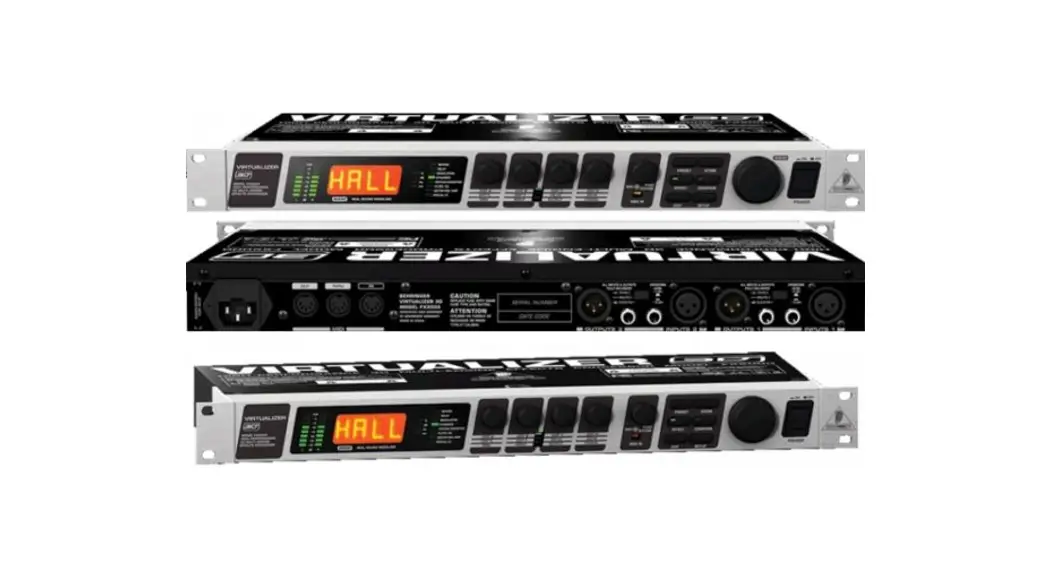
VIRTUALIZER 3D FX2000

High-Performance 3D Multi-Engine Effects Processor
V 5 .0
Important Safety Instructions

 Terminals marked with this symbol carry an electrical current of sufficient magnitude to constitute a risk of electric shock.
Use only high-quality professional speaker cables with ¼” TS or twist-locking plugs pre-installed. All other installations or modifications should be performed only by qualified personnel.
 This symbol, wherever it appears, alerts you to the presence of uninsulated dangerous voltage inside the enclosure – voltage that may be sufficient to constitute a risk of shock.
This symbol, wherever it appears, alerts you to important operating and maintenance instructions in the accompanying literature. Please read the manual.
Caution
To reduce the risk of electric shock, do not remove the top cover (or the rear section).
No user-serviceable parts inside. Refer servicing to qualified personnel.
Caution
To reduce the risk of fire or electric shock, do not expose this appliance to rain and moisture. The apparatus shall not be exposed to dripping or splashing liquids and no objects filled with liquids, such as vases, shall be placed on the apparatus.
Caution
These service instructions are for use by qualified service personnel only.
To reduce the risk of electric shock do not perform any servicing other than that contained in the operation instructions. Repairs have to be performed by qualified service personnel.
- Read these instructions.
- Keep these instructions.
- Heed all warnings.
- Follow all instructions.
- Do not use this apparatus near water.
- Clean only with a dry cloth.
- Do not block any ventilation openings. Install in accordance with the manufacturer’s instructions.
- Do not install near any heat sources such as radiators, heat registers, stoves, or other apparatus (including amplifiers) that produce heat.
- Do not defeat the safety purpose of the polarized or grounding-type plug. A polarized plug has two blades one wider than the other. A grounding-type plug has two blades and a third grounding prong. The wide blade or the third prong is provided for your safety. If the provided plug does not fit into your outlet, consult an electrician for the replacement of the obsolete outlet.
- Protect the power cord from being walked on or pinched particularly at plugs, convenience receptacles, and the point where they exit from the apparatus.
- Use only attachments/accessories specified by the manufacturer.
 Use only with the cart, stand, tripod, bracket, or table specified by the manufacturer, or sold with the apparatus. When a cart is used, use caution when moving the cart/apparatus combination to avoid injury from tip-over.
- Unplug this apparatus during lightning storms or when unused for long periods of time.
- Refer all servicing to qualified service personnel.
Servicing is required when the apparatus has been damaged in any way, such as a power supply cord or plug is damaged, liquid has been spilled or objects have fallen into the apparatus, the apparatus has been exposed to rain or moisture, does not operate normally, or has been dropped. - The apparatus shall be connected to a MAINS socket outlet with a protective earthing connection.
- Where the MAINS plug or an appliance coupler is used as the disconnect device, the disconnect device shall remain readily operable.
 Correct disposal of this product: This symbol indicates that this product must not be disposed of with household waste, according to the WEEE Directive (2012/19/EU) and your national law. This product should be taken to a collection center licensed for the recycling of waste electrical and electronic equipment (EEE). The mishandling of this type of waste could have a possible negative impact on the environment and human health due to potentially hazardous substances that are generally associated with EEE. At the same time, your cooperation in the correct disposal of this product will contribute to the efficient use of natural resources. For more information about where you can take your waste equipment for recycling, please contact your local city office or your household waste collection service.
- Do not install in a confined space, such as a bookcase or similar unit.
- Do not place naked flame sources, such as light candles, on the apparatus.
- Please keep the environmental aspects of battery disposal in mind. Batteries must be disposed of at a battery collection point.
- This apparatus may be used in tropical and moderate climates up to 45°C.
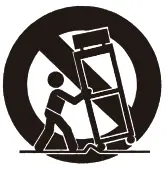 Use only with the cart, stand, tripod, bracket, or table specified by the manufacturer, or sold with the apparatus. When a cart is used, use caution when moving the cart/apparatus combination to avoid injury from tip-over.
LEGAL DISCLAIMER
Music Tribe accepts no liability for any loss which may be suffered by any person who relies either wholly on or in part upon any description, photograph, or statement contained herein. Technical specifications, appearances, and other information are subject to change without notice. All trademarks are the property of their respective owners. Midas, Klark Teknik, Lab Gruppen, Lake, Tannoy, Turbosound, TC Electronic, TC Helicon, Behringer, Bugera, Oberheim, Auratone, Aston Microphones, and Coolaudio are trademarks or registered trademarks of Music Tribe Global Brands Ltd. © Music Tribe Global Brands Ltd. 2021 All rights reserved.
LIMITED WARRANTY
For the applicable warranty terms and conditions and additional information regarding Music Tribe’s Limited Warranty, please see complete details online at musictribe.com/warranty.
VIRTUALIZER 3D FX2000 Hook-up
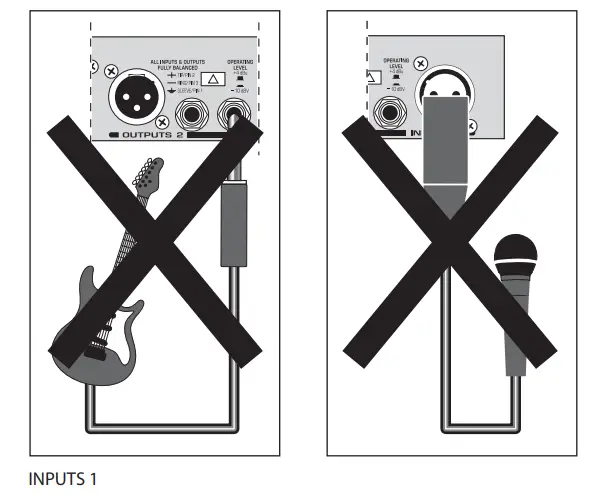
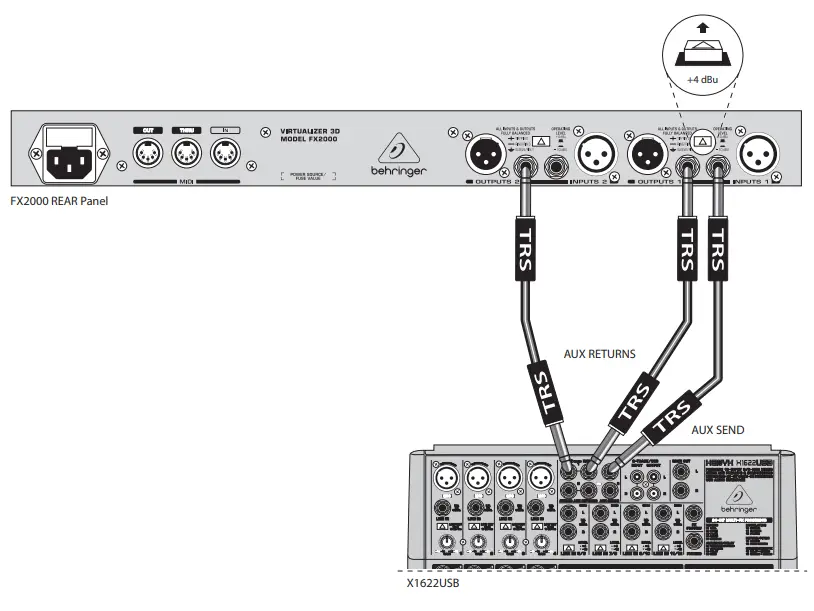
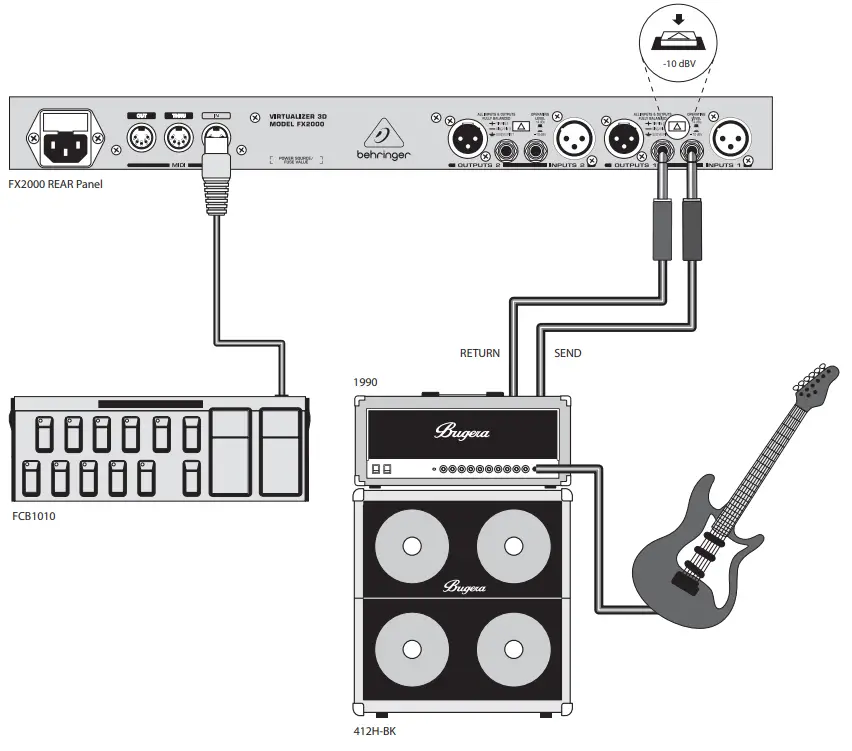
Step 1: Hook-Up
External effects processor with the mixing board
FX2000 in guitar amp effects loop
Step 2: Controls
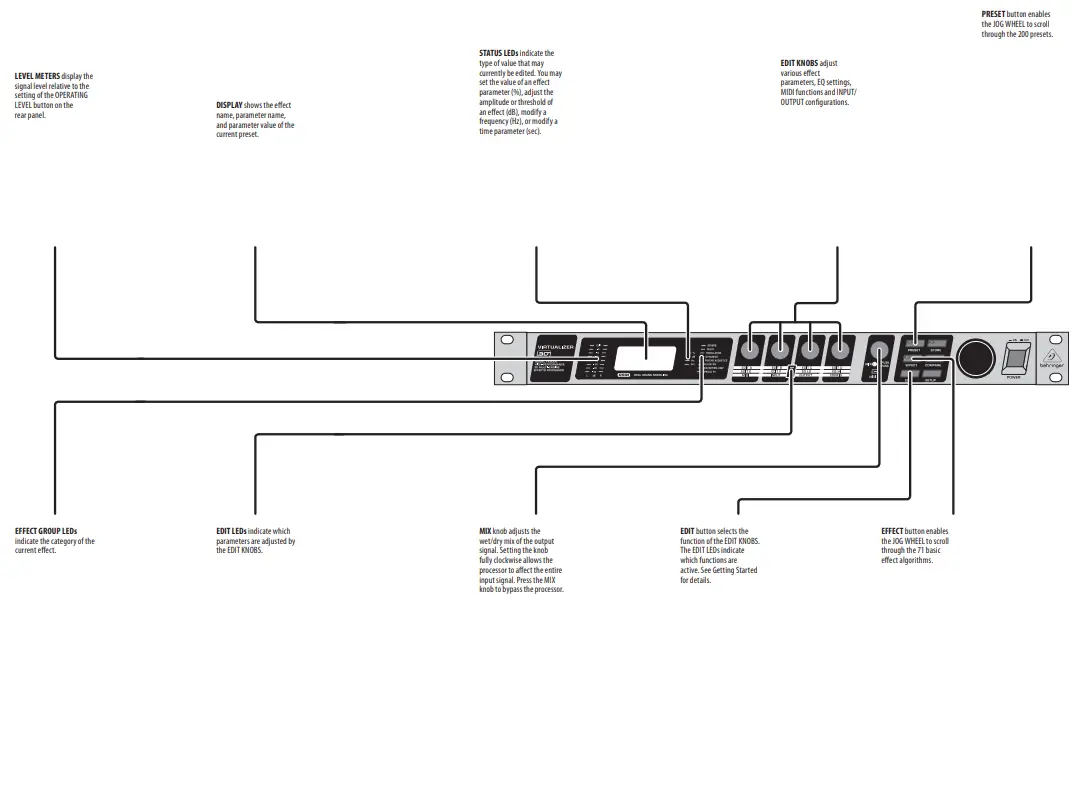
Step 2: Controls
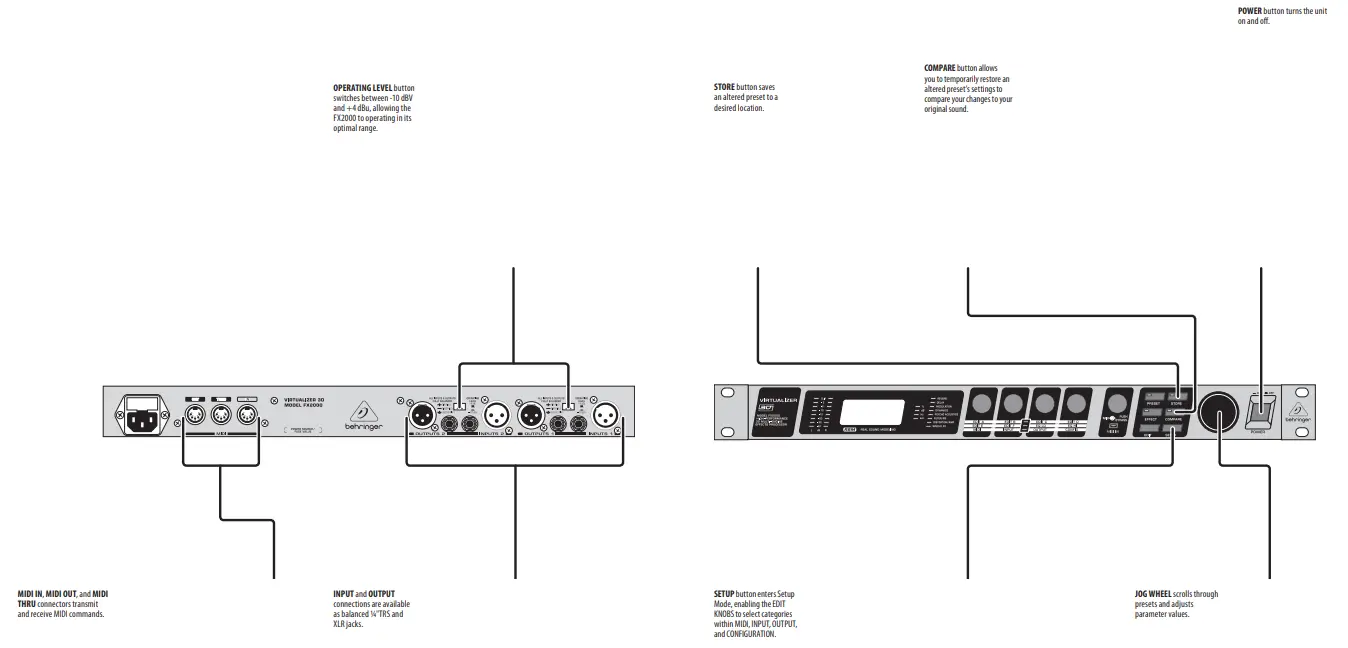
Step 3: Getting started
- Make all audio, MIDI, and power connections to the FX2000. Leave the power for all devices off!
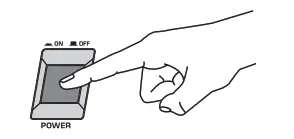
- Power up the FX2000, followed by other devices.

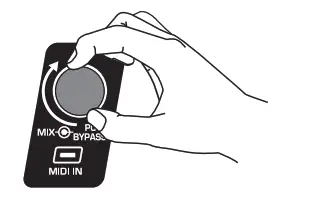
- Turn the MIX knob up to adjust how “wet” or intense the effect is on the signal. If using the processor with a mixing board, set the MIX knob fully clockwise.

- Adjust the Send and Return levels on your amplifier or mixer if necessary.
Make sure the LEVEL METERS on the front panel do not reach the red CLIP LEDs. - To select a preset, press the PRESET button, then turn the JOG WHEEL to scroll through the available presets.

- To edit the preset, press the EDIT button, then rotate the EDIT KNOBS to adjust parameters A-D. Press the EDIT button again to access parameters E and F and the LO and HI EQ.

- To save an altered preset, press the STORE button. Rotate the JOG WHEEL to select a user preset location, then press the STORE button again to confirm.

- Log on to behringer.com to download the full manual for more details on the FX2000’s functionality.
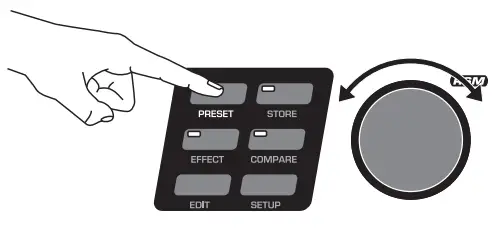
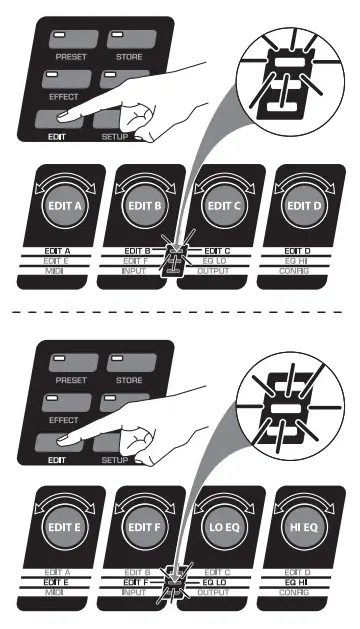
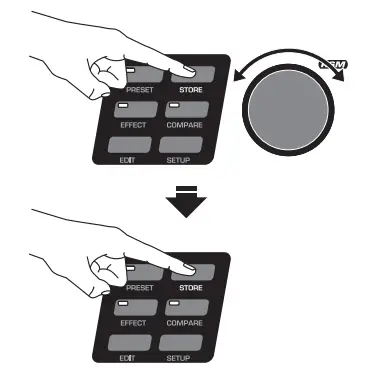
Internal Presets (Factory Settings)
| No. | EFFECT | No. | EFFECT | No. | EFFECT | No. | EFFECT |
| I.001 | CATHEDRAL OF COLOGNE | I.026 | MEDIUM DELAY | I.051 | PANNING | I.076 | HEAVY METAL |
| I.002 | CONCERT CATHEDRAL | I.027 | OLD TAPE | I.052 | COMPRESSOR | I.077 | FUZZ BOX |
| I.003 | BIG PLATE | I.028 | BIG TAPE | I.053 | EXPANDER | I.078 | RADIO SPEAKER |
| I.004 | DARK PLATE | I.029 | PING PONG | I.054 | GATE | I.079 | BAD SPEAKER |
| I.005 | SMALL CHAMBER | I.030 | CHAOS | I.055 | ANALOG COMPR./LIMITER | I.080 | ROBOTIZED |
| I.006 | DRUM CLOSET | I.031 | STEREO CHORUS | I.056 | ULTRAMIZER | I.081 | AM-RADIO |
| I.007 | BRIGHT ROOM | I.032 | ANALOG CHORUS | I.057 | DENOISER | I.082 | OLD RECORD PLAYER |
| I.008 | AMBIENT ROOM | I.033 | VINTAGE CHORUS | I.058 | DE-ESSER | I.083 | VINTAGE TAPE |
| I.009 | LARGE HALL | I.034 | ULTRA CHORUS | I.059 | WAVE DESIGNER | I.084 | SAMPLER |
| I.010 | CONCERT HALL | I.035 | STEREO FLANGER | I.060 | EXCITER | I.085 | VOCODER |
| I.011 | LIVE STUDIO | I.036 | VINTAGE FLANGER | I.061 | ULTRAVOX | I.086 | VOICE CANCELER |
| I.012 | DRY STUDIO | I.037 | JET STREAM FLANGER | I.062 | ULTRABASS | I.087 | RESONATOR |
| I.013 | ARENA | I.038 | STEREO PHASER | I.063 | SUBBASS | I.088 | CHORUS & REVERB 1 |
| I.014 | GARAGE | I.039 | RETRO PHASER | I.064 | STEREO IMAGER | I.089 | CHORUS & REVERB 2 |
| I.015 | GUITAR AMP SPRING | I.040 | WILD PHASER | I.065 | ULTRA-WIDE | I.090 | FLANGER & REVERB 1 |
| I.016 | STUDIO SPRING | I.041 | VINTAGE PHASER | I.066 | HEADPHONE EXTENDER | I.091 | FLANGER & REVERB 2 |
| I.017 | BIG DRUMS | I.042 | DUAL PHASER | I.067 | SPEAKER EXTENDER | I.092 | LESLIE & REVERB |
| I.018 | NICE AMBIENCE | I.043 | ROTARY SPEAKER | I.068 | AUTO FILTER | I.093 | PITCH & REVERB |
| I.019 | REFLECTING ROOM | I.044 | B3 LESLIE | I.069 | LFO FILTER | I.094 | DELAY & REVERB |
| I.020 | VOICE WIDENER | I.045 | STEREO PITCH SHIFTER | I.070 | PARAMETRIC EQ | I.095 | TREMOLO & REVERB |
| I.021 | BASS DRUM EXTENDER | I.046 | MAJOR 7 | I.071 | GRAPHIC EQ | I.096 | PHASER & REVERB |
| I.022 | PHIL’S DRUMS | I.047 | IT’S JAZZ | I.072 | VOCAL SPEAKER | I.097 | CHORUS & DELAY |
| I.023 | SHORT REVERSE | I.048 | REAL CHORUS! | I.073 | TUBE AMP | I.098 | FLANGER & DELAY |
| I.024 | MEDIUM REVERSE | I.049 | VIBRATO | I.074 | CRUNCH | I.099 | PITCH & DELAY |
| I.025 | SHORT DELAY | I.050 | TREMOLO | I.075 | BLUES | I.100 | TREMOLO & DELAY |
User Presets (Factory Settings)
| No. | EFFECT | No. | EFFECT | No. | EFFECT | No. | EFFECT |
| U.001 | DYNA CHORUS | U.026 | UNDER THE BRIDGE | U.051 | SOFT WAH WAH | U.076 | DISTORTION |
| U.002 | METALLIC FLANGER | U.027 | BASS EQ | U.052 | SOFT CHORUS REVERSE | U.077 | ROBOT |
| U.003 | GATED AMBIENCE | U.028 | BLUE’S GROOVE | U.053 | FAT GUITAR | U.078 | ULTRAMAXXX |
| U.004 | CHORUS ROOM | U.029 | SPACE FLANGER | U.054 | 4 SPACE FX | U.079 | PHIL’S SNARE |
| U.005 | TAPE ECHO & ROOM | U.030 | GOLD VERB | U.055 | FATTY | U.080 | WIDE |
| U.006 | QUART ROOM | U.031 | 80S DIGITAL | U.056 | SPACER | U.081 | AMBIENCE |
| U.007 | CRAZY MUSIC BOX | U.032 | ARPEGGIATOR VCF | U.057 | SYNTH HEAVEN | U.082 | PLATEAU |
| U.008 | OLD GRAMOPHONE | U.033 | VALVE PREAMP | U.058 | JEAN GLITTER | U.083 | EMPTY LIVING ROOM |
| U.009 | CRUNCH BOX | U.034 | NEAR FIELD-WIDE! | U.059 | SOFT TUBE | U.084 | ECHO PLAY |
| U.010 | AUTO-WAH | U.035 | PING PONG PAN | U.060 | DRUMZZZ | U.085 | STAGE |
| U.011 | FILTER GROOVE | U.036 | SUBWOOFER ROOM | U.061 | PERC COMPRESSION | U.086 | BIG CATHEDRAL |
| U.012 | SPACE RADIO | U.037 | MODULIZZ | U.062 | INDUSTRIALIZER | U.087 | ETERNITY |
| U.013 | BUBBLE DRUMS | U.038 | RECORDING STUDIO | U.063 | STRANGE GLIDE 140 | U.088 | NICE HALL |
| U.014 | BRICK WALL | U.039 | FLANGERS | U.064 | SQUARE AT 140 | U.089 | REVERSE TREMOLO |
| U.015 | ARPEGGIATOR | U.040 | CHEAP SPRING | U.065 | SQUARE BREATH 140 | U.090 | REVERSE |
| U.016 | STACCATO | U.041 | BRITISH SOLO | U.066 | PITCH CHORUS | U.091 | VOCAL CHORUS |
| U.017 | THE VOICE | U.042 | JAZZ CLUB | U.067 | CHORUS 2 | U.092 | SMOOTH VOCAL FX |
| U.018 | PSEUDO STEREO | U.043 | SMALL SPEAKER | U.068 | SOFT METALLIZER | U.093 | FATTY VOICE CHORUS |
| U.019 | ROOM PHASER | U.044 | AUDITORIUM | U.069 | PHASER | U.094 | VOICE EQ |
| U.020 | COMPUTER GAME | U.045 | DE-NOIZ | U.070 | FLANGER IN BACKGROUND | U.095 | PHONE VOICE |
| U.021 | THE FINAL MIX | U.046 | MINOR 7 | U.071 | HARD FLANGER | U.096 | VOICE COMPRESSOR |
| U.022 | BASS CHORUS | U.047 | BALLAD TREMOLO | U.072 | SOFT FLANGER | U.097 | EMPTY ARENA (VOICE) |
| U.023 | LIVE ROOM | U.048 | TRANCE | U.073 | DELAY 137 16TH | U.098 | PANOMOLO |
| U.024 | IN THE CLOSET | U.049 | DISCO SOUND | U.074 | VINTAGE PICKING | U.099 | DISTORTED VOCAL |
| U.025 | SYMPHONIC | U.050 | DUO REVERB | U.075 | DELAY STEREO 137 | U.100 | MOUNTAIN ECHOES |
| Name | Edit A | Edit B | Edit C | Edit D | Edit E | Edit F | Mix | |
| Reverbs | ||||||||
| 1 | Cathedral | Pre-Delay | Decay | Hi Dec. Damping | ER / Rev. Bal. | Low Cut | Rev. Mod. | Mix |
| 2 | Gold Plate | Pre-Delay | Decay | Hi Dec. Damping | Low Cut | She. Damping | Diffusion | Mix |
| 3 | Small Hall | Pre-Delay | Decay | Hi Dec. Damping | Size | She. Damping | Low Cut | Mix |
| 4 | Room | Pre-Delay | Decay | Hi Dec. Damping | Size | She. Damping | Diffusion | Mix |
| 5 | Concert | Pre-Delay | Decay | Hi Dec. Damping | Bass Mul. | She. Damping | Rev. Mod. | Mix |
| 6 | Studio | Pre-Delay | Decay | Hi Dec. Damping | Spread | She. Damping | Diffusion | Mix |
| 7 | Stage | Pre-Delay | Decay | Hi Dec. Damping | Size | She. Damping | ER / Rev. Bal. | Mix |
| 8 | Spring Reverb | Pre-Delay | Decay | Hi Dec. Damping | Metal Reso. | Hi-Cut | Diffusion | Mix |
| 9 | Ambiance | Pre-Delay | Decay | Hi Dec. Damping | Size | Low Cut | Diffusion | Mix |
| 10 | Early Reflections | Pre-Delay | Size | Wall Damping | Reflections | Stereo Width | Diffusion | Mix |
| 11 | Gated Reverb | Pre-Delay | Decay | Hi Dec. Damping | Density | Low Cut | Diffusion | Mix |
| 12 | Reverse Reverb | Pre-Delay | Decay | Hi Dec. Damping | Density | Low Cut | Diffusion | Mix |
| Delay | ||||||||
| 13 | Stereo Delay | Delay Left Coarse | Delay Left Fine | Delay Right Coarse | Delay Right Fine | Feedback Left | Feedback Right | Mix |
| 14 | Tape Echo | Delay Left | Delay Right | Feedback | Damping | Feedback HP | Feedback LP | Mix |
| 15 | Ping Pong | Delay Left | Delay Right | Feedback Left | Feedback Right | Feed. Delay L | Feed. Delay R | Mix |
| Modulation | ||||||||
| 16 | Stereo Chorus | Speed | Depth | Delay | Stereo Phase | LFO Wave | Damping | Mix |
| 17 | Analog Chorus | Speed | Depth | Delay | Stereo Spread | — | — | Mix |
| 18 | Vintage Chorus | Speed | Depth | Delay | Damping | — | — | Mix |
| 19 | Ultra Chorus | Speed | Depth | Delay | Wideness | Stereo Spread | Damping | Mix |
| 20 | Stereo Flanger | Speed | Depth | Feedback | Delay | Stereo Phase | Feedback LP | Mix |
| 21 | Vintage Flanger | Speed | Depth | Feedback | Delay | — | — | Mix |
| 22 | Jet Stream Flanger | Speed | Depth | Feedback | Delay | — | — | Mix |
| 23 | Stereo Phaser | Speed | Depth | Feedback | Stereo Phase | Mode | — | Mix |
| 24 | Vintage Phaser | Speed | Depth | Feedback | Base | — | — | Mix |
| 25 | Dual Phaser | Speed | Depth | Feedback | Base | — | — | Mix |
| 26 | Leslie | Speed | Drum Depth | Horn Depth | Drive | Balance | — | Mix |
| 27 | Pitch Shifter | Semitones 1 | Cents 1 | Semitones 2 | Cents 2 | Semitones 3 | Cents 3 | Mix |
| 28 | Vibrato | Speed | Depth | Wave | Auto Mode. | — | — | Mix |
| 29 | Tremolo | Speed | Depth | Wave | Auto Mode. | — | — | Mix |
| 30 | Auto Panning | Speed | Depth | Wave | Auto Mode. | — | — | Mix |
| Dynamics | ||||||||
| 31 | Compressor | Ratio | Threshold | Makeup-Gain | Soft Knee | Attack | Release | Mix |
| 32 | Expander | Ratio | Threshold | Makeup-Gain | SoftKnee | Attack | Release | Mix |
| 33 | Gate | Hold | Threshold | Attack | Release | Range | — | Mix |
| 34 | Analog Compr./Lim. | Ratio | Threshold | Makeup-Gain | Limiter Thresh. | Attack | Release | Mix |
| 35 | Ultramizer | Density | Range | Speed | Split Frequency | Stereo FX | Enhancer Freq. | Band |
| 36 | Denoiser | LP-Frequency | LP-Depth | LP-Speed | Gate Threshold | Gate Hold | Gate Resp. | Mix |
| 37 | De-Esser | Ratio | Threshold | Makeup-Gain | Frequency | Attack | Release | Band |
| 38 | Wave Designer | Attack Left | Release Left | Attack Right | Release Right | Gain Left | Gain Right | Mix |
| Psycho Acoustic | ||||||||
| 39 | Exciter | Frequency | Filter-Q | Harmonics | Timbre | Harmon. Kick | — | Mix |
| 40 | Enhancer | High Freq | High Gain | Bass Width | Bass Gain | Mid Q | Mid Gain | Gain |
| 41 | Ultra Bass | Subbass Freq. | Subbass Level | Harmon. Freq. | Harmon. Level | Harm. Density | Bass Gain | Mix |
| 42 | Stereo Imager | Spread | MS-Balance | Spread Mode | Gain | Stereo Bal. | Mono Balance | Mix |
| 43 | Ultra-Wide | Center | Spread | X-Over Frequ. | Gain | — | — | Mix |
| 44 | Binauralizer | Center | Space | Mode | Gain | Spk. Distance | Spk.Compens. | Mix |
| 45 | Auto Filter | Base Freq. | Depth | Type | Resonance | Attack | Release | Mix |
| 46 | LFO Filter | Base Freq. | Depth | Type | Resonance | Speed | Wave | Mix |
| 47 | Parametric EQ | Gain 1 | Freq. 1 | Q 1 | Gain 2 | Freq. 2 | Q 2 | Gain |
| 48 | Graphic EQ | 200 Hz | 400 Hz | 800 Hz | 1.6 kHz | 3.2 kHz | 6.4 kHz | Gain |
| Distortion/Amp Simulation | ||||||||
| 49 | Vocal Distortion | Distortion | Delay Gain | Delay | Flanger Level | Type | Flanger Speed | Mix |
| 50 | Tube Distortion | Drive | Pre HP | Pre LP | Damp | Tube Select | Mid EQ | Mix |
| 51 | Guitar Amp | In Gain | Drive | Presence | Gain | Cabinet Type | Mid EQ | Mix |
| 52 | Tri Fuzz | In Gain | Low-Fuzz | Mid-Fuzz | Hi-Fuzz | Drive | Hi Damp | Mix |
| 53 | Speaker Simulation | Type | EQ-Gain | EQ-Freq. | EQ-Q | — | — | Mix |
| 54 | Ring Modulator | Speed | Depth | Carrier Freq. | Tone | Mode | Slewing | Mix |
| 55 | LoFi | Bit Resolution | Tone | Buzz Level | Noise Gain | Noise HP | Noise LP | Mix |
| Special FX | ||||||||
| 56 | Finalizer | Speed | Clicks Level | Scratch Level | Noise Level | Tone | Noise Freq. | Mix |
| 57 | Sampler | Rec/Stop | Play/Stop | Speed | Mode | Rec Gain | Overdub Gain | Mix |
| 58 | Vocoder | Sensitivity | Mode | Attack | Release | Frequency | Resonance | Mix |
| 59 | Voice Canceler | Bass Freq. | MS-Balance | Treble Pan | Gain | — | — | Mix |
| 60 | Resonator | Speed | Depth | Carrier Freq. | Feedback | Mode | Slewing | Mix |
| Combination | ||||||||
| 61 | Chorus & Reverb | Speed | Depth | Delay | Reverb Mix | Decay | Hi Damp | Mix |
| 62 | Flanger & Reverb | Speed | Depth | Feedback | Reverb Mix | Decay | Hi Damp | Mix |
| 63 | Leslie & Reverb | Speed | Depth | Doppler | Reverb Mix | Decay | Hi Damp | Mix |
| 64 | Pitch Shifter & Reverb | Semitones | Cents | High Cut | Reverb Mix | Decay | Hi Damp | Mix |
| 65 | Delay & Reverb | Delay | Feedback | Type | Reverb Mix | Decay | Hi Damp | Mix |
| 66 | Tremolo &Reverb | Speed | Depth | Auto Mode. | Reverb Mix | Decay | Hi Damp | Mix |
| 67 | Phaser & Reverb | Speed | Depth | Feedback | Reverb Mix | Decay | Hi Damp | Mix |
| 68 | Chorus & Delay | Speed | Depth | Mod. Delay | Delay Mix | Delay Time | Delay Feb. | Mix |
| 69 | Flanger & Delay | Speed | Depth | Feedback | Delay Mix | Delay Time | Delay Feb. | Mix |
| 70 | Pitch Shifter & Delay | Semitones | Cents | High Cut | Delay Mix | Delay Time | Delay Feb. | Mix |
| 71 | Tremolo & Delay | Speed | Depth | Auto Mode. | Delay Mix | Delay Time | Delay Feb. | Mix |
Specifications
| Analog Inputs | |
| Connectors | XLR and ¼” TRS |
| Type | RF filtered, servo-balanced input stage |
| Impedance | 80 kΩ balanced |
| Nominal Operating Level | -10 dBV or +4 dBu (selectable) |
| Max. Input Level | +15 dBu at +4 dBu nominal level, +1 dB at -10 dBV nominal level |
| Analog Outputs | |
| Connectors | XLR and ¼” TRS |
| Type | Electronically servo-balanced output stage |
| Impedance | 80 Ω balanced |
| Max. Output Level | +15 dBu at +4 dBu nominal level, +1 dB at -10 dBV nominal level |
| System Specifications | |
| Bandwidth | 20 Hz to 20 kHz, +/- 3 dB |
| SNR | 91 dB, unweighted, 20 Hz to 20 kHz |
| THD | 0.018% typ. @ +4 dBu, 1 kHz, 0 dBu input, gain 1 |
| Crosstalk | < -76 dB |
| MIDI Interface | |
| Type | 5-pin DIN-socket IN / OUT / THRU |
| Digital Processing | |
| Converters | 24-bit Sigma-Delta, 64/128-times oversampling |
| Sampling Rate | 46.875 kHz |
| Display | |
| Type | 4-digit 14 segments alpha-numeric LED-Display |
| Power Supply | |
| Voltage | |
| USA/Canada | 120 V~, 60 Hz |
| Europe/U.K./Australia | 230 V~, 50 Hz |
| Japan | 100 V~, 50 – 60 Hz |
| General export model | 120/230 V~, 50 – 60 Hz |
| Fuse | 100 – 120 V~: T 200 mA H 250 V 200 – 240 V~: T 100 mA L 250 V |
| Power Consumption | 15 Watts max. |
| Mains Connection | Standard IEC receptacle |
| Physical | |
| Dimensions (H x W x D) | 1.75 x 19 x 8.5″ / 44.5 x 483 x 217 mm |
| Net Weight | approx. 4.2 lbs / 1.9 kg |
| Shipping Weight | approx. 7 lbs / 3.2 kg |
Other important information
Important information
- Register online. Please register your new Music Tribe equipment right after you purchase it by visiting musictribe.com. Registering your purchase using our simple online form helps us to process your repair claims more quickly and efficiently. Also, read the terms and conditions of our warranty, if applicable.
- Malfunction. Should your Music Tribe Authorized Reseller not be located in your vicinity, you may contact the Music Tribe Authorized Fulfiller for your country is listed under “Support” at musictribe.com. Should your country not be listed, please check if your problem can be dealt with by our “Online Support” which may also be found under “Support” at musictribe.com.
Alternatively, please submit an online warranty claim at musictribe.com BEFORE returning the product. - Power Connections. Before plugging the unit into a power socket, please make sure you are using the correct mains voltage for your particular model. Faulty fuses must be replaced with fuses of the same type and rating without exception.
FEDERAL COMMUNICATIONS COMMISSION COMPLIANCE INFORMATION
Behringger
VIRTUALIZER 3D FX2000
Responsible Party Name: Music Tribe Commercial NV Inc.
Address: 5270 Procyon Street, Las Vegas NV 89118, United States
Phone Number: +1 702 800 8290
VIRTUALIZER 3D FX2000
This equipment has been tested and found to comply with the limits for a Class B digital device, pursuant to part 15 of the FCC Rules. These limits are designed to provide reasonable protection against harmful interference in a residential installation. This equipment generates, uses and can radiate radio frequency energy and, if not installed and used in accordance with the instructions, may cause harmful interference to radio communications. However, there is no guarantee that interference will not occur in a particular installation. If this equipment does cause harmful interference to radio or television reception, which can be determined by turning the equipment off and on, the user is encouraged to try to correct the interference by one or more of the following measures:
- Reorient or relocate the receiving antenna.
- Increase the separation between the equipment and receiver.
- Connect the equipment into an outlet on a circuit different from that to which the receiver is connected.
- Consult the dealer or an experienced radio/TV technician for help.
This device complies with Part 15 of the FCC rules. Operation is subject to the following two conditions:
(1) this device may not cause harmful interference, and
(2) this device must accept any interference received, including interference that may cause undesired operation.
Important information:
Changes or modifications to the equipment not expressly approved by Music Tribe
can void the user’s authority to use the equipment.

Hereby, Music Tribe declares that this product is in compliance with Directive
2014/35/EU, Directive 2014/30/EU, Directive 2011/65/EU, and Amendment 2015/863/ EU, Directive 2012/19/EU, Regulation 519/2012 REACH SVHC and Directive 1907/2006/EC.
The full text of the EU DoC is available at https://community.musictribe.com/
EU Representative: Music Tribe Brands DK A/S
Address: Ib Spang Olsens Gade 17, DK – 8200 Aarhus N, Denmark
We Hear You
 Behringer | Home
 Music Tribe
 Music Tribe