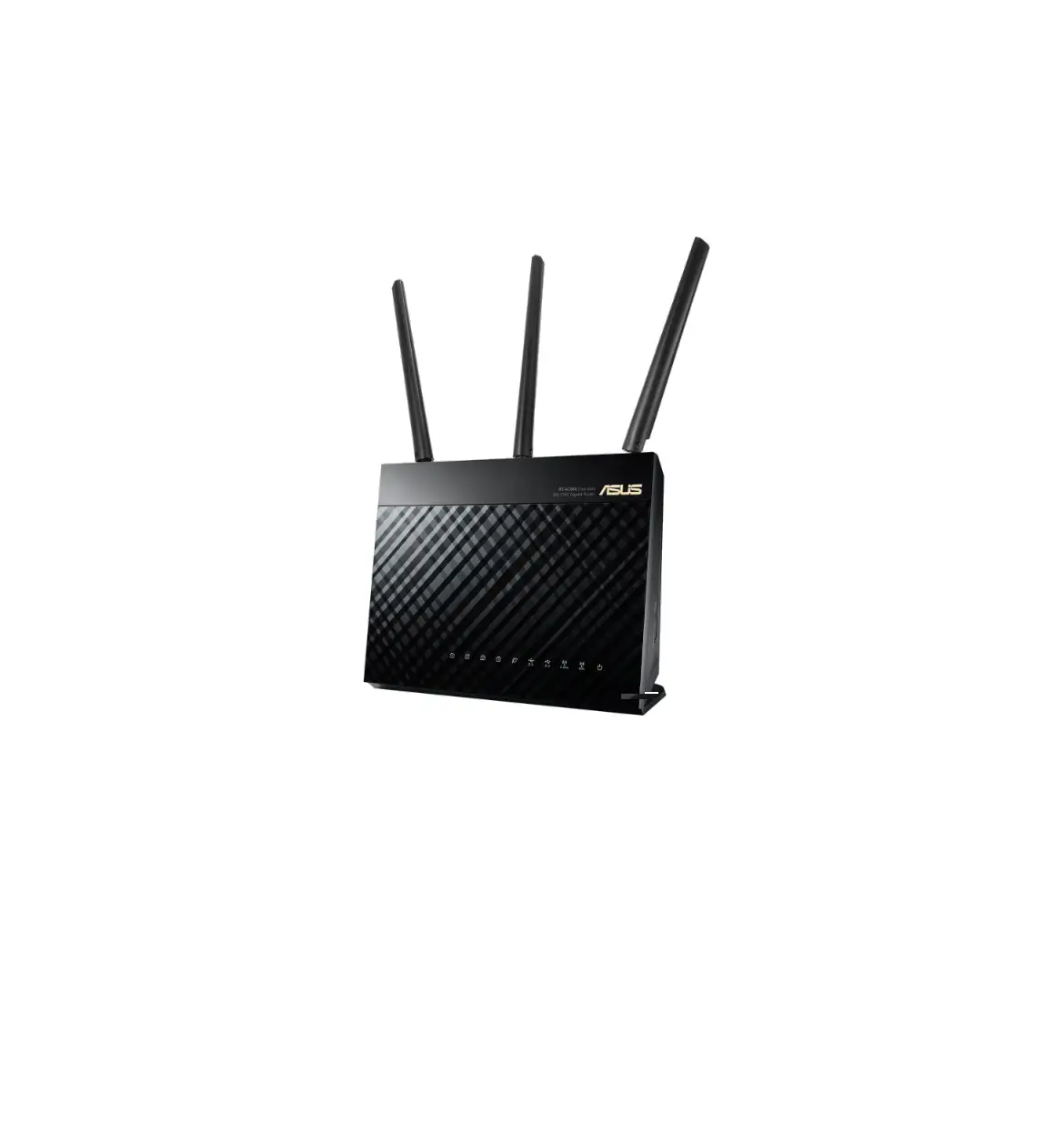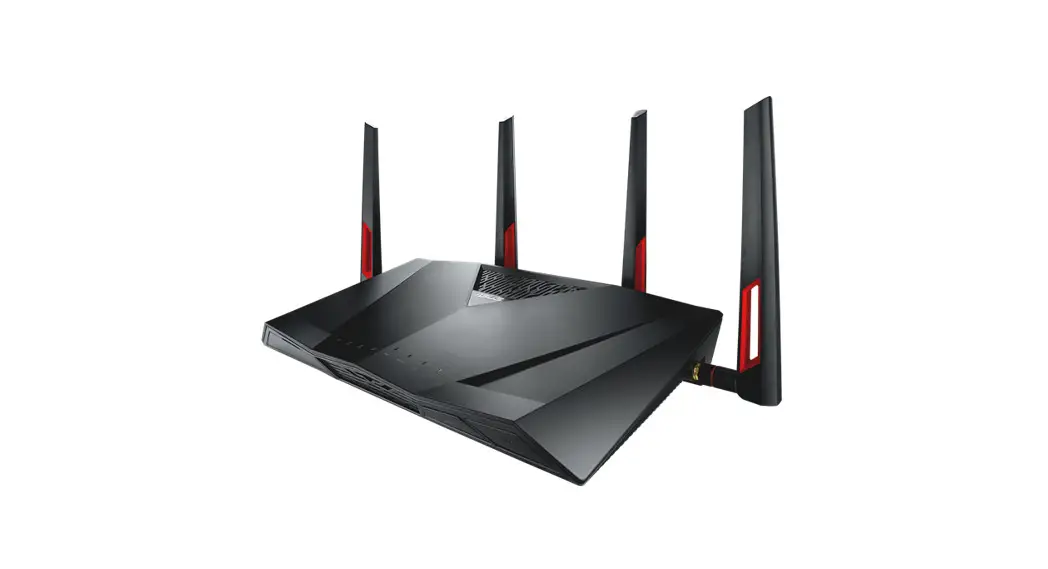
 DSL-AC88U Annex B
Dual-band Wi-Fi ADSL/VDSL Modem Router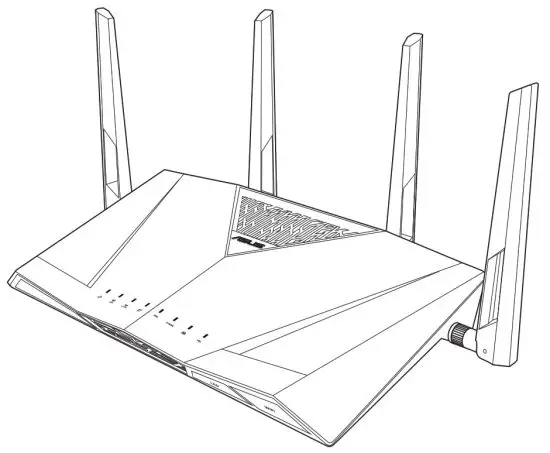
Quick Start Guide
G13736a/First Edition/January 2021
Hardware Features
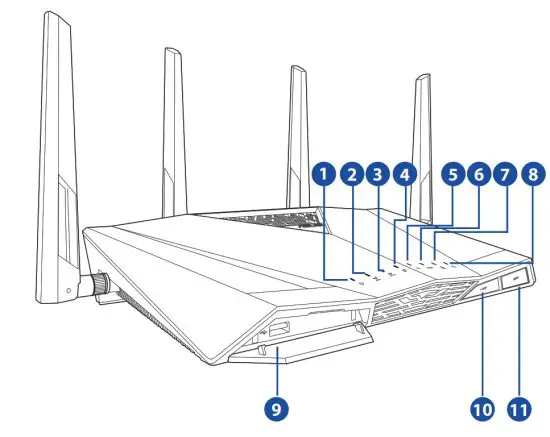
| 1 | Power LED | 7 | LAN 1~4 LED |
| 2 | 5 GHz LED | 8 | USB LED |
| 3 | 2.4 GHz LED | 9 | USB 3.0 port |
| 4 | Internet LED | 10 | LED button |
| 5 | DSL LED | 11 | Wi-Fi button |
| 6 | E-WAN LED |
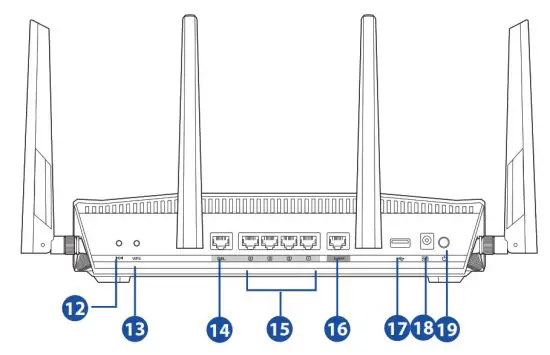
| 12 | Reset button | 16 | WAN port |
| 13 | WPS button | 17 | USB 2.0 port |
| 14 | DSL port | 18 | DC-IN jack |
| 15 | LAN 1~4 ports | 19 | Power button |

- USB External HDD/Flash disk:
- This wireless router works with most USB HDDs/Flash disks up to 2TB and supports read-write access for FAT16, FAT32, EXT2, EXT3, and NTFS.
- To safely remove the USB disk, launch the web GUI (http://router.asus.com), click the USB icon on the Network Map page and click Eject USB disk.
- Incorrect removal of the USB disk, such as during video/music streaming or file downloading, may cause data corruption.
- For the list of file system and hard disk partitions that this wireless router supports, visit: http://event.asus.com/networks/disksupport
- For the list of printers that the wireless router supports, visit: http://event.asus.com/2009/networks/printersupport
Package contents
✓ DSL-AC88U Annex B wireless modem router
✓ Network cable (RJ-45)
✓ AC adapter
✓ Phone cable (RJ-11)
✓ Warranty card
✓ Quick Start Guide
✓ Support CD (User Manual/utilities)
✓ Splitter (varies with regions)
If any of the items is damaged or missing, contact your retailer.
Positioning your wireless router
For the best wireless signal transmission between the wireless router and the network devices connected to it, ensure that you:
- Place the wireless router at the center of your network for maximum wireless coverage.
- Keep the device away from metal obstructions and away from direct sunlight.
- Keep the device away from 802.11g or 20MHz only Wi-Fi devices, 2.4GHz computer peripherals, Bluetooth devices, cordless phones, transformers, heavy-duty motors, fluorescent lights, microwave ovens, refrigerators, and other industrial equipment to prevent signal interference or loss.
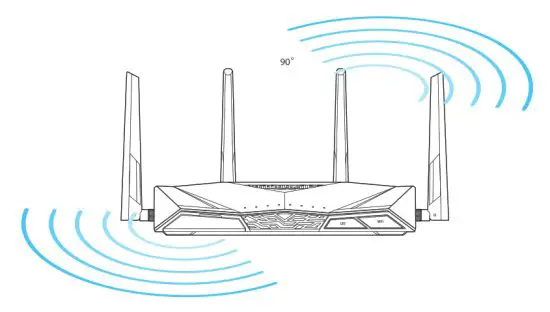
- To ensure the best wireless signal, orient the three detachable antennas as shown in the drawing below.
- Always update to the latest firmware. Visit the ASUS website at http://www.asus.com to get the latest firmware updates.
Before you proceed
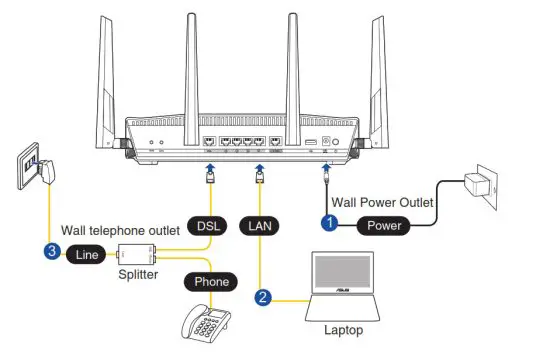
- Connect your devices.

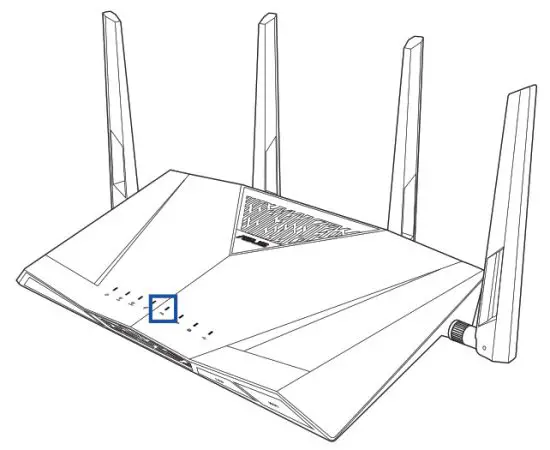
- Before setting up your network, ensure that the DSL LED indicator is a solid light.

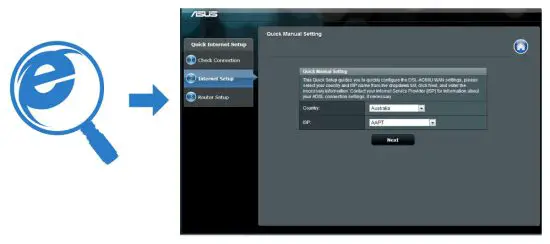
- Launch a web browser and follow the Quick Internet Setup (QIS) steps.

 If the QIS web page does not appear after you launched the web browser, disable the proxy settings on the web browser.
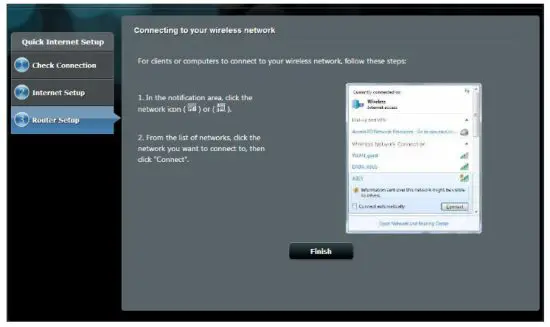
 - Setup complete.

ASUS Recycling/Takeback Services
ASUS recycling and takeback programs come from our commitment to the highest standards for protecting our environment. We believe in providing solutions for you to be able to responsibly recycle our products, batteries, other components, as well as the packaging materials. Please go to http://csr.asus.com/english/Takeback.htm for the detailed recycling information in different regions.
REACH
Complying with the REACH (Registration, Evaluation, Authorisation, and Restriction of Chemicals) regulatory framework, we published the chemical substances in our products at ASUS REACH website at http://csr.asus.com/english/REACH.htm
Prohibition of Co-location
This device and its antenna(s) must not be co-located or operating in conjunction with any other antenna or transmitter.
IMPORTANT NOTE:
Radiation Exposure Statement: This equipment complies with FCC radiation exposure limits set forth for an uncontrolled environment. End users must follow the specific operating instructions for satisfying RF exposure compliance. To maintain compliance with FCC exposure compliance requirement, please follow operation instruction as documented in this manual.
Declaration of Conformity for R&TTE directive 1999/5/EC
Essential requirements – Article 3
Protection requirements for health and safety – Article 3.1a
Testing for electric safety according to EN 60950-1 has been conducted. These are considered relevant and sufficient. Protection requirements for electromagnetic compatibility – Article 3.1b
Testing for electromagnetic compatibility according to EN 301 489-1 and EN 301 489-17 has been conducted. These are considered relevant and sufficient.
Effective use of the radio spectrum – Article 3.2
Testing for radio test suites according to EN 300 328- 2 has been conducted. These are considered relevant and sufficient.
CE Mark Warning
This is a Class B product, in a domestic environment, this product may cause radio interference, in which case the user may be required to take adequate measures. Operation Channels: CH1~11 for N. America; Ch1~14 for Japan; CH1~13 for Europe (ETSI)
This product should be connected by means of a power cord to a socket outlet with earthing connection.
Networks Global Hotline Information
For more information, visit the ASUS support site at: http://www.asus.com/support
| Area | Country/ Region | Hotline Number | Service Hours |
| Europe | Cyprus | 800-92491 | 09:00-13:00 ; 14:00-18:00 Mon-Fri |
| France | 0033-170949400 | 09:00-18:00 Mon-Fri | |
| Germany | 0049-1805010920 0049-1805010923 (component support) 0049-2102959911(Fax) | 09:00-18:00 Mon-Fri 10:00-17:00 Mon-Fri | |
| Hungary | 0036-15054561 | 09:00-17:30 Mon-Fri | |
| Italy | 199-400089 | 09:00-13:00 ; 14:00-18:00 Mon-Fri | |
| Greece | 00800-44142044 | 09:00-13:00 ; 14:00-18:00 Mon-Fri | |
| Austria | 0043-820240513 | 09:00-18:00 Mon-Fri | |
| Netherlands/ Luxembourg | 0031-591570290 | 09:00-17:00 Mon-Fri | |
| Belgium | 0032-78150231 | 09:00-17:00 Mon-Fri | |
| Norway | 0047-2316-2682 | 09:00-18:00 Mon-Fri | |
| Sweden | 0046-858769407 | 09:00-18:00 Mon-Fri | |
| Finland | 00358-969379690 | 10:00-19:00 Mon-Fri | |
| Denmark | 0045-38322943 | 09:00-18:00 Mon-Fri | |
| Poland | 0048-225718040 | 08:30-17:30 Mon-Fri | |
| Spain | 0034-902889688 | 09:00-18:00 Mon-Fri | |
| Portugal | 00351-707500310 | 09:00-18:00 Mon-Fri | |
| Slovak Republic | 00421-232162621 | 08:00-17:00 Mon-Fri | |
| Czech Republic | 00420-596766888 | 08:00-17:00 Mon-Fri | |
| Switzerland-German | 0041-848111010 | 09:00-18:00 Mon-Fri | |
| Switzerland-French | 0041-848111014 | 09:00-18:00 Mon-Fri | |
| Switzerland-Italian | 0041-848111012 | 09:00-18:00 Mon-Fri | |
| United Kingdom | 0044-1442265548 | 09:00-17:00 Mon-Fri | |
| Ireland | 0035-31890719918 | 09:00-17:00 Mon-Fri | |
| Russia and CIS | 008-800-100-ASUS | 09:00-18:00 Mon-Fri | |
| Ukraine | 0038-0445457727 | 09:00-18:00 Mon-Fri |
Networks Global Hotline Information
| Area | Country/ Region | Hotline Numbers | Service Hours |
| Asia-Pacific | Australia | 1300-278788 | 09:00-18:00 Mon-Fri |
| New Zealand | 0800-278788 | 09:00-18:00 Mon-Fri | |
| Japan | 0800-1232787 0081-570783886 ( Non-Toll Free ) | 09:00-18:00 Mon-Fri 09:00-17:00 Sat-Sun 09:00-18:00 Mon-Fri 09:00-17:00 Sat-Sun | |
| Korea | 0082-215666868 | 09:30-17:00 Mon-Fri | |
| Thailand | 0066-24011717 1800-8525201 | 09:00-18:00 Mon-Fri | |
| Singapore | 0065-64157917 0065-67203835 ( Repair Status Only ) | 11:00-19:00 Mon-Fri 11:00-19:00 Mon-Fri 11:00-13:00 Sat | |
| Malaysia | 1300-88-3495 | 9:00-18:00 Mon-Fri | |
| Philippine | 1800-18550163 | 09:00-18:00 Mon-Fri | |
| India India(WL/NW) | 1800-2090365 | 09:00-18:00 Mon-Sat 09:00-21:00 Mon-Sun | |
| Indonesia | 0062-2129495000 500128 (Local Only) | 09:30-17:00 Mon-Fri 9:30 – 12:00 Sat | |
| Vietnam | 1900-555581 | 08:00-12:00 13:30-17:30 Mon-Sat | |
| Hong Kong | 00852-35824770 | 10:00-19:00 Mon-Sat | |
| Americas | USA Canada | 1-812-282-2787 | 8:30-12:00 EST Mon-Fri 9:00-18:00 EST Sat-Sun |
| Mexico | 001-8008367847 | 08:00-20:00 CST Mon-Fri 08:00-15:00 CST Sat |
Networks Global Hotline Information
| Area | Country/ Region | Hotline Numbers | Service Hours |
| Middle East + Africa | Egypt | 800-2787349 | 09:00-18:00 Sun-Thu |
| Saudi Arabia | 800-1212787 | 09:00-18:00 Sat-Wed | |
| UAE | 00971-42958941 | 09:00-18:00 Sun-Thu | |
| Turkey | 0090-2165243000 | 09:00-18:00 Mon-Fri | |
| South Africa | 0861-278772 | 08:00-17:00 Mon-Fri | |
| Israel | *6557/00972-39142800 *9770/00972-35598555 | 08:00-17:00 Sun-Thu 08:30-17:30 Sun-Thu | |
| Balkan Countries | Romania | 0040-213301786 | 09:00-18:30 Mon-Fri |
| Bosnia Herzegovina | 00387-33773163 | 09:00-17:00 Mon-Fri | |
| Bulgaria | 00359-70014411 00359-29889170 | 09:30-18:30 Mon-Fri 09:30-18:00 Mon-Fri | |
| Croatia | 00385-16401111 | 09:00-17:00 Mon-Fri | |
| Montenegro | 00382-20608251 | 09:00-17:00 Mon-Fri | |
| Serbia | 00381-112070677 | 09:00-17:00 Mon-Fri | |
| Slovenia | 08:00-16:00 Mon-Fri | ||
| Baltic Countries | Estonia | 00372-6671796 | 09:00-18:00 Mon-Fri |
| Latvia | 00371-67408838 | 09:00-18:00 Mon-Fri | |
| Lithuania-Kaunas Lithuania-Vilnius | 00370-37329000 00370-522101160 | 09:00-18:00 Mon-Fri 09:00-18:00 Mon-Fri |
| Manufacturer | ASUSTeK Computer Inc. Tel: +886-2-2894-3447 Address: 1F., No. 15, LIDE RD., BEITOU DIST, TAIPEI City 112, TAIWAN |
| Authorised representative in Europe | ASUS Computer GmbH Address: HARKORT STR. 21-23, 40880 RATINGEN, GERMANY |
| Authorised distributors in Turkey | BOGAZICI BIL GISAYAR SAN. VE TIC. A.S. Tel: +90 212 3311000 Address: AYAZAGA MAH. KEMERBURGAZ CAD. NO.10 AYAZAGA/ISTANBUL |
| CIZGI Elektronik San. Tic. Ltd. Sti. Tel: +90 212 3567070 Address: CEMAL SURURI CD. HALIM MERIC IS MERKEZI No: 15/C D:5-6 34394 MECIDIYEKOY/ ISTANBUL | |
| KOYUNCU ELEKTRONiK BiLGi iSLEM SiST. SAN. VE DIS TIC. A.S. Tel: +90 216 5288888 Address: EMEK MAH.ORDU CAD. NO:18, SARIGAZi, SANCAKTEPE ISTANBUL |
 ASUS Corporate Social Responsibility
 ASUSTeK Computer Inc.
 ASUS Global