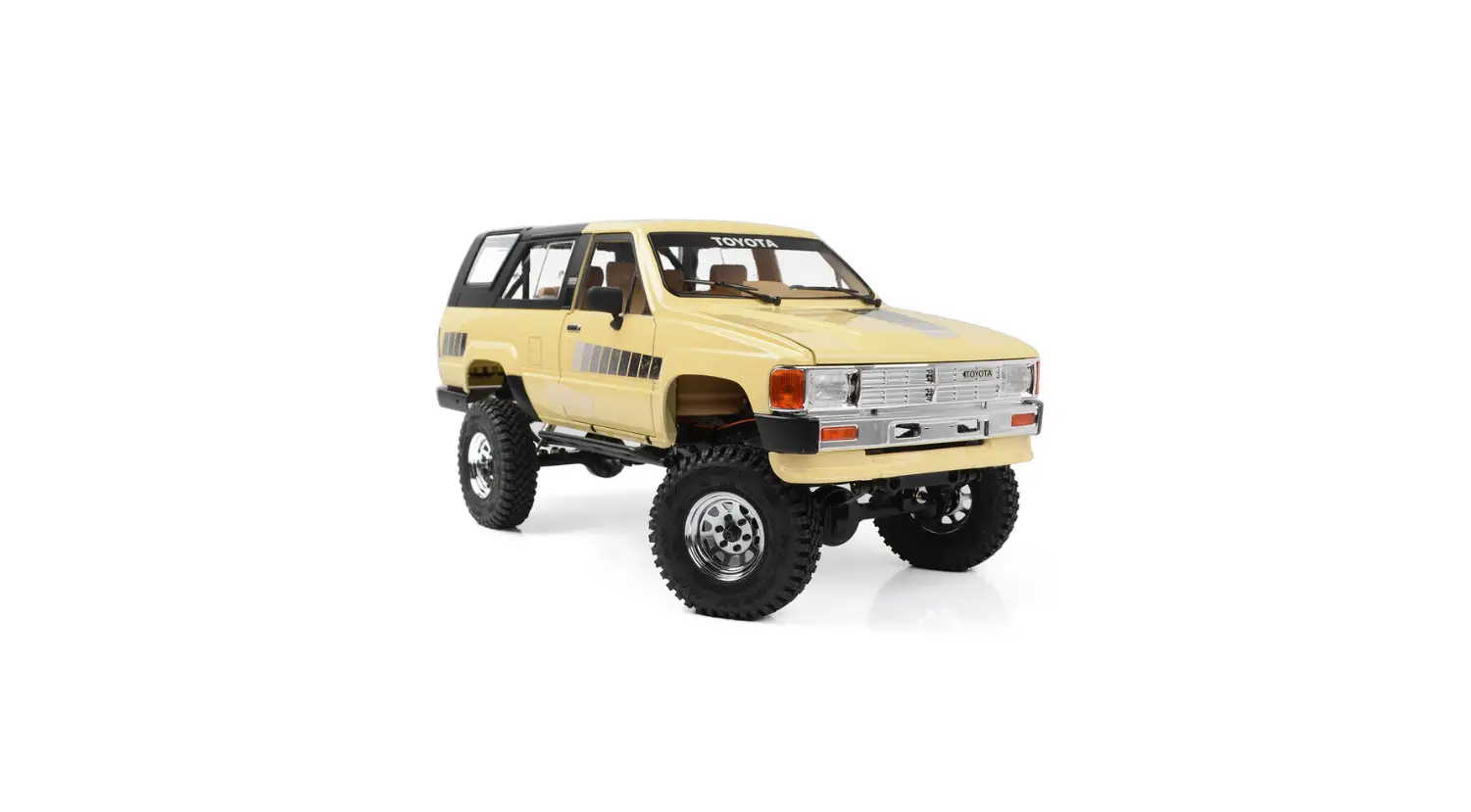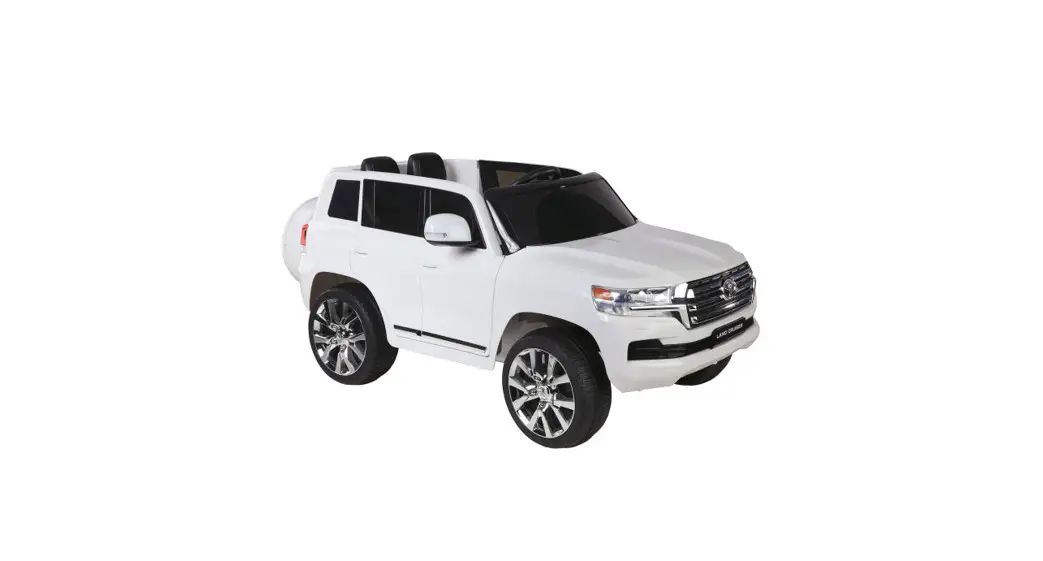
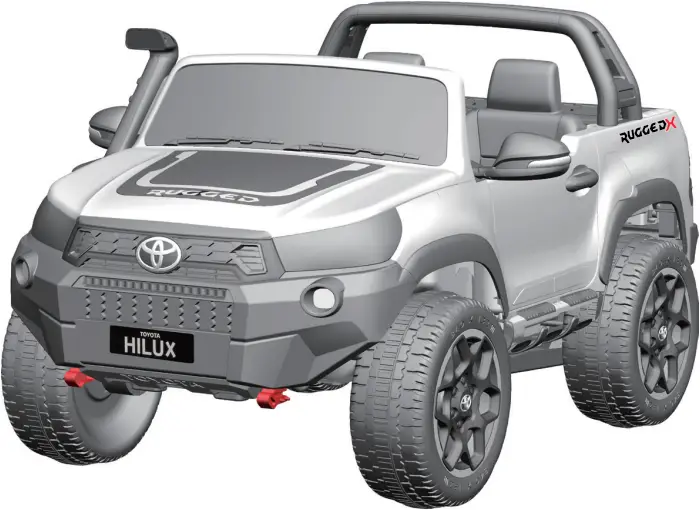
 TOYOTA HILUX
RIDE-ON 4WD
 TOYOTA HILUX
DK-HL850
 WARNING
Must be assembled by an adult.
- Suitable for 3+ Years
- Maximum user weight: 50 kg
OWNERS MANUAL
with Assembly Instructions
Read and understand this entire manual before using!
Please keep this manual for future reference as it contains important information. Before first time use, charge the battery for at least 8-12 hours.
If any parts are missing or damaged, please contact with our
CUSTOMER SERVICE representative on: Hunter Leisure Pty Ltd
Tel.: 1800632792 (Australia)(Monday to Friday 8:30am to 4:00pm)
E-mail: [email protected] Web: www.hunterservice.com.au
Business address: 94 Keilor Park Drive, Tullamarine, Vic 3043
SPECIFICATIONS
| Item | DK-HL850 |
| Battery&Motor | 2 x 12V7AH battery & 4 x motor (20-45W) |
| Available ages | 3+ Years |
| Maximum weight | 50KGS |
| Size | 140 x 92 x 74CM |
| Speed | 3-5km/h |
| Charge time | 8-12 hours |
| Remote control batteries | 2 x AAA batteries (not included) |
| Charger | Input: 100-200VAC 50-60Hz 0.56A Output 15.0VDC 1.0A |
Charging the drive battery:
 IMPORTANT! Before first time use, the batteries need to be charged 8 – 12 hours, no more than 20 hours to avoid overheating the charger.
Re-charge the batteries for 8 – 12 hours when in low power, no more than 20 hours to avoid overheating the charger.
 BATTERY INFORMATION
- Non-rechargeable batteries are not to be recharged.
- Rechargeable battery doesn’t need to be removed before charging.
- Rechargeable batteries are only to be charged under adult supervision.
- Different types of batteries or new and used batteries are not to be mixed.
- Batteries are to be inserted with the correct polarity.
- Exhausted batteries are to be removed from the toy.
- The supply terminals are not to be short-circuited.
PARTS LIST
NO. | PART NAME | QTY (PCS) | REMARK |
1 | Car body | 1 | |
2 | Roll bar | 1 | |
3 | Wheel covers | 4 | |
4 | Manual | 1 | |
5 | Plastic wrench | 2 | |
6 | Front windshield | 1 | |
7 | Seat | 2 | |
8 | Rear-view mirrors | 1 Pair | |
9 | Air scoop | 1 | |
10 | Hood | 1 | |
11 | Front wheels | 2 | |
12 | Charger | 1 | |
13 | Screws&nuts | 1 Bag | |
14 | Steering wheel | 1 | |
15 | Back wheels | 2 | |
16 | Remote control | 1 | |
17 | Key | 2 | |
18 | Audio cable | 1 | |
19 | Wheel motor | 4 |
PARTS DIAGRAM
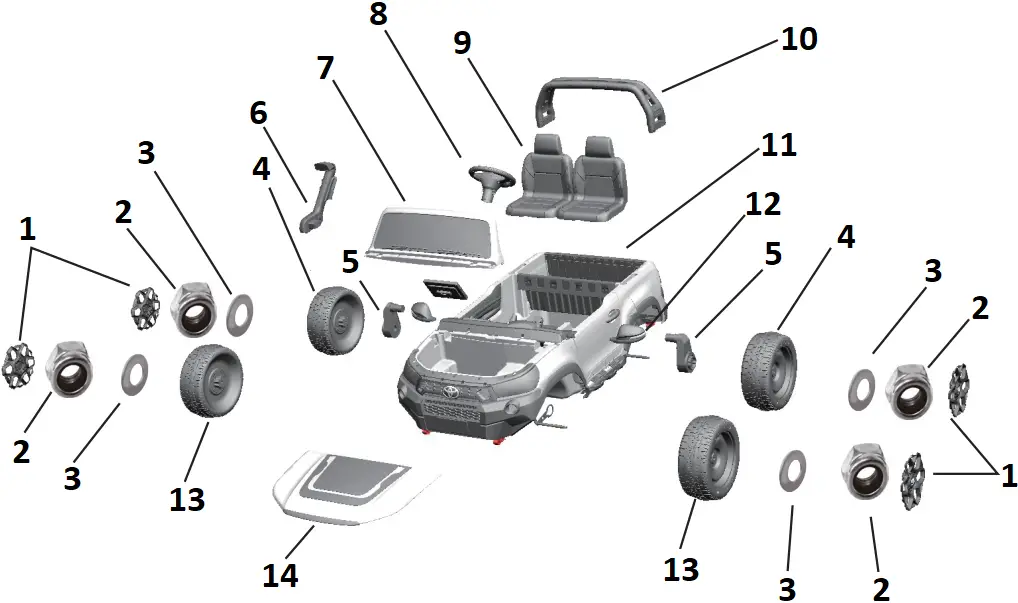
- Wheel covers
- Nut
- gasket
- Back wheels
- Electric engine
- Air scoop
- Front windshield
- Steering wheel
- Seat
- Roll bar
- Car body
- Rear-view mirrors
- Front wheels
- Hood
INSTALLATION PROCEDURE
1. INSTALL REAR DRIVING MOTORS
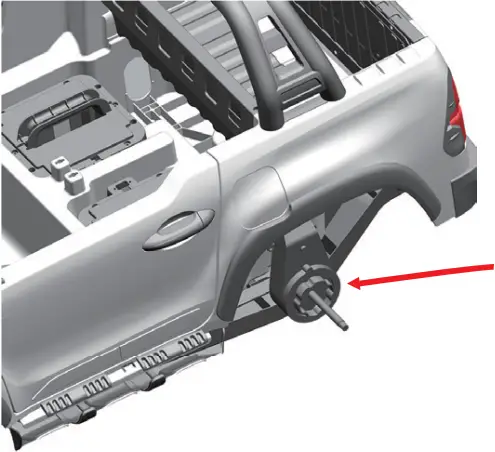
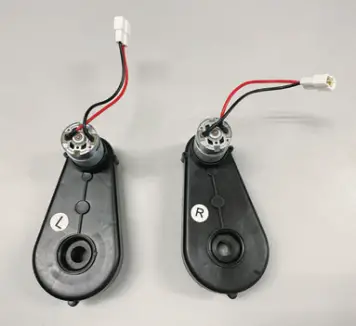
Make sure the right & left motor to be installed on correct side, each motor with R or L sticker.
Take out the driving motors, put the motor onto each end of the rear wheel axle.
2. INSTALL WHEELS
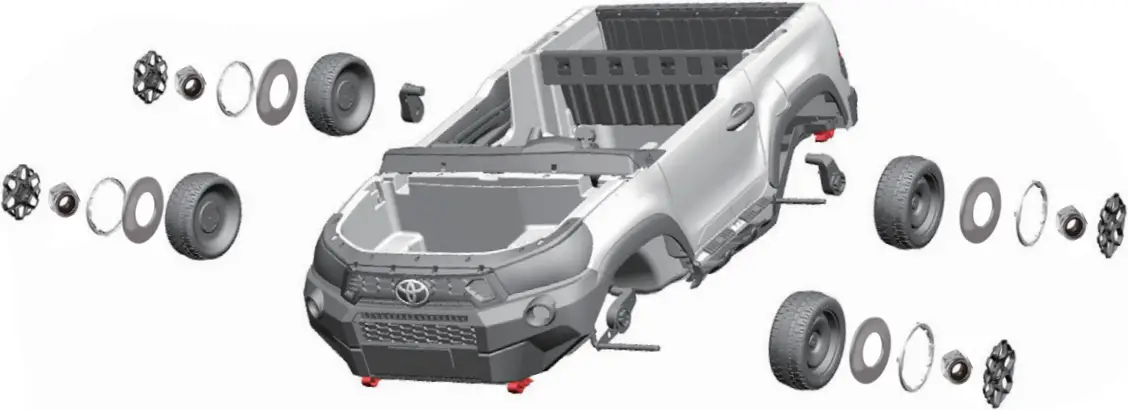
Install the wheels by putting the parts onto axles as above diagram:
Front wheels: wheel – gasket – screw – wheel cover
Rear wheels: driving motor – wheel – gasket – screws – wheel cover
3. CONNECT DRIVING MOTORS TO POWER
Contain
2 x 12V7A
batteries
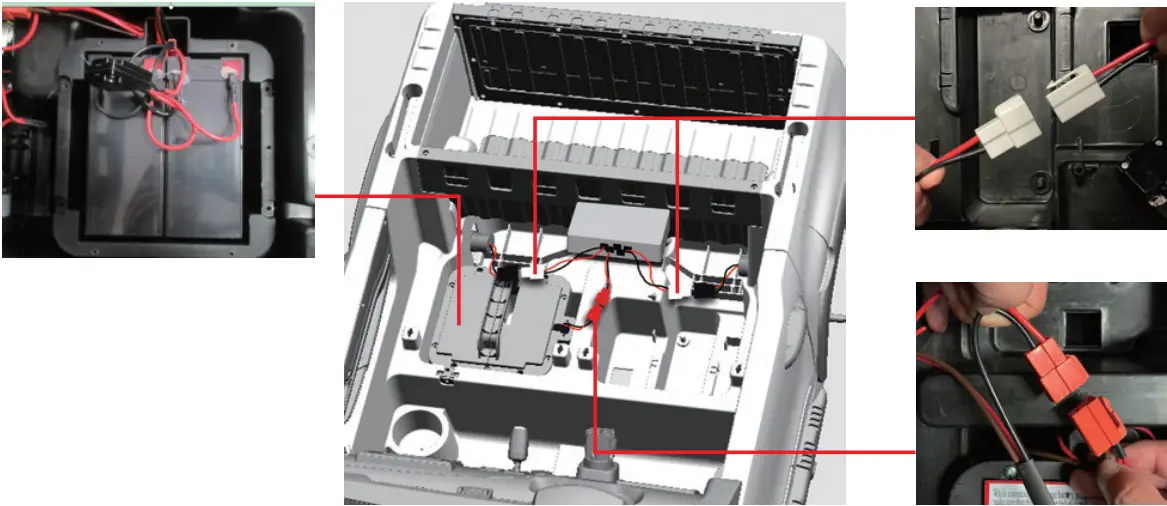
- Connect the driving motors to receiver by plug the white wire connectors.
- Plug the red wire connector to connect the power.
4. INSTALL ROLL BAR
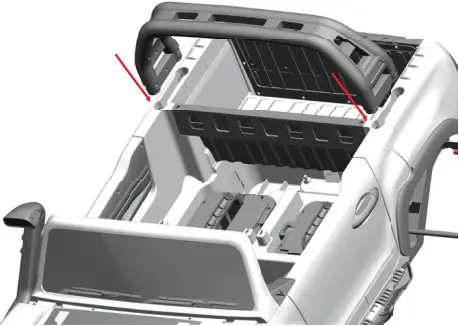
Attach the roll bar into the socket, and press till sound of ‘click’.
5. INSTALL SEATS
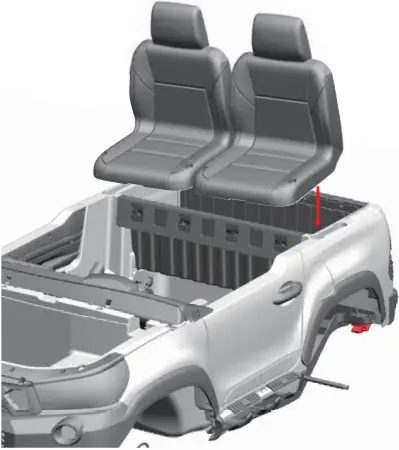
- Put the seats onto correct position, rotate the fasteners 90° to lock well.
- Press the backrest to the back board to fix the seats tight.
6. INSTALL STEERING WHEEL
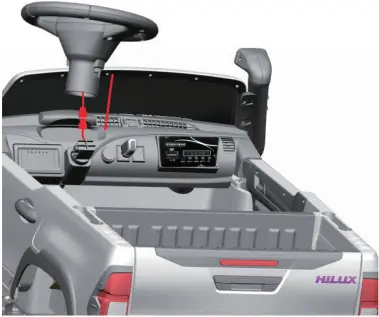
- Connect the wire plug, and tuck the wire into the socket of steering wheel.
- Fit the steering wheel to the column till sound of ‘click’ to finish installation.
7. INSTALL FRONT WINDSHIELD
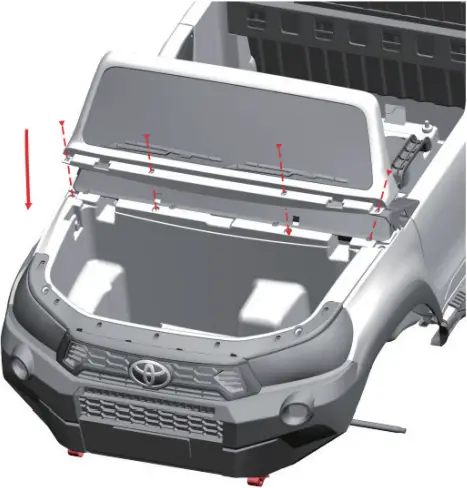
Attach the two end of the windshield into the sockets, and then lock it well with 4 screws.
8. INSTALL AIR SCOOP
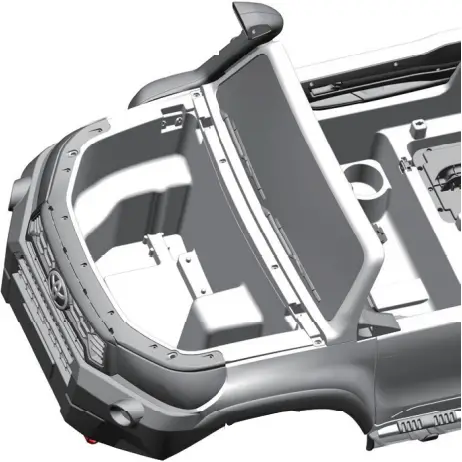
Attached the air scoop into the socket on side of car body, and then lock it well with 2 screws.
9. INSTALL HOOD
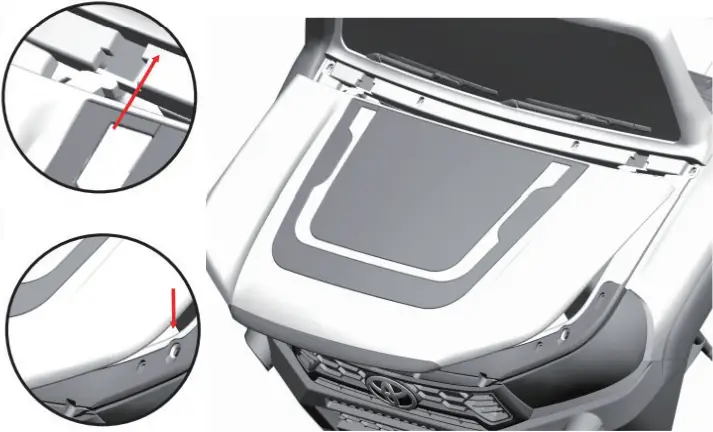
- Insert two buckles at the back part of hood into the two sockets of front windshield and fix.
- Press the 2 pillars at the front of hood into the holes of car body till sound of ‘click’.
10. INSTALL REAR-VIEW MIRRORS
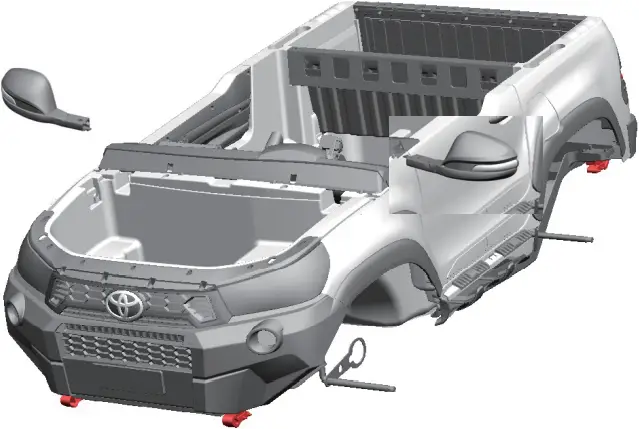
Insert the rear-view mirrors to each side till sound of ‘click’ to ensure fixed well.
USE YOUR NEW RIDE ON
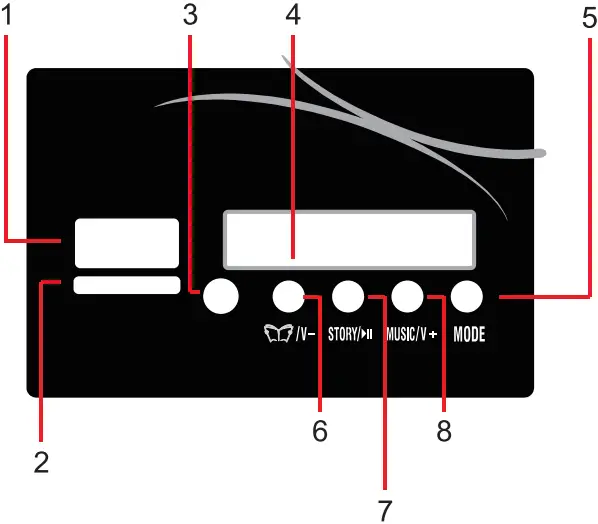
- USB socket, MP3 format ONLY
- TF socket
- MP3 socket
- Display
- Radio/ Bluetooth ‘YJ-BTcar’/TF card/USB connector/Music
- Education(Pressing for a longer time and it will lower the volume)
- Story (Play/Pause under the Bluetooth/TF/USB functions
- Music (Pressing for a longer time and it will higher the volume)
FUNCTION INDICATION
On the premise that the battery has been correctly connected, start the trolley circuit system
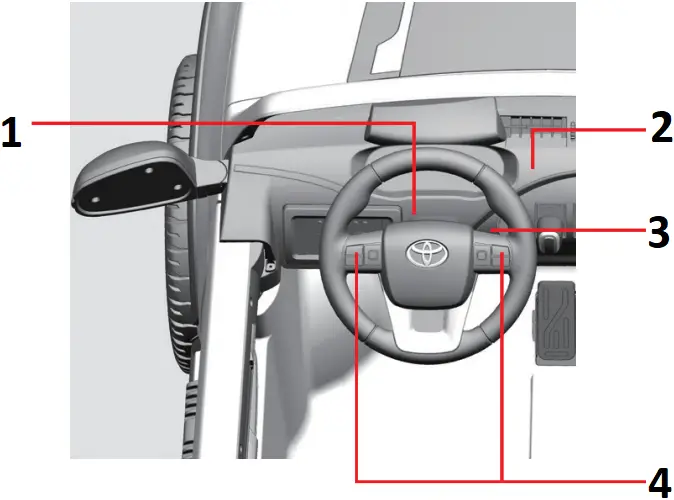
- The connection of steering wheel includes button connection
- Forward and backward switch
- Key switch
- Song switch/Horn/Volume adjust
USE THE REMOTE CONTROL
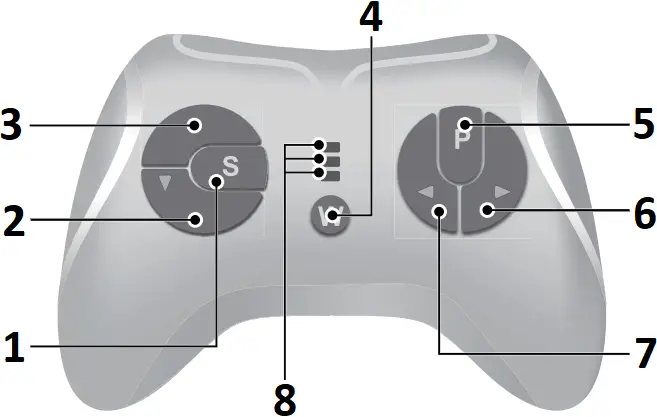
- Speed select button
- Reverse button
- Forward button
- Connection button
- Stop button
- Right button
- Left button
- High speed indicator
Normal speed indicator
Low speed indicator
Attach the batteries of controller
Lift the battery compartment door on the back of the controller and insert two AAA(LR03) batteries.
HINT: Batteries not included. Refer to the Battery Information on the page 1.
1. Build connection
Press the Connection button for 2 seconds, the status indicator flashes, then turn on the power switch located on the the vehicle dash, when the status indicator turns off about 2 seconds and turns into long bright, means the connection successful If the status indicator makes no response, means the connection failed. Replace the batteries and try again.
2. Stop button
Press the button to stop the vehicle, press it again to release the brake.
3. Speed select button
The switch operates the vehicle to move in low, normal or high speed.
HINT: This switch won’t work while your vehicle moves reverse.
NOTE:
- Leave the remote controller idling for about 10 seconds, it will shut down automatically.
- Rebuild connection when you replace the batteries of the remote controller.
CHARGING
- The POWER SWITCH must be turned in OFF position when charging.
- Before the first use, you should charge the battery for 8-12 hours. Do not recharge the battery for more than 20 hours to avoid overheating the charger.
- When the vehicle begins to run slowly, recharge the battery.
 WARNING!
- CHILDREN must not recharge the battery.
- This product contains Charging Protection meaning all functions of the car will not work when charging.
- Always charge in an open area with adequate ventilation.
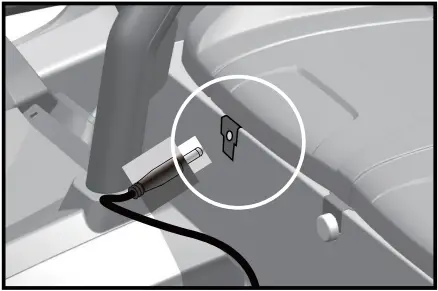
- Plug the charger port into the input socket. (below the seat)
- Plug the charger plug into a wall outlet. The battery will begin charging.
- The indicator is red when charging, and turn to green when full charged.
MAINTAINING
- It is parents’ responsibility to check main parts of the toy before using, must regularly examine for potential hazard, such as the battery, charge, cable or cord, plug, screws are fastening enclosure of other parts and that in the event of such damage, the toy must not be used until that damage had been properly removed.
- Make sure the plastic parts of the vehicle are not cracked or broken.
- Occasionally use a lightweight oil to lubricate moving parts such as wheels.
- Park the vehicle indoors or cover it with a tarp to protect it from wet weather.
- Keep the vehicle away from sources of heat, such as stoves and heaters. Plastic parts may melt.
- Recharge the battery after each use. Only an adult can handle the battery.
Recharge the battery at least once a month when the vehicle is not being used. - Do not wash the vehicle with a hose. Do not wash the vehicle with soap and water. Do not drive the vehicle in rainy or snowy weather Water will damage the motor, electric system and battery.
- Clean the vehicle with a soft, dry cloth. To restore shine to plastic parts, use a non-wax furniture polish Do not use car wax. Do not use abrasive cleaners.
- Do not drive the vehicle in loose dirt, sand or fine gravel which could damage the moving parts, motors or the electric system.
- When not using, all the electrical source should be turn off. Turn off the power switch and disconnect the battery connection.
TROUBLESHOOTING GUIDE
Problem | Possible Cause | Solution |
| Vehicle does not run | Battery low on power | Recharge battery. |
| Thermal fuse has tripped | Reset fuse, see <Fuse> | |
| Battery connector or wires are loose | Check that the battery connectors are firmly plugged into each other. If wires are loose around the motor contact your distributor please. | |
| Battery is dead | Replace battery, contact your distributor please. | |
| Electrical system is damaged | Contact your distributor please. | |
| Motor is damaged | Contact your distributor please. | |
| Vehicle does not run very long | Battery is under charged | Check that the battery connectors are firmly plugged into each other when recharging |
| Battery is old | Replace battery, contact your distributor please. | |
| Vehicle runs sluggishly | Battery low on power | Recharge battery, contact your distributor please. |
| Battery is old | Replace battery, contact your distributor please. | |
| Vehicle is overload | Reduce weight on vehicle. Maximum user weight is 50 kg. | |
| Vehicle is being used in harsh conditions | Avoid using vehicle in harsh conditions ,see <Safety>. | |
| Vehicle needs a push to go forward | Poor contact of wires or Connectors | Check that the battery connectors are firmly plugged into each other. If wires are loose around the motor, contact your distributor please. |
| “Dead Spot” on motor | A dead spot means the electric power is not being delivered to the terminal connection and the vehicle needs repair. Contact your distributor please. | |
| Difficult shifting from forward to reverse or vice-versa | Attempting to shift while the vehicle is motion | Completely stop the vehicle and shift, see <Use Your New Vehicle> |
| Loud grinding or clicking noises coming from motor or gear box | Motor or gears are damaged | Contact your distributor please. |
| Battery will not recharge | Battery connector or adapter connector is loose | Check that the battery connectors are firmly plugged into each other. |
| Charger not plugged in | Check that the battery charger is plugged into a working wall outlet. | |
| Charger is not working | Contact your distributor please. | |
| Charger feels warm when recharging | This is normal and not a cause for concern | |
| Completely read through this manual and the troubleshooting guide table before calling. If you still need help resolving the problem Contact your distributor please. | ||
INSTRUCTIONS
Warning-when replacing a replaceable battery, first open the lid and take out the old battery. Put in the new battery, pay attention to the positive and negative poles, cover the lid.
 WARNING!
For safety reasons,
- Please use this vehicle under adult guidance and supervision.
- Do not use this product on main roads, slopes, highways or other dangerous places.
- Children must wear shoes and protective gears when operating the vehicle.
- Children should be seated with the seat belt fasten when driving.
- Only load a maximum of 50kg on the vehicle.
- Only children aged over 3 years should be allowed on this vehicle.
- Use this toy strictly according to safety manual.
- Please check the tires, breaks, steering wheels, seats and seat belts before operating vehicle.
- This toy vehicle should be used with caution and requires skill to avoid fall or collision with third parties.
- Non-rechargeable batteries are not to be recharged;
- The supply terminals are not to be short-circuited.
- Rechargeable batteries don’t need to be removed from the car before charging.
- The toy should be regularly examined for damage to the cord, plug, anclosure and other parts, and in the event of such damage, they must not be used until the damage has been repaired.
– only use the battery specified by the manufacturer
– only use the charger specified by the manufacturer.
Pictures are for reference only,please adhere to the original products as standard.
Pictures are for reference only, please adhere to the original products as standard.
FUSE
The battery features a thermal fuse with a rest fuse that will automatically trip and cut all power to the vehicle if the motor, electric system or battery is overloaded. The fuse will reset and power will be restored after the unit is turned OFF for 20 seconds and then turned ON again. If the thermal fuse trips repeatedly during normal use, the vehicle may need repair. Contact your distributor please.
To avoid losing power, follow these guidelines:
- Do not overload the vehicle.
- Do not tow anything behind the vehicle.
- Do not drive up steep slopes.
- Do not drive into fixed objects, which may cause the wheels to spin, causing the motor to overheat.
- Do not drive in very hot weather, components may overheat.
- Do not allow water or other liquids to come in contact with the battery or other electric components.
- Do not tamper with the electric system. Doing so may create a short, causing the fuse to trip.
Disposal Of Battery 
- Your sealed lead-acid battery must be recycled or disposed of in an environmentally sound manner.
- Do not dispose of your lead-acid battery in a fire. The battery may explode or leak.
- Do not dispose of a lead-acid battery in your regular, household trash. The incineration, land filling or mixing of sealed lead-acid batteries with house-hold trash is prohibited by law.
Our products are suitable for EN71 and EN62115 standard.
SAFETY PRECAUTIONS
01. While driving, adult supervision is required all the time.
02. Always wear a helmet when driving.
03. Please don’t drive near road or on the footpath.
04. It is not recommended to drive the vehicle on wet surface or on slope greater than 15-degree.
05. It is recommended to drive this vehicle on smooth surface only.
06. Please don’t drive this vehicle outdoors when it is raining.
07. Make sure that the vehicle stop completely before changing direction from forward to reverse.
08. Please don’t allow children to operate the charger or play with the battery.
09. Clean the vehicle with a dry cloth only.
10. Please follow the correct and age limits allowed to drive this vehicle.
11. It is prohibited to change the circuit or add other electric parts.
12. Adults must teach their children about safe driving procedures.
13. Please turn the power off when not in use.
14. Check the seat to ensure it has been fitted and secured with bolt before driving.
15. Inspect all wires and connection of the vehicle periodically.
16. Charging the battery should only be done by adults.
17. Charging plug is located underneath the seat.
18. In order to avoid accidents, please ensure the vehicle is safe before driving.
19. Please don’t let children touch the wheels or be near them when the car is moving.
20. Please mind fingers when opening and closing doors.
If any parts are missing or damaged, please contact with our CUSTOMER SERVICE representative on:
Hunter Leisure Tel.: 1800632792 (Australia) E-mail: [email protected]