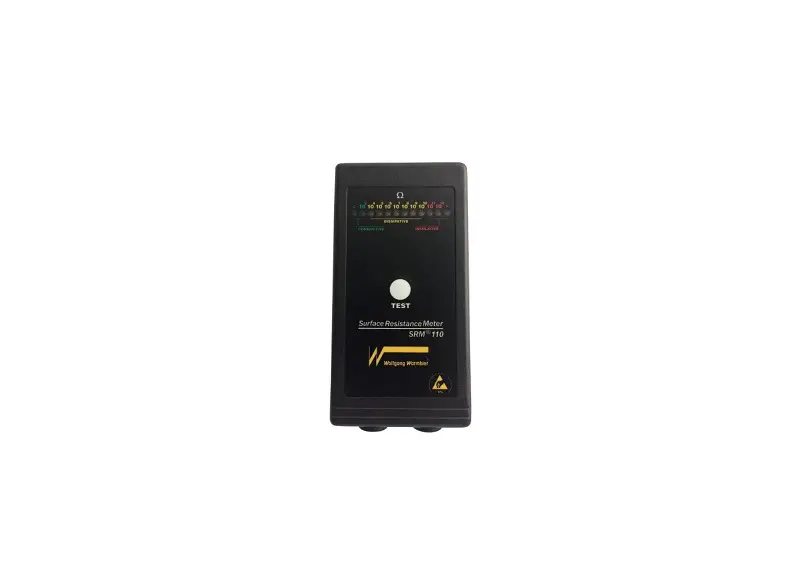

Wolfgang Warmbier SRM200 Surface Resistance Meter
Introduction
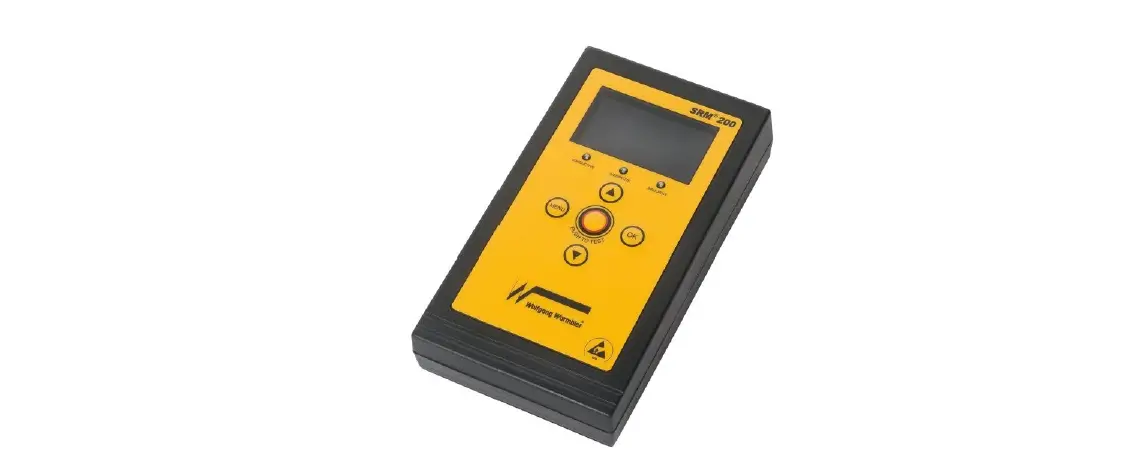
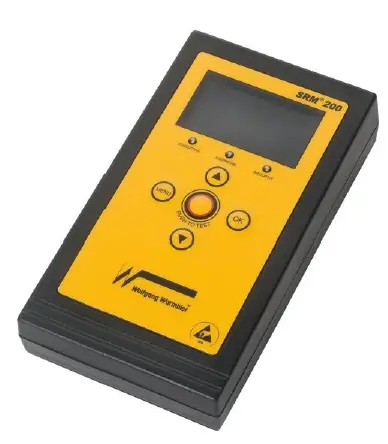
The SRM®200 is a pocket size, lightweight, auto ranging surface resistance tester. Measured values are displayed on an LCD dot matrix module and can be stored in the internal memory. Each measurement includes the current temperature and relative humidity. Built-in electrodes with conductive rubber make good contact with the object under test. IEC compatible electrodes can be externally connected for tests according to IEC 61340-4-1, IEC 61340-2-3 and IEC 61340-4-5.
Operating Instructions
Operation Description
| View results | Display measurement results |
| Delete results | Delete measurement data |
| Delete all data | Delete all measurement data |
| Limit | Display or change limit values (max. 19) |
| Folder name | Display or change folder names (max. 99) Folder names can be entered more convenient by using the PC software |
| Timeout | Turn-off delay time |
| Temperature | Change temperature between °C and °F |
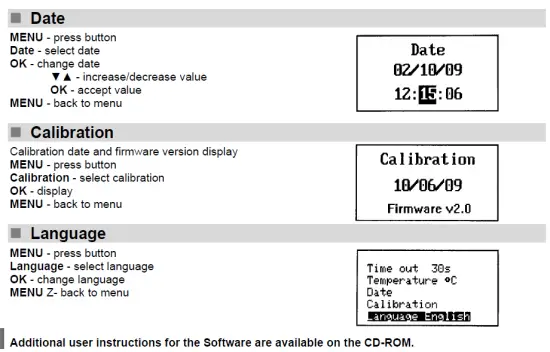
| Date | Adjust date and time |
| Calibration | Display calibration date and software version |
| Language | Language selection German / English |
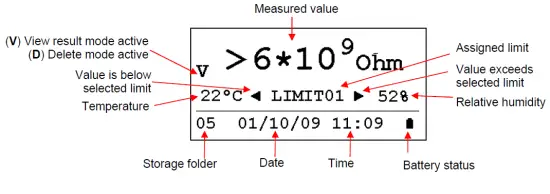
LCD display overview
Measuring Surface Resistance
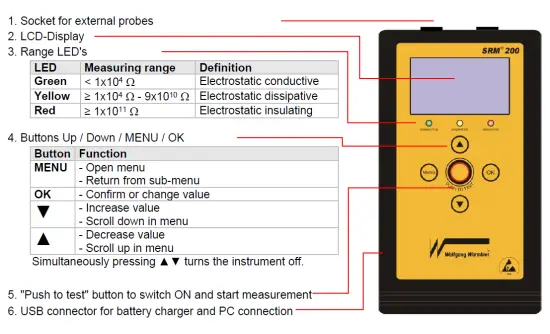
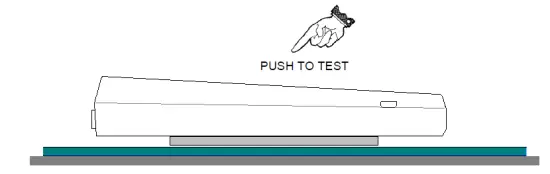
- To measure the surface resistance of an object, hold the instrument onto the surface and press the “PUSH TO TEST” button.
- The value is indicated on the display. The coloured LED’s additionally indicate the measuring range if no limit is assigned. If the limit is assigned, the limit arrows on the display will indicate the measured value being below or above the limit range.
- ▼▲ selects the storage folder; OK stores the current measurement value to the selected folder.
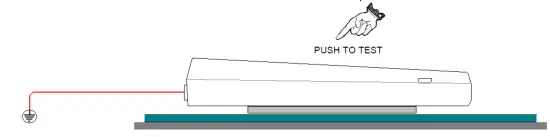
Measuring Resistance to Ground
- Plug in the supplied grounding cord at one socket of the instrument. The associated internal electrode will be disconnected.
- Connect the opposite end of the grounding cord to “ground” or a “groundable point”.
- Hold the instrument onto the surface like described above and press the button.
Other Measurements
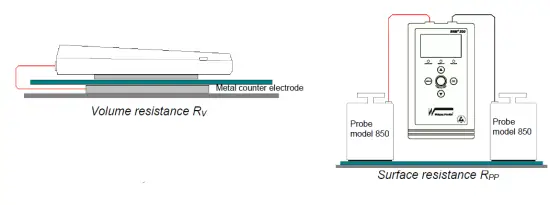
By connecting external electrodes to the instrument’s sockets it is possible to measure “point to point resistance”, or “volume resistance” for example.
Test values Storage
The included software can be used to transfer and process test values to the computer. The functionality includes:
- Measurement data transfer
- Store and export measurement data
- Print measurement report
- Limit value definition
- Labelling of measurement folders
- Adjust Date and time
Functions
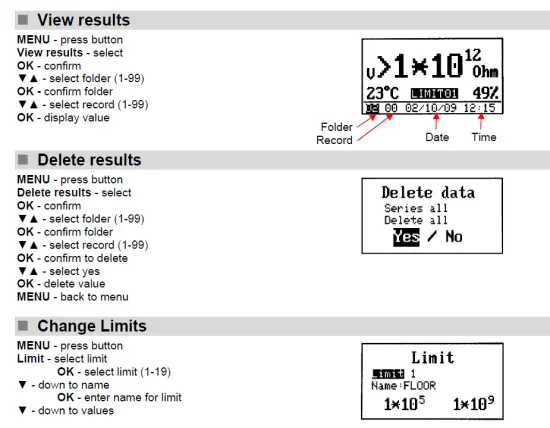
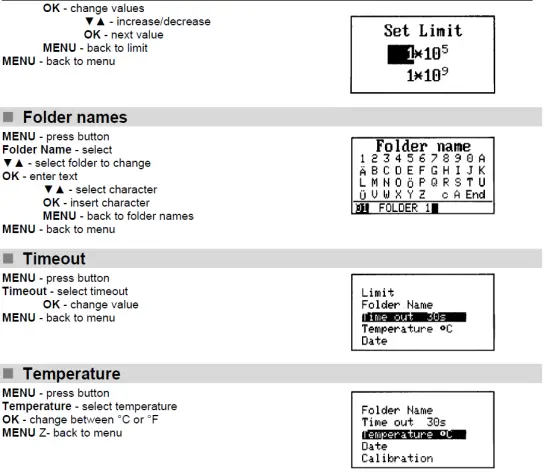
The following functions are available. Most of them can be accessed more conveniently by PC software.
Packing List
The SRM®200 includes:
- Surface Resistance Meter SRM®200
- Conductive carrying case
- USB data cable
- Software on CD-ROM
- Grounding cord and small alligator clip
- User’s manual (DE / EN)
- Calibration certificate (DE / EN)\
Technical Data
| Power supply: | Rechargeable Lithium Battery 3.6V, 900 mAh R6 (AA) |
| Charged via external power supply or USB interface | |
| Operating conditions: | – 5 … + 40 °C, up to 75 % rel. humidity, noncondensing |
| Storing conditions: | – 10 … + 50 °C, up to 85 % rel. humidity, noncondensing |
| Connectors: | 2 banana sockets – short version (15 mm) |
| Resistance measuring range: | 1×10³ – 1×10¹² n |
| Temperature measuring range: | 0 – 50 °C +/- 1 °C |
| Humidity measuring range: | 10 – 90 % r.F. +/- 5 % |
| Memory: | 9801 measuring values |
| Test voltage (open-circuit): | 100 V |
| Dimensions: | 145 x 80 x 35 mm (L x B x H) |
| PC interface: | USB 2.0 |
| Case: | ABS |
| Weight: | 290 g |
| Measuring range | Display range | Resolution | Accuracy |
| 103 n | 1×10³ – 9×10³ | 1 kn | 10 % reading |
| 104 n | 1×10⁴ – 9×10⁴ | 10 kn | 10 % reading |
| 105 n | 1×10⁵ – 9×10⁵ | 100 kn | 10 % reading |
| 106 n | 1×10⁶ – 9×10⁶ | 1 Mn | 10 % reading |
| 107 n | 1×10⁷ – 9×10⁷ | 10 Mn | 10 % reading |
| 108 n | 1×10⁸ – 9×10⁸ | 100 Mn | 10 % reading |
| 109 n | 1×10⁹ – 9×10⁹ | 1 Gn | 10 % reading |
| 1010 n | 1×10¹⁰ – 9×10¹⁰ | 10 Gn | 25 % reading |
| 1011 n | 1×10¹¹ – 9×10¹¹ | 100 Gn | 25 % reading |
| 1012 n | 1×10¹² | 1 Tn | 25 % reading |
Spare Parts
| Part number | Description |
| 7100.SRM200.RUB | Conductive rubber (Set of 2 pieces) |
| 7100.SRM200.AKKU | Lithium rechargeable battery |
| 7100.SRM200.L.USB | USB Cable |
Trouble-Shooting
| Problem | Cause | Remedy |
| No operation | Battery discharged | Connect computer to charge the rechargeable battery |
| No operation even after charging | Battery defect | Replace battery |
| No operation after battery replacement, red LED inside the battery case on | Wrong polarity | Insert battery in correct polarity |
| Conductive rubber defect | Wear | Replace contact rubber |
Notice
This instrument is not approved for measurements in explosion hazard areas! High electrostatic charges or measuring insulating highly charged materials might damage the instrument!
Using the instrument in power plants is not permitted.
Maintenance
Battery condition is permanently monitored in the LCD display. Connect the instrument to a computer to charge the rechargeable battery in time. The unit won’t switch on if the battery is damaged. Unscrew the battery lid at the backside of the unit to replace the battery. Replace only a rechargeable battery of the same type and take care of the polarity.
Warranty
The warranty does not include the rechargeable battery, battery damage due to drainage, and mechanical damage of the instrument. The warranty is void if the unit is opened.
Repair
Repairs shall be carried out by qualified personnel only. In case you send the instrument for repair, please pack it safely and state clearly the problem
Calibration
The recommended calibration interval is 2 years.
Waste Disposal
According to WEEE Directive 2012/19/EU the device is marked with this symbol. This device must therefore not be disposed of with the household waste. Batteries or rechargeable batteries must be disposed at the arranged collection points or according to the relevant national guidelines.