
TAITRA Virtual Booth Set-up

Enter the Admin Section
- Step 1.
Go to [Official Website] - Step 2.
Click [ Login] - Step 3.
Enter username and password - If you encounter any issues regarding your account or password, please contact TAITRA: [email protected]


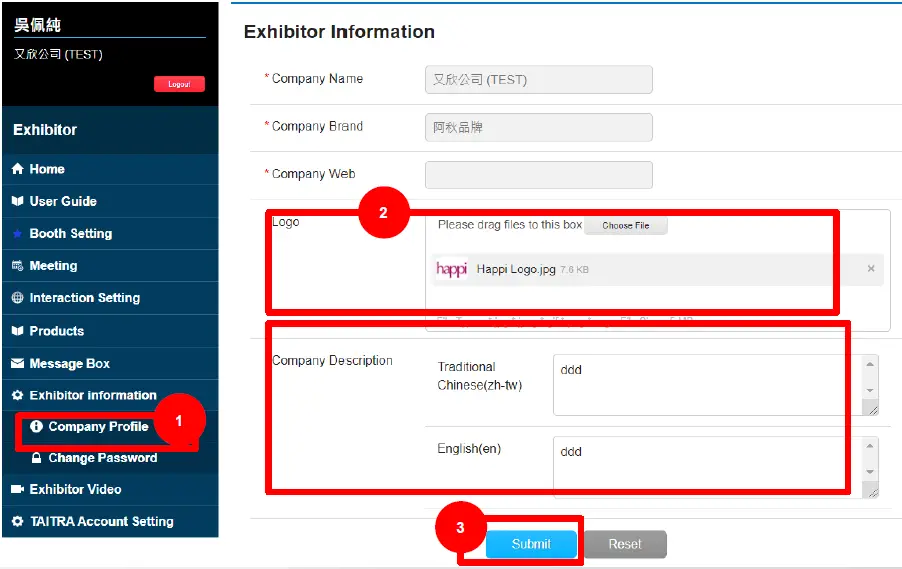
Edit Company Profile
- Step 1. Click【Company Profile】
- Step 2. Upload【Logo】 Enter【Company Description】
- Step 3. Click【Submit】

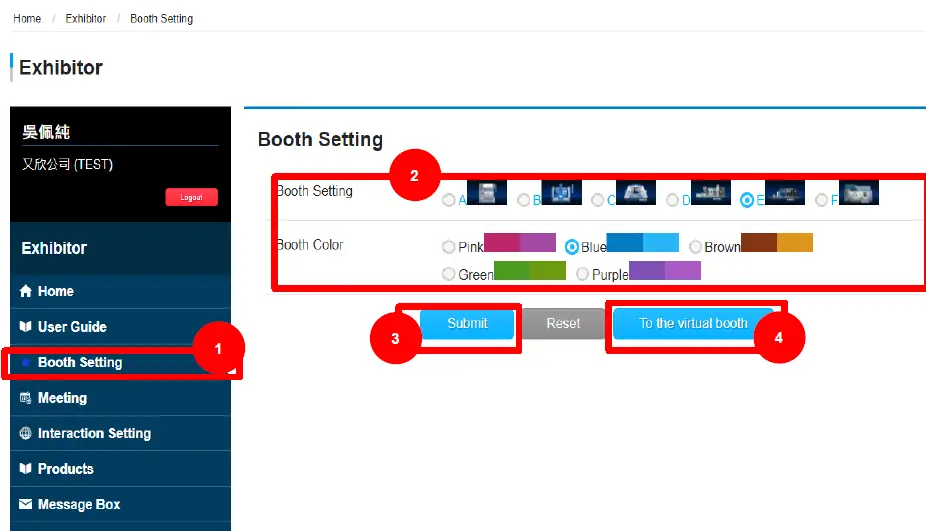
Choose Booth Design
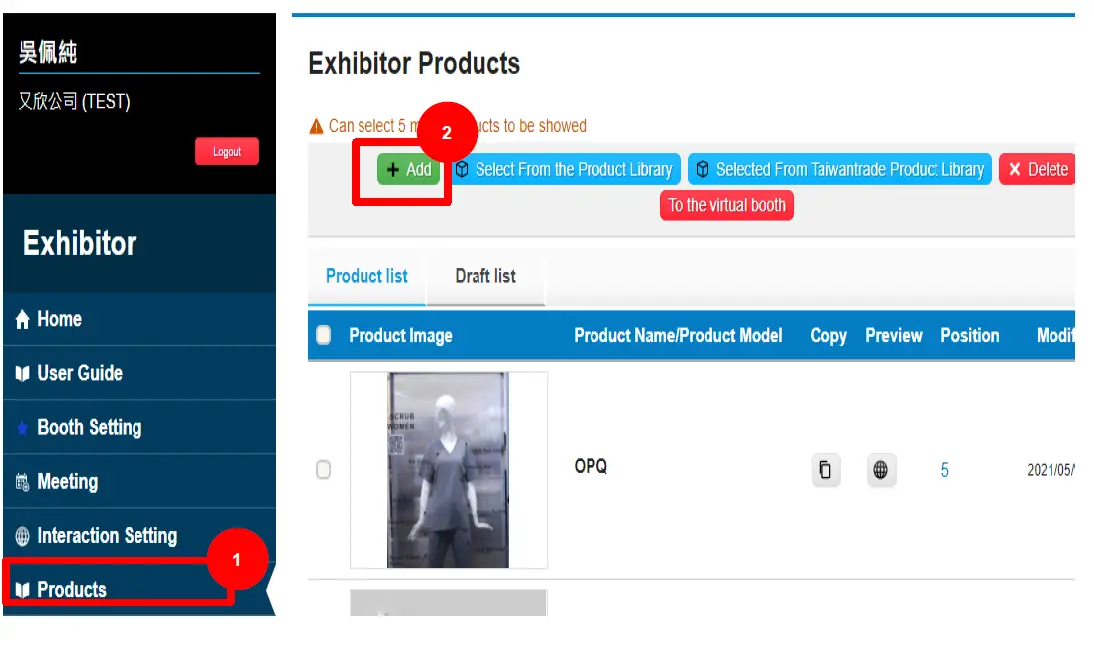
- Step 1.
Click Booth Setting. - Step 2.
Choose Booth Design Choose Booth Color - Step 3.
Click Submit - Step 4.
Click to the virtual booth to preview
Set up Booth
- Step 1.
Click Products - Step 2.
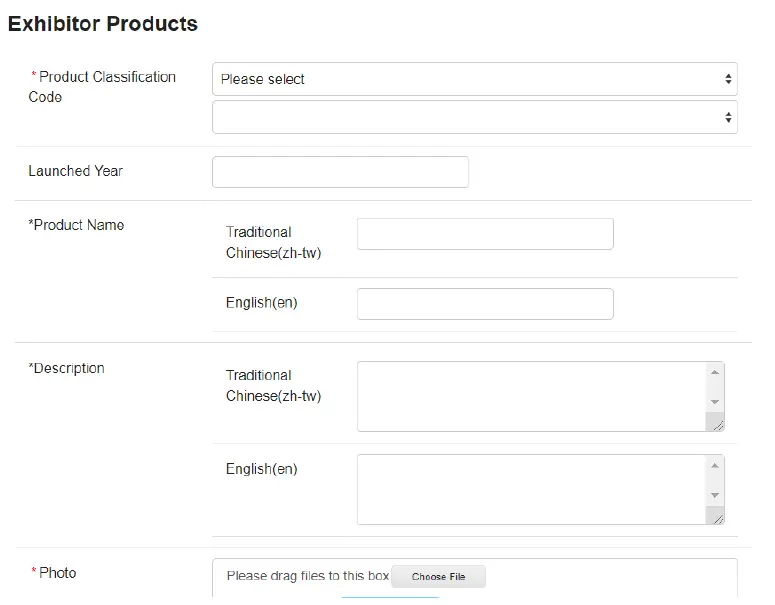
Click +Add and you can upload up to 10 items.
- When you are done editing product information , click SUBMIT.

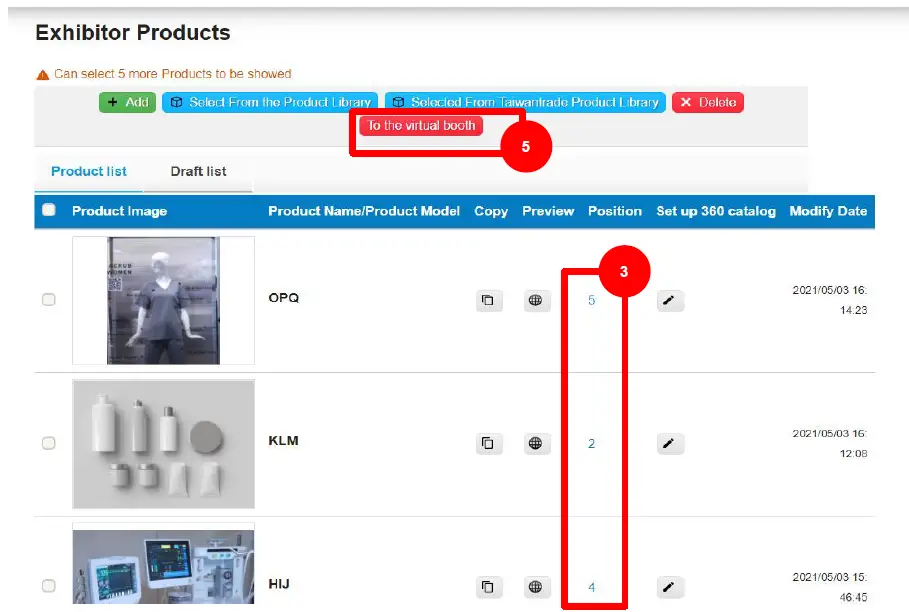
- Step 3. Adjust the position number by
- clicking (NONE)
- Each number refers to the corresponding position, please see next page.
- None means the product will not be displayed on the virtual booth
- Step 4.
Click Submit to save. - Step 5.
Click To the virtual booth to preview
Booth Designs x 6
Design A

| The numbers on the image are the sort order | |
| Data Type | Best Image Size |
| LOGO | 420*100 |
| Position1 | 380*580 |
| Position2 | 380*580 |
| Position3 | 380*580 |
| Position4 | 380*580 |
| Position5 | 390*700 |
Design B

| The numbers on the image are the sort order | |
| Data Type | Best Image Size |
| LOGO | 280*278 |
| Position1 | 440*265 |
Design C
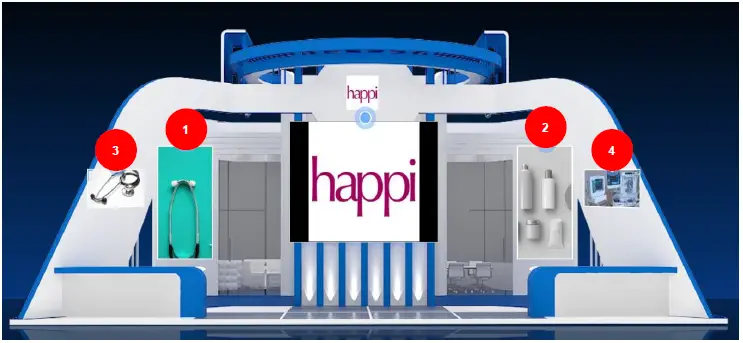
| The numbers on the image are the sort order | |
| Data Type | Best Image Size |
| LOGO | 430*130 |
| Position1 | 290*560 |
| Position2 | 290*560 |
| Position3 | 540*280 |
| Position4 | 540*280 |
Design D

| The numbers on the image are the sort order | |
| Data Type | Best Image Size |
| LOGO | 326*270 |
| Position1 | 512*581 |
| Position2 | 512*581 |
| Position3 | 300*600 |
| Position4 | 512*581 |
Design E

| The numbers on the image are the sort order | |
| Data Type | Best Image Size |
| LOGO | 220*156 |
| Position1 | 480*380 |
| Position2 | 480*380 |
| Position3 | 300*600 |
| Position4 | 300*600 |
| Position5 | 300*600 |
Design F

| The numbers on the image are the sort order | |
| Data Type | Best Image Size |
| LOGO | 350*80 |
| Position1 | 380*480 |
| Position2 | 380*480 |
| Position3 | 380*480 |
| Position4 | 380*480 |
| Position5 | 380*480 |
 www.org.tw DomainName For Sale!! 0971-252-119 [專業網址出售中] 專業網址轉讓代尋服務 歡迎洽詢
 MEDICAL TAIWAN