amazon AN Pannel Control User Manual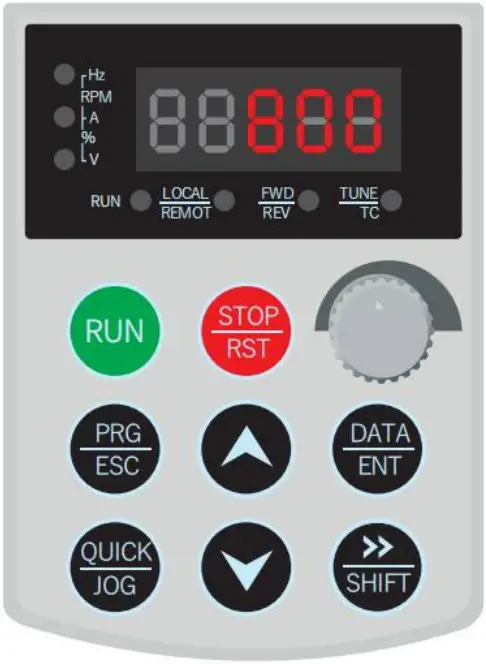
Multi-scheme setting
- Press the ESC key to enter the parameter settings and the code appears as “uA5.00”. Then set to “3” Multi-scheme setting , and then press the ENT key. See the following codefunction comparison table
- 1 scheme: Press SHIFT or up and down keys to “uA5.20” set the RPM -1000~1000(minusis reversal) “0” is stop. Then press ENT. Enter to “uA5.21” set the running time 0-9999 minutes.
- The other 2-16 scheme is the same setting. For example: Forward running 30 minutes, 600rpm; Stop 30 minutes;Reversal running 30minutes,-600rpm; Stop 30 minutes. Total time is 120 minutes
- Press ESC to uA5.00 then press ENT select “3” Multi-scheme setting.Then press the ENTkey.
- Press SHIFT or up and down key to “uA5.20” set the speed “600 “rpm,then press ENT key.
- Press SHIFT or up and down key to “uA5.21” set the time “30”minutes,then press ENT key.
- Press SHIFT or up and down key to “uA5.22” set the speed “0” rpm,then press ENT key.
- Press SHIFT or up and down key to “uA5.23” set the time “30”minutes,then press ENT key.
- Press SHIFT or up and down key to “uA5.24” set the speed “-600 “rpm,then press ENT key.
- Press SHIFT or up and down key to “uA5.25” set the time “30”minutes,then press ENT key.
- Press SHIFT or up and down key to “uA5.26” set the speed “0” rpm,then press ENT key.
- Press SHIFT or up and down key to “uA5.27” set the time “30”minutes,then press ENT key.
- Press SHIFT or up and down key to “uA5.14” set the time “120”minutes,then press ENT key.
- The total running time function code “uA5.14” setting refers to the sum of the total time of aprocess cycle times (N times). If the total time is not set, the machine is not stoppedcontinuously.
- Press the ESC to return back,and then press the “Start”
- Multi-scheme setting does not require speed control through the frequency converter speedknob button.
| Code | Name | Setting | Value |
| uA5.00 | Running pattern | 3:Multi-scheme running setting | 3 |
| uA5.14 | Total running time | The sum of the total number of processcycles (n times) | Set up according to demand |
| No. | Code | Setting | Code | Time(minute) |
| 01 | uA5.20 | -1000~1000 | uA5.21 | 0~9999 |
| 02 | uA5.22 | -1000~1000 | uA5.23 | 0~9999 |
| 03 | uA5.24 | -1000~1000 | uA5.25 | 0~9999 |
| 04 | uA5.26 | -1000~1000 | uA5.27 | 0~9999 |
| … | … | … | … | … |
| 16 | uA5.50 | -1000~1000 | uA5.51 | 0~9999 |
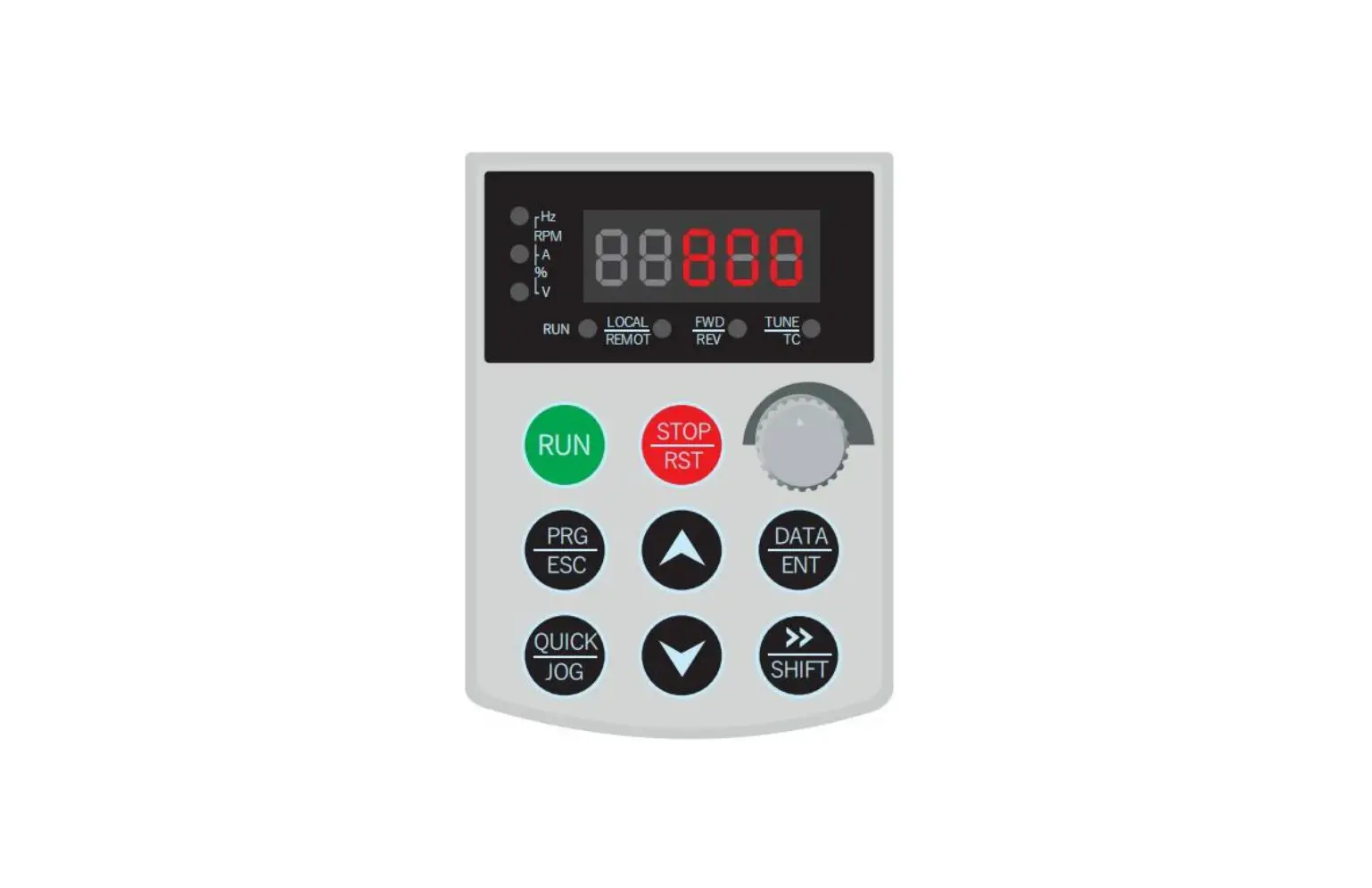
Function diagram of the C-type frequency converter panel
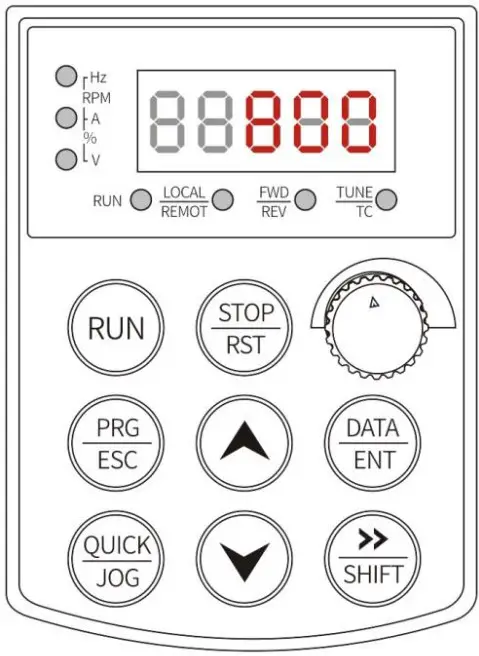
Code description
uA5.00 uA5: Manufacturer fixed code Functional coding(adjustable)
Basic parameter code function control table((This parameter is not usuallyrequired to be set)
| Code | Name | Parameter | Factory setting |
| uA5.01 | Running | 0:Power starts automatically 1:Effective | 1 |
| uA5.08 | Forward frequency | 0~50Hz | 50 |
| uA5.09 | Reversal frequency | 0~50Hz | 50 |
| uA5.10 | Transmission ratio | 0.001~10.000 | The factory has beenset |
| uA5.11 | RPM display | 0: No decimal point 1:A decimalpoint | 0 |
| uA5.12 | Restoreinitialization | 0: No 1: Yes | 0 |
| uA5.13 | Procedural memory | 000: Don’t remember | 0 |
| 111: Power off memory |
Note: If you need to set a special transmission ratio, you can contact us.
One-way mode running setting
- Description of operation steps
A. Press the ESC key to enter, the code shows uA5.00, press ENT key to set “1” one-waymode running setting, press ENT key to end.
B. Press SHIFT key and up/down key set uA5.00 to uA5.05 running time,press ENTkey. See the code function table (the same below)
C. Press SHIFT key and up/down key set uA5.00 to uA5.06 -interval standby time,thenpress ENT key.
D. Press SHIFT key and up/down key set uA5.00 to uA5.06 -running direction,then pressENT key.
E. Press SHIFT key and up/down key set uA5.00 to uA5.14-the total time setting. Total time is the sum of the cycle times (N times) of the total time, the calculationformula=(uA5.05+A59.06)*N times-(uA5.06) If the total time is not set, the operation is not stopped.
F. Press ESC key to return back, and then press Start.
G. Turn round the speed key - Code function control table
Code Name Parameter Setting uA5.00 Running mode 1: One-way operation 1 uA5.05 Running time 0~9999 minutes Set up according to demand uA5.06 Interval standby time 0~9999 minutes Set up according to demand uA5.07 Running direction 0:Forward running1:Reversal running Don’t set uA5.14 Total running time The sum of the totalcycle times (N times) Set up according to demand
Alternate-mode running settings
- Description of operation steps The operation steps are the same as in the one-way mode. The functioncoderefers to the following code function control table.
| Code | Name | Parameter setting |
| uA5.00 | Running mode | 2: Alternatively run |
| uA5.01 | Start protection mode | Running starts automatically when the power supply after thepower off |
| uA5.02 | Forward running | 0~9999 |
| uA5.03 | Reversal running | 0~9999 |
| uA5.04 | Interval standby time | 0~9999 |
| uA5.14 | Total running time | The sum of the total cycle times (N times) |