 INSTRUCTION MANUAL
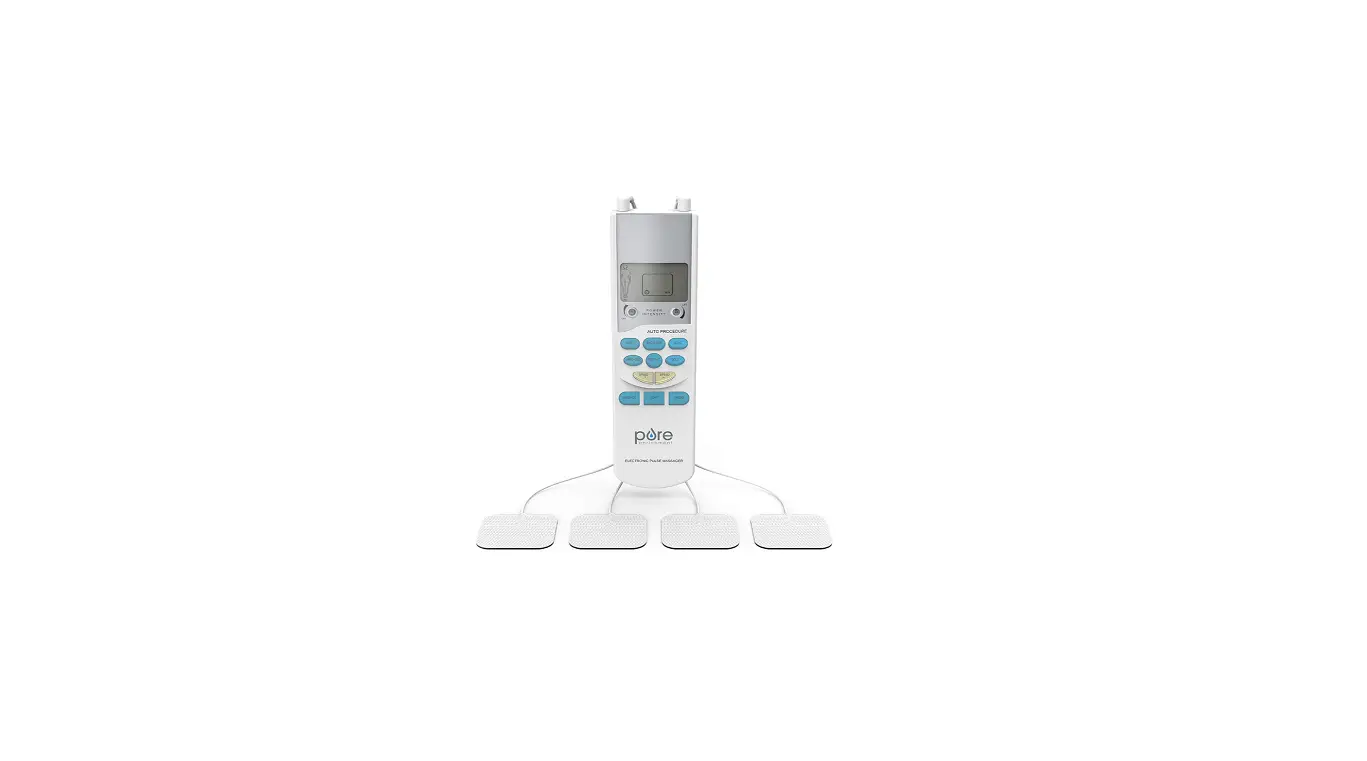
Electronic Pulse Stimulator
MDTS100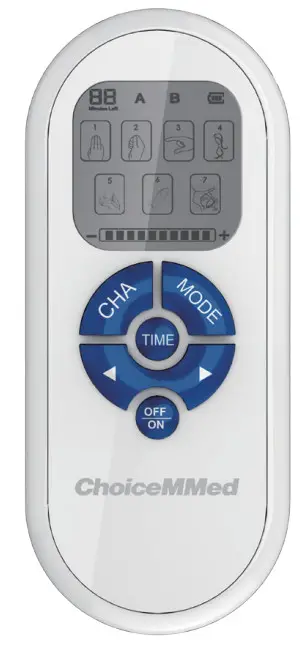 *Bluetooth function is available for the selected devices.
Box Contents
- ChoiceMMed Electronic Pulse Stimulator MDTS100
- Lead Wires with Pin Connection
- AAA Batteries
- Electrode Pads
1 – User Guide
Introduction
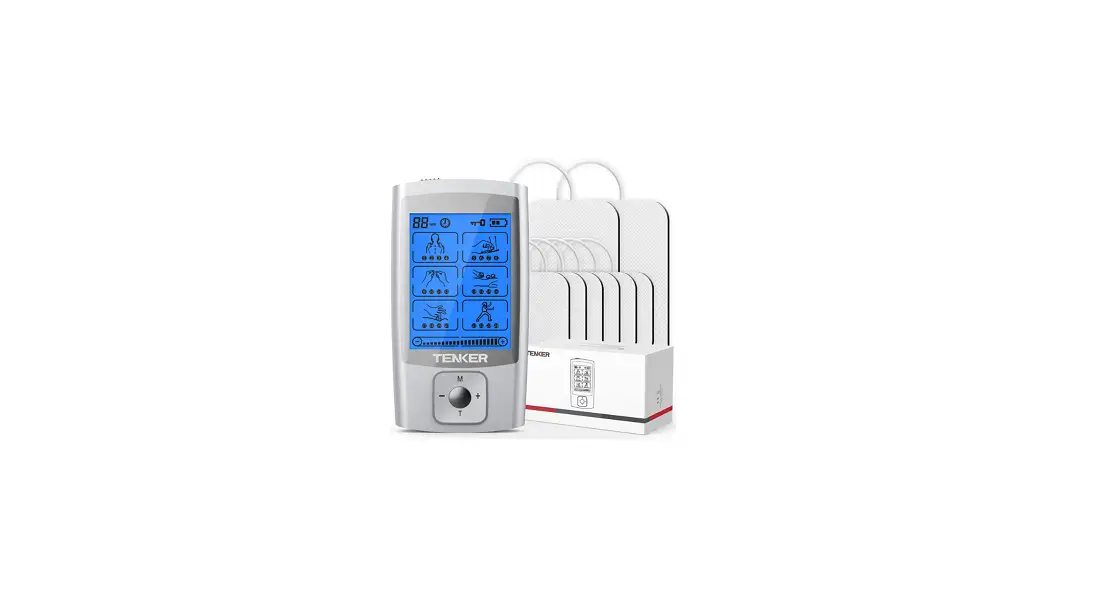
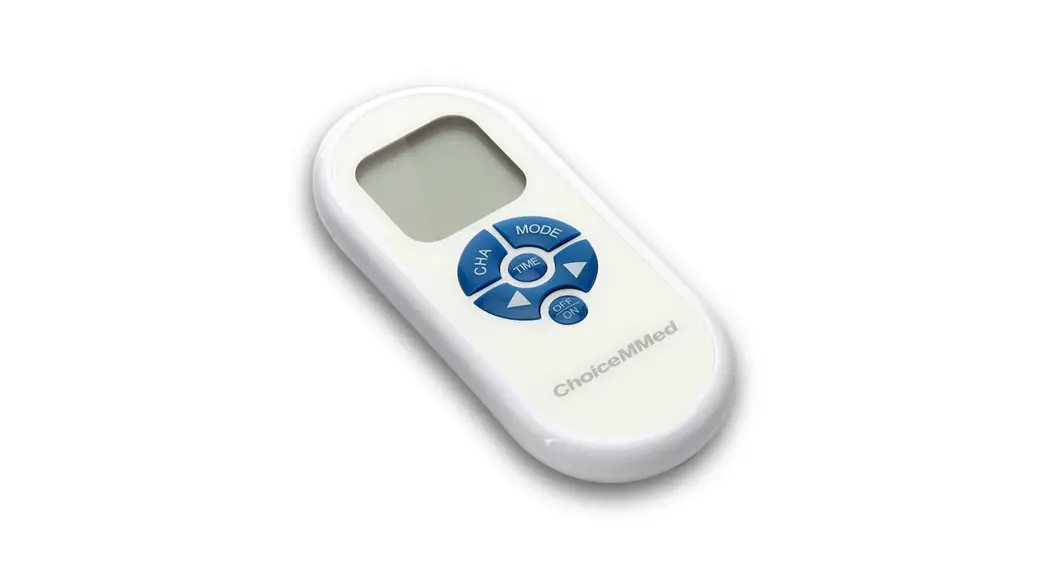
The Electronic Pulse Stimulator is intended for at-home use in delivering electric pulses to tired and sore muscles. These pulses are generated by the device & delivered through electrode pads placed on the skin which then trigger contractions of the targeted muscles.
The is portable, compact, and stylish in design.
The device has 7 stimulation modes: Mode1-Mode 7. These stimulation modes can be selected by pressing the MODE button on the front of the unit.
The device comes with 2 independent output channels (A&B). Each channel comes with an electrode wire & two electrode pads. Users can choose between the two output channels by pressing the CHA button. Channel A&B is selected by default. Pressing the & buttons will decrease & increase the intensity of stimulation. The LCD screen displays the remaining stimulation time in the lower-left corner. The default time is 20 minutes.
Indications for Use
The Electronic Pulse Stimulator is to be used for temporary relief of pain associated with sore and aching muscles in the shoulder, waist, back, upper extremities (arm), and lower extremities (leg) due to strain from exercise or normal household and work activities.
Features
- Liquid Crystal Display (LCD) Screen
- 2 Independent Output Channels
- 7 Stimulation Modes (Mode 1 – Mode 7)
- 10 Levels of intensity
- 8 Positions (SHOULDER, FOOT, BACK, WAIST, ARM, HAND, LEG AND JOINT)
- 20 Minutes Timer
- Bluetooth function (optional)
Safety Warnings
 DANGER
- Do not use this device if you have an implanted defibrillator or implanted metallic device, such as a pacemaker. Such use could cause electrical shock, burns, electrical interference, or death.
- Don’t use the device if you use a high-frequency surgical ME EQUIPMENT simultaneously. Such use may result in burns and possible damage to the device.
- Operation in close proximity (e.g. 1m) to shortwave or microwave therapy ME EQUIPMENT may produce instability in the device output.
- The application of electrodes near the thorax may increase the risk of cardiac fibrillation.
 WARNING
- Consult your physician before purchasing or using this device if you have one of the following conditions:
-Acute disease
-Malignant tumor
-Infective disease (i.e. HIV/AIDS, Pneumonia)
-Pregnant
-Heart disease
-High fever
-Abnormal blood pressure
-Lack of skin sensation
-Abnormal skin condition
-Any condition requiring the active supervision of a physician - Use of accessories and cables other than those specified or provided by the manufacturer of this equipment could result in increased electromagnetic emissions or decreased electromagnetic immunity of this equipment and result in improper operation.
- Portable RF communications equipment (including peripherals such as antenna cables and external antennas) should be used no closer than 30 cm (12 inches) to any part of the ME EQUIPMENT, including cables specified by the manufacturer. Otherwise, degradation of the performance of this equipment could result.
- Use of this equipment adjacent to or stacked with other equipment should be avoided because it could result in improper operation. If such use is necessary, this equipment and the other equipment should be observed to verify that they are operating normally.
NOTICE
- Do not use this device while driving or sleeping.
- Do not use this device in high humidity areas such as a bathroom.
- Keep the device away from wet, high temperature and direct sunlight place.
- Keep this device out of reach of children.
- Stop using this device and consult your physician immediately if you feel pain, discomfort, dizziness or nausea.
- Do not attempt to move the electrode pads while the device is ON or operating.
- Any electrodes that have current densities exceeding 2mA/cm2 may require special attention from the operator.
- Do not use the device around the heart, on the head, mouth, genitals, or blemished skin areas, on the front of the neck, or from electrodes placed on the chest and the upper back or crossing over the heart.
- When the device delivers an output of more than 10mA or 10V into a load resistance of 1000Ω, the device will have an indication that the A&B channels font flashes on the display screen.
- Do not apply stimulation of this device in the following conditions:
- Across the chest-the introduction of electrical current into the chest may cause rhythm disturbances to the heart, which could be lethal.
- Over painful areas. Consult your physician before using this device if you have painful areas.
- Over open wounds, rashes, or swollen, red, infected, or inflamed areas or skin eruptions (e.g. phlebitis, thrombophlebitis, varicose veins). Apply stimulation only to normal, intact, clean and healthy skin.
- In the presence of electronic monitoring equipment (e.g. cardiac monitors, ECG alarms). The electronic monitoring equipment may not operate properly when the electrical pulse stimulator is in use.
- While operating machinery, or during any activity in which electrical stimulation can put you at risk of injury.
- On children.
- Over your neck could cause severe muscle spasms resulting in the closure of your airway, difficulty in breathing, or adverse effects on heart rhythm or blood pressure.
- Over, or in proximity to, cancerous lesion.
- When the patient is in the bath or shower.
Be aware!
- Consult your physician before using this device. The stimulation with the device may:
i. cause lethal rhythm disturbances to the heart in susceptible individuals, and,
ii. disrupt the healing process after a recent surgical procedure. - The device is not effective for pain of central origin (i.e. appendicitis, Hepatitis), including headache.
- The device is not a substitute for pain medications and other pain management therapies.
- The device has no curative value.
- The device is a symptomatic treatment and, as such, suppresses the sensation of pain that would otherwise serve as a protective mechanism.
- The long-term effects of electrical stimulation are unknown.
- The user may experience skin irritation, burns or hypersensitivity due to the electrical stimulation or electrical conductive medium (gel).
- If the user has suspected or diagnosed epilepsy, the user should follow precautions recommended by his or her physician.
- Use caution if the user had a tendency to bleed internally, such as following an injury or fracture.
- Use caution if stimulation is applied over the menstruating uterus.
- Use caution if stimulation is applied over areas of skin that lack normal sensation.
- Stop using the device if the device does not provide pain relief.
- Use this device only with the wires, electrodes, and accessories that the manufacturer recommends.
- The patient is the intended, operator.
- Effectiveness is highly dependent upon patient selection by a practitioner qualified in the management of pain patients.
- The effects of stimulation of the brain are unknown. Stimulation should not be applied across the head and electrodes should not be placed on opposite sides of the head.
- Do not use the stimulator near an MRI environment.
Medical Electrical Equipment needs special precautions regarding electromagnetic compatibility (EMC) and needs to be installed and put into service according to the EMC information provided. Portable and mobile radio frequency (RF) communication equipment can affect Medical Electrical Equipment.
Specification
ENVIRONMENT CONDITION
Environmental condition for transportation & storage
| Temperature Range | : -13 ℉ ~158 ℉ (-25 ℃ ~70 ℃ ) |
| Humidity | : ≤90% RH |
| Atmosphere Pressure | : 70kPa~106kPa |
Environment condition for operation
| Temperature Range | : 41 ℉ ~104 ℉ (5 ℃ ~40 ℃ ) |
| Humidity | : 15% ~ 90% RH |
| Atmosphere Pressure | : 70kPa~106kPa |
TECHNICAL SPECIFICATION
| Dimensions (in.) [W x H x D] | : 2.17 x 5.12 x 0.79 |
| LCD Display (in.) | : 1.34 x 1.34 |
| Size of electrodes (in.) | : 1.57 × 1.57 |
| Weight | : 2.2oz/64±5g (Batteries Excluded) |
| Life of Pads | : Up to 80 Uses |
| Power Requirements | : DC 3V, 2 AAA batteries |
| Battery Life | : Two AAA 1.5V, 800mAh alkaline batteries could be continuously operated as long as 20h. |
| Number of output modes | : 7 |
| Number of alternating output channels | : 2 |
| Timer Range (minutes) | : 20 minutes |
| Waveform | : monophasic |
| Shape | : monophasic square wave |
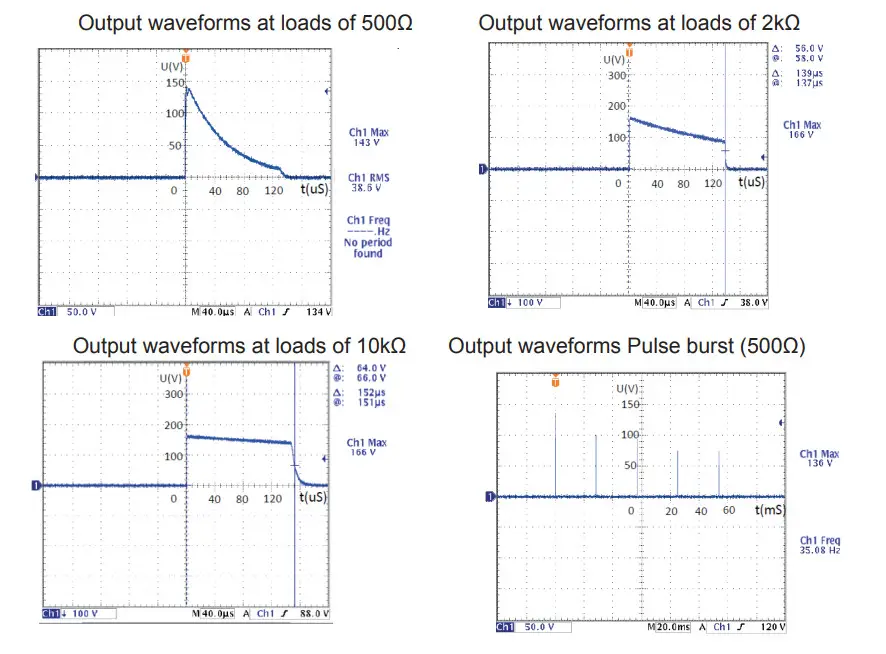
| Maximum Output Voltage (±20%) | : 150V@500Ω; 160V@2kΩ; 165V@10kΩ |
| Pulse Duration | : 50~140µsec |
| Frequency | : 0.9Hz~82Hz |
| Output Current | : ≤50mA (r.m.s) @500Ω |
| ON / OFF TIME | : ≤1second |
Procedures Include the Following Parameters
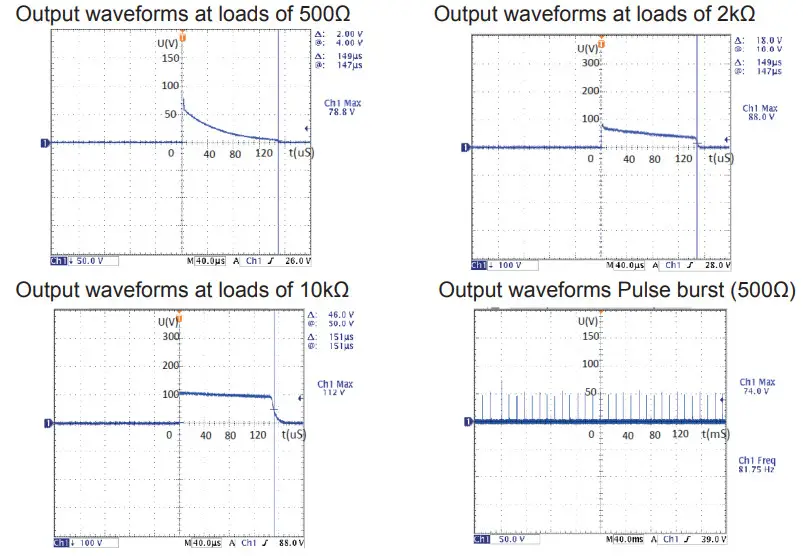
The procedure contains the master pulse and the sub pulse. The working time of the master pulse consists of several sub-pulses while the sub-pulse consists of several single pulses. Without special instruction in procedure: single pulse width is 140µS; the stimulation time is 20 minutes.
–Mode 1
- Frequency: 35Hz Pulse Width: 50-140µS
- The Maximum amplitude (500Ωload): 150V
–Mode 2
- Frequency: 6.25Hz/0.9Hz/2.25Hz Pulse Width: 140µS
- The Maximum amplitude (500Ωload): 150V
The second procedures consist of three pulses with different frequency (6.25hz/0.9hz/2.25hz).
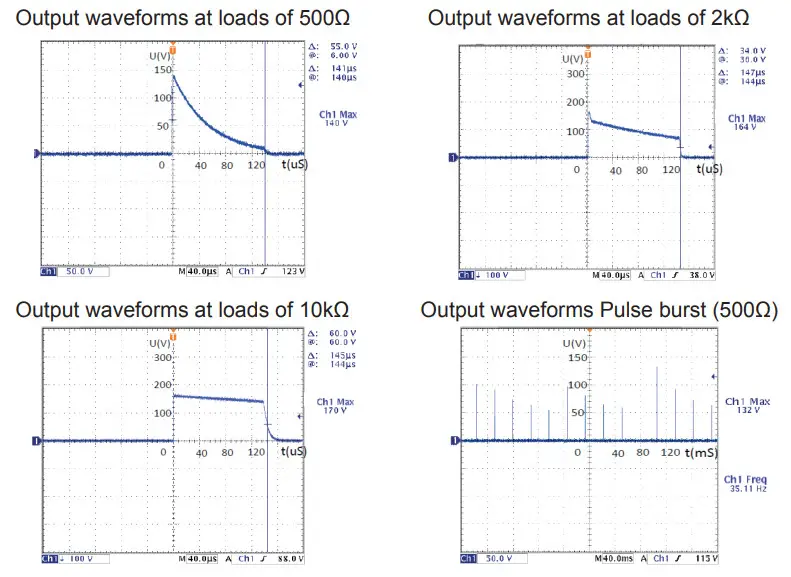
–Mode 3
- Frequency: 35Hz Pulse Width: 50-140µS
- The Maximum amplitude (500Ωload): 150V
–Mode 4
- Frequency: 35Hz Pulse Width: 140µS
- The Maximum amplitude (500Ωload): 120V
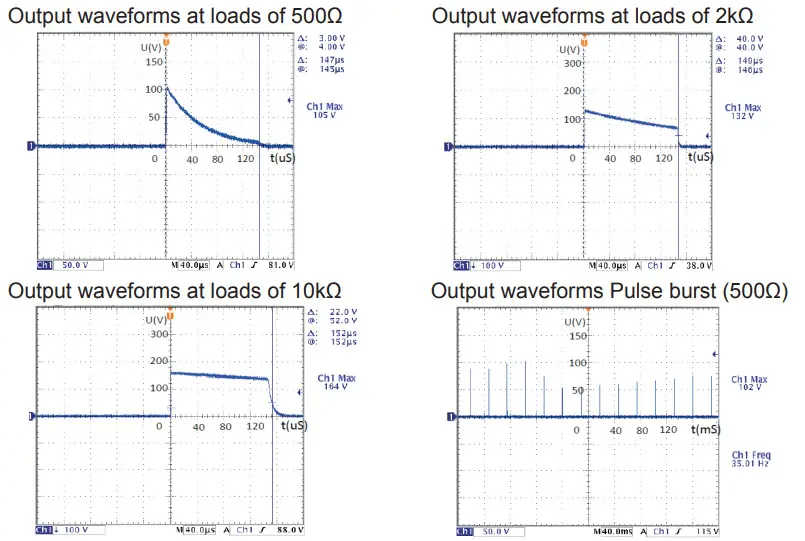
–Mode 5
- Frequency: 35Hz Pulse Width: 140µS
- The Maximum amplitude (500Ωload): 120V
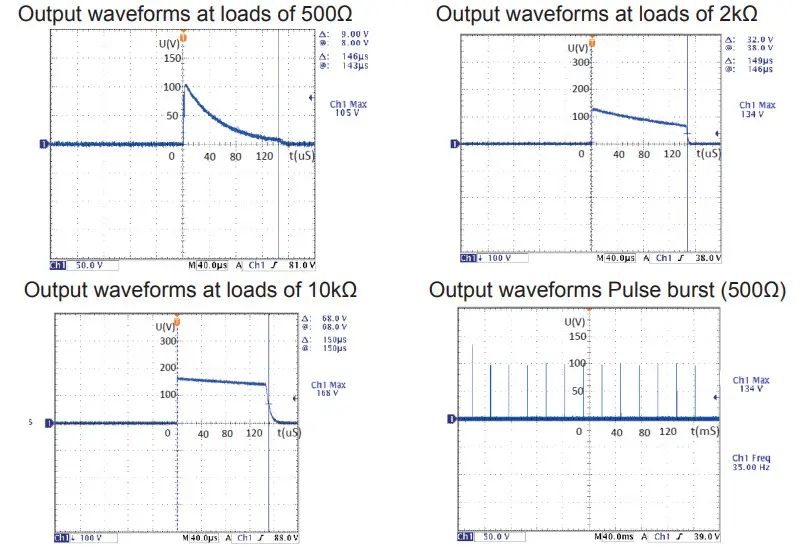
–Mode 6
- Frequency: 82Hz Pulse Width: 140µS
- The Maximum amplitude (500Ωload): 80V
–Mode 7
- Frequency: 35Hz Pulse Width: 140µS
- The Maximum amplitude (500Ωload): 120V
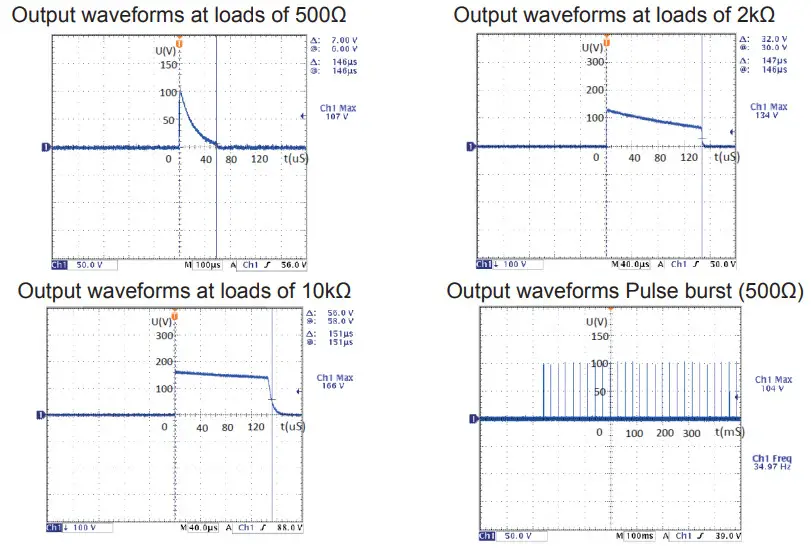
Description of each mode:
| Mode | Frequency (Hz) | Pulse Width (µs) | Max amplitude (V) @500Ωload | Output Mode | Type of Pain | Sensation |
| Mode 1 | 35 | 50-140 | 150 | Cycle& Modulated | Acute&Chronic Pain | Massage-Like feeling |
| Mode 2 | 6.25 /0.9 /2.25 | 140 | 150 | Cycle& Modulated | Acute Pain | Variable tingling and pulsing sensation (sensation should appear to come in waves) |
| Mode 3 | 35 | 50-140 | 150 | Cycle& Modulated | Chronic Pain | Variable comfortable pulsing sensation (sensation should appear to come in waves) |
| Mode 4 | 35 | 140 | 120 | Constant& Modulated | Chronic Pain | Constant comfortable pulsing sensation (sensation should appear to come in waves) |
| Mode 5 | 35 | 140 | 120 | Cycle& Modulated | Acute&Chronic Pain | Variable stimulation sensation (sensation should appear to come in waves) |
| Mode 6 | 82 | 140 | 80 | Constant& Modulated | Acute&Chronic Pain | Constant comfortable rubbing sensation |
| Mode 7 | 35 | 140 | 120 | Cycle& Modulated | Chronic Pain | Variable pulsing and pumping action (sensation should appear to come in waves) |
How the Device Works
The device generates small pulses of electrical current. It transmits these pulses to the user’s skin through adhesive electrode pads, which activate the nerves below and temporarily relieve pain related to soreness.
Understanding Your Unit
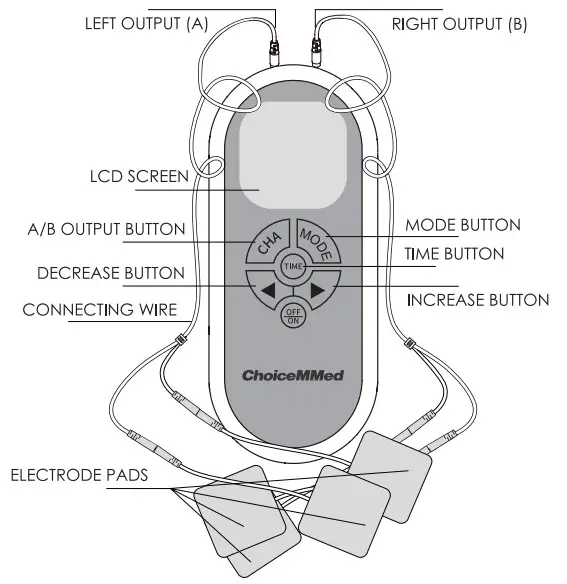
Operating Instructions
The following graphical steps are used to explain the operation of the equipment. The table lists detailed information about each step.
| Step 1 | Insert two AAA batteries into the device. |
| Step 2 | Connect the electrode pads to the wires and then connect the wires to the device. |
| Step 3 | Put the electrode pads on the targeted body area. Clean your skin before each use. Make sure your skin is clean, dry and free from lotion before placing the electrode pads on your skin. Refer to the Pads User Guide. |
| Step 4 | Press the ON/OFF button once to turn the device on. |
| Step 5 | Choose the output channel(s) to be used. You can use one channel at a time or both channels simultaneously. |
| Step 6 | Select one of the seven modes. |
| Step 7 | Set the stimulation time. |
| Step 8 | Adjust the stimulation intensity. |
| Step 9 | Press the ON/OFF button once to turn the device off. |
| DESCRIPTION OF OPERATION | DIAGRAM |
| Step 1- Insert the 2 AAA batteries into the device. Make sure the unit is OFF. Slide the compartment cover on the back of the device downward until the cover pops off. Insert 2 AAA batteries according to the diagram inside the battery compartment. Close the cover. | 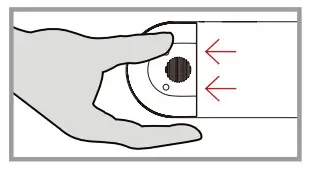 |
| Step 2- Connect the electrode pads to the wires and then connect the wires to the device. Plug the connecting wires into the electrode pads. Then connect the wires to the device’s output channels. Two output channels can be used simultaneously or one at a time. Select channel by pressing CHA Button. NOTE: If you connect wires to both A and B outputs, you must turn on both A and B channels and have pads connected. These pads MUST be placed on the body for stimulation to occur. | 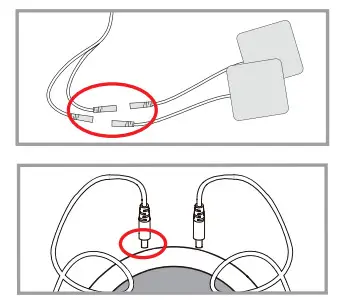 |
| Step 3- Place the electrode pads on the part of the body that needs stimulation. In order to achieve the best relief results, place the electrode pads around or on the top of your painful areas. If possible, always use all 4 electrode pads at the same time. (If all 4 pads are being used, both outputs must be turned on). Electrode pads should be placed between 0.5″ to 1.5″ apart from each other based on the relief area. Make sure the pads stick firmly on the skin. Do not move or remove the pads when the device is on. | 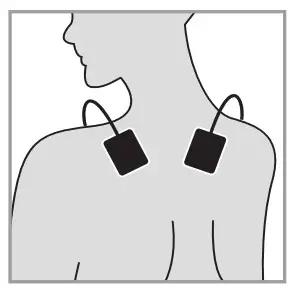 |
| Step 4- Press the ON/OFF button once to turn the unit on. The LCD display will show 7 stimulation modes. | 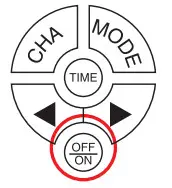 |
| Step 5- Choose the output channel(s) to be used for stimulation. Press the CHA button on the front of the unit to turn on or off the corresponding output channels (Both A&B are ON by default). IMPORTANT: Before stimulation, you must plug the wire into the output port and place the pads on the skin. You can use one channel at a time or both channels simultaneously as long as the output channel is turned on, wires are connected and pads are attached to skin. | 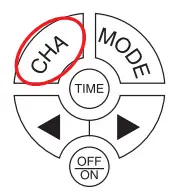 |
| Step 6- Select one of the seven stimulation modes. Press the MODE button to switch between stimulation modes: Mode1, Mode 2, Mode 3, Mode 4, Mode 5, Mode 6 and Mode 7. LCD Screen shows the current mode. | 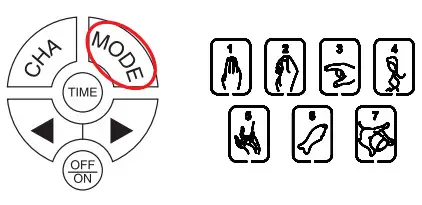 |
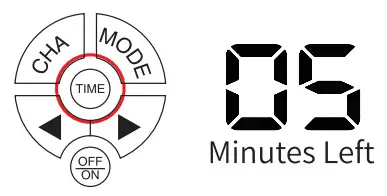
| Step 7- Set the stimulation time. Press TIME to set the duration. The time can be set from 5 minutes to 20 minutes. |
|
| Step 8- Adjust the stimulation intensity. Pressing on the & buttons will Decrease & Increase the intensity level of stimulation. NOTE: With the increase of intensity, you may experience sensations like tingling, vibration, pain, etc. Therefore, gradually increase the intensity. When the most comfortable level is reached, stop increasing. | 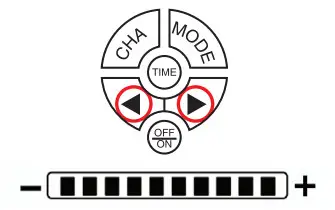 |
| Step 9- Press the ON/OFF button once to turn the unit off. After the device is turned off, disconnect the wires and electrode pads. If you plan not to use the device for a long time, please remove the battery from the device. | |
Quality Assurance Tests
The test result of each step should meet the following passing criteria.
Otherwise, it may be considered a failed test.
♦ Key Function Test
When the functional keys are pressed step by step, the outputs of the device should be identical to the following description:
- Press the ON / OFF button to turn on the device. The LCD screen will show 7 modes, minutes left, and A&B output channels.
- When the MODE key is pressed, the corresponding mode is selected on the LCD screen.
- Press the & button, the stimulation intensity is adjusted. The default level is 0.
- The number displayed in the top left corner is the remaining stimulation time.
♦ LCD Check
The information displayed on the LCD screen should be identical to the following description:
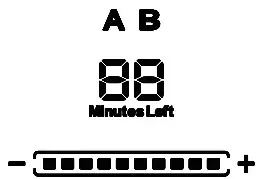 | Output Channels | 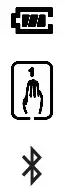 | Battery indicator |
| Stimulation Timer | Current Stimulation Mode | ||
| Level of Intensity | Bluetooth indicator * (optional) |
* Bluetooth is an OPTIONAL function for the device. The Bluetooth indicator flashes if no Bluetooth connection and stays lit when that connection is established.
* Operation to the device is available through the APP when they are connected via Bluetooth.
Accessories
- Connecting Wires
The lead wires consist of PVC material in the outside and thin copper wire on the inside. The total length of the lead wire is 59.05 inches and there are 3 connectors on each wire. The one connector on one end is used to connect to the device and the 2 connectors on the other end are used to connect to the electrode pads. The pulse is generated by the device to the pads through these connecting wires.
● Electrode Pads
The electrode pads are reusable up to 80 uses.
Electrode Pads User Guide
- Positions for Use
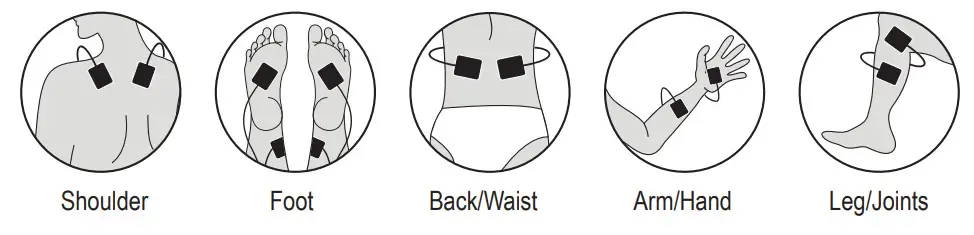
- Steps for Use
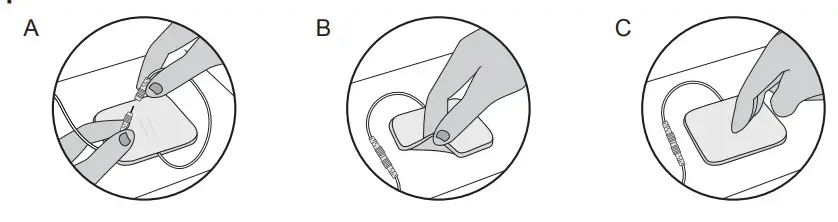
- Insert the pins of connecting wire into the wire connectors of each electrode pad (see image A).
- Remove the electrode pads from the protective liner. Lift at the edge of the electrode pad and peel from the liner (see image B). Do not pull on the lead wires when removing the electrode pads from the protective liner or skin, which may cause damage to the electrodes.
- Apply firmly to the skin.
- When not in use, return the pads to the protective liner (see image C). Store the electrode pads in the re-sealable bag in a cool place, out of direct sunlight.
Notes:
- Place the electrode pads around or on the top of your painful areas.
- Never apply electrodes on the throat or both sides of the neck, where the carotid sinus nerves are located.
- Clean your skin thoroughly prior to each application of electrode pads. Pads will not stick well if any lotion, make-up, or dirt is left on your skin.
- Make sure the Electronic Pulse Stimulator is off before applying the electrodes to the skin.
- Wipe electrodes between uses by one drop of water or damp and clean cloth if needed.
Cleaning and Maintenance
- Use wet wipes or towels moistened with neutral detergent to clean the device and then use a dry towel to wipe it again.
- The electrode pads attached with the device are reusable up to 80 uses and should be replaced when the adhesiveness becomes weak. To ensure proper use, the applied Self Adhesive Replacement Gel Pads should be used. Do not let the sticky side of the electrode pads touch anything, including your fingertips. Do not use damaged or broken wires.
- Dispose of the battery should follow any applicable local battery disposal laws.
- The useful life of the device is five years when it is used for 15 measurements every day and 20 minutes per one measurement.
Warnings
- Water is prohibited in the host device, so to avoid damage or malfunction of the device.
- Please do not open the battery cover when the device is operated.
- Please do not clean or maintain the device when the device is operated.
- Please do not open the device enclosure. The device can only be maintained by personnel authorized by the manufacturer.
- When the accessory of the device is damaged or fails, it must be the personnel authorized by the manufacturers to replace the correct attachment.
- The host device should be cleaned at least once a month and can be cleaned by using a soft cloth dipped in a small amount of water.
- The electrode pads can only be used by a single patient and the electrode pads are required to be replaced periodically.
- Check the insulation of the output cable regularly. If there is any damage, the cable should be replaced immediately.
- When the battery is exhausted, replace the battery immediately according to the specification.
Symbols
 | Type BF applied part |  | Follow instructions for use |
| Serial number | Warning | ||
| Date of manufacture | Manufacturer’s information | ||
| Storage temperature and humidity | Conformity to WEEE Directive | ||
| Mode 1 | Mode 2 | ||
| Mode 3 | Mode 4 | ||
| Mode 5 | Mode 6 | ||
| Mode 7 | Enclosure protection degree |
Troubleshooting
If your device can not be operated properly, please check if it is for the following problems or conditions. if the recommended action does not solve the problem, please contact us.
| MALFUNCTION | CAUSE | SOLUTION |
| Weak stimulation or no stimulation | Are the electrode pads in close contact with the skin? | Remove, clean, and place back on the skin. |
| Are the electrode pads touching each other? | If so, separate the pads. | |
| Are the wires connected to the electrode pads and the main device properly? | Disconnect, clean, and reconnect all the parts. | |
| Are the batteries dead? | Replace the batteries. | |
| Skin redness | Did you stay with stimulation too long? | Stop treatment or move to another area. |
| Skin feels numb | Our electrode pads dirty? | Clean with a damp cloth or replace. |
| Do the electrode pads touch the skin closely? | Remove and place again on the skin. | |
| The device does not turn on | Are the batteries installed correctly? | Remove and install batteries. |
| Pads are not sticky | Pads will deteriorate after multiple uses. | Replace them with ChoiceMMed Self- Adhesive Replacement Gel Pads MDPS100. |
Compliance Information for EMC Test
Electromagnetic emission | ||
| Emission test | Compliance | Electromagnetic Environment – guidance |
| Conducted and radiated RF emissions | CISPR 11, Group 1, Class B | Home Healthcare environment |
Electromagnetic immunity | |||
| Immunity test | IEC 60601 test level | Compliance Level | Electromagnetic Environment – guidance |
| Electrostatic discharge (ESD) IEC 61000-4-2 | ± 8kV contact ±15kV air | ± 8kV contact ±15kV air | Special healthcare environment. The relative humidity should be at least 50%. |
| Radiated RF IEC 61000-4-3 | 10 V/m 80 MHz to 2.7 GHz | 10 V/m 80 MHz to 2.7 GHz | Home healthcare environment |
| Power frequency (50/60Hz) magnetic field IEC61000-4-8 | 30A/m | 30A/m | Home healthcare environment |
| Electromagnetic immunity to RF wireless communications equipment | ||||||
| Test frequency (MHz) | Band a) (MHz) | Service a) | Modulation b) | Maximum power (W) | Distance (m) | Immunity test level (V/m) |
| 385 | 380-390 | TETRA 400 | Pulse modulation b) 18Hz | 1.8 | 0.3 | 27 |
| 450 | 430-470 | GMRS 460, FRS 460 | FM c) ±5kHz deviation 1kHz sine | 2 | 0.3 | 28 |
| 710 | 704-787 | LTE Band 13,17 | Pulse modulation b) 217Hz | 0.2 | 0.3 | 9 |
| 745 | ||||||
| 780 | ||||||
| 810 | 800-960 | GSM 800/900, TETRA 800, iDEN 820, CDMA 850, LTE Band 5 | Pulse modulation b) 18Hz | 2 | 0.3 | 28 |
| 870 | ||||||
| 930 | ||||||
| 1720 | 1700-1990 | GSM 1800; CDMA 1900; GSM 1900; DECT; LTE Band 1,3,4,25; UMTS | Pulse modulation b) 217Hz | 2 | 0.3 | 28 |
| 1845 | ||||||
| 1970 | ||||||
| 2450 | 2400-2570 | Bluetooth, WALN, 802.11 b/g/n, RFID 2450, LTE Band 7 | Pulse modulation b) 217Hz | 2 | 0.3 | 28 |
| 5240 | 5100-5800 | WLAN 802.11 a/n | Pulse modulation b) 217Hz | 2 | 0.3 | 9 |
| 5500 | ||||||
| 5785 | ||||||
FCC Declaration
FCC ID: WWIMDTS100
This device complies with Part 15 of the FCC Rules. Operation is subject to the following two conditions: (1) this device may not cause harmful interference, and (2) this device must accept any interference received, including interference that may cause undesired operation.
Caution: The user is cautioned that changes or modifications not expressly approved by the party responsible for compliance could void the user’s authority to operate the equipment.
Note: This equipment has been tested and found to comply with the limits for a Class B digital device, pursuant to part 15 of the FCC Rules. These limits are designed to provide reasonable protection against harmful interference in a residential installation. This equipment generates uses and can radiate radio frequency energy and, if not installed and used in accordance with the instructions, may cause harmful interference to radio communications. However, there is no guarantee that interference will not occur in a particular installation. If this equipment does cause harmful interference to radio or television reception, which can be determined by turning the equipment off and on, the user is encouraged to try to correct the interference by one or more of the following measures:
- Reorient or relocate the receiving antenna.
- Increase the separation between the equipment and receiver.
- Connect the equipment into an outlet on a circuit different from that to which the receiver is connected.
- Consult the dealer or an experienced radio/TV technician for help.
Applicable Model
MDTS100
 Beijing Choice Electronic Technology Co., Ltd.
Add.: 2nd Floor, 3rd Floor and Room 410-412 4th Floor,
No. 2 Building, No. 9 Shuangyuan Road, Shijingshan District
100041 Beijing, PEOPLE’S REPUBLlC OF CHINA
All Right Reserved
Issue Date: August 23, 2021
Version 1.0