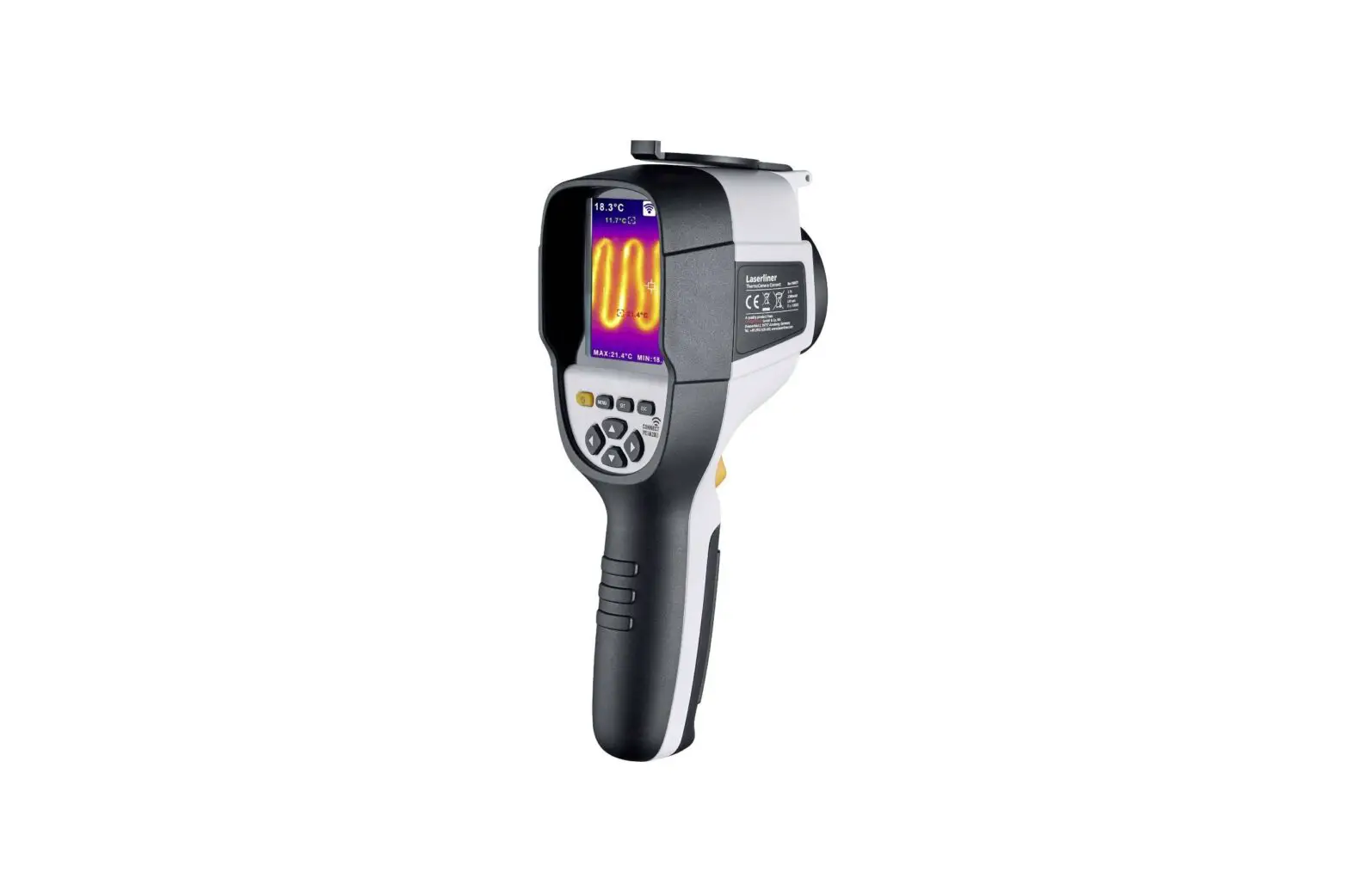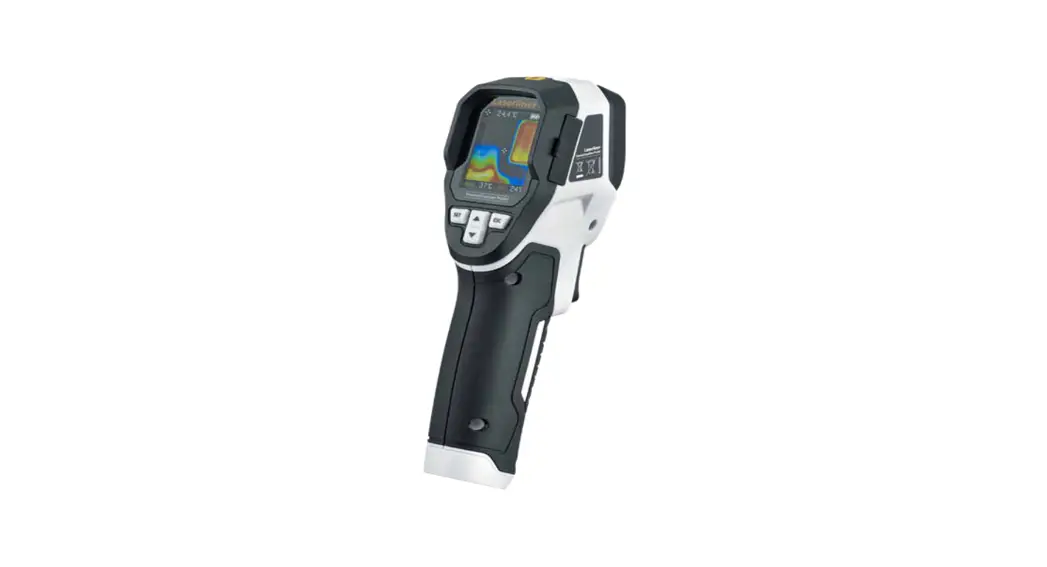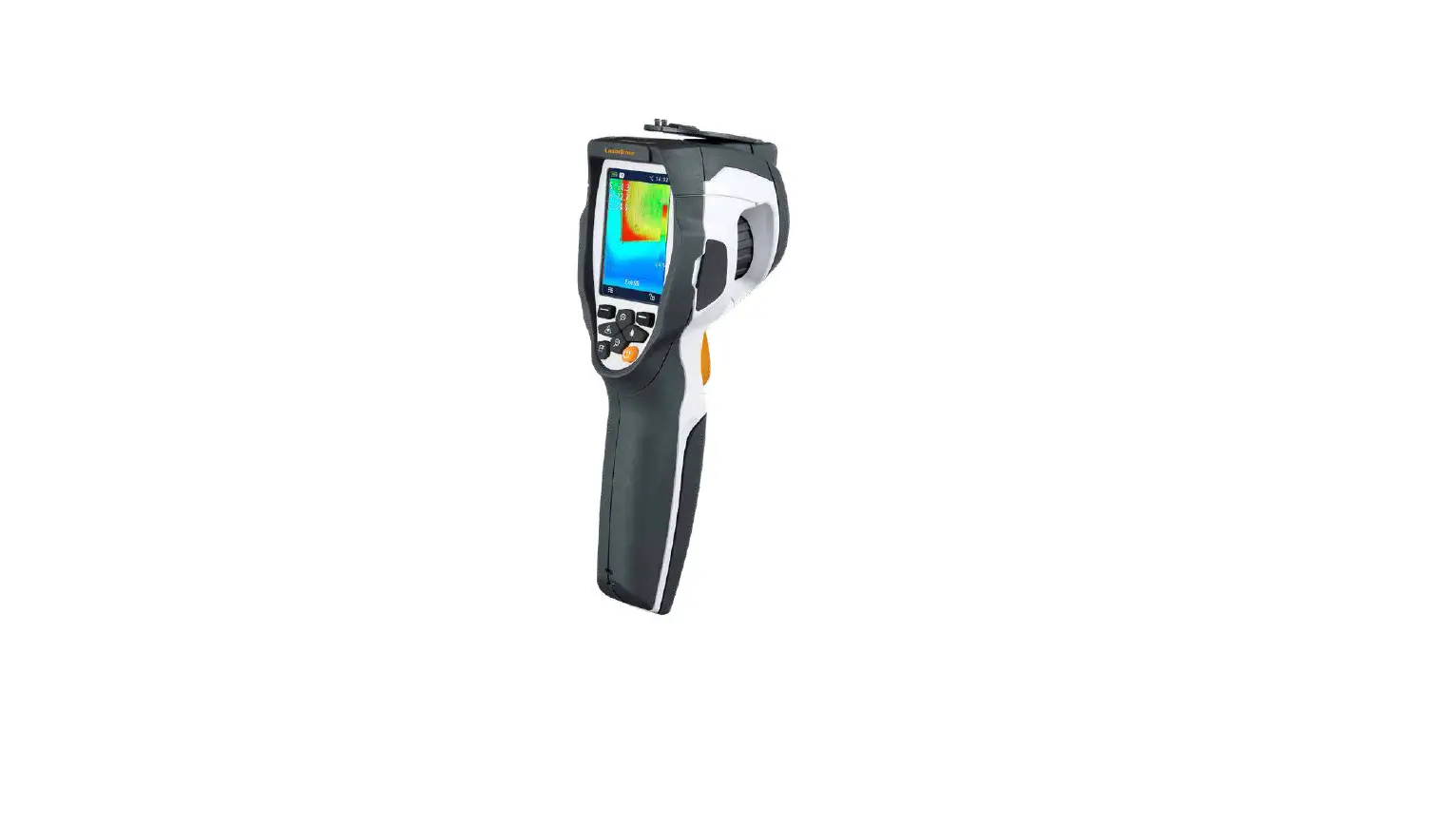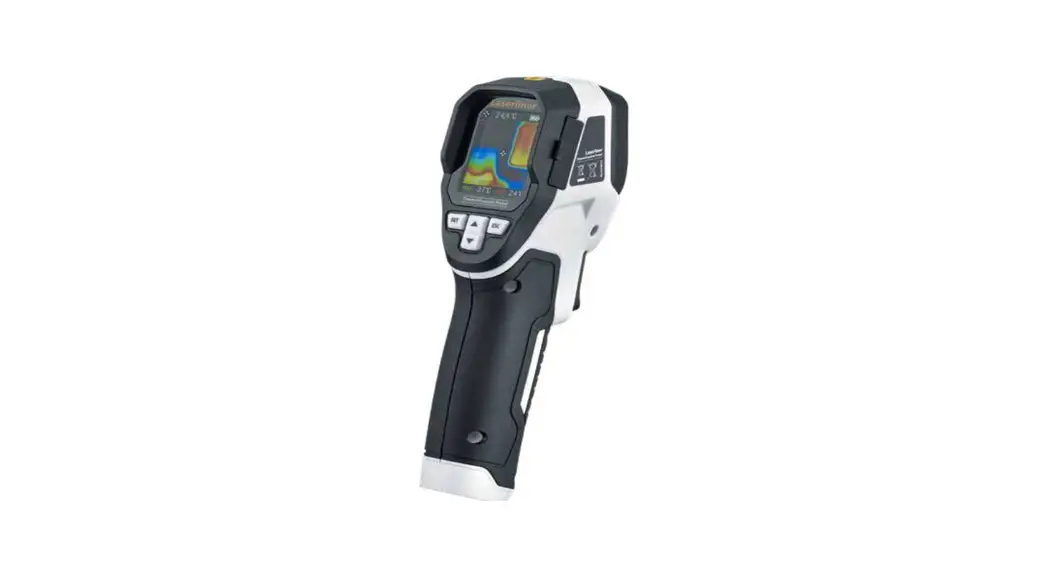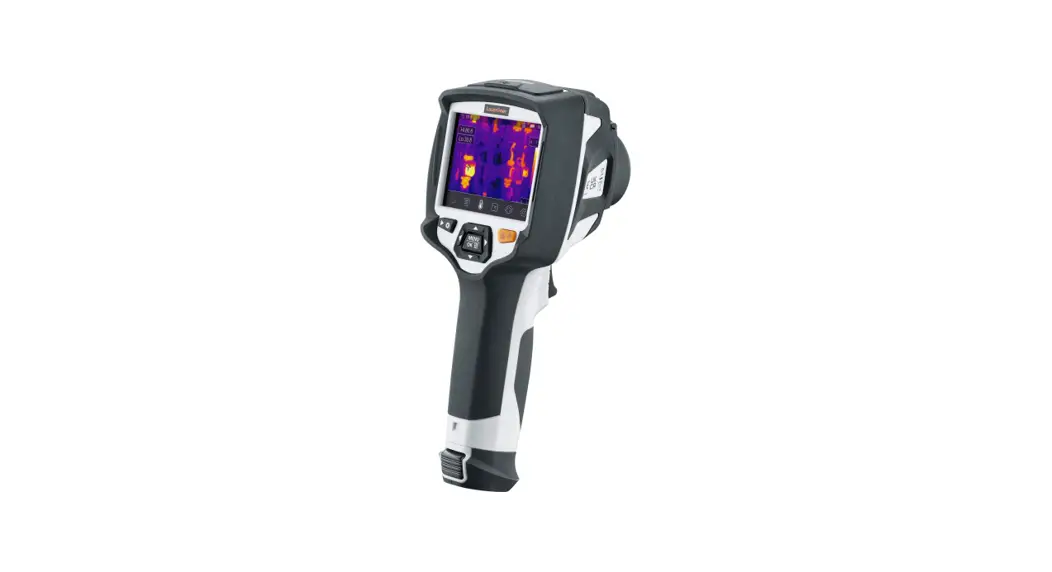

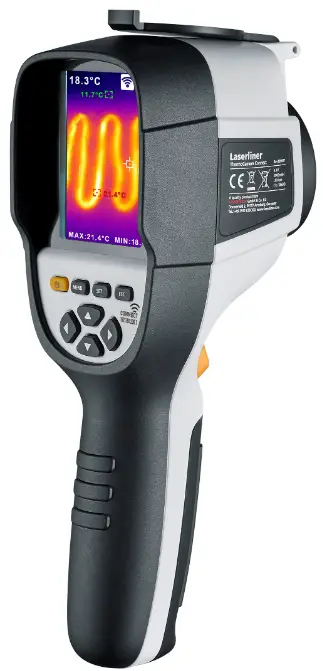
Laserliner 082.086A ThermoCamera Connect Compact Thermal Imaging Camera
Completely read through the operating instructions, the „Warranty and Additional Information“ booklet as well as the latest information under the internet link at the end of these instructions. Follow the instructions they contain. This document must be kept in a safe place and passed on together with the device.
Function / Application
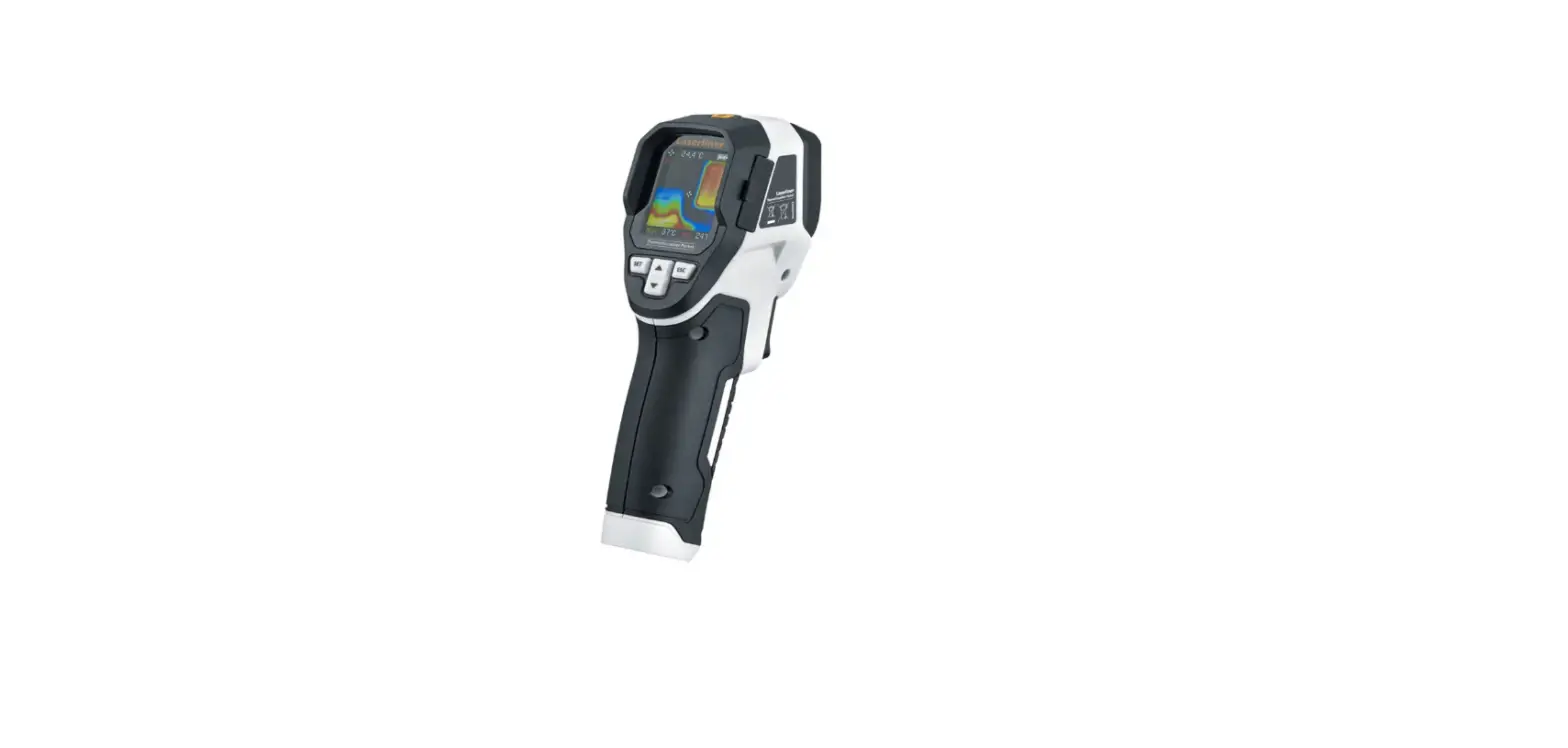
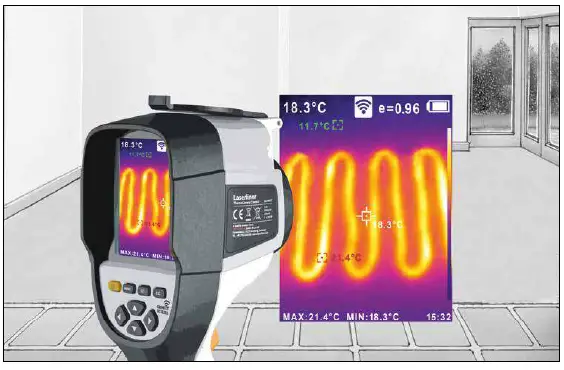
The ThermoCamera Connect is used to visually display thermal patterns and enables non-contact measurement of surfaces by evaluating the radiation in the infrared wavelength range via the integrated non-chilled microbolometer. The imaging technology of the sensor provides a visual image of the temperatures surrounding the inspected object. The temperature differences can be visualised by colourcoding the individual temperatures in a thermogram with false colour display. Possible applications include locating overloads in electrical components, detecting overheating in mechanical components, pinpointing and analysing heating lines in walls and floors, assessing refrigerant and air conditioning systems and much more.
General safety instructions
- The device must only be used in accordance with its intended purpose and within the scope of the specifications.
- The measuring tools and accessories are not toys. Keep out of reach of children.
- Modifications or changes to the device are not permitted, this will otherwise invalidate the approval and safety specifications.
- Do not expose the device to mechanical stress, extreme temperatures, moisture or significant vibration.
- The device must no longer be used if one or more of its functions fail or the battery charge is weak.
- Use only genuine accessories. Use of inappropriate accessories will invalidate the warranty.
- The charging progress can be viewed by briefly pressing the ON/OFF button.
- The residual charge of batteries with a weak charge is shown in red.
- The battery can also be charged while using the device.
- Disconnect the power pack from the mains when the device is not in use.
- Never use extension cables in conjunction with the battery charger, or similar accessories not approved by the manufacturer, as this may result in a fire risk, the risk of an electric shock or injury to persons.
Safety instructions
Using electromagnetic radiation and RF wireless radiation
- Local operating restrictions – for example, in hospitals, aircraft, petrol stations or in the vicinity of people with pacemakers – may apply. Electronic devices can potentially cause hazards or interference or be subject to hazards or interference.
- The measuring accuracy may be affected when working close to high voltages or high electromagnetic alternating fields.
- The measuring device is equipped with a wireless interface.
- The measuring device complies with electromagnetic compatibility and wireless radiation regulations and limits in accordance with the RED 2014/53/EU.
- Umarex GmbH & Co. KG hereby declares that the ThermoCamera Connect radio equipment complies with the essential requirements and other provisions of the European Radio Equipment Directive 2014/53/EU (RED). The EU Declaration of Conformity can be found in its entirety at the following address: http://laserliner.com/info?an=AGR
- This device complies with the CE limit values for radiation exposure as defined for uncontrolled environments. To avoid wireless radiation, this device should be used at a minimum distance of 20 cm from the body.
FEATURES
OVERVIEW
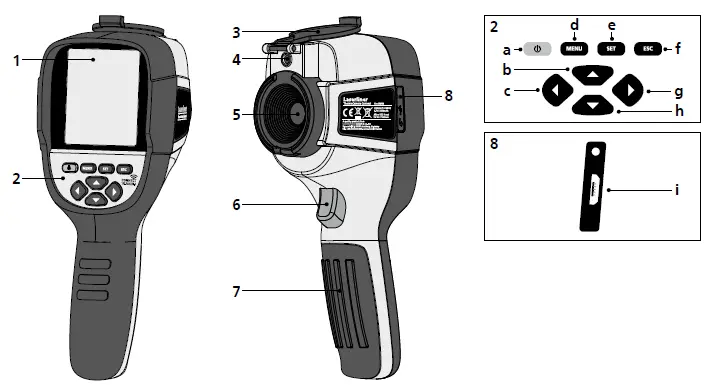
- 3,2“ TFT color display
- Hotkeys
- Lens cover
- Camera
- Infrared camera lens
- Trigger: Capture
- Battery compartment
- Shaft
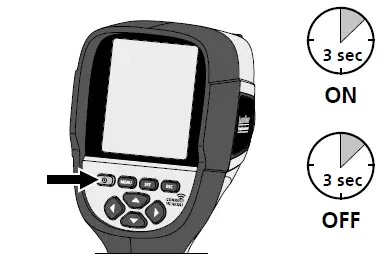
- a ON/OFF
- b Menu navigation
- c Menu navigation / select digital image, overlay infrared / digital image and infrared image
- d Open main menu / exit main menu (cancel) / save image
- e Control menu (confirmation) / do not save image
- f Control menu (cancel)
- g Menu navigation / select digital image, overlay infrared / digital image and infrared image
- h Menu navigation
- i Micro USB interface
Standard measurement view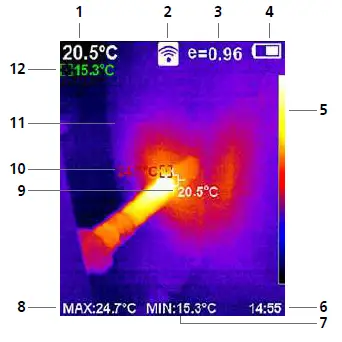
- Temperature at centre of image
- WLAN active
- Set emissivity coefficient
- Battery charge indicator
- Color palette
- Time
- Min. temperature
- Max. temperature
- Temperature at centre of image
- Max. temperature
- Thermography image
- Min. temperature
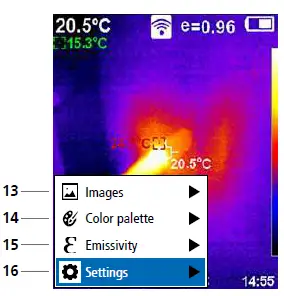
- Main menu

- Main menu
- Open media gallery
- Change color palette
- Set emissivity coefficient
- Settings
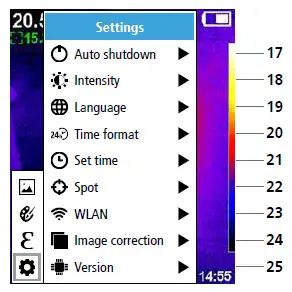
- Main menu settings

- Main menu settings
- Auto shutdown
- Display brightness
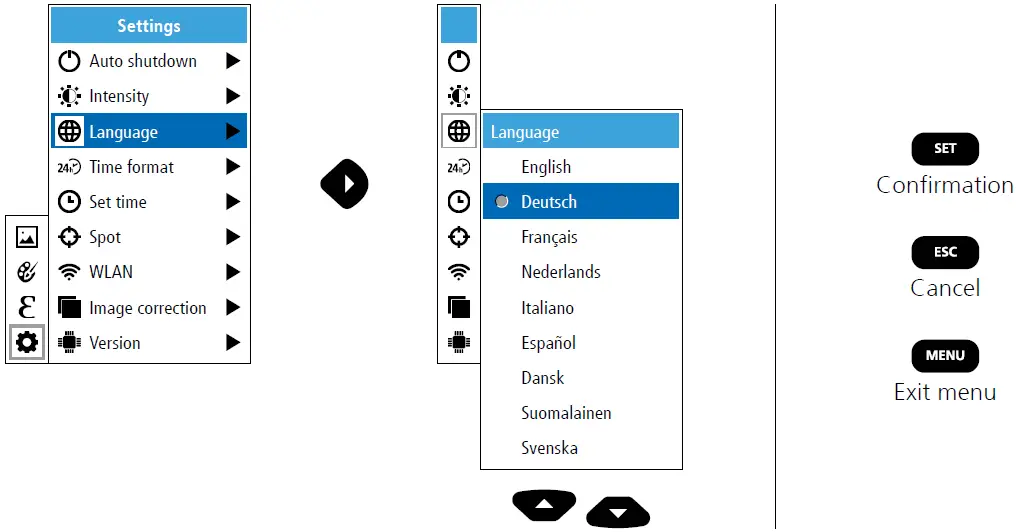
- Menu language
- Time format
- Time settings
- Spot (Measuring point)
- WLAN connection ON/OFF
- Image correction
- Software version
ON / OFF
Charging the li-ion battery
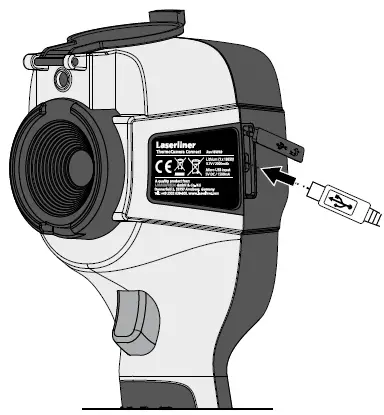
- To charge the Li-ion battery pack, plug the supplied USB cable into the charging socket „i“ and connect it to the USB 2.0 power supply unit. Operation while charging is possible.
Removing / inserting li-ion battery pack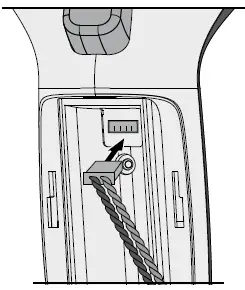
- Open battery compartment (7) and remove/ insert the Li-ion battery pack. When inserting battery ensure correct polarity.
Main menu
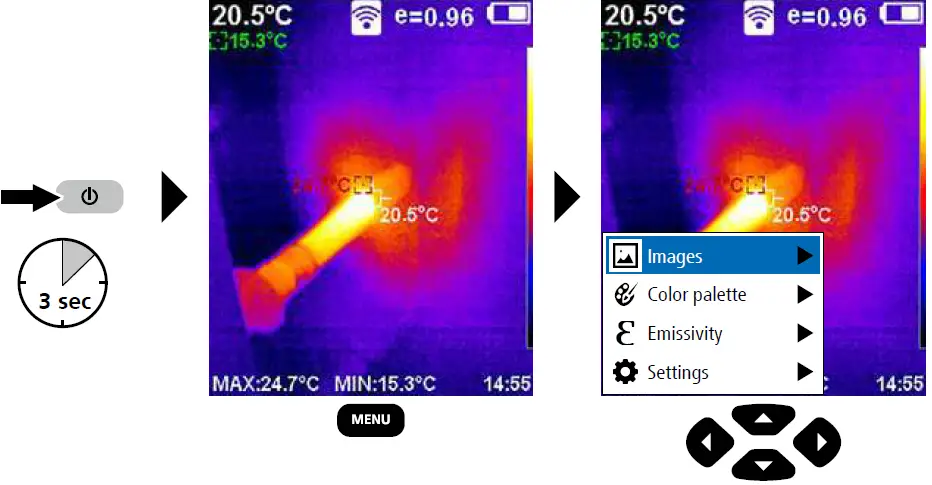
- General and measurement-specific settings can be made in the main menu. The menu is controlled with the four buttons (b, c, g, h).
Settings
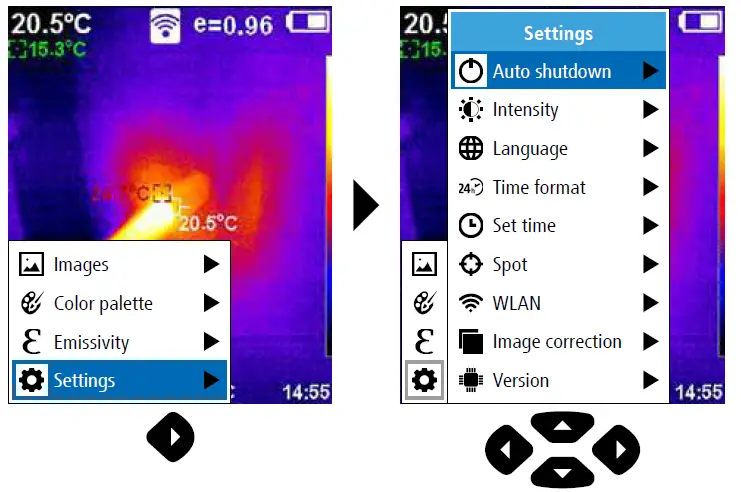
Settings: Auto shutdown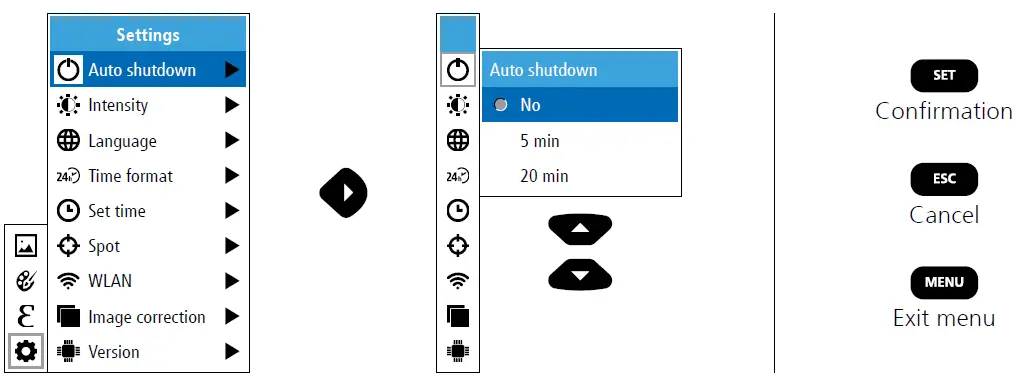
- The device switches off automatically after a set period of inactivity.
Settings: Display brightness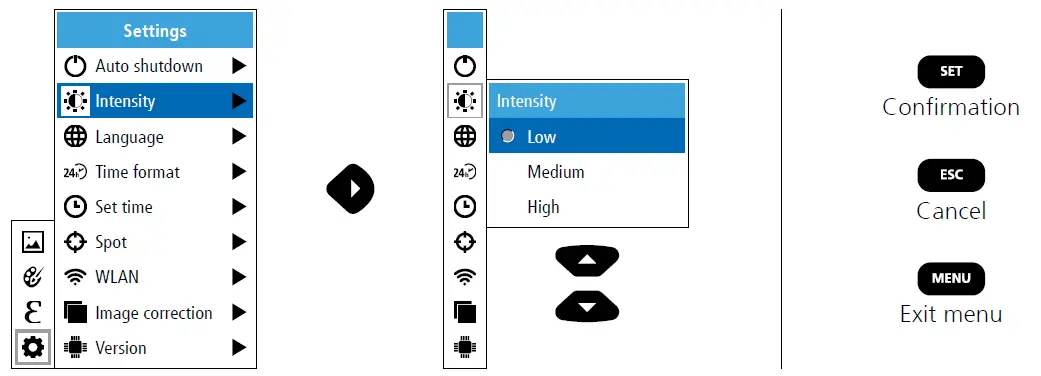
Settings: To set menu language EN / DE / FR / NL / IT / ES / DK / FI / SE
Settings: Time format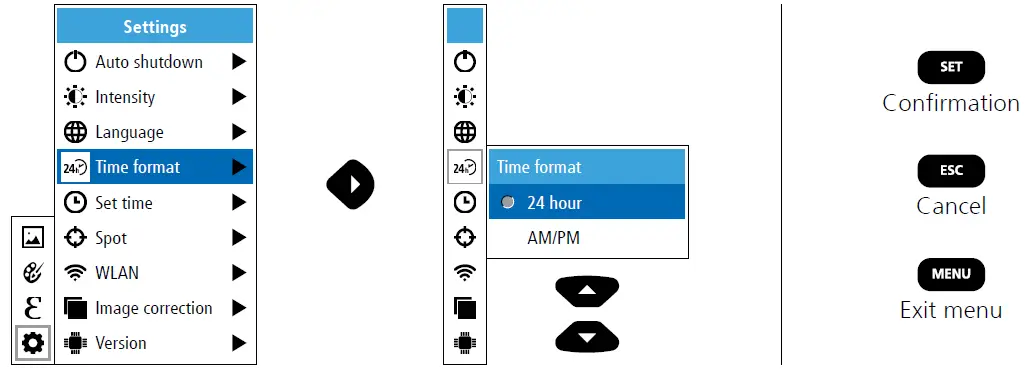
Settings: Set time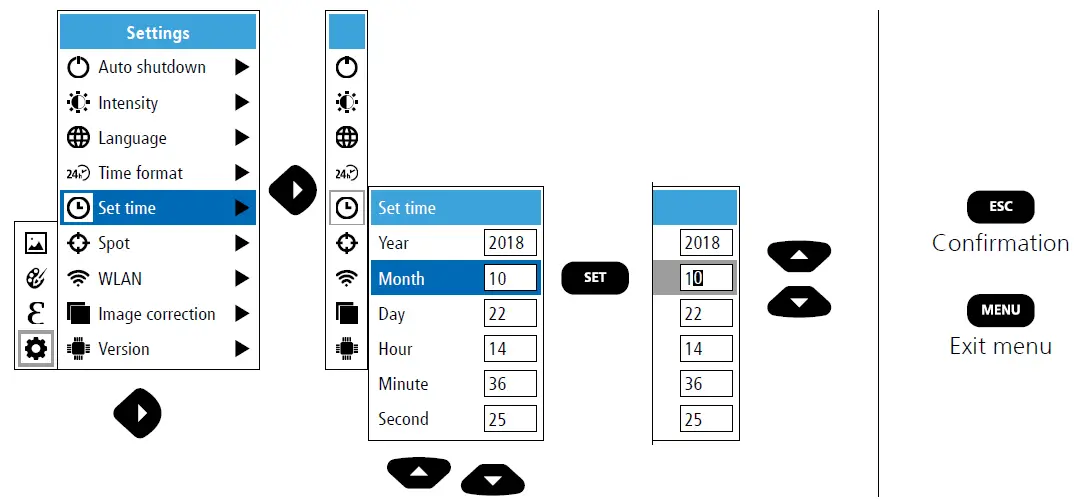
Settings: Spot (Measuring point)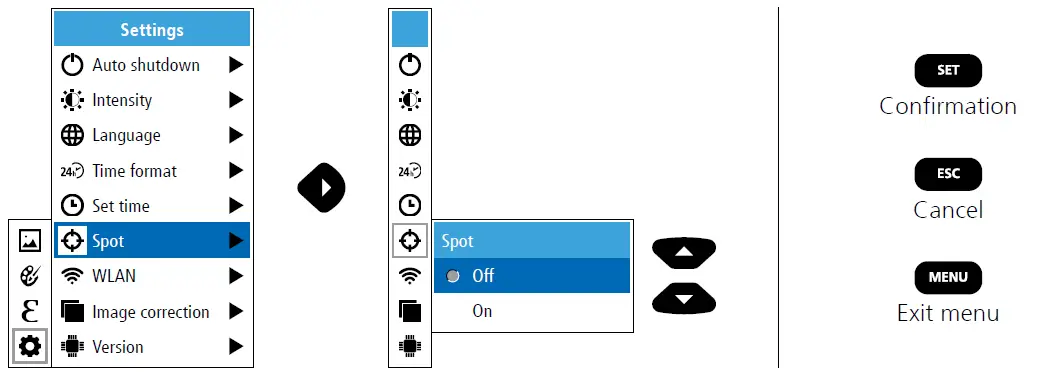
- The temperature is shown in the centre of the image as standard. Two spots can be added. Max: highest temperature, Min: lowest temperature.
Settings: WLAN connection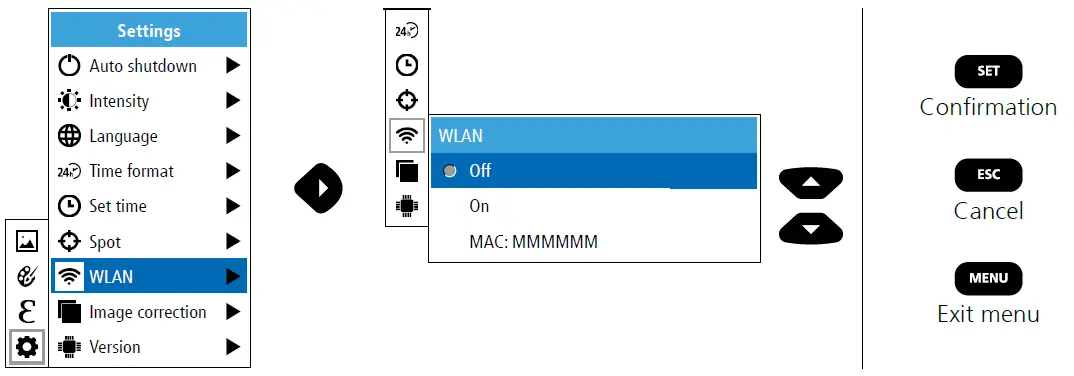
To evaluate the data, the ThermoCamera Connect can be connected via WLAN to a terminal device (desktop PC or mobile phone) with WLAN capabilities. For this purpose first select the required WLAN SSID on the device (MAC:MMMMMM). MMMMMM corresponds to the MAC address.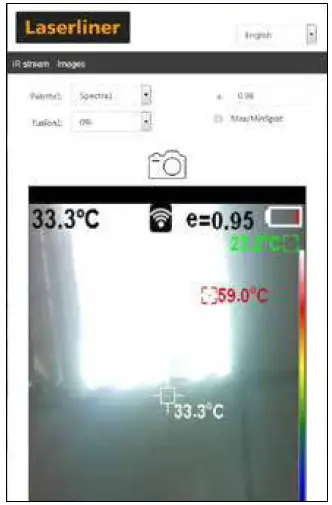
The connection with the corresponding SSID is then set up at the terminal device. With any modern browser the ThermoCamera Connect makes the data available under the IP-address 192.168.230.1 Port 80.
Settings: Image correction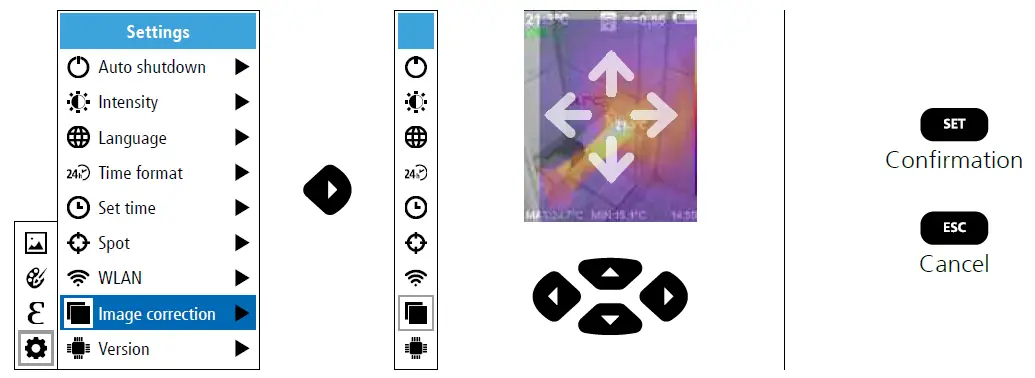
Settings: Version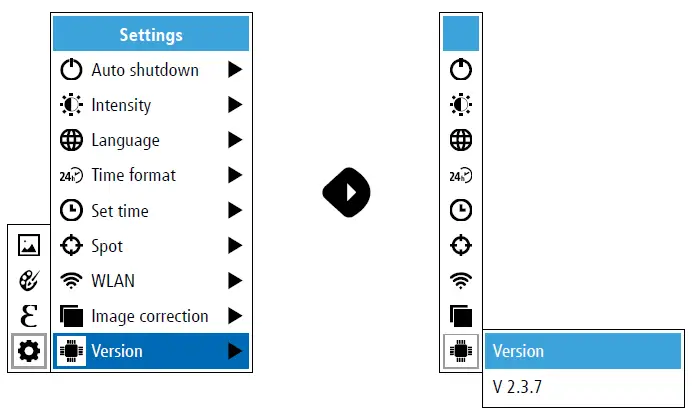
Emissivity
Before each use, check the settings for infrared measurement and adjust them to the respective measuring situation to ensure accurate measurements. Pay particular attention to the general parameters for the emissivity coefficient.
Emissivity: Emissivity coefficient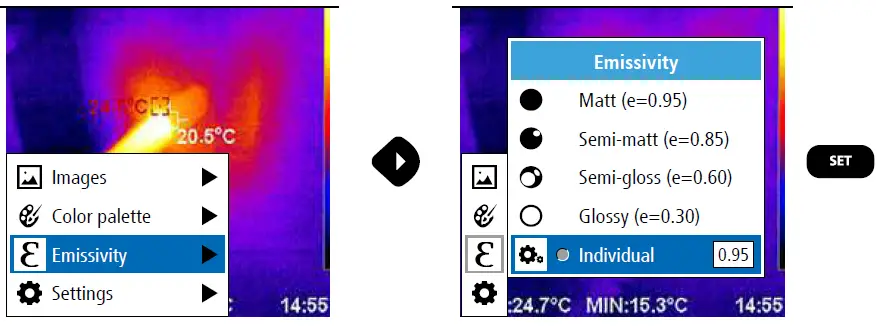
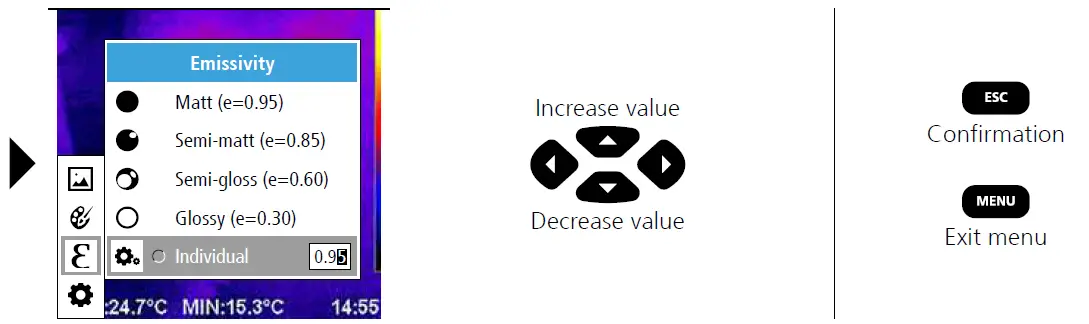
The level of infrared emissions given off by everything depends on the specific material and surface. This factor is determined by the emissivity coefficient (0.10 … 1.0). For accurate measurements, it is absolutely essential that the emissivity coefficient is set first. The emissivity coefficient can either be custom set or selected based on the predefined emissivity coefficients from the material list.
Emissivity table (reference values with tolerances)
| Metals | ||||||||
| Alloy A3003 Oxidised Roughened | 0.20 0.20 | Iron Oxidised With rust | 0.75 0.60 | Steel Alloy (8% nickel, 18% chromium) Galvanised Oxidised Heavily oxidised Freshly rolled Rough, flat surface Rusty, red Sheet, nickel plated Sheet, rolled Stainless steel |
0.35 0.28 0.80 0.88 0.24 0.96 0.69 0.11 0.56 0.45 | |||
| Aluminium Oxidised Polished | 0.30 0.05 | Iron, cast Non-oxidised Molten mass | 0.20 0.25 | |||||
| Brass Polished Oxidised | 0.30 0.50 | Iron, forged Matt | 0.90 | |||||
| Lead Rough | 0.40 | |||||||
| Chromium oxide | 0.81 | |||||||
| Copper Oxidised Copperoxide | 0.72 0.78 | Platinum Black | 0.90 | |||||
| Zinc Oxidised | 0.10 | |||||||
| Steel Cold rolled Ground plate Polished plate | 0.80 0.50 0.10 | |||||||
| Inconel Oxidised Electropolished | 0.83 0.15 | |||||||
| Nonmetals | ||||||||
| Asbestos | 0.93 | Gravel | 0.95 | Paper All colours | 0.96 | |||
| Asphalt | 0.95 | Grit | 0.95 | |||||
| Basalt | 0.70 | Gypsum | 0.88 | Plastic Translucent PE, P, PVC | 0.95 0.94 | |||
| Brick, red | 0.93 | Gypsum cardboard | 0.95 | |||||
| Carborundum | 0.90 | Heat sink Black, anodized | 0.98 | Quartz glass | 0.93 | |||
| Cement | 0.95 | Rubber Hard Soft, grey | 0.94 0.89 | |||||
| Ceramics | 0.95 | Human skin | 0.98 | |||||
| China Brilliant white With glaze | 0.73 0.92 | Ice Clear With heavy frost | 0.97 0.98 | |||||
| Sand | 0.95 | |||||||
| Screed | 0.93 | |||||||
| Clay | 0.95 | Laminate | 0.90 | Snow | 0.80 | |||
| Coal Non-oxidised | 0.85 | Lime | 0.35 | Soil | 0.94 | |||
| Lime malm brick | 0.95 | |||||||
| Tar | 0.82 | |||||||
| Concrete, plaster, mortar | 0.93 | Limestone | 0.98 | |||||
| Tar paper | 0.92 | |||||||
| Cotton | 0.77 | Marble Black, dull finish Greyish, polished | 0.94 0.93 | |||||
| Transformer paint | 0.94 | |||||||
| Earthenware, matt | 0.93 | |||||||
| Wallpaper, light-coloured | 0.89 | |||||||
| Fabric | 0.95 | |||||||
| Masonry | 0.93 | Water | 0.93 | |||||
| Glass | 0.90 | |||||||
| Paint Black, matt Heat-resistant White | 0.97 0.92 0.90 | Wood Untreated Beech, planed | 0.88 0.94 | |||||
| Glass wool | 0.95 | |||||||
| Graphite | 0.75 | |||||||
Colour ranges IR image
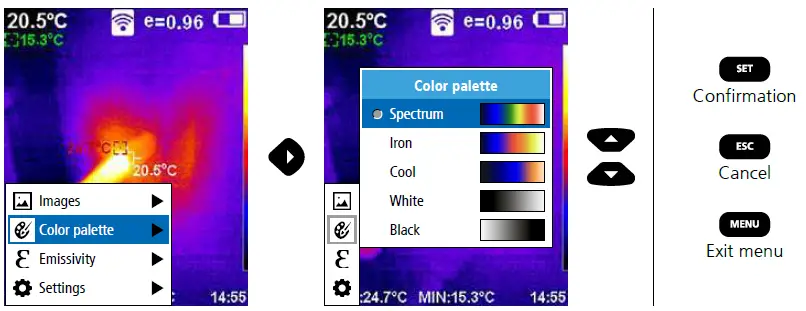
You can choose from several standard colour ranges to represent the measured infrared temperatures. Depending on the colour palette, the measured temperatures are adjusted within the current image section and displayed in the respective colour space. The bargraph for the respective minimum/ maximum temperatures of the entire image serves as a reference for the corresponding temperature/ colour mapping.
Image modes
There are 5 image modes to choose from.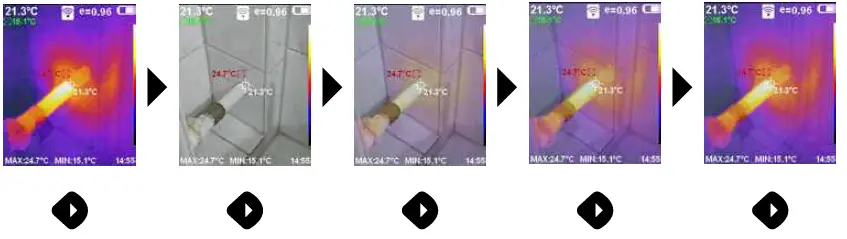
- IR image (IR)
- Digital image (Visible)
- Digital image with IR image overlay (MIX), level 1
- Digital image with IR image overlay (MIX), level 2
- Digital image with IR image overlay (MIX), level 3
Capture image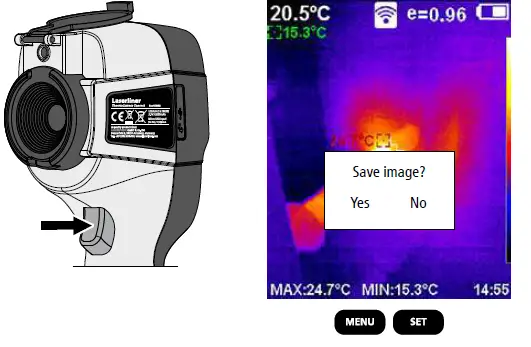
- Using the „Trigger“ button (6), users can take images of any measurement situation for the subsequent documentation.
Media gallery / to delete recording

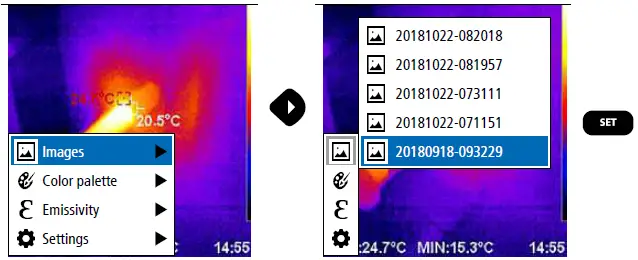
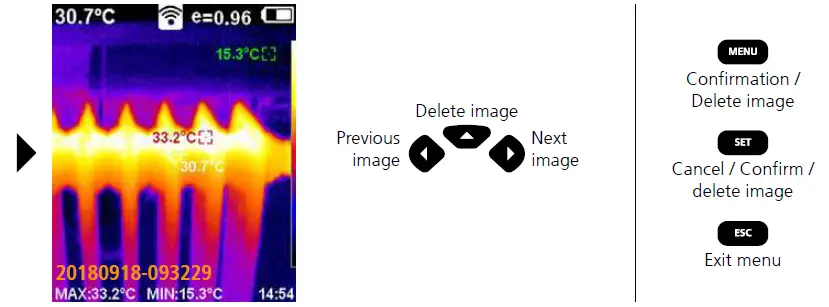
- All images recorded with the ThermoCamera Connect can be accessed in the media gallery.
- The image will be deleted immediately by pressing the MENU button. There are no safety prompts.
Information on maintenance and care
Clean all components with a damp cloth and do not use cleaning agents, scouring agents and solvents. Remove the battery pack before storing for longer periods. Store the device in a clean and dry place. Do not touch the lens.
Calibration
- The meter needs to be calibrated and tested on a regular basis to ensure it produces accurate measurement results. We recommend carrying out calibration once a year.
EU directives and disposal
This device complies with all necessary standards for the free movement of goods within the EU. This product is an electric device and must be collected separately for disposal according to the European Directive on waste electrical and electronic equipment. Further safety and supplementary notices at: http://laserliner.com/info?an=AGR
Technical data
Subject to technical changes without notice. 19W05
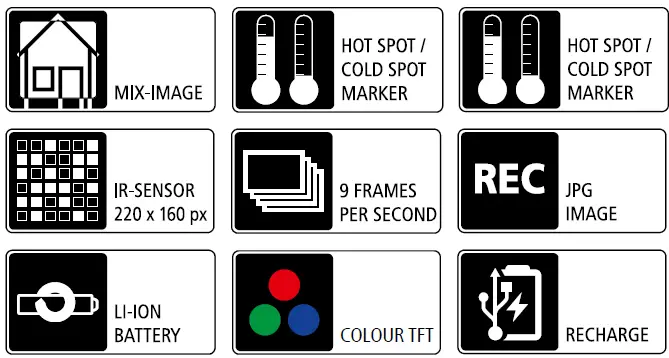
| IR sensor | Resolution: 220 x 160 pixels, uncooled microbolometer, 9 Hz, 8-14 μm | |
| IR optics | High-quality IR-lens, 27° x 35° (FOV), fixed focus, working area: 0.5 m … 20 m | |
| Thermal sensitivity | 0.07°C @ 30°C | |
| Precision | ± 2°C or ± 2% of measured value | |
| Measurement range | -20°C … 350°C | |
| Display | 3,2“ colour TFT | |
| Image modes | Infrared image, digital image, MIX image | |
| Digital camera | Resolution: 640 x 480 pixels | |
| Format | JPEG format | |
| Memory function | Integrated SD memory (more than 20.000 images) | |
| Interface | WLAN | |
| Ports | Micro USB charging | |
| Emissivity coefficient | 0.01 – 1.0 adjustable | |
| Protection class | IP54 | |
| Operating conditions | 0°C … 45°C, max. humidity 20 … 85% rH, no condensation, max. working altitude 2000 m above sea level | |
| Storage conditions | -20°C … 60°C, max. humidity 85% rH | |
| Radio module operating data | WLAN standard | IEEE 802.11 b/g/n |
| Frequency band | 2.400 – 2.4835 GHz (IEEE 802.11 b/g/n) | |
| Radio channels | Channel 9 | |
| Transmit power | 17 dBm max. | |
| Transmission rate | IEEE 802.11 b to 11 Mbps IEEE 802.11 g/n to 54 Mbps (at 15 ± 2 dBm) | |
| Safety | Open | |
| Local server mode | IP address 192.168.230.1; HTTP; no DHCP | |
| Port | 80 | |
| Automatic switch-off | Adjustable: 5 minutes / 20 minutes / no auto power off | |
| Power supply | Li-Ion pack battery 3.5V – 4.2V / 2000 mAh Micro USB 4.75V – 5.50V | |
| Charging time | Approx. 3 – 4 h | |
| Operating time | Approx. 2 – 3 h (depending on use) | |
| Dimensions (W x H x D) | 105 x 223 x 90 mm | |
| Weight | 389 g (incl. battery pack) | |
SERVICE
Umarex GmbH & Co. KG
- Laserliner
- Möhnestraße 149, 59755 Arnsberg, Germany
- Tel: +49 2932 638-300
- Fax: +49 2932 638-333
- [email protected]
Umarex GmbH & Co. KG
- Donnerfeld 2
- 59757 Arnsberg, Germany
- Tel: +49 2932 638-300
- Fax: -333
- www.laserliner.com
8.082.96.163.1 / Rev19W05
 Info - Laserliner
 Home
Home