
User Manual
7″ HD screen video baby monitor
Model: SM70PTZ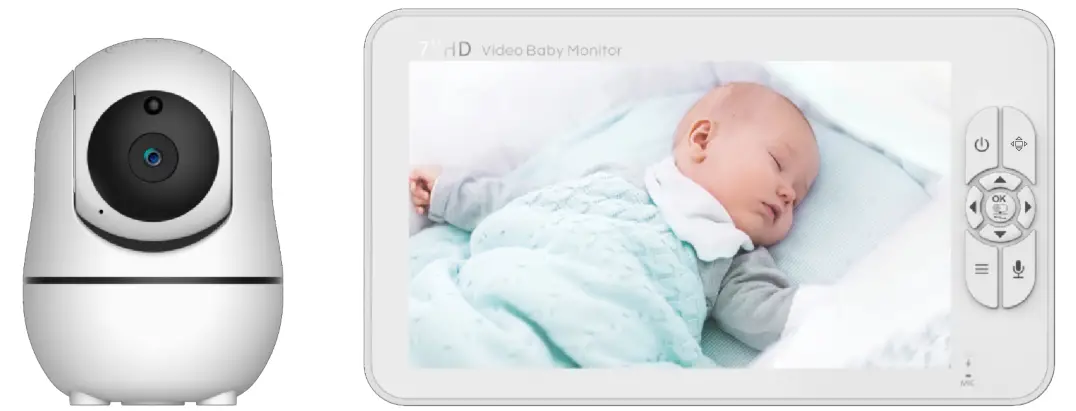

WARNING:
Keep this cord out of reach of children. The cord needs to be at least three feet away from the child at all times. Do not use an extension cord. Do not remove this tag. Children have STRANGLED with cords.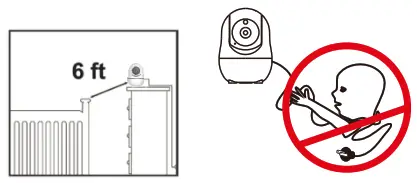
WARNING AND SAFETY INSTRUCTIONS
Follow these safety precautions to prevent fire, injury, or damage to the product.
Read and keep instructions: it is very important that you read all the safety and operating Warnings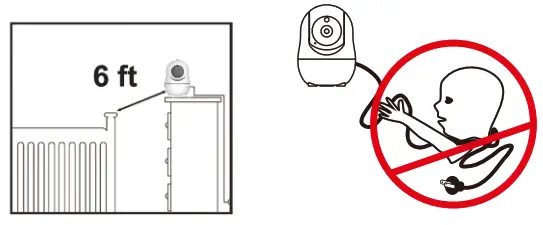
STRANGULATION HAZARD: Children can become entangled in cords. Make sure the baby unit, parent unit, and mains adapter cables are kept out of reach of your baby and other young children at all times, at least 6 feet away.
CHOKING HAZARD: This product contains small parts which may cause choking. Exercise care when unpacking and assembling the product and keeping the small parts away from children.
RISK OF SUFFOCATION: Keep all packaging materials and protective foils out of reach of children.
DANGER FROM POWER CORDS: To avoid possible danger from power cords the cords should be secured and never be hung on or near the crib. Never place the baby unit or parent unit inside your baby crib, bed, or playpen.
DO NOT HANDLE ROUGHLY, DROP OR THROW: A baby monitor is a high-quality electronic device that must be handled with care.
WATER AND MOISTURE: The product should not be exposed to rain, moisture, or splashing. Never use or place the product in or near moisture or water.
THIS PRODUCT CAN NOT REPLACE RESPONSIBLE ADULT SUPERVISION: Your video monitor is designed to be an aid and should not be used as a substitute for responsible and proper adult supervision of a child.
VENTILATION: This product should not be used on a bed, sofa, rug, or similar surface that may block the venison or speaker openings, or be placed in an enclosed area, such as a bookcase or drawer that may impede air flow. Never cover the product with clothes and towels. Never cover the product with clothes, towels, blankets, or any other item.
THIS PRODUCT IS NOT A TOY: It should be kept out of children’s reach.
KEEP AWAY FROM SOURCES OF HEAT: This unit should not be exposed to direct heat sources such as a candle, stove, radiator, heat register, or other appliance that emit heat. the unit should not be in direct sunlight.
BATTERY: Before you use the product, we recommend you fully charge the battery of the parent unit, so that it continues to work if you disconnect it from the power supply to carry it to another location.
INSTALLATION LOCATION: The installation location plays an important role in ensuring proper operation. Therefore, maintain a distance of at least 5 feet from other electronic equipment, such as microwave ovens or Wi-Fi routers, otherwise, they could cause interference. If this occurs, move the baby and parent units to another location. RANGE: The range of all baby monitors is always measured in an open space. The actual range may be shortened due to environmental obstacles(such as concrete walls).
DAMAGE REQUIRING SERVICE: This product should be serviced by qualified personnel only.
DO NOT TRY TO OPEN AND REPAIR THE PRODUCT: If you have any problems with the product, please contact the authorized distributor. In case of unusual noises or smells originating from the device, immediately disconnect the product from the power outlet and contact the authorized. If the product becomes dirty, use a lightly damp cloth to wipe surfaces, taking care to not allow water to any openings.
IMPORTANT: This baby monitor is designed only for hearing the baby’s voice and seeing the images of the baby. This product is not a medical device and should not be used as a substitute for responsible adult supervision. It is important that you regularly check on your baby personally.
1.2 Say Instructions for AC Power Adapter
The adapter should not be exposed to direct heat sources such as a candle, stove, radiator, heat register, or other appliance that emits heat.
During continual use, the power adapters may become warm to the touch. This is normal and should not be a cause of concern.
Examine the intactness of the power cord and its plug.
The adapter must be handled with care: Do not handle roughly, drop or throw.
When removing the power adapter from the wall outlet, hold and pull from the receptacle.
Do not pull on the cable itself or bend the cable as that will put additional stress on the cable and could lead to damage.
Do not touch the power adapter with wet hands or allow liquids to spill on it.
Make sure the mains adapter cables are kept out of reach of your baby and other young children at all times.
To avoid possible danger from power cords, the cords should be secured and never be hung on or near the crib.
Do not replace the plugs or cable on your power adapter. This product should only be used with the AC power adapter supplied by the manufacturer, as included in this package
Never cut, damage, or bend the power cord.
Do not put any objects on top of the power cord, which could cause overheating, damage, combustion, and electronics.
Do not leave the power adapter connected to the wall outlet when it is not plugged into the baby or parent unit.
Warning
Do not replace the power cord with non-original substitutes. Improper connection may cause electrocution. Do not place the AC adaptor cable in high wear and tear location. Never use a frayed or compromised cord. intended for indoor use only
1.3 Say Instructions for Li-ion battery(Non-removable pre-installed battery)
Do not attempt to repair or adjust any of the electrical or mechanical functions of the unit.
Do not dismantle,cut,open,crush,bend,puncture,or shred cells or bakeries.
If the battery leaks, do not let the battery liquid touch skin or eyes. If this happens, immediately flush the affected areas with water, and seek medical assistance.
The battery should not be exposed to direct sunlight or heat sources such as a candle, stove, radiator, heat register, or other appliance that emits heat.
Do not modify, remanufacture, attempt to insert foreign objects into the battery, or immerse or expose it to water or other liquids. Batteries may explode if damaged.
Use only the battery pack supplied with the product or the same type, sold by the manufacturer or its authorized distributors.
Improper use or use of unapproved batteries may present a risk of fire, explosion, or other hazards, and may invalidate the warranty.
If you believe the battery is damaged, remove the product from the charge and stop using the product.
Never use a damaged battery
1.4 Information on disposal of product
Always dispose of your product(with the nonremovable pre-installed battery)at the end of their life in an environmentally responsible way and in accordance with your local waste disposal requirements. All cardboard and paper packaging materials should be recycled in accordance with your local council waste regulations.
PRODUCT OVERVIEW
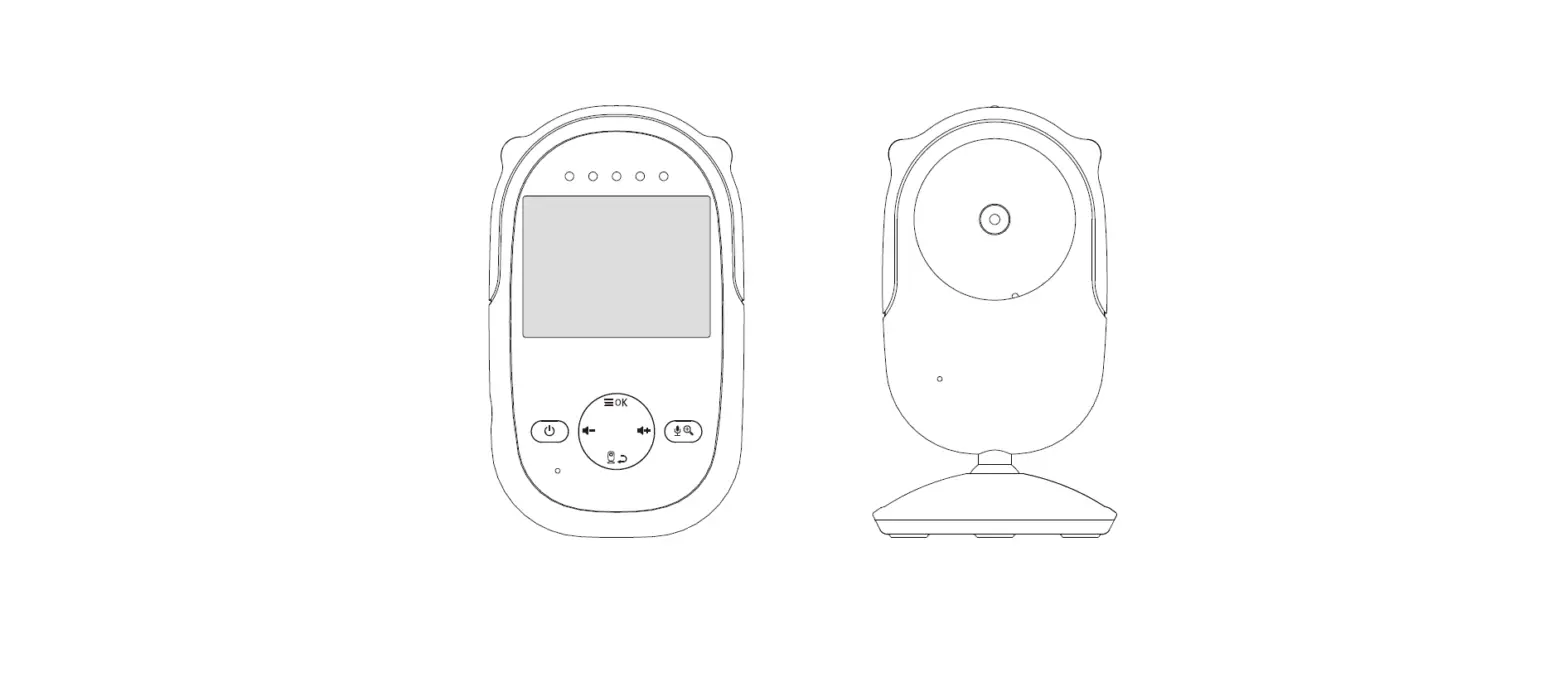
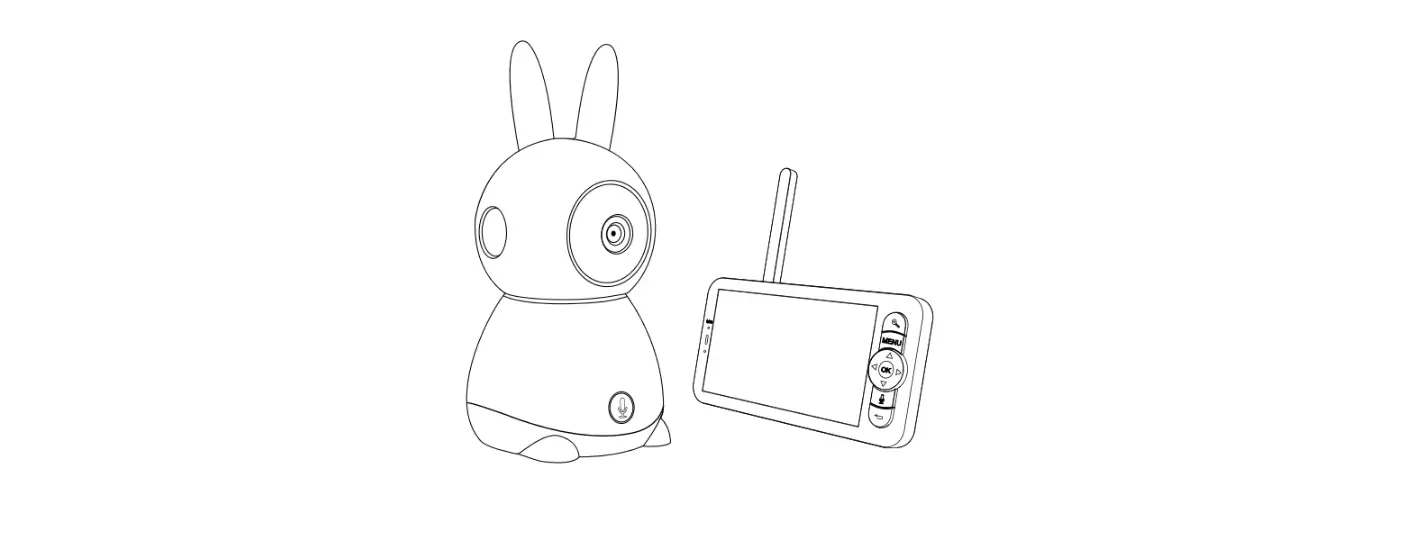
2.1 Parent unit overview
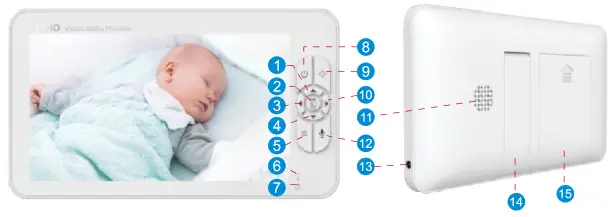
| 1. Volume up Press Volume+ to increase the volume. 2. OK key Press the OK key to confirm. 3. Brightness down Press the Bright- to decrease the brightness. 4. Volume down Press volume- to decrease the volume. 5. Menu Short press the menu key the menu will pop up, and press again to Exit. Press and hold the Menu key for around 2 seconds to operate Zoom in/out. 6. Power&Charging LED *The LED shows red when charging under the display is turned off state. *The LED shows orange when charging under the turn-on state. *The LED shows green aer the battery is fully charged. 7. Microphone When talking to the baby, collect the voices of the parents. | 8. Power key Long press to turn on/off the monitor; short press to screen on/off. 9. Pan/Tilt Press the key  to enter into the Pan/Tilt mode. to enter into the Pan/Tilt mode.10. Brightness up Press the Bright+ to increase the brightness. 11. Speaker Hear the sound from the baby. 12. Talk to baby To talk, press and hold the talk key on the front of the monitor. 13. DC jack Charge the monitor by connecting the Power Adapter to the monitor and a socket. 14. Stand Monitor placement stand. 15. Battery door |
2.2 Baby unit overview
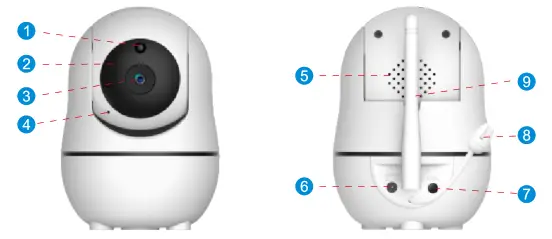
| 1-Light sensor 2 -Infrared LEDs 3 -CMOS lens | 4- Microphone 5- Speaker 6 – DC jack | 4-Pairing key 5-Temperature sensor 6-Antenna |
2.3 Icon overview
 | Lullaby |  | Time Format |
 | VOX |  | Brightness |
 | Zoom |  | Timer |
 | Camera |  | Alert Volume |
 | Seng |  | Frequency Seng |
 | Temp C/F |  | Temp |
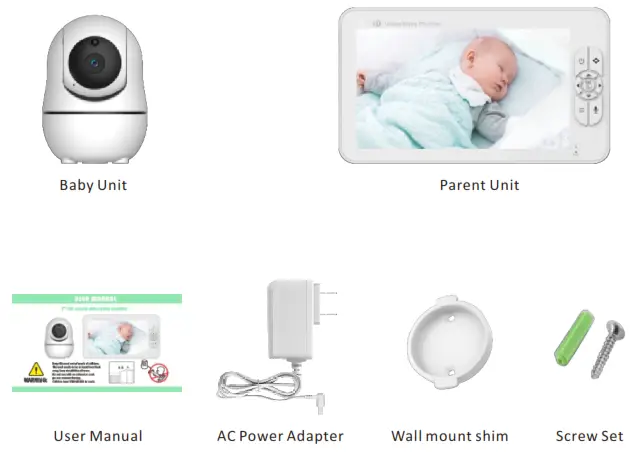
2.4 Product list:
- Parent Unit x1
- Baby Unit(Camera) x1
- AC Power Adapter x2
- Screw Set x1
- Wall mount shim x1
- User Manual x
POWERING ON YOUR PRODUCT
Step1: Charge the baby uni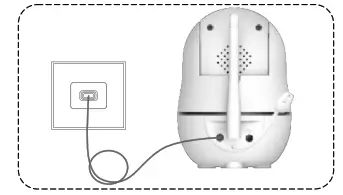
Step3: Set the parent unit to prepare for connecting
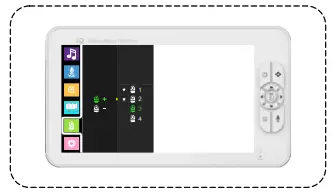
NOTE: If the baby unit and parent unit have been connected, steps 3 and 4 are unnecessary.
Step2: Press for two seconds to Power on the parent unit.
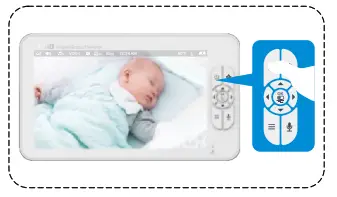
Step4: Press the PAIR button for two seconds until it has been paired (the symbol appears before ).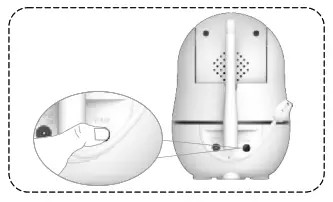
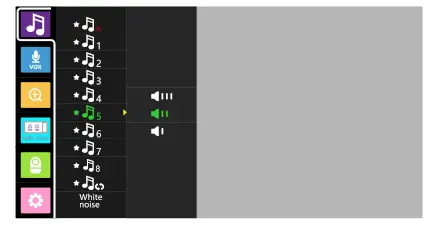
Music setting
- Press the menu button to access the menu. choose
 and press
- select the lullaby you want to play and press
- Press the NAVIGATION key to select the duration and music volume.
- In order to stop the lullaby playback, select

- Press the menu button
 to exit the menu.
NOTE: The lullaby default setting is off.
 and press
 to exit the menu.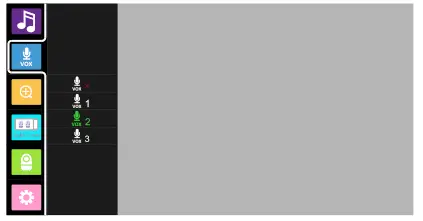
VOX setting
- Press the menu button to access the menu. choose
 and press
 - Press the UP key
 or DOWN key
  to select the VOX level.
 - Press to confirm.
- Press the menu button to exit the menu.
NOTE: To resume the video and audio signal manually on your parent unit when the VOX function is on,briefly press any key on your parent unit.
 and press
 or DOWN key
  to select the VOX level.
Zoom in /out setting
- Press the menu button to access the menu.choose and press
- Press the UP key or DOWN key to select the magnificaon.
- Press to confirm.
- Press the menu button to exit the menu.

 choose and press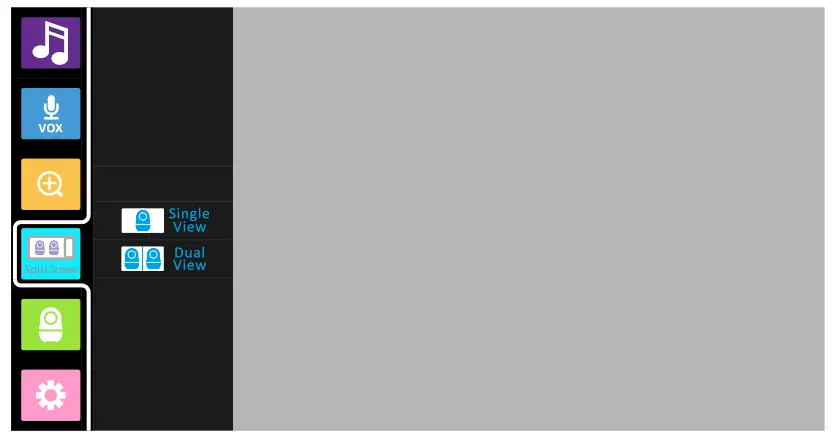
Split screen
- Press the menu button to access the menu.
 choose and press
 - Press the UP key or DOWN key to select the desired options.
- Press to confirm.
- Press the menu button to exit the menu.
NOTE: This function is only available when two or more cameras are paired.
 choose and press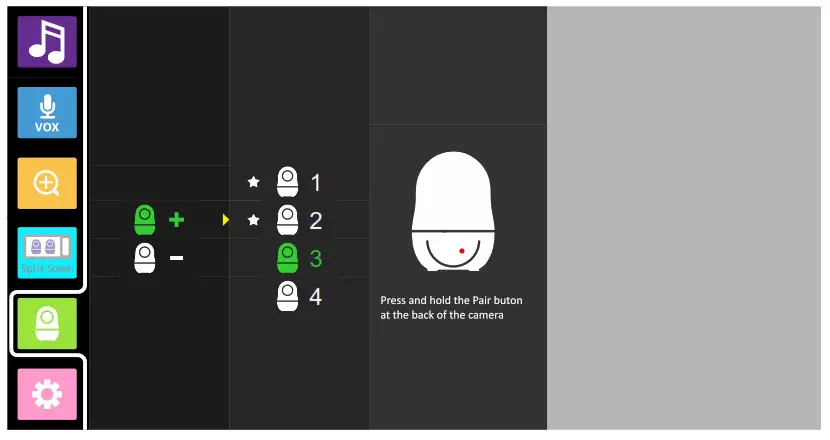
Add camera
- Press the menu button to access the menu.
 choose and press
 - Press the UP key or DOWN key to select the camera to be paired.
- Press to start the pairing, while the screen shows pairing then press the PAIR button
on the back of the camera. - Press the menu button to exit the menu.
NOTE: Before you begin pairing, make sure to have the baby and parent unit side by side and turned on.
 choose and press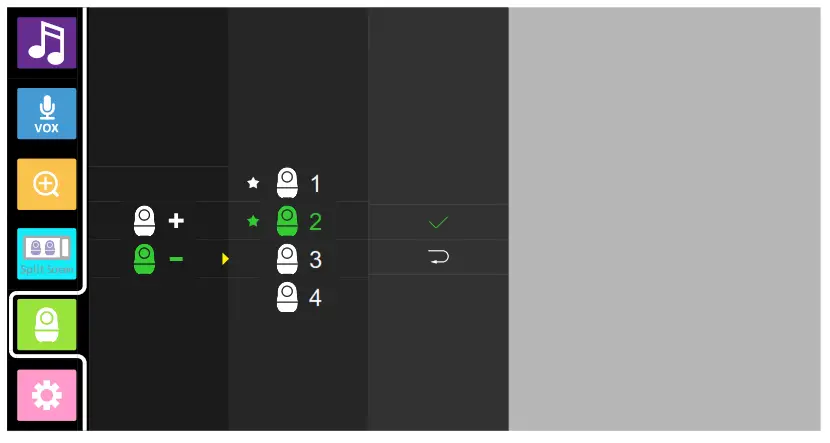
Delete camera
- Press the menu button to access the menu. choose and press
- Press the UP key or DOWN key to select the camera to be canceled.
- Press to confirm.
- Press the menu button to exit the menu.
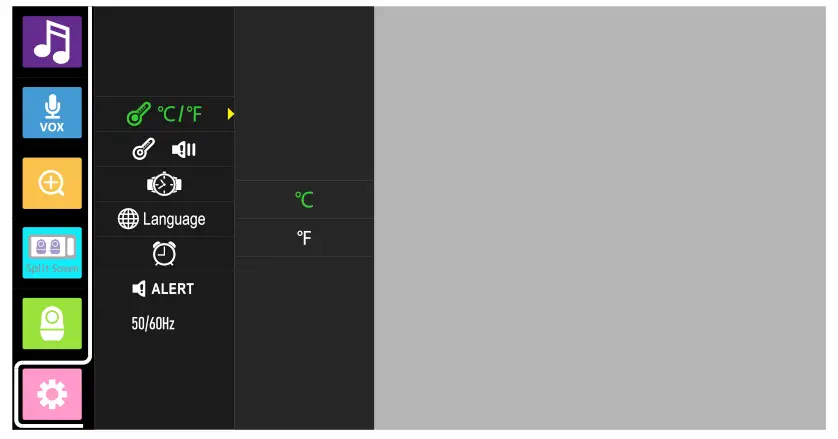 Temp unit setting
- Press the menu button to access the menu. choose and press
- Select
 and press
 - Press the UP key or DOWN key to select℃ or ℉
- Press to confirm.
- Press the menu button to exit the menu.
 and press
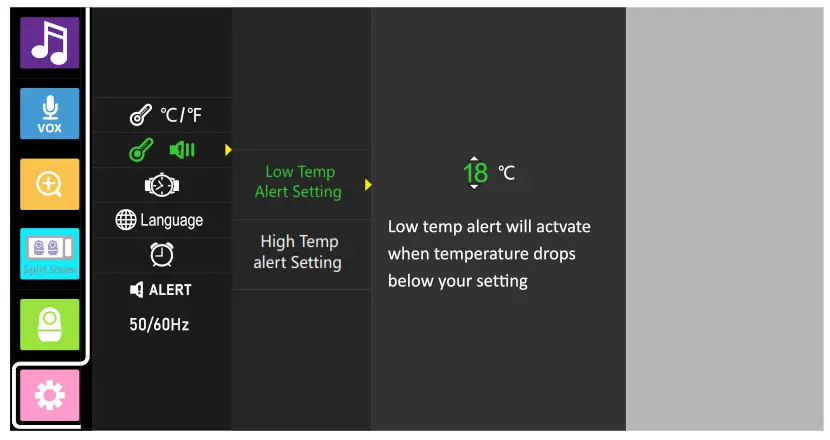 Temp alert setting
- Press the menu button to access the menu. choose and press
- Select
 and press
 - Press the UP key or DOWN key to set the maximum and minimum alarm temperatures.
- Press to confirm.
- Press the menu button to exit the menu.
 and press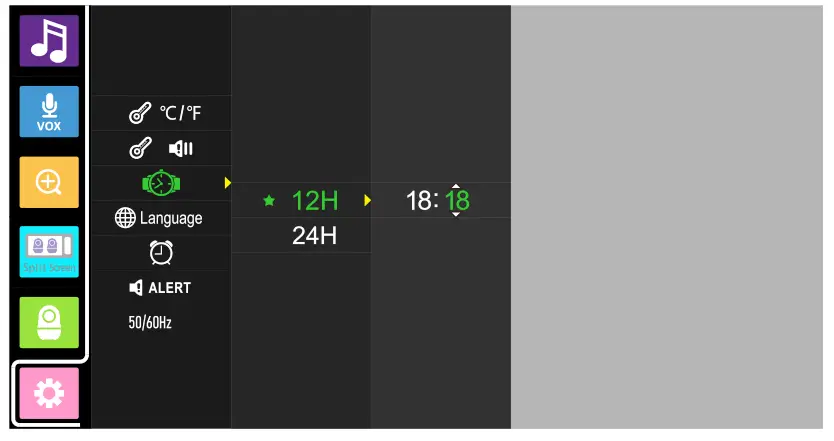
Time setting
- Press the menu button to access the menu. choose
 and press
 - Select
 and press
 - Press the UP key or DOWN key to select 12H or 24H
- Press to confirm.
- Press the menu button to exit the menu.
 and press
 and press
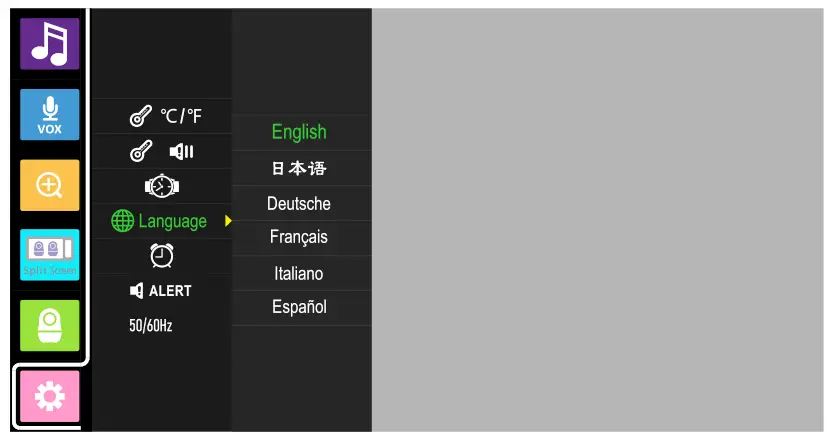 Language setting
- Press the menu button to access the menu. choose and press
- Select and press
- Press the UP key or DOWN key to select the language.
- Press to confirm.
- Press the menu button to exit the menu.
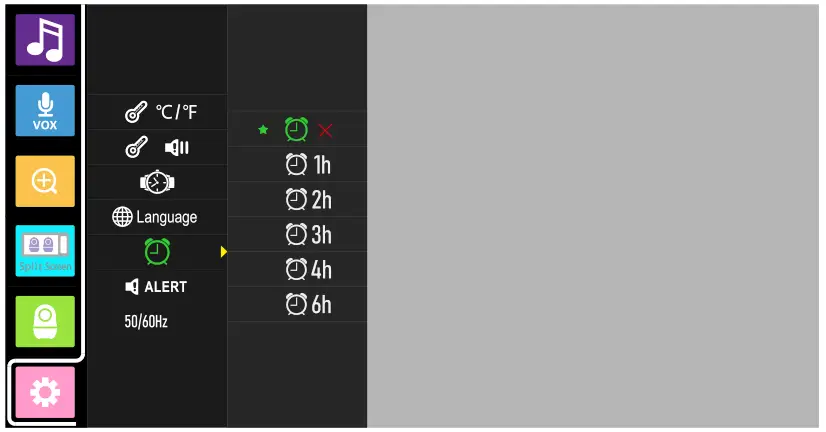 Timer setting
- Press the menu button to access the menu. choose and press
- Select and press
- Press the UP key or DOWN key to select the desired alert me.
- Press to confirm.
- Press the menu button to exit the menu.
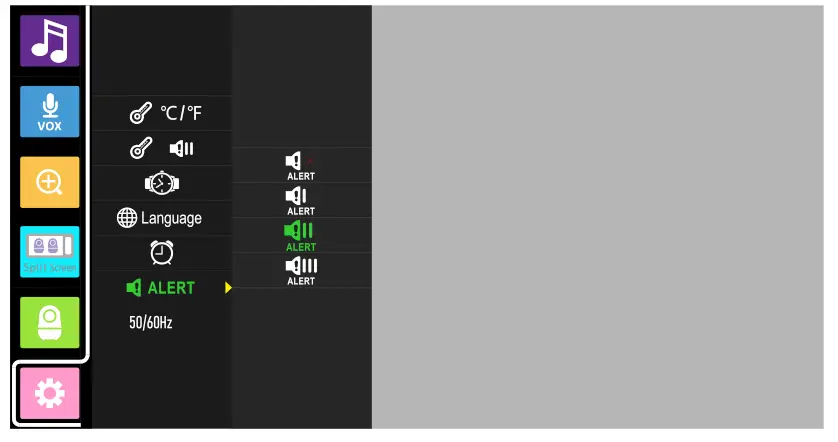
Alert volume setting
- Press the menu button to access the menu. choose and press
- Select
 and press
 - Press the UP key or DOWN key to select the desired alert volume.
- Press to confirm.
- Press the menu button to exit the menu.
 and press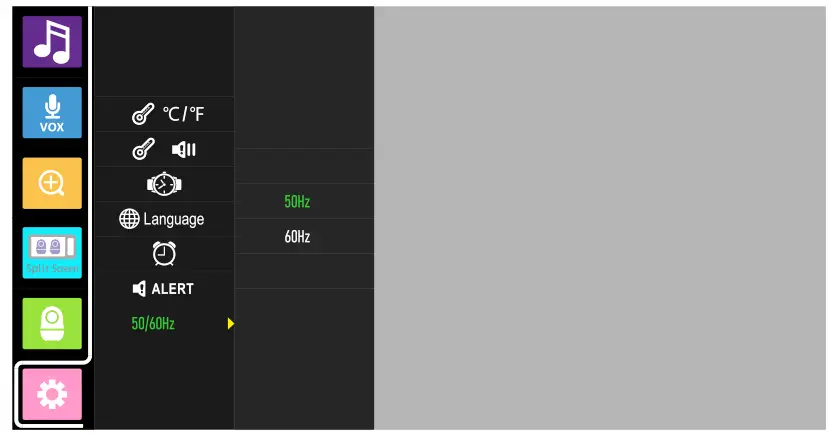
Frequency setting
- Press the menu button to access the menu. choose and press
- Select 50Hz60Hz and press
- Press the UP key or DOWN key to select 50Hz or 60Hz
- Press to confirm.
- Press the menu button to exit the menu.
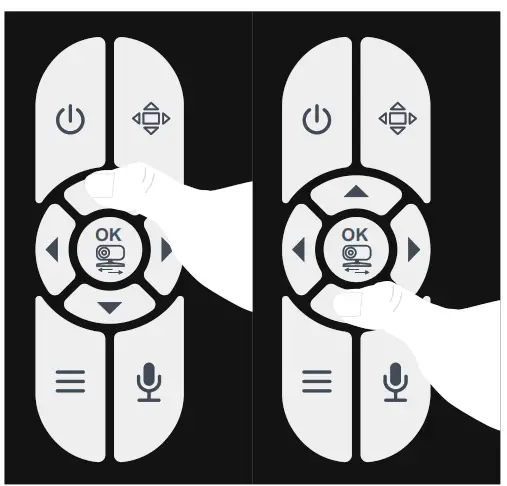
Volume/Brightness adjustments
Press or
or to increase/decrease the sound of the parent unit
Press or
or to increase/decrease the brightness of the parent unit
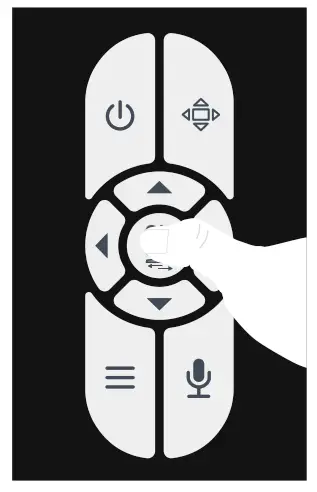
Switching between the paired baby unit
Briefly press the switch button on your parent unit
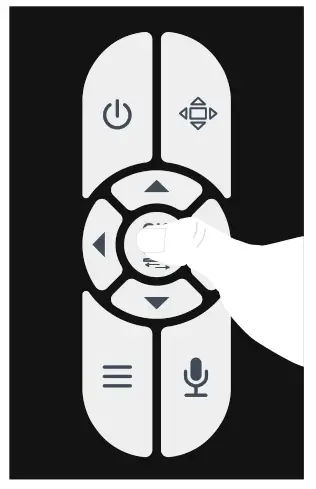 Scan mode
Press and hold the button to activate the automatic scan mode
Press the button to deactivate the scan mode
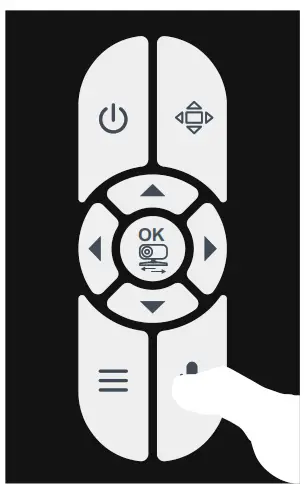
Talk to baby
Press and hold the button to talk to your baby
Release the button when you are finished talking
TROUBLESHOOTING
| Troubleshooting | |
| No reception in the Parent Unit | • The power adapters may not be properly connected. • Ensure that the Baby and Parent Units are ON. • Make sure the Baby Unit and Parent Unit are not far away from each other. • Baby Unit and Parent Unit may not be properly paired. Follow PAIRING instructions |
| Interference or poor reception | • Move the Baby Unit closer to the Parent Unit. • The Baby or Parent Unit may be too close to metal objects. • Other electronic devices may be entering with the signal. • The battery power may be too low. |
| Image froze on the Parent Uni | • Restart the Baby Unit(pull out the power adapter from the wall outlet, wait for approx. 5 seconds, and plug it back in). • Reset the Parent unit by opening the battery compartment and disconnecting the battery. wait for 30 seconds and then reconnect the battery. |
| A high pitched ear piercing noise is heard from the units (feedback, static) | • The Baby Unit and Parent Unit may be too close to each other, move them further apart. • The volume on the Parent Unit may be set too high. |
| Cannot hear the baby sounds in the Parent Unit | • Volume setting on the Parent Unit may be too low. Increase the volume. |
| Background noises | • In a quiet environment surrounding the Parent Unit, decrease the volume on your Parent Unit to level 3 and below. • In a loud environment surrounding the Parent Unit, increase the volume on your Parent Unit to the maximum level. |
| If the above tips are not helpful; maybe the system crashed, please disconnect the battery and the power adapter with your unit; then plug in it again and turn your unit | |
TECHNICAL DATASHEET
| Technical datasheet | |
| Frequency | 2.4GHz |
| Type of modulation | GFSK |
| Transmission range | Up to 960 feet/300 meters(Open space -No obstructions) |
| Input voltage | 5V, 1/1.2A |
| Power adapter | Input: 100-240VAC 50/60Hz, 200mA Max |
| LCD screen | 7″HD TFT LCD(1024*600 Pixels) |
| Rechargeable battery | Model: YB905560 3.7V, 4000mAh |
| Transmission Power | 18dB |
| Image sensor type | 1/4″ Color CMOS |
| IR LED Type | 940 nm |
| Operating environment | Indoor use only; Temperature: 32-104F / 0-40 C; Humidity: 5%-90%rh(relative humidity) |
FCC Requirement
Any changes or modificaons not expressly approved by the party responsible for compliance could void the user’s authority to operate the equipment.
This device complies with Part 15 of the Fcc Rules. Operation is subject to the following two conditions:
- this device may not cause harmful interference, and
- this device must accept any interference received, including interference that may cause undesired operation.
Note: This equipment has been tested and found to comply with the limits for a Class B digital device, pursuant to Part 15 of the FCC Rules. These limits are designed to provide reasonable protection against harmful interference in a residential installation. This equipment generates, uses, and can radiate radio frequency energy, and if not installed and used in accordance with the instructions, may cause harmful interference to radio communications. However, there is no guarantee that interference will not occur in a particular installation. If this equipment does cause harmful interference to radio or television reception, which can be determined by turning the equipment off and on, the user is encouraged to try to correct the interference by one or more of the following measures:
- Reorient or relocate the receiving antenna.
- Increase the separation between equipment and receiver.
- Connect the equipment into an outlet on a circuit defferent from that which the receiver is connected.
- Consult the dealer or an experienced radio/TV technician for help.
Maintenance and Warranty
8.1 Maintenance
All of the following maintenance procedures should only be performed when baby and parent units are unplugged and off.
Clean the surfaces of the baby and parent units with a so, fluff-free cloth.
Never use cleaning agents or solvents.
If the units become dirty, use a lightly damp cloth to wipe surfaces, taking care not to allow water into any openings.
8.2 Warranty terms
We take quality very seriously. This is why all of our products come in three moths warranty(replace or refund)and lifetime technical support from the original purchase date against defects in workmanship and materials. The warranty terms do not apply to any product that has been subject to abuse, misuse, negligence, or accident. Defects caused by this warranty. If you have warranty or support issues, please contact the customer service of the Amazon seller before leaving your review.
8.3 Information on disposal of product
Always dispose of your product(with the nonremovable pre-installed battery)at the end of its life in an environmentally responsible way and in accordance with your local waste disposal requirements. All cardboard and paper packaging materials should be recycled in accordance with your local council waste regulations.
Printed in China
Version:1.0