 300628 Ticket Releases the launch
User Guide
Ticket Introduction
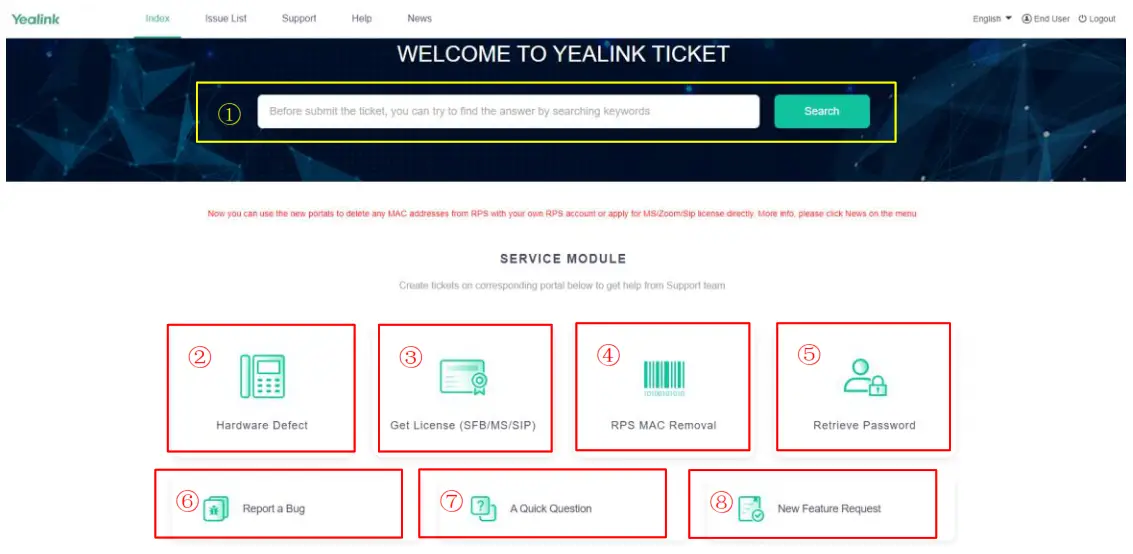
When you access Yealink Ticket System by entering ticket link or through Yealink website and Support website, you will be directed to ticket’s index page.
- Index page

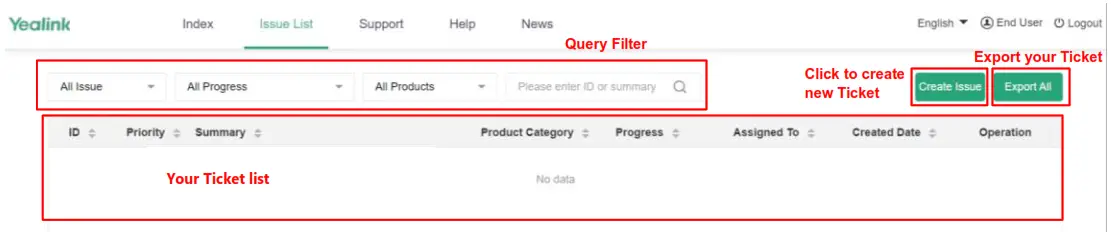
1 Search Bar Before submitting the ticket, you can try to find the answer by searching keywords. It will display the Top 10 articles with the highest matching degree which are searched from the entire Support website. For many questions, such as voice mail, firmware upgrade, and so on, you could find the solution quickly so that it can save much valuable time. 2 Hardware Defect If your product is defective, including the stuck on initializing cases, you could follow the guidance of the system to check whether there is already a solution or create a ticket to support team. For example, your phone failed to start up and stuck on initializing mode, you could obtain recovery mode files directly from system guidance. 3 Get License (SFB/MS/SIP) For some phone models, you could apply for the license by yourself if you need to change the product version from SIP to SFB/MS/Zoom or SFB/MS to SIP. You could refer to the related FAQ which you could find on the Support website to change the product version. For example, you have a T58A Teams phone and want to change the Teams version to SIP version, so you could apply for the license and search the FAQ which can help you to know how to do it. 4 RPS MAC Removal If you find your phone is bound to another RPS account, you could delete the MAC address from the RPS server, using your own RPS account (not YMCS account), don’t need to know which enterprise the MAC belongs to. About the RPS account, you could contact your local distributor to apply for an account. 5 Retrieve Password If you forget the password or want to get the default password or want to understand how to reset the product to factory default, you could use the module. 6 Report a Bug If the feature of product doesn’t work as expected, please report the issue to the support team and follow the guidance of the system to check whether there is already a solution. 7 A Quick Question If you have some questions, please follow the guidance of the system and fill in the true and valid information to check whether there is a solution. The question is mainly a consultation question which about you don’t know something or you need to know how to do something. 8 New Feature Request If you have a new feature request, please describe it in detail and submit to the support team. The new feature mainly means that Yealink phones don’t have the feature at present and you can’t find another solution to meet your requirement. - Issue List page
 For the page without account login:
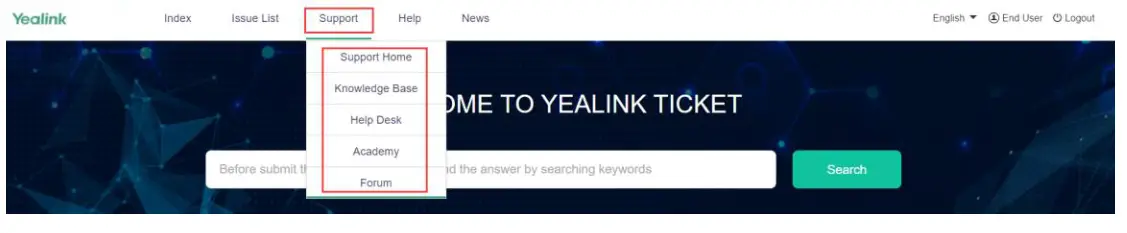
- Support page
Through this page you could enter other systems or modules, as shown in the figure below:
- Help page
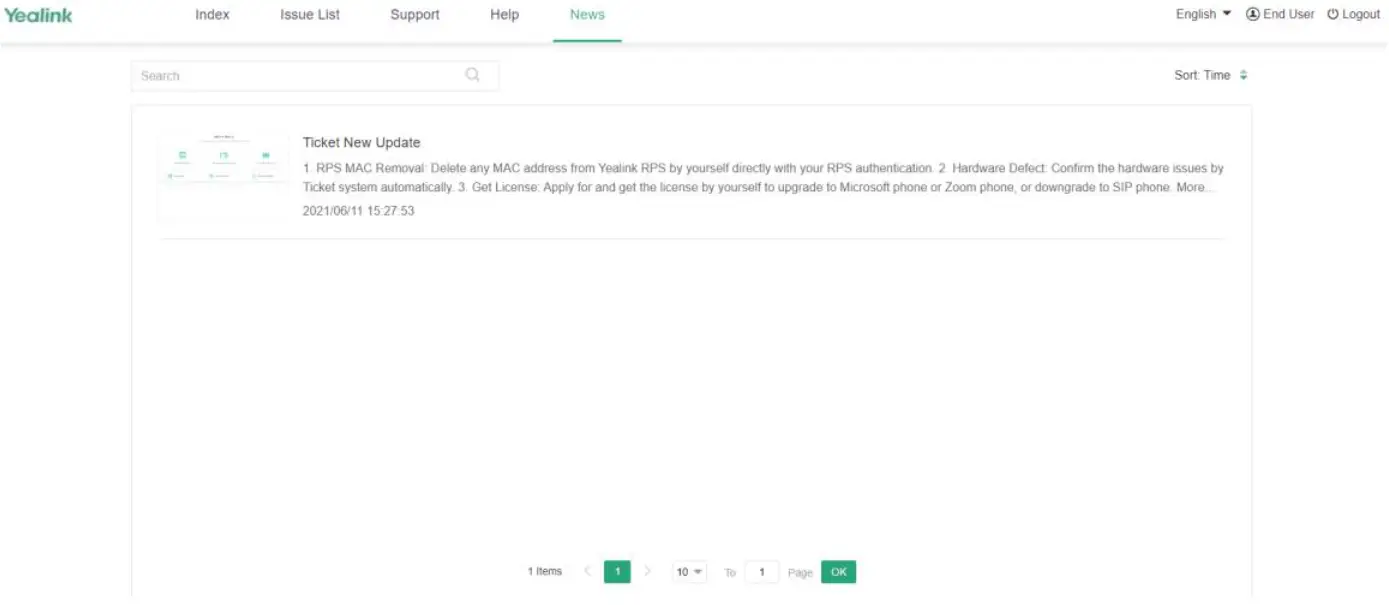
You could download the Yealink Ticket Quick Guide by clicking the “Help”. - News page
You could view latest update about the Ticket system.
 For the page without account login: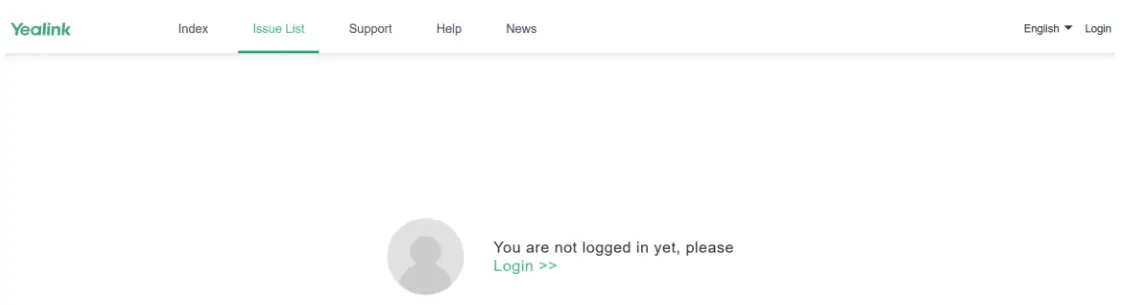
Opening a Ticket
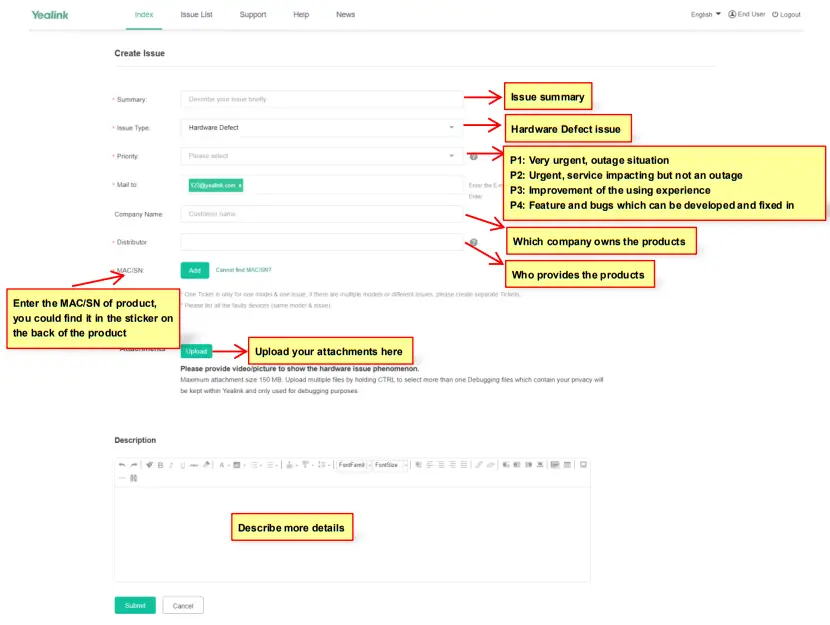
- In ticket Index page, you could click “Hardware Defect” or “Report a Bug” or “A Quick Question” or “New Feature Request” to open a ticket. The specific introduction of each service module is as follows:
a. Click “Hardware Defect”, then you will be required to fill basic information as follows: b. Click “Get License(SFB/MS/SIP)”, you will enter the Yealink License Management Platform as follows:
 Note: For SFB/MS to SIP, please remember to select Unlock License.
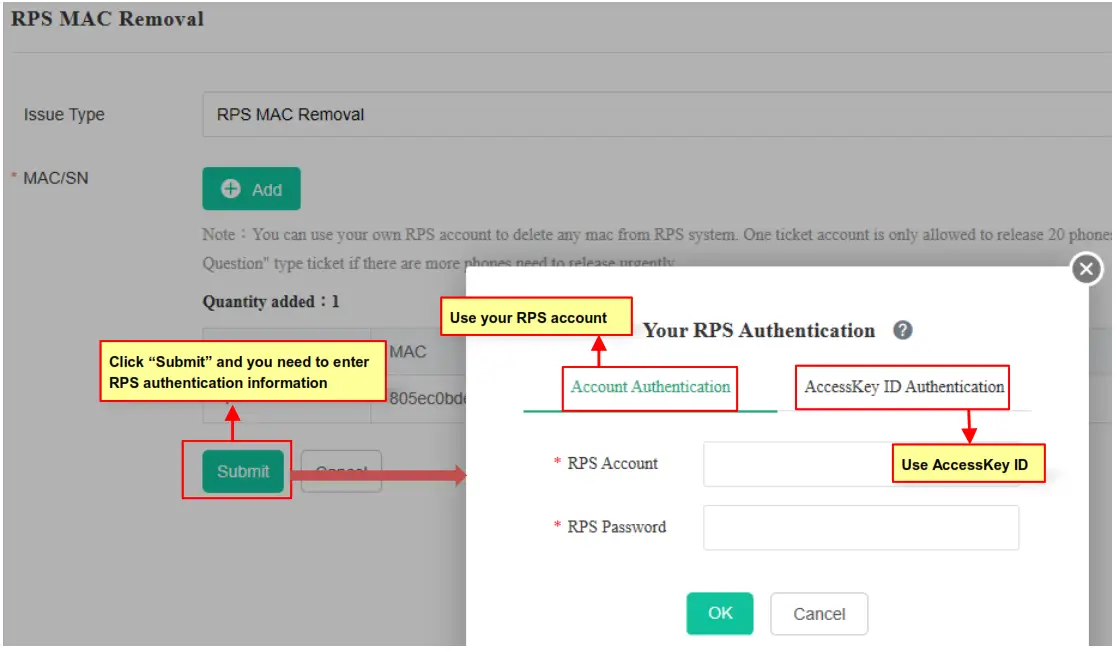
 c. Click “RPS MAC Removal”, then you will be required to fill basic information as follows:
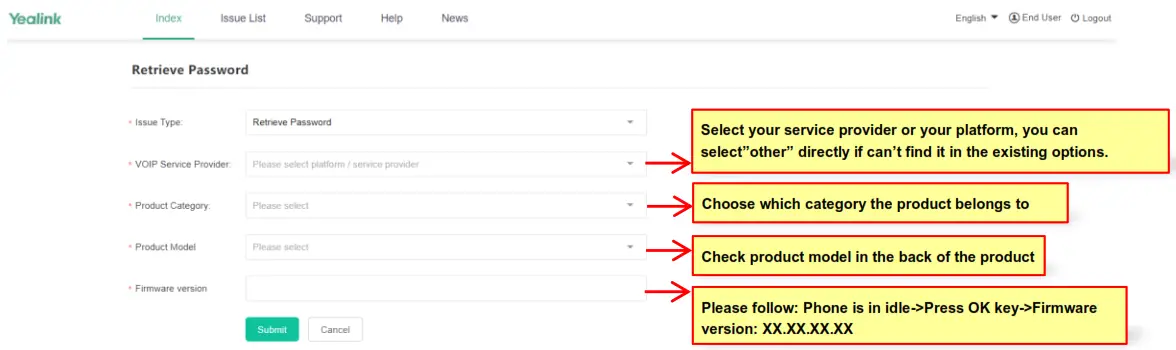
 d. Click “Retrieve Password”, then you will be required to fill basic information as follows:
 e. Click “Report a Bug”, then you will be required to fill basic information as follows:
 f. Click “A Quick Question”, then you will be required to fill basic information as follows:
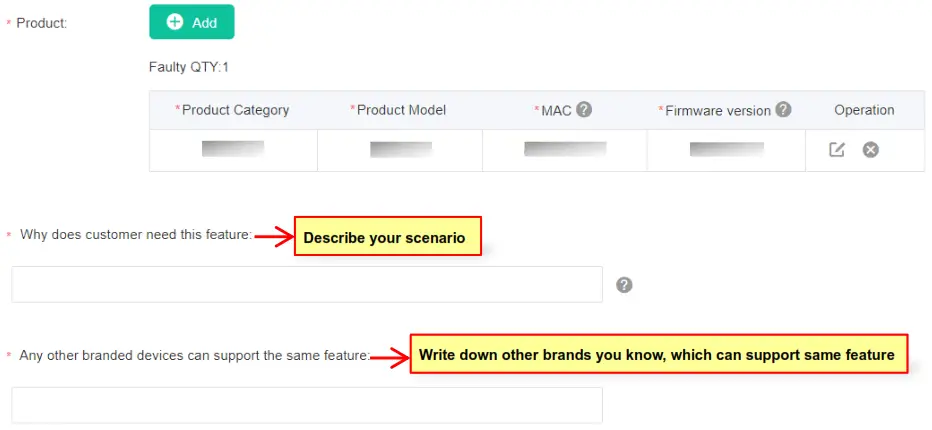
 g. Issue Type configured with New Feature Request, there are some different options showed by comparing with Issue Type configured with Report a Bug.
 If you don’t login the ticket account, after you click one module, the ticket website will redirect from the Index page to the login page.
- Click ‘Submit to submit your ticket once you confirmed all the filled information is correct.

- Your case will be assigned to Yealink Support Team, and ticket progress will be ‘New’. You will receive a New Ticket Submission Confirmation email. Yealink will give you feedback within at most 48 hours.
Note: For better follow up all your cases, Yealink suggest users submit one ticket just for one issue.
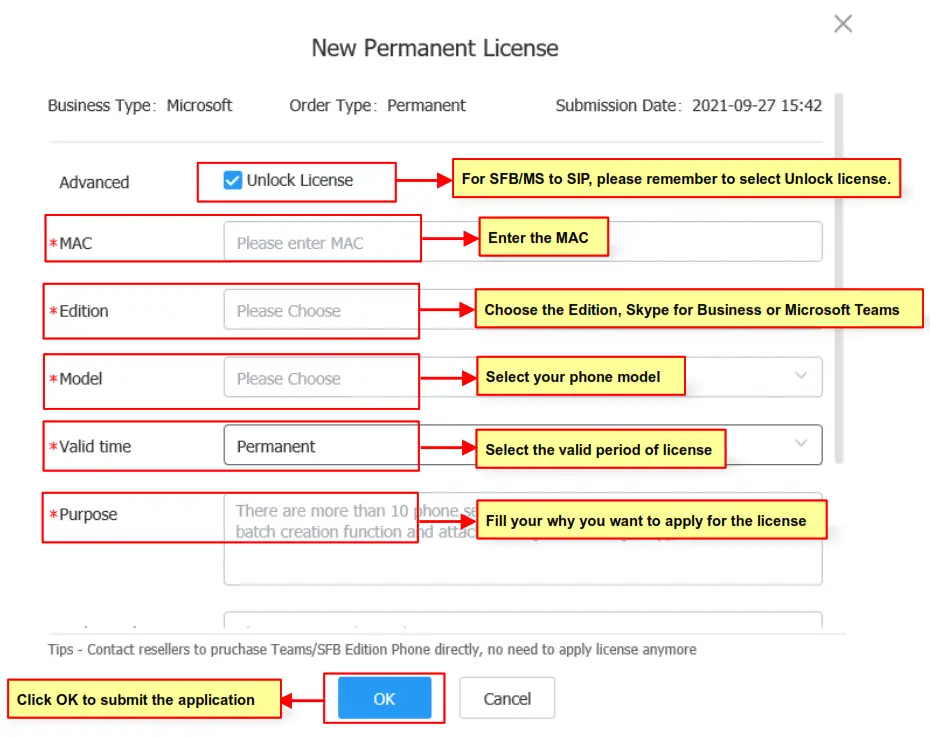
 b. Click “Get License(SFB/MS/SIP)”, you will enter the Yealink License Management Platform as follows:
 Note: For SFB/MS to SIP, please remember to select Unlock License.
 c. Click “RPS MAC Removal”, then you will be required to fill basic information as follows: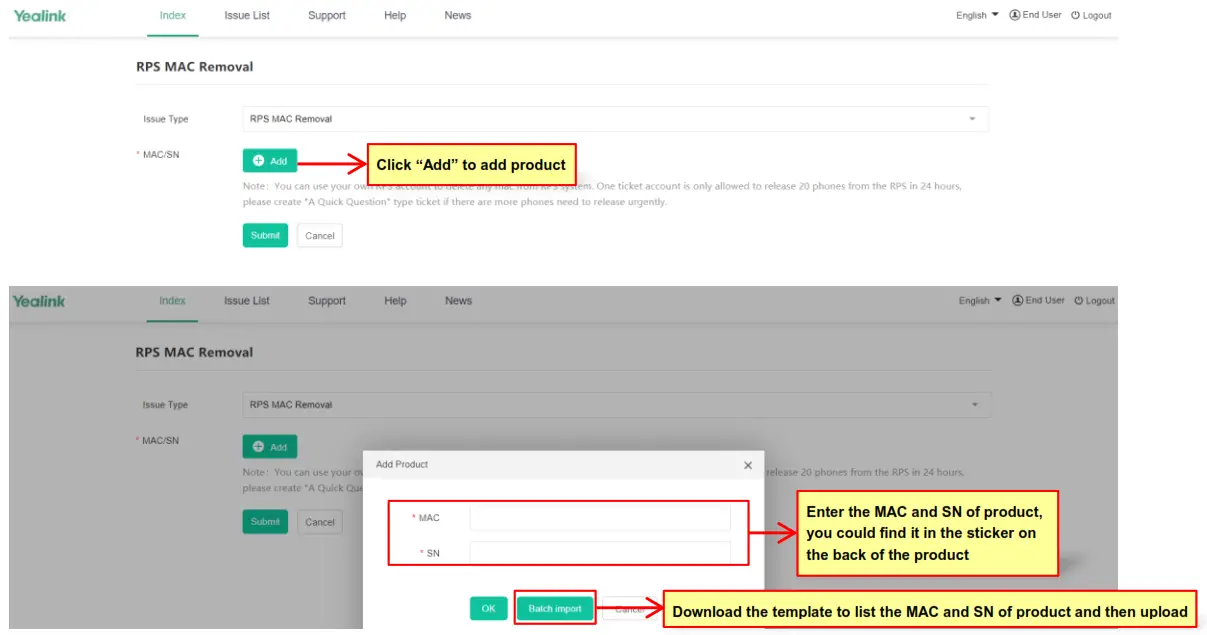
 d. Click “Retrieve Password”, then you will be required to fill basic information as follows:
 e. Click “Report a Bug”, then you will be required to fill basic information as follows: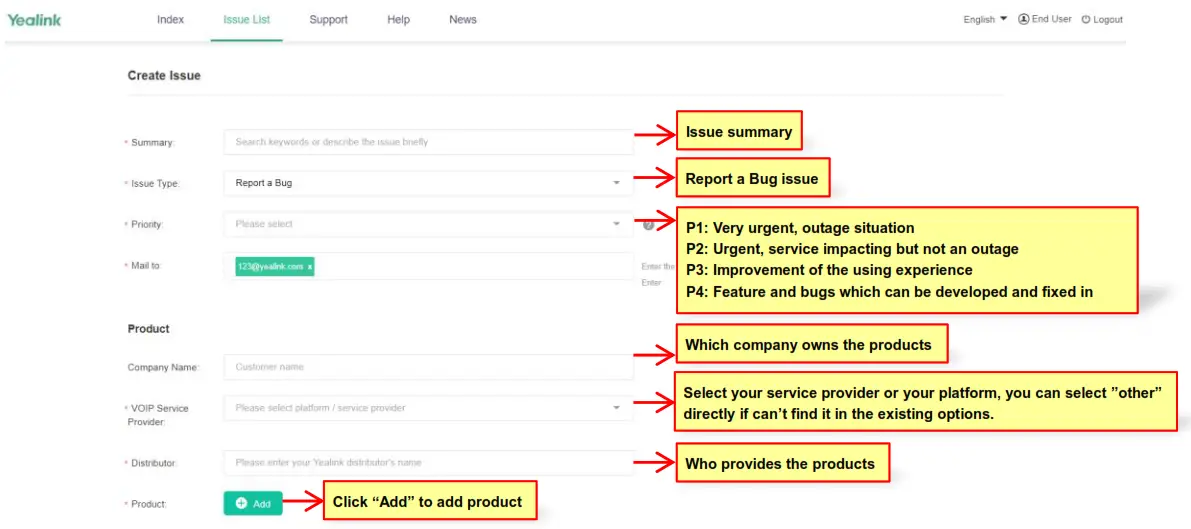
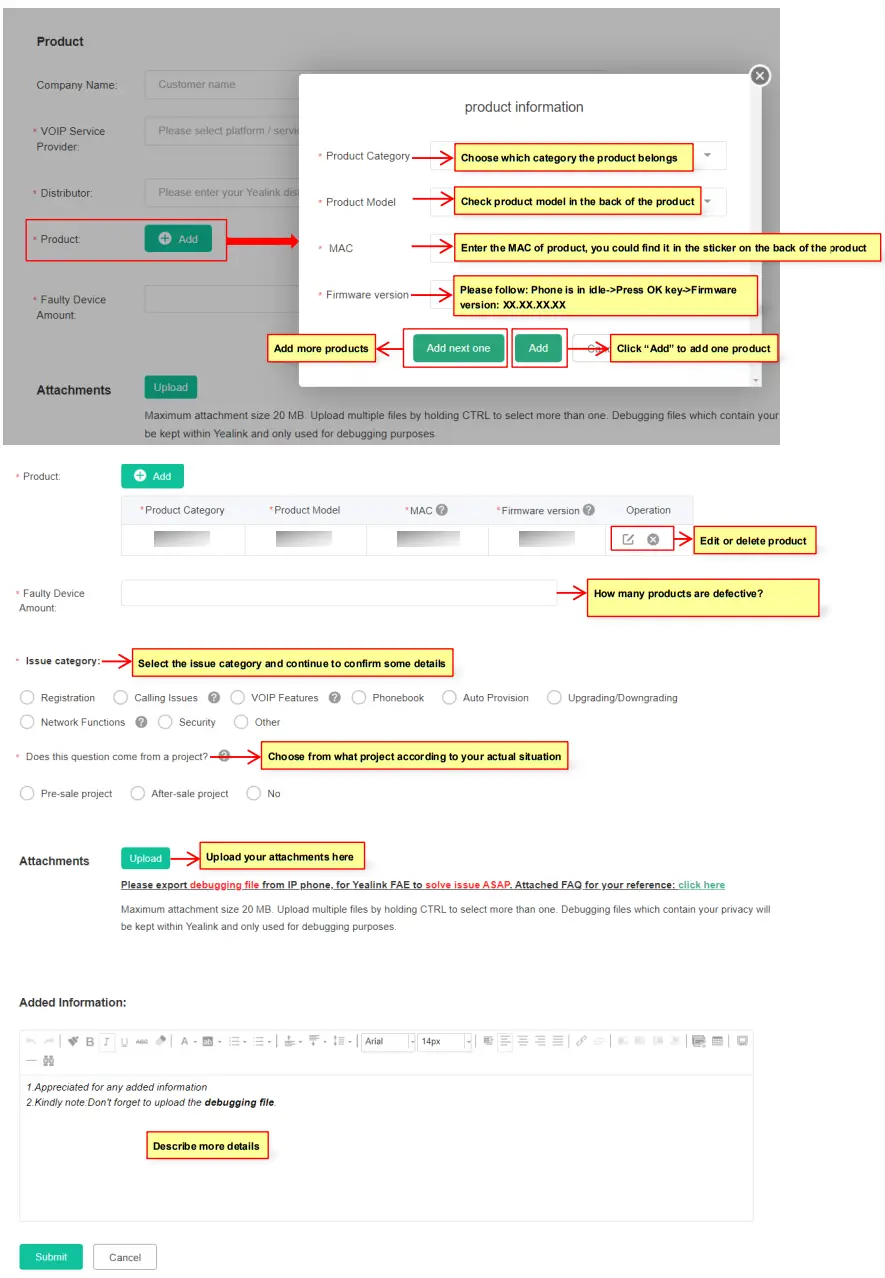 f. Click “A Quick Question”, then you will be required to fill basic information as follows: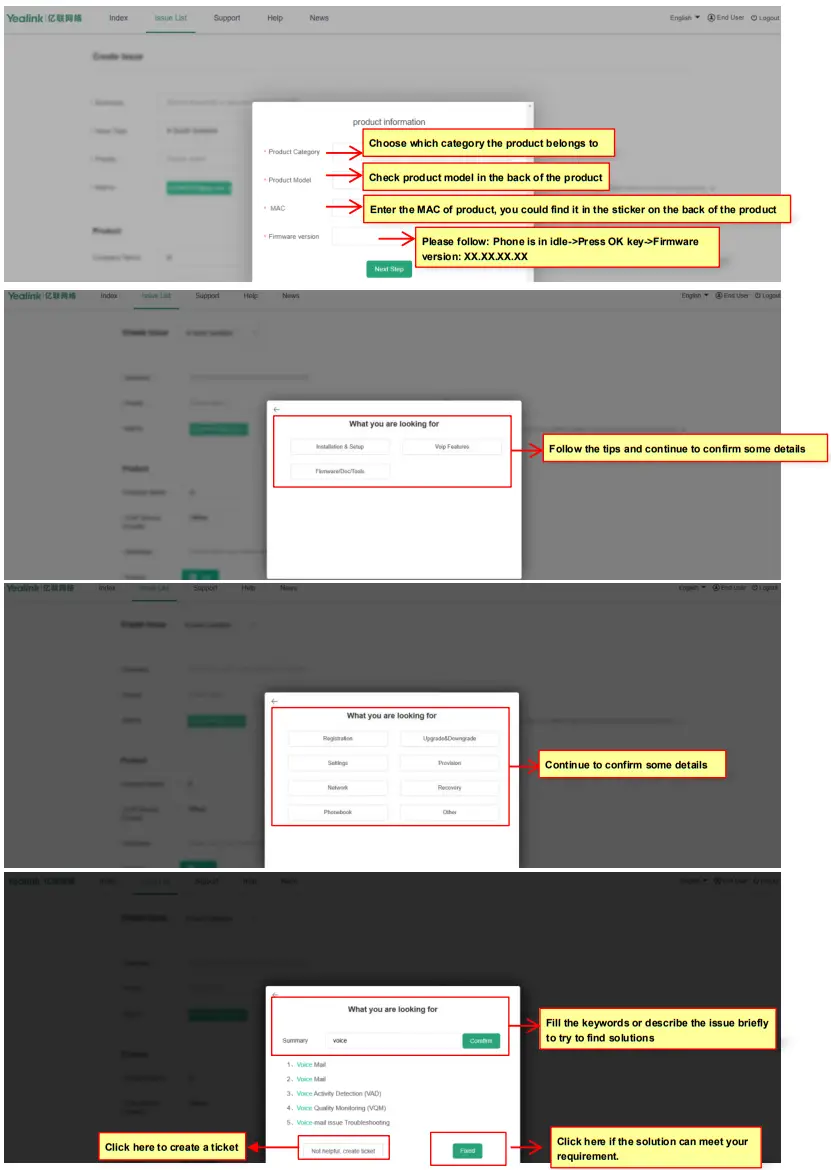
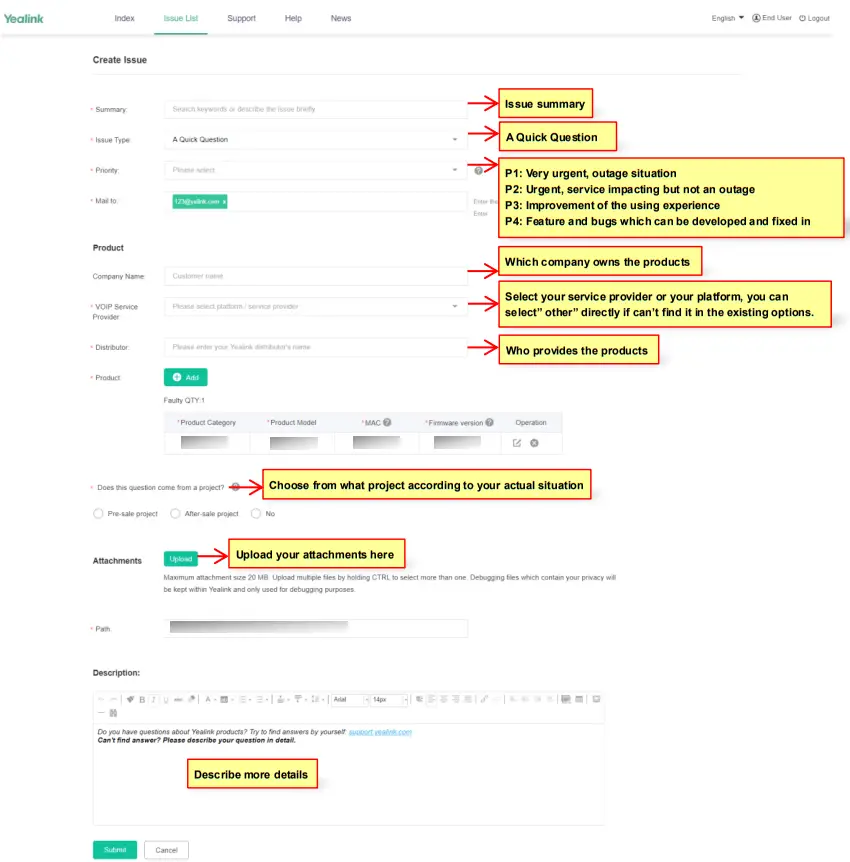 g. Issue Type configured with New Feature Request, there are some different options showed by comparing with Issue Type configured with Report a Bug.
 If you don’t login the ticket account, after you click one module, the ticket website will redirect from the Index page to the login page.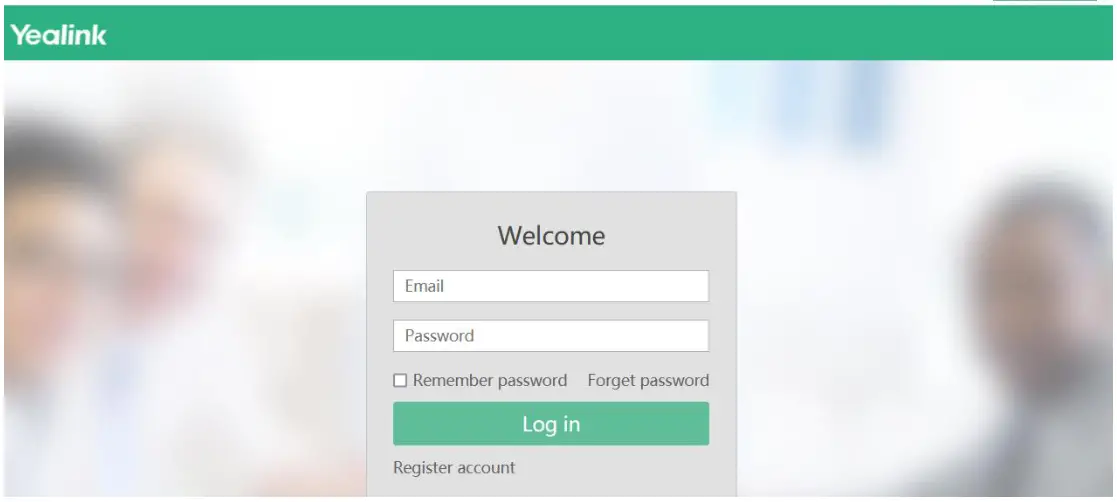

Replying a Ticket
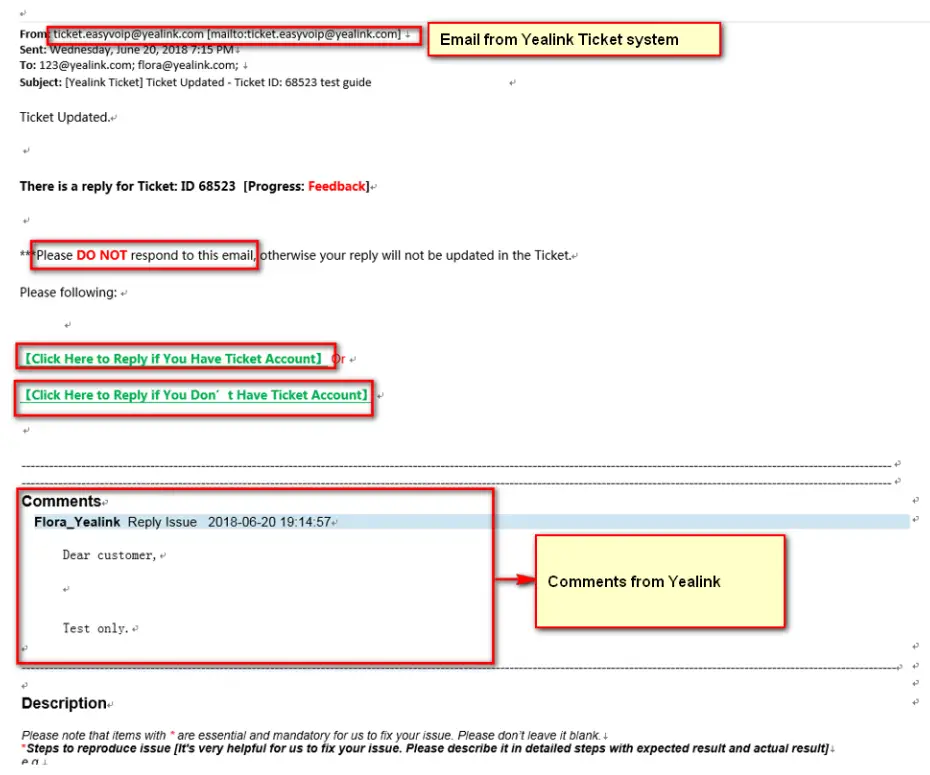
- You will receive mail notification from Yealink Ticket System when there is an update of your ticket.
Note: Yealink Suggest customers login Yealink Ticket System to review tickets regularly, in case the mail notification doesn’t send to you successfully sometimes.
- Please DO NOT reply to the mail directly, you can choose “Click Here to Reply if You Have Ticket Account” if you have a ticket account or “Click Here to Reply if You Don’t Have Ticket Account” if you don’t have a ticket account.
【Click Here to Reply if You Have a Ticket Account】
a. Reply through Ticket system. b. Click ‘Submit’ to submit your comment, your comment will be sent to Yealink 【Click Here to Reply if You Don’t Have Ticket Account】
 Note: If your issue is not properly processed or can’t meet your request, you can click Escalate button to escalate the issue, Yealink will evaluate and assign a higher level engineer to this ticket if needed.
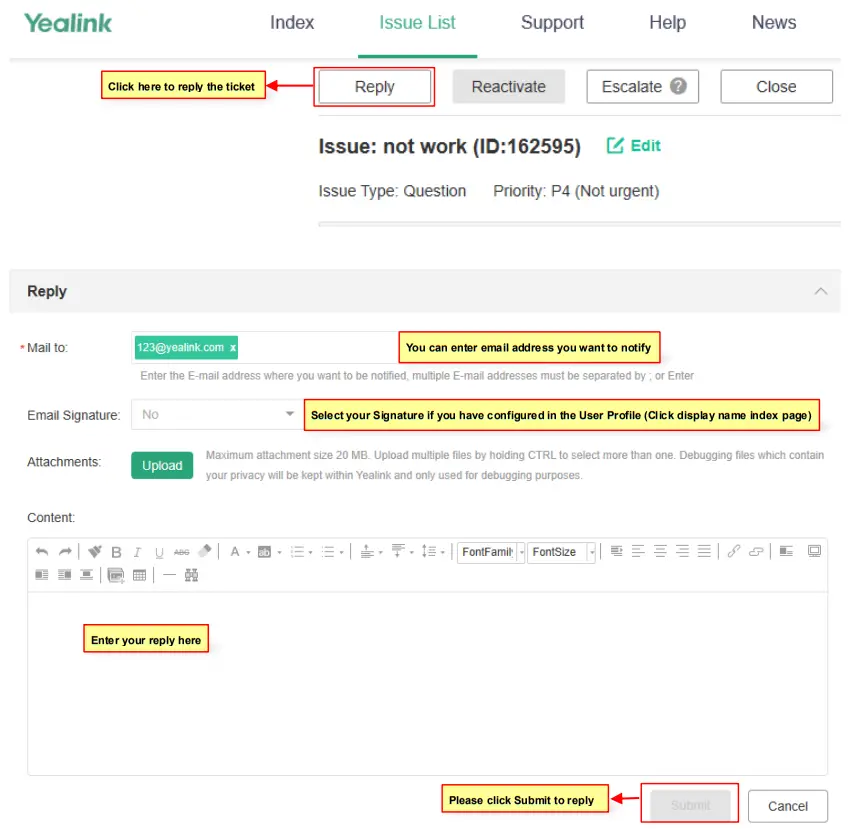 b. Click ‘Submit’ to submit your comment, your comment will be sent to Yealink 【Click Here to Reply if You Don’t Have Ticket Account】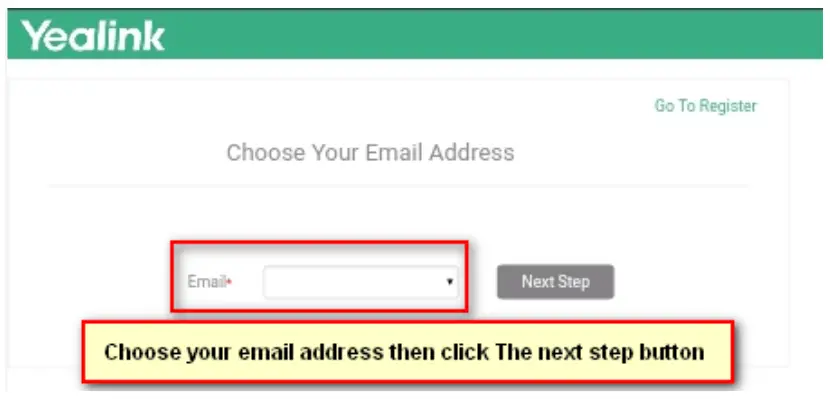
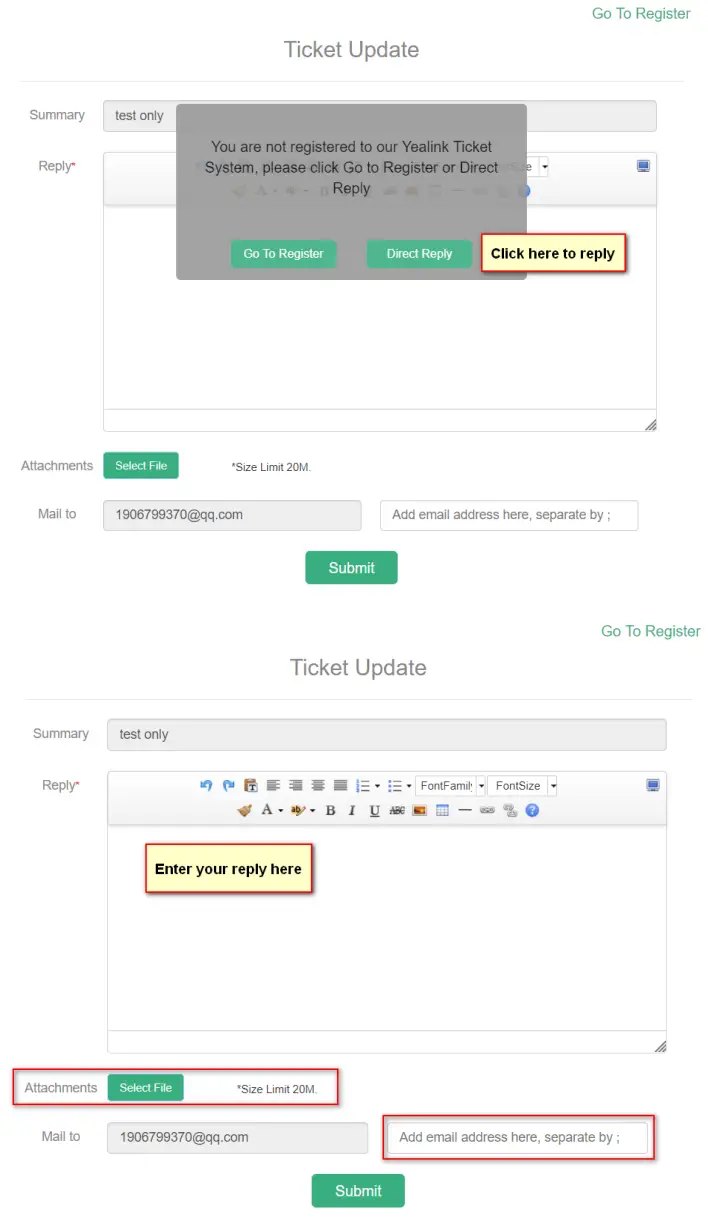 Note: If your issue is not properly processed or can’t meet your request, you can click Escalate button to escalate the issue, Yealink will evaluate and assign a higher level engineer to this ticket if needed.
Closing a Ticket
- When you confirmed the issue is solved, you can click ‘Close’ to close the ticket.

- Please kindly give us the comments for Yealink performance of this ticket.

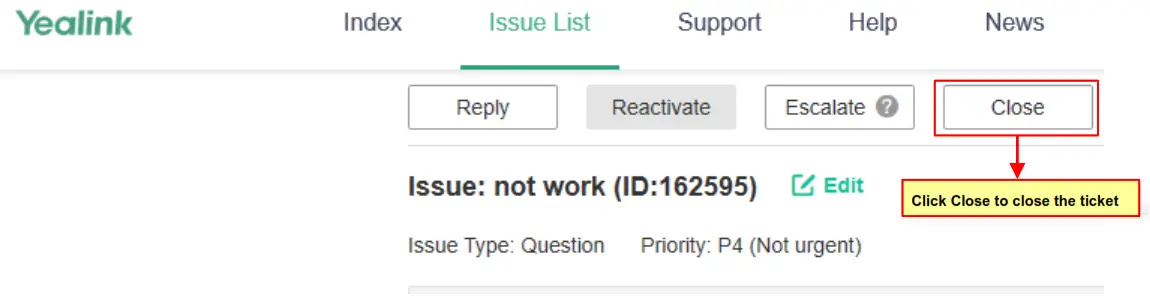
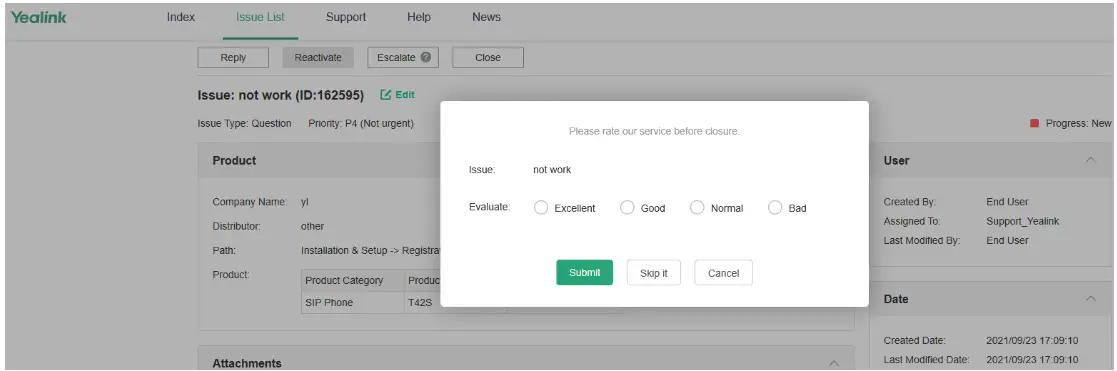
Note: If Yealink does not get feedback from you for a week, Yealink will send a notification email. If Yealink does not get any reply for 2 weeks, Yealink will close the case but customers can re-open it based on their request or create new ticket.
Re-opening a Ticket
If your problem re-occurs after your case is closed, you can always re-open the case, or submit a new Ticket. Click ‘Reactive’ to re-open this ticket.
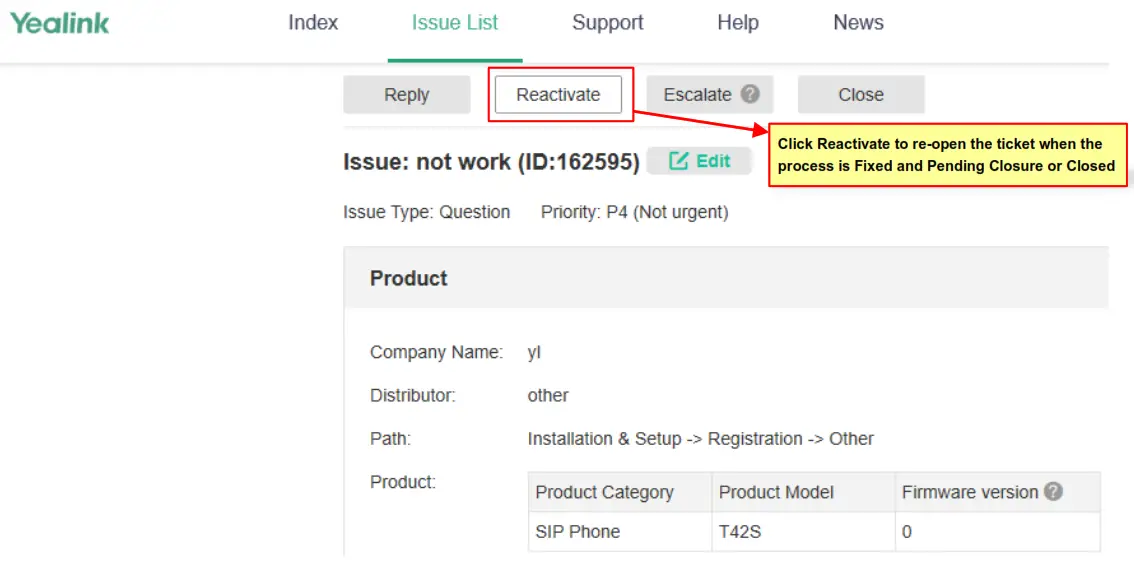
About Yealink
Yealink (Stock Code: 300628) is a global leading unified communication (UC) terminal solution provider that primarily offers video conferencing systems and voice communication solutions. Founded in 2001, Yealink leverages its independent research and development and innovation to pursue its core mission: “Easy collaboration, high productivity.” The company’s high-quality UC terminal solutions enhance the work efficiency and competitive advantages of its customers in over 100 countries. Yealink is the world’s second-largest SIP phone provider and is number one in the China market.
Copyright@2018 Yealink Inc. All rights reserved