 1400 Series Audio-Nav Keypad
Technical Manual

The content of this communication and/or document, including but not limited to images, specifications, designs, concepts, and information is confidential and is not to be used for any purpose or disclosed to a third party without the express and written consent of Keymap Technology Ltd., Copyright 2020. All rights reserved.
1400 Series Audio-Nav Technical Manual Rev 2.1 www.storm-interface.com
Product Features
AudioNav is an ADA compliant assistive USB device offering menu navigation by means of audible content description.
Users with impaired vision, reading difficulties or impaired fine motor skills can navigate through menus or directories that would typically be presented on a visual display or touch screen. Screen content is represented and summarised by recorded or synthesized language via a headset or handset.
This provides a set of menu selection keys that are differentiated in a way that makes the product easier to use by people with visual impairments. In addition, a standard 3.5mm headphone socket is provided. This allows customers to plug their headsets into the module and receive audio instruction to help them navigate the use of the equipment.
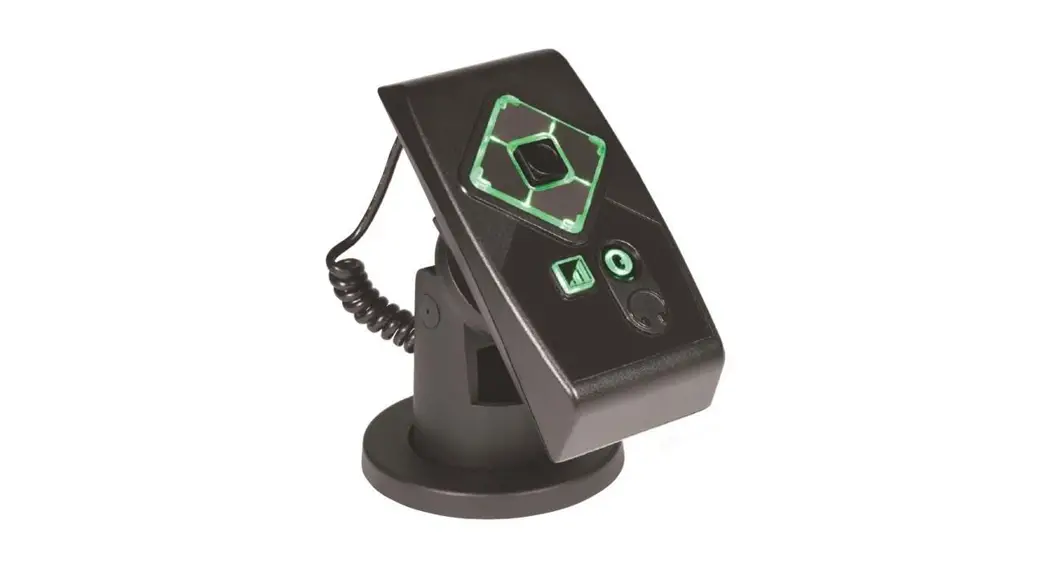
The externally mounted version of the AudioNav provides options for manufacturers and operators to permanently affix an AudioNav device to the outer casing of a host terminal or to adjacent surfaces such as walls or service counters. This is especially useful when existing self-service installations must be upgraded to meet current accessibility mandates.
An optional ‘Quick Release Cradle’ allows the AudioNav to be detached from the host system for use as a hand-held device. In this hand-held configuration, AudioNav can, if required, be passed directly to any user with limited reach or impaired dexterity.
Used in combination with SpacePole™ products this externally mounted version of the AudioNav can be conveniently positioned and adjusted to ensure maximum accessibility.
The Extended Footprint version “AudioNav EF” adds volume and playback speed control keys.
By use of the utility software, default illumination status and ‘wake-up’ behavior can be selected. The USB codes can also be changed. Connection to the host is via a single USB cable.
Keypad
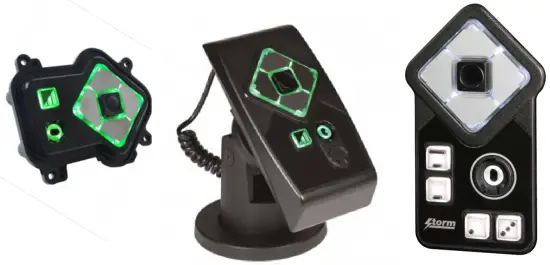
– The keypad is available in standard, extended footprint, or externally mounted versions, with the following keys :
– A 4-way directional key providing UP, DOWN, LEFT, and RIGHT navigation.
– A central ENTER key
– An illuminated audio volume key
– Additional keys on the EF version
– Illuminated 3.5mm audio jack socket (illumination under software control)
– Orientation switch in under panel version to allow portrait or landscape mode.
– Mini-USB socket for connection to host (external version has fitted cable)
USB Interface
– HID keyboard
– Supports standard modifiers, i.e. Ctrl, Shift, Alt
– HID consumer-controlled device
– Advanced audio device
– No special drivers are required
– Audio Jack Insert / Removal sends USB code to host
– Versions with microphone support need to be set as the default recording device in the Sound Panel
– Products with microphone support have been tested with the following voice assistants:- Alexa, Cortana, Siri, and Google Assistant.
Support
– Windows compatible utility for changing the USB Code Tables
– API for custom integration
– Remote Firmware update support
The content of this communication and/or document, including but not limited to images, specifications, designs, concepts, and information is confidential and is not to be used for any purpose or disclosed to a third party without the express and written consent of Keymap Technology Ltd., Copyright 2020. All rights reserved.
The typical method for audio module volume control using the API
User Action
‐ Plugin the headphone jack
Host
‐ Host system detects the connection
‐ Sets volume level to initial default
‐ Repeating message :
“Press the volume key at any time to increase the volume level”
User Action
‐ Presses the volume key
Host
‐ Host system changes the volume on each keypress (up to a max limit, then revert to default)
Host
‐ Message stops if the volume key is not pressed within 2 seconds.
User Action
‐ Remove the headphone jack
Host
‐ Volume reset to default.
The content of this communication and/or document, including but not limited to images, specifications, designs, concepts, and information is confidential and is not to be used for any purpose or disclosed to a third party without the express and written consent of Keymap Technology Ltd., Copyright 2020. All rights reserved.
Underpanel Version
Part Number 1406-33001 6 KEY DEVICE + USB AUDIO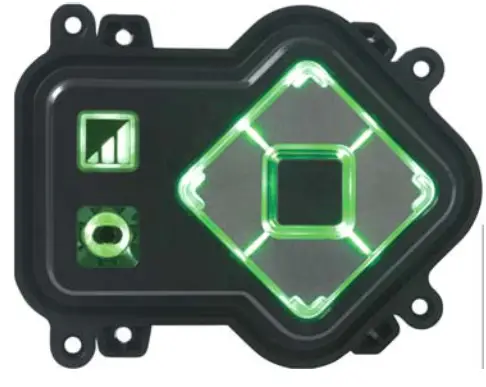
The Audio-Nav is for under-panel use in either portrait or landscape orientation. There are 2 sets of fixing lugs :
– for weld studs on steel panel (1.2mm – 4mm thick), and
– for threaded inserts on plastic panel (3mm thick).
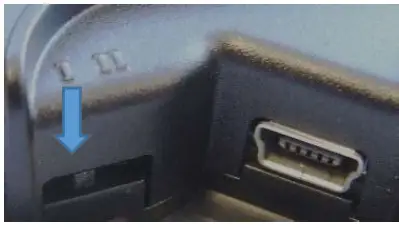
An orientation switch is provided so that the keypad can be fitted in portrait or landscape orientation.
This sends a USB code to the host: the factory default is landscape
(Landscape = switch position I shown in picture )
The keypad is designed to be installed under a panel onto M3 weld studs. Download CAD File for panel cutout drawing.
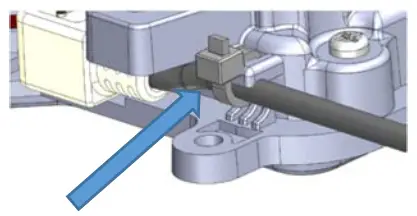
It is recommended to use a cable tie for strain relief on the USB cable.
(Use 2.5mm nylon cable tie, RS 233-402 or equivalent)
Accessories / Cables
4500-01 USB CABLE MINI-B TO TYPE A, 0.9m

The content of this communication and/or document, including but not limited to images, specifications, designs, concepts, and information is confidential and is not to be used for any purpose or disclosed to a third party without the express and written consent of Keymat Technology Ltd., Copyright 2020. All rights reserved.
Externally Mounted Version
Part Number 1406-33002 6 KEY DEVICE + USB AUDIO (includes 2m Cable)
1406-QR000 Quick Release Bracket Kit (includes Qty 4 T20 M4 x 10mm screws)
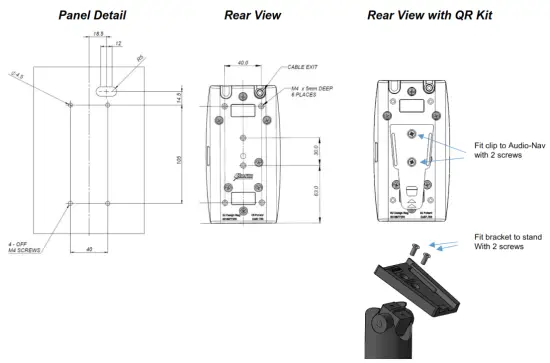
The externally mounted Audio-Nav is for use either fixed directly to a panel, or on a stand.
For direct panel fixing use M4 screws through the panel into the brass inserts on the rear of the Audio-Nav
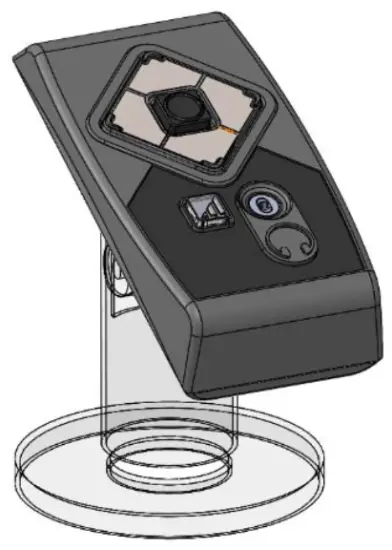 If used with a Spacepole stand then use the Quick Release Bracket kit Compatible with Spacepole Stack STP101-02
The content of this communication and/or document, including but not limited to images, specifications, designs, concepts, and information is confidential and is not to be used for any purpose or disclosed to a third party without the express and written consent of Keymat Technology Ltd., Copyright 2020. All rights reserved.
Extended Footprint Version
Part Number
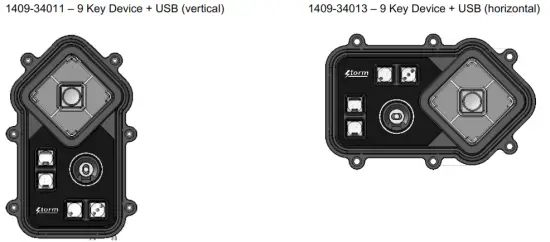
An Audio-Nav EF product with additional keys to adjust the speed of speech reproduction, and to have a sound volume adjustment. This version also supports voice input from the headset microphone
The Audio-Nav is for under panel installation: there are portrait & landscape versions
There are 3 sets of fixing lugs :
– for weld studs on steel panel (1.2mm – 4mm thick), and
– for threaded inserts on plastic panel (3mm thick).
The keypad is designed to be installed under a panel onto M3 weld studs.
Download CAD File for panel cutout drawing.
It is recommended to use a cable tie for strain relief on the USB cable.
(Use 2.5mm nylon cable tie, RS 233-402 or equivalent)
Accessories / Cables
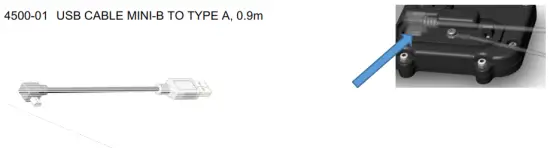
4500-01 USB CABLE MINI-B TO TYPE A, 0.9m
Specifications
| Underpanel | Externally Mounted | Extended Footprint | |||||||
| Rating | 5V ±0.25V (USB 2.0) | 5V ±0.25V (USB 2.0) | 5V ±0.25V (USB 2.0) | ||||||
| Connection | mini USB B socket | USB A Male 2.0 | USB A Male 2.0 | ||||||
| Compatibility | Storm Interface products are developed primarily for use with current and supported Microsoft Windows® platforms. For use with a non-Windows® platform, please contact Storm Interface for advice. Compatibility with non-Windows® platforms or operating systems cannot be guaranteed. | ||||||||
| Audio | 3.5mm jack socket illuminated | 3.5mm jack socket illuminated | 3.5mm jack socket illuminated | ||||||
| Audio Output level | 30mW per channel max into a 32ohm load | 30mW per channel max into a 32ohm load | 30mW per channel max into a 32ohm load | ||||||
| Microphone Input | Supported in some versions | Supported | |||||||
| Ground | M3 thread grounding point | M3 thread grounding point | |||||||
| Dimensions | Overall 105 mm x 85mm x 28mm | Overall 150mm x 82mm x 34mm | Overall 138mm x 90mm x 28mm | ||||||
| Cable | Not Included | 2 M (includes coiled section) | Not Included | ||||||
| Order Codes | Part Number | LED Colour | Mic support | Part Number | LED Colour | Mic support | Part Number | LED Colour | Mic support |
| 1406-33001 | Green | No | 1406-33002 | Green | No | 1409-34011 | White | Yes | |
| 1406-33011 | White | No | 1409-34013 | White | Yes | ||||
| 1406-34001 | Green | Yes | |||||||
| 1406-34011 | White | Yes | |||||||
Performance/Regulatory
| Underpanel | Externally Mounted | Extended Footprint | |
| Operational Temp | -20°C to +70°C | -20°C to +70°C | -20°C to +70°C |
| Impact Rating | 1K08 (5J) | 1K08 (5J) | 1K09 (10J) |
| Vibration/Shock | ETSI 5M3 | ETSI 5M3 | ETSI 5M3 |
| Key Operational Life | 4 million | 4 million | 4 million |
| Water / Dust sealed | IP65 | IP54 | IP65 |
| Certification | CE / FCC/ UL | CE / FCC/ UL | CE / FCC/ UL |
| ADA | ADA Compliant | ADA Compliant | ADA Compliant |
Connectivity
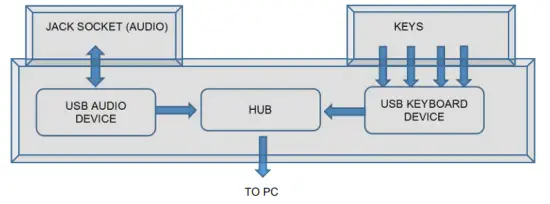
The USB interface comprises an internal USB hub with a connected keyboard and audio module.
This is a composite USB device and no additional drivers are required.
PC based software utility and API are available to set/control: –
- Volume key function
- Illumination level control
- Customize the USB codes
This product is licensed under NCR’s design rights, including NCR U.S. Design Patent D687,783 and European Design Registration 001887290. It incorporates proprietary technology and intellectual property retained by Keymat Technology Ltd. (trading as Storm Interface).
USB Device Information
USB HID
The USB interface comprises a USB HUB with a keyboard device and audio device connected.
The following VID/PID combinations are used:
For USB HUB:
- VID – 0x0424
- PID – 0x2512
For Standard Keyboard/Composite HID/Consumer Controlled device
- VID – 0x2047
- PID – 0x09D0
For USB Audio device
- VID – 0x0D8C
- PID – 0x0170
This document will concentrate on the Standard Keyboard/Composite HID/Consumer Controlled device.
This interface will enumerate as
- Standard HID Keyboard
- Composite HID-Datapipe Interface
- HID Consumer Controlled device
One of the advantages of using this implementation is that no drivers are required.
The data-pipe interface is used to provide the host application to facilitate customization of the product.
Supported Audio Jack Configurations
The following jack configurations are supported.
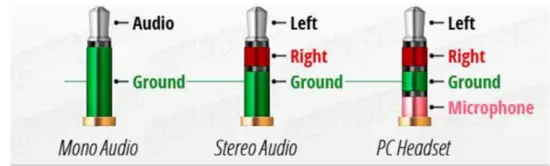
Notes: Application software should always ensure the same audio is present on both Left and Right Channels for correct mono operation. Headsets with microphones can be used but there is only microphone support on some versions.
Device Manager
When connected to a PC, the keypad should be detected by the operating system and enumerated without drivers.
Windows shows the following devices in the Device Manager:
(Note that other audio devices will need to be disabled in Device Manager otherwise they will take priority).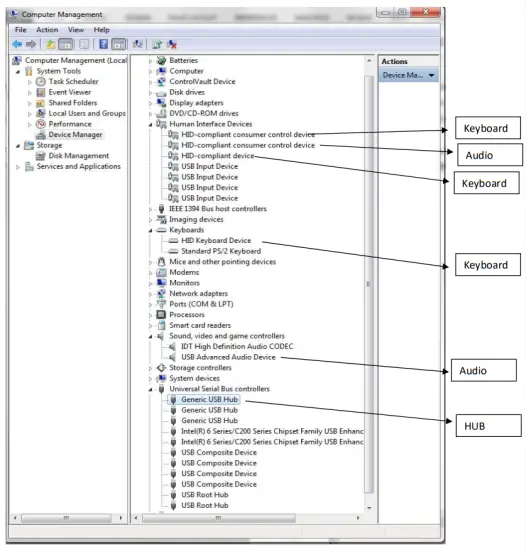
Microphone Support
The device will enumerate as a sound device (no special drivers are required) and will show up on the device manager as a USB Advanced Recording Device Open the sound panel it will show up as per the screenshot below :
For any windows, application ensure that the microphone is set as the default device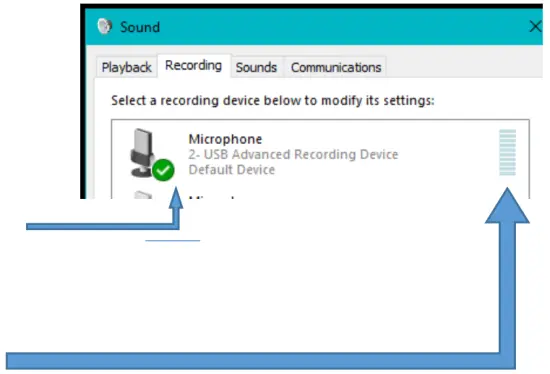
If you speak the bar on the right-hand side will indicate that the microphone is picking up the voice.
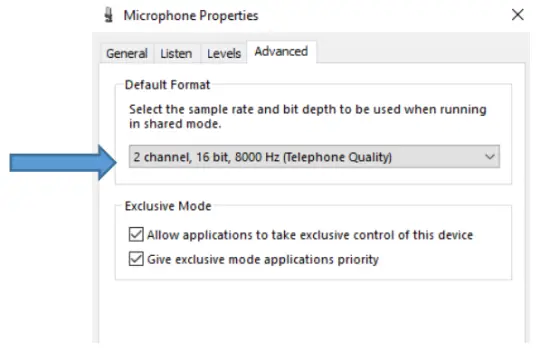
It is recommended for speech recognition that the sample rate is set to 8 kHz: click on Properties and then select the sample rate (in the Advanced tab).
Code Tables
The default and alternate USB code tables are shown below.
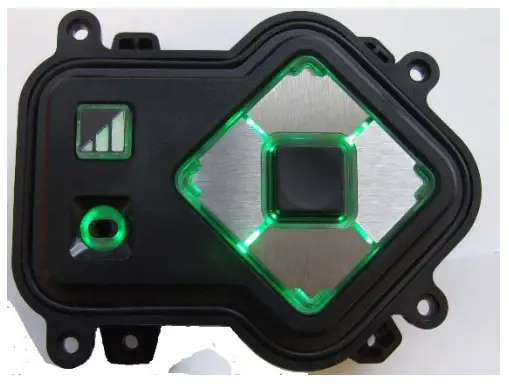 Landscape Landscape | 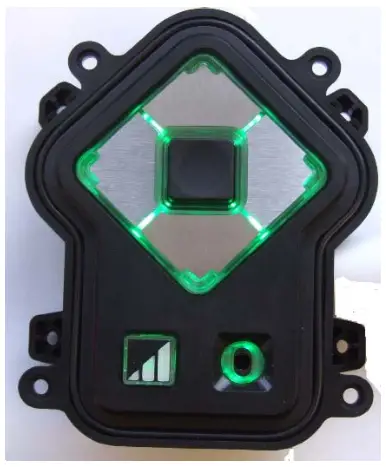 Portrait Portrait |
The standard AudioNav can be used in landscape or portrait mode. The conventional orientation is the landscape – if you move the switch to portrait mode the output codes are adjusted to suit the new orientation.
| FACTORY DEFAULT CODE TABLE | ALTERNATE CODE TABLE | CUSTOMISED CODE TABLE | |||
| LANDSCAPE | PORTRAIT | LANDSCAPE | PORTRAIT | ||
| Function | Hex USB | Hex USB | Hex USB | Hex USB | Set initially to the factory |
| Right | Ox4F Right Arrow | Ox4F Right Arrow | Ox4F Right Arrow | 01 02 Multimedia Vol Up | |
| Left | 0x50 Left Arrow | 0x50 Left Arrow | 0x50 Left Arrow | 01 04 Multimedia Vol Down | |
| Down | 0x51 Down Arrow | 0x51 Down Arrow | <0x01><0x04> Multimedia Vol Down | Ox4F Right Arrow | |
| Up | 0x52 Up Arrow | 0x52 Up Arrow | <0x01><Ox02> Multimedia Vol Up | 0x50 Left Arrow | |
| Select | 0x28 Enter | 0x28 Enter | 0x28 Enter | 0x28 Enter | |
| Jack IN | Ox6A F15 | Ox6A F15 | Ox6A F15 | Ox6A F15 | |
| Jack OUT | Ox6B F16 | Ox6B F16 | Ox6B F16 | Ox6B F16 | |
| Volume | Ox6C F17 | Ox6C F17 | Ox6C F17 | Ox6C F17 | |
| Orientation Switch | |||||
| I Landscape Ox6D F18 | Ox6D F18 | Ox6D F18 | Ox6D F18 | ||
| II Portrait Ox6E F19 | Ox6E F19 | Ox6E F19 | Ox6E F19 | ||
Extended Footprint Version
| Function | Hex | USB |
| Right Left Down Up Select Jack IN Jack OUT Volume Up Volume Down + Speech Rate – Speech Rate | 0x4F 0x50 0x51 0x52 0x28 0x6A 0x6B 01 02 01 04 0x72 0x73 | Right Arrow Left Arrow Down Arrow Up Arrow Enter F15 F16 Windows Multimedia Codes F23 F24 |
External Mount Version
| Function | Hex | USB |
| Right Left Down Up Select Jack IN Jack OUT Volume | 0x4F 0x50 0x51 0x52 0x28 0x6A 0x6B 0x6C | Right Arrow Left Arrow Down Arrow Up Arrow Enter F15 F16 F17 |
Using the Windows Utility to change USB Codes
Each product version has its own (free to download) version of the utility
If any other keypad utility software is installed (e.g EZ-Key Utility) then you should uninstall that before you start.
System Requirements
The utility requires the .NET Framework to be installed on the PC and will communicate over the same USB connection but via the HID-HID data pipe channel, no special drivers are required.
Compatability
Windows 10 
Windows 8
Windows 7
Windows Vista
Windows XP Only if you install the .NET framework
The utility can be used to configure the product to
- Select Code Table
- LED brightness (0 to 9)
- Test Audionav
- Create a customized keypad table
- Reset to factory default
- Load Firmware
API for controlling the AudioNav device from the Host Computer
It is also possible to control the AudioNav device programmatically using an API (free to download) from a host that has USB capabilities.
AudioNav | Instructions | Utility | API |
AudioNav External Mount |  |
|
|
AudioNav EF |  |
|
|
Change History
| Technical Manual | Date | Version | Details |
| 29 July 15 | 1.0 | First Release | |
| 12 Aug 15 | 1.2 | Screenshots updated | |
| 01 Sep 15 | 1.3 | API added | |
| 08 Oct 15 | 1.4 | Added amended function for h/v switch on p6 | |
| 20 Nov 15 | 1.5 | Added cable tie picture to page 2. | |
| 08 Sep 17 | 1.6 | Update and added Remote Update Instructions | |
| 25 Jan 18 | 1.7 | Added RNIB logo and Externally mounted version | |
| 13 Sep 19 | 1.8 | Added EF version and split off Utility/API | |
| 02 Sep 20 | 1.9 | Added PNs for mic support versions | |
| 02 Sep 20 | 2.0 | Add note re Voice Assistant Support | |
| 02 Dec 20 | 2.1 | Add Code table for EM version |
| Configuration Utility | Date | Version | Details |
| 29 Jul 15 | 2.0 | First Release | |
|
Configuration Utility EF | 08 Sep 17 | 3.0 | Added Win 10 Compatability |
| 20 Sep 20 | 4.0 | Recompiled with Visual Studio 2017. | |
| 24 Nov 20 | 4.1 | Bugfix | |
| 08 Dec 20 | 5.0 | Added function to test microphone | |
| Date | Version | Details | |
| 05 Jan 21 | 2.0 | Added missing .dll files |
| Product Firmware | Date | Version | Details |
| 29/7/15 | 2.0 | Updated so that only vol up / down works as a consumer device. | |
| 10/8/15 | 4.0 | H/V Code table switchover fixed for std table | |
| 25/2/16 | 5.0 | Jack In/Out debounce increased from 400ms to 1.2 sec | |
| 25/3/17 | 6.0 | Improve stability | |
| 18/10/17 | 7.0 | Added 8 digit SN, set LED default brightness to 6, improved recovery process. |
| AudioNav API | Date | Version | Details |
| 01 Sep 15 | 1.0 | First Release | |
| 08 Sep 17 | 4.0 | Added Win 10 Compatability | |
| AudioNav EF API | Date | Version | Details |
| 11 Dec 20 | 1.0 | First Release | |
| Remote Firmware Update | Date | version | Details |
| AudioNavDownloaderUtility | 08 Sep 17 | 1.0 | New Release, added to Tech Manual |
The content of this communication and/or document, including but not limited to images, specifications, designs, concepts, and information is confidential and is not to be used for any purpose or disclosed to a third party without the express and written consent of Keymat Technology Ltd., Copyright 2020. All rights reserved.
1400 Series Audio-Nav Technical Manual Rev 2.1 www.storm-interface.com
 Home | Storm Interface | Interface Specialists