 www.alcatel-home.com
 User Guide
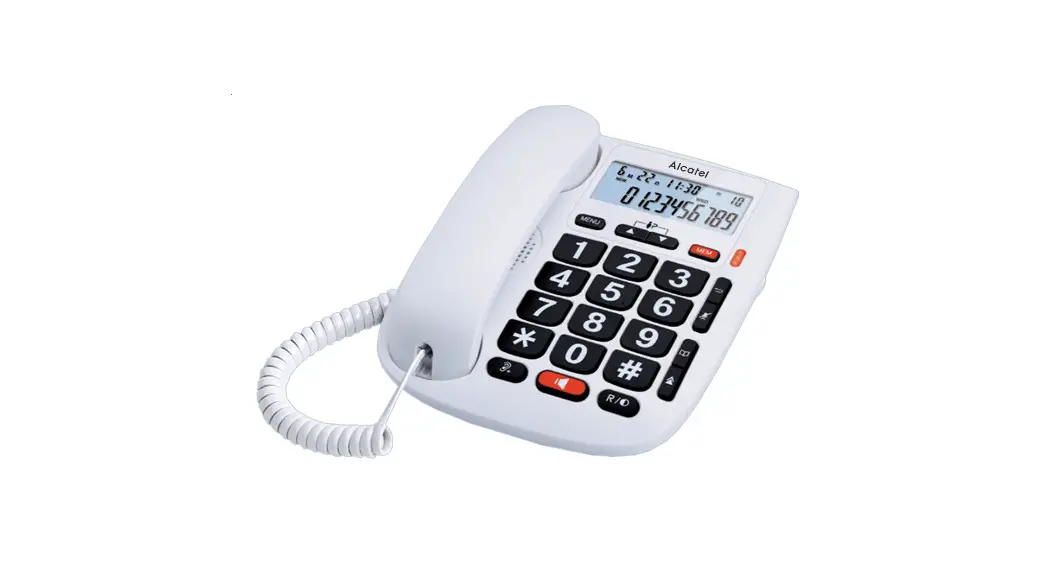
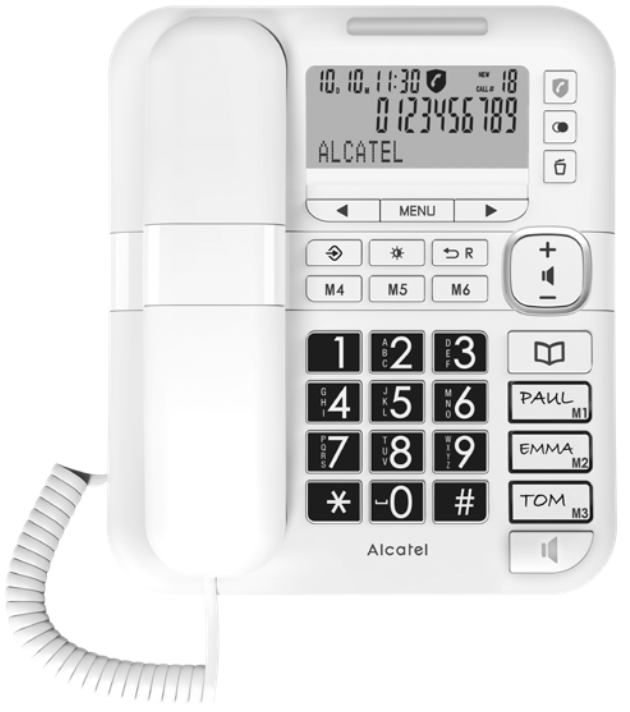
TMax 70 Phones
 |  |
 |  |
Please read this user’s guide before using your phone
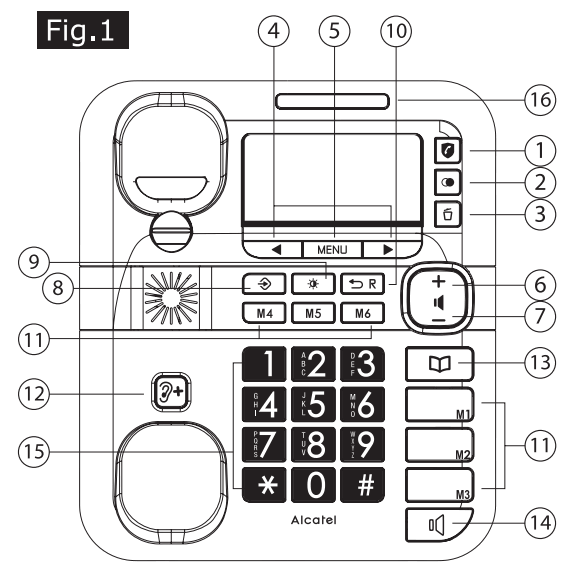
BASE STATION KEYS
 Access to Call block menu (long press/Call block key)
 Redial key
 Delete/Erase button
 Left button/Right button
- Menu Menu button
 Increase speaker volume
 Decrease speaker volume
 Memory setting key
 Contrast button
 Exit/Flash button
 Direct memory button
 Audio-boost button
 Phonebook button
 Speaker button
- Alphanumeric keypad

- Ring indicator

 Microphone
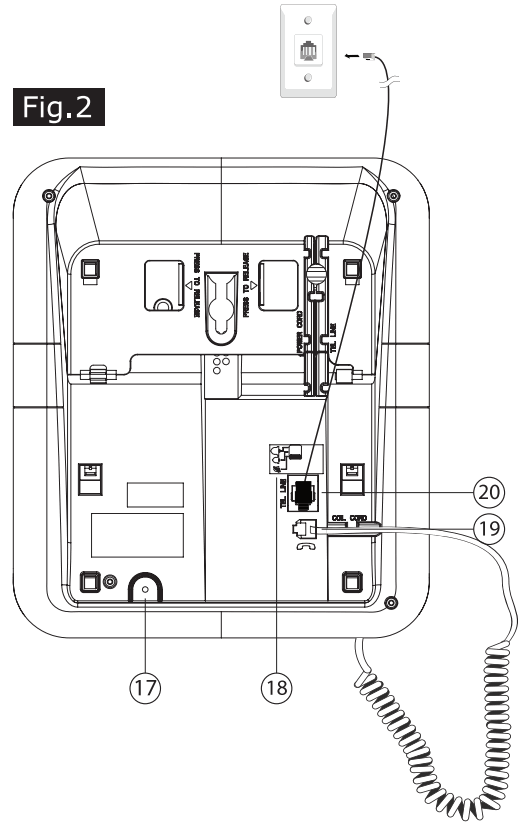
 Ringer volume switch (under the base)
 Plug for coil cord to handset
 Plug for Telephone line cord
 Left button/Right button
 Increase speaker volume
 Decrease speaker volume
 Contrast button
 Direct memory button
 Audio-boost button
 Phonebook button

 Microphone
 Ringer volume switch (under the base)
 Plug for coil cord to handset
 Plug for Telephone line cord
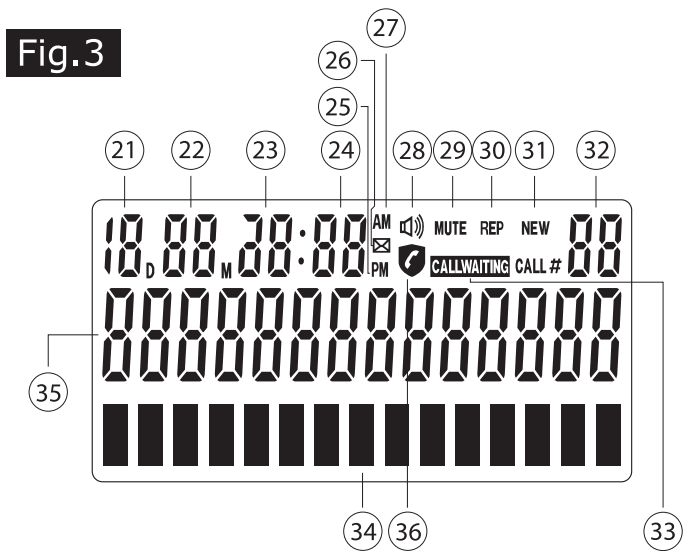
DISPLAY ICONS
| 21. Day 23. Hour 25. Afternoon 27. Morning 29. Repeat 31. Call-log number* 33. Name display 35. Call block | 22. Month 24. Minute 26. Voice mail 28. Speakerphone 30. New CID* 32. Call waiting* 34. Phone number display |
* Subject to subscription and availability of the service from the fixed line operator.
INSTALLATION AND SETUP
Your phone should be placed on a level surface, such as a desk or table top, or you can mount it on a wall.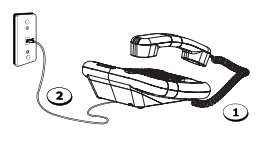
DESKTOP INSTALLATION
- Connecting the handset.
- Connecting the telephone line.
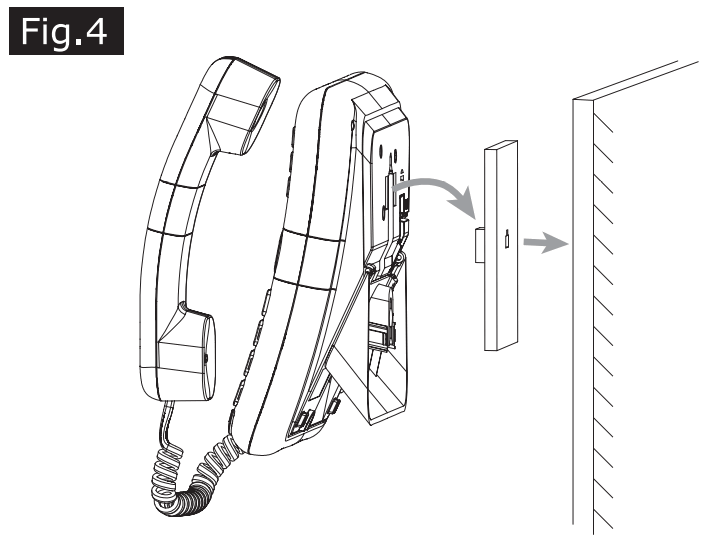
WALL MOUNT INSTALLATION
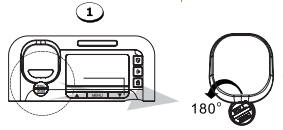
- Rotate the wall mounting knob as shown in the following layout:

The knob is designed to keep this unit in place when the telephone is vertical on the wall. - Plug one end of line cord into junction box and the other end into modular telephone line jack marked
 . (Fig 2)
 - Under the base, tilt the movable top section of the base by pressing simultaneoulsy where it is marked: “press to release”.
- Fix the telephone on the wall. (Fig. 4)
 . (Fig 2)
USING THE PHONE
Receive and end a call
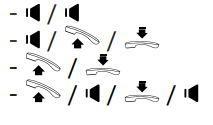
Handsfree Volume
To adjust handsfree volume, press key.
key.
Adjusting the ringer volume
To adjust the ringer volume (off, low, high) move the slider under the base (fig.2, 18) to the desired desired level. When the ringer is off, the led (fig.1) lights up when there is an incoming call.
Use of Audio Boost key (Warning!)
During a call with the handset, to increase a lot the hearing volume, press key. Press again to desactivate;
WARNING: this key increase volume up to 30dB ; Extended use can damage hearing. Don’t use if no hearing issue.
Make a call
–  or
or either before or after dialing your number or, dial number /
– Last number redial:
1. / or
/ or
2.or /
– From redial list:
1. ◀or ▶ to select the caller number / or.
2. ◀or ▶ to select the caller number / toadd number prior to the select number / or.
– Adjust handsfree volume (2 levels)
During a call in handsfree mode, press key.
DIRECT MEMORIES (M1 to M6)
Store a direct memory
Press key
key
“Store memory” will display
Select a direct memory 
Press key
First, enter the number
Press key
Then, enter the name with dialling keypad (e.g.: press “6” key to reachM , press twice “6” key to reach N). Press “0” key to enter a space between names.
Press key to save
Press key to exit
Edit/modify/delete a direct memory (M1 to M6)
Press the chosen direct memory (from M1 to M6)
To modify number, press key and modify number or erase all numbers (to delete)
Press
Then, to modify name, enter name or erase all letters (to delete)
Press key
Press key to exit
Call a direct memory (M1 to M6)
Once registered (see above chapter), Press the desired direct memory,
Then, lift-up the handset to call or
Press key to call in handsfree mode “Now dialling” is displayed
PHONEBOOK
Add a number in the phonebook (up to 99 entries)
Press  key
key
Select ADD by pressing▶ key. “Add” is flashing
Press
First, enter name with dialling keypad (eg, press“6” key to reach letter, press twice “6” key to reach N). Press “0” key to enter a space.
To modify, press key and enter letter again.
Press
Then, enter the number with dialling keypad (line above name).
To modify, press key and enter name again.
Press key to confirm.
Press key to exit
Call a phonebook entry
Press
Select SEARCH by pressing the▲ key. Search is flashing
Press
press ◀or▶ key to select entry or sort out by first letter by pressing dialling keypad (e.g. press “6” key for M letter)
To call the entry, lift up handset or press key for dialing out the selected numbers.
Delete a phonebook entry
Press
Scroll with◀or▶ key or sort out by pressing first letter with dialling keypad
Press key
Delete? will display
Press to confirm
Press to exit
Store the last dialled number into the phonebook
Press key
Press key
Enter name with dialling keypad
Press key to confirm.
Press to exit
Review/Store/Delete a received call (answered or unanswered)*
Press▲ or▼ key to review the calls.
When requested call is displayed:
– to store (if not yet done):
– press key
– Enter name with dialling keypad
– Press key
– PressR key to exit
To delete:
– Press when reviewing the number
– PressR to exit
CALL BLOCKER
This telephone is built-in with Basic Call Block feature*.
This feature will help you avoid nuisance calls by only allowing some numbers to make your phone ring.
Default setting of Call Block in this telephone is OFF but you can activate it via your phone settings, as explained in the following paragraphs.
*This feature requires a subscription of Caller Line Identification service from your telephone service provider.
CALL BLOCK OVERVIEW
| Setting | Explanations |
| BLOCKLIST | Call block is on. Numbers registered in the block list will not go through and phone will not ring and call drop immediately. Numbers can be adding to the list while the phone is ringing on / after see part 1) |
| ALLOW PB | For those calls matched with one touch (M1…M6) or Phonebook stored numbers will allow call through. And, Caller information show on display as normal ( to enable , see part 2) For those call does not matched with M1.. M6 or Phonebook stored numbers, phone will not ring and keep silent and call will drop immediately. |
| BLOCK ANONYMOUS | This feature allows you to block call that do not have a number attached to them (ie private calls, international calls, etc). |
| BLOCK OFF | Call Block function (Block all call with numbers) is Disabled. Call block icon is turned off. |
1. Manual Call Block Mode
Make sure you have enabled BLOCKLIST mode (see section 2 below) and the screen shows .
.
When call block is OFF, all previously blocked numbers will make the phone ring.
How to block an incoming call:
When the phone is ringing and before answering, presswill terminate the call and offer you the option to register the number to the blacklist in one click.
IMPORTANT: if you don’t confirm, the number will not be added to the Blocklist and the next call will go through normally.
2. Set Block Mode (Call block is OFF by default)
In idle mode,
Press for 3 sec., press▲ or▼ to select:
BLOCKLIST / ALLOW PB /BLOCK ANONYMOUS / BLOCK OFF.
Press again , confirmation Tone will be heard and Block mode setup finished.
After you setup the any options above, the call block icon will be displayed on the LCD.
2.1. Add numbers to Blocklist
In idle mode,
Press ◀ or▶ key,review the dial in number in call list.
Press once. Number will be stored into blocklist.
2.2. Review or Delete numbers in Blocklist
In idle mode,
Press once , blocked numbers will be displayed on LCD or “NO CALLS” if no numbers has been stored.
Use ◀or▶ for review the blocked numbers in list.
Press once , blocked numbers will be deleted on LCD.
OR
Long press > 3 sec to Erase ALL numbers in blocklist. LCD will show “NO CALLS”.
2.3. Set Allow PB (Allow contacts)
In idle mode,
Press key for > 3 sec.,press ▲ or▼ to ALLOW PB and press once. confirmation Tone will be heard and PB ALLOW mode setup finished.
2.4. Set Block Anonymous
In idle mode,
Press key for > 3 sec., press ◀ or▶ to “BLOCK ANONYMOUS “ and press once, confirmation tone will be heard and Block Anonymous mode setup finished.
2.5. Set Block off
In idle mode,
Press key for > 3 sec., press ◀ or▶ to “BLOCK OFF” and press once. confirmation Tone will be heard and Block off is set means Call Block (ALL) is disable. Setup finished.
Review, dial back or delete last dialed number:
– Press
– To dial back: Press key (handsfree mode) or lift the handset or
To delete: Press
GENERAL SETTINGS
Set language and flashtime to operate correctly on your network
– Press on MENU / ◀ or▶ SELECT LANGUAGE / MENU / ◀ or▶to select language desire /MENU / .
.
– Press on MENU /◀ or▶ SET FLASH TIME / MENU / ◀ or▶ to select flash time FLASH 100ms / FLASH 300ms / FLASH 600ms or FLASH 1000ms / MENU /.
Setting Date and Time
– Press on MENU key / ◀ or▶ select DATE /TIME / MENU //◀ or▶ to enter Month, Day, Hour and Minute / MENU /.
Adjust display contrast
Press key until you reach the suitable level (5 levels)
Setting local area code
– Press on MENU key / ◀ or▶ select LOCAL AREA CODE / MENU / to enter a local area code / MENU /.
Setting long distance country code
– Press on MENU key / ◀ or▶ select LONG DIST CODE / MENU /to enter a long distance country code / MENU / .
.
Setting tone or pulse
– Press on MENU key / ◀ or▶ select SET TONE / PULSE / MENU / ◀ or▶ to select TONE DIAL or PULSE DIAL / MENU / .
SAFETY
Do not use your telephone to notify a gas leak or other potential explosion hazard. Do not open your device to avoid risk of electrical shock. Your tele- phone must be located in a dry place away from hot, humid and direct sunlight condition.
ENVIRONMENT This symbol means that your inoperative electronic appliance must be collected separately and not mixed with the household waste.
Help us to protect the environment in which we live!
CONFORMITY The logo printed on the products indicates the conformity with all essential requirements and all applicable directives. You can download the Declaration of Conformity from our website www.alcatel-home.com

ATLINKS Europe
28 Boulevard Belle Rive
92500 RUEIL-MALMAISON
France
Atlinks UK Ltd
3rd Floor, Waverley House
7-12 Noel St.
London W1F 8GQ – UK
Alcatel is a trademark of Nokia,
used under license by Atlinks.
www.alcatel-home.com
Model: Alcatel TMAX 70-EU
A/W No.:10002465 Rev.1
Printed in China
 Homepage | Alcatel-Phones
 Homepage | Alcatel-Phones