
Sec3ure Go Apps
User Guide

Skip THE LINE & GO!
You’re Going To Love YOUR NEW SEC3URE GO! because you’ll never wait in line again. You’ve got instant and trusted access to over 11,000 locations of care around the world. Here’s how you get started.
Download Apps
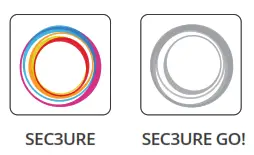
Download Google Play and download Apps both of the SEC3URE apps.
*Make sure your mobile device has the SEC3URE SEC3URE GO! most recent software updates.
Charged Badge
 Charge To ensure the badge is fully Charged, connect the charger with the enclosed 0t to ith l d cable.
Enable ‘ Bluetooth
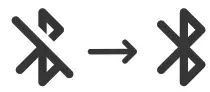
Verify Bluetooth is enabled * S on your mobile device.
Pair Badge
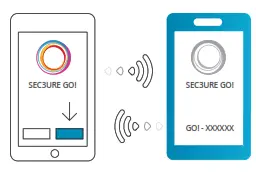
Open the SEC3URE GO! app Select Pair Badge on the home screen and select the SEC3URE GO! I displayed it on the badge.
Enter passcode
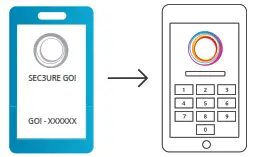
on the A six-digit passcode will Enter appear on your SEC3URE GO! Will Passcode Enter the passcode on your mobile device?
Get Connected
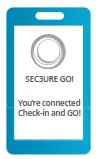 Your SEC3URE GO! will display Get “You’re connected – Check-in and GO!” Connected when pairing has been completed. That’s it!
Visit the Facility
Check-In with your SEC3URE Mobile App. Visit the Transmit to transfer your visit info to your Facility SEC3URE GO!
Check Out with your SEC3URE Mobile App.
If you need assistance with anything, just call 817-SEC3URE
Or visit: https://www.intellicentrics.com/SEC3UREGOSupport
Ready, SEC3URE GO!
This device complies with both part 15 Read, Ihe FCC rules, as well as with ISED’s license-exempt RSSs. Operation is subject to the following two conditions (1) This device may not cause harmful interference, and (2) This device must accept any interference received, including interference that may cause an undesired operation. Changes or modifications not expressly approved by the party responsible for compliance could void the user’s authority to operate the equipment.
This equipment has been tested and found to comply with the limits for a Class B digital device, pursuant to part 15 of the FCC Rules. These limits are designed to provide reasonable protection against harmful interference in a residential installation. This equipment generates, uses, and can radiate radio frequency energy and, if not installed and used in accordance with the instructions, may cause harmful interference to radio communications. However, there is no guarantee that interference will not occur in a particular installation. If this equipment does cause harmful interference to radio or television reception, which can be determined by turning the equipment off and on, the user is encouraged to try to correct the interference by one or more of the following measures:
- Reorient or relocate the receiving antenna.
- Increase the separation between the equipment and receiver.
- Connect the equipment into an outlet on a circuit different from that to which the receiver is connected.
- Consult the dealer or an experienced radio/TV technician for help.
WARNING: This product can expose you to chemicals including lead, which is known to the State of California to cause cancer and birth defects or other reproductive harm. For more information, go to: http://www.P65Warnings.ca.gov
Radiation Exposure Statement:
The product complies with the Canada portable RF exposure limit set forth for an uncontrolled environment and is safe for intended operation as described In this manual. Further RF exposure reduction can be achieved if the product can be kept as far as possible from the user body or set the device to lower output power if such a function is available.
WARNING: TO REDUCE THE RISK OF FIRE OR ELECTRIC SHOCK, DO NOT EXPOSE THIS PRODUCT TO RAIN OR MOISTURE.
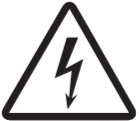 CAUTION THE RISK OF ELECTRIC SHOCK DOES NOT OPEN
CAUTION: TO REDUCE THE RISK OF ELECTRIC SHOCK, DO NOT REMOVE THE COVER (OR BACK). NO USER-SERVICABLE PARTS INSIDE. FOR SERVICE CALL 817-SECURE (732-3873)
IntelliCentrics
1420 Lakeside Pkwy #110
Flower Mound, TX 75028
1-817-SEC3URE
http://www.intellicentrics.com
IntelliCen cs UK, Ltd.
Regent House Heaton Lane
Stockport SK4 1BS UK
0161-250-7533 ext.
http://www.intellicentrics.co.uk
SEC3URE GO!
Model No. H37N0D
FCC ID: NOI-H37NOD
IC: 8857A-H37NOD
Made in China
SEC3URE GO!
Designed and engineered in Flower Mound, TX Badge made in Taiwan. Accessories are made in China.

 The package is recyclable. 60% post-consumer waste.
 intellicentrics.co
 Trusted Healthcare Credentialing | IntelliCentrics
 P65Warnings.ca.gov