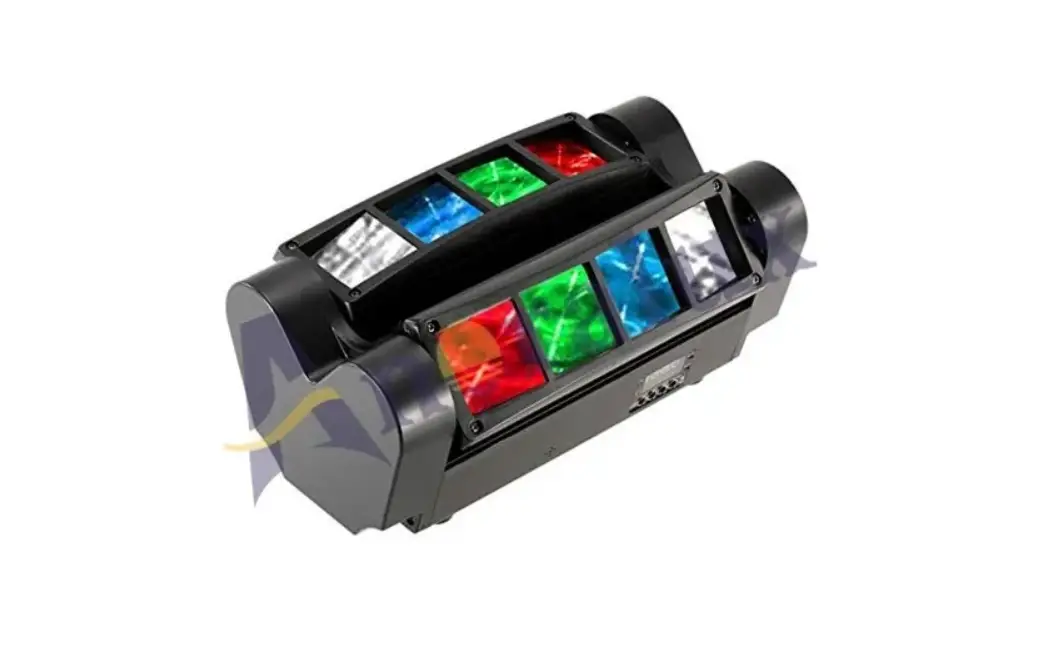
Anoralux AL-MHBL-007 Mini Spider Light Instruction Manual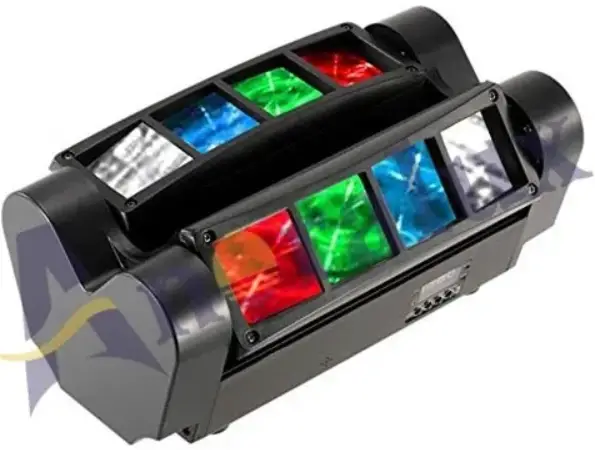
Introduction
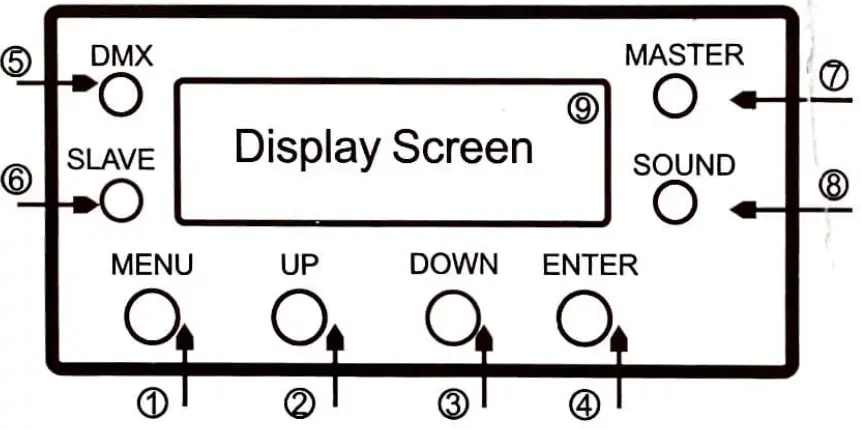
Overview
- MENU
- UP
- DOWN
- ENTER
- DMX Pilot Lamp
- Slave Pilot Lamp
- Master Pilot Lamp
- Sound Pilot Lamp
- Display Screen

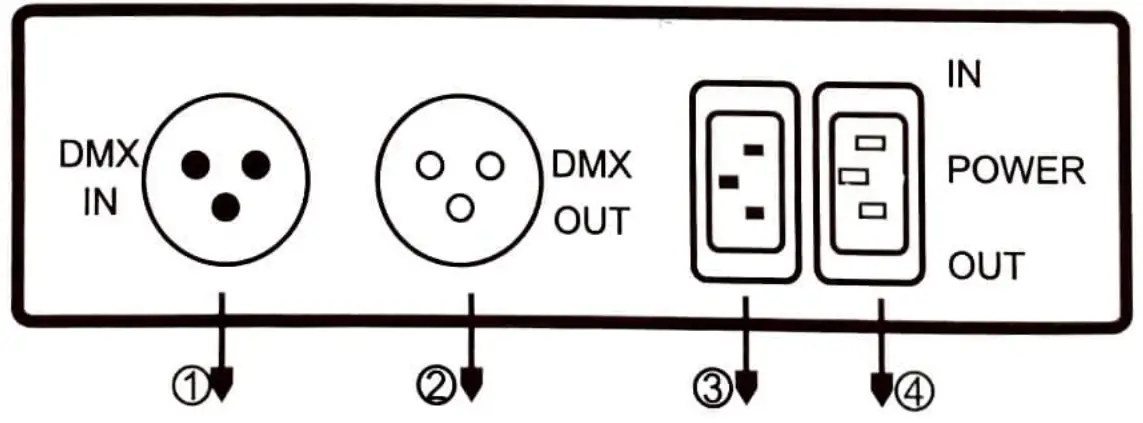
- DMXIN
- DMX OUT
- POWERIN
- Connect output
“rust ” is displayed after the power i s plugged in . The moving head light is being reset. Please do not operate.
The step to start the Self-Propelled mode :
- Press” MENU ” to find “Sind “
- Press “MENTER ” to enter the menu,
- Press” UP ” or ” DOWN “to select ” NAST”, and press “ENTER “.
The step to start the Sound Active Control mode :
- Press ” MENU” t o find “Sound “,
- Press “ENTER” to enter The menu,
- Press ” UP ” o r “DOWN” to select “ON” and press “ENTER “.
- Continue to press ” MENU ” to find “Sound” press “ENTER “
- Press “UP ” or “DOWN ” to select “Sound “,and press “ENTER” .
| AODR | AOOT-A512 | Address Senin0 | |
| 7 Channel option | |||
| 15 Channel option | |||
| SLND | MAST | Auto Mode (self propelled) | |
| SOUN | sound mode | ||
| Slav | Master and Slave option | ||
| SHND | SH1-SH24 | Effect selected.Sh24 for multi-effect | |
| self-prophesied ‘SPED 01-08 Chase | |||
| speed from slow to fast | |||
| SOUD | ON,OFF | Sound control Switch | |
| SOEN | 0-100 | Sound Sensitivity(0 close,100 the most) | |
| TEST | YES | Automatically Test | |
| DISP | ON | Reverse Display | |
| YES | Reverse Display | ||
| OFF | Back-light Switch | ||
| /g | Back-light Switch | ||
| ITIL | ON | Y1 Motor reverse | |
| YES | Y1 Motor reverse | ||
| 2TI | Y2 Motor reverse | ||
| YES | Y2 Motor reverse | ||
| DEFT | YES,ON | Reset | |
OMX Channel Function 8 LED4 Dimming 0-255 0-100%
7 Channel Mode
{NOTE: Enter Addr-A001 to DMX control mode) 9 LEDS Dimming 0-255 0–100%
| Channel | Function | Value | Instruction |
| 1 | Motor route | 0-255 | 0*-135 |
| 2 | Motor route | 0-255 | 0′-135′ |
| 3 | Sun Dimmer | 0-255 | 0-100% |
| 4 | Strobe | 0-9 | No Strobe |
| 10-255 | Strobe speed from slow to fast | ||
| 5 | Effect | 0-7 | No Effect |
| 8-17 | Effect 1 | ||
| 18-27 | Effect 2 | ||
| 28-37 | Effect 3 | ||
| 37-47 | Effect 4 | ||
| 48-57 | Effect 5 | ||
| 58-67 | Effect 6 | ||
| 68-77 | Effect 7 | ||
| 78-87 | Effect 8 | ||
| 88-97 | Effect 9 | ||
| 98-107 | Effect 10 | ||
| 108-117 | Effect 11 | ||
| 118–127 | |||
| 128-136 | Effect 12 | ||
| 137-146 | Effect 13 | ||
| 147-158 | Effect 14 | ||
| 157-166 | ‘Effect 15 | ||
| 187-178 | Effect 16 |
|
| Effect | 177-186 | Effect 18 |
| 187-196 | Eftect J9 | ||
| 197-206 | Effect 20 | ||
| 207-216 | EPect 21 | ||
| 217-226 | Effect 22 | ||
| 227-236 | Effect 23 | ||
| z37-246 | Effect 24 Self- rolled multi effects | ||
| 247-255 | Effect 25 Sound | ||
| $ | Effect speed | 0-255 | From fast to slow |
| y | Reset | 241-250 | For 5second store effect |
| Channel | Function | Value | Instruction |
| 1 | Motor1 route | 0-255 | 60‘—150” |
| 2 | Motor2 route | 0-255 | 60”—150” |
| 3 | Sum Dimmer | 0-255 | 0—100% |
| Strobe | 0-9 | No Strobe | |
| 10-255 | Strobe speed from slow la | ||
| 5 | LED1 Dimming | 0-255 | 0—100°/« |
| 6 | LED2 Dimming | 0-255 | 0—100% |
| 7 | LED3 Dimming | 0-255 | 0-100% |
| g | LED4 Dimming | 0-255 | 0—100% |
| g | LED5 Dimming | 0-255 | 0—100% |
| 10 | LED6 Dimming | 0-255 | 0—100% |
| 11 | LED7 Dimming | 0-255 | 0—100% |
| 12 | LED8 Dimming | 0-255 | 0—100% |
| 13 | Marco Function | 0-7 | No Effect |
| 8-17 | Effect 1 | ||
| 18-27 | Effect 2 | ||
| 28-37 | Effect 3 | ||
| 38-47 | Effect 4 | ||
| 48-57 | Effect 5 | ||
| 58-67 | Effect 6 | ||
| 68-77 | Effect 7 | ||
| 78-87 | Effect 8 | ||
| gg-g7 | Effect 9 | ||
| 98-107 | Effect 10 | ||
| 108-117 | Effect 11 | ||
| 118-127 | Effect 12 | ||
| 128-136 | Effect 13 | ||
| 137-146 | Effect 14 | ||
| 147-1s6 | Effect 15 | ||
| 157-166 | Effect 16 | ||
| 167-17s | Effect 17 | ||
| 177-186 | Effect 18 | ||
| 187-196 | Eff6ct 13 |
| 197-206 | Effect 20 | ||
| 207-216 | Effect 21 | ||
| 217-226 | Effect 22 | ||
| 227-236 | Effect 23 | ||
| 237-246 | Effect 24 Self-propelled multi-effects | ||
| 247-255 | Effect 25 Sound | ||
| 14 | Effect speed | 0-255 | From slow to fast |
| 15 | Reset | 241-250 | For 5 seconds to reset |