
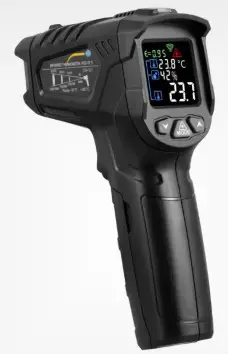
User Manual
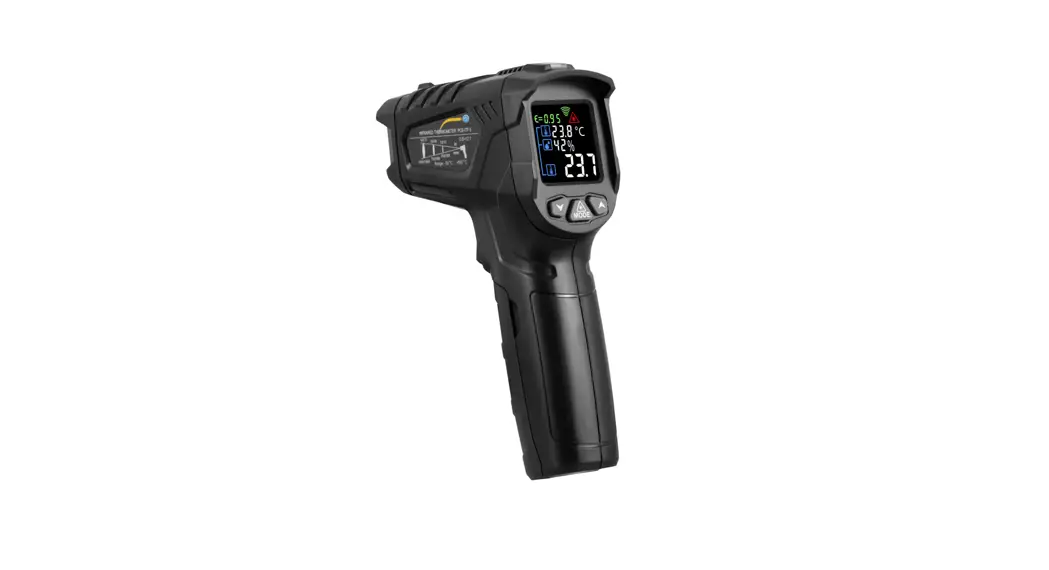
PCE-ITF 5 Infrared Thermometer
User manuals in various languages can be found by using our product search on: www.pce-instruments.com
Last change: 31 March 2020
v1.0
© PCE Instruments
Safety notes
Please read this manual carefully and completely before you use the device for the first time. The device may only be used by qualified personnel and repaired by PCE Instruments personnel. Damage or injuries caused by non-observance of the manual are excluded from our liability and not covered by our warranty.
- The device must only be used as described in this instruction manual. If used otherwise, this can cause dangerous situations for the user and damage to the meter.
- The instrument may only be used if the environmental conditions (temperature, relative humidity, …) are within the ranges stated in the technical specifications. Do not expose the device to extreme temperatures, direct sunlight, extreme humidity or moisture.
- Do not expose the device to shocks or strong vibrations.
- The case should only be opened by qualified PCE Instruments personnel.
- Never use the instrument when your hands are wet.
- You must not make any technical changes to the device.
- The appliance should only be cleaned with a damp cloth. Use only pH-neutral cleaner, no abrasives or solvents.
- The device must only be used with accessories from PCE Instruments or equivalent.
- Before each use, inspect the case for visible damage. If any damage is visible, do not use the device.
- Do not use the instrument in explosive atmospheres.
- The measurement range as stated in the specifications must not be exceeded under any circumstances.
- Non-observance of the safety notes can cause damage to the device and injuries to the user.
- Never target persons or animals with the laser beam.
- Never look into the laser beam directly.
We do not assume liability for printing errors or any other mistakes in this manual.
We expressly point to our general guarantee terms which can be found in our general terms of business.
If you have any questions please contact PCE Instruments. The contact details can be found at the end of this manual.
Delivery contents
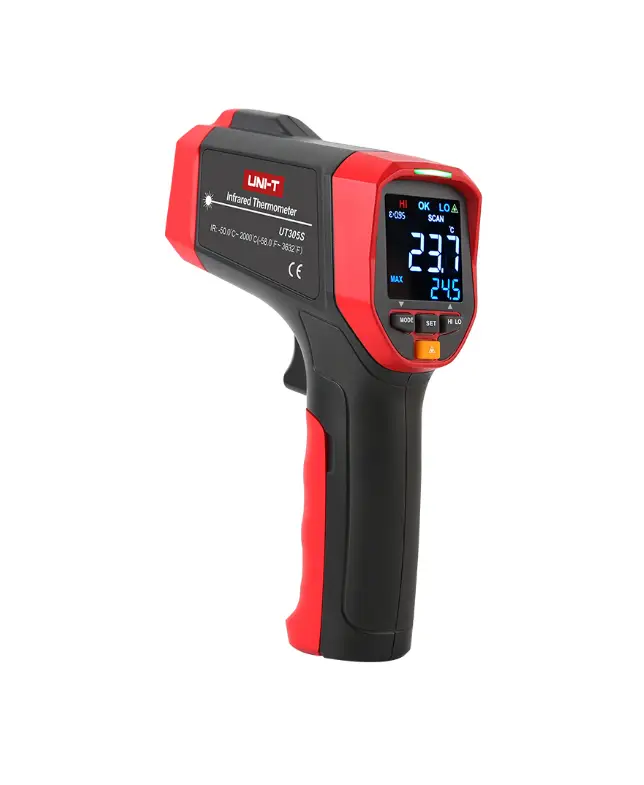
1 x infrared thermometer PCE-ITF 5
2 x 1.5 V AAA battery
1 x user manual
Specifications
| Measuring function | Measurement range | Resolution | Accuracy |
| Infrared temperature | -50 … 550 °C / -58 … +1022 °F | 0.1 °C / 0.18 °F | 0 … 550 °C / 32 … 1022 °F: ±(1.5 % of rdg. +2 °C / 4 °F) Rest of range.: ±3 °C / 5.4 °F |
| Air temperature | -45 … 60 °C / -49 … 140 °F | 0.1 °C / 0.18 °F | 0 …45 °C/ 32 … 113°F: ±1 °C/ 2 °F Rest of range: ±1.5 °C / 3 °F |
| Relative humidity | 0 … 100 % RH | 1 % RH | 20 … 80 % RH: ±4 % RH Rest of range: ±5 % RH |
| Further specifications | |||
| Emissivity | 0.1 … 1 | ||
| Distance-to-spot ratio | 12:01 | ||
| Spectral sensitivity | 8 … 17 pm | ||
| Laser class | 2<1 mW 620 … 690 nm Ai  | ||
| Response time | approx. 0.5 s | ||
| Auto Power Off function | After approx. 30 s | ||
| Power supply | 2 x 1.5 V AAA battery | ||
| Operating conditions | 0 … 40 °C | ||
| Storage conditions | -10 … 60 °C | ||
| Weight | approx. 108 q | ||
| Dimensions | 150 x 94 x 40 mm | ||
Device description
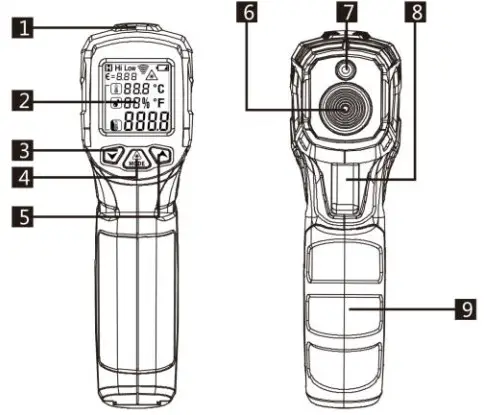
| No. | Description |
| 1 | Humidity sensor and alarm LED |
| 2 | Display |
| 3 | Arrow down ke |
| 4 | „MODE“ key |
| 5 | Arrow up key |
| 6 | Sensor system |
| 7 | Laser |
| 8 | Trigger |
| 9 | Trigger Battery compartment |
Display description
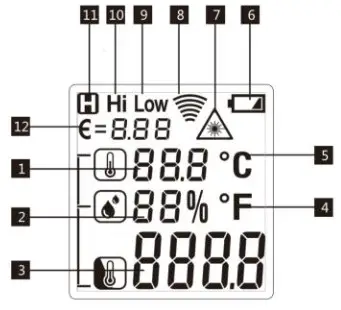
| No. | Description |
| 1 | Ambient temperature |
| 2 | Ambient humidity |
| 3 | Surface temperature |
| 4 | Reading in degrees Fahrenheit |
| 5 | Reading in degrees Celsius |
| 6 | Batteries have insufficient voltage to operate meter properly |
| 7 | Laser active during a measurement |
| 8 | A measurement is made |
| 9 | Lowest set limit value fallen below |
| 10 | Highest set limit value exceeded |
| 11 | Readings held. No measurement is taking place |
| 12 | Set emissivity |
Before making a measurement
In order to obtain a measurement result that is as accurate as possible, it is advisable to give the measuring instrument at least 30 minutes to acclimatize in the event of strong ambient temperature fluctuations.
Avoid strong electromagnetic fields (EFM).
Do not place the meter on heated surfaces. Always keep the meter clean.
Cleaning
In order to clean the sensor system, a mild and cleaned air pressure, for example from a compressor, can be used to remove coarse dirt. A cotton cloth can then be used to remove any dirt that is stuck.
Turning the meter on/off
To turn on the meter, apply the trigger. The meter will turn off automatically after 30 minutes.
How to make a measurement
To make a measurement, start by targeting the surface to be measured with the meter. Then press and hold the trigger until the readings have stabilised. You can then read out the measured values from the display.
Settings
Various further settings can be made in the meter. Turn on the meter if you want to make any settings. Now press and hold the “MODE” key fror approx. 2 seconds. You are now in settings mode. To leave the menu, press and hold the “MODE” key again for approx. two seconds or press and release the trigger. Use the arrow keys to change values. The menu hast he following levels:
| Hi | Here you can set the alarm limit for the highest reading. When this set value is exceeded, “Hi” will be displayed and the alarm LED will glow. |
| LOW | Here you can set the alarm limit for the lowest reading. When this set value is fallen below, “LOW” will be displayed and the alarm LED will glow. |
 | Here you can set the emissivity for the surface temperature measurement. Each surface has its specific emissivity. |
| °C /°F | Here you can choose the temperature unit — either degrees Celsius or degrees Fahrenheit. |
To get to the desired function, press the “MODE” key repeatedly.
Laser ring
The meter has a built-in laser for orientation purposes. To activate the laser, briefly press the “MODE” key when you are in measurement view. The warning signal for the laser appears in the display. If you now press the trigger for a measurement, the laser will be activated. As soon as the measurement is finished, the laser will also be switched off.
Distance-to-spot ratio
The distance-to-spot ratio of this meter is 12:1. This means that the distance between the surface and the meter is 12 times larger than the measuring surface itself.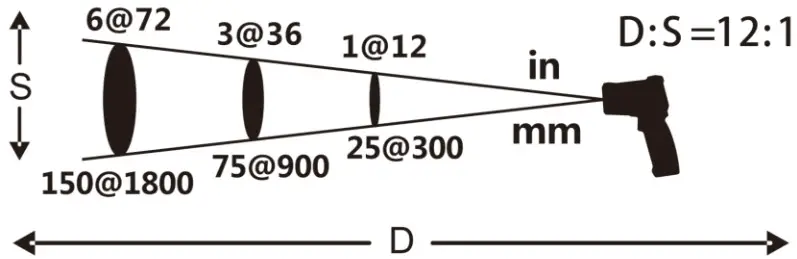 The farther the meter is away from the surface to be measured, the more space will be measured. If the distance-to-spot ratio is too large, undesired surfaces may be included in the measurement. This will cause incorrect readings.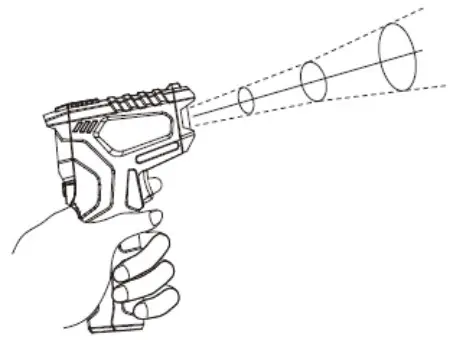
Emissivity
Each surface has its own emissivity. In the following, you can find a rough list of different surfaces and their emissivities.
| Asphalt | 0.90 … 0.98 | Brick | 0.93 … 0.96 |
| Concrete | 0.94 | Marble | 0.94 |
| Cement | 0.96 | Mortar | 0.89 … 0.91 |
| Sand | 0.90 | Rubber | 0.94 |
| Soil | 0.92 … 0.96 | Plastic | 0.85 … 0.95 |
| Water | 0.92 … 0.96 | Timber | 0.90 |
| Cloth | 0.98 | Paper | 0.70 … 0.94 |
| Skin | 0.81 … 0.83 | Chrome | 0.81 |
| Leather | 0.75 … 0.80 | Copper | 0.78 |
| Powder | 0.96 | Iron | 0.78 … 0.82 |
| Lacquer | 0.97 | Textiles | 0.90 |
| Ice | 0.96 … 0.98 | Ceramics | 0.90 … 0.94 |
| Snow | 0.83 | Plaster | 0.80 … 0.91 |
Replacing the batteries
When the battery icon appears, the batteries must be replaced. To do so, first open the battery compartment at the handle. Now replace the batteries by two new 1.5 V AAA batteries. Observe correct polarity.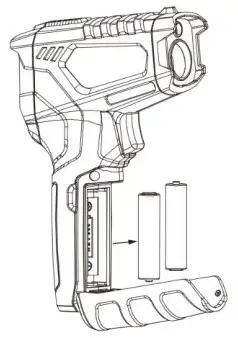
Warranty
You can read our warranty terms in our General Business Terms which you can find here: https://www.pce-instruments.com/english/terms.
Disposal
For the disposal of batteries in the EU, the 2006/66/EC directive of the European Parliament applies. Due to the contained pollutants, batteries must not be disposed of as household waste. They must be given to collection points designed for that purpose.
In order to comply with the EU directive 2012/19/EU we take our devices back. We either re-use them or give them to a recycling company which disposes of the devices in line with law.
For countries outside the EU, batteries and devices should be disposed of in accordance with your local waste regulations.
If you have any questions, please contact PCE Instruments.


United Kingdom
PCE Instruments UK Ltd
Unit 11 Southpoint Business Park
Ensign Way, Southampton
Hampshire
United Kingdom, SO31 4RF
Tel: +44 (0) 2380 98703 0
Fax: +44 (0) 2380 98703 9
[email protected]
www.pce-instruments.com/english