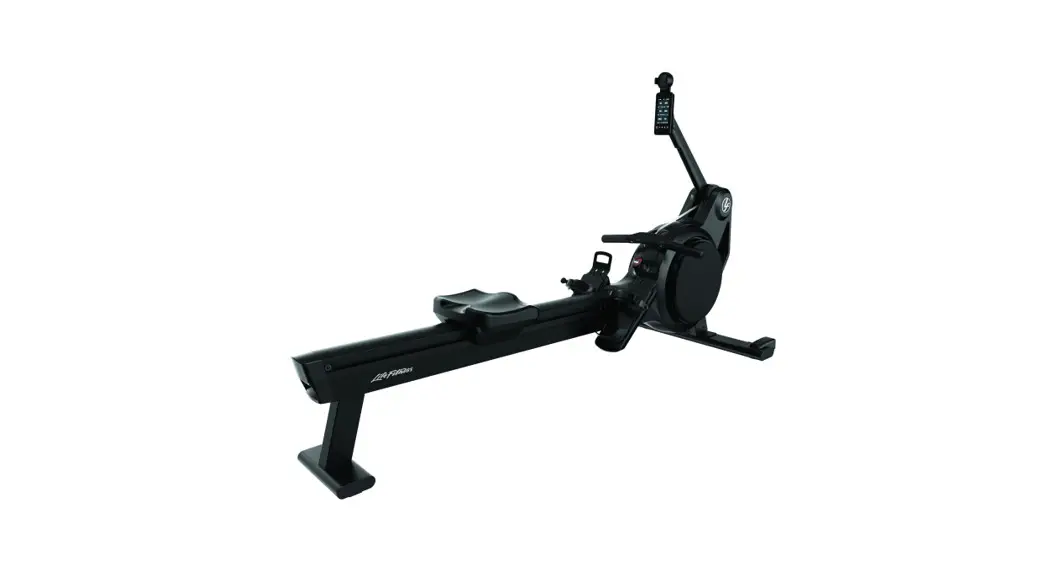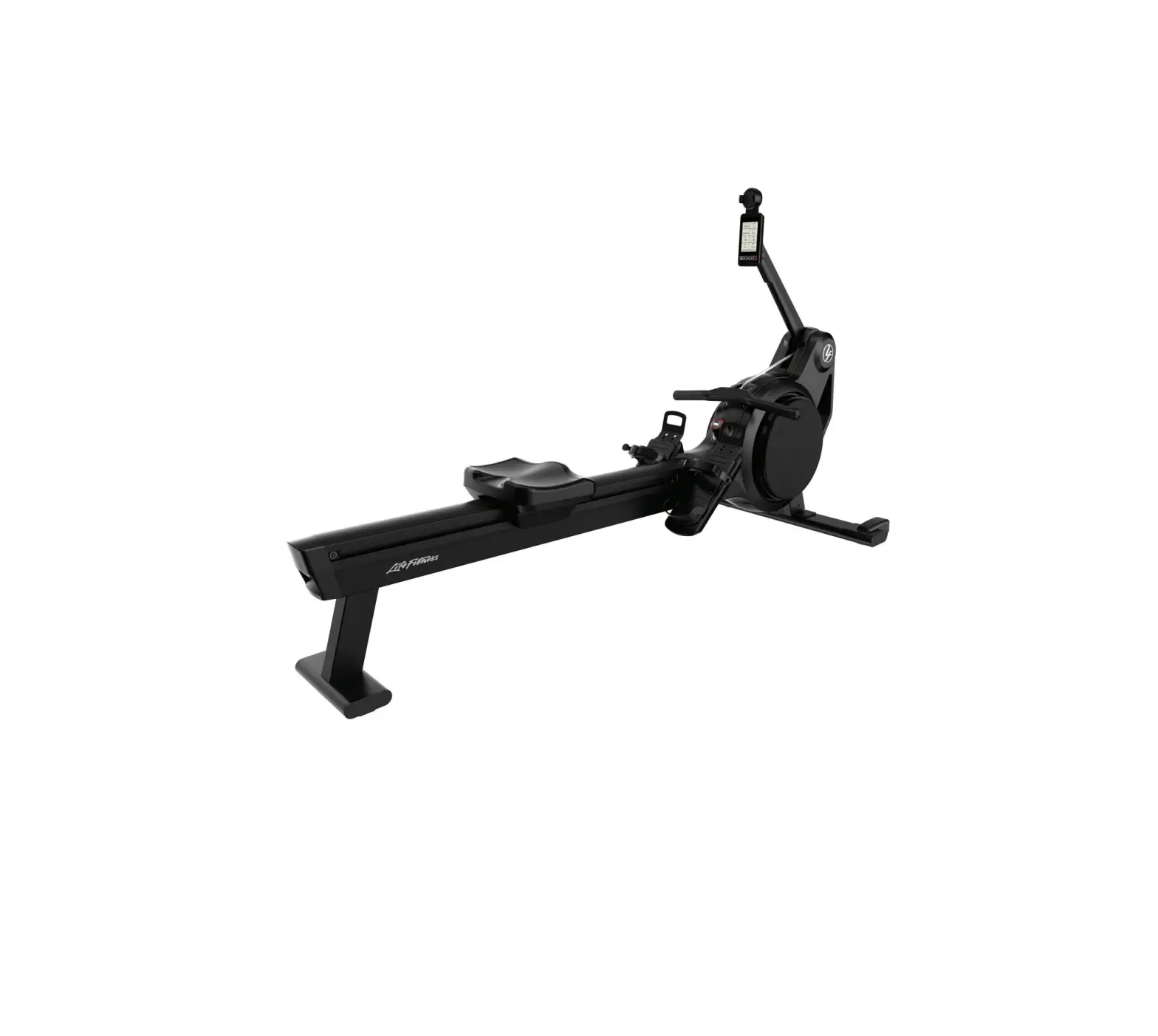
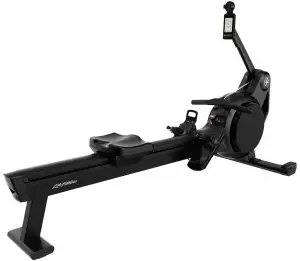
LifeFitness PRF-ROW-LCD Heat Row
SAFETY
Safety Instructions
WARNING: To reduce the risk of serious injury due to improper use of the training equipment, carefully read and adhere to the following important precautions and information before operating the rower.
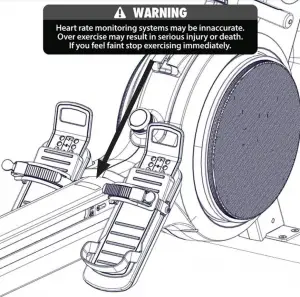
WARNING: Heart rate monitoring systems may be inaccurate. Over exercising may result in serious injury or death. If you feel faint, stop exercising immediately.
- It is the responsibility of the owner to ensure that all users are informed of all warnings and precautions for proper use of the training equipment and it is only authorized for use in a supervised environment with qualified instructors.
- Do not operate the training equipment until it has been properly assembled and inspected as described in this manual.
- Keep the training equipment away from moisture and dust. Do not place the training equipment in a garage, covered patio, near water or pools. Operating temperature of the training equipment must be between 15°C~ 40°C Celsius (59°~104°F) at max. humidity of 65%.
- The training equipment must be on a stable, leveled base and installed in the horizontal position. If the training equipment is to be placed on a hardwood floor or carpet, it is recommended to place a floor mat beneath the rower, to protect the floor from becoming damaged.
- The level of safety of the training equipment can only be guaranteed if it is regularly checked for possible damage as well as wear and tear (e.g. fixing points, toe straps, etc.). Consult an authorized service provider or the manufacturer to ensure the regular inspections are properly carried out.
- Carry out all maintenance, care and service procedures as described in this manual on a regular basis. Defective parts must be replaced immediately, and the device must not be used until the repairs have been carried out.
Only use original parts from the manufacturer. Repairs must only be carried out by manufacturer authorized service technicians. - Unsupervised children should always be kept away from the training device.
- If any of the adjustment devices are left projecting, they could interfere with the user’s movement.
WARNING: The training equipment can be used by children aged from 14 years and above and persons with lack of experience and knowledge if they have been given supervision or instruction concerning use of the appliance in a safe way and understand the hazards involved. Persons with reduced physical, sensory or mental capabilities are prohibited from using the training equipment. Children shall not play with the training equipment. Cleaning and user maintenance shall not be made by children without supervision.
- The training equipment must not be used by persons exceeding weight of 330 lbs./150 kg.
- Always wear appropriate tight-fitting athletic attire and shoes.
- If you feel pain or dizziness while exercising, stop immediately. It is recommended that you consult a doctor if the pain does not subside for an extended period.
- All data shown on the display, especially the Watt values generated by the integrated power sensor serve merely as information and to help guide training. Only exercise within your physical limitations.
- Place the handle in its fixture after each workout.
WARNING: All data shown on the display serves merely as information to help guide training and may not be correct. Only exercise within your physical limitations.
WARNING: If you have pre-existing health problems or a disability, it is recommended that you consult your physician, in order to find the training method which is best suited to you. Incorrect or extensive training can result in serious health injuries. The manufacturer expressly assumes no responsibility for health risks, personal injury, property damage or consequential damages sustained by or through the use of this device, unless it is a case of consequential damage which can be traced back to faulty material and/or manufacturing, and which come under the responsibility of the manufacturer.
WARNING: Do not position or store the rower vertically.
WARNING: Danger of injury! Do not touch any moving parts such as the flywheel, chain or sprocket during operation.
WARNING: Do not reach inside the shroud and touch the sprocket or chain
WARNING: Read all precautions and instructions in this manual before you start using this equipment. Please keep
this manual for future reference. Improper assembly, use or maintenance can void the warranty terms.
WARNING: Batteries may not be exploded to fire or get into contact with other metal objects. If you don´t use the equipment for a longer period of time, please remove the batteries to avoid any damage by leaking or corroding batteries. If the battery is depleted, insert new batteries into the handle. If the battery has leaked, remove all residue immediately. Avoid contact with eyes and if you come in contact with residue, wash thoroughly.
WARNING: If rechargeable batteries are in use, they must be removed from the equipment for recharging. The charged battery must deliver 1.5V output.
WARNING: Never use batteries other than D-Cell (LR-20) batteries. Do not use different battery types or depleted and new batteries together.
WARNING: Always insert the batteries with the correct polarity.
WARNING: Do not attempt to recharge non rechargeable batteries.
WARNING Never short circuit the connection terminals
Disposing of Batteries
BATTERIES MAY NOT:
Products or batteries labelled with this symbol may not be disposed of with normal household refuse. For proper disposal, please find out about the applicable laws or guidelines on disposing of electrical devices and batteries in your local area and adhere to them.
Signed products or batteries with this symbol may not be disposed of in normal domestic refuse. Please familiarize yourself with relevant local laws or guidelines for the disposal of electrical devices and batteries and act accordingly.
Before disposing of the handle, please remove the batteries. Products or batteries labelled with this symbol may not be disposed of along with normal household refuse. For proper disposal, please find out about the applicable laws or guidelines on disposing of electrical devices and batteries in your local area and adhere to them.
OVERVIEW
Heat Row
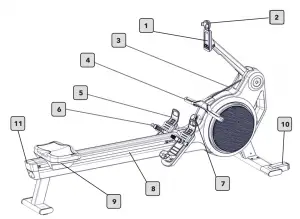
| ITEM | DESCRIPTION |
| 1 | Rower console |
| 2 | Phone holder |
| 3 | Chain |
| 4 | Handle |
| 5 | Foot length adjustment |
| 6 | Quick release foots trap binding |
| 7 | Resistance adjustment knob |
| 8 | Rail |
| 9 | Seat |
| 10 | Transport wheels |
| 11 | Transport handle |
Specifications
The Heat Row is not suitable for therapeutic purposes
| Specifications | EN ISO 20957-1 / EN 957-7 / prEN ISO 20975-7, Product Class SB, adjustment by repeatable resistance steps |
| Braking System | Speed Independent |
| Product Gross Weight | Approx. 62kg |
| Max User Weight | 330 lb (150 kg) |
| Length / Width / Height | 84″ x 31.88″ x 48.03″ (213 x 81 x 122 cm) |
| Surface Area | 18.6ft2 (1.73m2) |
| Battery | 2 pcs. D Cell (LR20) batteries |
When possible, please use rechargeable batteries to help save the environment.
EU Declaration of Conformity
Electronic components satisfy the EMC Directive 2014/53/EU, EMC Directive 99/519/EC,and EN 60335-1:2012/ A14:2019 for electrical safety.
The Declaration of Conformity can be viewed at www.lifefitness.com.
Training area
Allow a minimum safety distance to any nearby equipment, objects or walls as illustrated below.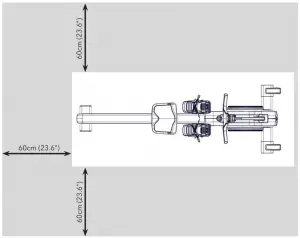
GETTING STARTED/ASSEMBLY/INSTALLATION/SPARE PARTS
Parts
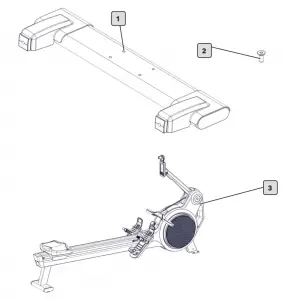
| ITEM | QTY | SPAR PART NUMBER | DESCRIPTION |
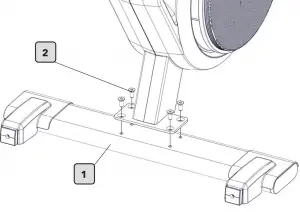
| 1 | 1 | 140-01-00014-01 (includes stabilizer and 4 bolts) | Stabilizer |
| 2 | 1 | Bolts | |
| 3 | 1 | Not available as spare part | Rower |
| REQUIRED TOOLS FOR ASSEMBLY |
| Torque wrench |
| 6 mm standard hex bit socket driver |
| Phillips head screwdriver (No. 1) |
Stabilizer Assembly
Stabilizer Assembly
| 1.
|  |
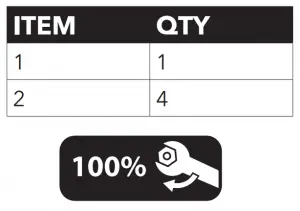 37 FT-LBS (50 Nm
Positioning the Console
| 2. 2.1 Raise the arm and snap into position | 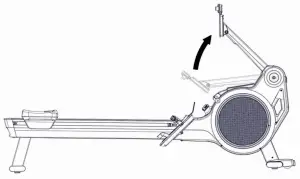 |
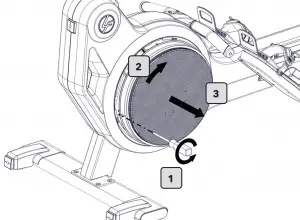
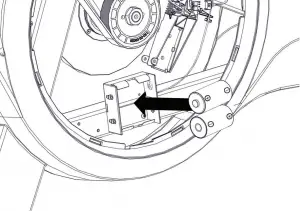
Inserting the Batteries
3.
|  |
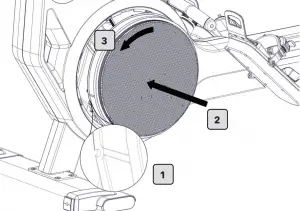
4.
|  |
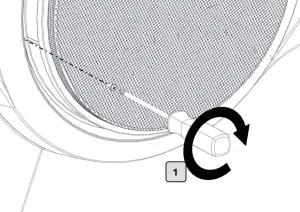
5.
|  |
6.
|  |
Warning Label Replacement
7.
|  |
Turn the console on by pulling the handle once.
Press the Menu button on the console to access the Programs screen.
Press the MENU button and the UP ARROW button simultaneously for 3 seconds to enter the settings menu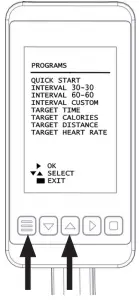
| SETTINGS | DESCRIPTION |
| System | Displays firmware and hardware information and settings relevant for service. |
| Language | Language selection. |
| Usage | Displays total usage in time and distance rowed. |
| Screen Timeout | Set the duration until the console stays on after the flywheel stops spinning. |
OPERATION
Console Overview
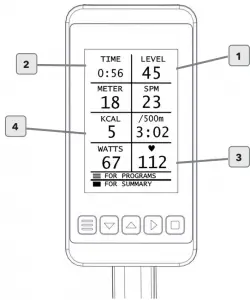
| ITEM | DATA READOUTS/BUTTONS | DESCRIPTION |
| 1 | Menu / Back Button. | Menu / Back button. |
| 2 | Down Arrow | Push to move cursor down in the menus. |
| 3 | Up Arrow | Push to move cursor up in the menus. |
| 4 | Right Arrow | Confirmation button. |
| 5 | Square Button | Push to pause and stop workout. |
| 6 | Training Programs | Overview |
| 7 | Quick Start | The Quick Start mode allows training without entering additional data. |
| 8 | Interval Training Custom Interval Training | Training mode for predefined or custom time oriented interval training. Interval 30 – 30: 30 seconds row and 30 seconds recovery (10 Rounds) |
| 9 | Target | Train according to user defined workout targets. Distance |
Turning the Rower ON and OFF
Turn on the rower by pulling the handle of the rower for one complete stroke.
The rower will automatically shut off when no longer in use.
Workout Screen Overview
The workout screens consist of 4 – 8 mulitiple tiles or power curve which provide various metrics during your workout.
| ITEM | DATA | DESCRIPTION |
| 1 | Resistance level | The value indicates the position of the resistance knob 0 – 100. |
| 2 | Workout time | Indicates the accumulated workout time |
| 3 | Heart Rate | The value indicates the current BPM |
| 4 | Tile | Tiles provide specific metrics. See page 18 for an overview of the available metrics. |
Training Mode Tiles (displayed in information overview)
| TILE NAME | DESCRIPTION | QUICK START | INTERVAL | TARGET | RACE |
| SPM | Strokes per Minute | X | X | X | |
| 500m | Current 500m pace | X | X | X | X |
| Watt | Current Power | X | X | X | |
| kCal | Calorie Consumption | X | X | X | (X) |
| Meters | Distance Rowed | X | X | X | X |
| BPM | Heart Rate (beats per minute) | X | X | X | X |
| 500m Avg | Average pace required to row 500m | (X) | (X) | (X) | (X) |
| 500m Max | Best pace in current workout | (X) | (X) | (X) | |
| Watt Avg | Average Power | (X) | (X) | (X) | (X) |
| Watt Max | Maximum Power | (X) | (X) | (X) | |
| SPM Avg | Average Strokes Per Minute | (X) | (X) | (X) | (X) |
| SPM Max | Maximum Strokes Per Minute | (X) | (X) | (X) | |
| BPM Avg | Average Beats Per Minute | (X) | (X) | (X) | (X) |
| BPM Max | Maximum Beats Per Minute | (X) | (X) | (X) | |
| Level | X | X | X | X |
| X | Available during workout only |
| (X) | Shown in the workout summary |
Chest Belts
Polar compatible heart rate sensors at 5.5 kHz (coded sensors recommended)
Phone Holder
Phone Holder (fig. a).
Warning:
Do not use the phone holder if your device is slippery or wet.
Use only if your device fits securely in the mobile phone holder.
Maximum dimensions and weight:
6.7×3.1×0.4 Inches (170x80x12mm) Weight: 8.1 ounces (230gr.)
Minimum dimensions
2.2×2.8×0.2 Inches (55x70x6mm)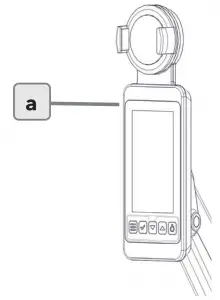
Binding/Footplate
Adjusting the foot binding
The slider footplate is designed to fit a wide range of foot sizes and is very simple to use. To adjust, lift the top sliding portion of the footplate and slide up or down. The numbers 1-8 marked on the footplate, represent a guideline from which the proper length can be determined. Secure the plate onto the mounting pegs and push down firmly to lock into position. Tighten the binding by pushing down on the tab. To release the binding, pull the tab.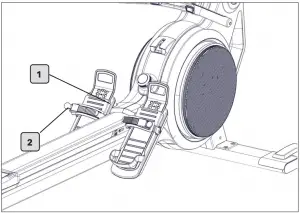
| ITEM | DESCRIPTION |
| 1 | Slider Footplate |
| 2 | Binding – Tab |
Resistance Knob
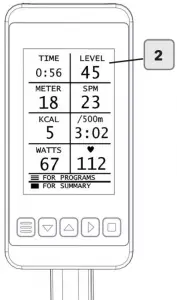
A knob is used to adjust the resistance from the lightest resistance to the heaviest from 1 – 100. The resistance value is displayed in the upper right-hand corner of the console screen once either a Quick Start, Power Training or Heart Rate Training workout is selected.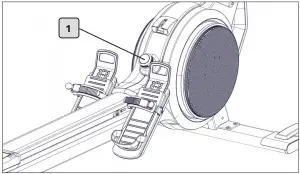
| ITEM | DESCRIPTION |
| 1 | Resistance knob |
| 2 | Resistance as displayed during a workout |
How to Row
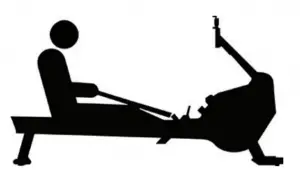
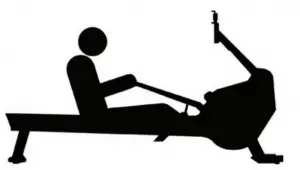
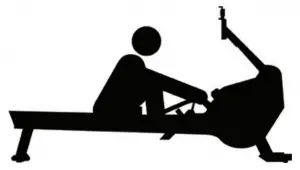
- Sit on the rower facing the console.
- Position your feet in the foot bindings and fasten.
WARNING: An open binding could interfere with your workout. - Begin the stroke comfortably forward and push strongly back with your legs while keeping your arms and back straight.
- Begin to pull your arms back as they pass over your knees and continue the stroke through to completion, rocking slightly back over your pelvis.
- Return to the starting position and repeat.
- For further details regarding rowing technique please refer to our website at www.lifefitness.com.
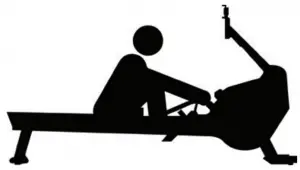
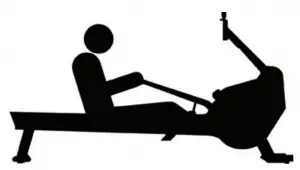
| CATCH | DRIVE | FINISH | RECOVERY | CATCH |
| Comfortably for- ward with straight back and arms. | Push with the legs while arms remain straight. | Pull through with arms and legs rocking slightly back on your pelvis. | Upper body tips forward over your pelvis and move forward. | Catch and begin again. |
 |  |  |  |  |
After Your Workout.
- Place the handle in it’s fixture
- Loosen the foot bindings and pull your feet out of the foot binding.
- Close the binding after your workout.
Moving the Rower
We advise moving the rower with 2 people. Lift the rower from the back of the rail and onto the wheels on the stabilizer.
Please take extra care when moving the rower over uneven surfaces. A second person is advisable to prevent the rower from tilting to one side. Allow a minimum safety distance away from any equipment, objects or walls.
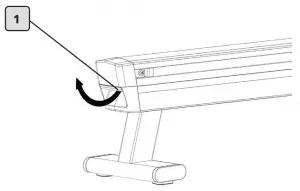
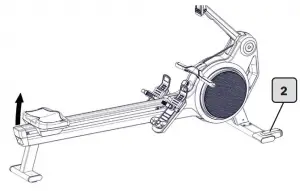
| ITEM | DESCRIPTION |
| 1 | Transport Handle |
| 2 | Integrated wheels in Stabilizer |
MAINTENANCE/SERVICE SCHEDULES
Please carefully observe the following instructions. The maintenance and care procedures must be performed as defined to ensure maximum operating safety and lifespan. Irregularly executed maintenance and care procedures will lead to increased wear to the product and will void the warranty. If you have any further questions on this topic, please contact our technical support.
Only use acid solvent-free and abrasive free maintenance care agents and cleaning agents to prevent damage to components of the rower.
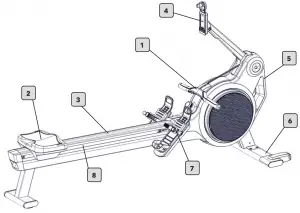
| DAILY MAINTENANCE | |||
| Item | Description | Instructions | Notes |
| 1 | Clean handle (1) | Clean with a lint free cloth and mild detergent / disinfectant after each workout. | |
| 2 | Clean seat (2) | ||
| 3 | Clean rail (3) | ||
| WEEKLY MAINTENANCE | |||
| 4 | Clean console and arm (4) | Clean with a lint free cloth and mild detergent / disinfectant after each workout. | |
| 5 | Clean shroud (5) | ||
| 6 | Clean stabilizers (6) | ||
| 7 | Clean foot straps | ||
| 8 | Clean castors / tracks (7) | Perform a visual inspection of the castors and rails and clean with mild detergent and lint free cloth is needed. | |
| 9 | Rub down with Maintenance spray 3,5,6,7 & 8 | Rub down components with a lint free cloth and maintenance spray | |
| MONTHLY MAINTENANCE | |||
| Item | Description | Instructions | Notes |
| 10 | Check complete rower for loose nuts or bolts. | Inspect the rower for loose nuts, bolts. Check that all connections are fitted firmly. Review the rower for damage and test function. | |
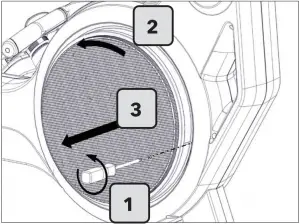
| 11 | Vacuum dust from inside the right cover.
| 
| |
| MAINTENANCE EVERY 50 HRS OF USE | |||
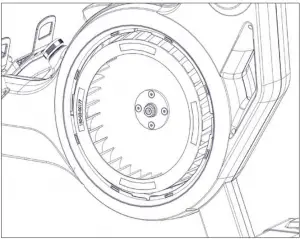
| 12 | Carefully extend the handle and chain from the rower. Run the chain from back to front through a dry lint free cloth, to clean the chain. Lubricate the chain by applying a fine, non-resinous oil to a cloth and running the chain through it from back to front. | 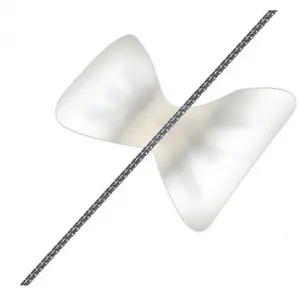 | |
WARRANTY
What is Covered
This LIFE FITNESS commercial exercise equipment product is warranted to be free of all defects in material and workmanship.
Who is Covered
The original purchaser or any person receiving the product as a gift from the original purchaser. Warranty will be voided on subsequent transfers.
How long it is covered
All coverage is provided by specific Product according to the guidelines listed in Warranty Information.
Who Pays Transportation and Insurance for Service
If the Product or any covered part must be returned to a service facility for repairs, We, Life Fitness, will pay all transportation and insurance charges for the first year. You are responsible for transportation and insurance charge after the first year.
What We Will Do To Correct Covered Defects
We will ship to you any new or rebuilt replacement part or component, or at our option, replace the Product. Such replacement parts are warranted for the remaining portion of the original warranty period.
What is Not Covered
Any failures or damage caused by unauthorized service, misuse, accident, negligence, improper assembly or installation, debris resulting from any construction activities in the Product’s environment, rust or corrosion as a result of the Product’s location, alterations or modifications without our written authorization or by failure on your part to use, operate and maintain the Product as set out in your Operation Manual (“Manual”).
All terms of this warranty are void if this product is moved beyond the continental borders of the United States of America (excluding Alaska, Hawaii and Canada) and are then subject to the terms provided by that country’s local authorized Life Fitness representative.
What You Must Do
Retain proof of purchase. use, operate and maintain the Product as specified in the Manual; notify the place of purchase of any defect within 10 days after discovery of the defect; if instructed, return any defective part for replacement or, if necessary, the entire Product for repair. Life Fitness reserves the right to decide whether or not a product is to be returned for repair.
How to Get Parts and Service
Refer to the Corporate Headquarters section of this manual for your local service contact information. Reference your name, address and the serial number of your Product (consoles and frames may have different serial numbers).
They will tell you how to get a replacement part, or, if necessary, arrange for service where your Product is located.
Exclusive Warranty
THIS LIMITED WARRANTY IS IN LIEU OF ALL OTHER WARRANTIES OF ANY KIND EITHER EXPRESSED OR IMPLIED, INCLUDING BUT NOT LIMITED TO THE IMPLIED WARRANTIES OF MERCHANTABILITY AND FITNESS FOR A PARTICULAR PURPOSE, AND ALL OTHER OBLIGATIONS OR LIABILITIES ON OUR PART. We neither assume nor authorize any person to assure for us any other obligation or liability concerning the sale of this Product. Under no circumstances shall we be liable under this warranty, or otherwise, of any damage to any person or property, including any lost profits or lost savings, for any special, indirect, secondary, incidental or consequential damages of any nature arising out of the use of or inability to use this Product. Some states do not allow the exclusion or limitation of implied warranties or of liability for incidental or consequential damages, so the above limitations or exclusions may not apply to you.
Changes in Warranty Not Authorized
No one is authorized to change, modify or extend the terms of this limited warranty.
Effects of State Laws
This warranty gives you specific legal rights, and you may have other rights which vary from state to state and country by country.
Our Pledge To You
Our Products are designed and manufactured to the highest standards. We want you to be completely satisfied with our Products and will do everything possible under the terms of this warranty to keep you secure in knowing you have bought the best!
Warranty Information
| HEAT ROW | |
| Frame | 3 Years (excludes coatings) |
| Mechanical | 2 Years |
| Electrical | 1 Year |
| Wear Items | 6 Months |
| Labor | 90 Days |
| Mechanical includes: Resistance System, Handlebar (excludes electronics), Chain, Drivetrain | |
| Electronic includes: Console, Pcbs, Cable Harness, Batteries | |
| Wear items include: Seat and Foot Strap | |

© Copyright 2020, Life Fitness, LLC. All Rights Reserved. Life Fitness, Hammer Strength, Cybex, ICG and SCIFIT are registered trademarks of Life
Fitness, LLC and its affiliated companies and subsidiaries. Brunswick and related trademarks used under license from Brunswick Corporation.
Disclaimer: Images and specifications are current as the date of publication and are subject to change.
Columbia Center III, 9525 Bryn Mawr Ave., Rosemont, IL 60018 , 847-288-3300 www.lifefitness.com, 2021
 Fitness & Exercise Equipment for Your Facility or Home | Life Fitness
 Life Fitness Technical Support - Documents & Software