OCSD Series Wireless Dynamometer
Anyload OCSD Wireless Dynamometer
Introduction and Product Features
The Anyload OCSD Wireless Dynamometer is a high-quality weighing
instrument equipped with a microprocessor for precision and
accuracy. It is suitable for various weighing applications and
comes with a wireless indicator for easy configuration and
calibration. Its key features include:
- Rugged construction with aluminum and alloy steel capacities
that are powder-coated - Accuracy of 0.05% for 1-50t, 0.1% for above 50t capacity
- Dual-direction wireless communication
- Clear LCD display with backlighting and 1-inch high digits for
distant viewing - Two user-programmable set points for safety and warning
applications - Powered by 3 standard AA size alkaline batteries
- Available in commonly used units such as kilograms (kg), tons
(t), pounds (lb), newton (N), and kilo-newton (kN) - Easy operation through its wireless handheld indicator
- 4 local mechanical keys for ON/OFF, ZERO, PEAK, and Unit
Change - Low battery warning
- RF wireless handheld indicator is powered by 4 standard AA size
alkaline batteries
Safe Operation Guides
To ensure safe operation of the Anyload OCSD Wireless
Dynamometer, please follow these guidelines:
- Do not exceed the rated load capacity of the dynamometer and
its shackle(s). - Avoid performing overhead weighing and stay away when the
dynamometer is in operation. - Do not perform weighing under strong wind, as it may cause
inaccurate readings. - Avoid weighing in an environment with rapid temperature change,
as it may cause incorrect readings. - Do not attempt to open the dynamometer, as there are no
serviceable parts inside. - Do not remove the wire rope stopper from the hook. Always apply
it for safety reasons. - Remove all loads from the shackle or hook when not in use.
- Before weighing, check that all hanging and load-receiving
elements are secure and undamaged.
Technical Data and Specifications
Main Technical Date
- Rated Load Capacity: 1-500t
- Accuracy: 0.05% for 1-50t, 0.1% for above 50t capacity
- Wireless Communication Distance: Up to 100m
- Battery Life: Approx. 200 hours
Technical Specifications
- Units of Measure: kg, t, lb, N, kN
- Display: LCD with backlighting and 1-inch high digits
- Keys: ON/OFF, ZERO, PEAK, Unit Change
- Power Supply: 3 standard AA size alkaline batteries
- Wireless Indicator Power Supply: 4 standard AA size alkaline
batteries
Appearance Illustration
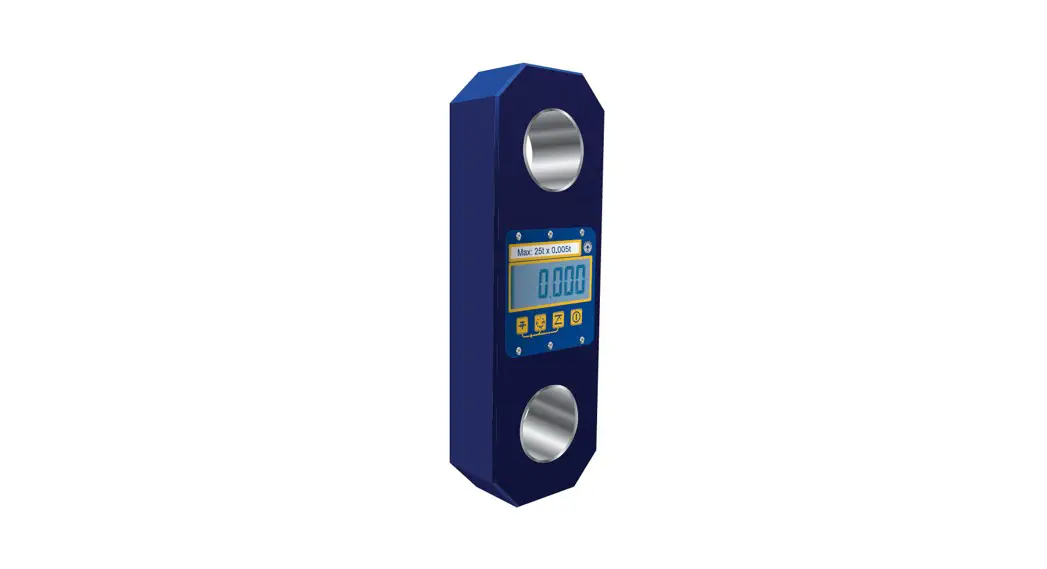
The Anyload OCSD Wireless Dynamometer has a compact and sturdy
design, with a shackle and a hook for easy attachment. It also
comes with a wireless indicator for convenient operation.
Dynamometer Functions Guides
The Anyload OCSD Wireless Dynamometer comes with various
functions that are easy to use. These include:
- On/Off: Press the ON/OFF key to turn on or
turn off the dynamometer. - Zero: Press the ZERO key to reset the display
to zero. - Tare: This function is not available on the
OCSD Wireless Dynamometer. - Peak Hold: Press the PEAK key to display the
highest weight measured since the last zero or tare. - Accumulation: This function allows you to add
up multiple weights. To start accumulation, press and hold the PEAK
key for 3 seconds. To stop accumulation, press the PEAK key
again.- Accumulation Search: Press and hold the UNIT
key for 3 seconds to search for accumulated values. - Accumulation Clear: Press and hold the ZERO
key for 3 seconds to clear all accumulated values.
- Accumulation Search: Press and hold the UNIT
- Battery Voltage: Press and hold the UNIT key
for 3 seconds to display the battery voltage. - Unit: Press the UNIT key to change the unit of
measurement. - Return: This function is not available on the
OCSD Wireless Dynamometer. - Set Point: Press the SET POINT key to set the
upper and lower limit for weight. When the weight is within the set
point range, the dynamometer will beep.
Wireless Indicator Operation Guides
The Anyload OCSD Wireless Dynamometer comes with a wireless
indicator for easy operation. To use the wireless indicator, follow
these steps:
- Insert 4 standard AA size alkaline batteries into the wireless
indicator. - Press and hold the ON/OFF key on the dynamometer until the
display shows “LoA”. This indicates that the dynamometer is in
wireless mode. - Press and hold the ON/OFF key on the wireless indicator until
the display shows “rF”. This indicates that the wireless indicator
is in search mode. - The wireless indicator will search for the dynamometer and
connect automatically. Once connected, the display will show the
weight measured by the dynamometer.
Parameter Settings and Calibration
The Anyload OCSD Wireless Dynamometer comes with easy-to-use
parameter settings and calibration functions. These include:
- Key Functions: The SET POINT key is used to
enter parameter settings mode. The UNIT key is used to navigate
through different settings. The ZERO key is used to confirm and
save settings. - Parameter Settings: The Anyload OCSD Wireless
Dynamometer allows you to customize various settings, such as unit
of measurement, backlighting, beep sound, auto power off, etc. - Calibration: The Anyload OCSD Wireless
Dynamometer comes with one-point and three-point calibration
functions. Calibration is recommended before first use and after
any major impact or change in temperature. To calibrate the
dynamometer, follow the instructions provided in the manual.
Display Illustration
The Anyload OCSD Wireless Dynamometer has a clear LCD display
with backlighting and 1-inch high digits for easy viewing. The
display shows the weight measured by the dynamometer, as well as
various settings and indicators.
Troubleshooting Guide
If you encounter any issues with the Anyload OCSD Wireless
Dynamometer, please refer to the troubleshooting guide provided in
the manual.
RS232 Protocol
The Anyload OCSD Wireless Dynamometer comes with an RS232
protocol for easy data transfer to a computer or other device.
Please refer to the manual for more information on how to use the
RS232 protocol.
OCSD
Wireless Dynamometer
Operations Manual (V1904)
Anyload Weigh & Measure Inc.
Website: www.anyload.com Email: [email protected]
TABLE OF CONTENTS
1. Introduction and Product Features
2
2. Safe Operation Guides
3
3. Technical Data and Specifications
3
3.1 Main Technical Date
3
3.2 Technical Specifications
4
3.3 Appearance Illustration
4
3.4 Power Supply
5
4. Display and Keys
6
4.1 LCD Display
6
4.2 Keys
6
5. Dynamometer Functions Guides
7
5.1 On/Off
7
5.2 Zero
7
5.3 Tare
8
5.4 Peak Hold
8
5.5 Accumulation
8
5.5.1 Accumulation Search
8
5.5.2 Accumulation Clear
9
5.6 Battery Voltage
9
5.7 Unit
9
5.8 Return
10
5.9 Set Point
10
6. Wireless Indicator Operation Guides
11
7. Parameter Settings and Calibration
13
7.1 Key Functions
13
7.2 Parameter Settings
13
7.3 Calibration
17
7.3.1 One-Point Calibration
17
7.3.2 Three-Point Calibration
18
8 Display Illustration
20
9 Troubleshooting Guide
21
10 RS232 Protocol
22
1 | ANYLOAD OCSD Wireless Dynamometer Operations Manual (V1904)
1. Introduction and Product Features
Thank you for choosing Anyload OCSD Wireless Dynamometer with P180/P380/P580 Wireless Display. The OCSD Wireless Dynamometer is a wellbuilt weighing instrument used for different weighing applications equipped with microprocessor for the precision and accuracy. Parameter settings and calibration are easy to configure through its wireless indicator.
Key Features include:
Rugged construction, aluminum and alloy steel capacities are powder coated.
Accuracy: 0.05% for 1-50t, 0.1% for above 50t capacity. Dual direction wireless communication All functions and units are clearly displayed on the LCD (with
backlighting) Digits are 1 inch high for distant viewing. Two user-programmable Set-Point that can be used for safety and
warning applications. The dynamometer is powered by 3 standard AA size alkaline batteries. All commonly used and internationally recognized units are available:
Kilograms (kg), Tons (t), Pounds (lb), Newton (N) and kilo-Newton (kN). Operation through its wireless handheld indicator, easier to calibrate and configure 4 local mechanical keys: “ON/OFF”,”ZERO”,”PEAK” and “Unit Change”. Low battery warning. RF wireless handheld indicator is powered by 4 standard AA size alkaline batteries
This manual provides installation, operation and configuration information of OCSD wireless dynamometer with its wireless indicator. It is recommended to go through the manual in details before installing, operating or configuring the scale.
2 | ANYLOAD OCSD Wireless Dynamometer Operations Manual (V1904)
2. Safe Operation Guides
1. Do not make lift beyond the rated load capacity of the dynamometer and its shackle(s).
2. Do not perform overhead weighing. Stay away when Dynamometer is in operation.
3. Do not perform weighing under strong wind, it may cause inaccurate readings.
4. Do not perform weighing in an environment with rapid temperature change, it may cause incorrect readings.
5. Do not attempt to open the dynamometer, there are no serviceable parts inside.
6. Do not remove wire rope stopper from hook. For safety reasons, always apply.
7. Remove all loads from shackle or hook when not in use. 8. Before weighing, check that all hanging, load- receiving elements and
devices are in good condition. 9. Check hook, shackle, safety pins, and latches periodically. Contact
your dealer for replacement parts in case of defect, deformities or worn out. 10. Always lift loads vertically.
3. Technical Data and Specifications
3.1 Main Technical Data
Display
25mm (1”) 5 digits LCD with backlight
Power on zero range
20% F.S.
Manual Zero Range
4% F.S.
Tare Range
100% F.S.
Stable Time
5 seconds
Overload Indication
100% F.S. + 9e
Max. Safety Load
125% F.S.
Ultimate Load
400% F.S.
Dynamometer battery
AA size alkaline batteries. 1.5Vx3
Indicator battery
AA size alkaline batteries. 1.5Vx4
Operating Temp.
– 10°C ~ + 40°C
Operating Humidity
85% RH under 20°C
Wireless Distance
Up to 30m
Wireless Frequency
2.4GHz (default), 433MHz,860MHz (optional)
3 | ANYLOAD OCSD Wireless Dynamometer Operations Manual (V1904)
3.2 Technical Specifications
Model
Capacity(kg)
OCSD-1t OCSD-2t OCSD-3t OCSD-5t OCSD-10t OCSD-20t OCSD-30t OCSD-50t OCSD-100t
OCSD-200t
1000 2000 3000 5000 10000 20000 30000 50000 100000
200000
Min. Weigh(kg)
10 20 20 40 100 200 200 400 1000
2000
3.3 Appearance Illustration
Division(kg)
0.5 1 1 2 5 10 10 20 50
100
Total counts (n)
2000 2000 3000 2500 2000 2000 3000 2500 2000
2000
Cap: 1-5t
Cap: 10-200t
DIMENSIONS (Dimensions shown are nominal and subject to tolerances)
MODEL CAP A(mm) B(mm) C(mm) D(mm) (mm) H(mm) Material
OCSD-1t 1t
245
112
37
190
43
335 Aluminum
OCSD-2t 2t
260
123
37
195
51
365 Aluminum
OCSD-3t 3t
260
123
37
195
51
365 Aluminum
OCSD-5t 5t
285
123
57
210
58
405 Aluminum
OCSD-
10t 320
120
57
230
92
535 Alloy Steel
10t
4 | ANYLOAD OCSD Wireless Dynamometer Operations Manual (V1904)
OCSD-
20t 375
128
74
260
127
660 Alloy Steel
20t
OCSD-
30t 420
138
82
280
146
740 Alloy Steel
30t
OCSD-
50t 465
150
104
305
184
930 Alloy Steel
50t
OCSD-
100t 570
190
132
366
229
1230 Alloy Steel
100t
OCSD-
200t 720
265
183
440
280
1362 Alloy Steel
200t
WEIGHTS:
Model
OCSD-1t
Unit Weight (kg)
Weight with shackles (kg)
Model
Unit Weight (kg)
Weight with shackles (kg)
1.6
3.1 OCSD-
20t 17.8
48.6
OCSD-2t
2.1
4.6 OCSD-
30t 25
73
OCSD-3t
2.1
4.6 OCSD-
50t 39
128
OCSD-5t
2.7
6.3 OCSD100t
81
321
OCSD10t 10.4
24.8 OCSD200t
210
776
3.4 Power Supply
Dynamometer battery: AA size alkaline batteries. 1.5V x 3 Indicator battery: AA size alkaline batteries. 1.5V x 4 Current: the dynamometer’s average current is about 35mA (DC); 3
pcs. of new batteries can be last up to 40 hours under continuous operation. Wireless indicator average current is about 28mA (DC); 4 pcs. of new batteries can last up 80 hours under continuous operation. Low battery warning: When the digits at the display are flashing, it means the battery needs to be replaced. The Dynamometer or wireless indicator will turn off automatically if no activities detected after an hour.
5 | ANYLOAD OCSD Wireless Dynamometer Operations Manual (V1904)
4. Display and Keys
4.1 LCD Display
a. 25mm (1”) 5 digits LCD with all functions and units.
b.
: Wireless signal: It shows up when the signal is stable; It
disappears when no signal detected; Flashing when the signal is weak.
c.
: Battery Voltage, : Full, : Low, : Empty
d. PEAKCurrent value is in Peak Hold value (maximum value).
e. MEMAppears once when Parameter or Calibration value is stored
to memory. Appearing in the display means the current value is added
to Accumulated data.
f. STB: Stable Status.
g. KN: “kilo-Newton”, N”Newton”. Tare status “N” will flash.
h. t “Ton”
i. lb “Pound”
j. kg “Kilogram ”
4.2 Keys
a. ON/OFF key
· Press “ON/OFF” key to turn on the dynamometer. · At ON status pressing “ON/OFF” key for 1 second, the
dynamometer will turn off. b. ZERO key
When t h e dynamometer at no load is showing reading other than zero, pressing this key will zero the reading. c. UNIT key
Pressing the UNITkey, the scale will switch its unit and the screen will display the following units in order: “kg” “lb” “N” “kN” “t” “kg”. d. PEAK key
6 | ANYLOAD OCSD Wireless Dynamometer Operations Manual (V1904)
When load is changing and unstable, pressing this key will catch and display the maximum reading of the load and freeze the screen. Pressing again this key will return to normal weighing mode.
5. Dynamometer Functions Guides
Note( ) means the key on the dynamometer
means the key on the indicator
means the display content
5.1 On/Off Turn ON dynamometer
OPERATION DISPLAY
DESCRIPTION
(ON/OFF) 88888 Self-test, flashing twice
Ert
Flashing twice
u=3.72 Displays the current software version
CH=E3 Displays the current wireless channel E3
5000 Displays the max capacity, e.g. 5t
U=3.98 Displays the current battery voltage
0
Waiting to stable Displays the current load, generally equal to 0
Turn OFF dynamometer
1
Manual Power OFF Press (ON/OFF) Key for 1 sec.
2
Remote Power OFF PressMENUor MODE Key at the indicator until
it displays “OFF” then pressENTERkey.
3
Auto Power OFF
Set the auto-off function in parameter settings. The
dynamometer will display -if having no operation
after 15 minutes to save power, and will turn off
automatically after 60 minutes.
5.2 Zero OPERATION
1 PressZERO PressZERO
2
DISPLAY 0
When the Dynamometer is on, generally it displays 0. In case no weight on it but displaying other than `0″, press this button to reset it.
7 | ANYLOAD OCSD Wireless Dynamometer Operations Manual (V1904)
5.3 Tare
OPERATION PressTARE
DISPLAY 0
When tare weight is hanged on the scale such as sling cable, pressing this key the “TARE” light will light on. The scale will display the net weight of the load.
5.4 Peak Hold OPERATION
Press (PEAK)
Press (PEAK)
DESCRIPTION Catch and display the Maximum value of changing load. Scale will return to normal weighing mode.
5.5 Accumulation
OPERATION
DISPLAY
PressMENUor ACCU
MODEkey 5
times
PressENTER
No*** H****
L****
DESCRIPTION
Current accumulation time Front four digits of total value Rear four digits of total value
5.5.1 Accumulation Search
OPERATION PressMENUor MODEkey 6 times Press ENTER
DISPLAY SACCU
No*** ***** H**** L****
DESCRIPTION
Current accumulation time Current weight reading Front four digits of total value Rear four digits of total value
Press MENUor
Return
MODEkey again
PressingTAREandZEROcan check different times, weight and accumulation.
8 | ANYLOAD OCSD Wireless Dynamometer Operations Manual (V1904)
5.5.2 Accumulation Clear
OPERATION
Press MENUor MODE key 7 times
Press ENTER
DISPLAY CLEAr
DESCRIPTION
CLr 1 noCLr 88888
Ask if you want to clear or not PressMENUkey Cancel clear PressENTERkey Confirm clear
5.6 Battery Voltage
OPERATION
DISPLAY
DESCRIPTION
Press MENUor
MODEkey 3 times, Display “dC”, press
U *.**
Displays the current battery voltage
ENTERkey.
Press MENUor MODE key again
Return
NoteBattery voltage normally between U 3.50to U 4.70, if below U 3.10,
the display will flash, Battery should be replaced.
5.7 Unit
OPERATION
DISPLAY
1 PressMENUor
UnIt
MODEkey 4 times
DESCRIPTION
Press ENTERkey
Press MENUor MODE key 2 Press (UNIT)
Un=0
0 Un=0
Un=0, the unit is in kg. Press ZEROor DATEto select unit from 0-4. 1 means lb; 2 means N; 3 means KN; 4 means ton. Confirm chosen unit and return to weighing mode. The dynamometer will display kg, lb, N, kN, ton in sequence.
9 | ANYLOAD OCSD Wireless Dynamometer Operations Manual (V1904)
5.8 Return
OPERATION
DISPLAY
DESCRIPTION
PressMENUor
ESC
MODEkey 9 times
Press ENTERkey
0
Return to normal weighing
mode For P580, press the Esc key in the keypad to return to normal weighing mode.
5.9 Set Point There are two user-programmable Set-Point that can be used for safety and warning applications or to limit weighing:
_ 1 LO SP1 1 HI 2 LO SP2 2 HI
OPERATION
DISPLAY
DESCRIPTION
PressMENUor
SETUP
MODEkey twice
Confirm, enter into parameter setting program
Press ENTER PressENTERto
SP1 1 OFF
Set point 1 For new dynamometer, it displays
confirm
1 OFF. If already set, it will display
PressZERO to choose
1 HIor 1 LO
the set value. There are 3 choices: 1 OFF means you will not set a set point; 1 HI
means the indicator will alarm
when load exceeds the set value; 1
LO means the indicator will alarm
when the load is smaller than the
set value.
PressENTERto 02000
The screen should display 02000 if
confirm
you set it to 2000.
Press ZERO and 01000 TAREto change
Set “1 HI” or “1LO” Value. e.g. 1000kg
value
PressENTERto
SP2 Set point 2
confirm 10 | ANYLOAD OCSD Wireless Dynamometer Operations Manual (V1904)
PressENTERto confirm
2 OFF
PressZEROto choose
2 HIor 2 LO
PressENTERto confirm Press ZERO and TAREto change value
01200 03000
The screen will display 2 OFF. If already set, it will display the set value. There are 3 choices: 2 OFF means you will not set a set point; 2 HI means the indicator will alarm when load exceeds the set value; 2 LO means the indicator will alarm when load is smaller than the set value. The screen should display 01200 if you set it to 1200. Set “2 LO” or “2 HI” Value. e.g.3000kg
If you will not set a set point, just press the ENTERkey until it displays the next function.
6. Wireless Indicator Operation Guides
P180
P380 P580
DESCRIPTION/FUNCTION
Push button switch
ON/OFF ON & Pressing ON/OFF will turn on or turn off the OFF indicator.
ZERO
When the screen displays reading other than zero during weighing mode, pressing the ZERO will return the scale to zero.
TARE
1. When there is tare weight such as a container and thereadingisstable, pressing this key will display “0” and “N” indicator will flash.
2. Putting the object(s) into the container, the dynamometer will display the net weight.
3. If the object(s) and container are removed, the dynamometer will display a negative value.
4. During Parameter Settings, it can also be used as a directional key.
11 | ANYLOAD OCSD Wireless Dynamometer Operations Manual (V1904)
ENTER PEAK
MODE or MENU
Used as function selection, normally combined with MODE or MENU
When load is changing and unstable, pressing this key will catch and display the maximum reading of the load and freeze the screen. Pressing this key again will return to normal weighing mode.
Used to browse or shift the modes / menus / functions of the scale, normally combined with ENTER to select the menu: · PressingMODEkey once will
display “OFF” and pressingENTER will remotely turn off the dynamometer. The indicator will display “noSIG”, means no signal received. · PressingMODEkey twice will display “SETUP” and press ENTER to access its parameter settings. After setting the parameters, press the MODEkey to confirm the settings and to return to weighing mode. · PressingMODEkey 3 times will display “dC”. PressENTER to read current battery voltage. PressMODE key again to return to weighing
mode. · Pressing MODEkey 4 times will
display “Unit”. Press ENTER to access unit selection. PressZEROto select unit, pressMODE again to return to weighing mode. · Pressing MODE key 5 times will d i s p l a y “ACCU”. PressENTER t o access Accumulation status. Press MODEto return to weighing mode. · Pressing MODEkey 6 times will d i s p l a y “SACCU”. Press ENTER t o access Accumulation Search status. PressMODEkey to return to
12 | ANYLOAD OCSD Wireless Dynamometer Operations Manual (V1904)
weighing mode. · PressingMODEkey 7 times will
d i s p l a y “CLEAR”. Press ENTER t o access Accumulation clear status. The d i s p l a y w i l l s h o w “CLr 1”. Pressing TARE w i l l s h o w “noCLr”. PressMODE to return to weighing mode. · PressingMODE key 8 times will d i s p l a y “CLIbr”. PressENTER to enter into calibration program. When calibration is finished, pressMENU to return to weighing mode. · PressingMODE key 9 times will d i s p l a y “ESC”. Press ENTER to return to weighing mode.
7. Parameter Settings and Calibration
Setting the parameters and calibration can only be achieved using its wireless indicator (P180 or P380 or P580).
7.1 Key Functions
KEY
P180
P380
TARE
ZERO
MENU MODE
ENTER
P580
DATE MENU
FUNCTION
Move to next digit Set digit’s value Store and exit Confirm
7.2 Parameter Settings
OPERATION
DISPLAY
DESCRIPTION
PressMENUor MODEkey twice
SETUP
Confirm to enter into parameter settings menu
PressENTER FS=06 The screen displaying FS=06 means the
13 | ANYLOAD OCSD Wireless Dynamometer Operations Manual (V1904)
PressZEROor DATE
Press ENTERto confirm
PressZEROor DATE to choose
PressENTER
PressZERO or DATE to choose
PressENTER to confirm
PressENTER to confirm
PressZEROor DATE to choose
FS=05 Id=02 Id=02 Pt=0 Pt=0
Ab=24 Cd=11 Cd=12
scale will be set to 6000kg capacity scale. If set to FS=10 then the capacity will be 10000kg. Assuming we are setting a 5-ton scale, set FS=05. Here are the available capacities that can be set:02 / 03 / 05 / 06 / 10 / 15 / 20/30/50/60/75/80. The screen may display Id=02. This maybe the division set during previous calibration. Assuming we will set the 5-ton scale into 2kg division, so, we will set ld=02. Here are the available options: 01 / 02 / 05/10/20 circularly. The screen may display Pt=0. This indicates the decimal point position. We will set it to Pt=0 for the 2kg division. Choose decimal position. The options are 0/1/2/3 . 0=xxxxx, 1=xxxx.x, 2=xxx.xx, 3=xx.xxx. For Cap.5000kg ,we will set Pt=0 Zero range settings. A: zero range by hand (manual); B: automatic zero range. There are 6 options: 0=0%F. S; 1=2%F.S; 2=4%F.S; 3=10%F.S; 4=20%F.S; 5=50%F.S. Generally do not change this parameter. If Dynamometer was already calibrated, it will display the calibrated value for zero tracking range (e.g Cd=11). C: zero-tracking range. There are 6 options; 0=0d; 1=0.5d; 2=1d; 3=1.5d; 4=2d; 5=2.5d d: display speed. There are 3 options: 0=slow; 1=average; 2=fast. Before
14 | ANYLOAD OCSD Wireless Dynamometer Operations Manual (V1904)
PressENTER to confirm
LL=2
PressZEROor DATE to choose
LL=1
Press ENTER to confirm
Un=0
PressZERO or DATE to choose
Press ENTER to confirm
Un=0 OFF 1
PressZEROor DATE to choose
OFF 2
PressENTER PressENTERto confirm
SP1 1 OFF
PressZEROor DATE to choose
1 HIor 1 LO
calibration, set Cd=00 to achieve high accuracy. After calibration, set Cd back to Cd=11 again. Generally choose Cd=12. If Dynamometer was already calibrated, it will display the calibrated value for filter parameter (e.g LL=2). LL: filter parameter has 6 options from smallest to biggest. Before calibration, set LL=0, after calibration, set LL=1, generally choose LL=1. If Dynamometer was already calibrated, it will display the calibrated value for the measurement unit (e.g Un=0). Set Un=0 for kg, Un=1 for lb, Un=2 for N, Un=3 for KN, Un=4 for t, Generally, choose Un=0. If Dynamometer was already calibrated, it will display the calibrated value for auto off function (e.g OFF 1).
Auto Off has 3 options: 0: turn off by hand; 1: if no operation, the screen will display —– after 15minutes to save power; 2: if no operation, the screen will display —– after 15minutes, and turn off automatically after 60minutes. Generally, choose OFF=2. Set point 1
The screen will display 1 OFF, if this parameter was set. It will display the set value. There are 3 choices: 1 OFF means you will not set set point; 1 HI means the indicator will alarm when load exceeds the value you set; 1 LO means the
15 | ANYLOAD OCSD Wireless Dynamometer Operations Manual (V1904)
PressENTERto confirm
PressZEROor DATEand TAREto change value PressENTER PressENTERto confirm
02000 01000
SP2 2 OFF
PressZEROor DATEto choose
2 HI or
2 LO
PressENTERto confirm
PressZEROor DATEand TARE PressENTER PressENTER, ZEROor DATEand TAREto change value PressMENUor MODEkey
01200 03000
g= 9.7930
End 0
indicator will alarm when load is smaller than the value. The screen should display 02000 if parameter is set to 2000. Set “1 HI” or “1 LO” Value. e.g. 1000kg
Set point 2 The screen will display 2 OFF, if this parameter was set. It will display the set value. There are 3 choices: 2 OFF means you will not set set point; 2 HI means the indicator will alarm when load exceeds the value you set; 2 LO means the indicator will alarm when load is smaller than the value The screen should display 01200 if parameter is set to 1200. Set “2 LO” or “2 HI” Value. e.g.3000kg, input 3000
Acceleration due to gravity The screen will display the default or the calibrated (e.g 9.7930). User can change it according to local area gravity value. The value range is 9.783 – 9.832.
Confirm above parameter setting. Exit parameter setting program.
16 | ANYLOAD OCSD Wireless Dynamometer Operations Manual (V1904)
Below is the recommended division and decimal position of the scale according to its full scale capacity:
CAPACITY/DIVISION
1000kg/0.5kg 2000kg/1kg 3000kg/1kg 5000kg/2kg 10000kg/5kg 15000kg/5kg 20000kg/10kg 30000kg/10kg 50000kg/20kg
FS CAP
10 02 03 05 10 15 20 30 50
Id (DIVISION)
05 01 01 02 05 05 10 10 20
PtDecimal position 1 0 0 0 0 0 0 0 0
7.3 Calibration
User must set all parameters before doing calibration.
7.3.1 One Point Calibration
OPERATION
DISPLAY
Turn on dynamometer and indicator
0
PressMENUor MODE 8 times
CLIbr
PressENTERkey CAL 1
PressENTERkey CALSP
DETAILS In these instructions, we assume we have 5000kg dynamometer. Make sure it is displaying 0before starting the calibration. At this stage you can hang tare weight ( if it is required) then reboot the dynamometer to get zero reading.
Access calibration menu
When CAL 1 is displaying press enter to start the one point calibration In this stage we have to run the zero calibration. Make sure the scale has
17 | ANYLOAD OCSD Wireless Dynamometer Operations Manual (V1904)
no load and it is in stable status.
PressENTERkey LoAd
Hang the span calibration weight. In this example we will use a 3000kg weight. Wait until STB signal appearing in the screen
PressENTERkey
05000
It will display the full scale capacity you set in parameter settings. The first digit will be flashing. Wait until “STB” signal is displaying on the screen.
PressZEROor DATEand TAREkey
03000
We will change the value to 3000 since we will be using a 3000kg calibration weight. Press ZEROto change value, pressTARE
Press MENU or MODEkey
——- -oL-
to move to next digit. Confirm, store and run the span calibration
End
When End is displaying meaning calibration is finished.
3000
Attention: The test load required in order the calibration will continue should
be more than 20% of its FS capacity. It is highly recommended to use a test
load of at least 80% of its FS capacity to get a better calibration result.
7.3.2 Three Point Calibration
If you want the scale to have high linearity result, calibrate the scale using the 3 point calibration procedure:
Turn on the dynamometer. Make sure it is displaying 0 even there is tare weight on it.
Turn the indicator off. While the indicator is off, press and holdMENUor MODEkey then press the ON/OFF key until it displays LOCAL. For P180, you must use its USB and insert it to a PC to get a power.
18 | ANYLOAD OCSD Wireless Dynamometer Operations Manual (V1904)
OPERATION PressMENU
or MODE (insert to PC) Press ZERO
or DATE PressENTER
DISPLAY LOCAL
CLInt u 1.03
88888 Ert CH=E3 U=X.XX
PressMENU
or MODE PressMENU
or MODE PressENTER
SETdC SEtrF
SEt3P
CAL 3
PressENTER CALSP
PressENTER LoAd1
PressENTER
PressTARE andZEROor DATE
05000 01000
PressENTER LoAd2
DETAILS
Displays the Current indicator Software version
Displays the current indicator channel E3 Displays the current indicator voltage which is X.XX
Dynamometer’s RF parameter setting
Enter into a 3 point calibration
In these instructions, we will set 5000kg scale as an example. For the 5000kg scale, the recommended calibration weights are LOAD1: 1500kg, LOAD2: 3000kg, LOAD3: 5000kg Zero point calibration. Make sure the stable light is on before running this procedure At this stage you will load the LOAD1 which is 1500kg (from our example). First load must exceed 20% of its capacity. It will display FS capacity you set in parameter settings. Change the value into 1500. Press ZEROto adjust digit’s value and pressTAREto move to next digit. Wait until STB light turns on. Hanging the second load LOAD2 which is 3000kg (from our example). Second load must be at least 20% of its capacity greater than the first load. Wait until STB
19 | ANYLOAD OCSD Wireless Dynamometer Operations Manual (V1904)
light turns on.
PressENTER
Based on the first load, it will display the
01800
minimum weight required for the second load. From our example, it may display
1800.
PressTARE andZEROor
DATE
03000
The LOAD2 shall be 3000 (from our example). Press ZEROto adjust digit’s value and pressTAREto move to next digit. Change the value here into
Input 3000 and wait until STB light turns
on.
PressENTER LoAd3 Hanging the third load.
PressENTER 03600
Mention your Load3 must exceed 2600kg
PressTARE andZEROor 05000
From our example LOAD3 shall be 5000kg. Change the value here into 5000
DATE
and wait until STB light turns on
PressENTER —— –
End
5000
PressMENU
or MODE
ESC
Press Menu or Mode multiple times until it displays Esc then press enter to exit calibration.
First load: LOAD1 must be larger than 20% of its FS capacity and
LOAD1<LOAD2<LOAD3. Between LOAD1 and LOAD2 and LOAD2 and LOAD3,
the interval must be greater than 20% of its FS capacity.
8. Display Illustration
DISPLAY
ILLUSTRATION
noSIg
Without wireless signal
SEtUP
Enter into parameter setting
UAdJ
Enter voltage calibration
LoAd
Calibration point
¯ ¯ ¯ ¯ ¯
Exceed high limit
—– Err10 Err11
Exceed low limit Waiting stable Weight less than Min. Capacity Accumulated times overflow
DESCRIPTION Distance too far.
Tare weight cannot exceed full capacity Tare weight cannot be negative
Cannot accumulate the value Cannot accumulate after 30
20 | ANYLOAD OCSD Wireless Dynamometer Operations Manual (V1904)
Err12 Err13 no*** H****
L****
CLr noCLr 88888 ¯¯¯
noACC -oL0-
-oL1-
-Lb-
U*.**
End OFF Unstb
Accumulated weight overflow
Error in repeat accumulation
Current accumulation times Front four digit of accumulated
Rare four digit of accumulated
Ask if you really want to delete accumulated weight Give up deletion Confirm deletion
Input value is too large
Input value is too small No accumulated value Overload warning
Overload warning
Low battery warning
The voltage of battery
current
End
Turn off Input value before STB light on
times Cannot accumulate after 99999 Cannot accumulate one weight repeatedly
Total weight=front four digit + rare four digit Total weight=front four digit + rare four digit
In case of error deletion
When you input tare or weight value When you input tare or weight value When you check accumulation Tare + Net weight exceed full capacity + 9e Tare + Net weight exceed full capacity 125% Turns off automatically one minute later
When parameter setting or calibration ready
9. Troubleshooting Guides
21 | ANYLOAD OCSD Wireless Dynamometer Operations Manual (V1904)
PROBLEM No display
POSSIBLE CAUSE Defective battery Defective button
Digits flash Display does not respond to load changes
Power button not properly pressed Low battery Faulty load cell or PCB
Display experiences excessive Zero drift between weighing Displayed weight shows large error
Wireless distance shortened
Out of calibration Dynamometer does not stabilize after turning on
Dynamometer not Zeroed before applying weight Requires recalibration Kg/lb wrong selection Wireless indicator’s battery is low
SOLUTION Replace Requires authorized service Press and hold ON/OFF key for three seconds Replace battery Requires authorized service Re- calibration After turning on, heating 3-5 minutes. Depress ZERO before applying weight
See calibration See operation Replace battery.
10. RS232 Protocol
Precode
Data(ASCII)
0X +/-(0 means+
39 39 Comm odity
FF AA data da data data data F means – numbe
(H) ta
(L) )
r
X is
decimal
position
RS-232 Setup Instructions Communication Configuration Port : COM1 Baud Rate: 4800 Data Bits : 8 Stop Bits : 1 Parity : None Display mode HEX
F0 Stable Signal
F0: (stable)
00: (unstable)
F0 Wireless
Signal F0: Have
signal 00:
Without signal
22 | ANYLOAD OCSD Wireless Dynamometer Operations Manual (V1904)
Anyload Weigh & Measure Inc.
Website: www.anyload.com Email: [email protected] Fax: +1 866 612 9088
North America Toll Free: 1-855-ANYLOAD (269 5623)
 ANYLOAD Weigh & Measure Inc.