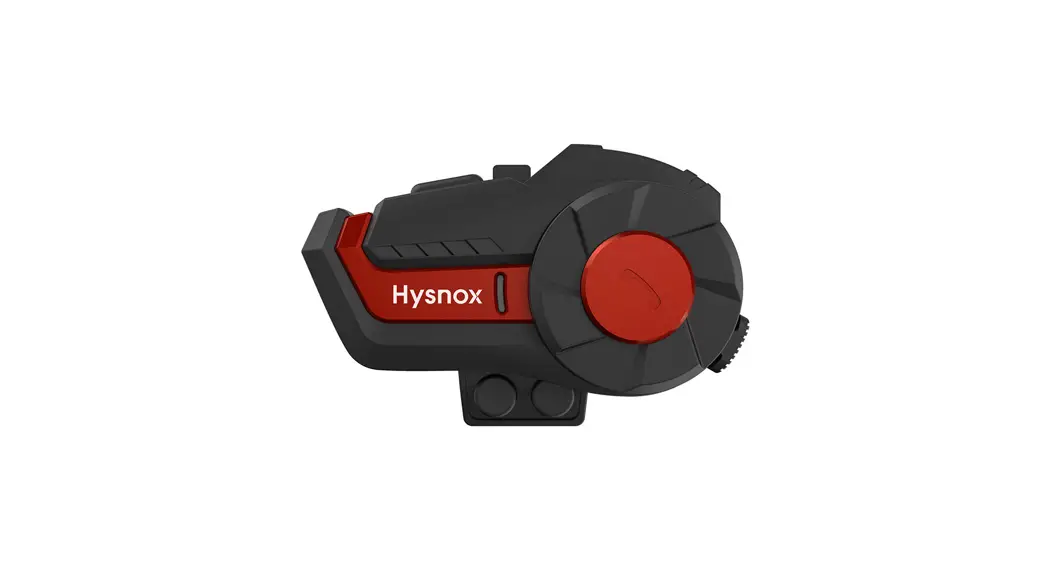
Motorhelm Headset
Product Information:
- Product Name: Helm Communicatie
- Product Type: Headset
- Compatible Devices: Any device supporting
Bluetooth - Included Parts: Refer to the user manual
- Battery Caution: Follow the battery usage
guidelines - Automatic Functions: Explore the automatic
features of the headset
Product Usage Instructions:
- To adjust the volume, hold the button until the sound level is
to your liking. - To perform a single click action, press the button once.
- To perform another single click action, press the button
again. - To charge the battery, connect the device. The LED will turn
red during charging and turn off when fully charged. - To install the headset on your helmet:
- Ensure that the Dynetix does not block any helmet
functions. - Attach the clip on the left side of the helmet using the
threads. - Attach the microphone on the left side of the helmet, making
sure it fits properly inside. - Attach the speaker on the right side of the helmet, behind the
cushions or helmet strap. - If necessary, stick velcro pads on the left side of the helmet
for better microphone and speaker placement. - Ensure the microphone runs behind the helmet cushions and fits
properly. - Secure the velcro pads previously placed and make sure the
microphone is positioned correctly. - Place the speaker behind the cushions or inside the slit as
shown in the user manual.
- Ensure that the Dynetix does not block any helmet
Stay connected, stay safe with Dynetix!
Helm Communicatie Handleiding | Manual
Inbegrepen onderdelen | Parts included
· BT-12 Intercom met Speakers & Microfoon · 2x Pop filter · Micro-USB Oplaadkabel · Aansluitstuk · 2x Schroef · Klitterband pads
· BT-12 Intercom with Speakers & Microphone · 2x Pop filter · Micro-USB Charging cable · Attachment piece · 2x Screw · Velcro pads
Batterij gebruik | Battery Caution
· Zorg er voor dat u de batterij niet vaak te lang oplaadt.
· Zorg er voor dat de intercom niet te heet wordt o.a. lang in de zon laten liggen.
· Gooi niet weg in de vuilnisbak, bevat Lithium batterij
· Make sure not to overcharge the battery frequently.
· Make sure that the intercom does not get too hot, e.g. Leave it in the sun for too long
· Don’t throw away in garbage container, contains Lithium battery
Headset diagram | Headset diagram
LHoHeriepamsdusimepLHosteurfaemudmnsecipttsgieuesmb|ruHikeadset funtions
Automatische functies | Automatic functions
· Aan / Uit Houd knop , 3 seconden ingedrukttot dat u de geluidstoon “Power on” hoort.
· Bluetooth pairing Houd knop , 3 seconden ingedrukt wanneer u de geluidstoon “Power on” hoort moet u knop ingedrukt blijven houden tot u de reminder “pairing” hoort.
· Pauzeren / Afspelen Klik 1 keer op knop om te pauzeren of om af te spelen.
· Vorig nummer Klik 1 keer op knop
· Volgend nummer Klik 1 keer op knop
·Geluidsniveau zachter Houd knop ingedrukt tot dat het geluidsniveau naar u wens is.
· On / Off Hold butten for 3 seconds untill the sound reminder “Power on”.
· Bluetooth pairing Hold button for 3 seconds, when the sound reminder “Power on” louds keep holding button untill you hear the reminder “Pairing”.
· Pauze / Play Press button once to pauze or to play.
· Previous song Press button once.
· Next song Press button once.
· Volume down Hold button untill the volume is to your liking.
· Geluidsniveau harder
· Volume up
Houd knop ingedrukt tot dat het Hold button untill the volume
geluidsniveau naar u wens is.
is to your liking.
· Oproep opnemen
· Answer call
Klik 1 keer op knop
Press button once.
· Oproep ophangen
· End call
Klik 1 keer op knop
Press button again.
· Automatisch verbinden De headset verbind automatisch met het laatst gekoppelde apparaat nadat dat je de headset aan zet.
· Automatische pairing mode Als u laatste gekoppelde apparaat niet verbind met de headset, dan gaat deze automatisch in pariring mode.
· Batterij besparing Na 5 minuten wordt de headset automatisch uitgeschakeld wanneer er geen apparaat verbonden is.
· Lage batterij toon Wanneer je de toon “Power low” hoort, is de batterij op 20%
· Automatic reconnect The headset automatically connects with the most recently paired device. · Automatic pairing mode when the most recently paired device is not in range or online, the headset will automatically enter bluetooth pairing mode. · Power saving mode 5 minutes after no device has been connected the headset will automatically turn off. · Low battery warning When you hear “Power low” the battery is 20% or less
Te gebruiken met elk apparaat die blueooth ondersteund
· Oplaadtijd Totale laadtijd van ongeveer 2 uur.
· Laadpoort Micro-USB
· LED indicator Tijdens het laden is de led rood, wanneer de batterij volledig is opgeladen gaat de led uit.
· Charging time Total charging time of 2 hours.
· Charging port Micro-USB
· LED indicator
During charging the led turns red, when the battery is fully charged the led turns off.
Installatie proces | Installation process
· Gebruik een kruiskop schroevendraaier om de klem losser te draaien.
· Stap 1
· Use a screwdriver to loosen
the threads.
· Stap 3
· Zoek de beste positie voor de Dynetix waarbij hij niet in de weg
· Find the best position for
the Dynetix, make sure it doesnt block any functions on your helmet
· Stap 5
· Steek de Dynetix Helm Communicatie aan de linker kant van de helm met gebruik van de clip.
· Put the Dynetix headset
on the left side of the helmet with the usage of the clip.
· Stap 2
· Haal de hoofd kussens uit de weg en pak de plakrand van de klitterband pads erbij.
· Stap 3
· Remove the cushions
from the helmet and grab the velcro pads.
· Plaats de speaker met de microfoon aan de linker kant van de helm, kijk hoe deze het best in uw helm past.
· Put the speaker with
the microphone on the left side of the helmet. Make sure it fits properly inside the helmet.
· Plak de klitterband pads rechts achter de helm riem of achter de hoofd kussens.
· Stick the velcro pads on
the right side of the helmet. Behind the cuchions or behind the helmet strap.
· Stap 7
· Zodra u weet waar de linker speaker met mic het best past, kunt u ook links de klitterband pads plakken.
· Once you have found the
best location for the microphone and speaker you can also stick the velcro pads on the left side of the helmet.
· Stap 6
· Plak allebij de speakers op de hiervoor geplaatste pads. Zorg dat de microfoon achter de kussens langs loopt.
· Stick both speakers on to
the previously placed velcro pads. Make sure the microphone runs behind the helmet cuchions.
· Stap 8
· Stap 9
· Plaats de kabels achter de hoofdkussens of langs de achter kant van de helm zoals aangegeven.
· Lay the cabels behind
the cuchions or inside the slit as seen in the last picture.
· Let op! Elke helm is anders, bij de ene helm past de Dynetix helm communicatie gelijk achter de helm band. En bij de andere helm moeten allen hoofd kussens uit de helm voordat de kit geplaatst kan worden.
· Warning! Every helmet is different, with some helmets the installation process is easy and doesnt take long. With others the process is more difficult and it will be necessary to remove the head cuchions.
Blijf verbonden, blijf veilig met Dynetix!