 Tag Team
User Guide
Quick Start Guide
This quick start guide contains important information on the safe operation of the product. Read and follow the safety advice and instructions given. Retain the quick start guide for future reference. If you pass the product on to others please include this quick start guide.
Safety instructions
Intended use
This device is intended for use as an effect pedal for electric bass guitars. Any other use or use under other operating conditions is considered to be improper and may result in personal injury or property damage. No liability will be assumed for damages resulting from improper use.
Danger for children Ensure that plastic bags, packaging, etc. are disposed of properly and are not within reach of babies and young children. Choking hazard! Ensure that children do not detach any small parts from the product. They could swallow the pieces and choke!
Where to use the product
Never use the product
- in conditions of extreme temperature or humidity
- in extremely dusty or dirty areas
- at locations where the unit can become wet
General handling
- To prevent damage, never use force when handling the product.
- Never immerse the product in water. Just wipe it with a clean dry cloth. Do not use liquid cleaners such as benzene, thinners or flammable cleaning agents.
Features
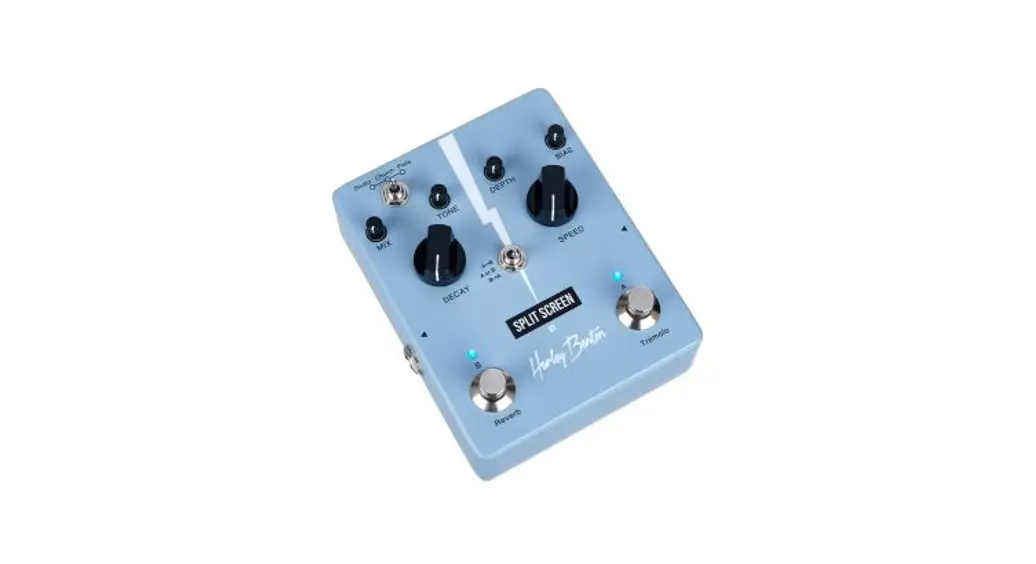
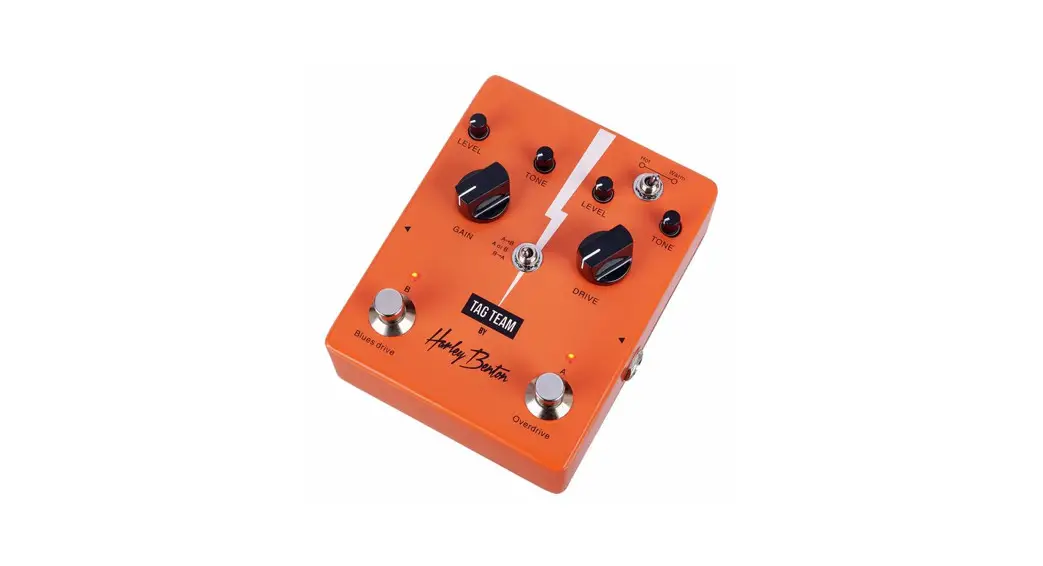
- Dual effect pedal for electric bass guitars
- Foot switches with LED indicators
- The effect modules A and B can be used simultaneously or individually and in any order
- Warm, analog, optical Tremolo (effect module A)
- High-quality Reverb with three different modes (effect module B)
- 3-way switch for effects order
- Power supply via 9 V power adapter (not included, suitable optional power adapter: item no. 409939, no battery operation)
Operating elements
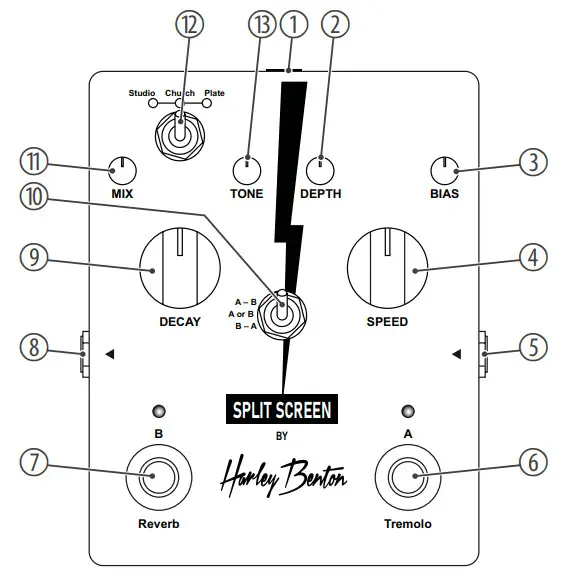
| 1 9 V | Socket for connecting a power adapter (not included) |
| 2 DEPTH | Rotary control for adjusting the depth of the Tremolo effect |
| 3 BIAS | Rotary control for adjusting the bias of the Tremolo effect |
| 4 SPEED | Rotary control for adjusting the speed of the Tremolo effect |
| 5 INPUT | 1/4″ jack socket for connecting instruments |
| 6 Tremolo | Footswitch for switching on/off the Tremolo effect |
| 7 Reverb | Footswitch for switching on/off the Reverb effect |
| 8 OUTPUT | 1/4″ jack socket for connecting an amplifier |
| 9 DECAY | Rotary control for adjusting the Decay time of the Reverb effect |
| 10 A – B | The Tremolo effect and the Reverb effect can simultaneously be enabled. The signal will go through the Tremolo |
| A or B | Either the Tremolo effect or the Reverb effect can be enabled. |
| B – A | The Reverb effect and the Tremolo effect can simultaneously be enabled. The signal will go through the Reverb effect and then to the Tremolo effect. |
| 11 MIX | Rotary control for adjusting the volume level of the Reverb effect |
| 12 Studio/Church/Plate | Switch to selecting the Reverb mode Studio: Warm and natural room reverb Church: Church reverb – wide, smooth, and natural Plate: Studio-style plate reverb |
| 13 TONE | Rotary control for adjusting the tone color of the Reverb effect |
Technical specifications
| • Input connections | 1/4″ jack socket Socket for connecting a power adapter |
| • Output connections | 1/4″ jack socket |
| • Power supply | External power adapter, 100 – 240 V ~ 50/60 Hz |
| • Power adapter | Secondary current 200 mA Secondary voltage 9 V Polarity Centre Negative |
| • Degree of rotection | IP20 |
| • Dimensions (W × H × D) | 95 mm × 37 mm × 120 mm |
| • Weight | 322 g |
| • Ambient conditions | Temperature range 0 °C…40 °C Relative humidity 20 %…80 % (non-condensing) |
 For the transport and protective packaging, environmentally friendly materials have been chosen that can be supplied to normal recycling. Ensure that plastic bags, packaging, etc. are properly disposed of. Do not just dispose of these materials with your normal household waste, but make sure that they are collected for recycling. Please follow the notes and markings on the packaging.
 This product is subject to the European Waste Electrical and Electronic Equipment Directive (WEEE) in its currently valid version. Do not dispose of your old device with your normal household waste. Dispose of this product through an approved waste disposal firm or through your local waste facility.
Comply with the rules and regulations that apply in your country.
If in doubt, consult your local waste disposal facility.
Thomann GmbH
Hans-Thomann-Straße 1
96138 Burgebrach
www.thomann.de
[email protected]
 Welcome – Thomann United States