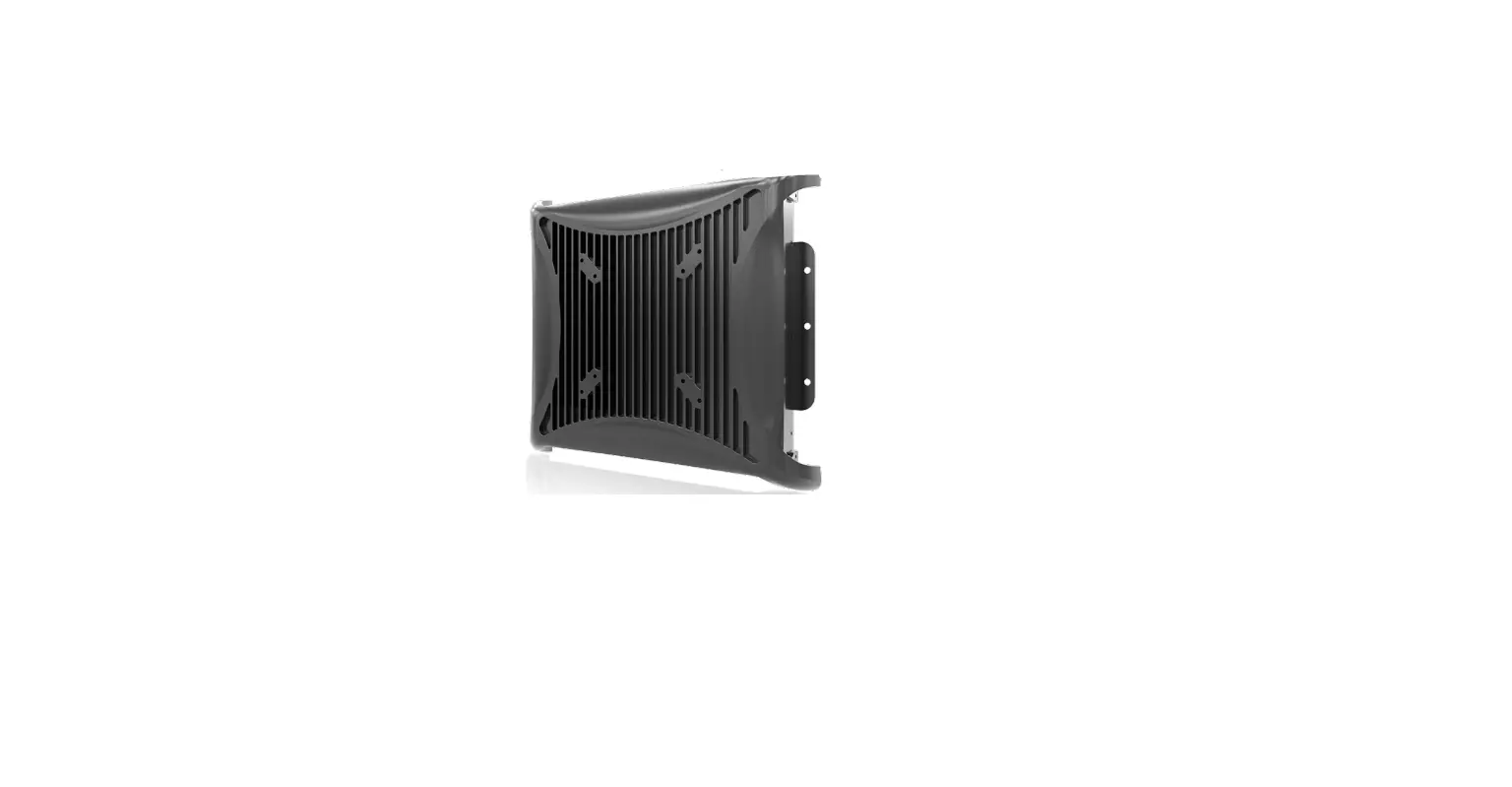

premio MX100H Series Monitor Module
Prefaces
| Revision | Description | Date |
| 1.0 | Manual Released | 2021/06/30 |
Disclaimer
All specifications and information in this User’s Manual are believed to be accurate and up to date. Premio Inc. does not guarantee that the contents herein are complete, true, accurate or non-misleading. The information in this document is subject to change without notice and does not represent a commitment on the part of Premio Inc.
Premio Inc. disclaims all warranties, express or implied, including, without limitation, those of merchantability, fitness for a particular purpose with respect to contents of this User’s Manual. Users must take full responsibility for the application of the product.
Copyright Notice
All rights reserved. No part of this manual may be reproduced or transmitted in any form or by any means, electronic or mechanical, including photocopying, recording, or information storage and retrieval systems, without the prior written permission of Premio Inc. Copyright © Premio Inc.
Trademarks Acknowledgment
Intel®, Celeron® and Pentium® are trademarks of Intel Corporation. Windows® is registered trademark of Microsoft Corporation. AMI is trademark of American Megatrend Inc. IBM, XT, AT, PS/2 and Personal System/2 are trademarks of International Business Machines Corporation All other products and trademarks mentioned in this manual are trademarks of their respective owners.
Environmental Protection Announcement
Do not dispose this electronic device into the trash while discarding. Please recycle to minimize pollution and ensure environment protection.
Safety Precautions
Before installing and using the equipment, please read the following precautions:
- Put this equipment on a reliable surface during installation. Dropping it or letting it fall could cause damage.
- The power outlet shall be installed near the equipment and shall be easily accessible.
- Turn off the system power and disconnect the power cord from its source before making any installation. Be sure both the system and the external devices are turned OFF. Sudden surge
- of power could ruin sensitive components. Make sure the equipment is properly grounded.
- When the power is connected, never open the equipment. The equipment should be opened only by qualified service personnel.
- Make sure the voltage of the power source is correct before connecting the equipment to the power outlet.
- Disconnect this equipment from the power before cleaning. Use a damp cloth. Do not use liquid or spray detergents for cleaning.
- Avoid the dusty, humidity and temperature extremes.
- Do not place heavy objects on the equipment.
- If the equipment is not used for long time, disconnect it from the power to avoid being damaged by transient over-voltage.
- The storage temperature shall be above -20°C and below 70°C.
- The computer is provided with a battery-powered real-time clock circuit. There is a danger of explosion if incorrectly replaced. Replace only with the same or equivalent type recommended by the manufacturer.
- If one of the following situation arises, get the equipment checked be service personnel:
- The power cord or plug is damaged.
- Liquid has penetrated into the equipment.
- The equipment has been exposed to moisture.
- The equipment does not work well or it cannot work according the user’s manual.
- The equipment has been dropped and damaged.
- The equipment has obvious signs of breakage.
Technical Support and Assistance
- Visit the Premio Inc website at https://premioinc.com/where you can find the latest information about the product.
- Contact your distributor, our technical support team or sales representative for technical support if you need additional assistance. Please have following information ready before you call:
- Model name and serial number
- Description of your peripheral attachments
- Description of your software (operating system, version, application software, etc.)
- A complete description of the problem
- The exact wording of any error messages
Conventions Used in this Manual
WARNING
This indication alerts operators to an operation that, if not strictly observed, may result in severe injury.
CAUTION
This indication alerts operators to an operation that, if not strictly observed, may result in safety hazards to personnel or damage to equipment.
NOTE
This indication provides additional information to complete a task easily.
Package Contents
Before installation, please ensure all the items listed in the following table are included in the package.
| Item | Description | Q’ty |
| 1 | MX100H Seris Monitor Module | 1 |
| 2 | USB Cable | 1 |
| 3 | VGA Cable | 1 |
| 4 | Screw Pack | 1 |
Note: Notify your sales representative if any of the above items are missing or damaged.
Ordering Information
| Model No. | Product Description |
| MX100H | Monitor Module with 1x VGA Input, 1x HDMI Input, 1x DP Input, 1x USB 2.0 Input |
Optional Accessories
| Model No. | Product Description |
| 1-E09A06007 | Adapter AC/DC 12V 5A 60W with 3pin Terminal Block Plug 5.0mm Pitch |
| SFICBL022 | Power Cord, 3-pin US Type, 180cm |
| 1-TPCD00002 | Power Cord, European Type, 180cm |
| 1-TPCD00001 | Power Cord, 3-pin UK Type, 180cm |
Product Introductions
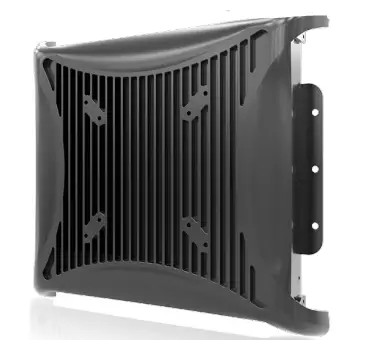
The MX100H series monitor module featuring with flat surface, IP 65 dust/waterproof front panel, and aluminum die-casting front frame with rugged body structure, it is rugged and reliable for industrial environment. By supporting Multi-Mode Display Module (MDM) technology, enabling MX100H series monitor module to configure, upgrade and maintain easily. The MX100H series supports both digital and analog signal input via three types of display interface: VGA, HDMI and DisplayPort. Touch screen can be connected with USB or COM port. It also has multi-language OSD function for adjusting the view options of display. In addition, supporting wide range power input from 9 to 48VDC and high reliability even operating in temperature extremes, MX100H is designed as an ideal solution for industrial application.
Featuring with completely cable-less designed and high functional, MX100H series are ruggedized display systems that can operate in harsh environments and easy to install and maintain. A build in over voltage protection (OVP), over current protection (OCP), reserve protection, and wide range DC power input makes MX100H series are safety system for all industrial applications.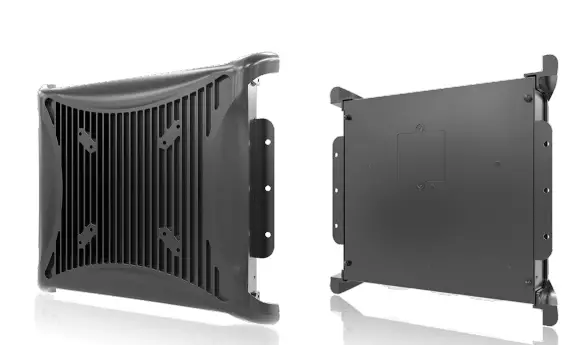
Key Features
- 1x VGA, 1x DisplayPort, 1x HDMI
- 1x USB 2.0, 1x COM, 1x Audio
- 9 to 48VDC wide range power input
- -10°C to 60°C extended operating temperature
Hardware Specification
I/O
- 1x VGA Input
- 1x HDMI Input
- 1x DisplayPort Input
- 1x Audio Input
- 1x USB 2.0 Input
- 1x COM Port Input (Resistive Touch Only) (USB & COM port are reserved for the connection to enable touch usage only)
Power
- 1x 3-pin Terminal Block Connector with Power Input 9~48VDC
- Power Ignition Sensing
- 1x Optional AC/DC 12V/5A, 60W Power Adapter
- Power Protection
- OVP (Over Voltage Protection)
- OCP (Over Current Protection)
- Reserve Protection
Environment
- Operating Temperature:
- Ambient with Air Flow:
- 10°C to 60°C (with Industrial Grade Peripherals)
- Storage Temperature: -20°C to 70°C
- Relative humidity: 10%~95% (non-condensing)
Physical
- Dimension: 246 (W) x 220 (D) x 37 (H) mm
- Weight: 1.61kg
- Construction: Extruded Aluminum with Heavy Duty Metal
- Mounting: VESA Mounting Holes 75 x 75mm, 100 x 100mm
Certifications
- CE
- FCC Class A
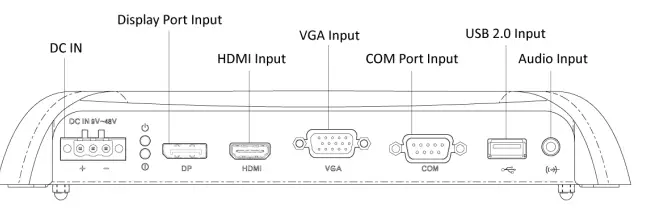
System I/O Rear
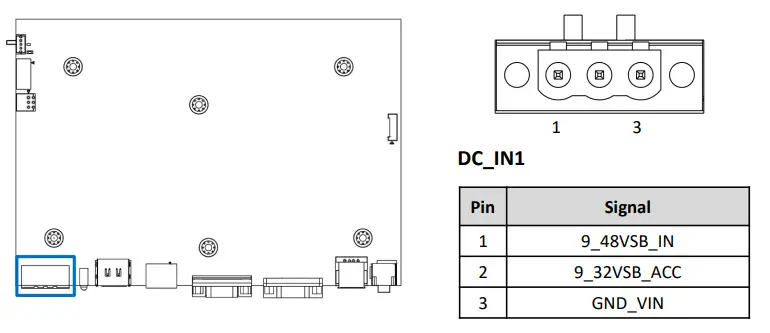
- DC IN
- Used to plug a DC power input with terminal block.
- HDMI
- Used to connect a DisplayPort monitor
- VGA
- Use the rear panel standard 15-pin female VGA connector to connect the monitor to the system graphics interface.
- DisplayPort
- The DisplayPort connector connects to a display device with DisplayPort interface.
- COM Port for Touch Panel Connector (Resistive Touch Only)
- Use the rear panel female DB-9 touch panel connector to connect the monitor to the system interface.
- USB for Touch Panel Connector
- Use the rear panel standard USB touch panel connector to connect the monitor to the system interface.
- Audio-in
- This port connects PC audio source by the bundled audio cable.

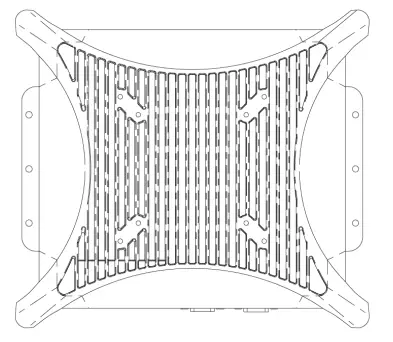
Top
- VESA Mounting Hole
- These are mounting holes for VESA mount (75x75mm and 100x100mm)

Mechanical Dimensions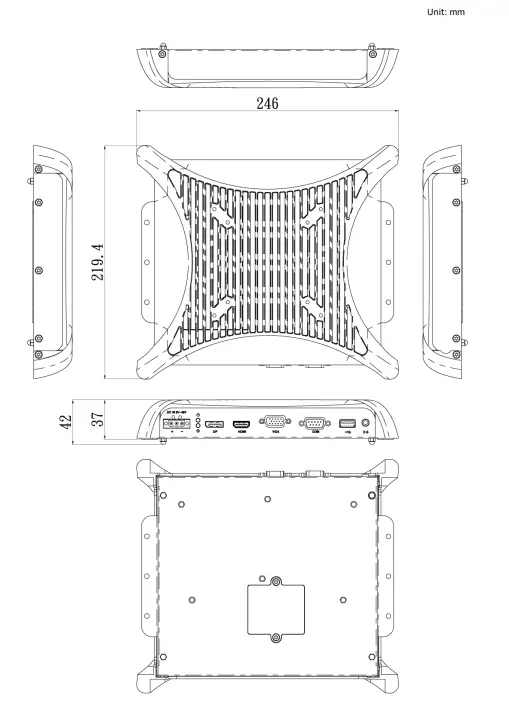
Switches and Connectors
Switch and Connector Locations
Top View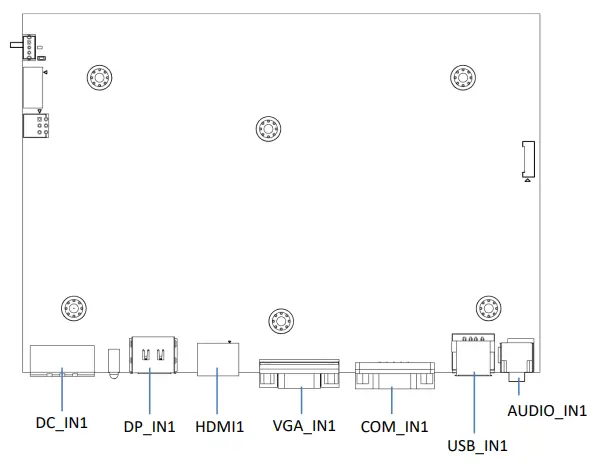
Bottom View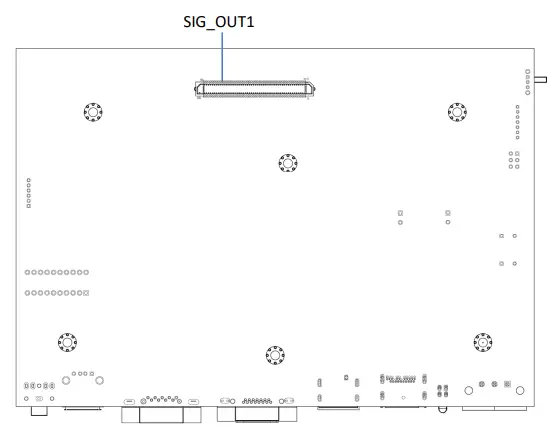
Rear I/O
Connector / Switch Definition
List of Connector / Switch
| Connector Location | Definition |
| DC_IN1 | 3-pin DC 9~48V Power Input Connector |
| DP_IN1 | DisplayPort Input Connector |
| HDMI | HDMI signal connector |
| VGA_IN1 | VGA Input Connector |
| COM_IN1 | COM Port Input Connector |
| USB_IN1 | USB 2.0 Input Connector |
| AUDIO_IN1 | Audio Input Connector |
| SIG_OUT1 | VIO Display Module Connector |
I/O Interface Descriptions
DisplayPort Input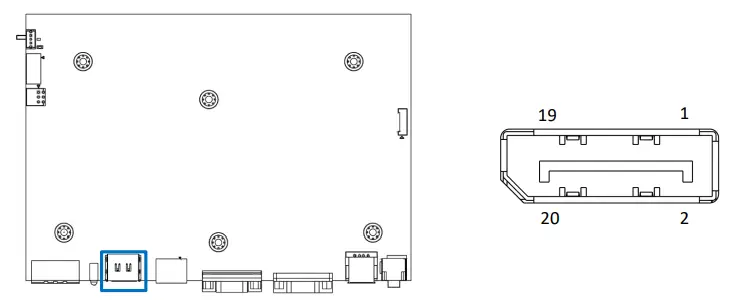
DP_IN1
| Pin | Signal | Pin | Signal |
| 1 | DP_RX3N | 11 | GND |
| 2 | GND | 12 | DP_RX0P |
| 3 | DP_RX3P | 13 | GND |
| 4 | DP_RX2N | 14 | GND |
| 5 | GND | 15 | DP_AUXP |
| 6 | DP_RX2P | 16 | DP_DET |
| 7 | DP_RX1N | 17 | DP_AUXN |
| 8 | GND | 18 | DP_HPD |
| 9 | DP_RX1P | 19 | GND |
| 10 | DP_RX0N | 20 | DP_3V3 |
I/O Interface Descriptions
HDMI signal connector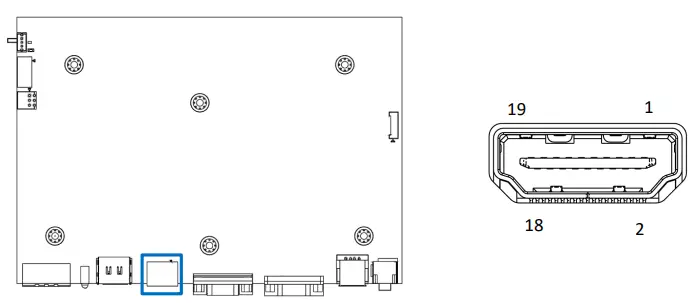
HDMI1
| Pin | Signal | Pin | Signal |
| 1 | HDMI_RX32+ | 11 | HDMI_DET |
| 2 | GND | 12 | HDMI_RX3C- |
| 3 | HDMI_RX32- | 13 | NC |
| 4 | HDMI_RX31+ | 14 | NC |
| 5 | GND | 15 | HDMI_SCL |
| 6 | HDMI_RX31- | 16 | HDMI_SDA |
| 7 | HDMI_RX30+ | 17 | GND |
| 8 | GND | 18 | HDMI_5V |
| 9 | HDMI_RX3C+ | 19 | HDMI_HPD |
| 10 | HDMI_RX3C+ | 20 |
VGA Input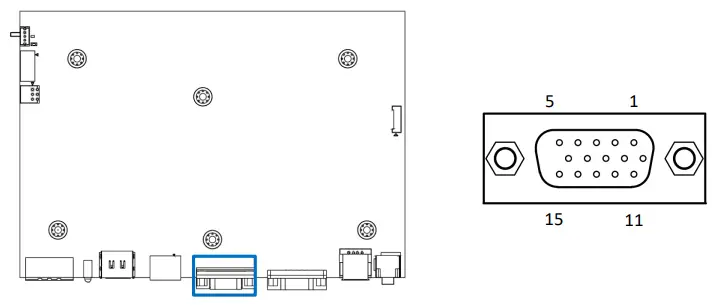
VGA_IN1
| Pin | Signal | Pin | Signal |
| 1 | RED+ | 9 | GND |
| 2 | GREEN+ | 10 | NC |
| 3 | BLUE+ | 11 | DDC_SDA_VGA |
| 4 | NC | 12 | HSYNC |
| 5 | VGA_DET | 13 | VSYNC |
| 6 | RED- | 14 | DDC_SCL_VGA |
| 7 | GREEN- | 15 | GND |
| 8 | BLUE- |
COM Port Input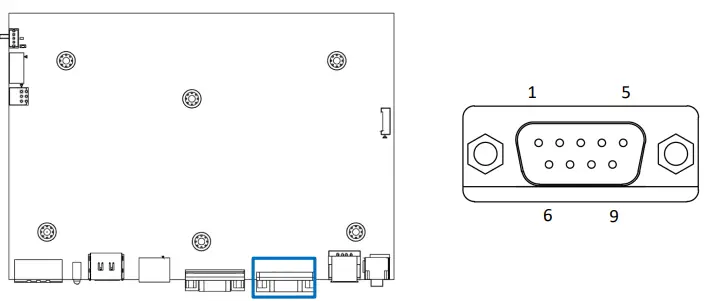
COM_IN1
| Pin | Signal |
| 1 | NC |
| 2 | RX_R_2 |
| 3 | NC |
| 4 | TX_R_2 |
| 5 | NC |
| 6 | NC |
| 7 | NC |
| 8 | NC |
USB 2.0 Input Connector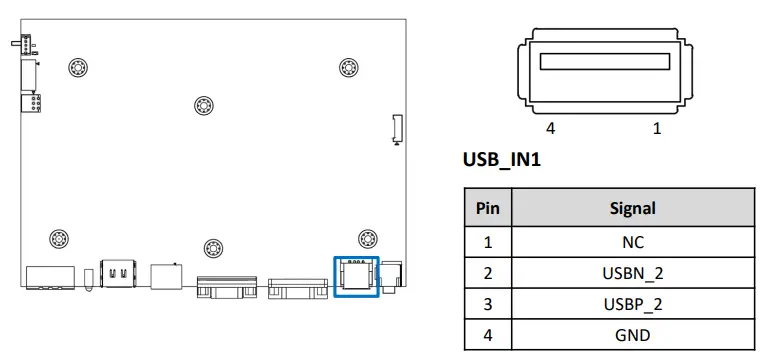
Audio Input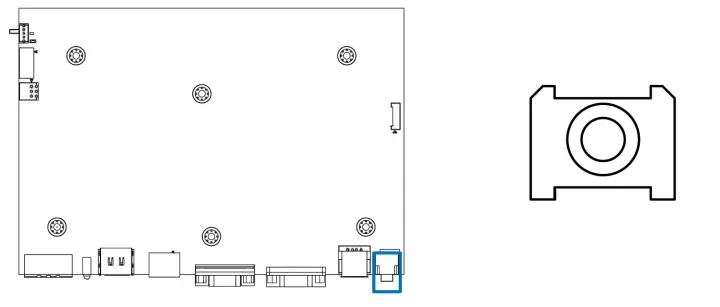
AUDIO_IN1
| Pin | Signal |
| 1 | AGND2 |
| 2 | AIN_R |
| 3 | AGND2 |
| 4 | AGND2 |
| 5 | AIN_L |
VIO Display Module Connector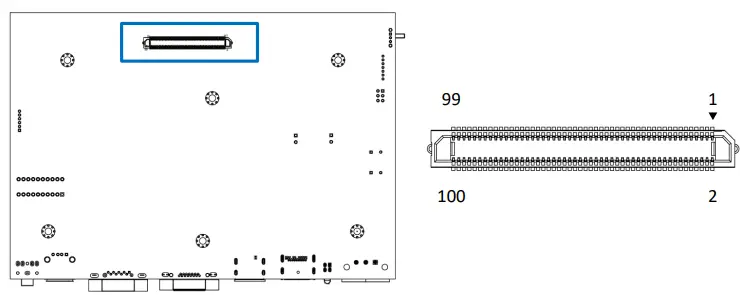
SIG_OUT1
| Pin | Signal | Pin | Signal |
| 1 | RXO0+ | 2 | DDC_SDA_VGA |
| 3 | RXO0- | 4 | DDC_SCL_VGA |
| 5 | GND | 6 | GND |
| 7 | RXO1+ | 8 | EDID_0 |
| 9 | RXO1- | 10 | EDID_1 |
| 11 | GND | 12 | GND |
| 13 | RXO2+ | 14 | EDID_2 |
| 15 | RXO2- | 16 | EDID_3 |
| 17 | GND | 18 | GND |
| 19 | RXO3+ | 20 | HDMI_SDA |
| 21 | RXO3- | 22 | HDMI_SCL |
| 23 | GND | 24 | GND |
| 25 | RXOC+ | 26 | USBP |
| 27 | RXOC- | 28 | USBN |
| 29 | GND | 30 | GND |
| 31 | RXE0+ | 32 | TX_R |
| 33 | RXE0- | 34 | RX_R |
| 35 | GND | 36 | GND |
| Pin | Signal | Pin | Signal |
| 37 | RXE1+ | 38 | POWER_KEY_R |
| 39 | RXE1- | 40 | AUTO_KEY_R |
| 41 | GND | 42 | GND |
| 43 | RXE2+ | 44 | MENU_KEY_R |
| 45 | RXE2- | 46 | UP_KEY_R |
| 47 | GND | 48 | GND |
| 49 | RXE3+ | 50 | DOWN_KEY_R |
| 51 | RXE3- | 52 | NC |
| 53 | GND | 54 | GND |
| 55 | RXEC+ | 56 | BL_ADJ |
| 57 | RXEC- | 58 | BL_EN |
| 59 | GND | 60 | GND |
| 61 | OUT-R+ | 62 | NC |
| 63 | OUT-R- | 64 | LEDB |
| 65 | NC | 66 | LEDA |
| 67 | OUT-L+ | 68 | NC |
| 69 | OUT-L- | 70 | NC |
| 71 | V5P0SB | 72 | V5P0SB |
| 73 | V5P0SB | 74 | V5P0SB |
| 75 | V5P0_LED | 76 | V5P0_LED |
| 77 | V5P0_LED | 78 | V5P0_LED |
| 79 | V3P3_LED | 80 | V3P3_LED |
| 81 | V3P3_LED | 82 | V3P3_LED |
| 83 | V3P3_LED | 84 | V3P3_LED |
| 85 | VCCM12 | 86 | VCCM12 |
| 87 | VCCM12 | 88 | VCCM12 |
| 89 | VCCM12 | 90 | VCCM12 |
| 91 | VCCM12 | 92 | VCCM12 |
| 93 | VCCM5 | 94 | VCCM5 |
| 95 | VCCM5 | 96 | VCCM5 |
| 97 | VCCM3 | 98 | VCCM3 |
| 99 | VCCM3 | 100 | VCCM3 |
Front Panel Controls
Users Controls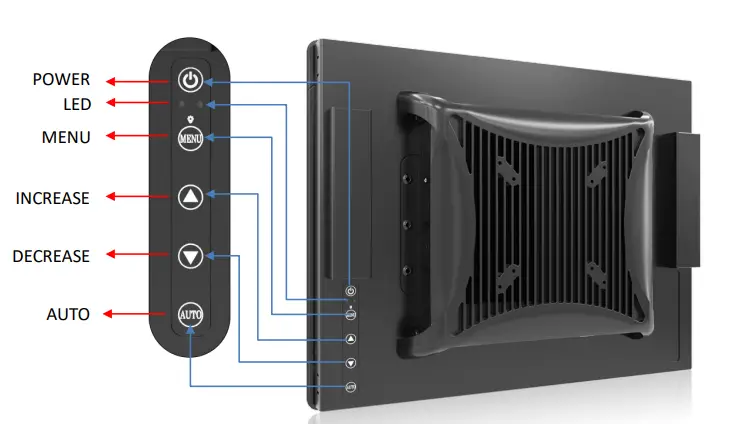
Power button
Turns the monitor on or off.
 LED
LED
- Blue indicates power on.
- Yellow indicates standby mode.
MENU/ Enter button
Press to view the OSD menu. Press it again to enter a selection in the OSD menu.
 Increase button
- Activates the Volume control menu, and increases the volume (with audio option).
- Scrolls the OSD menu upward.
Increases the value of a selected function.
 Decrease button
- Activates the Volume control menu, and decreases volume (with audio option).
- Scrolls the OSD menu downward.
- Decreases the value of a selected function.
AUTO/ Exit button
- When the OSD menu is active, press this button to exit the OSD menu.
- When the OSD menu is inactive, press this button for two seconds to activate the Auto Adjustment function and the monitor will automatically optimize the display position, focus, and clock of your display.
OSD Operation
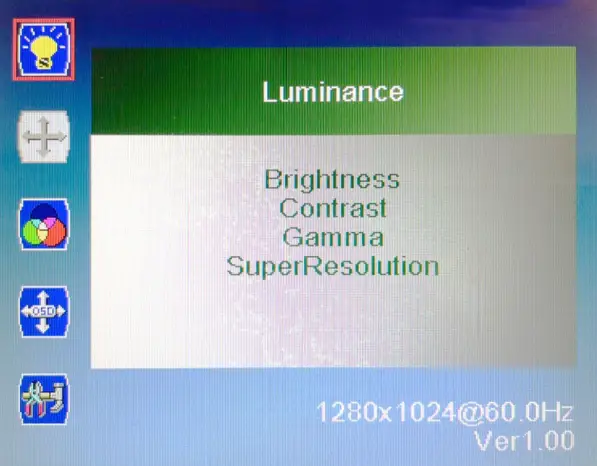
Luminance
- Brightness
Adjust the luminance level of the screen. - Contrast
Adjusts the contrast level of the screen. - Gamma
This item allows you to on or off the Gamma function. - SuperResolution
This setting allows you to select options for SuperResolution. Select <Off> , <Weak>, <Median> or <Strong>.
Picture (VGA input only)
- Phase
Adjust the monitor’s internal signal phase. - lock
Adjust the monitor’s internal sampling clock rate. - H. Position
Adjusts the position of the screen image left and right. - V. Position
Adjusts the position of the screen image up and down.
Color
Color Temperature
- 6500K: Select the setting of screen color to be reddish white. 7500K: Select the setting of screen color to be bluish white.
- 9300K: Select the setting of screen color to be bluish white.
- sRGB: Set the screen color to fit the sRGB standard color specification. User Define: Individual adjustments for red (R), green (G), blue (B).
OSD Settings
- Horizontal
Changes the viewing position of the OSD menu to the left or right area of the screen. - Vertical
Changes the viewing position of the OSD menu to the top or bottom area of the screen. - Transparency
Adjust to view the background information through the OSD. - OSD Time Out
Sets the time duration in seconds that the OSD is visible after the last button is pressed.
Setup
- Language
Selects the language in which the OSD menu is displayed. The factory default is English. - Mute
Allows the user to turn the Mute On or Off. - Input
When press Input Select change Input signal to D-SUB, DVI or DP. - Reset
Reset monitor parameters back to factory preset values.
System Setup
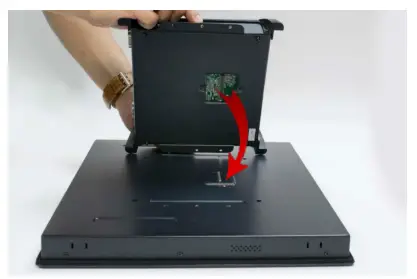
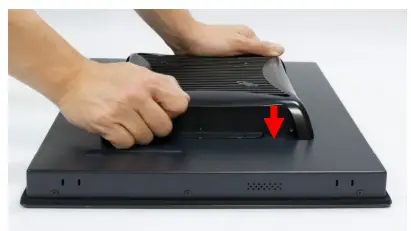
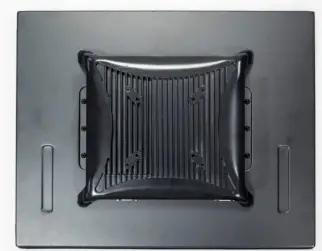
Connecting with VIO Series Display Module
WARNING
In order to prevent electric shock or system damage, before removing the chassis cover, must turn off power and disconnect the unit from power source.
- Locate the module connector slot and loosen the 1 screw.

- Turn over the unit to have the bottom side face up, loosen the 2 screws of the module connector bracket.

- Turn over the unit to have the bottom side face up, loosen the 2 screws of the module connector bracket.

Copyright © 2021 Premio Inc. All Rights Reserved www.premioinc.com
 Embedded IoT Computers , HMI Displays, & HPC Storage – Premio Inc

![Philips Gaming Monitor [272e1] User Manual](https://static-data1.manualsee.com/1/img/407/16107/2020/12/Philips-Gaming-Monitor-272E1.jpg "Philips Gaming Monitor [272e1] User Manual")