
Hope-3.3L-C1 Lithium Ion Standalone Battery
User Manual
Hope-3.3L-C1 Lithium Ion Standalone Battery
Hope 3.3L-C1 Lithium Ion Standalone Battery Residential Energy Storage System
Quick Guidance
Version: V1.0
Date: 2020-10-12
Read this Guidance carefully before installation to understand product features and safety precautions.
 WARNING
- Operators should he well trained to fully understand grid-connected photovoltaic power system and nationaVregional standards.
- Installers must use insulating tools and wear safety equipment.
- Device damages caused noncompliance with storage. transportation, installation and usage requirements specified in Quick Guidance and Manual are not coved by Warranty.


Precautions
Risks of electrolyte leakage
- Do not subject battery to strong impact.
- Do not crush or puncture battery.
- Prevent battery from falling. In case of fall, turn off the battery immediately and stop using it.
- Do not open or mutilate batteries. Released electrolyte is harmful to the skin and eyes.
Risks of fire
- Do not expose battery to direct sunlight.
- Avoid contact with conductive objects such as wires.
- Keep battery away from fire source, inflammable, explosive and chemical materials.
- Do not dispose of batteries in a fire. The batteries may explode. Risks of electric shock
- Do not touch battery with wet hands.
- Keep battery away from children and animals.
- A battery can present a risk of electric shock and bums by high short-circuited current.
- Battery installation and wire connection must be operated by professionals.
Risks of damage
- Keep a distance to water source.
- Do not subject battery to high voltage.
- Place battery on a flat surface. Do not place any foreign object on top of battery nor step on battery.
- Battery-connected PCS should have reinforced insulation.
Product Appearance
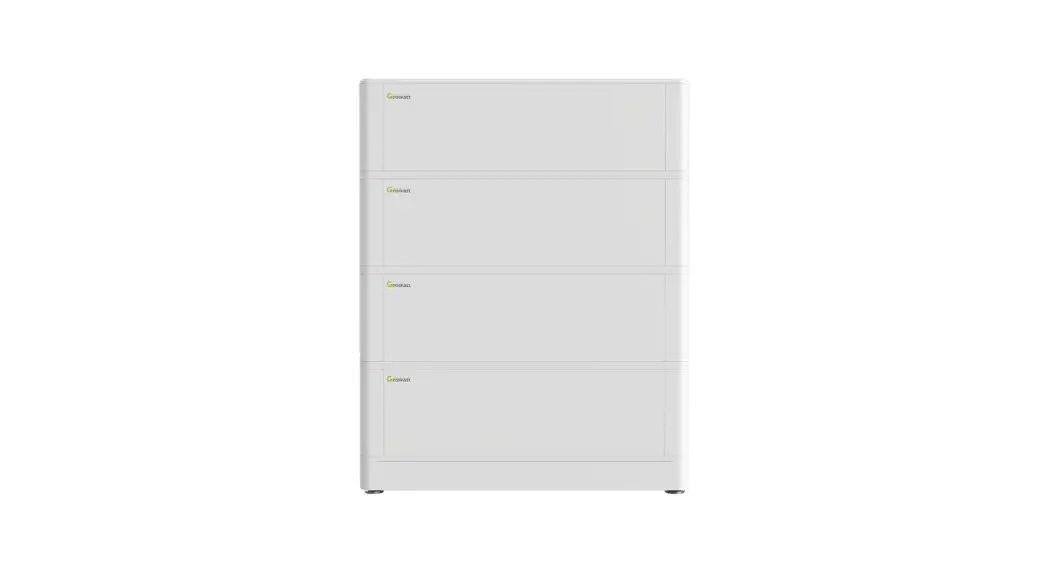
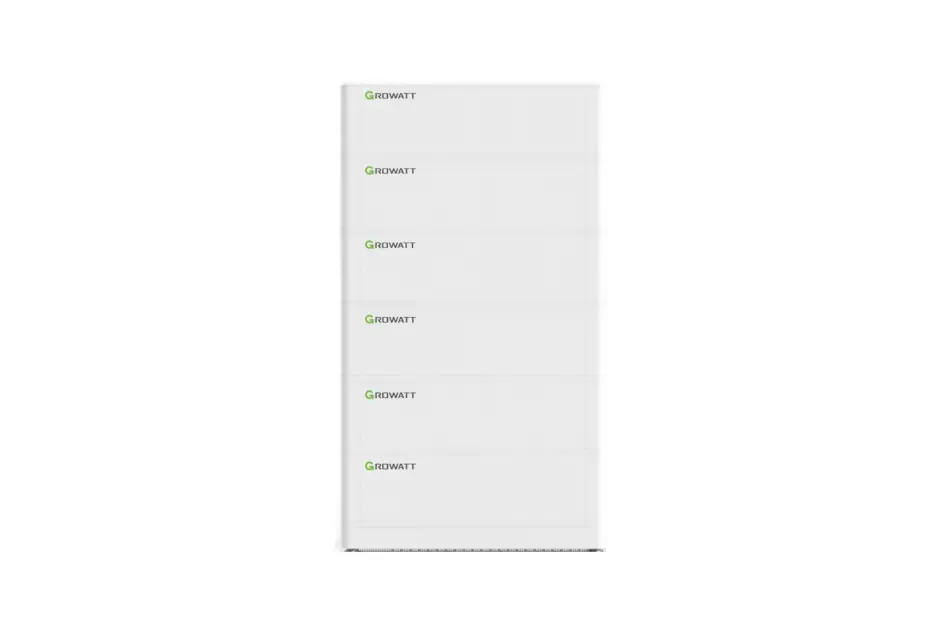
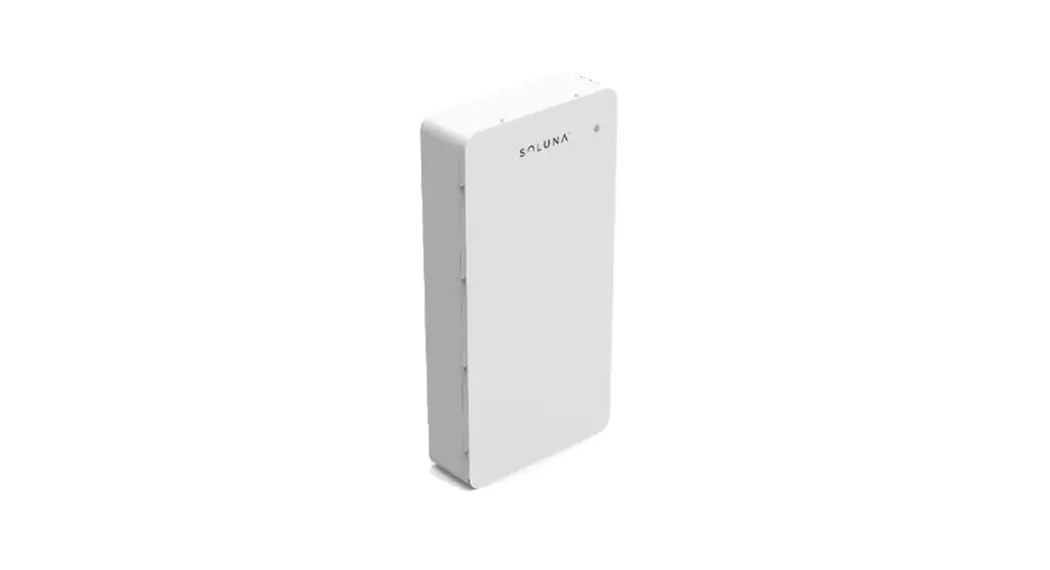
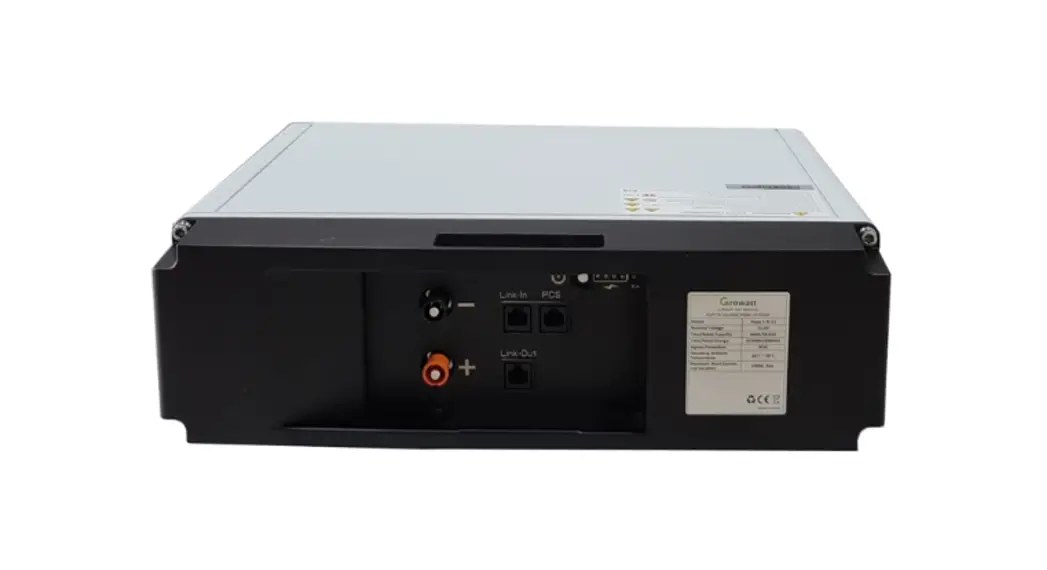
Hope 3.3L-C1 battery is an energy storage unit composed of cells, mechanical parts, battery management system (BMS) as well as power and signal terminals.
Table 2-1 Mgechanical features
| Parameter | Value |
| Dimensions | W445*D131*H399.6 mm |
| Weight | Around 29 kg |
| Installation | Rack-mounted installation Installation with bracket |
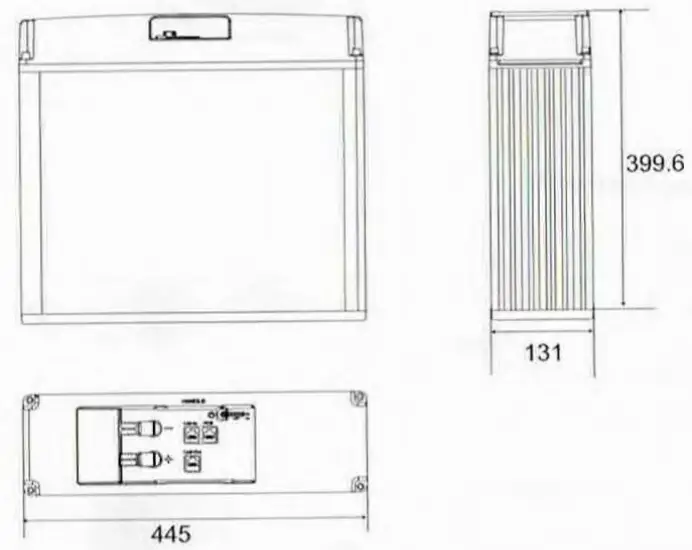
Table 2-2 Ports and terminals
| No. | Label | Name |
| 1 | Link-Out | Network port 3 |
| 2 | P+ | Positive terminal 1 |
| 3 | P- | Negative terminal 1 |
| 4 | Link-In | Network port 2 |
| 5 | PCS | Network port 1 |
| 6 | POWER | POWER button |
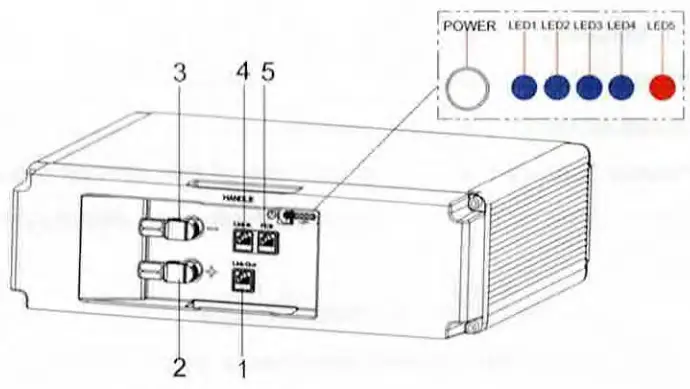
Table 2-3 Network ports
| Pin No. | PCS |
| 1 | RS485_B |
| 2 | RS485 A |
| 3 | NA |
| 4 | CANO_H |
| 5 | CANO_L |
| 6 | NA |
| 7 | PCS_WAKE- |
| 8 | PCS_WAKE+ |
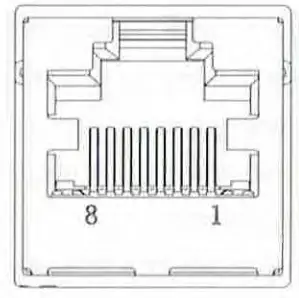
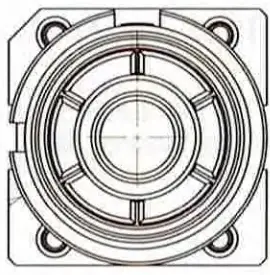
Table 2-4 Power terminals
| Terminal | Description | Specifications |
| P+ | Positive terminal 1 | Max. 120A |
| P- | Negative terminal 1 | Max. 120A |
Terminal Parameters
| No. | Items | Specifications |
| 1 | Nominal Voltage (V) | 51.2V |
| 2 | Normal Capacity | 3.3kWh |
| 3 | Usable Capacity | 3.OkWh |
| 4 | Operating Voltage | 48 — 57.6V |
| 5 | Rated Charging Current | 32A |
| 5 | Rated Discharging Current | 42.5A |
| 6 | Max. Discharging Power | 3kW |
| 7 | Peak Discharging Power | 4.3kW/5s |
| 8 | Max Charging Power | 1.5kW |
| 9 | IP Protection | IP20 |
| 10 | Working Temperature | -10°C-+55°C |
| 11 | Storage Temperature | -20°C-+45°C |
| 12 | DOD | 95.% |
| 13 | Cycle Life | >3500 (25°C, 60% SOH) |
| 14 | Parallel Connection | Max .6 packs |
| 15 | Communication Port | CAN2.0 / RS485 |
| 16 | Warranty | 5 years |
| 17 | Certification | IEC62619, CE, UN38.3. |
Package Items
Before installation. check carefully for any damages on the package and the products and inspect if all accessories in the list are included. If any part is missing or damaged, please contact your distributor.
| Battery Package | Hope 3.3L C1 Kit package | ||||
| Item NO. | Part Name | Quantity | Item NO. | Part Name | Quantity |
| 1 | Hope 3.3L-C1 Battery | 1 | 8 | Battery Bracket | 2 |
| 2 | Quick Guidance | 1 | 9 | Power+ Cable | 1 |
| 3 | Warranty Card | 1 | 10 | Power- Cable | 1 |
| 4 | Master plug | 1 | 11 | Network Cable A | 1 |
| 5 | Slave plug | 1 | 12 | Network Cable B | 1 |
| 6 | Tap | 2 | |||
| 7 | Screw | 4 | |||
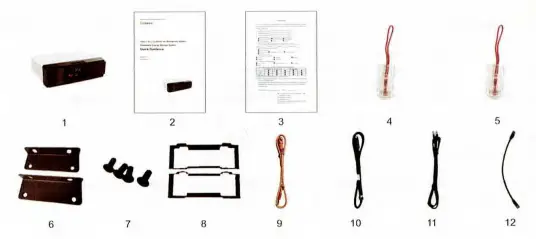
Tools and Protective Equipment
Before installing, operating, and maintaining the battery, you need to prepare tools and protection equipment to ensure safety.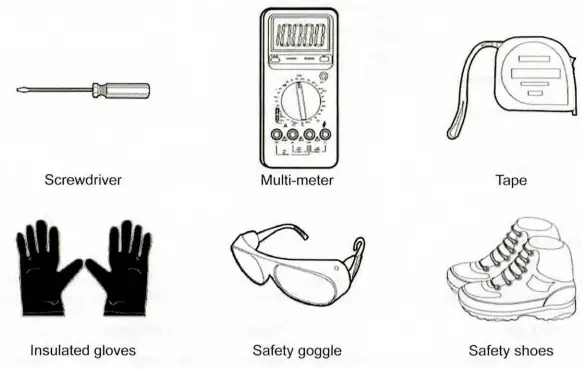 To prevent injury, always wear acid-resistant clothing, PVC gloves. goggles and rubber boots during installation, operation, and maintenance.
Installation with Bracket
It is recommended to install the battery into a cabinet and place it indoor. If you install it outdoor, select a cabinet with a sufficient IP rating. Build sunshade & rain shelter to avoid direct exposure to sunlight and rain for outdoor application. CAUTION
- Keep the din or dust at a minimal level;
- Do not install battery in a place where flood frequently occurs;
- DO not install battery in highly humid area such as bathroom;
- Ensure direct contact between battery shell and ambient air and do NOT cover or shield battery.
CAUTION
Before installing the battery, wear safety goggle, insulitive glves- and safety shoes lin protection and remove conductive ornanents such as watch, bracelet, and rings.
The battery supports installation with bracket. At most 4 batteries can be athwart stacked.
Check and confirm the battery is powered off before any process. Install the batteries in the following way:
Step I. Prepare brackets.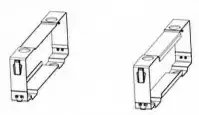 Step 2. Set the battery into 2 pcs brackets from right and left.
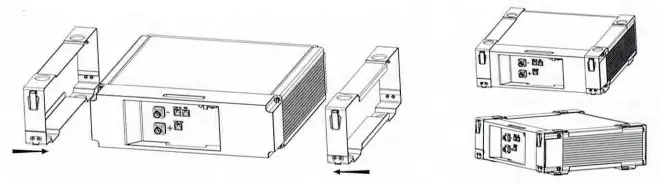 Step 3. Aim at the 4 pairs of location holes. stack the batteries together, and hasp the 4 agraffes together.
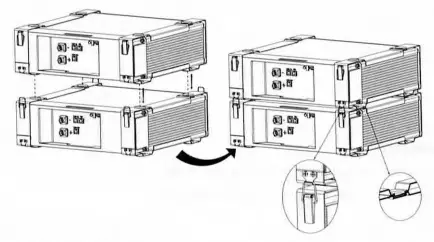 The installed batteries are as shown below.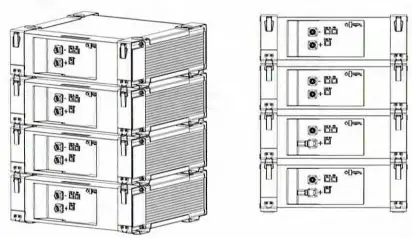
Electrical Connection
The battery provides three network ports and two power terminals for electrical connection. You can connect one battery to your system or connect at most 6 batteries in parallel.
7.1 Connect One Battery WARNING
- Before connecting the cables. ensure than the buttery is off
- Wear protection equipment when wiring batteries.
- Ensure all cables are smooth and no twisted.
Keep the battery in off mode and connect it in the following way: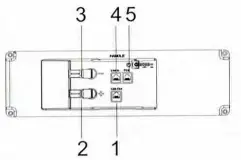 Step I, Connect network cable.
- Insert the master plug into port 4 of the battery.
- Plug one end of Network Cable A into port 5 and the other end into PCS.
- Insert the slave plug into port 1 of the battery.

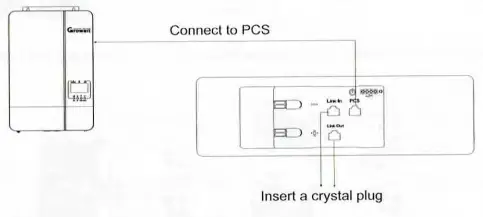
Step 2. Connect power cables.
- Plug the positive power cable into port 2 and junction box.
- Plug the negative power cable into port 3 and junction box.

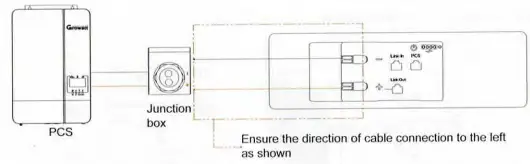
7.2 Connect Batteries in Parallel
To increase the available amount of current and capacity, connect batteries in parallel. At most 6 pcs of batteries can be connected in parallel. WARNING
Batteries in parallel should be manufactured within one year and have a cycle difierence less than 300.
Step I. Boforo installing and connecting the batteries, ensure that the voltage difforonco is not greater than 1V between batteries to be paralleled.
- Power the batteries on and use a multi-meter to measure their voltages.
- Charge the battery with lower voltage or discharge the battery with higher voltage if voltage difference is greater than 1V.
- Power off all batteries and keep them in off mode.
Step 2. Connect network cables
- Insert the master plug into port 4 of the first battery.
- Plug one end of Network Cable A into port 5 of the first battery and the other end into PCS.
- Plug one end of Network Cable B into port 1 of the first battery, and the other end into port 4 of the second battery. The process goes on until the last battery is connected.
- Insert the slave plug into port 1 of the last battery.
Step 3. Connect power cables.
- Plug the positive power cable into port 2 of each battery and junction box
- Plug the negative power cable into port 3 of each battery and junction box.
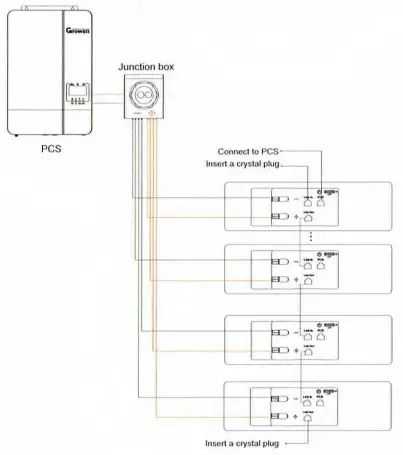
Operation
After the battery module is installed, you can power on/off the battery. WARNING
When operating or maintain the battery module. please strictly follow the safety instruction below:
- You must be a technician who goes through technical training and obtains certificates in compliance with local laws and regulations.
- Please stand on dry insulating objects and do not wear metal objects such as watches, rings and necklaces during operation.
- Use insulating tools and wear protective devices.
- Do not contact with two charged positions with a potential difference.
- Hang a prohibition sign that stops people approaching the battery.
- Measure battery voltage with a multi meter and ensure voltage output in off mode is OV.
- If any abnormality is detected. immediately power off the battery.
- Proceed again only after causes are confirmed.
8.1 Power on Batten
Hold the POWER button for three seconds. LED lights flicker and the battery is powered on.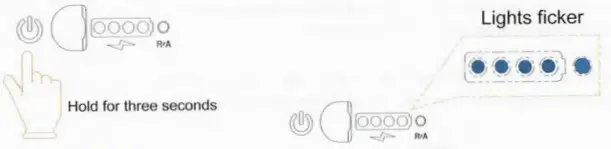 8.2 Power off Battery
- Hold the POWER button of any battery for three seconds.
- Five LED lights flicker for three times, and battery turns off.
- Turn off the inverter.