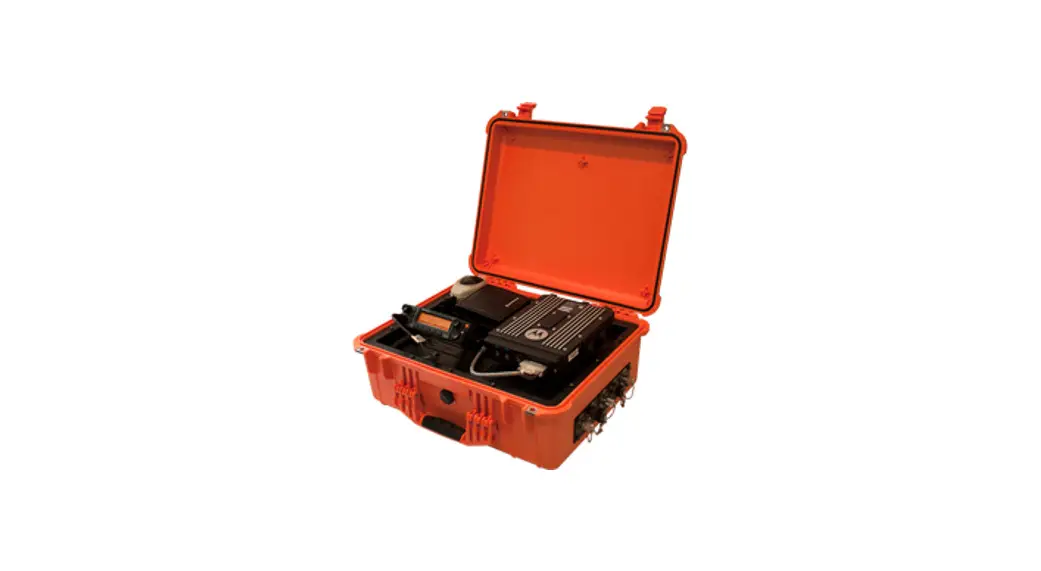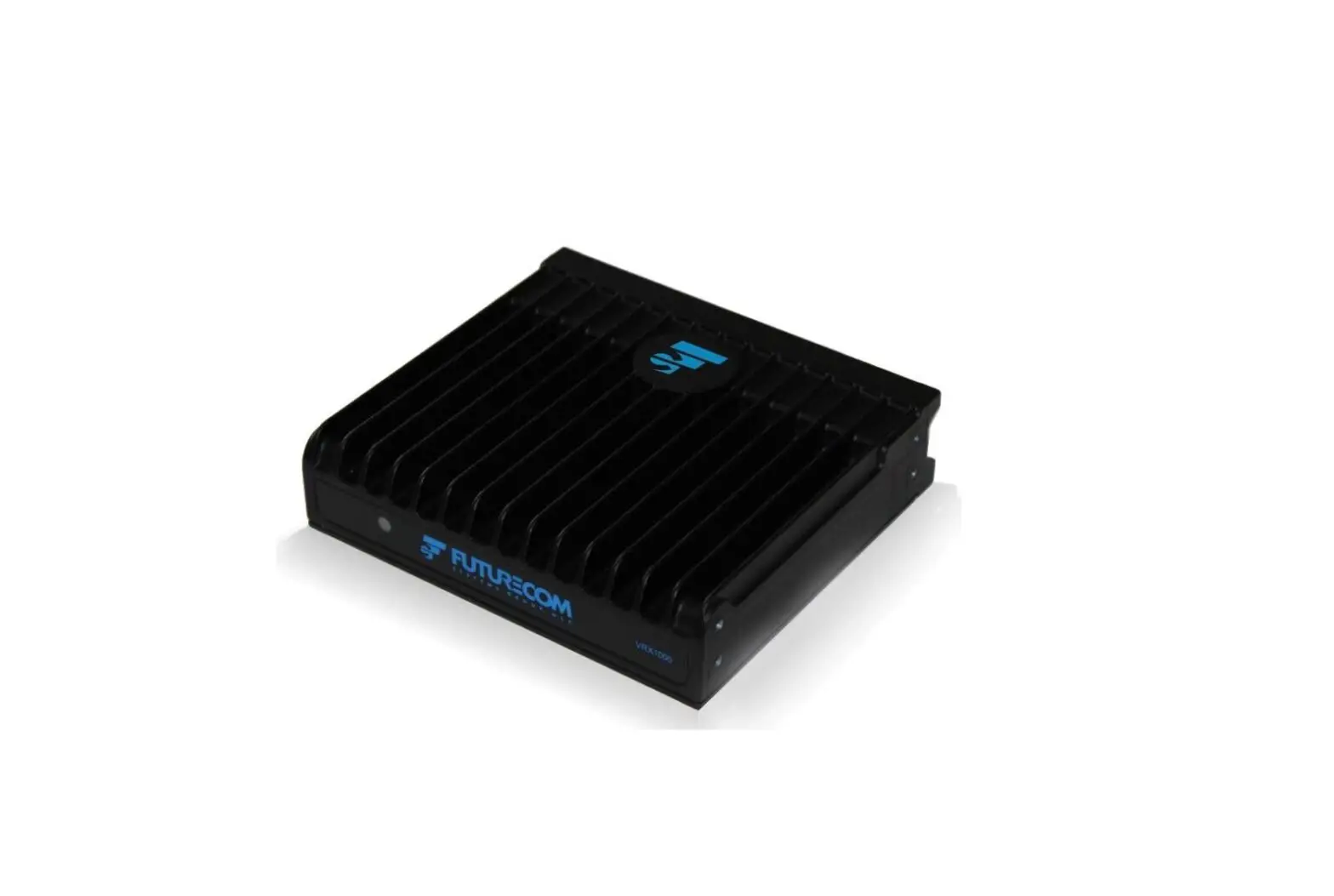

FUTURECOM VRX1000 Vehicle Radio Extender
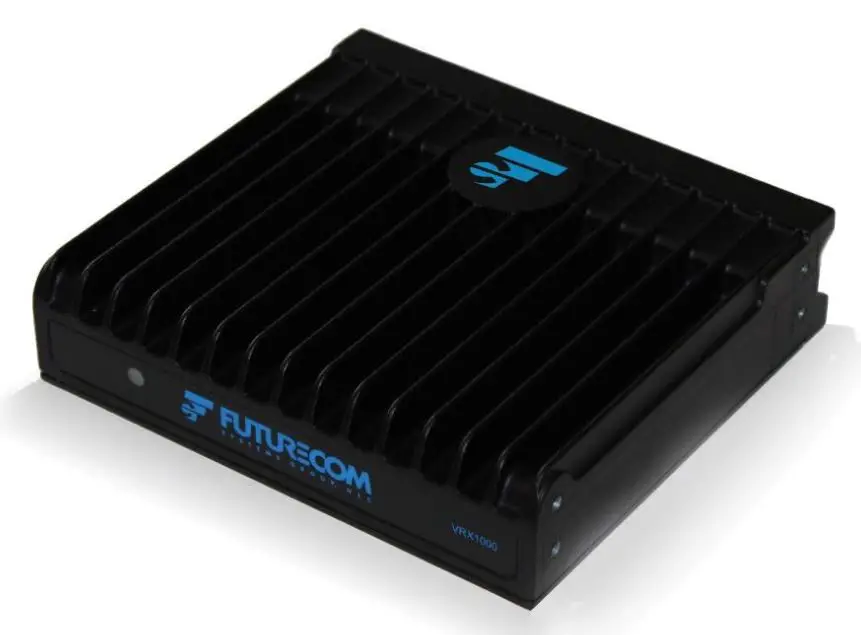
Ordering Instructions – PLEASE READ CAREFULLY
If only ordering spares or kits, proceed to step 8. If only ordering services, proceed to step 9.
- Select mobile radio type (Section 1).
- Select base transceiver type (Section 2). NOTE: base transceiver provides analog only operation. Select appropriate option in Section 3 if P25 operation is required.
- Select transceiver functional tiers and additional features as applicable to your intended operation (Section 3).
- If In-Band frequency operation is required, select the appropriate In-Band option (Section 4). NOTE the frequency requirements in Section 4 to ensure your frequency plan meets the operating requirements. (Note: For Custom Filters See Section 9)
- If an In-Band frequency option was selected in Step 4, note the default is flat mount configuration. If required, select the option In-Band mounting option in Section 8.
- If applicable, select additional hardware options (Section 5 and 8).
- Select required antennas (Section 6 & 7).
- Select spares or kits as required (Section 7).
- Select optional services as required (Section 10).
Important Notes
- Only the frequency bands shown in Section 4 are available as standard configurations. For custom filtering, please contact Futurecom at [email protected].
- In-Band Models – VRX1000 Frequencies must be specified when placing an order since the filters are custom tuned and cannot be re-tuned in the field. In all In-Band VRX1000 configurations, the MSU Transmit power must not exceed 50 Watts on DVRS Enabled MSU Modes due to the in-band filters power rating. The in-band filters connected to the MSU have typical insertion loss of 1.5dB
- Standard VRX1000 delivery time is 10-12 weeks after receipt of a purchase order and a valid frequency plan. Frequency information must be accurate and in accordance with the frequency plan requirements described in this document in order to avoid delays.
- The Motorola Mobile Radios and Motorola accessories are NOT included with the VRX1000.
- VRX1000 models include standard 3 ft long interconnecting cable (Mobile Radio to VRX1000). Longer cables (up to 25 ft) are available.
- The Motorola Mobile Radios may require firmware upgrades in order to operate with the VRX1000. Motorola Radio Firmware Upgrades are to be purchased directly from Motorola. Please note, to ensure full compatibility and make use of the latest available feature set, it is recommended that the APX Mobile Radio and VRX1000 Firmware are updated to the latest Motorola certified firmware versions. APX Mobile Radios operating as the host mobile for the VRX1000 require subscriber option GA00631 for operation.
- APX Portable Radios operating through a VRX1000, utilizing VRX1000 P25 Enhanced feature set require subscriber option QA00631. No special option is required for XTS Portable Radios.
- The Motorola Mobile radio can operate with up to two control heads while interfaced to a VRX1000
- For all sales inquiries, please contact Futurecom sales at [email protected].
- Subscribe to our newsletter if you want to be informed about news releases and updates. Please visit http://futurecom.com/support/newsletter/
Frequency plans that do not meet Futurecom’s specified frequency separation are custom orders. Please contact Futurecom to determine if custom a frequency plan is viable and for quotations on viable plans. [email protected]
Mobile Radio Type
The VRX1000 is compatible with the following Motorola Mobile Radios:
- Remote Mount APXTM 4500 or APXTM 2500 with O2 Control Head, single band – Select Option TT05715AA
- Remote Mount APXTM 5500 with any Control Head, single band – Select Option TT05715AA
- Remote Mount APXTM 6500 with any Control Head, single band -Select Option TT05715AA
- Remote Mount APXTM 8500 with any Control Head, all band -Select Option TT06279AA
Depending on the isolation available between the APXTM 8500 Mobile and VRX1000 antennas, one of the following kits may be required. Relay kit DDN2808A is required for all VRX1000 in-band operations for all APX mobiles.
- Dual Triplexer Kit -Select Option DDN2657A
- Single Triplexer Relay Kit -Select Option DDN2658A
- Dual Triplexer Relay Kit -Select Option DDN2659A
- Relay Kit -Select Option DDN2808A
Please reference the interface kit selection tool APX8500™at: https://www.futurecom.com/support/documentation-and-software/
When the VRX1000 is Connected to the APX™ 8500, The Motorola option number GA01515 is required at time of order or KT000247A01 as an accessory if ordered after original shipment. This Y cable splits the J2 into J2 and J600(DB25). Does not support APX8500 SmartConnect (Sold exclusively through Motorola Solutions, Inc.)
When the VRX1000 is Connected to the APX™ 8500 using SmartConnect, The Motorola Y CABLE GA01779 is required. Y-Cable supports VRX1000 and SmartConnect to allow RS232 and USB line to be used concurrently. (Sold exclusively through Motorola Solutions, Inc.)
VRX1000 Base Transceiver Frequency Options
VRX1000 136-174 MHz
| ORDER CODE | ITEM | INCLUDES | PREREQUISITES | NOTES |
| TT2792A | Base Order Code
VHF Cross Band VRX1000 – Analog | DDN1963A – Mounting Kit DDN1966A – DC Power Cable DDN1969A – VRX to Mobile Radio Control Cable 3 ft (standard) | Mobile Radio option GA00631 | APX Mobile Radio operation with VRX1000 Enabled is limited to UHF and/or 700/800 unless In- Band option is also ordered; see Section 4 for In-Band options. Analog only; see Section 3 for P25 operation and other options. |
VRX1000 380-512 MHz
| ORDER CODE | ITEM | INCLUDES | PREREQUISITES | NOTES |
| TT2793A | Base Order Code
UHF Cross Band VRX1000 – Analog | DDN1963A – Mounting Kit DDN1966A – DC Power Cable DDN1969A – VRX to Mobile Radio Control Cable 3 ft (standard) | Mobile Radio option GA00631 | APX Mobile Radio operation with VRX1000 Enabled is limited to VHF and/or 700/800 unless In- Band option is also ordered; see Section 4 for In-Band options. Analog only; see Section 3 for P25 operation and other options. |
VRX1000 769-775 MHz / 851-869 MHz
| ORDER CODE | ITEM | INCLUDES | PREREQUISITES | NOTES |
| TT2794A | Base Order Code
700 & 800 MHz Cross Band VRX1000 – Analog | DDN1963A – Mounting Kit DDN1966A – DC Power Cable DDN1969A – VRX to Mobile Radio Control Cable 3 ft (standard) | Mobile Radio option GA00631 | APX Mobile Radio operation with VRX1000 Enabled is limited to UHF and/or VHF unless In-Band option is also ordered; see Section 4 for In-Band options. Analog only; see Section 3 for P25 operation and other options. |
VRX1000 Transceiver Functional Tiers & Additional Features
- Tier 1 – Analog Base Transceiver (As ordered in Section 2)
- Tier 2 – P25 Operation + P25 Encryption
- Tier 3 – P25 Operation + P25 Encryption + Enhanced Trunking Features
| FACTORY INSTALLED LICENSED FEATURES | |||
| ORDER CODE | ITEM | PREREQUISITES | NOTES |
| TT05951AA | P25 Operation & P25 Encryption Factory Installed | TT2792A
Or | Tier 2
Includes ADP encryption pass-through. Refer to |
| TT2793A | Futurecom functional description for further information. | ||
| Or | Enables the transparent pass through of P25 | ||
| TT2794A | between the P25 infrastructure, system subscriber units, the mobile radio, portable radios on the | ||
| Requires that the APX Mobile | VRX1000 channel. | ||
| interfaced to the VRX1000 is on | |||
| a P25 FDMA or P25 | |||
| conventional channel | |||
| TT05953AA | P25 Enhanced Trunking Features Factory Installed | TT05951AA
Portable radio option QA00631 | Tier 3
Allows the use of “DVR / VRX Enabled” portable radios (such as APX with QA00631) and provides |
| FACTORY INSTALLED LICENSED FEATURES | |||
| ORDER CODE | ITEM | PREREQUISITES | NOTES |
| the associated trunking features through the VRX1000. Note: End to end digital operation on TDMA talkgroups requires this option. For information on what portable radios can be “DVR / VRX Enabled” and operating requirements for end to end Digital on TDMA trunking, please refer to the compatibility charts. P25 OTAR (P25 Enhanced Trunking Features Required) is supported via the VRX1000 on P25 Trunked FNE; P25 OTAR is NOT supported on conventional P25 FNE. Required for FDMA Conventional Operation Prerequisite for FDMA or TDMA Trunking | |||
| TT06566AA | Authentication – Factory Installed | TT05951AA – P25 Operation TT05953AA – P25 Trunking Features Requires VRX1000 software release 1.51 or greater | Portable Link Layer authentication through the VRX1000 Prevents unauthorized portables accessing the radio network (per unit) |
| FACTORY INSTALLED LICENSED FEATURES | |||
| ORDER CODE | ITEM | PREREQUISITES | NOTES |
| Requires mobile and portable to be running compatible firmware version (R20.02.00) Cost of subscriber upgrade and any required options not included in kit. | |||
| TT06569AA | RM-OTAP – Factory Installed | Requires VRX1000 software release 1.60 or greater Requires mobile to be running compatible firmware version (R21.01.00 or later) Cost of subscriber upgrade and any required options not included in kit. | This feature enables operators to perform firmware & configuration updates on each VRX1000 unit using Motorola Radio Management via the mobile radio. |
| TT3816A | PSU Conventional Scan – Factory Installed | TT05951AA – P25 Operation TT05953AA – P25 Trunking Features Requires VRX1000 software release 1.61 or greater
Requires mobile and portable to be running compatible firmware version (R21.20.00) Cost of subscriber upgrade and any required options not included in kit. | PSU conventional scan feature enables an enhanced PSU to support conventional scan while the Futurecom repeater is configured as its system type. |
| FACTORY INSTALLED LICENSED FEATURES | |||
| ORDER CODE | ITEM | PREREQUISITES | NOTES |
| PSU will need to have both QA00631 (DVRS Enabled PSU) & HA00677 (DVRS PSU Conventional Scan enabled) | |||
| TT3924A | SmartConnect In-Vehicle Range Extension Factory Installed | TT05951AA – P25 Operation TT05953AA – P25 Trunking Features 1. Requires VRX1000 compatibility software release (See compatibility charts for reference)
2. Requires mobile and portable to be running compatible firmware version (See Compatibility Charts for reference)
3. Requires SmartConnect GA01630 & DVRS MSU GA00631 | Enables a “DVR enabled PSU” to maintain voice and emergency services when SmartConnect MSU is connected via broadband (LTE, SAT, Wi-Fi) per unit.
The Motorola Y CABLE GA01779 is required. |
| TT4005A | GPS Driven Deactivation Factory Installed | 1. Requires VRX1000 compatibility software release (See compatibility charts for reference) 2. Requires mobile to be running compatible firmware version (See | Enables a VRX1000 to be deactivated by a pre- configured GPS based (Speed & Distance) threshold to decide when to deactivate the primary VRX1000. Per Unit |
| FACTORY INSTALLED LICENSED FEATURES | |||
| ORDER CODE | ITEM | PREREQUISITES | NOTES |
| compatibility charts for reference) Cost of subscriber upgrade not included.
Requires GPS Activation GA00229 | |||
| NOTE: FEATURE LICENSE(S) ARE NOT TRANSFERABLE BETWEEN UNITS | |||
| NOTE: SHOULD CUSTOMER LOSE FEATURE LICENSE FILE(S), CUSTOMER IS RESPONSIBLE FOR RE-PURCHASING FEATURE LICENSE(S) | |||
| FIELD UPGRADE LICENSED FEATURES | |||
| ORDER CODE | ITEM | PREREQUISITES | NOTES |
| DDN1960A | P25 Operation & P25 Encryption Field Upgrade | TT2792A
Or TT2793A Or | Tier 2
Includes ADP encryption pass-through. Refer to Futurecom functional description for further information. Required for FDMA Conventional Operation |
| FIELD UPGRADE LICENSED FEATURES | |||
| ORDER CODE | ITEM | PREREQUISITES | NOTES |
| TT2794A
Requires that the APX Mobile interfaced to the VRX1000 is on a P25 FDMA or P25 conventional channel | Prerequisite for FDMA or TDMA Trunking
Enables the transparent pass through of P25 between the P25 infrastructure, system subscriber units, the mobile radio, portable radios on the VRX1000 channel. All serial numbers must be provided to Futurecom at the time of order | ||
| DDN1962A | P25 Enhanced Trunking Features Field Upgrade | TT05951AA & or DDN1960A
Portable radio option QA00631 | Tier 3
Allows the use of “DVR / VRX Enabled” portable radios (such as APX with QA00631) and provides the associated trunking features through the VRX1000. Note: End to end digital operation on TDMA talkgroups requires this option. For information on what portable radios can be “DVR / VRX Enabled” and operating requirements for end to end Digital on TDMA trunking, please refer to the VR compatibility chart. |
| FIELD UPGRADE LICENSED FEATURES | |||
| ORDER CODE | ITEM | PREREQUISITES | NOTES |
| P25 OTAR (P25 Enhanced Trunking Features Required) is supported via the VRX1000 on P25 Trunked FNE; P25 OTAR is NOT supported on conventional P25 FNE. Required for FDMA Conventional Operation Prerequisite for FDMA or TDMA Trunking All serial numbers must be provided to Futurecom at the time of order | |||
| DDN3116A | Authentication Field Upgrade | TT05951AA – P25 Operation TT05953AA – P25 Trunking Features | Portable Link Layer authentication through the VRX1000 Prevents unauthorized portables accessing the radio network (per unit) |
| Or DDN1960A & DDN1962A | All serial numbers must be provided to Futurecom at the time of order | ||
| Requires VRX1000 software release 1.51 or greater | |||
| Requires mobile and portable to be running compatible firmware version (R20.02.00) Cost of subscriber upgrade and any required options not included in kit. | |||
| FIELD UPGRADE LICENSED FEATURES | |||
| ORDER CODE | ITEM | PREREQUISITES | NOTES |
| DDN3119A | RM-OTAP – Field Upgrade | Requires VRX1000 software release 1.60 or greater
Requires mobile to be running compatible firmware version (R21.01.00 or later) Cost of subscriber upgrade and any required options not included in kit. | This feature enables operators to perform firmware & configuration updates on each VRX1000 unit using Motorola Radio Management via the mobile radio. All serial numbers must be provided to Futurecom at the time of order |
| DDN3174A | PSU Conventional Scan – Field Upgrade (Bulk Order) | TT05951AA – P25 Operation TT05953AA – P25 Trunking Features Requires VRX1000 software release 1.61 or greater
Requires mobile and portable to be running compatible firmware version (R21.20.00) Cost of subscriber upgrade and any required options not included in kit.
PSU will need to have both QA00631 (DVRS Enabled PSU) & HA00677 (DVRS PSU Conventional Scan enabled) | PSU conventional scan feature enables an enhanced PSU to support conventional scan while the Futurecom repeater is configured as its system type.
Note: To qualify for bulk order, all serial numbers must be provided to Futurecom at the time of order. The PSU Conventional Scan Feature License will be applicable only to the serial numbers provided. Should the Customer fail to provide the serial numbers for all units at the time of order, the Customer must place a new order for DDN3174A when the remaining serial numbers are available. |
| FIELD UPGRADE LICENSED FEATURES | |||
| ORDER CODE | ITEM | PREREQUISITES | NOTES |
| DDN3229A | SmartConnect In-Vehicle Range Extension Field Upgrade | TT05951AA & or DDN1960A
Requires SmartConnect GA01630 & DVRS MSU GA00631 | Enables a “DVR enabled PSU” to maintain voice and emergency services when SmartConnect MSU is connected via broadband (LTE, SAT, Wi- Fi) per unit. All serial numbers must be provided to Futurecom at the time of order |
| DDN3262A | GPS Driven Deactivation Field Upgrade | 1. Requires VRX1000 compatibility software release (See compatibility charts for reference)
2. Requires mobile to be running compatible firmware version (See compatibility charts for reference) Cost of subscriber upgrade not included.
Requires GPS Activation GA00229 | Enables a VRX1000 to be deactivated by a pre- configured GPS based (Speed & Distance) threshold to decide when to deactivate the primary VRX1000. Per Unit All serial numbers must be provided to Futurecom at the time of order |
| NOTE: FEATURE LICENSE(S) ARE NOT TRANSFERABLE BETWEEN UNITS | |||
| NOTE: SHOULD CUSTOMER LOSE FEATURE LICENSE FILE(S), CUSTOMER IS RESPONSIBLE FOR RE- PURCHASING FEATURE LICENSE(S) | |||
VRX1000 In-Band Standard Frequency Plans
VRX1000 VHF – In-Band Frequency Options
Frequency plans that do not meet Futurecom’s specified frequency separation are custom orders. Please contact Futurecom to determine if custom a frequency plan is viable and for quotations on viable plans. [email protected]
| OPTIONS ORDER CODE | ITEM | INCLUDES | PREREQUISITES | NOTES |
| Frequency Plan A: TT05945AA
or
Frequency Plan B: TT05946AA | In-Band Filter Kit if Required
Refer to Standard Frequency Plans to choose correct order code. | Standard Flat Mount Configuration
DDN1967A – 2 x 2 ft RF Cable; mini UHF (m) – mini UHF (m), VRX1000 filter to VRX1000 and APX Mobile filter to APX Mobile | TT2792A – VHF VRX1000 base transceiver DDN2808A – Relay kit | Refer to mounting configurations in Section 8 for alternative mounting options. |
VRX1000 UHF – In-Band Frequency Options
Frequency plans that do not meet Futurecom’s specified frequency separation are custom orders. Please contact Futurecom to determine if custom a frequency plan is viable and for quotations on viable plans. [email protected]
| OPTIONS ORDER CODES | ITEM | INCLUDES | PREREQUISITES | NOTES |
| Frequency Plan A: TT05947AA
or
Frequency Plan B: TT05948AA | In-Band Filter Kit if Required
Refer to Standard Frequency Plans to choose correct order code. | Standard Flat Mount Configuration
DDN1967A – 2 x 2 ft RF Cable; mini UHF (m) – mini UHF (m), VRX1000 filter to VRX1000 and APX Mobile filter to APX Mobile | TT2793A – UHF VRX1000 base transceiver DDN2808A – Relay kit | Refer to mounting configurations in Section 8 for alternative mounting options. |
VHF / UHF In-Band Standard Frequency Plans
Frequency plans that do not meet Futurecom’s specified frequency separation are custom orders. Please contact Futurecom to determine if custom a frequency plan is viable and for quotations on viable plans. [email protected]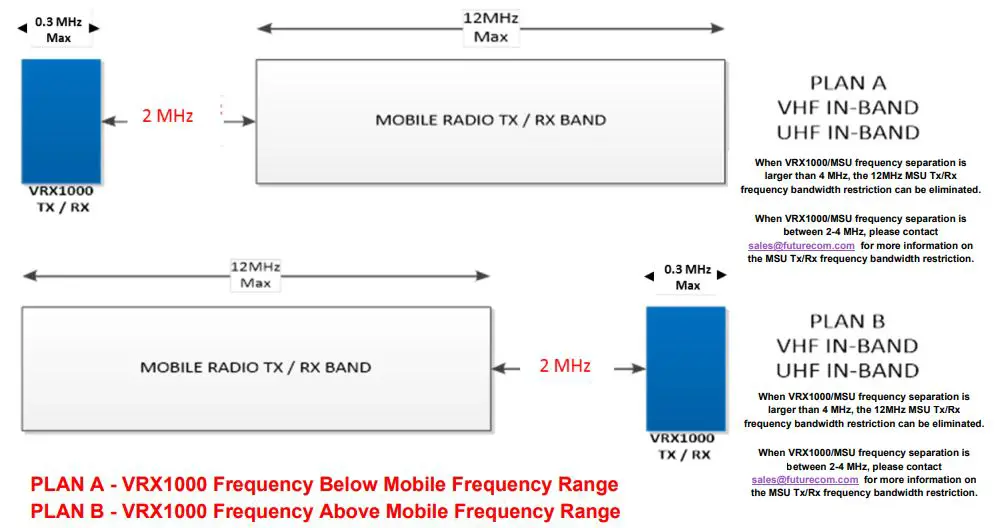
VRX1000 700/800 MHz In-Band Frequency Options
Frequency plans that do not meet Futurecom’s specified frequency separation are custom orders. Please contact Futurecom to determine if custom a frequency plan is viable and for quotations on viable plans. [email protected]
| OPTIONS ORDER CODES | ITEM | INCLUDES | PREREQUISITES | NOTES |
| Frequency Plan A: TT05949AA
or
Frequency Plan B: TT05950AA | In-Band Filter Kit if Required
Refer to Standard Frequency Plans to choose correct order code. | Standard Flat Mount Configuration
DDN1967A – 2 x 2 ft RF Cable; mini UHF (m) – mini UHF (m), VRX1000 filter to VRX1000 and APX Mobile filter to APX Mobile | TT2794A – 700/800 MHz VRX1000 base transceiver DDN2808A – Relay kit | Refer to mounting configurations in Section 8 for alternative mounting options. |
700/800 MHz In-Band Standard Frequency Plans
Frequency plans that do not meet Futurecom’s specified frequency separation are custom orders. Please contact Futurecom to determine if custom a frequency plan is viable and for quotations on viable plans. [email protected]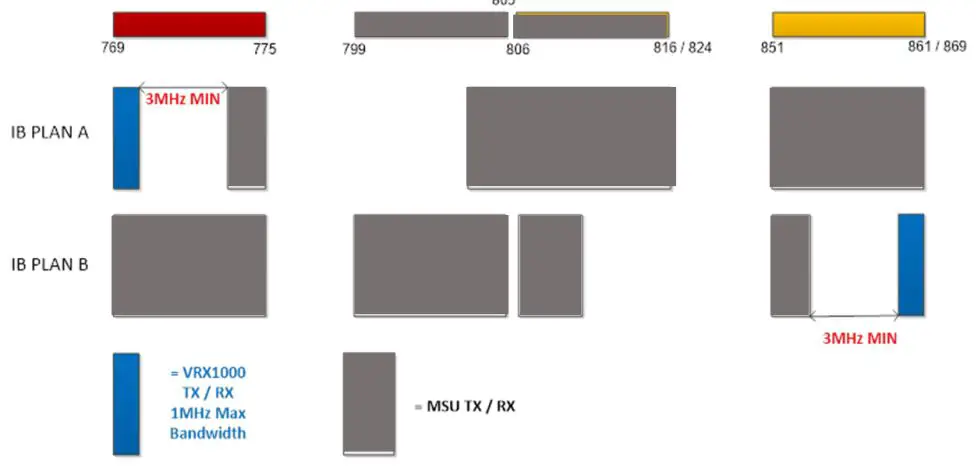
PLAN A – VRX1000 Frequency Below Mobile Frequency Range
PLAN B – VRX1000 Frequency Above Mobile Frequency Range
VRX1000 Hardware Options
| ORDER CODE | DESCRIPTION | Connector Type / Cable Length |
| TT05954AA | VRX1000 Programming Kit (physical media) – Includes programming and installation manual, programming software and USB cable (DDN1968A) – NOTE: Manuals and software available online for download to registered users | USB to mini USB Connectors 10 ft |
| TT05956AA | Delete standard VRX to Mobile Radio Control Cable (DDN1969A) from VRX1000 – Used when Y cable is required instead of standard cable – NOTE: Replacement Y cable TT05964AA or TT05977AA MUST be ordered. | N/A |
| TT05964AA | VRX1000 Y – Control Cable / AUX (PN 7W087X08-01) – Connects the VRX1000 to the MSU and provides access to the VRX1000 AUX pins (DB15) – Replaces the Standard Control Cable DDN1969A | DB25 to DB25 & DB15 3 ft |
| TT05977AA | VRX1000 Y – Control Cable / Siren (PN 7W087X09-01) | DB25 to DB25 & DB25 |
| ORDER CODE | DESCRIPTION | Connector Type / Cable Length |
| – connects the VRX1000 to the MSU and provides connection for Motorola Siren (DB25) – Replaces the Standard Control Cable DDN1969A | 3 ft |
Antennas – Sold Exclusively Through Motorola Solutions, Inc
| ANTENNAS FOR VEHICULAR MOUNT VRX1000 UNITY GAIN (0dBd), ROOF / TRUNK MOUNT | FREQUENCY BAND [MHz] |
| HAD4006A | 136-144 MHz |
| HAD4007A | 144-150.8 MHz |
| HAD4008A | 150.8-162 MHz |
| HAD4009A | 162-174 MHz |
| HAE6012A | 380-433 MHz |
| HAE4003A | 450-470 MHz |
| HAE4004A | 470-512 MHz |
| HAF4016A | 764-870 MHz |
Mag Mount Antennas
| MAG MOUNT ANTENNAS FOR VRX1000 UNITY GAIN (0dBd) | |
| DDN9014A | 136-174 MHz |
| DDN9015A | 380-520 MHz |
| DDN9016A | 764-869 z |
VRX1000 Spares / Kits – Ordered Separately from VRX1000
| ORDER CODE | DESCRIPTION | NOTES |
| DDN2073A | VRX1000 VHF In-Band Filter Kit, Plan A, Flat Mount | |
| DDN2074A | VRX1000 VHF In-Band Filter Kit, Plan B, Flat Mount | |
| DDN2075A | VRX1000 UHF In-Band Filter Kit, Plan A, Flat Mount | |
| DDN2076A | VRX1000 UHF In-Band Filter Kit, Plan B, Flat Mount | |
| DDN2077A | VRX1000 700/800 In-Band Filter Kit, Plan A, Flat Mount |
| ORDER CODE | DESCRIPTION | NOTES |
| DDN2078A | VRX1000 700/800 In-Band Filter Kit, Plan B, Flat Mount | |
| DDN2808A | Relay Kit | |
| DDN1963A | VRX1000 Mounting Kit – Included with all VRX1000 models – Order as spare if required | |
| DDN1965A | VRX1000 In-Band Filter Mounting Bracket Kit – STACKED MOUNT – Order as spare if required | |
| DDN2751A | VRX1000 Installation Kit – Includes Bracket, Mini UHF Connector, Fuse Kit, Power Cable
– Included with all VRX1000 models – Order as spare if required | |
| ORDER CODE | DESCRIPTION | CONNECTORS / CABLE LENGTH |
| DDN1966A | VRX1000 DC Power Cable (PN 7W087X20-01) – Included with VRX1000 models – Order as spare if required | M12 Circular connector 18 ft |
| DDN1967A | RF Cable for In-Band Filter Kit (PN 7W087X11-01) – Connects VRX1000 to VRX1000 In-Band filter OR Mobile Radio to Mobile Radio In-Band filter | Mini UHF (m) to mini UHF (m) 20” |
| ORDER CODE | DESCRIPTION | NOTES |
| – Qty 2 included in TT05945AA, TT05946AA, TT05947AA, TT05948AA, TT05949AA, or TT05950AA | ||
| DDN2719A | RF Cable for In-Band Filter Kit (PN 7W900X94-01) – Connects APXTM 8500 Mobile Radio to Mobile Radio In-Band filter | QMA RA (m) to mini UHF (m) 20” |
| DDN1968A | VRX1000 Programming Cable | USB to mini USB 10 ft |
| DDN1969A | VRX1000 to Mobile Radio Control Cable (PN 7W087X07- 01) is equivalent 1W087B01-01 – Included with VRX1000 models – Order as spare if required – connects the VRX1000 to the MSU | DB25 to DB25 3 ft |
| DDN1970A | VRX1000 Y – Control Cable / AUX (PN 7W087X08-01) is equivalent to 1W087B05-01 – Connects the VRX1000 to the MSU and provides access to the VRX1000 AUX pins (DB15) – Replaces the Standard Control Cable DDN1969A | DB25 to DB25 & DB15 3 ft |
| DDN2053A | VRX1000 Y – Control Cable / Siren (PN 7W087X09-01) – connects the VRX1000 to the MSU and provides connection for Motorola Siren (DB25) – Replaces the Standard Control Cable DDN1969A | DB25 to DB25 & DB25 3 ft |
| ORDER CODE | DESCRIPTION | NOTES |
Custom Filtering
| ORDER CODE | DESCRIPTION | Notes and Conditions |
| TT06579AA | ENGINERING DESIGN TIME – Non-Recurring Engineering Fee (NRE) | |
| TT06580AA | CUSTOM FILTER DESIGN – TIER 1 (Per Unit)
This option is for a custom filter design and must be ordered if frequency plans do not meet Futurecom’s specified frequency separation stated in the ordering guide. In order to determine if a custom frequency plan is viable, please contact [email protected] prior to placing an order. Tier 1 option consists of 1-2* custom filters per unit. Delivery lead time is 14-16 weeks ARO and a verified frequency plan. | |
| TT06581AA | CUSTOM FILTER DESIGN – TIER 2 (Per Unit) This option is for a custom filter design and must be ordered if frequency plans do not meet Futurecom’s |
| specified frequency separation stated in the ordering guide.
In order to determine if a custom frequency plan is viable, please contact [email protected] prior to placing an order. Tier 2 option consists of 3-4* custom filters per unit. Delivery lead time is 14-16 weeks ARO and a verified frequency plan. |
Services
Futurecom’s standard hardware warranty is 18 months starting from the date the product ships from Futurecom. Please reference Futurecom’s Terms and Conditions of Sale, Section 7 regarding standard hardware warranty. https://www.futurecom.com/terms-and-conditions/
| ORDER CODE | DESCRIPTION | Notes and Conditions |
| DDN2079A | VRX1000 Cross Band 4 Year Extended Hardware Warranty | Extends standard 18-month hardware warranty by 4 years. Can only be purchased once per unit.
Must be purchased prior to expiration of standard hardware warranty. |
| DDN2080A | VRX1000 Cross Band 1 Year Extended Hardware Warranty | Extends existing hardware warranty by one year. |
| ORDER CODE | DESCRIPTION | Notes and Conditions |
| Must be purchased prior to expiration of any existing hardware warranty. Standard 18-month hardware warranty can be extended by a maximum of 4 years. | ||
| DDN2081A | VRX1000 In-Band 4 Year Extended Hardware Warranty | Extends standard 18-month hardware warranty by 4 years.
Must be purchased prior to expiration of standard hardware warranty. |
| DDN2082A | VRX1000 In-Band 1 Year Extended Hardware Warranty | Extends existing hardware warranty by one year.
Must be purchased prior to expiration of any existing hardware warranty. Standard 18-month hardware warranty can be extended by a maximum of 4 years. |
| DDN1971A | On-site and/or Virtual Programming Support (Basic) | Maximum 1 day; see EXTENDED support for additional days.
Minimum 2 weeks advance notice required however subject to resource availability. Applies to North America only. |
| ORDER CODE | DESCRIPTION | Notes and Conditions |
| DDN1972A | On-site and/or Virtual Programming Support (Extended | Must purchase BASIC On-site/virtual technical and programming support. |
|
DDN1974A | On-site and/or Virtual Training (Basic) 2 Courses Available:
1. Training the Trainer/end user
1 Day (Est 4 hours) end user training gives the end user a general understanding of Futurecom solutions through your agencies particular use case, highlighting best practices through situations commonly seen in the field during deployment situations. Participants will have hands on training with the newly implemented solution for practical operation and control. OR
2. Technical and Programming Training
1 Day Technical and Programming training gives the radio technician an in depth understanding on how the DVR-LX®/VRX1000/PDR8000® is integrated into the everyday operation of the agency. Highlighting code plug compatibility, Futurecom Repeater Configurator (FRC) software functionality and programming for optimal end user experience. | Maximum 1 day; see EXTENDED training for additional days.
Minimum 2 weeks advance notice required however subject to resource availability. Applies to North America only.
Training the trainer requires the newly implemented DVR-LX®/VRX1000/PDR8000® to be tested and in use on the network to get the most out of the Training the Trainer.
Standard training package. Includes soft copy of training materials. Customized training available subject to content and price negotiation.
Contact Futurecom Systems Group, ULC for a pre- training checklist to insure your solution is ready for Basic virtual Training Technical and Programming Training, Futurecom Systems Group, ULC requires at least two full functioning Portable radios (PSUs) programmed to the current system, at least one installed DVR- LX®/VRX1000/PDR8000®. For DVR-LX® and |
| ORDER CODE | DESCRIPTION | Notes and Conditions |
| VRX1000 use a Mobile Radio (MSU) radio set is required to conduct this training properly. | ||
| DDN1975A | On-site and/or Virtual Training (EXTENDED) | Must purchase BASIC on-site and/or virtual training. All virtual activity must be scheduled as sequential days. |
Futurecom, DVR-LX, PDR8000, the Futurecom Logo and the Stylized FC logo are registered trademarks of Futurecom Systems Group, ULC. All other trademarks are the property of their respective owner. © 2020 Futurecom Systems Group, ULC. All rights reserved
 Newsletter Signup - Futurecom Systems Group
 Documentation and Software - Futurecom Systems Group