ASRock Thunderbolt 3 AIC Thunderbolt Technology Community Instruction Manual
Package Contents
- 1 x Quick Installation Guide
- 1 x Support CD
- 1 x TBT Header Cable
- 1 x DisplayPort Cable
- 1 x Mini DisplayPort to Mini DisplayPort Cable
- 1 x Mini DisplayPort to DisplayPort Adapter Cable
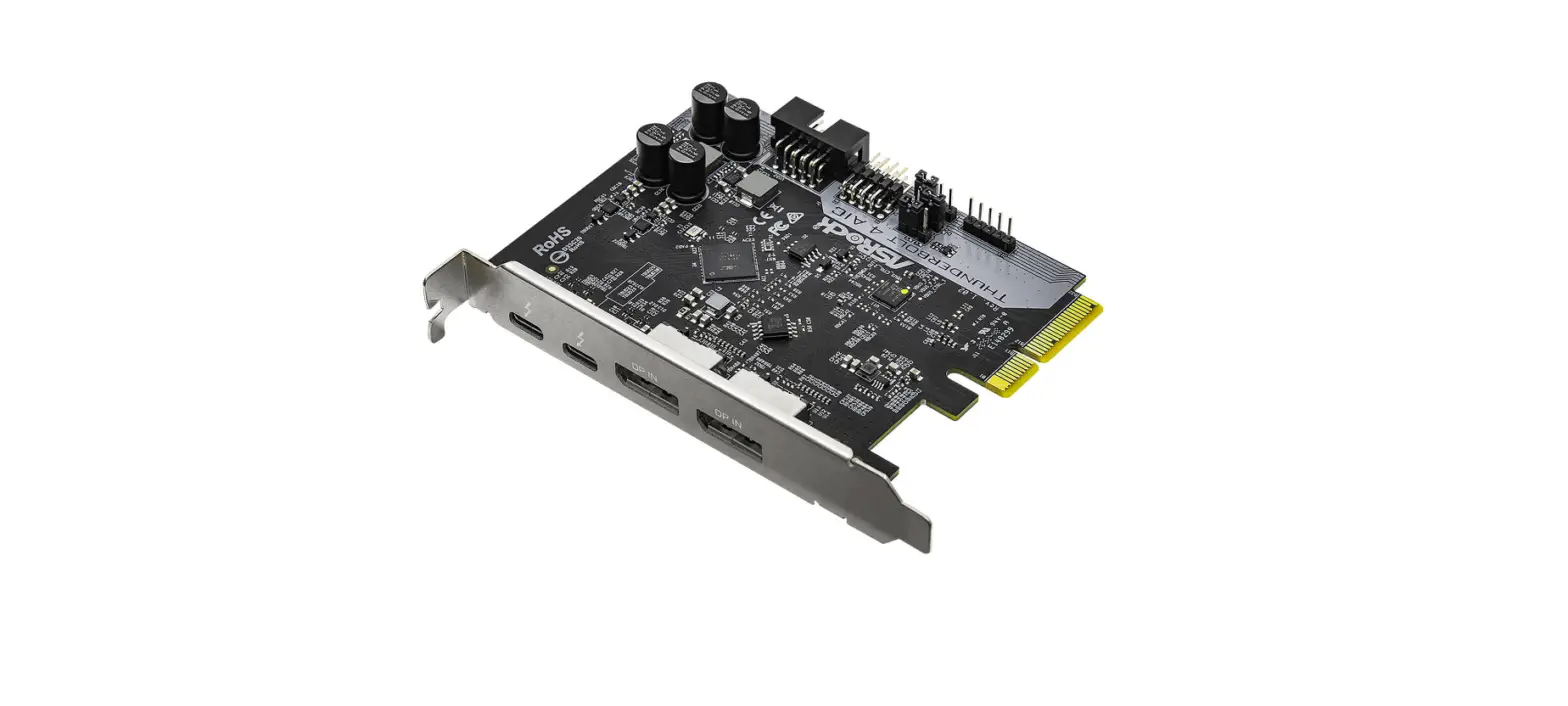
Card Layout
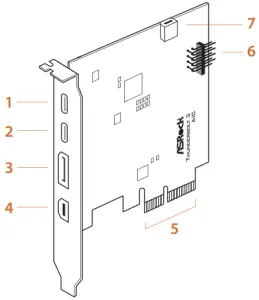
- ThunderboltTM 3 Type-C Port
- ThunderboltTM 3 Type-C Port
- DisplayPort IN Port
- Mini DisplayPort IN Port
- PCI Express 3.0 Interface
- TBT Header
- Mini DisplayPort IN Port
| Input | Output |
| DisplayPort IN Port 3 | ThunderboltTM 3 Type-C Port 1 |
| Mini DisplayPort IN Port 4 0r 7 | ThunderboltTM 3 Type-C Port 2 |
Installing the Thunderbolt 3 AIC
- Power off the PC and unplug the power cord. Detach all other cables from the PC.
- Remove the PC cover.
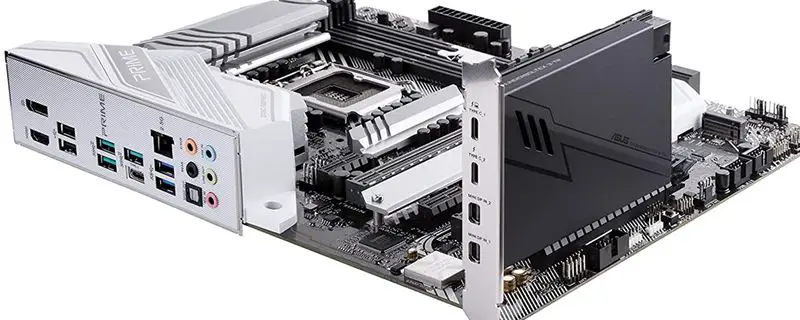
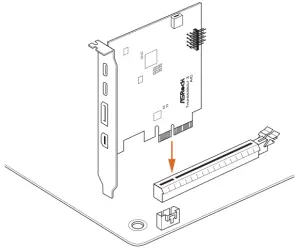
- Align and insert the card into a PCI Express 3.0 slot on the motherboard.
Press firmly until the card is securely seated in place.
To determine the slot in which to install the Thunderbolt 3 AIC, refer to the user manual that comes with your motherboard.
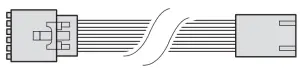
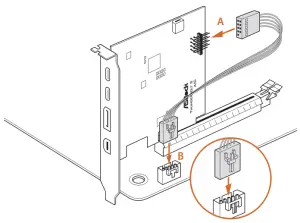
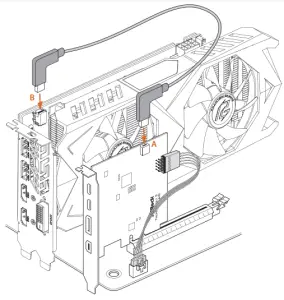
- Connect one end of the TBT Header Cable to the TBT Header (A) on the Thunderbolt 3 AIC. Then connect the other end of the cable to the Thunderbolt AIC Connector (TBT1) (B) on the motherboard.
TBT Header Cable

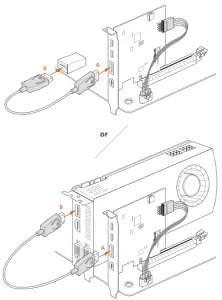
- Connect one end of the DisplayPort Cable to the DisplayPort IN Port (A) on the Thunderbolt 3 AIC. Then connect the other end of the cable to the DisplayPort Port (B) on the motherboard’s rear I/O panel or on the graphics card.

DisplayPort Cable
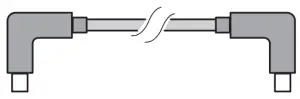
- Connect one end of the Mini DisplayPort to Mini DisplayPort Cable to the internal Mini DisplayPort Port (A) on the Thunderbolt 3 AIC. Then connect the other end of the cable to the internal Mini DisplayPort Port (B) on the graphics card.
The internal Mini DisplayPort IN Port is only compatible with the ASRock graphics card with the internal Mini DisplayPort OUT Port.
Mini DisplayPort to Mini DisplayPort Cable
- Connect one end of the Mini DisplayPort to DisplayPort Adapter Cable to the Mini DisplayPort Port (A) on the Thunderbolt 3 AIC. Then connect the other end of the cable to the DisplayPortPort (B) on the motherboard’s rear I/O panel or on the graphics card.

Mini DisplayPort to DisplayPort Adapter Cable
- Replace the PC cover.
- Reconnect the power cord and any other cables that were disconnected. Then power on the PC.


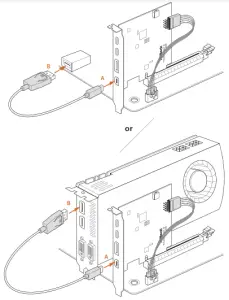
Connecting the Thunderbolt™ Cable
Connect the ThunderboltTM cable from your Thunderbolt-enabled device to the ThunderboltTM 3 Port on the Thunderbolt 3 AIC.
The ThunderboltTM cable is not included in the package.

Thunderbolt™ cable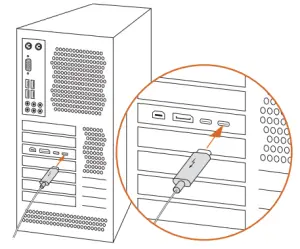
Enabling the Thunderbolt™ Function
After hardware installation is completed, enter the BIOS Setup and enable the Intel® Thunderbolt™ function in BIOS setup.
For X570 models: Go to Advanced\AMD PBS\Thunderbolt Support
For other models: Go to Advanced\Intel Thunderbolt
Installing the Thunderbolt Software in Windows
Place the Support CD into your CD-ROM drive and follow the on-screen instructions to complete the installation.
Recommended ASRock Motherboard Models:
| Motherboard Models | Supported PCIE slot | PCIE 3.0 mode | Max. bandwidth |
| Z490 PG Velocita | PCIE3 | x4 from PCH | 40Gbps |
| Z490 Taichi | PCIE5 | x4 from PCH | 40Gbps |
| Z490 Extreme4 | PCIE3 | x4 from PCH | 40Gbps |
| Z490 Phantom Gaming 4 | PCIE4 | x4 from PCH | 40Gbps |
| Z490 Phantom Gaming 4/2.5G | PCIE4 | x4 from PCH | 40Gbps |
| Z490 Phantom Gaming 4/ac | PCIE4 | x4 from PCH | 40Gbps |
| Z490 Phantom Gaming 4/ax | PCIE4 | x4 from PCH | 40Gbps |
| Z490 Phantom Gaming 4/TW | PCIE4 | x4 from PCH | 40Gbps |
| Z490 Steel Legend | PCIE3 | x4 from PCH | 40Gbps |
| Z490 Pro4 | PCIE4 | x4 from PCH | 40Gbps |
| Z490 Pro4/ac | PCIE4 | x4 from PCH | 40Gbps |
| Z490M Pro4 | PCIE4 | x4 from PCH | 40Gbps |
| H470 Phantom Gaming 4 | PCIE4 | x4 from PCH | 40Gbps |
| H470 Steel Legend | PCIE3 | x4 from PCH | 40Gbps |
| H470M Pro4 | PCIE4 | x4 from PCH | 40Gbps |
| X570 Taichi | PCIE5 | x4 from PCH | 40Gbps |
| X570 Phantom Gaming 4S | PCIE3 | x4 from PCH | 40Gbps |
| X570 Phantom Gaming 4 WiFi ax | PCIE3 | x4 from PCH | 40Gbps |
| X570 Phantom Gaming 4 | PCIE3 | x4 from PCH | 40Gbps |
| X570 Extreme4 WiFi ax | PCIE4 | x4 from PCH | 40Gbps |
| X570 Extreme4 | PCIE4 | x4 from PCH | 40Gbps |
| X570 Steel Legend WiFi ax | PCIE4 | x4 from PCH | 40Gbps |
| X570 Steel Legend | PCIE4 | x4 from PCH | 40Gbps |
| X570 Pro4 | PCIE3 | x4 from PCH | 40Gbps |
| X570M Pro4 | PCIE3 | x4 from PCH | 40Gbps |
| Z390 Taichi Ultimate | PCIE5 | x4 from CPU | 40Gbps |
| Z390 Taichi | PCIE5 | x4 from CPU | 40Gbps |
| Z390 Phantom Gaming X | PCIE5 | x4 from CPU | 40Gbps |
| Z390 Phantom Gaming 9 | PCIE5 | x4 from CPU | 40Gbps |
| Z390 Phantom Gaming 7 | PCIE6 | x4 from PCH | 40Gbps |
| Z390 Extreme4 | PCIE6 | x4 from PCH | 40Gbps |
| Z390 Phantom Gaming 6 | PCIE6 | x4 from PCH | 40Gbps |
| Z390 Phantom Gaming 4S | PCIE3 | x4 from PCH | 40Gbps |
| Z390 Phantom Gaming 4 | PCIE4 | x4 from PCH | 40Gbps |
| Z390 Phantom Gaming SLI/ac | PCIE4 | x4 from CPU | 40Gbps |
| Z390 Phantom Gaming SLI | PCIE4 | x4 from CPU | 40Gbps |
| Z390 Pro4 | PCIE4 | x4 from PCH | 40Gbps |
| B365 Phantom Gaming 4 | PCIE3 | x4 from PCH | 40Gbps |
| B365 Pro4 | PCIE3 | x4 from PCH | 40Gbps |
| B360 Gaming K4 | PCIE4 | x4 from PCH | 40Gbps |
| B360 Pro4 | PCIE4 | x4 from PCH | 40Gbps |
| H370 Performance | PCIE4 | x4 from PCH | 40Gbps |
| H370 Pro4 | PCIE4 | x4 from PCH | 40Gbps |
| Z370 Gaming K6 | PCIE6 | x4 from PCH | 40Gbps |
| Z370 Extreme4 | PCIE6 | x4 from PCH | 40Gbps |
| Z370 Killer SLI | PCIE4 | x4 from CPU | 40Gbps |
| Z370 Killer SLI/ac | PCIE4 | x4 from CPU | 40Gbps |
| Z370 Taichi | PCIE5 | x4 from CPU | 40Gbps |
| Z370 Professional Gaming i7 | PCIE5 | x4 from CPU | 40Gbps |
| Z370 Pro4 | PCIE4 | x4 from PCH | 40Gbps |
| Z270 Professional Gaming i7 | PCIE3 | x4 from PCH | 40Gbps |
| Z270 Taichi | PCIE3 | x4 from PCH | 40Gbps |
| Z270 Gaming K6 | PCIE6 | x4 from PCH | 40Gbps |
| Z270 Extreme4 | PCIE6 | x4 from PCH | 40Gbps |
| Z270 Pro4 | PCIE4 | x4 from PCH | 40Gbps |
| H270 Pro4 | PCIE4 | x4 from PCH | 40Gbps |
| B250 Pro4 | PCIE4 | x4 from PCH | 40Gbps |
| Z270 Killer SLI | PCIE4 | x4 from CPU | 40Gbps |
| Z270 Gaming K4 | PCIE4 | x4 from PCH | 40Gbps |
| H270 Performance | PCIE4 | x4 from PCH | 40Gbps |
| B250 Gaming K4 | PCIE4 | x4 from PCH | 40Gbps |
| Z270M Extreme4 | PCIE4 | x4 from PCH | 40Gbps |
| X299 Professional Gaming i9 XE | PCIE1, 2, 3, 5 (44 Lane) PCIE1, 3, 5 (28 Lane) | x4 from CPU | 40Gbps |
| X299 Taichi XE | PCIE1, 2, 3, 5 (44 Lane) PCIE1, 3, 5 (28 Lane) | x4 from CPU | 40Gbps |
| X299 Professional Gaming i9 | PCIE1, 2, 3, 5 (44 Lane) PCIE1, 3, 5 (28 Lane) | x4 from CPU | 40Gbps |
| X299 Taichi | PCIE1, 2, 3, 5 (44 Lane) PCIE1, 3, 5 (28 Lane) | x4 from CPU | 40Gbps |
| X299 Taichi CLX | PCIE1, 2, 3, 5 (48 Lane) PCIE1, 2, 3, 5 (44 Lane) PCIE1, 2, 3 (28 Lane) | x4 from CPU | 40Gbps |
| X299 Steel Legend | PCIE3 | x4 from PCH | 40Gbps |
| X299 OC Formula | PCIE6 (for 44 lanes) PCIE7 (for 28 lanes, 16 lanes) | x4 from PCH | 40Gbps |
| X299 Gaming K6 | PCIE2 | x4 from PCH | 40Gbps |
| X299 Killer SLI/ac | PCIE2 | x4 from PCH | 40Gbps |
| X299 Extreme4 | PCIE4 | x4 from PCH | 40Gbps |
| X299 Designer+ | PCIE2 | x4 from PCH | 40Gbps |
| X299M Extreme4 | PCIE3 | x4 from PCH | 40Gbps |
For the updated information, please visit www.asrock.com.