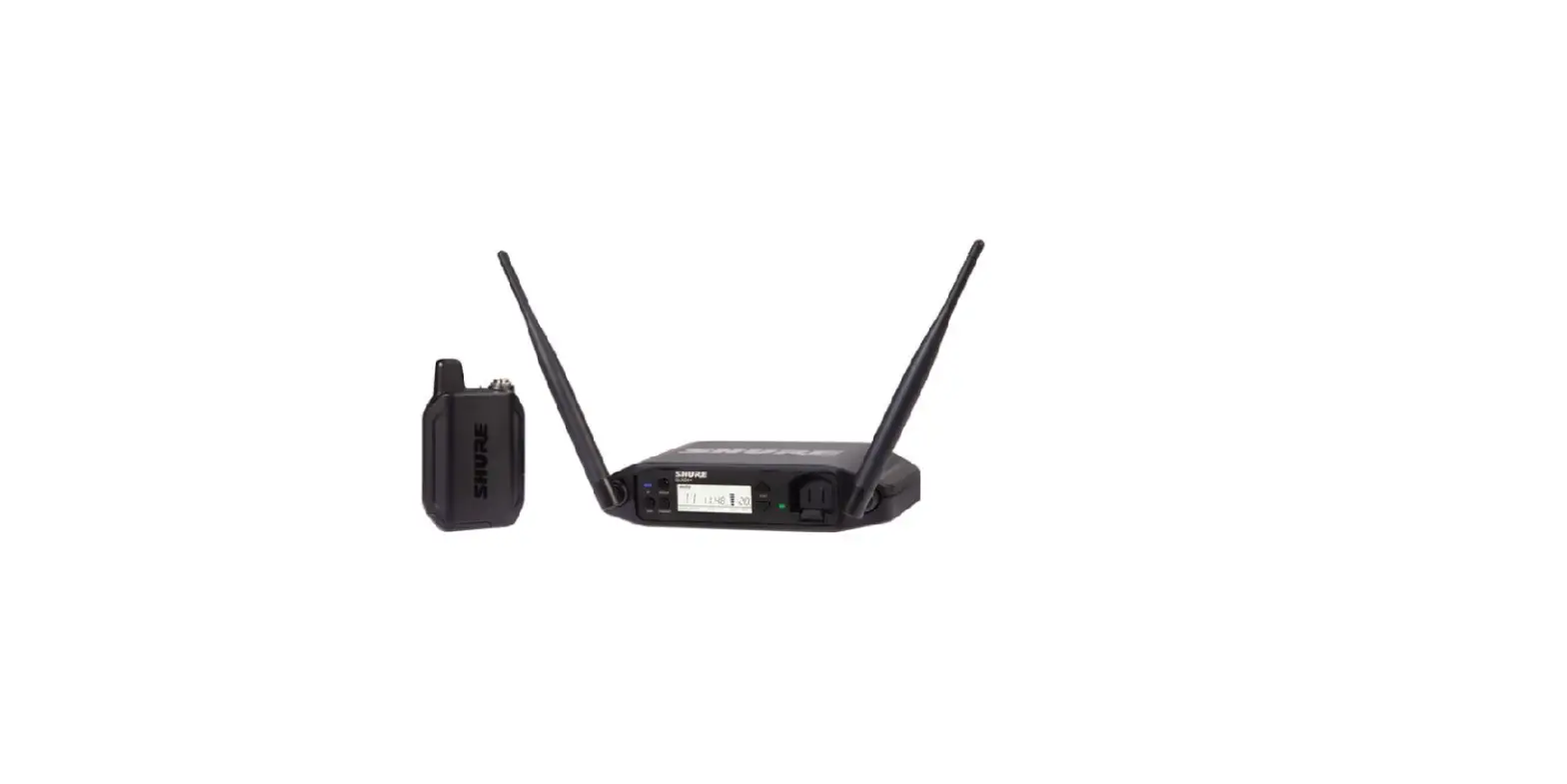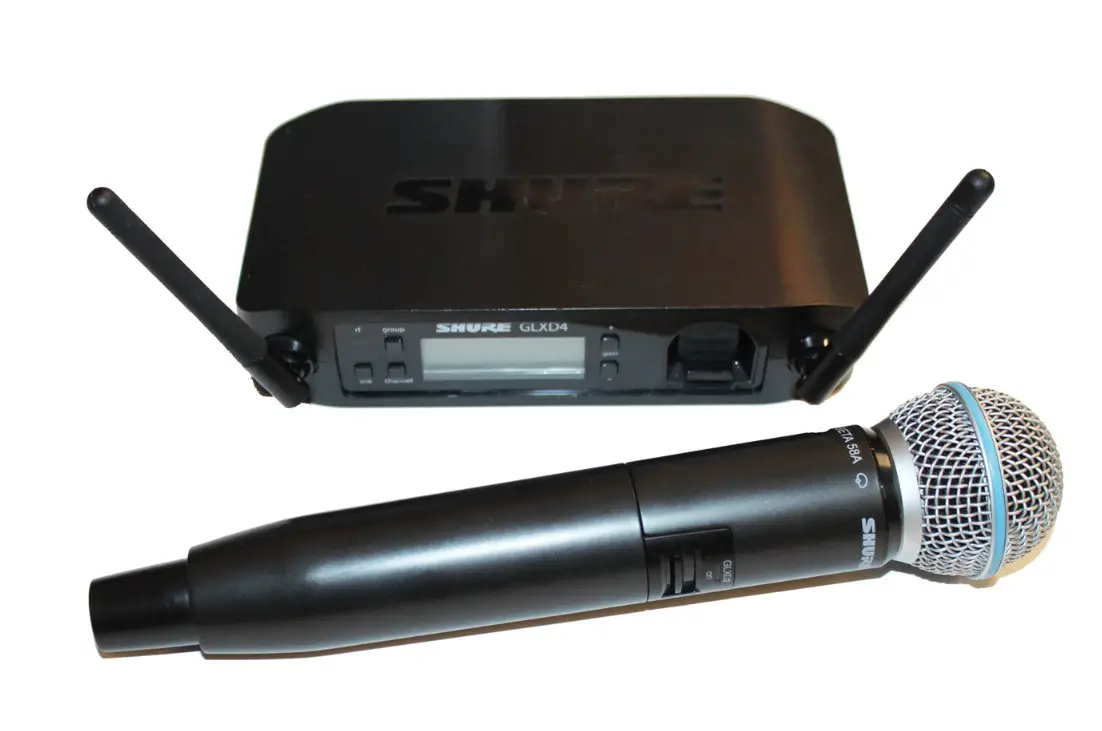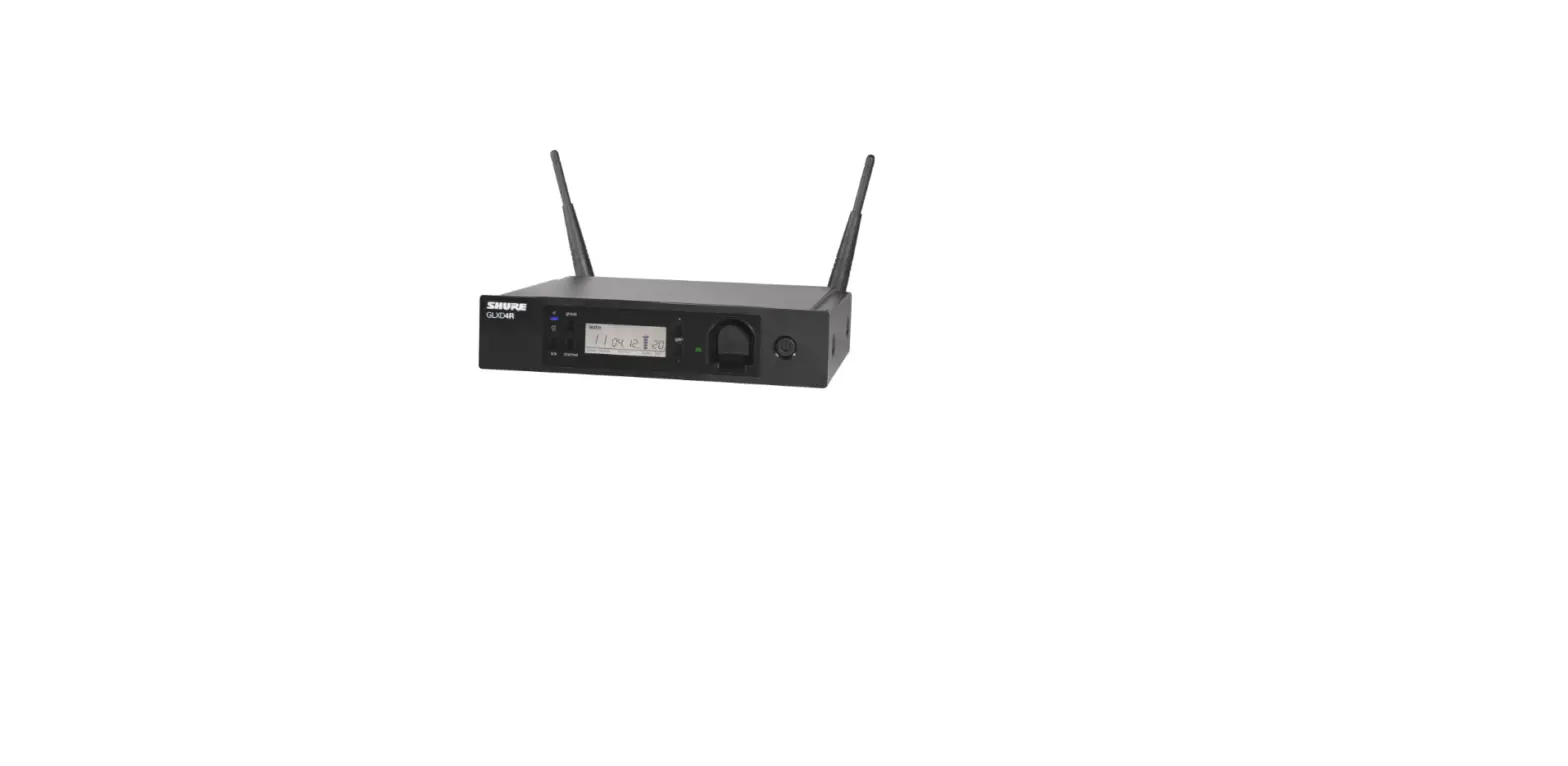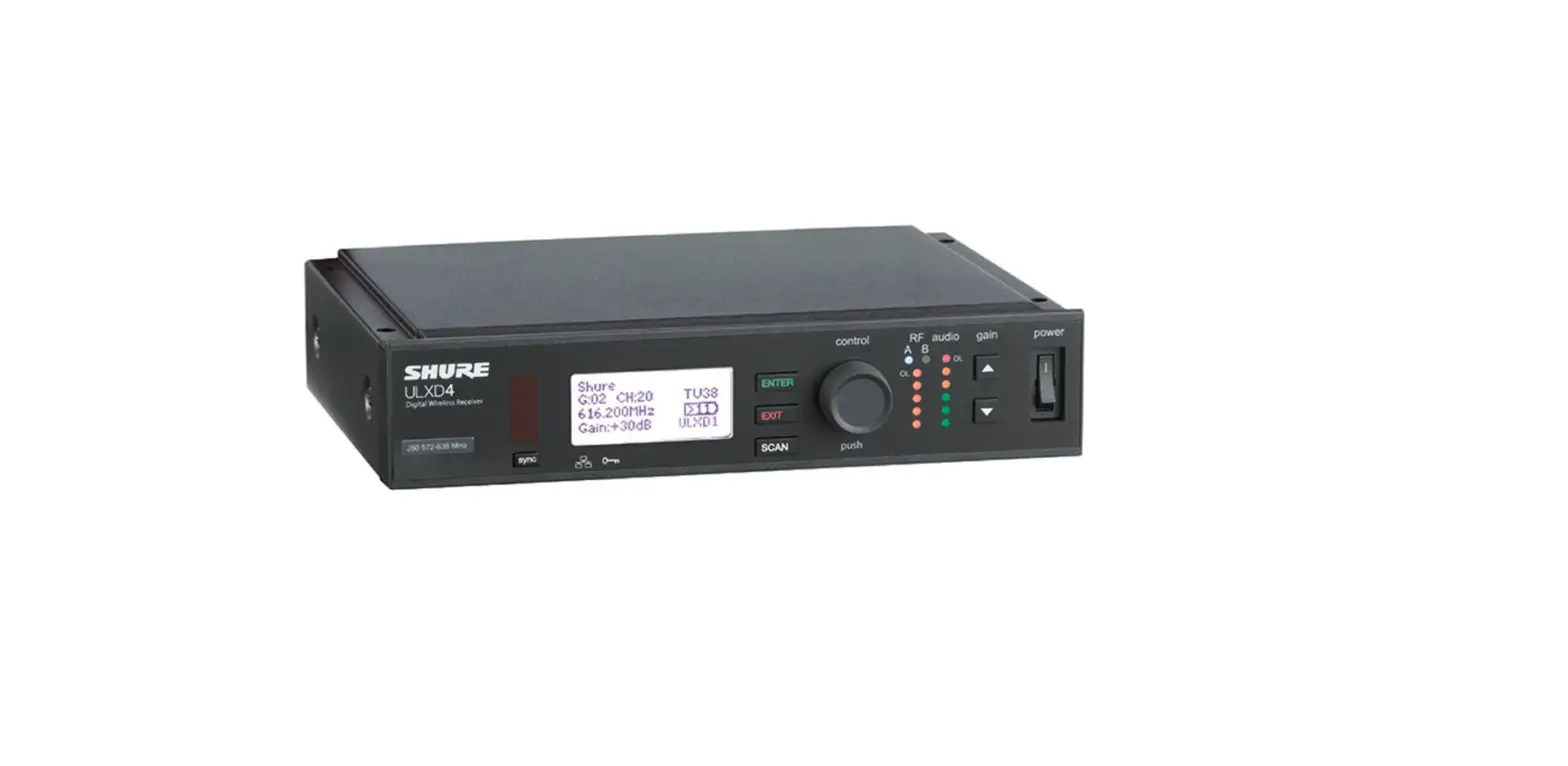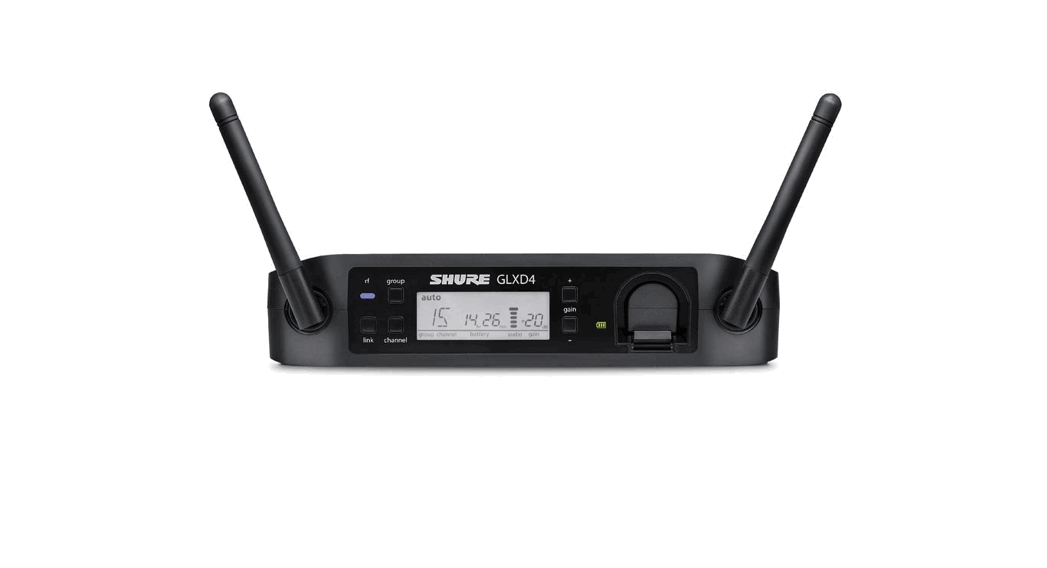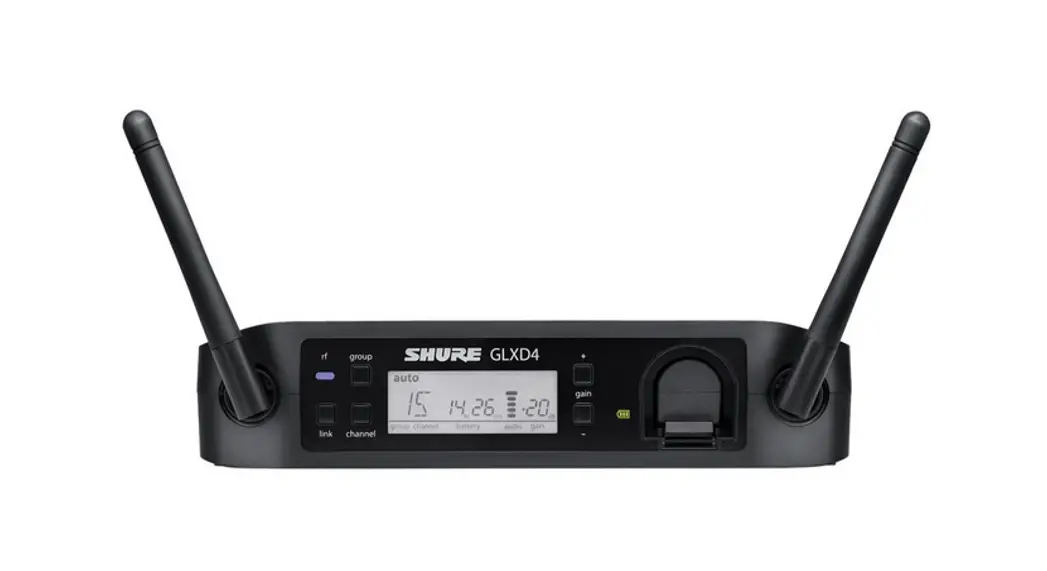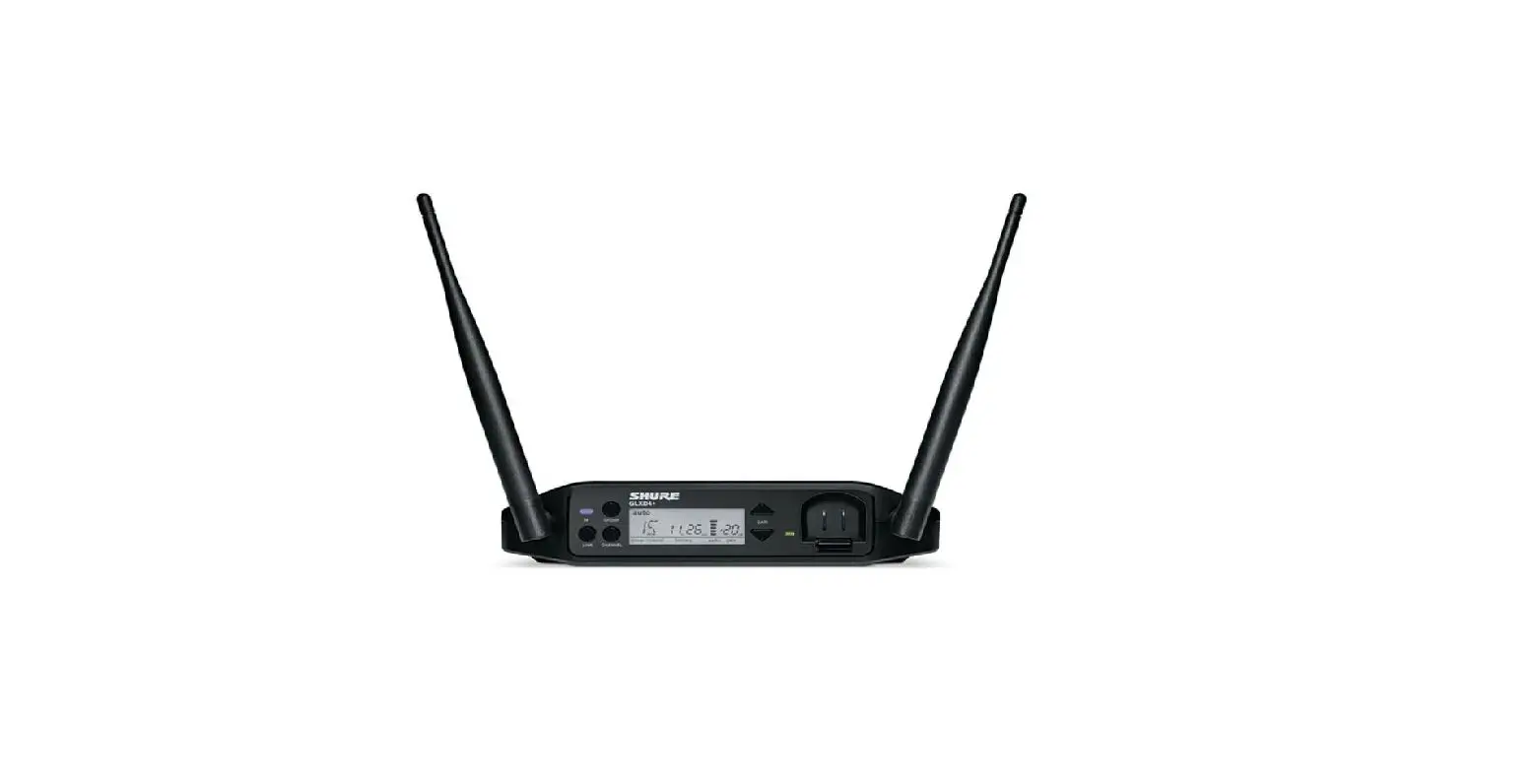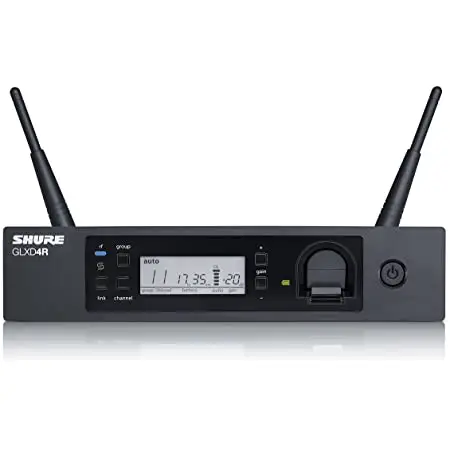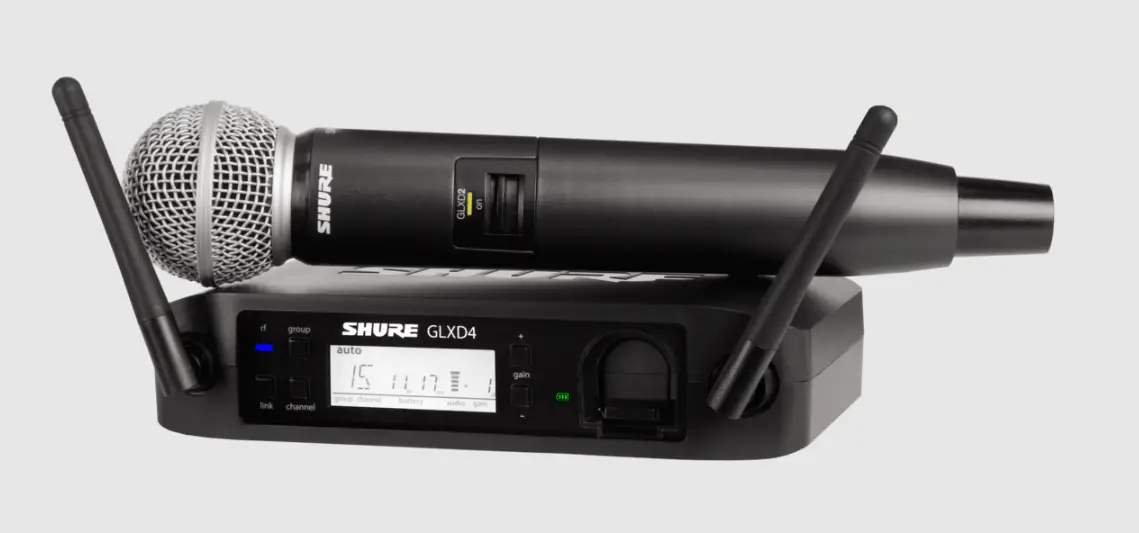

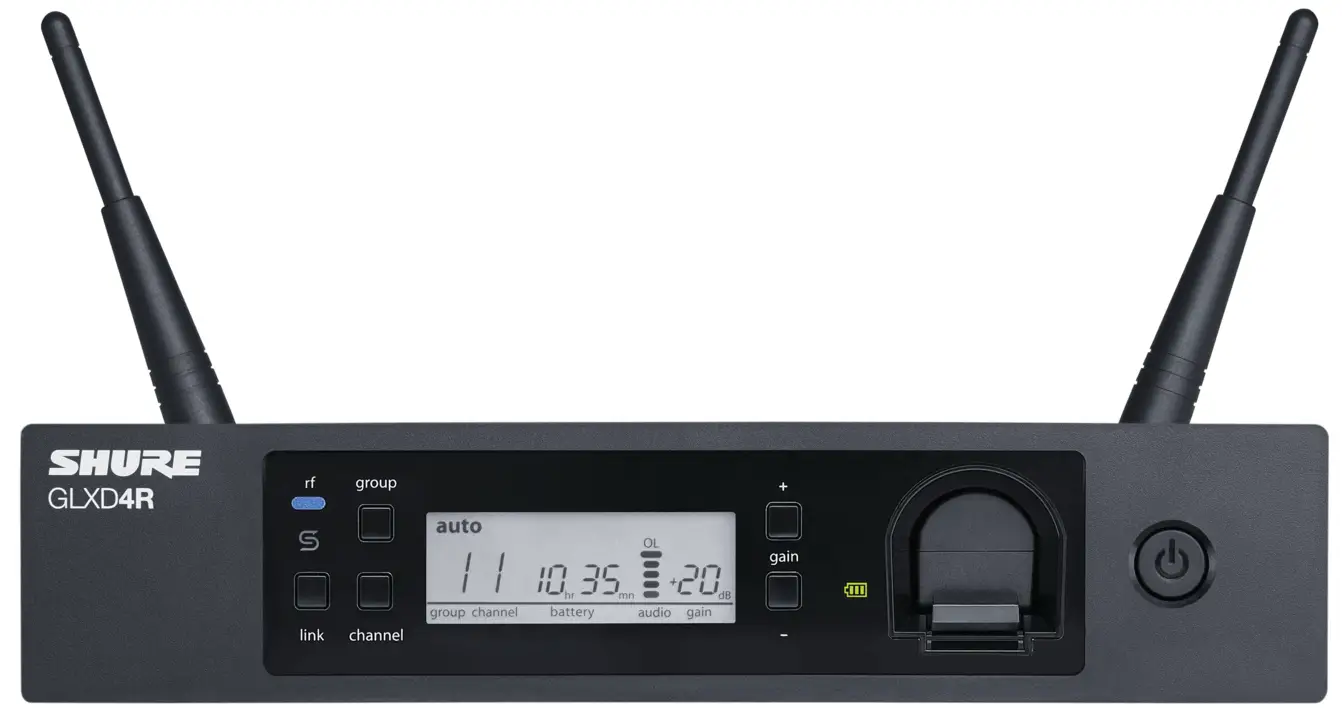
SHURE GLXD4R Plus GLX-D Receiver
IMPORTANT SAFETY INSTRUCTIONS
- READ these instructions.
- KEEP these instructions.
- HEED all warnings.
- FOLLOW all instructions.
- DO NOT use this apparatus near water.
- CLEAN ONLY with dry cloth.
- DO NOT block any ventilation openings. Allow sufficient distances for adequate ventilation and install in accordance with the manufacturer’s instructions.
- DO NOT install near any heat sources such as open flames, radiators, heat registers, stoves, or other apparatus (including amplifiers) that produce heat. Do not place any open flame sources on the product.
- DO NOT defeat the safety purpose of the polarized or grounding type plug. A polarized plug has two blades with one wider than the other. A grounding type plug has two blades and a third grounding prong. The wider blade or the third prong are provided for your safety. If the provided plug does not fit into your outlet, consult an electrician for replace meant of the obsolete outlet.
- PROTECT the power cord from being walked on or pinched, particularly at plugs, convenience receptacles, and the point where they exit from the apparatus.
- ONLY USE attachments/accessories specified by the manufacturer.
- USE only with a cart, stand, tripod , bracket, or table specified by the manu- ® facturer, or sold with the apparatus. When a cart is used, use caution when moving the cart/apparatus combination to avoid injury from tip-over. •
- UNPLUG this apparatus during lightning storms or when unused for long periods of time
- REFER all servicing to qualified service personnel. Servicing is required when the apparatus has been damaged in any way, such as power supply cord or plug is damaged, liquid has been spilled or objects have fallen into the apparatus, the apparatus has been exposed to rain or moisture, does not operate normally, or has been dropped.
- DO NOT expose the apparatus to dripping and splashing. DO NOT put objects filled with liquids, such as vases, on the apparatus.
- The MAINS plug or an appliance coupler shall remain readily operable.
- The airborne noise of the Apparatus does not exceed 70dB (A).
- Apparatus with CLASS I construction shall be connected to a MAINS socket outlet with a protective earthing connection.
- To reduce the risk of fire or electric shock, do not expose this apparatus to rain or moisture.
- Do not attempt to modify this product. Doing so could result in personal injury and/or product failure.
- Operate this product within its specified operating temperature range.
This symbol indicates that dangerous voltage constituting a risk of electric shock is present with in this unit.
This symbol indicates that there are important operating and maintenance instructions in the literature accompanying this unit
Set Up the Receiver
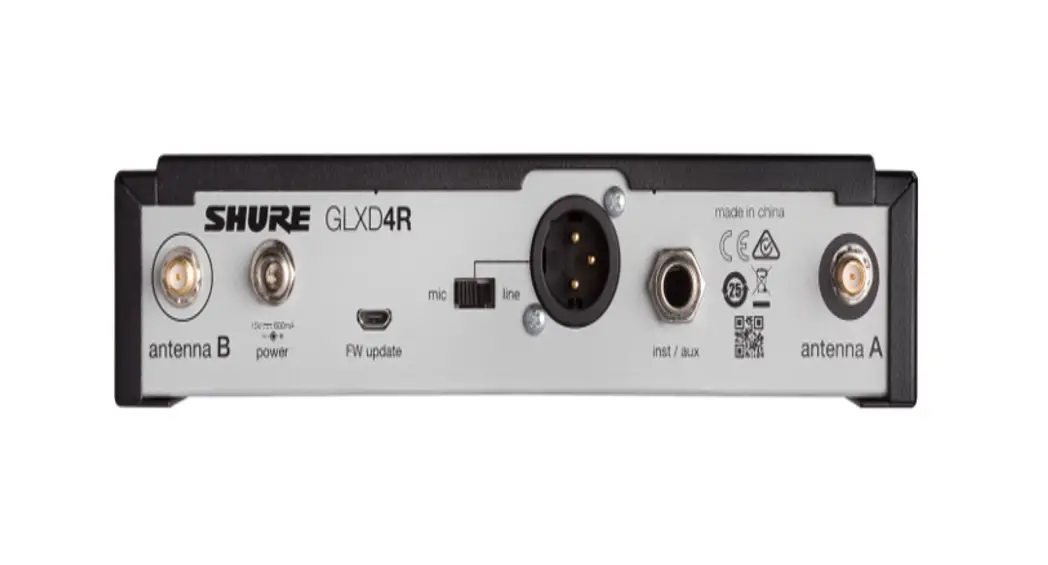
- Attach the included antennas to the back of the receiver.
- Connect the power supply to the receiver and plug the cord into an AC power source.
- Connect the audio output to an amplifier or mixer
Install Transmitter Batteries
Bodypack:
- Move the locking lever to the open position and slide the battery door open.
- Place the battery into the transmitter.
- Close the battery door

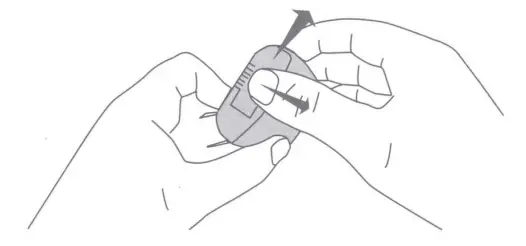
Handheld:
- Unscrew and remove the battery cover.
- Place the battery into the transmitter.
- Replace and tighten the battery cover

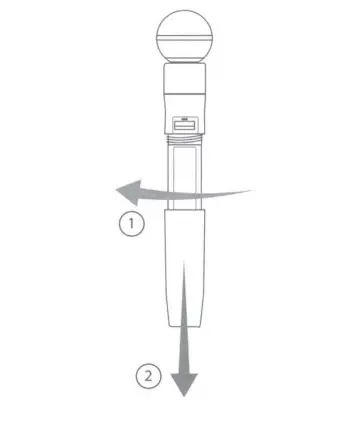
System Set Up
Important: Before beginning, turn off all receivers and transmitters. Turn on and link each receiver/transmitter pair one at a time to prevent cross-linking.
- Turn on a receiver.
- Press and hold the group button to select a group (if necessary). If the group is already set, press the channel button to scan for the best available channel.
- Turn on a transmitter. The blue RF LED will flash while the transmitter and receiver form a link. When the link has successfully formed, the RF LED will remain illuminated. The transmitter and receiver will remain linked for future usage. Repeat steps 1-3 for each additional receiver and transmitter. Remember to set each receiver to the same group.
Note: Dashes appearing on the group and channel display after a channel selection indicate that frequencies are not available in the selected group. Choose a group that supports more receivers and repeat the linking steps.
Linking Two Transmitters to a Receiver
Only one transmitter can be active at a time to prevent cross interference. Gain settings for each transmitter can be independently set and stored when the transmitter is active.
Important! Do not turn on and operate both linked transmitters at any time. Turn off both transmitters before beginning.
- Press the group button to select a group. The receiver automatically scans the selected group to find the best available channel.
- Turn on transmitter 1 and link it to the receiver. Adjust the gain, and then turn off the transmitter.
- Turn on transmitter 2 and press and hold the link button on the transmitter and the receiver to link them together. Adjust the gain, and then turn off the transmitter.
Identifying Linked Transmitters and Receivers with Remote ID
Use the remote ID feature to identify linked transmitter and receiver pairs in multiple receiver systems.
To activate remote ID:
- Momentarily press the link button on the transmitter or receiver.
- The screen of the linked receiver will blink and display ID, while the status LED on the linked transmitter will flash red/green.
- To exit remote ID mode, momentarily press the link button or allow the function to timeout.
Gain Adjustment
Momentarily press the gain buttons on the receiver to adjust the gain of a linked transmitter in 1 dB increments. For faster gain adjustments, press and hold the gain buttons.
Tip: Monitor the audio and observe the receiver audio meter level while adjusting the gain to prevent signal overload
Locking and Unlocking the Controls
The controls of the receiver and transmitter can be locked to prevent unauthorized setting changes or power-off. The lock status is not changed by power cycles.
Locking the Receiver Controls
- Simultaneously press and hold the group and channel buttons until LK appears on the screen. Repeat to unlock.
- LK is displayed if a locked control is pressed
- UN is displayed momentarily to confirm the unlock command
Locking the Transmitter Controls
To lock directly from the transmitter:
Start with the transmitter off, then press and hold the link button while turning on the transmitter. Release the link button when the transmitter powers on to prevent an accidental factory reset. The lock icon appears on the receiver screen when locked.
Repeat sequence to unlock.
To lock from the receiver front panel:
Simultaneously press and hold the group and link buttons for approximately 2 seconds until the flashing lock icon appears on the receiver screen. Repeat sequence to unlock.
Note: The transmitter status LED will flash if a locked switch is set to the off position
Firmware
New versions of the firmware can be uploaded and installed using the Shure Update
Utility tool.
Download Shure Update Utility from shure.com
Specifications
Tuning Bandwidth
| 22 | 2400 – 2483.5 MHz |
| Z3 | 2400 – 2483.5 MHz and 5725 – 5850 MHz |
| 24 | 2400 – 2483.5 MHz and 5725 – 5875 MHz |
| 25 | 2400 – 2483.5 MHz and 5725 – 5825 MHz |
- Dependent on frequency bandTransmit Mode
Shure proprietary digital - RF Output Power
10 mW E.I.R.P. maximum
Ambient Temperature Range
Polarity
Positive pressure on microphone diaphragm (or positive voltage applied to tip of WA302 phone plug) produces positive voltage on pin 2 (with respect to pin 3 of lowimpedance output) and the tip of the high impedance 1 /4-inch output
- GLXD4R+
Power Requirements 14.5 V-17 V, 600 mA
Antenna Type Dual-band ½ Wave Sleeve Dipole - GLXD1+
Power Requirements 3.6 V
Rechargeable Li-Ion
Antenna Type Dual-band Internal Monopole - GLXD2+
Power Requirements 3.6 V
Rechargeable Li -Ion
In the European Union and the United Kingdom, this label indicates that the A batteries in this product should be collected separately and not be disposed of with household waste. Substances in batteries can have a potential negative impact on health and environment and you have a role in recycling waste batteries thus contributing to the protection, preservation, and improvement of the quality of the environment. You should contact your local authority or retailer for details of the collection and recycling schemes available.
Please consider the environment, electric products and packaging are part of regional recycling schemes and do not belong to regular household waste.
WARNING
- Battery packs may explode or release toxic materials. Risk of fire or burns. Do not open, crush, modify, disassemble, heat above 140°F (60°C), or incinerate.
- Follow instructions from manufacturer
- Only use Shure charger to recharge Shure rechargeable batteries
- WARNING: Danger of explosion if battery incorrectly replaced. Replace only with same or equivalent type.
- Never put batteries in mouth. If swallowed, contact your physician or local poison control center
- Do not short circuit; may cause burns or catch fire
- Do not charge or use battery packs other than Shure rechargeable batteries
- Dispose of battery packs properly. Check with local vendor for proper disposal of used battery packs.
- Batteries (battery pack or batteries installed) shall not be exposed to excessive
- heat such as sunshine, fire or the like
- Do not immerse the battery in liquid such as water, beverages, or other fluids.
- Do not attach or insert battery with polarity reversed.
- Keep away from small children.
- Do not use abnormal batteries.
- Pack the battery securely for transport.
Note:
- This equipment is intended to be used in professional audio applications.
- EMC conformance is based on the use of supplied and recommended cable types. The use of other cable types may degrade EMC performance.
- Use this battery charger only with the Shure charging modules and battery packs for which it is designed. Use with other than the specified modules and battery packs may increase the risk of fire or explosion.
- Changes or modifications not expressly approved by Shure Incorporated could void your authority to operate this equipment.
FCC
This device complies with part 15 of the FCC Rules. Operation is subject to the following two conditions:
- This device may not cause harmful interference.
- This device must accept any interference received, including interference that may cause undesired operation
Note: This equipment has been tested and found to comply with the limits for a Class B digital device, pursuant to part 15 of the FCC Rules. These limits are designed to provide reasonable protection against harmful interference in a residential installation. This equipment generates uses and can radiate radio frequency energy and, if not installed and used in accordance with the instructions, may cause harmful interference to radio communications. However, there is no guarantee that interference will not occur in a particular installation. If this equipment does cause harmful interference to radio or television reception, which can be determined by turning the equipment off and on, the user is encouraged to try to correct the interference by one or more of the following measures:
- Reorient or relocate the receiving antenna.
- Increase the separation between the equipment and the receiver.
- Connect the equipment to an outlet on a circuit different from that to which the receiver is connected.
- Consult the dealer or an experienced radio/TV technician for help.
Certified under FCC Part 15.
Shure has determined that this product is a Class B harmonized product. The following sections provide country-specific EMC/EMI or product safety information
Certifications
FCC ID: DD4GLXD4RZ3, DD4GLXD123, DD4GLXD223 IC: 616A-GLXD4RZ3, 616A-GLXD123, 616A-GLXD2Z3 CAN ICES-003 (B)/NMB-003(8)
Changes or modifications not expressly approved by the manufacturer could void the user’s authority to operate the equipment.
The antenna(s) must be installed such that a minimum separation distance of 20 cm is maintained between the radiator (antenna) and all persons at all times.
This equipment complies with FCC radiation exposure limits set forth for an uncontrolled environment. This equipment should be installed and operated with minimum distance 20 cm between the radiator & your body.This product meets the applicable Innovation, Science and Economic Development Canada technical specifications. Certified by ISED in Canada under RSS-247 and RSS-GEN.
This device contains licence-exempt transmitter(s)/receiver(s) that comply with Innovation, Science and Economic Development Canada’s licence-exempt RSS(s). Operation is subject to the following two conditions:
- This device may not cause interference.
- This device must accept any interference, including interfer- ence that may cause undesired operation of the device.
This equipment complies with FCC and ISED radiation exposure limits set forth for an uncontrolled environment. End user must follow the specific operating instructions for satisfying RF exposure compliance. This transmitter must not be co-located or operating in conjunction with any other antenna or transmitter.
Waste Electrical and Electronic Equipment (WEEE) Directive
In the European Union and the United Kingdom, this label indicates that this product should not be disposed of with household waste. It should be deposited at an appropriate facility to enable recovery and recycling.
REACH (Registration, Evaluation, Authorization of Chemicals) is the European Union (EU) and the United Kingdom (UK) chemical substances regulatory framework. Information on substances of very high concern contained in Shure products in a concentration above 0.1 % weight over weight (w/w) is available upon request.
CE Notice: Hereby, Shure Incorporated declares that this product with CE Marking has been determined to be in compliance with European Union requirements. The full text of the EU declaration of conformity is available at the following site: https://www.shure.com/en-EU/support/declarations-of-conformity.
UKCA Notice: Hereby, Shure Incorporated declares that this product with UKCA Marking has been determined to be in compliance with UKCA requirements. The full text of the UK declaration of conformity is available at the following site: https://www.shure.com/en-GB/support/declarations-of-conformity.
UK Importer / UK Rep.
Shure UK Limited
Unit 2, The 10 Centre, Lea Road, Waltham Abbey, Essex, EN9 1 AS, UK
Frequency Tables
Z2 (2.4 GHz only):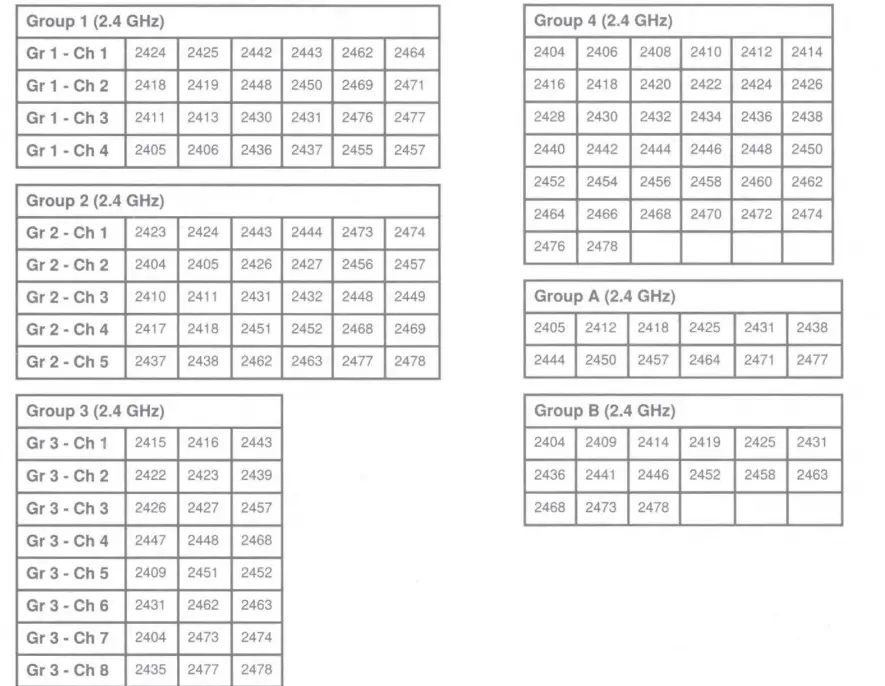
Z3: 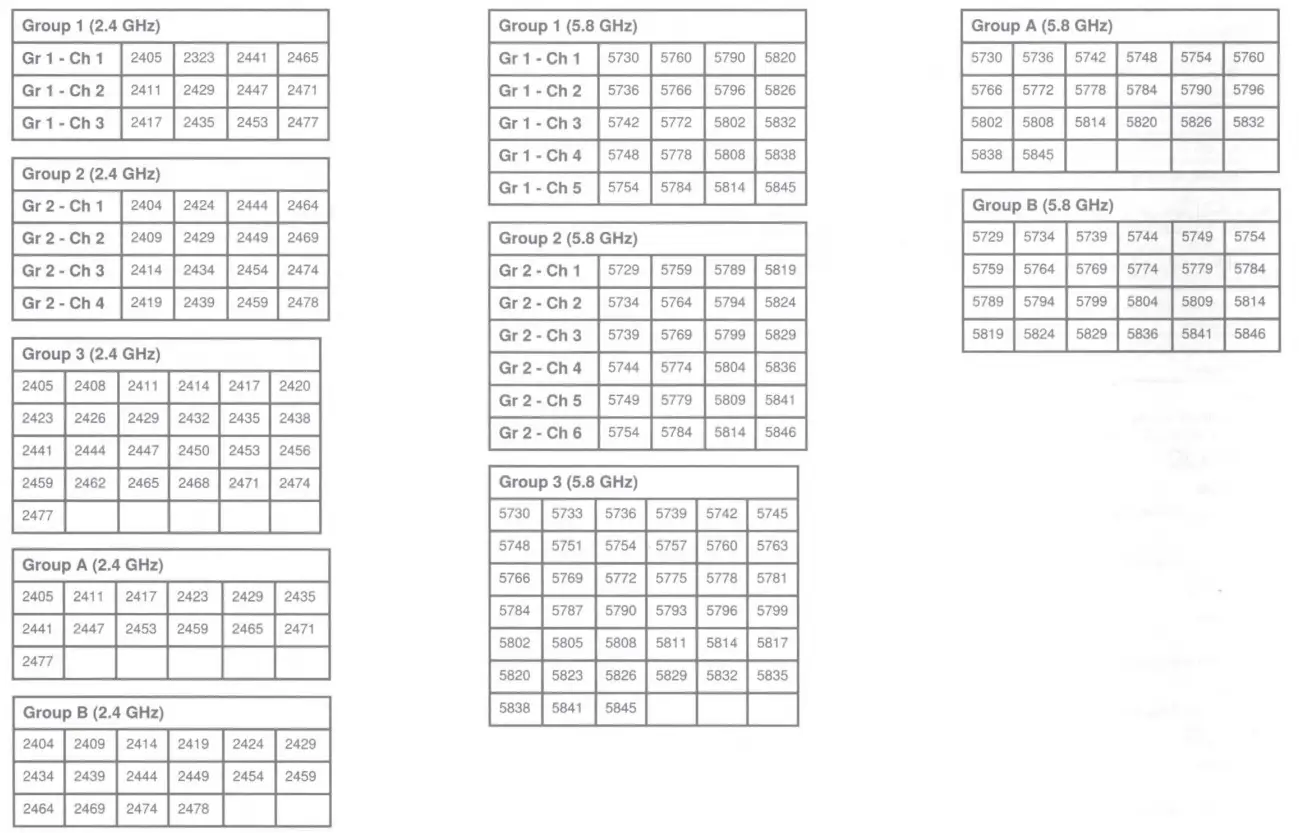
24: 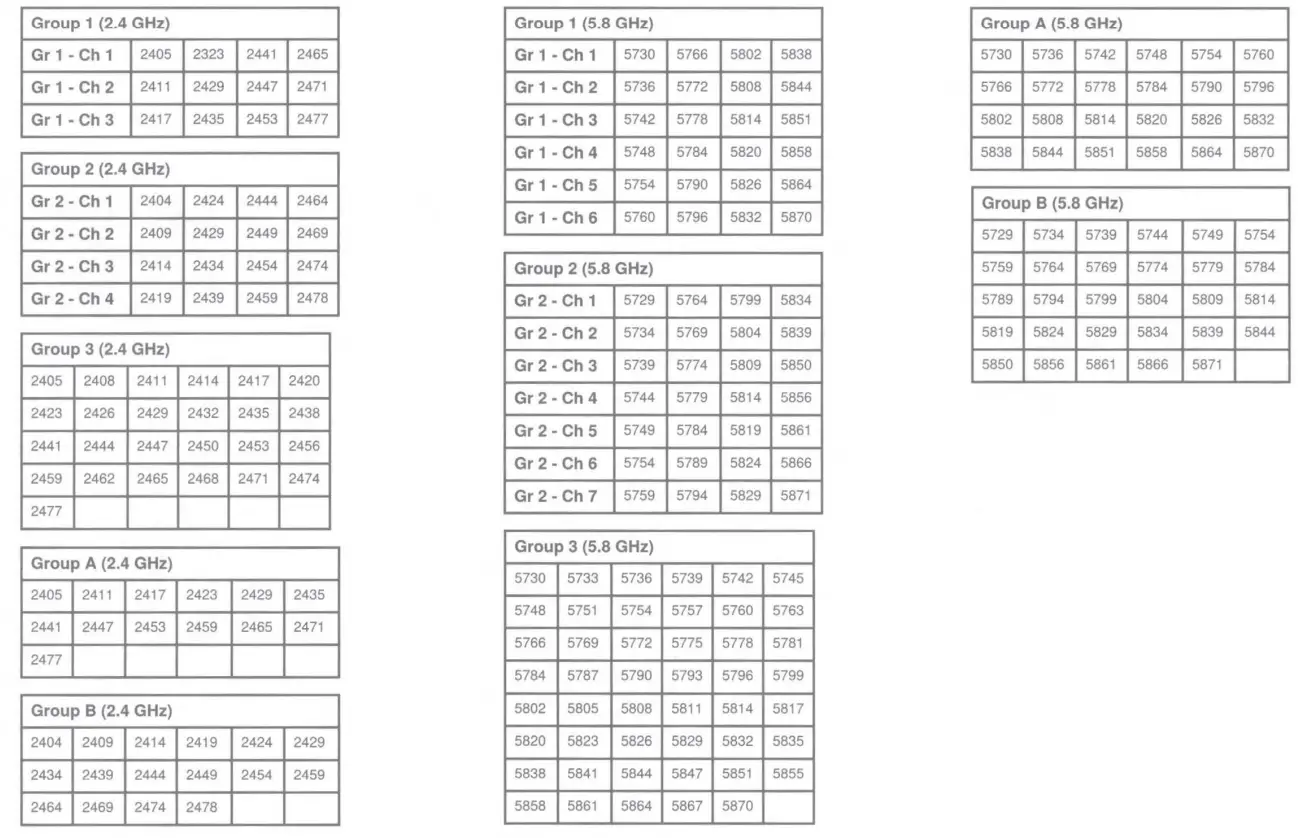
25: 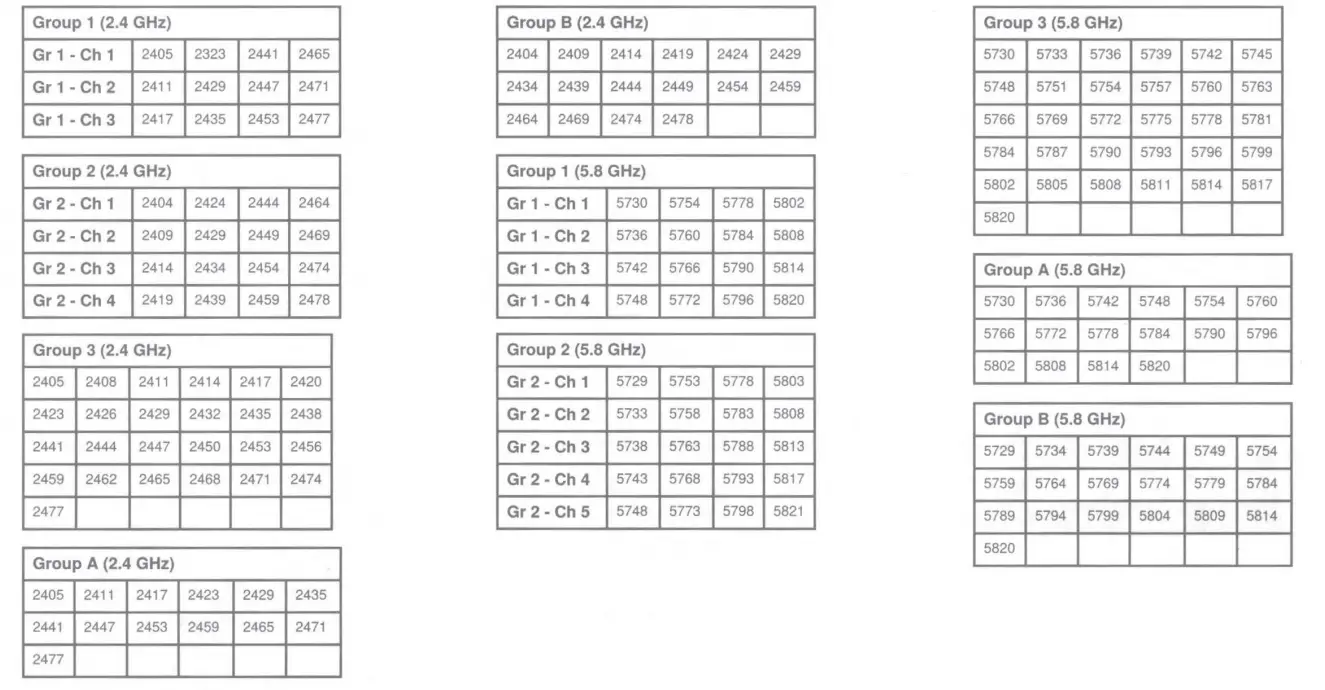
System Overview
GLX-D+ Dual Band Digital Wireless offers confidence without complexity. Dual-band operation in 2.4 and 5.8 GHz more than doubles the available bandwidth to avoid interference without audio interruption. The receiver is compatible with a selection of lavalier, headset, and vocal microphones. The included lithium-ion battery offers up to 12 hours of runtime, and can be charged directly on the receiver or via USBC. Rackmount receivers can be combined with the GLXD+ Frequency Manager and directional antennas (both sold separately) for installations where a larger number of channels are needed.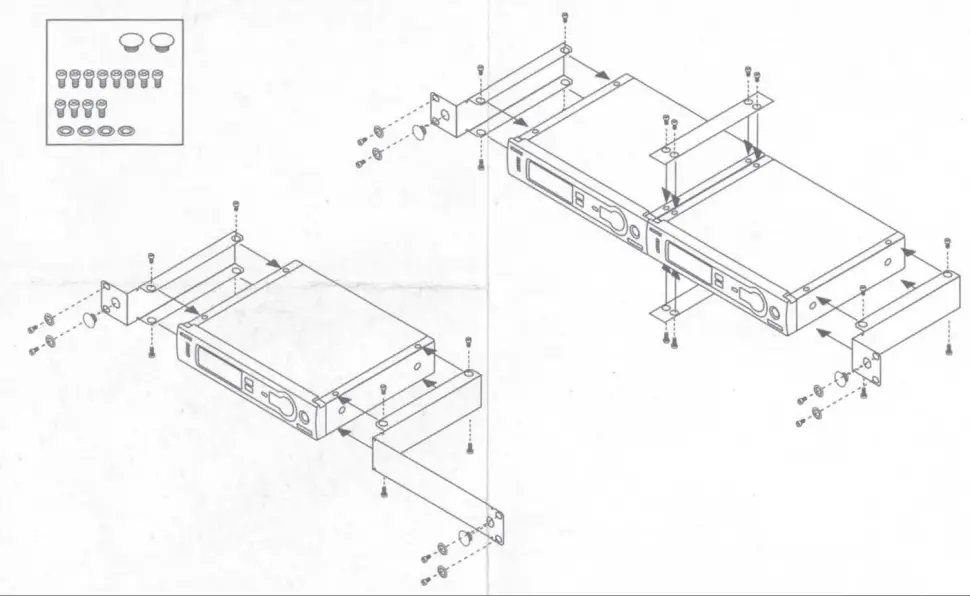
Features
- Exceptional digital audio clarity
- Compatible with multiple legendary microphone options
- Automatically moves away from interference without audio interruption
- Operates in 2.4 and 5.8 GHz spectrum*
- Rechargeable battery delivers up to 12 hours of runtime
- Rock-solid RF performance for multiple system installations
- License-free frequency range
Note: region dependent
Receiver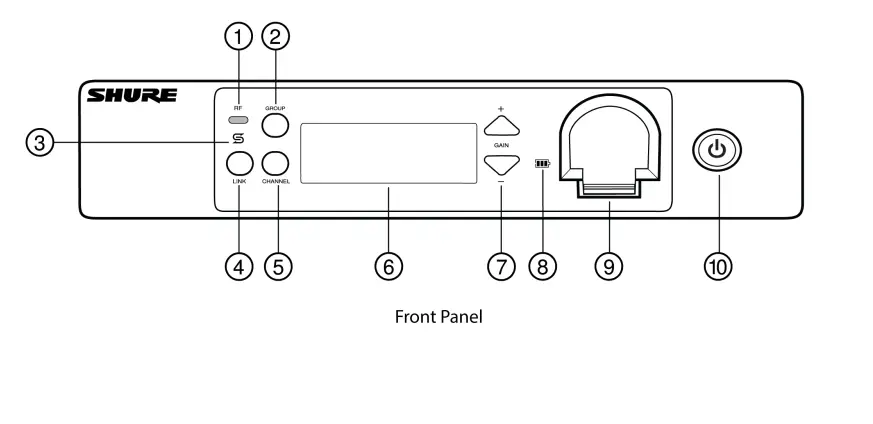
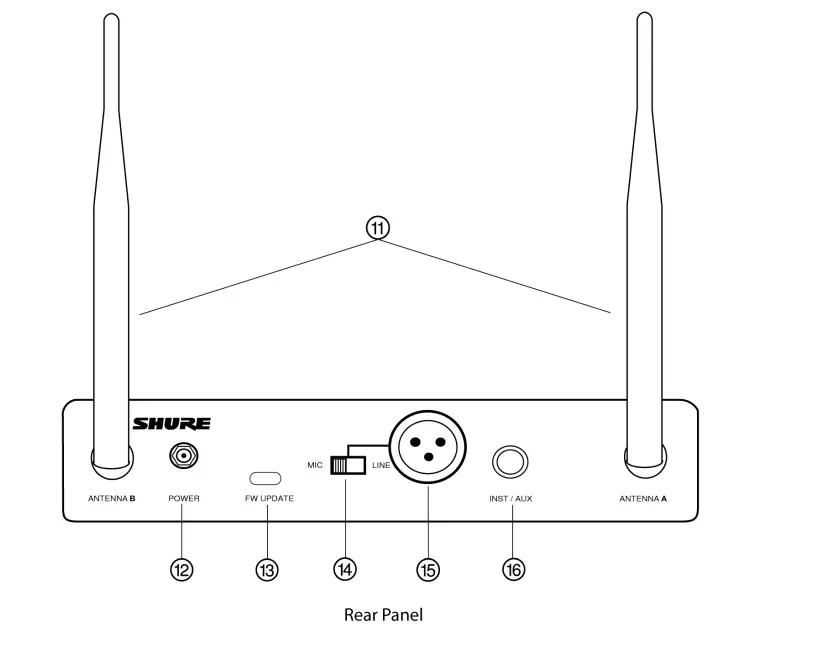
- RF status LED
- ON = Linked transmitter is on
- Flashing = Searching for transmitter
- OFF = Linked transmitter off or transmitter unlinked
- Group button
- Press and hold for two seconds to enable manual group edit.
- Data sync LED
- ON = Data sync is on (receiver connected to GLX-D+ frequency manager)
- Flashing = Searching for frequencies
- OFF = Data sync is off (receiver not connected to GLX-D+ frequency manager)
- Link button
- Press to manually link receiver to a transmitter or to activate the remote ID function.
- Channel button
- Press to start a channel scan.
- Display
- Shows receiver and transmitter status.
- Gain buttons
- Press to increase or decrease transmitter gain in 1 dB increments.
- Battery charging indicator
- Illuminates when battery is in charging bay:
- Red = Battery charging
- Green Flashing = Battery charge at 90%
- Green = Battery charged
- Amber Flashing = Charging error, replace battery
- Battery charging bay
- Charges transmitter battery.
- Power button
- Powers the unit on and off.
- Antenna
- Two antennas per receiver. Antennas pick up the signal from the transmitter.
- Power supply port
- Connect the supplied 15 V DC external power supply.
- USB-C port
- Connect to computer to download firmware updates.
- Mic/Line switch
- Sets XLR output level to microphone or line level.
- XLR audio output
- Supplies microphone-level or line-level audio output.
- Inst/Aux output
- TRS ¼” (6.35mm) audio output. Connect to mixers, recorders, and amplifiers.
Receiver Screen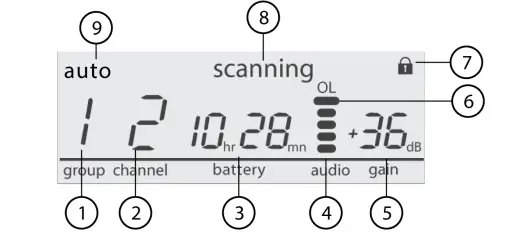
- Group
- Displays the selected group.
- Channel
- Displays the selected channel.
- Transmitter battery runtime
- Displays remaining battery life in hours and minutes.
- Alternatively displays the following battery status:
- CALC = Battery life calculation
- Lo = Battery life less than 15 minutes
- Err = Replace battery
- Audio meter
- Indicates audio signal level and peaks.
- Gain
- Displays transmitter gain settings (dB).
- OL indicator
- Indicates audio overload, reduce gain.
- Transmitter locked
- Displayed when linked transmitter controls are locked.
- Scanning
- Indicates a scan is in progress.
- Auto
- Indicates that the selected group has backup channels available.
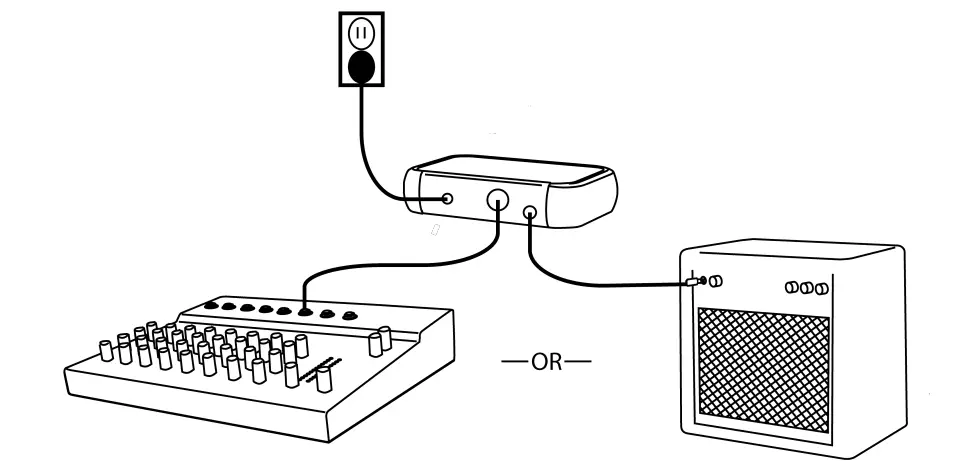
Set Up the Receiver
- Attach the included antennas to the back of the receiver.
- Connect the PS43 power supply to the receiver and plug the cord into an AC power source.
- Connect the audio output to an amplifier or mixer.

Transmitters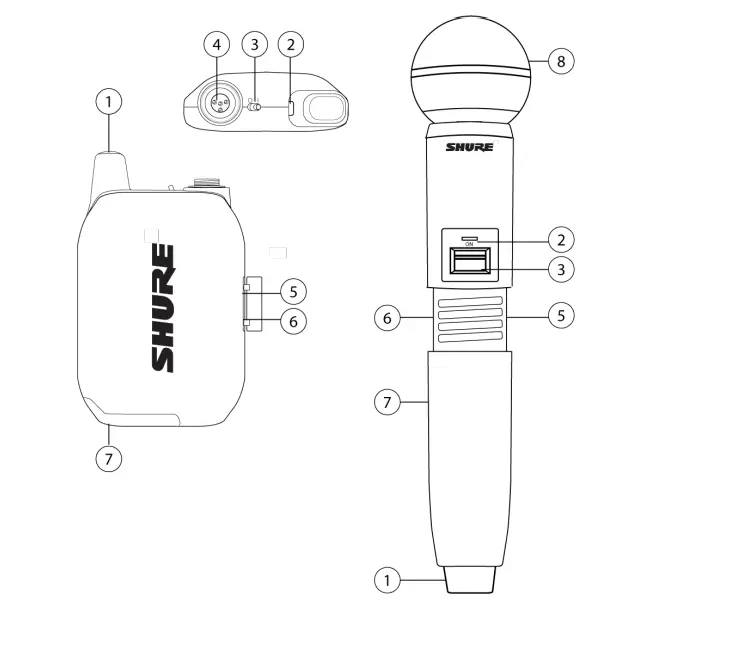
- Antenna
Carries wireless signal. - Status LED
LED color and state indicate transmitter status. - Power switch
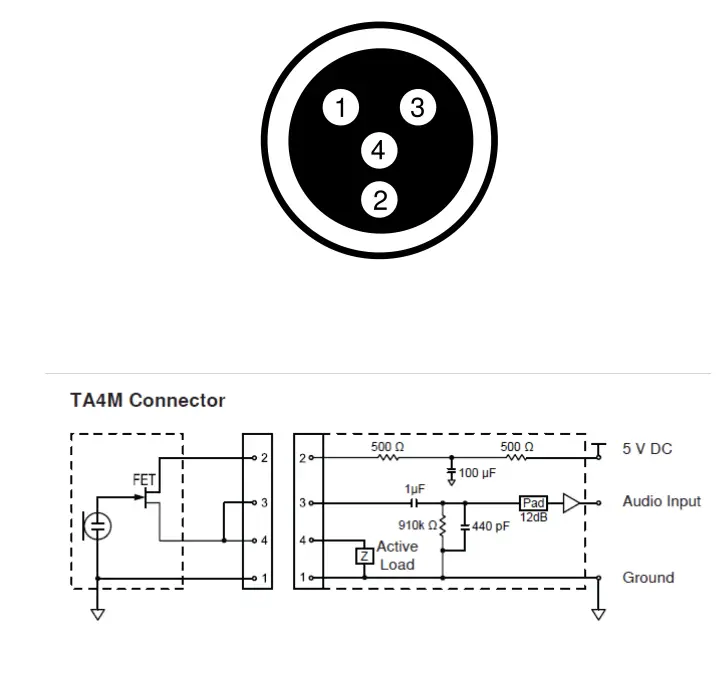
Turns the transmitter on/off. - TA4M input port
Connects to a 4-Pin mini connector (TA4F) microphone or instrument cable. - USB-C charging port
Connect to USB battery charger. - Link button
Press and hold within 5 seconds of power-on to manually link with receiver.
Press momentarily to activate remote ID function. - Battery compartment
Holds 1 Shure rechargeable battery. - Microphone cartridge
GLXD2+ transmitter models are available with the following cartridge types: SM58, Beta 58, Beta 87A.
Transmitter Status LED
- LED is green during normal operation.
- LED color or flashing indicates a change in transmitter status as shown in the following table:
| Color | State | Description |
|
Green | Flashing (slow) | Transmitter attempting relink with receiver |
| Flashing (fast) | Unlinked transmitter searching for receiver | |
| Flashes 3 times | Indicates locked transmitter when power switch is pressed | |
| Red | On | Battery life < 1 hour |
| Flashing | Battery life < 30 minutes | |
| Red/Green | Flashing | Remote ID active |
| Amber | Flashing | Battery error; remove and insert again, or replace battery |
Wearing the Bodypack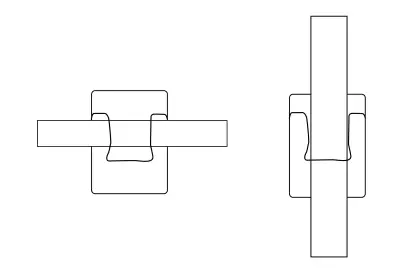
- Clip the bodypack to a belt or slide a guitar strap through the bodypack clip as shown.
- For best results, the belt should be pressed against the base of the clip
Wearing the Headworn Microphone
- Position the headworn microphone 13 mm (1/2 in.) from the corner of your mouth.
- Position lavalier and headworn microphones so that clothing, jewelry, or other items do not bump or rub against the microphone.

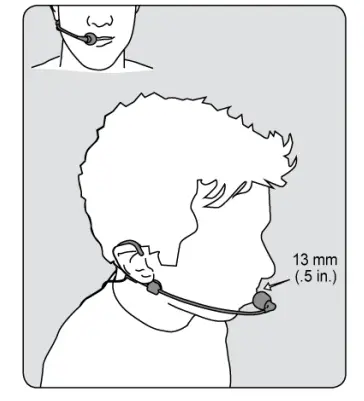
Correct Microphone Placement
- Hold the microphone within 12 inches from the sound source.
- For a warmer sound with increased bass presence, move the microphone closer to the sound source.
- Do not cover grille with hand.
Install Transmitter Batteries
Important: Always fully charge a new battery before first use.
Bodypack:
- Move the locking lever to the open position and slide the battery door open.
- Place the battery into the transmitter.
- Close the battery door

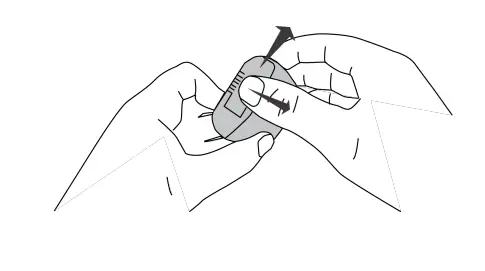
Handheld:
- Unscrew and remove the battery cover.
- Place the battery into the transmitter.
- Replace and tighten the battery cover.

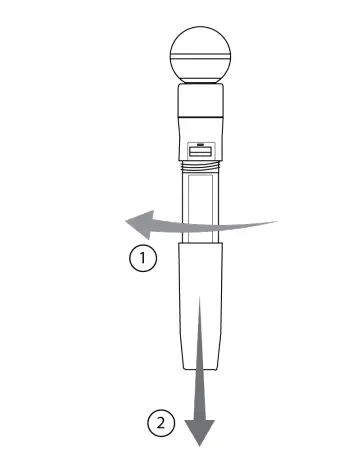
Batteries and Charging
GLX-D+ transmitters are powered by Shure SB904 lithium-ion rechargeable batteries. Advanced battery chemistry maximizes
runtimes with zero memory effects, eliminating the need to discharge batteries prior to charging.
When not in use, recommended battery storage temperature is 10°C (50°F) to 25°C (77°F).
Note: The transmitter will not pass RF or audio signals when connected to the charging cable.
The following battery charging options are available:
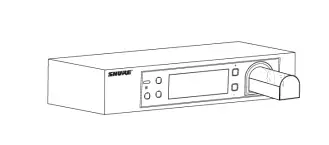
Receiver Charging Bay
The receiver’s built-in charging bay will charge transmitter batteries when the receiver is plugged in to a power outlet.
- Insert the battery into the charging bay.
- Monitor the battery charging indicator on the front panel.

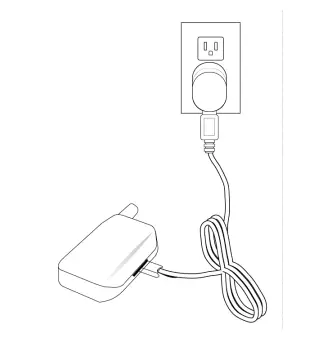
Charging from an AC Power Source
- Plug the charging cable into the charging port on the transmitter.
- Plug the charging cable into an AC power source.

Charging Status LEDs
| LED Color | Description |
| Green (solid) | Device is fully charged |
| Red (solid) | Charging |
| Amber (flashing) | Out of temperature range, or battery error |
| Off | Power supply is disconnected, or no device is docked in the charging bay |
Charging Times and Transmitter Runtimes
Use the following table to determine approximate battery runtime based on the duration of charging time when in 5.8 GHz mode. Times shown are in hours and minutes. Transmitters automatically poweroffafter approximately 1 hour to conserve battery life if the signal from a linked receiver is not detected
| Receiver Bay or AC Power Source Charging | Transmitter Runtime |
| 0:15 | up to 1:30 |
| 0:30 | up to 3:00 |
| 1:00 | up to 6:00 |
| 3:00 | up to 11:30* |
Important Tips for Care and Storage of Shure Rechargeable Batteries
Proper care and storage of Shure batteries results in reliable performance and ensures a long lifetime.
- Always store batteries and transmitters at room temperature
- Ideally, batteries should be charged to approximately 40% of capacity for long-term storage
- During storage, check batteries every 6 months and recharge to 40% of capacity as needed
Tips to Improve Wireless System Performance
If you encounter interference or dropouts, try the following suggestions:
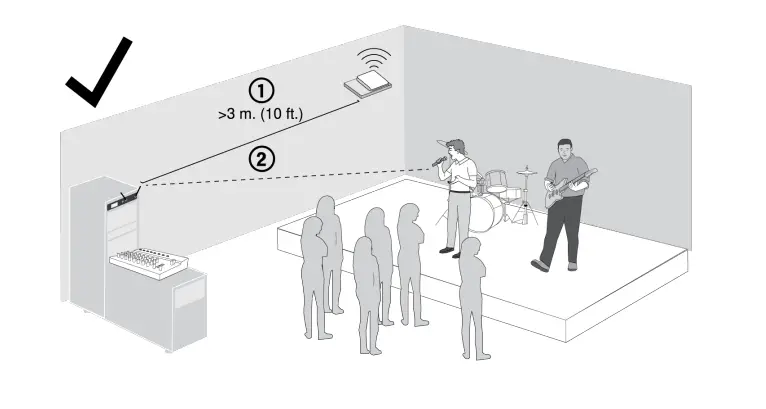
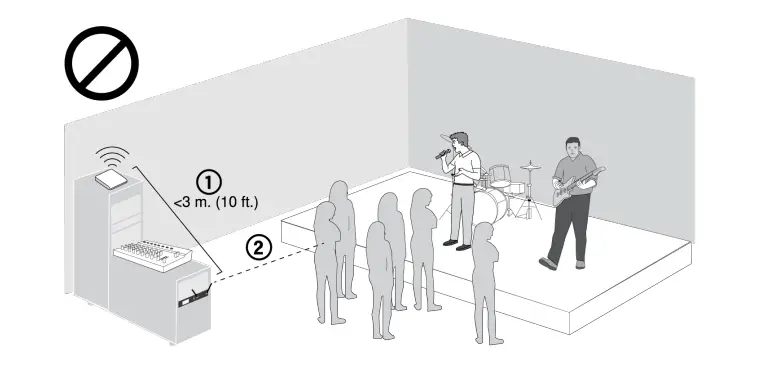
- Place receiver at least 3 meters (10 feet) away from Wi-Fi access points, computers, or other active 2.4 GHz and 5.8 GHz sources.
- Avoid heavy Wi-Fi traffic activities such as downloading large files or viewing a movie.
- Turn on any Wi-Fi prior to turning on receivers and scanning for the best channel.
- Reduce transmitter-to-receiver distance by placing receivers on stage or above the audience with a clear line of sight to the transmitter.
- Move receiver to the top of the equipment rack for a clear line of sight.
- Mount antennas remotely to place closer to transmitters and improve RF reliability if receivers cannot be moved closer.
- Make sure people do not block the line of sight between receiver and transmiter


Additional Tips
- Do not place competitive 2.4 GHz and 5.8 GHz receivers near GLXD4R+ receivers.
- Connect more than two GLXD4R+ receivers to a GLX-D+ frequency manager to improve RF reliability.
- Scan for the best available channel by pressing the channel button.
- Keep transmitters more than 2 meters (6 feet) apart. This is less critical with shorter receiver-to-transmitter distances or if receivers are connected to a GLX-D+ frequency manager.
Note: If transmitters are within 6 inches of non-GLX-D+ transmitters or microphone cartridges, audible noise is possible. - Move transmitter and receiver away from metal or other dense materials.
- During sound check, mark trouble spots and ask performers to avoid those areas.
Rack-Mounting Instructions
Use the supplied mounting hardware to install the receiver in a standard 19 inch audio equipment rack.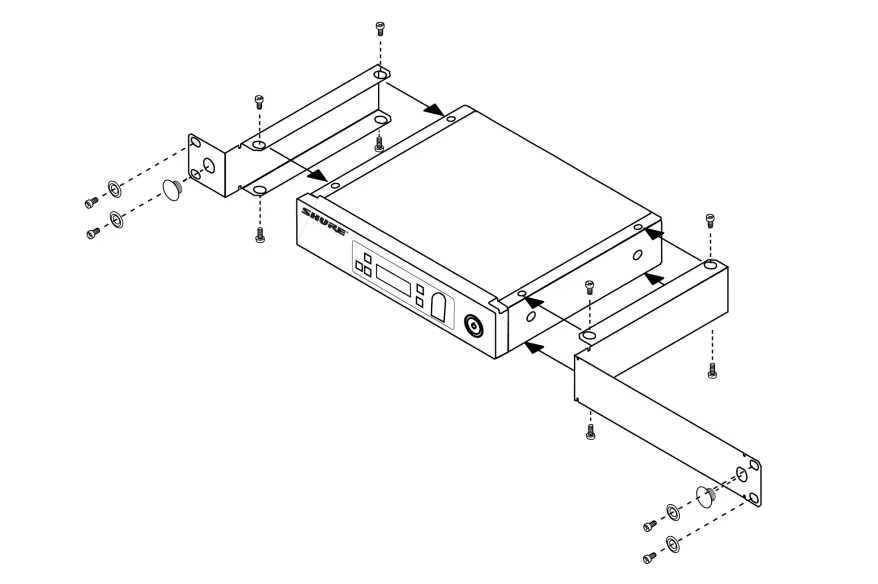
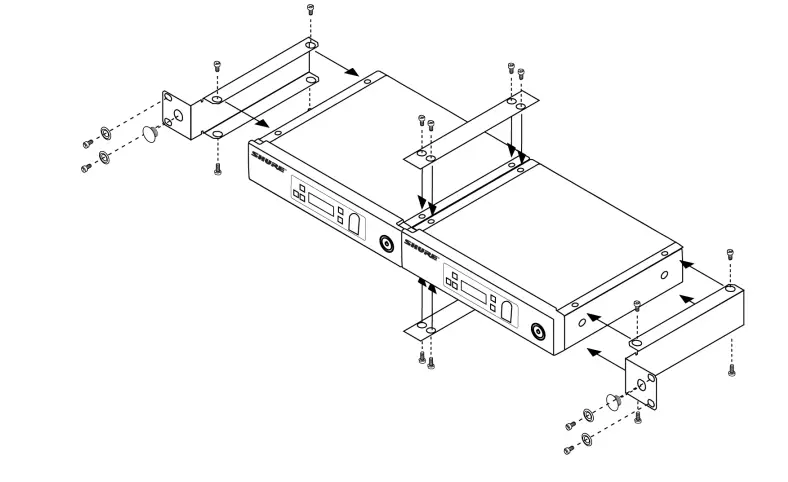
Remote Antenna Placement
Follow these guidelines when mounting antennas remotely:
- Reduce distance between transmitter and antenna
- Mount antennas farther from each other to improve performance.
- Position antennas so there is nothing obstructing the line of sight to the transmitter, including the audience.
- Keep antennas away from metal objects and any other antennas.
- Use only low-loss reverse SMA cable to avoid poor RF signal.
- Consult cable’s specifications and calculate signal loss for desired cable run.
- Use one continuous length of cable from the antenna to the receiver to increase signal reliability.
- Always perform a walkaround test to verify coverage before using a wireless system during a speech or performance. Experiment with antenna placement to find the optimum location. If necessary, mark any trouble spots and ask presenters or performers to avoid those areas.
System Set Up
Important: Before beginning, turn off all receivers and transmitters. Turn on and link each receiver/transmitter pair one at a time to prevent cross-linking.
- Turn on a receiver.
- Press and hold the group button to select a group (if necessary). If the group is already set, press the channel button to scan for the best available channel.
- Turn on a transmitter. The blue RF LED will flash while the transmitter and receiver form a link. When the link has successfully formed, the RF LED will remain illuminated. The transmitter and receiver will remain linked for future usage.
Repeat steps 1-3 for each additional receiver and transmitter. Remember to set each receiver to the same group.
Note: Dashes appearing on the group and channel display after a channel selection indicate that frequencies are not available in the selected group. Choose a group that supports more receivers and repeat the linking steps.
Manually Linking Receivers and Transmitters
- Turn on a transmitter.
- Press and hold the link button on the transmitter until the LED begins to flash green.
- Press and hold the link button on the receiver. The blue RF LED will flash and then remain illuminated when the link has been established.
- Test the audio to verify the link.
Linking Two Transmitters to a Receiver
Only one transmitter can be active at a time to prevent cross interference. Gain settings for each transmitter can be independently set and stored when the transmitter is active.
Important! Do not turn on and operate both linked transmitters at any time. Turn off both transmitters before beginning.
- Press the group button to select a group. The receiver automatically scans the selected group to find the best available channel.
- Turn on transmitter 1 and link it to the receiver. Adjust the gain, and then turn off the transmitter.
- Turn on transmitter 2 and press and hold the link button on the transmitter and the receiver to link them together. Adjust the gain, and then turn off the transmitter.
Identifying Linked Transmitters and Receivers with Remote ID
Use the remote ID feature to identify linked transmitter and receiver pairs in multiple receiver systems.
To activate remote ID:
- Momentarily press the link button on the transmitter or receiver.
- The screen of the linked receiver will blink and display ID, while the status LED on the linked transmitter will flash red/green.
- To exit remote ID mode, momentarily press the link button or allow the function to timeout.
Multiple Receiver Systems
To run more than two receivers at the same time, the GLX-D+ frequency manager is recommended to improve RF reliability (only compatible with GLXD4R+).
However, you can run multiple receivers without the frequency manager. Select the group by determining the total number of receivers in your system. All receivers in the system must be set to the same group.
2.4 GHz and 5.8 GHz bands:
| Group | Number of Receivers | Description |
| 1 | 2 – 5 typical | Default setting |
| 2 | 2 – 5 typical | Best multi-channel group if you experience interference |
| 3 | 1 | Best single-channel group if you experience interference |
| A* | Up to 11 typical, 16 maxi mum | Default setting |
| B* | Best multi-channel group if you experience interference |
2.4 GHz bands only:
| Group | Number of Receivers | Description |
| 1 | 2 – 4 typical | Default setting |
| 2 | 2 – 4 typical | Best multi-channel group if you experience interference |
| 3 | 2 – 4 typical, 8 maximum | Only use Group 3 in controlled WiFi environments because there are no back up frequencies to avoid interference |
| 4 | 1 | Best single-channel group if you experience interference |
| A* | Up to 9 typical, 11 maxi mum | Default setting |
| B* | Best multi-channel group if you experience interference |
Groups A and B are only for systems with a GLXD4R+ and GLXD+ frequency manager.
See Tips to Improve Wireless System Performance for additional information. See the GLXD+FM user guide for information about receiver groups when connected to the GLX-D+ frequency manager.
Receiver Band Modes
There are 3 band modes available for GLXD+ receivers.* The band mode options are:
- 2.4 GHz-only mode
- 5.8 GHz-only mode
- Best band mode – 2.4 and 5.8 GHz (default)
Note: region dependent
To change the band mode:
- Press and hold the channel button while powering on the receiver. Continue to hold the channel button for approximately 5 seconds until the band selection menu opens.
- Press the up/down gain button to select a band mode. The screen will flash momentarily and scan for the best channel to use.
Note: Linked receivers and transmitters must be able to operate in the same band. Transmitters that don’t support the selected band mode will unlink from the receiver.
Gain Adjustment
Momentarily press the gain buttons on the receiver to adjust the gain of a linked transmitter in 1 dB increments. For faster gain adjustments, press and hold the gain buttons.
Tip: Monitor the audio and observe the receiver audio meter level while adjusting the gain to prevent signal overload.
Locking and Unlocking the Controls
The controls of the receiver and transmitter can be locked to prevent unauthorized setting changes or poweroff. The lock status is not changed by power cycles.
Locking the Receiver Controls
Simultaneously press and hold the group and channel buttons until LK appears on the screen. Repeat to unlock.
- LK is displayed if a locked control is pressed
- UN is displayed momentarily to confirm the unlock command
Locking the Transmitter Controls
To lock directly from the transmitter:
Start with the transmitter off, then press and hold the link button while turning on the transmitter. Release the link button when the transmitter powers on to prevent an accidental factory reset. The lock icon appears on the receiver screen when locked. Repeat sequence to unlock.
To lock from the receiver front panel:
Simultaneously press and hold the group and link buttons for approximately 2 seconds until the flashing lock icon appears on the receiver screen. Repeat sequence to unlock.
Note: The transmitter status LED will flash if a locked switch is set to the off position.
Receiver Display Brightness
To adjust the receiver display brightness, press and hold the group button and any gain button simultaneously. Use the gain buttons to set the brightness of the display to low, medium, or high.
- Low = Br 1
- Medium = Br 2
- High = Br 3
Firmware
New versions of the firmware can be uploaded and installed using the Shure Update Utility tool.
Download Shure Update Utility from shure.com
To update your firmware, connect the device to your computer using a USB-C cable and open the Shure Update Utility.
Resetting Components
Use the reset function if it is necessary to restore the transmitter or receiver to their factory settings.
Resetting the Receiver
Restores the receiver to the following factory settings:
- Gain level = default
- Controls = unlocked
Press and hold the link button while turning on the receiver power until the display shows RE.
Note: When reset is complete, the receiver will automatically initiate linking to search for a transmitter. Press and hold the transmitter link button within five seconds of powering-on to complete the link.
Resetting the Transmitter
Restores the transmitter to the following factory settings:
- Controls = unlocked
Press and hold the transmitter link button while turning on the transmitter until power LED turns off.
When the link button is released, the transmitter will automatically initiate linking to find an available receiver. Press the link button on an available receiver to relink.
Troubleshooting
| Issue | Indicator Sta tus | Solution |
| No sound or faint sound | Receiver RF LED on | Verify all sound system connections or adjust gain as needed. |
| Issue | Indicator Sta tus | Solution |
| Verify that the receiver is connected to mixer/amplifier. | ||
|
Receiver RF LED off | Turn on transmitter. Make sure the batteries are installed correctly. Link transmitter and receiver. Charge or change transmitter battery. | |
| Receiver dis play off | Make sure AC adapter is securely plugged into electrical outlet. Make sure receiver is powered on. | |
| Transmitter in dicator LED flashing red | Charge or change transmitter battery. | |
| Transmitter plugged into charger. | Disconnect transmitter from charger. | |
|
Audio artifacts or dropouts |
RF LED flicker ing or off | Change receiver and transmitter to a different group and/or channel. Identify nearby sources of interference (cell phones, Wi-Fi access points, signal processor, etc.) and shut down or remove source. Charge or change transmitter battery. Ensure that receiver and transmitter are positioned within system parameters. System must be set up within recommended range and receiver kept away from metallic surfaces. Transmitter must be used in line of sight from receiver for optimal sound. |
| Distortion | OL indicator ap pears on receiv er display | Reduce transmitter gain. |
|
Transmitter and receiver link unsuccessful | Transmitter and receiver LEDs flash to indicate that linking start ed, but the link fails |
Update both components to the latest firmware version. |
| Sound level variations when switching to different sources | N/A | Adjust transmitter gain as necessary. |
| Receiver/transmitter won’t turn off | Transmitter LED flashing rapidly | Controls locked. |
| Issue | Indicator Sta tus | Solution |
| Receiver gain control cannot be adjusted | N/A | Check transmitter. Transmitter must be on to enable gain changes. |
| Receiver controls cannot be adjusted | LK shown on re ceiver display when buttons are pressed |
Controls locked. |
| Transmitter ID function does not respond | Transmitter LED flashes green 3 times | Controls locked. |
| Transmitter information does not appear on the receiver dis play | N/A | Linked transmitter is off or the receiver is not linked to a transmitter. |
| Transmitter powers off after 1 hour | Transmitter sta tus LED off | Transmitters automatically turn off after 1 hour to conserve battery life if the signal from a linked receiver is not detected. Make sure that linked receiver is turned on. |
| Second frequency manager does not send RF signal to re ceivers | Data sync LED off | Verify that antenna A and antenna B ports on second frequency manager are connected to cascade A and cascade B ports on first frequency manager. |
|
RF interference while connect ed to frequency manager |
Receiver display flashes | Move system away from other 2.4 GHz and 5.8 GHz sources such as Wi-Fi access points or computers. If using directional antennas, place interference sources behind antennas in the null to minimize interference. Place receivers or directional antennas closer to trans mitters. |
Accessories
| Frequency Manager | GLXD+FM |
| Passive Directional Antenna | PA805DB-RSMA |
| Reverse SMA Passive Antenna Splitter | UA221DB-RSMA |
| Remote Antenna Mounting Bracket Kit | UA505-RSMA |
| 1/2 Wave Antenna, 45 deg. | UA8-2.4-5.8GHZ |
| 0.6 m (2 ft.) Reverse SMA Cable | UA802-RSMA |
| 1.8 m (6 ft.) Reverse SMA Cable | UA806-RSMA |
| 7.6 m (25 ft.) Reverse SMA Cable | UA825-RSMA |
| 15.2 m (50 ft.) Reverse SMA Cable | UA850-RSMA |
| 30.4 m (100 ft.) Reverse SMA Cable | UA8100-RSMA |
| Reverse SMA Bulkhead Adapters, lockwasher, nut | 95A32436 |
| Cable, Instrument, 2.5 foot (.75 m), 4 Pin Mini Connector (TA4F) to 1/4inch Connec tor. | WA302 |
| Cable, Instrument, 2-foot (0.7m), 4-pin Mini Connector (TA4F) with Right-Angle 1/4- inch Connector, used with Shure Wireless Bodypack Transmitters | WA304 |
| Rack Tray | URT2 |
| Shure Rechargeable Battery | SB904 |
| USB-C Battery Charger | SBC10-USBC |
| Premium Guitar Cable TQG Threaded Connector | WA305 |
| Power Supply | PS43 |
Tuning Bandwidth
| Z2 | 2400 – 2483.5 MHz |
| Z3 | 2400 – 2483.5 MHz and 5725 – 5850 MHz |
| Z4 | 2400 – 2483.5 MHz and 5725 – 5875 MHz |
| Z5 | 2400 – 2483.5 MHz and 5725 – 5825 MHz |
Dependent on frequency band
Transmit Mode
Shure proprietary digital
RF Output Power
10 mW E.I.R.P. maximum
Ambient Temperature Range
| Charging: | 0°C (32°F) to 40°C (104°F) |
| Operating: | 0°C (32°F) to 45°C (113°F) |
Polarity
Positive pressure on microphone diaphragm (or positive voltage applied to tip of WA302 phone plug) produces positive voltage on pin 2 (with respect to pin 3 of lowimpedance output) and the tip of the high impedance 1/4-inch output.
- Audio Frequency Response|
20 Hz – 20 kHz - Dynamic Range
120 dB, A-weighted - RF Sensitivity
-88 dBm, typical - Total Harmonic Distortion
0.07%, typical - Battery Life
Up to 11.5 hours
Channel Count
| Without Frequency Manager | Up to 4 typical, 8 optimal | 2.4 GHz only: Up to 4 typical, 5 optimal |
| With Frequency Manager | Up to 11 typical, 16 optimal | 2.4 GHz only: Up to 9 typical, 11 optimal |
GLXD4R+
- Power Requirements
14.5 V – 17 V, 600 mA (efficiency level VI power supply) - Antenna Type
Dual-band ½ Wave Sleeve Dipole - Dimensions
7.7 x 6.4 x 1.6 in. (196.8 x 162.97 x 41.8 mm), without antenna - Weight
30.5 oz (866 g) - Housing
Steel - Spurious Rejection
> 35 dB, typical - Gain Adjustment Range
-18 to 42 dB, 1 dB increments - Phantom Power Protection
Yes
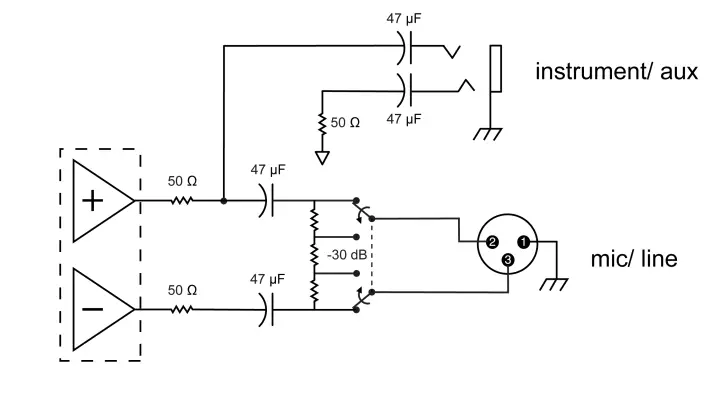
AUDIO OUTPUT:
Configuration
| XLR Output | Balanced |
| 6.35 mm (1/4″) output | Impedance balanced |
| XLR Output | 100 Ω |
| 6.35 mm (1/4″) output | 100 Ω (50 Ω, Unbalanced) |
Full Scale Output
| 6.35 mm (1/4″) | +12 dBV |
| XLR | LINE setting = +18 dBV, MIC setting = -12 dBV |
Mic/Line Switch
30 dB pad
Pin Assignments
| XLR Output | 1=ground, 2=hot, 3=cold |
| 6.35 mm (1/4″) connector | Tip=audio, Ring=no audio, Sleeve=ground |
RECEIVER ANTENNA INPUT:
- Impedance
50 Ω - Maximum Input Level
-20 dBm
GLXD1+
Power Requirements
| Shure Rechargeable Li-Ion Battery | SB904 |
| USB Power Supply (US/Canada) | SBC10-USB15WSUSTWJ |
- Antenna Type
Dual-band Internal Monopole - Dimensions
4.5 x 2.6 x 1.1 in. (115 x 66.94 x 28.51 mm), (H x W x D) - Weight
5.4 oz (153.1 g), without battery - Housing
Aluminum alloy, ABS plastic - Input Impedance
900 kΩ - TX INPUT: Connector
4-pin male mini connector (TA4M) - Maximum Input Level
+8.4 dBV (7.5 Vp-p) - Configuration
Unbalanced
Pin Assignments
| 1 | Ground (cable shield) |
| 2 | + 5 V bias |
| 3 | Audio |
| 4 | Tied through active load to ground (on instru ment adapter cable, pin 4 floats) |
GLXD2+
Power Requirements
| Shure Rechargeable Li-Ion Battery | SB904 |
| USB Power Supply (US/Canada) | SBC10-USB15WSUSTWJ |
Dimensions
9.69 in. (246 mm)
Weight
| SM58 | 9.7 oz (275 g), without battery |
| BETA 58 | 7.9 oz (225 g), without battery |
| BETA 87A | 9.3 oz (265 g), without battery |
Housing
Aluminum alloy, ABS plastic
Maximum Input Level
| SM58 | 146 dB SPL |
| BETA 58 | 147 dB SPL |
| BETA 87A | 147 dB SPL |
SB904
- Battery Type
Rechargeable Li-Ion - Nominal Capacity
2420 mAh (8.71 Wh) - Nominal Voltage
3.6 V - Dimensions
2.87 x 0.83 x 0.82 inches (72.8 x 20.96 x 20.80 mm), (H x W x D) - Weight
1.89 oz. (53.7 g) - Housing
PC/ABS
Ambient Temperature Range
| Charging: | 0°C (32°F) to 40°C (104°F) |
| Operating: | 18 °C (0 °F) to 45 °C (113 °F) |
SBC10-904
- DC Input Voltage
5 V - Ambient Temperature Range Operating:
0°C (32°F) to 40°C (104°F)
SBC10-USB15W Power Supply
- Input Voltage Range
100 to 240 V AC - Maximum Input Power
600 mA @ 100 V AC (full load) - Output Voltage
5 v DC @ 3 A - Maximum Output Power
15 W
SBC10-USB Power Supply
- Input Voltage Range
100 to 240 V AC - Maximum Input Power
200 mA @ 100 V AC (full load) - Output Voltage
5 v DC @ 1 A - Maximum Output Power
5 W
Diagrams

Frequency Tables
Z2 (2.4 GHz only)
| Group 1 | |||||||||
| Gr 1 – Ch 1 | 2424 | 2425 | 2442 | 2443 | 2462 | 2464 | |||
| Gr 1 – Ch 2 | 2418 | 2419 | 2448 | 2450 | 2469 | 2471 | |||
| Gr 1 – Ch 3 | 2411 | 2413 | 2430 | 2431 | 2476 | 2477 | |||
| Gr 1 – Ch 4 | 2405 | 2406 | 2436 | 2437 | 2455 | 2457 | |||
| Group 2 | |||||||||
| Gr 2 – Ch 1 | 2423 | 2424 | 2443 | 2444 | 2473 | 2474 | |||
| Gr 2 – Ch 2 | 2404 | 2405 | 2426 | 2427 | 2456 | 2457 | |||
| Gr 2 – Ch 3 | 2410 | 2411 | 2431 | 2432 | 2448 | 2449 | |||
| Gr 2 – Ch 4 | 2417 | 2418 | 2451 | 2452 | 2468 | 2469 | |||
| Gr 2 – Ch 5 | 2437 | 2438 | 2462 | 2463 | 2477 | 2478 | |||
| Group 3 | |||||||||
| Gr 3 – Ch 1 | 2415 | 2416 | 2443 | ||||||
| Gr 3 – Ch 2 | 2422 | 2423 | 2439 | ||||||
| Gr 3 – Ch 3 | 2426 | 2427 | 2457 | ||||||
| Gr 3 – Ch 4 | 2447 | 2448 | 2468 | ||||||
| Gr 3 – Ch 5 | 2409 | 2451 | 2452 | ||||||
| Group 3 | ||||||||
| Gr 3 – Ch 6 | 2431 | 2462 | 2463 | |||||
| Gr 3 – Ch 7 | 2404 | 2473 | 2474 | |||||
| Gr 3 – Ch 8 | 2435 | 2477 | 2478 | |||||
| Group 4 | ||||||||
| 2404 | 2406 | 2408 | 2410 | 2412 | 2414 | |||
| 2416 | 2418 | 2420 | 2422 | 2424 | 2426 | |||
| 2428 | 2430 | 2432 | 2434 | 2436 | 2438 | |||
| 2440 | 2442 | 2444 | 2446 | 2448 | 2450 | |||
| 2452 | 2454 | 2456 | 2458 | 2460 | 2462 | |||
| 2464 | 2466 | 2468 | 2470 | 2472 | 2474 | |||
| 2476 | 2478 | |||||||
| Group A | ||||||||
| 2405 | 2412 | 2418 | 2425 | 2431 | 2438 | |||
| 2444 | 2450 | 2457 | 2464 | 2471 | 2477 | |||
| Group B | ||||||||
| 2404 | 2409 | 2414 | 2419 | 2425 | 2431 | |||
| 2436 | 2441 | 2446 | 2452 | 2458 | 2463 | |||
| 2468 | 2473 | 2478 | ||||||
Z3
| Group 1 (2.4 GHz) | ||||
| Gr 1 – Ch 1 | 2405 | 2323 | 2441 | 2465 |
| Gr 1 – Ch 2 | 2411 | 2429 | 2447 | 2471 |
| Gr 1 – Ch 3 | 2417 | 2435 | 2453 | 2477 |
| Group 2 (2.4 GHz) | ||||
| Gr 2 – Ch 1 | 2404 | 2424 | 2444 | 2464 |
| Gr 2 – Ch 2 | 2409 | 2429 | 2449 | 2469 |
| Gr 2 – Ch 3 | 2414 | 2434 | 2454 | 2474 |
| Gr 2 – Ch 4 | 2419 | 2439 | 2459 | 2478 |
| Group 3 (2.4 GHz) | ||||||||
| 2405 | 2408 | 2411 | 2414 | 2417 | 2420 | |||
| 2423 | 2426 | 2429 | 2432 | 2435 | 2438 | |||
| 2441 | 2444 | 2447 | 2450 | 2453 | 2456 | |||
| 2459 | 2462 | 2465 | 2468 | 2471 | 2474 | |||
| 2477 | ||||||||
| Group A (2.4 GHz) | ||||||||
| 2405 | 2411 | 2417 | 2423 | 2429 | 2435 | |||
| 2441 | 2447 | 2453 | 2459 | 2465 | 2471 | |||
| 2477 | ||||||||
| Group B (2.4 GHz) | ||||||||
| 2404 | 2409 | 2414 | 2419 | 2424 | 2429 | |||
| 2434 | 2439 | 2444 | 2449 | 2454 | 2459 | |||
| 2464 | 2469 | 2474 | 2478 | |||||
| Group 1 (5.8 GHz) | ||||||||
| Gr 1 – Ch 1 | 5730 | 5760 | 5790 | 5820 | ||||
| Gr 1 – Ch 2 | 5736 | 5766 | 5796 | 5826 | ||||
| Gr 1 – Ch 3 | 5742 | 5772 | 5802 | 5832 | ||||
| Gr 1 – Ch 4 | 5748 | 5778 | 5808 | 5838 | ||||
| Gr 1 – Ch 5 | 5754 | 5784 | 5814 | 5845 | ||||
| Group 2 (5.8 GHz) | ||||||||
| Gr 2 – Ch 1 | 5729 | 5759 | 5789 | 5819 | ||||
| Gr 2 – Ch 2 | 5734 | 5764 | 5794 | 5824 | ||||
| Gr 2 – Ch 3 | 5739 | 5769 | 5799 | 5829 | ||||
| Gr 2 – Ch 4 | 5744 | 5774 | 5804 | 5836 | ||||
| Gr 2 – Ch 5 | 5749 | 5779 | 5809 | 5841 | ||||
| Gr 2 – Ch 6 | 5754 | 5784 | 5814 | 5846 | ||||
| Group 3 (5.8 GHz) | ||||||||
| 5730 | 5733 | 5736 | 5739 | 5742 | 5745 | |||
| 5748 | 5751 | 5754 | 5757 | 5760 | 5763 | |||
| Group 3 (5.8 GHz) | |||||
| 5766 | 5769 | 5772 | 5775 | 5778 | 5781 |
| 5784 | 5787 | 5790 | 5793 | 5796 | 5799 |
| 5802 | 5805 | 5808 | 5811 | 5814 | 5817 |
| 5820 | 5823 | 5826 | 5829 | 5832 | 5835 |
| 5838 | 5841 | 5845 | |||
| Group A (5.8 GHz) | |||||
| 5730 | 5736 | 5742 | 5748 | 5754 | 5760 |
| 5766 | 5772 | 5778 | 5784 | 5790 | 5796 |
| 5802 | 5808 | 5814 | 5820 | 5826 | 5832 |
| 5838 | 5845 | ||||
| Group B (5.8 GHz) | |||||
| 5729 | 5734 | 5739 | 5744 | 5749 | 5754 |
| 5759 | 5764 | 5769 | 5774 | 5779 | 5784 |
| 5789 | 5794 | 5799 | 5804 | 5809 | 5814 |
| 5819 | 5824 | 5829 | 5836 | 5841 | 5846 |
Z4
| Group 1 (2.4 GHz) | ||||||||
| Gr 1 – Ch 1 | 2405 | 2323 | 2441 | 2465 | ||||
| Gr 1 – Ch 2 | 2411 | 2429 | 2447 | 2471 | ||||
| Gr 1 – Ch 3 | 2417 | 2435 | 2453 | 2477 | ||||
| Group 2 (2.4 GHz) | ||||||||
| Gr 2 – Ch 1 | 2404 | 2424 | 2444 | 2464 | ||||
| Gr 2 – Ch 2 | 2409 | 2429 | 2449 | 2469 | ||||
| Gr 2 – Ch 3 | 2414 | 2434 | 2454 | 2474 | ||||
| Gr 2 – Ch 4 | 2419 | 2439 | 2459 | 2478 | ||||
| Group 3 (2.4 GHz) | ||||||||
| 2405 | 2408 | 2411 | 2414 | 2417 | 2420 | |||
| 2423 | 2426 | 2429 | 2432 | 2435 | 2438 | |||
| 2441 | 2444 | 2447 | 2450 | 2453 | 2456 | |||
| Group 3 (2.4 GHz) | ||||||||
| 2459 | 2462 | 2465 | 2468 | 2471 | 2474 | |||
| 2477 | ||||||||
| Group A (2.4 GHz) | ||||||||
| 2405 | 2411 | 2417 | 2423 | 2429 | 2435 | |||
| 2441 | 2447 | 2453 | 2459 | 2465 | 2471 | |||
| 2477 | ||||||||
| Group B (2.4 GHz) | ||||||||
| 2404 | 2409 | 2414 | 2419 | 2424 | 2429 | |||
| 2434 | 2439 | 2444 | 2449 | 2454 | 2459 | |||
| 2464 | 2469 | 2474 | 2478 | |||||
| Group 1 (5.8 GHz) | ||||||||
| Gr 1 – Ch 1 | 5730 | 5766 | 5802 | 5838 | ||||
| Gr 1 – Ch 2 | 5736 | 5772 | 5808 | 5844 | ||||
| Gr 1 – Ch 3 | 5742 | 5778 | 5814 | 5851 | ||||
| Gr 1 – Ch 4 | 5748 | 5784 | 5820 | 5858 | ||||
| Gr 1 – Ch 5 | 5754 | 5790 | 5826 | 5864 | ||||
| Gr 1 – Ch 6 | 5760 | 5796 | 5832 | 5870 | ||||
| Group 2 (5.8 GHz) | ||||||||
| Gr 2 – Ch 1 | 5729 | 5764 | 5799 | 5834 | ||||
| Gr 2 – Ch 2 | 5734 | 5769 | 5804 | 5839 | ||||
| Gr 2 – Ch 3 | 5739 | 5774 | 5809 | 5850 | ||||
| Gr 2 – Ch 4 | 5744 | 5779 | 5814 | 5856 | ||||
| Gr 2 – Ch 5 | 5749 | 5784 | 5819 | 5861 | ||||
| Gr 2 – Ch 6 | 5754 | 5789 | 5824 | 5866 | ||||
| Gr 2 – Ch 7 | 5759 | 5794 | 5829 | 5871 | ||||
| Group 3 (5.8 GHz) | ||||||||
| 5730 | 5733 | 5736 | 5739 | 5742 | 5745 | |||
| 5748 | 5751 | 5754 | 5757 | 5760 | 5763 | |||
| 5766 | 5769 | 5772 | 5775 | 5778 | 5781 | |||
| Group 3 (5.8 GHz) | |||||
| 5784 | 5787 | 5790 | 5793 | 5796 | 5799 |
| 5802 | 5805 | 5808 | 5811 | 5814 | 5817 |
| 5820 | 5823 | 5826 | 5829 | 5832 | 5835 |
| 5838 | 5841 | 5844 | 5847 | 5851 | 5855 |
| 5858 | 5861 | 5864 | 5867 | 5870 | |
| Group A (5.8 GHz) | |||||
| 5730 | 5736 | 5742 | 5748 | 5754 | 5760 |
| 5766 | 5772 | 5778 | 5784 | 5790 | 5796 |
| 5802 | 5808 | 5814 | 5820 | 5826 | 5832 |
| 5838 | 5844 | 5851 | 5858 | 5864 | 5870 |
| Group B (5.8 GHz) | |||||
| 5729 | 5734 | 5739 | 5744 | 5749 | 5754 |
| 5759 | 5764 | 5769 | 5774 | 5779 | 5784 |
| 5789 | 5794 | 5799 | 5804 | 5809 | 5814 |
| 5819 | 5824 | 5829 | 5834 | 5839 | 5844 |
| 5850 | 5856 | 5861 | 5866 | 5871 | |
Z5
| Group 1 (2.4 GHz) | ||||||||
| Gr 1 – Ch 1 | 2405 | 2323 | 2441 | 2465 | ||||
| Gr 1 – Ch 2 | 2411 | 2429 | 2447 | 2471 | ||||
| Gr 1 – Ch 3 | 2417 | 2435 | 2453 | 2477 | ||||
| Group 2 (2.4 GHz) | ||||||||
| Gr 2 – Ch 1 | 2404 | 2424 | 2444 | 2464 | ||||
| Gr 2 – Ch 2 | 2409 | 2429 | 2449 | 2469 | ||||
| Gr 2 – Ch 3 | 2414 | 2434 | 2454 | 2474 | ||||
| Gr 2 – Ch 4 | 2419 | 2439 | 2459 | 2478 | ||||
| Group 3 (2.4 GHz) | ||||||||
| 2405 | 2408 | 2411 | 2414 | 2417 | 2420 | |||
| 2423 | 2426 | 2429 | 2432 | 2435 | 2438 | |||
| Group 3 (2.4 GHz) | ||||||||
| 2441 | 2444 | 2447 | 2450 | 2453 | 2456 | |||
| 2459 | 2462 | 2465 | 2468 | 2471 | 2474 | |||
| 2477 | ||||||||
| Group A (2.4 GHz) | ||||||||
| 2405 | 2411 | 2417 | 2423 | 2429 | 2435 | |||
| 2441 | 2447 | 2453 | 2459 | 2465 | 2471 | |||
| 2477 | ||||||||
| Group B (2.4 GHz) | ||||||||
| 2404 | 2409 | 2414 | 2419 | 2424 | 2429 | |||
| 2434 | 2439 | 2444 | 2449 | 2454 | 2459 | |||
| 2464 | 2469 | 2474 | 2478 | |||||
| Group 1 (5.8 GHz) | ||||||||
| Gr 1 – Ch 1 | 5730 | 5754 | 5778 | 5802 | ||||
| Gr 1 – Ch 2 | 5736 | 5760 | 5784 | 5808 | ||||
| Gr 1 – Ch 3 | 5742 | 5766 | 5790 | 5814 | ||||
| Gr 1 – Ch 4 | 5748 | 5772 | 5796 | 5820 | ||||
| Group 2 (5.8 GHz) | ||||||||
| Gr 2 – Ch 1 | 5729 | 5753 | 5778 | 5803 | ||||
| Gr 2 – Ch 2 | 5733 | 5758 | 5783 | 5808 | ||||
| Gr 2 – Ch 3 | 5738 | 5763 | 5788 | 5813 | ||||
| Gr 2 – Ch 4 | 5743 | 5768 | 5793 | 5817 | ||||
| Gr 2 – Ch 5 | 5748 | 5773 | 5798 | 5821 | ||||
| Group 3 (5.8 GHz) | ||||||||
| 5730 | 5733 | 5736 | 5739 | 5742 | 5745 | |||
| 5748 | 5751 | 5754 | 5757 | 5760 | 5763 | |||
| 5766 | 5769 | 5772 | 5775 | 5778 | 5781 | |||
| 5784 | 5787 | 5790 | 5793 | 5796 | 5799 | |||
| 5802 | 5805 | 5808 | 5811 | 5814 | 5817 | |||
| 5820 | ||||||||
| Group A (5.8 GHz) | |||||
| 5730 | 5736 | 5742 | 5748 | 5754 | 5760 |
| 5766 | 5772 | 5778 | 5784 | 5790 | 5796 |
| 5802 | 5808 | 5814 | 5820 | ||
| Group B (5.8 GHz) | |||||
| 5729 | 5734 | 5739 | 5744 | 5749 | 5754 |
| 5759 | 5764 | 5769 | 5774 | 5779 | 5784 |
| 5789 | 5794 | 5799 | 5804 | 5809 | 5814 |
| 5820 | |||||
IMPORTANT SAFETY INSTRUCTIONS
- READ these instructions.
- KEEP these instructions.
- HEED all warnings.
- FOLLOW all instructions.
- DO NOT use this apparatus near water.
- CLEAN ONLY with dry cloth.
- DO NOT block any ventilation openings. Allow sufficient distances for adequate ventilation and install in accordance with the manufacturer’s instructions.
- DO NOT install near any heat sources such as open flames, radiators, heat registers, stoves, or other apparatus (including amplifiers) that produce heat. Do not place any open flame sources on the product.
- DO NOT defeat the safety purpose of the polarized or grounding type plug. A polarized plug has two blades with one wider than the other. A grounding type plug has two blades and a third grounding prong. The wider blade or the third prong are provided for your safety. If the provided plug does not fit into your outlet, consult an electrician for replacement of the obsolete outlet.
- PROTECT the power cord from being walked on or pinched, particularly at plugs, convenience receptacles, and the point where they exit from the apparatus.
- ONLY USE attachments/accessories specified by the manufacturer.
- USE only with a cart, stand, tripod, bracket, or table specified by the manufacturer, or sold with the apparatus. When a cart is used, use caution when moving the cart/apparatus combination to avoid injury from tip-over.
- UNPLUG this apparatus during lightning storms or when unused for long periods of time.
- REFER all servicing to qualified service personnel. Servicing is required when the apparatus has been damaged in any way, such as power supply cord or plug is damaged, liquid has been spilled or objects have fallen into the apparatus, the apparatus has been exposed to rain or moisture, does not operate normally, or has been dropped.
- DO NOT expose the apparatus to dripping and splashing. DO NOT put objects filled with liquids, such as vases, on the apparatus
- The MAINS plug or an appliance coupler shall remain readily operable.
- The airborne noise of the Apparatus does not exceed 70dB (A).
- Apparatus with CLASS I construction shall be connected to a MAINS socket outlet with a protective earthing connection.
- To reduce the risk of fire or electric shock, do not expose this apparatus to rain or moisture.
- Do not attempt to modify this product. Doing so could result in personal injury and/or product failure.
- Operate this product within its specified operating temperature range.
This symbol indicates that dangerous voltage constituting a risk of electric shock is present within this unit.
This symbol indicates that there are important operating and maintenance instructions in the literature accompanying this unit.
In the European Union and the United Kingdom, this label indicates that the batteries in this product should be collected separately and not be disposed of with household waste. Substances in batteries can have a potential negative impact on health and environment and you have a role in recycling waste batteries thus contributing to the protection, preservation, and improvement of the quality of the environment. You should contact your local authority or retailer for details of the collection and recycling schemes available.
Please consider the environment, electric products and packaging are part of regional recycling schemes and do not belong to regular household waste.
WARNING
- Battery packs may explode or release toxic materials. Risk of fire or burns. Do not open, crush, modify, disassemble, heat above 140°F (60°C), or incinerate.
- Follow instructions from manufacturer
- Only use Shure charger to recharge Shure rechargeable batteries
WARNING: Danger of explosion if battery incorrectly replaced. Replace only with same or equivalent type. - Never put batteries in mouth. If swallowed, contact your physician or local poison control center
- Do not short circuit; may cause burns or catch fire
- Do not charge or use battery packs other than Shure rechargeable batteries
- Dispose of battery packs properly. Check with local vendor for proper disposal of used battery packs.
- Batteries (battery pack or batteries installed) shall not be exposed to excessive heat such as sunshine, fire or the like Do not immerse the battery in liquid such as water, beverages, or other fluids.
- Do not attach or insert battery with polarity reversed.
- Keep away from small children.
- Do not use abnormal batteries.
- Pack the battery securely for transport.
Note:
- This equipment is intended to be used in professional audio applications.
- EMC conformance is based on the use of supplied and recommended cable types. The use of other cable types may degrade EMC performance.
- Use this battery charger only with the Shure charging modules and battery packs for which it is designed. Use with other than the specified modules and battery packs may increase the risk of fire or explosion.
- Changes or modifications not expressly approved by Shure Incorporated could void your authority to operate this equipment.
Information to the user
This equipment has been tested and found to comply with the limits for a Class B digital device, pursuant to part 15 of the FCC Rules. This equipment generates, uses, and can radiate radio frequency energy and, if not installed and used in accordance with the manufacturer’s instruction manual, may cause interference with radio and television reception.
Notice: The FCC regulations provide that changes or modifications not expressly approved by Shure Incorporated could void your authority to operate this equipment.
These limits are designed to provide reasonable protection against harmful interference in a residential installation. This equipment generates, uses, and can radiate radio frequency energy and, if not installed and used in accordance with the instructions, may cause harmful interference to radio communications. However, there is no guarantee that interference will not occur in a particular installation. If this equipment does cause harmful interference to radio or television reception, which can be determined by turning the equipment off and on, the user is encouraged to try to correct the interference by one or more of the following measures:
- Reorient or relocate the receiving antenna.
- Increase the separation between the equipment and the receiver.
- Connect the equipment to an outlet on a circuit different from that to which the receiver is connected.
- Consult the dealer or an experienced radio/TV technician for help.
This device complies with part 15 of the FCC Rules. Operation is subject to the following two conditions:
- This device may not cause harmful interference.
- This device must accept any interference received, including interference that may cause undesired operation.
Certified under FCC Part 15.
Shure has determined that this product is a Class B harmonized product. The following sections provide country-specific EMC/EMI or product safety information.
Certifications
FCC ID: DD4GLXD4RZ3, DD4GLXD1Z3, DD4GLXD2Z3 IC: 616A-GLXD4RZ3, 616A-GLXD1Z3, 616A-GLXD2Z3
CAN ICES-003 (B)/NMB-003(B)
- Changes or modifications not expressly approved by the manufacturer could void the user’s authority to operate the equipment.
- The antenna(s) must be installed such that a minimum separation distance of 20 cm is maintained between the radiator (antenna) and all persons at all times.
- This equipment complies with FCC radiation exposure limits set forth for an uncontrolled environment. This equipment should be installed and operated with minimum distance 20 cm between the radiator & your body.
- This product meets the applicable Innovation, Science and Economic Development Canada technical specifications. Certified by ISED in Canada under RSS-247 and RSS-GEN.
This device contains licenceexempt transmitter(s)/receiver(s) that comply with Innovation, Science and Economic Development Canada’s licenceexempt RSS(s). Operation is subject to the following two conditions:
- This device may not cause interference.
- This device must accept any interference, including interference that may cause undesired operation of the device.
This equipment complies with FCC and ISED radiation exposure limits set forth for an uncontrolled environment. End user must follow the specific operating instructions for satisfying RF exposure compliance. This transmitter must not be co-located or operating in conjunction with any other antenna or transmitter.
In the European Union and the United Kingdom, this label indicates that this product should not be disposed of with household waste. It should be deposited at an appropriate facility to enable recovery and recycling.
Registration, Evaluation, Authorization of Chemicals (REACH) Directive
REACH (Registration, Evaluation, Authorization of Chemicals) is the European Union (EU) and the United Kingdom (UK) chemical substances regulatory framework. Information on substances of very high concern contained in Shure products in a concentration above 0.1% weight over weight (w/w) is available upon request.
CE Notice:
Hereby, Shure Incorporated declares that this product with CE Marking has been determined to be in compliance with European Union requirements. The full text of the EU declaration of conformity is available at the following site:
https://www.shure.com/en-EU/support/declarations-of-conformity.
Authorized European Importer / Representative:
Shure Europe GmbH Department: Global Compliance Jakob-Dieffenbacher-Str. 12 75031 Eppingen, Germany
Phone: +49-7262-92 49 0
Fax: +49-7262-92 49 11 4
Email: [email protected]
UKCA Notice:
Hereby, Shure Incorporated declares that this product with UKCA Marking has been determined to be in compliance with UKCA requirements. The full text of the UK declaration of conformity is available at the following site: https://www.shure.com/en-GB/support/declarations-of-conformity.
Authorized UK Importer / Representative:
Shure UK Limited
Unit 2, The IO Centre, Lea Road,
Waltham Abbey, Essex, EN9 1 AS, UK
LIMITED WARRANTY
Shure Incorporated (“Shure”) hereby warrants to the origlnal consumer purchaser only that, except as otherwise specified below, this product will be free in normal use of any defects in materials and workmanship for a period of two (2) years from the consumer’s original date of purchase directly from Shure or from a Shure-authorized reseller.
Any rechargeable batteries contained in or packaged with this product are so warranted for a period of one (1) year from the consumer’s original date of purchase. However. rechargeable batteries are consumable and their capacity will be reduced over time based on temperature, amount of time in storage, charging cycles, and other factors; hence reduction In battery capacity does not constitute a defect in material or workmanship.
Al its sole option, Shure will repair or replace the detective product and promptly return It to you. In order for this warranty to be valid, the consumer must, at the time the product is returned, provide proof of purchase in the form of the original purchase receipt directly from Shure or from a Shure?authorized reseller. If Shure elects to replace the defective product, then Shure reserves the right to replace the defective product with another product of the same model or a model of at least comparable quality and features in Shure’s sole determination.
If you believe this product Is defective within the warranty period, carefully repack the unit, insure it and return it with proof of purchase, postage prepaid, to Shure Incorporated, Atten• lion: Service Department, at the address below.
Outside of the United States, return the product to your dealer or Authorized Service Center. Addresses are listed on www.Shure.com or can be obtained by contacting Shure at the address listed below.
This warranty is not transferable. This warranty does not apply in cases of abuse or misuse of the product, use contrary to Shure’s instruction, ordinary wear and tear, an act of God, negligent use, purchase from a party other than Shure or a Shure-authorized reseller, unauthorized repair, or modification of the product.
ALL IMPLIED WARRANTIES OF MERCHANTABILITY OR FITNESS FOR A PARTICULAR PURPOSE ARE HEREBY DISCLAIMED TO THE EXTENT PERMITTED UNDER APPLI· CABLE LAWS AND, TO THE EXTENT NOT PERMITTED, ARE HEREBY LIMITED TO THE DURATION AND TERMS OF THIS WARRANTY, SHURE ALSO HEREBY DISCLAIMS ALL LIABILITY FOR INCIDENTAL, SPECIAL, OR CONSEQUENTIAL DAMAGES.
Some states do not allow !Imitations on how long an implied warranty lasts, or the exclusion or limitatlon of Incidental or consequential damages, so the above limitation may not apply to you. This warranty gives you specific legal rights, and you may have other rights which vary from state to state.
This warranty does not restrict the rights of the consumer mandated under applicable laws.
THIS WARRANTY SUPERSEDES ALL OTHER WARRANTIES THAT ARE ASSOCIATED OR INCLUDED WITH THIS PRODUCT, EXCEPT THAT ANY SOFTWARE CONTAINED
IN OR PACKAGED WITH THIS PRODUCT IS EXCLUDED FROM THIS WARRANTY AND INSTEAD SHALL BE COVERED BY THE WARRANTY. IF ANY, PROVIDED IN SHU RE’S END USER LICENSE AGREEMENT ACCOMPANYING SUCH SOFTWARE.
FOR ORIGINAL PURCHASES IN AUSTRALIA ONLY
LIMITED WARRANTY AGAINST DEFECTS
Shure Incorporated (“Shure”) hereby warrants to the original consumer purchaser in Australia only that, except as otherwise specified below, this product will be free in normal use of any defects in materials and workmanship for a period of two (2) years rrom the consumer’s original date of purchase directly from Shure or from a Shure-authorized reseller.
Any rechargeable batteries contained in or packaged with this product are so warranted for a period of one (1) year from the consumer’s original date of purchase. However, rechargeable batteries are consumable and their capacity will be reduced over time based on temperature, amount of time in storage, charging cycles, and other factors; hence reduction in battery capacity does not constitute a defect In material or workmanship. At its sole option, Shure will repair or replace the defective product and promptly return it to you. In order for this warranty to be valid, the consumer must, at the time the product is returned, provide proof of purchase in the form of the original purchase receipt directly from Shure or from a Shure-authorized reseller. If Shure elects to replace the defective product, then Shure reserves the right to replace the defective product with another product of the same model or a model of at least comparable quality and features in Shure’s sole determination.
It you believe this product Is defective within the warranty period, carefully repack the unit, insure it (at your expense, if you want the benefit of insurance) and return it with proof of purchase, postage paid by you, to Shure Incorporated, Attention: Service Department, at the address below.
Outside of the United States, return the product to your dealer or Authorized Seivice Center. Addresses are listed on www.Shure.com or can be obtained by contacting Shure at the address listed below.
This warranty is not transferable. This warranty does not apply in cases of abuse or misuse of the product, use contrary to Shure’s instruction, ordinary wear and tear, an act of God, negligent use, purchase from a party other than Shure or a Shure-authorized reseller, unauthorized repair, or modification of the product.
ALL IMPLIED WARRANTIES OF MERCHANTABILITY OR FITNESS FOR A PARTICULAR PURPOSE ARE HEREBY DISCLAIMED TO THE EXTENT PERMITTED UNDER APPLI· CABLE LAWS AND, TO THE EXTENT NOT PERMITTED, ARE HEREBY LIMITED TO THE EXTENT PERMITTED TO THE DURATION AND TERMS OF THIS WARRANTY. SHURE ALSO HEREBY DISCLAIMS ALL LIABILITY FOR INCIDENTAL, SPECIAL, OR CONSEQUENTIAL DAMAGES FOR ANY PURCHASER ACQUIRING THIS PRODUCT, EXCEPT THAT THIS DOES NOT CONSTITUTE A DISCLAIMER OF RIGHTS GUARANTEED TO ANY “CONSUMER” UNDER THE AUSTRALIAN CONSUMER LAW.
This warranty gives purchasers of this product in Australia specific legal rights which are in addition to the rights and remedies of consumers under the Australian Consumer Law, which cannot be excluded or limited. If you are a “consumer” under the Australian Consumer Law. you are entitled to a replacement or refund for a major failure and for compensation for any other reasonably forseeable loss or damage. You are also entitled to have the goods repaired or replaced if the goods fail to be of acceptable quality and the failure does not amount to a major failure.
THIS WARRANTY SUPERSEDES ALL OTHER WARRANTIES THAT ARE ASSOCIATED OR INCLUDED WITH THIS PRODUCT, EXCEPT THAT ANY SOFTWARE CONTAINED IN OR PACKAGED WITH THIS PRODUCT IS EXCLUDED FROM THIS WARRANTY AND INSTEAD SHALL BE COVERED BY THE WARRANTY, IF ANY, PROVIDED IN SHU RE’S END USER LICENSE AGREEMENT ACCOMPANYING SUCH SOFTWARE.
Service Centers
United States, Canada, Latin America, Carribbean Shure Incorporated
Attn: Service Department 945 Chaddick Dr. Wheeling, IL 60090-6449 Europe, Middle East, and Africa Shure Europe GmbH
Attn: Service
Jakob-Dieffenbacher-Sir. 12 75031 Eppingen, Germany
Asia
Shure Asia Limited 22/F, 625 King’s Road
North Point, Island East Hong Kong
Attention: Service Department
Phone: (852) 2893-4290
Fax: (852) 2893-4055
Email: [email protected]
Indonesia
Service Center Resmi: Jakarta Hotline (021) 612 6286 Medan(061)6612550 Surabaya (031) 5032219 Jogjakarta (0274) 371710 Denpasar(0361) 766788 Makasar (0411) 324652
© 201 8, Shure Incorporated 27F3175 (Rev. 5)
Printed in China
References
 Shure: Microphones, Wireless microphones, in-ear monitoring, earphones, headphones
-
Documentation Finder - Shure United Kingdom
 Anatel — Agência Nacional de Telecomunicações
-
Shure シュア | マイクロホン、インイヤーモニタリング、イヤホンやヘッドホンなどオーディオ機器のリーディングカンパニー
-
Shure: Microphones, Wireless microphones, in-ear monitoring, earphones, headphones
-
Documentation Finder - Shure Europe
-
Shure: Microphones, Wireless microphones, in-ear monitoring, earphones, headphones
-
Documentation Finder - Shure Europe
-
Documentation Finder - Shure United Kingdom
 Shure: Microphones, Wireless microphones, in-ear monitoring, earphones, headphones
 Anatel — Agência Nacional de Telecomunicações
 Shure シュア | マイクロホン、インイヤーモニタリング、イヤホンやヘッドホンなどオーディオ機器のリーディングカンパニー
 Shure: Microphones, Wireless microphones, in-ear monitoring, earphones, headphones