 SERVER MEMORY POPULATION RULES
FOR HPE PROLIANT GEN10 AND GEN10
PLUS SERVERS WITH AMD EPYC 7002
AND 7003-SERIES PROCESSORS
Technical white paper
Check if the document is available in the language of your choice.
INTRODUCTION
This paper provides an overview of HPE DDR4 Smart Memory and its use in HPE ProLiant servers using the AMD EPYC™ 7002 and 7003 processor family. HPE ProLiant servers with AMD EPYC 7002 and 7003 introduce HPE DDR4-2933 and HPE DDR4-3200 memory, which has faster data rates, lower latencies, and greater power efficiency than the memory used in previous generations of HPE ProLiant servers.
HPE Smart Memory also provides superior performance over third-party memory when used in HPE ProLiant servers. HPE Standard Memory offers the best combination of pricing, quality, reliability, and compatibility for HPE ProLiant servers—designed to help your business achieve powerful results with right-sized, affordable solutions.
In addition to describing these improvements, this white paper reviews the rules, best practices, and optimization strategies that should be used when installing HPE DDR4- 2933 on a HPE ProLiant Gen10 with 7002 and 7003 Processor or HPE DDR4-3200 memory on HPE ProLiant Gen10 Plus servers using AMD EPYC 7002 and 7003 processors.
POPULATING HPE DDR4 MEMORY IN HPE PROLIANT GEN10 PLUS SERVERS WITH AMD EPYC 7002 AND 7003 PROCESSORS
The high-level memory system architecture for HPE ProLiant Gen10 Plus servers using AMD EPYC 7002 and 7003 processors is different from that of the previous HPE ProLiant servers. HPE ProLiant servers using AMD EPYC 7002 and 7003 processors integrates an IOD chip which includes 8 memory controllers to interface 8 memory channels per CPU and up to 32 DIMM slots in two-socket servers.
Population rules for HPE ProLiant Gen10 Plus servers with AMD EPYC 7002 and 7003 processors
HPE ProLiant Gen10 Plus systems support a variety of flexible server memory configurations, enabling the system to be configured and run in any valid memory controller configuration. For optimal performance and functionality, you should follow the rules when populating HPE ProLiant servers with HPE DDR4 memory. Violating these rules may result in reduced memory capacity, performance, or error messages during boot. Table 1 summarizes the overall DIMM population rules for HPE ProLiant Gen10 Plus servers. TABLE 1. DIMM population rules for HPE ProLiant Gen10 Plus servers
| Category | Population guidelines |
| Processors and DIMM slots | Install DIMMs only if the corresponding processor is installed. If only one processor is installed in a two-processor system, only half of the DIMM slots are available. If a memory channel consists of more than one DIMM slot, the white DIMM slot will be located furthest from the CPU. White DIMM slots denote the first slot to be populated in a channel. For one DIMM per channel (DPC) populate white DIMM slots only. When mixing DIMMs of different ranks on the same channel, place the DIMMs with the heaviest electrical load (highest number of ranks) in the white DIMM slot. Within a given channel, populate DIMMs from the heaviest electrical load (dual rank) to the lightest load (single rank). If multiple CPUs are populated, split the DIMMs evenly across the CPUs and follow the corresponding CPU rule when populating DIMMs. |
| Performance | To maximize performance in a majority of the potential applications, it is recommended to balance the total memory capacity across all installed processors, channel pairs (A/B, C/D, E/F, and G/H). Load the channels similarly whenever possible to enable optimal interleaving. Populate all available channels first before installing two DIMMs in a channel. If the number of DIMMs does not spread evenly across the CPUs, populate as close to evenly as possible. Refer Figure 4. |
| DIMM types and capacities | The maximum memory capacity is a function of the number of DIMM slots on the platform: the largest DIMM capacity qualified on the platform and the number and model of qualified processors installed on the platform. Do not mix RDIMMs and LRDIMMs in the same system. Do not mix 3DS DIMMs with non-3DS DIMMs in the same system. Do not mix x4 and x8 DRAM widths or 8 Gb and 16 Gb DRAM in the same system. Unbuffered DIMMs (UDIMMs) are not supported. |
| DIMM speed | The maximum memory speed is a function of the memory type, memory configuration, and processor model. The server will select the highest common speed among all of the DIMMs present in the system. |
There are several HPE ProLiant Gen10 Plus servers with different EPYC series. Table 2 shows EPYC series on each HPE ProLiant DL series Gen10 Plus servers. Table 3 shows EPYC series on each HPE ProLiant XL and HPE Apollo series Gen10 Plus servers.
TABLE 2. EPYC series on each HPE ProLiant DL series Gen10 Plus servers
| HPE ProLiant DL series 1P Servers | HPE ProLiant DL series 2P Servers | ||
| DL325 Gen10 | AMD EPYC 7002 | DL385 Gen10 | AMD EPYC 7002 |
| DL325 Gen10 Plus | AMD EPYC 7002 | DL385 Gen10 Plus | AMD EPYC 7002 |
| DL325 Gen10 Plus v2 | AMD EPYC 7003 | DL385 Gen10 Plus v2 | AMD EPYC 7003 |
| DL345 Gen10 Plus | AMD EPYC 7002 or 7003 | DL365 Gen10 Plus | AMD EPYC 7002 or 7003 |
Technical white paper
TABLE 3. EPYC series on each HPE ProLiant XL and HPE Apollo series Gen10 Plus servers
HPE ProLiant XL and HPE Apollo series 2P Servers
XL225n Gen10 Plus and HPE Apollo AMD EPYC 7002 or 7003
DIMM connector location
In general, memory population order follows the same logic for all HPE ProLiant servers using AMD EPYC 7002 and 7003 processors although physical arrangement may vary from server to server.
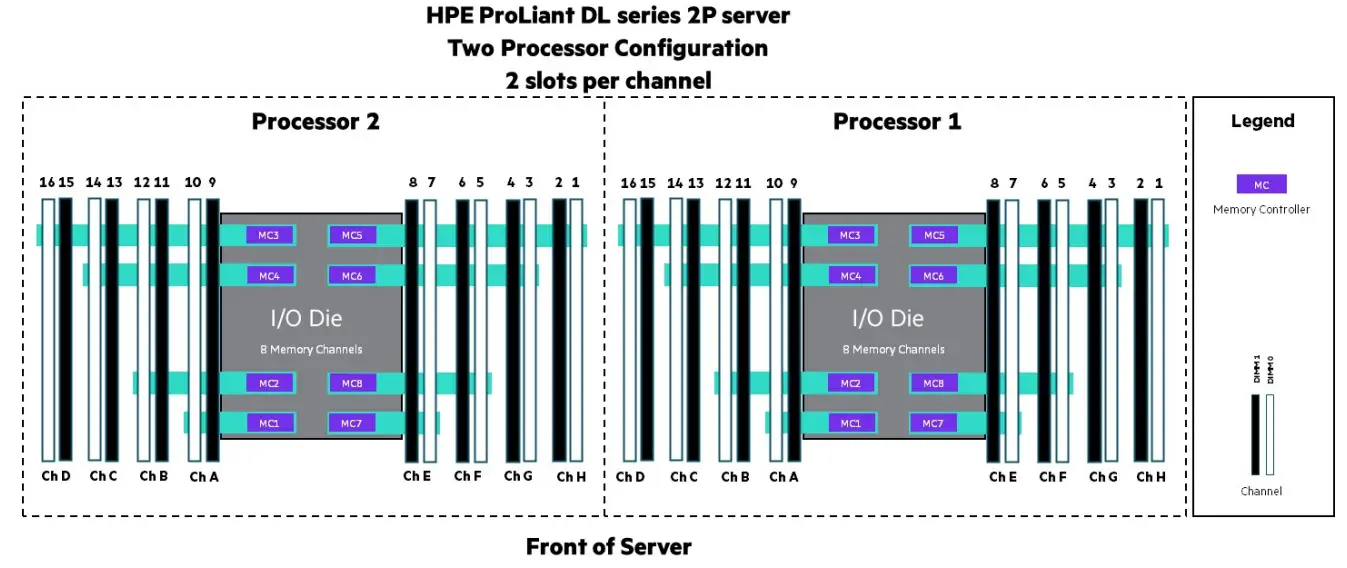
FIGURE 1. DIMM slot locations for 32-slot HPE ProLiant 2P Gen10 Plus two-socket configuration. The first DIMM slot for each channel on each processor are the white DIMM slots. 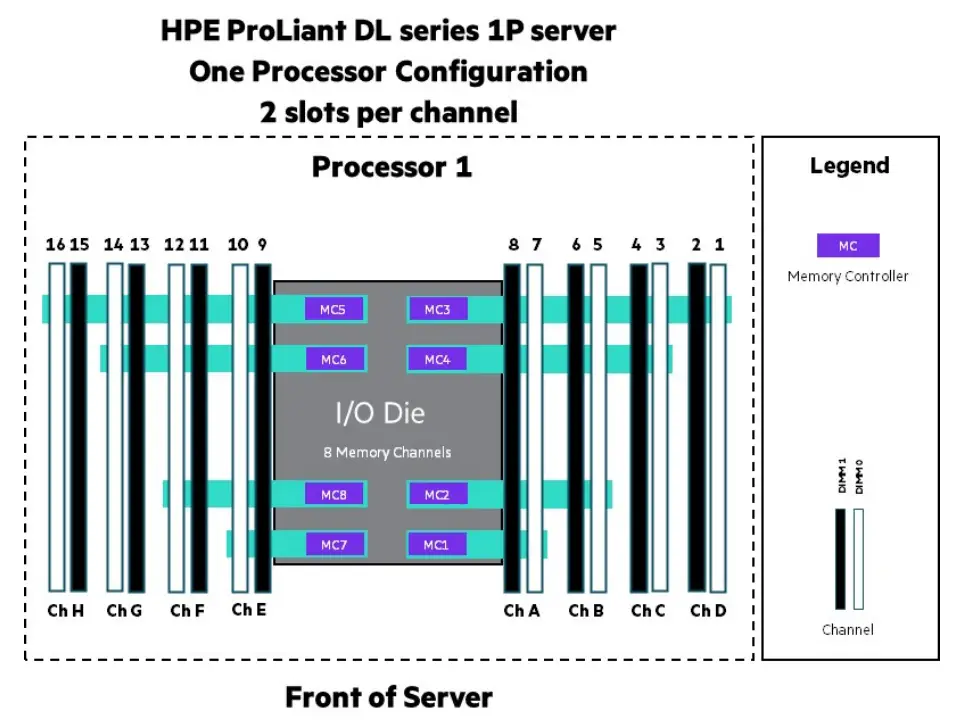
FIGURE 2. DIMM slot locations for 16-slot HPE ProLiant 1P Gen10 Plus one-socket servers. The first DIMM slot for each channel on the processor are the white DIMM slots.
HPE ProLiant XL225n Gen10 Plus and HPE Apollo Server Two Processor Configuration 1 slot per channel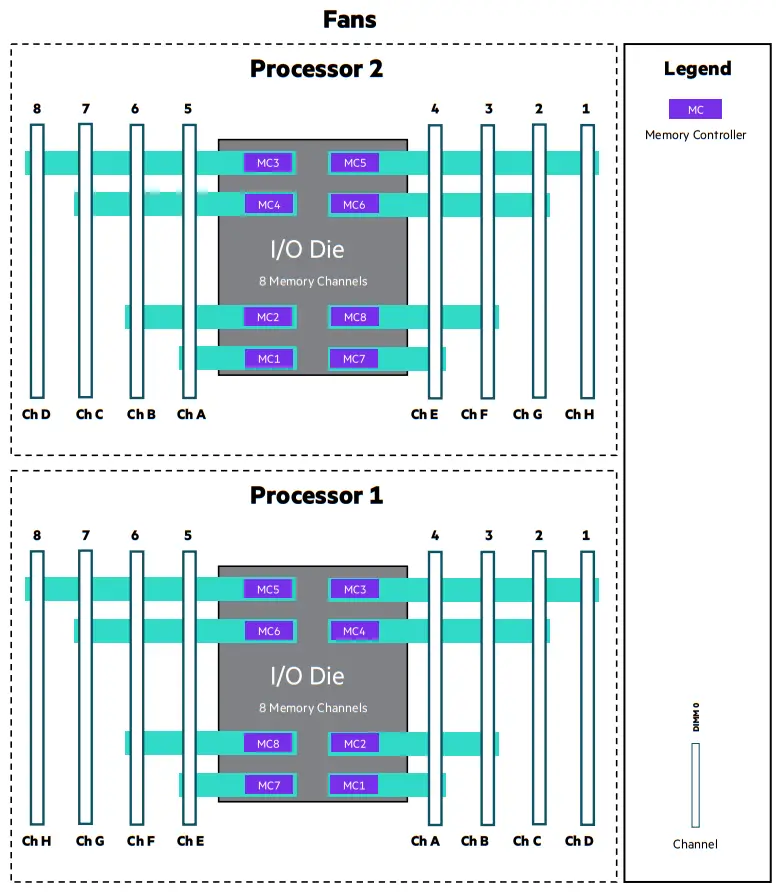
FIGURE 3. DIMM slot locations for 16-slot HPE ProLiant XL225n Gen10 Plus and HPE Apollo one-socket servers. Each DIMM slot corresponds with a channel.
DIMM population order
Figures 4, 5, and 6 shows the DIMM population order for HPE ProLiant Gen10 Plus servers with one AMD EPYC processor installed. There are 16 DIMM slots available to be populated. For a given number of DIMMs, populate those DIMMs in the corresponding numbered DIMM slot(s) on the particular row based on server model as shown in Figures 4, 5, 6, 7, and 8. The most optimal performance will be achieved if populating 4, 8, and 16 shown in green. If populating only 4 DIMMs, it is recommended to use a processor with 32 or less cores. This is to prevent the memory bus to be heavily saturated by the greater amount of cores, which will impact performance.
HPE Server Memory should be installed as indicated based upon the total number of DIMMs being installed per CPU. For example, if two DIMMs are being installed per CPU on a DL series 2P, they should be located in white DIMM slots numbered 16 and 14. If six DIMMs are being used per CPU, they should be installed in DIMM slots 16, 14, 12, 10, 3, and 1
| HPE ProLiant DL series 2P Gen10 Plus—One Processor Configuration Homogeneous DIMM(s) Population Order | ||||||||||||||||
| Number of DIMM(s) to populate | Processor 1 | |||||||||||||||
| CH D | CH C | CH B | CH A | CH E | CH F | CH G | CH H | |||||||||
| 1 | 14 | |||||||||||||||
| 2 | 16 | 14 | ||||||||||||||
| 3 | 16 | 14 | 3 | |||||||||||||
| 4* | 16 | 14 | 3 | 1 | ||||||||||||
| 5 | 16 | 14 | 12 | 3 | 1 | |||||||||||
| 6** | 16 | 14 | 12 | 10 | 3 | 1 | ||||||||||
| 6*** | 16 | 14 | 10 | 7 | 3 | 1 | ||||||||||
| 7 | 16 | 14 | 12 | 10 | 5 | 3 | 1 | |||||||||
| 8 | 16 | 14 | 12 | 10 | 7 | 5 | 3 | 1 | ||||||||
| 9 | 16 | 14 | 13 | 12 | 10 | 7 | 5 | 3 | 1 | |||||||
| 10 | 16 | 15 | 14 | 13 | 12 | 10 | 7 | 5 | 3 | 1 | ||||||
| 11 | 16 | 15 | 14 | 13 | 12 | 10 | 7 | 5 | 4 | 3 | 1 | |||||
| 12 | 16 | 15 | 14 | 13 | 12 | 10 | 7 | 5 | 4 | 3 | 2 | 1 | ||||
| 13 | 16 | 15 | 14 | 13 | 12 | 11 | 10 | 7 | 5 | 4 | 3 | 2 | 1 | |||
| 14 | 16 | 15 | 14 | 13 | 12 | 11 | 10 | 9 | 7 | 5 | 4 | 3 | 2 | 1 | ||
| 15 | 16 | 15 | 14 | 13 | 12 | 11 | 10 | 9 | 7 | 6 | 5 | 4 | 3 | 2 | 1 | |
| 16 | 16 | 15 | 14 | 13 | 12 | 11 | 10 | 9 | 8 | 7 | 6 | 5 | 4 | 3 | 2 | 1 |
* Recommended only with processors that have 128 MB L3 cache or less.
** This is for EPYC 7002 only.
*** This is for EPYC 7003 only.
FIGURE 4. DIMM population order for HPE ProLiant DL series 2P Gen10 Plus servers with one processor installed (16 slots per processor).
| HPE ProLiant DL series 1P Gen10 Plus—One Processor Configuration Homogeneous DIMM(s) Population Order | ||||||||||||||||
| Number of DIMM(s) to populate | Processor 1 | |||||||||||||||
| CH H | CH G | CH F | CH E | CH A | CH B | CH C | CH D | |||||||||
| 1 | 3 | |||||||||||||||
| 2 | 3 | 1 | ||||||||||||||
| 3 | 14 | 3 | 1 | |||||||||||||
| 4* | 16 | 14 | 3 | 1 | ||||||||||||
| 5 | 16 | 14 | 5 | 3 | 1 | |||||||||||
| 6** | 16 | 14 | 7 | 5 | 3 | 1 | ||||||||||
| 6*** | 16 | 14 | 10 | 7 | 3 | 1 | ||||||||||
| 7 | 16 | 14 | 12 | 7 | 5 | 3 | 1 | |||||||||
| 8 | 16 | 14 | 12 | 10 | 7 | 5 | 3 | 1 | ||||||||
| 9 | 16 | 14 | 12 | 10 | 7 | 5 | 4 | 3 | 1 | |||||||
| 10 | 16 | 14 | 12 | 10 | 7 | 5 | 4 | 3 | 2 | 1 | ||||||
| 11 | 16 | 14 | 13 | 12 | 10 | 7 | 5 | 4 | 3 | 2 | 1 | |||||
| 12 | 16 | 15 | 14 | 13 | 12 | 10 | 7 | 5 | 4 | 3 | 2 | 1 | ||||
| 13 | 16 | 15 | 14 | 13 | 12 | 10 | 7 | 6 | 5 | 4 | 3 | 2 | 1 | |||
| 14 | 16 | 15 | 14 | 13 | 12 | 10 | 8 | 7 | 6 | 5 | 4 | 3 | 2 | 1 | ||
| 15 | 16 | 15 | 14 | 13 | 12 | 11 | 10 | 8 | 7 | 6 | 5 | 4 | 3 | 2 | 1 | |
| 16 | 16 | 15 | 14 | 13 | 12 | 11 | 10 | 9 | 8 | 7 | 6 | 5 | 4 | 3 | 2 | 1 |
* Recommended only with processors that have 128 MB L3 cache or less.
** This is for EPYC 7002 only.
*** This is for EPYC 7003 only.
FIGURE 5. DIMM population order for HPE ProLiant DL series 1P Gen10 Plus servers with one processor installed (16 slots per processor).
| HPE XL225n Gen10 Plus—Two Processor Configuration Homogeneous DIMM(s) Population Order | ||||||||
| Number of DIMM(s) to populate | Processor 1 | |||||||
| CH H | CH G | CH F | CH E | CH A | CH B | CH C | CH D | |
| 1 | 2 | |||||||
| 2 | 2 | 1 | ||||||
| 3 | 7 | 2 | 1 | |||||
| 4 | 8 | 7 | 2 | 1 | ||||
| 5 | 8 | 7 | 3 | 2 | 1 | |||
| 6* | 8 | 7 | 4 | 3 | 2 | 1 | ||
| 6** | 8 | 7 | 5 | 4 | 2 | 1 | ||
| 7 | 8 | 7 | 6 | 4 | 3 | 2 | 1 | |
| 8 | 8 | 7 | 6 | 5 | 4 | 3 | 2 | 1 |
* This is for EPYC 7002 only.
** This is for EPYC 7003 only.
FIGURE 6. DIMM population order for HPE ProLiant XL225n Gen10 Plus and HPE Apollo servers with one processor installed (16 slots per processor).
Figures 7 and 8 show the DIMM population order for HPE ProLiant DL series 2P Gen10 Plus, and HPE ProLiant XL225n Gen10 Plus and HPE Apollo servers with two processors installed. For a given number of DIMMs, populate those DIMMs in the corresponding numbered DIMM slot(s) on that row as shown in Figures 7 and 8.
| HPE ProLiant DL series 2P Gen10 Plus—Two Processor Configuration Homogeneous DIMM(s) Population Order | ||||||||||||||||||||||||||||||||
| Number of DIMM(s) to populate | Processor 2 | Processor 1 | ||||||||||||||||||||||||||||||
| CH D | CH C | CH B | CH A | CH E | CH F | CH G | CH H | CH D | CH C | CH B | CH A | CH E | CH F | CH G | CH H | |||||||||||||||||
| 1 | 14 | |||||||||||||||||||||||||||||||
| 2 | 14 | 14 | ||||||||||||||||||||||||||||||
| 3 | 14 | 16 | 14 | |||||||||||||||||||||||||||||
| 4 | 16 | 14 | 16 | 14 | ||||||||||||||||||||||||||||
| 5 | 16 | 14 | 16 | 14 | 3 | |||||||||||||||||||||||||||
| 6 | 16 | 14 | 3 | 16 | 14 | 3 | ||||||||||||||||||||||||||
| 7 | 16 | 14 | 3 | 16 | 14 | 3 | 1 | |||||||||||||||||||||||||
| 8*** | 16 | 14 | 3 | 1 | 16 | 14 | 3 | 1 | ||||||||||||||||||||||||
| 9 | 16 | 14 | 3 | 1 | 16 | 14 | 12 | 3 | 1 | |||||||||||||||||||||||
| 10 | 16 | 14 | 12 | 3 | 1 | 16 | 14 | 12 | 3 | 1 | ||||||||||||||||||||||
| 11 | 16 | 14 | 12 | 3 | 1 | 16 | 14 | 12 | 10 | 3 | 1 | |||||||||||||||||||||
| 12* | 16 | 14 | 12 | 10 | 3 | 1 | 16 | 14 | 12 | 10 | 3 | 1 | ||||||||||||||||||||
| 12** | 16 | 14 | 10 | 7 | 3 | 1 | 16 | 14 | 10 | 7 | 3 | 1 | ||||||||||||||||||||
| 13 | 16 | 14 | 12 | 10 | 3 | 1 | 16 | 14 | 12 | 10 | 5 | 3 | 1 | |||||||||||||||||||
| 14 | 16 | 14 | 12 | 10 | 5 | 3 | 1 | 16 | 14 | 12 | 10 | 5 | 3 | 1 | ||||||||||||||||||
| 15 | 16 | 14 | 12 | 10 | 5 | 3 | 1 | 16 | 14 | 12 | 10 | 7 | 5 | 3 | 1 | |||||||||||||||||
| 16 | 16 | 14 | 12 | 10 | 7 | 5 | 3 | 1 | 16 | 14 | 12 | 10 | 7 | 5 | 3 | 1 | ||||||||||||||||
| 17 | 16 | 14 | 12 | 10 | 7 | 5 | 3 | 1 | 16 | 14 | 13 | 12 | 10 | 7 | 5 | 3 | 1 | |||||||||||||||
| 18 | 16 | 14 | 13 | 12 | 10 | 7 | 5 | 3 | 1 | 16 | 14 | 13 | 12 | 10 | 7 | 5 | 3 | 1 | ||||||||||||||
| 19 | 16 | 14 | 13 | 12 | 10 | 7 | 5 | 3 | 1 | 16 | 15 | 14 | 13 | 12 | 10 | 7 | 5 | 3 | 1 | |||||||||||||
| 20 | 16 | 15 | 14 | 13 | 12 | 10 | 7 | 5 | 3 | 1 | 16 | 15 | 14 | 13 | 12 | 10 | 7 | 5 | 3 | 1 | ||||||||||||
| 21 | 16 | 15 | 14 | 13 | 12 | 10 | 7 | 5 | 3 | 1 | 16 | 15 | 14 | 13 | 12 | 10 | 7 | 5 | 4 | 3 | 1 | |||||||||||
| 22 | 16 | 15 | 14 | 13 | 12 | 10 | 7 | 5 | 4 | 3 | 1 | 16 | 15 | 14 | 13 | 12 | 10 | 7 | 5 | 4 | 3 | 1 | ||||||||||
| 23 | 16 | 15 | 14 | 13 | 12 | 10 | 7 | 5 | 4 | 3 | 1 | 16 | 15 | 14 | 13 | 12 | 10 | 7 | 5 | 4 | 3 | 2 | 1 | |||||||||
| 24 | 16 | 15 | 14 | 13 | 12 | 10 | 7 | 5 | 4 | 3 | 2 | 1 | 16 | 15 | 14 | 13 | 12 | 10 | 7 | 5 | 4 | 3 | 2 | 1 | ||||||||
| 25 | 16 | 15 | 14 | 13 | 12 | 10 | 7 | 5 | 4 | 3 | 2 | 1 | 16 | 15 | 14 | 13 | 12 | 11 | 10 | 7 | 5 | 4 | 3 | 2 | 1 | |||||||
| 26 | 16 | 15 | 14 | 13 | 12 | 11 | 10 | 7 | 5 | 4 | 3 | 2 | 1 | 16 | 15 | 14 | 13 | 12 | 11 | 10 | 7 | 5 | 4 | 3 | 2 | 1 | ||||||
| 27 | 16 | 15 | 14 | 13 | 12 | 11 | 10 | 7 | 5 | 4 | 3 | 2 | 1 | 16 | 15 | 14 | 13 | 12 | 11 | 10 | 9 | 7 | 5 | 4 | 3 | 2 | 1 | |||||
| 28 | 16 | 15 | 14 | 13 | 12 | 11 | 10 | 9 | 7 | 5 | 4 | 3 | 2 | 1 | 16 | 15 | 14 | 13 | 12 | 11 | 10 | 9 | 7 | 5 | 4 | 3 | 2 | 1 | ||||
| 29 | 16 | 15 | 14 | 13 | 12 | 11 | 10 | 9 | 7 | 5 | 4 | 3 | 2 | 1 | 16 | 15 | 14 | 13 | 12 | 11 | 10 | 9 | 7 | 6 | 5 | 4 | 3 | 2 | 1 | |||
| 30 | 16 | 15 | 14 | 13 | 12 | 11 | 10 | 9 | 7 | 6 | 5 | 4 | 3 | 2 | 1 | 16 | 15 | 14 | 13 | 12 | 11 | 10 | 9 | 7 | 6 | 5 | 4 | 3 | 2 | 1 | ||
| 31 | 16 | 15 | 14 | 13 | 12 | 11 | 10 | 9 | 7 | 6 | 5 | 4 | 3 | 2 | 1 | 16 | 15 | 14 | 13 | 12 | 11 | 10 | 9 | 8 | 7 | 6 | 5 | 4 | 3 | 2 | 1 | |
| 32 | 16 | 15 | 14 | 13 | 12 | 11 | 10 | 9 | 8 | 7 | 6 | 5 | 4 | 3 | 2 | 1 | 16 | 15 | 14 | 13 | 12 | 11 | 10 | 9 | 8 | 7 | 6 | 5 | 4 | 3 | 2 | 1 |
* This is for EPYC 7002 only.
** This is for EPYC 7003 only.
*** Recommended only with processors that have 128 MB L3 cache or less.
FIGURE 7. DIMM population order for HPE ProLiant DL series 2P Gen10 Plus servers with two processors installed (16 slots per processor).
| HPE XL225n Gen10 Plus—Two Processor Configuration Homogeneous DIMM(s) Population Order | ||||||||||||||||
| Number of DIMM(s) to populate | Processor 2 | Processor 1 | ||||||||||||||
| CH D | CH C | CH B | CH A | CH E | CH F | CH G | CH H | CH H | CH G | CH F | CH E | CH A | CH B | CH C | CH D | |
| 1 | 2 | |||||||||||||||
| 2 | 7 | 2 | ||||||||||||||
| 3 | 7 | 2 | 1 | |||||||||||||
| 4 | 8 | 7 | 2 | 1 | ||||||||||||
| 5 | 8 | 7 | 7 | 2 | 1 | |||||||||||
| 6 | 8 | 7 | 2 | 7 | 2 | 1 | ||||||||||
| 7 | 8 | 7 | 2 | 8 | 7 | 2 | 1 | |||||||||
| 8 | 8 | 7 | 2 | 1 | 8 | 7 | 2 | 1 | ||||||||
| 9 | 8 | 7 | 2 | 1 | 8 | 7 | 3 | 2 | 1 | |||||||
| 10 | 8 | 7 | 6 | 2 | 1 | 8 | 7 | 3 | 2 | 1 | ||||||
| 11 | 8 | 7 | 6 | 2 | 1 | 8 | 7 | 4 | 3 | 2 | 1 | |||||
| 12* | 8 | 7 | 6 | 5 | 2 | 1 | 8 | 7 | 4 | 3 | 2 | 1 | ||||
| 12** | 8 | 7 | 5 | 4 | 2 | 1 | 8 | 7 | 5 | 4 | 2 | 1 | ||||
| 13 | 8 | 7 | 6 | 5 | 2 | 1 | 8 | 7 | 6 | 4 | 3 | 2 | 1 | |||
| 14 | 8 | 7 | 6 | 5 | 3 | 2 | 1 | 8 | 7 | 6 | 4 | 3 | 2 | 1 | ||
| 15 | 8 | 7 | 6 | 5 | 3 | 2 | 1 | 8 | 7 | 6 | 5 | 4 | 3 | 2 | 1 | |
| 16 | 8 | 7 | 6 | 5 | 4 | 3 | 2 | 1 | 8 | 7 | 6 | 5 | 4 | 3 | 2 | 1 |
* This is for EPYC 7002 only.
** This is for EPYC 7003 only.
FIGURE 8. DIMM population order for HPE ProLiant XL225n Gen10 Plus and HPE Apollo servers with two processors installed (8 slots per processor).
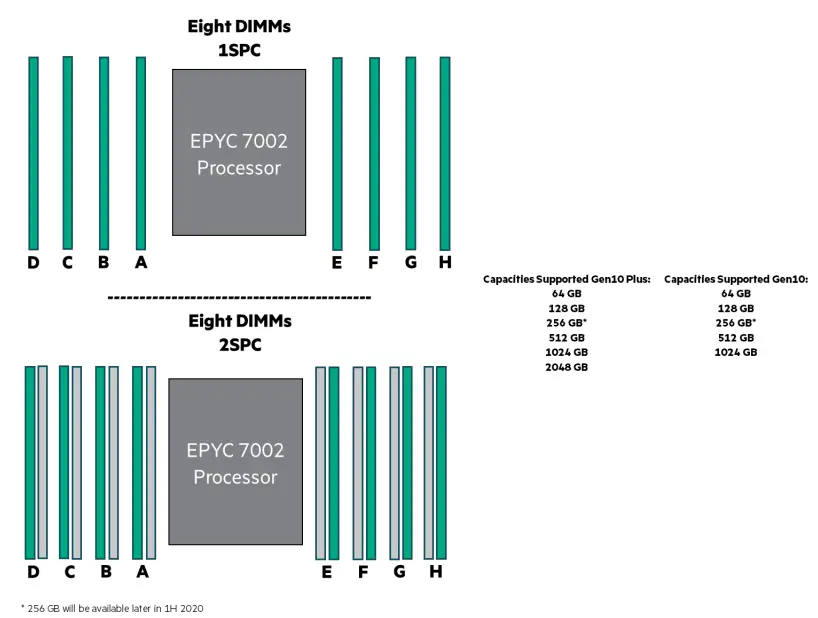
FIGURE 9. Supported capacities on Gen10 Plus using the recommended populations with 8 DIMMs installed. Homogeneous Configuration.
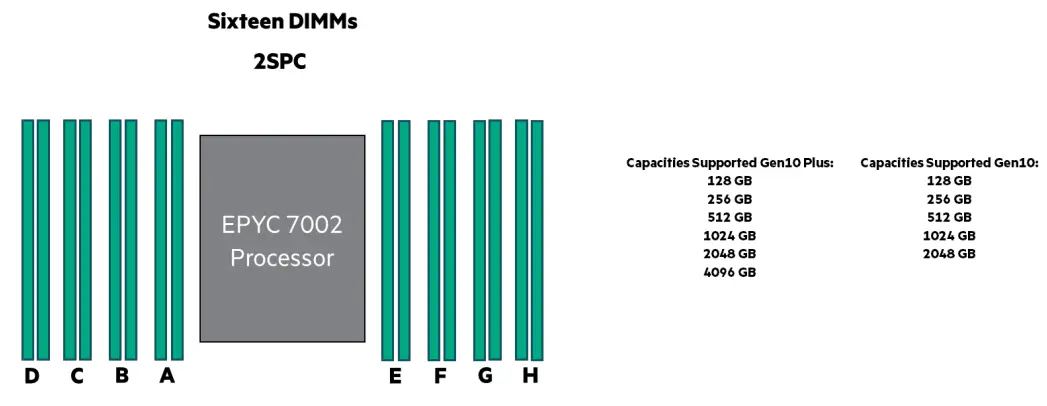
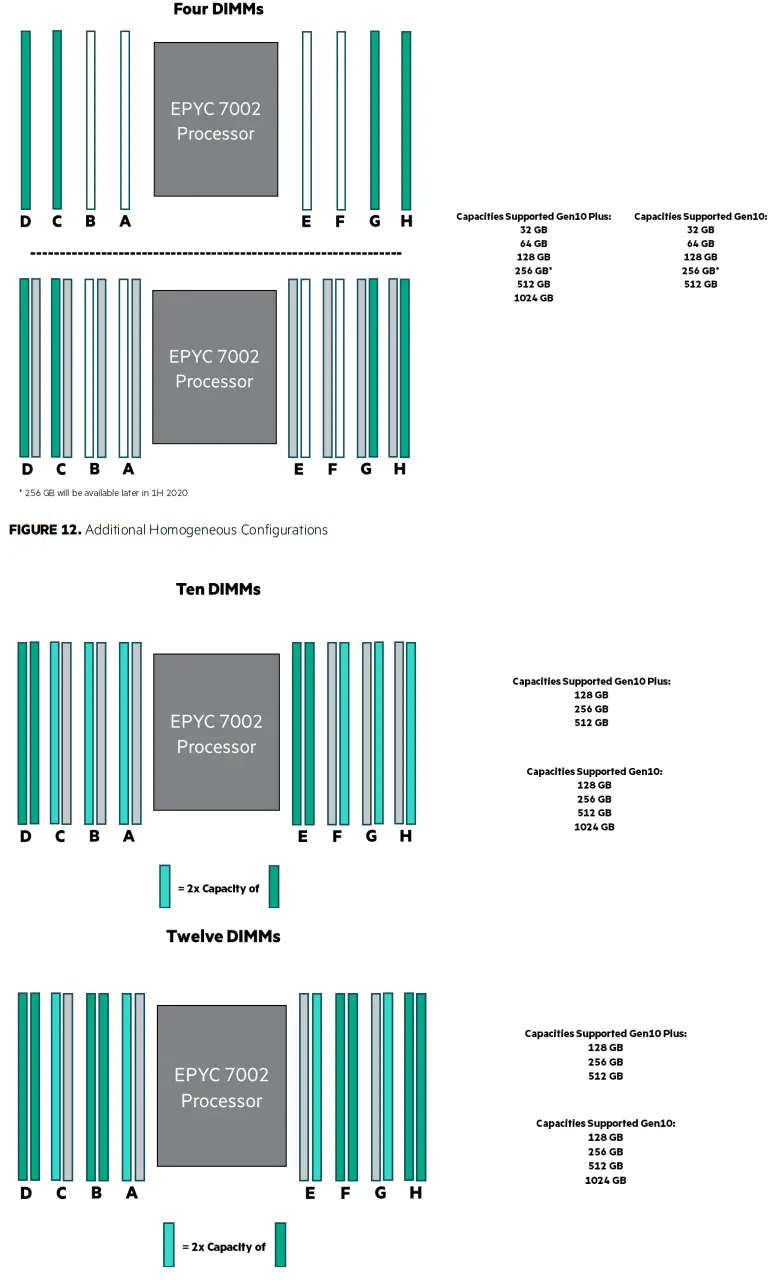
FIGURE 10. Supported capacities on Gen10 Plus using the recommended populations with 16 DIMMs Installed. Homogeneous Configuration. For additional homogeneous configurations based on capacity see Additional Homogeneous Configurations section. 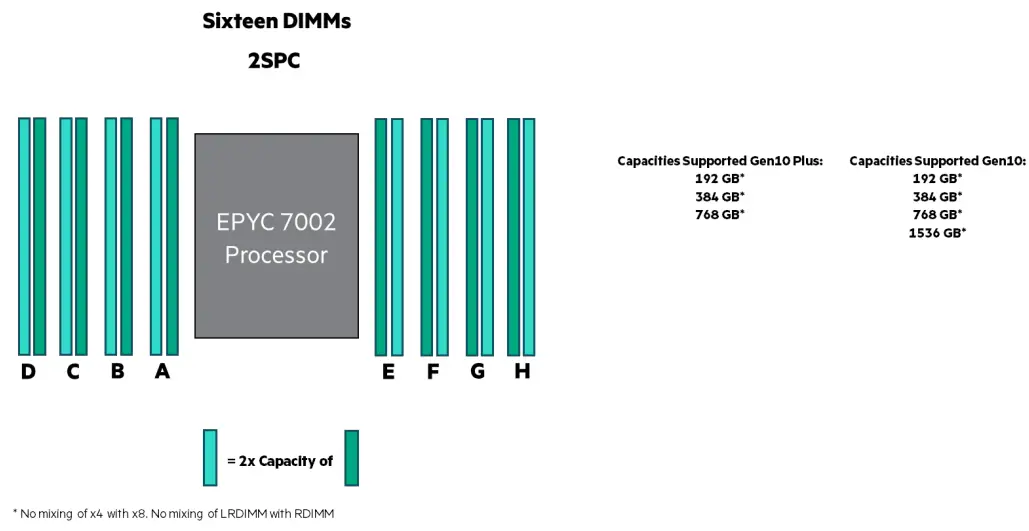
FIGURE 11. Supported capacities on Gen10 Plus using the recommended populations with 16 DIMMs Installed. Heterogeneous Configuration. For additional heterogeneous configurations based on capacity see Additional Heterogeneous Configurations section.
NUMA NODES
HPE ProLiant servers with EPYC 7002 and 7003 processors may support the option of configuring the NUMA (Non-Uniform Memory Access) NPS (Nodes Per Socket) you can have on the processor. This will depend on the exact model number of the processor. This setting will be available in the RBSU->Memory Options->NUMA memory domains per socket (1, 2, 4). For most workloads, one NUMA node will give the most optimal performance and is the default.
Nodes Per Socket (1)
This setting will assign one NUMA node per processor.
This setting will be the default and in general will give the best performance for most workloads.
Supports: 8-Way, 4-Way, and 2-Way interleaving modes depending on DIMM population.
Nodes Per Socket (2)
This setting will assign two NUMA nodes per processor.
Supports: 4-Way and 2-Way interleaving modes depending on DIMM population.
Nodes Per Socket (4)
This setting will assign four NUMA nodes per processor.
Supports: 2-Way interleaving mode depending on DIMM population.
MEMORY INTERLEAVING
Memory interleaving is a technique used to maximize memory performance by spreading memory addresses evenly across memory devices.
Interleaved memory results in a contiguous memory region across multiple devices with sequential accesses using each memory device in turn, instead of using the same one repeatedly. HPE encourages enabling interleaving for the most optimal and deterministic performance.
The result is higher memory throughput due to the reduced wait times for memory banks to become available for desired operations between reads and writes.
Memory interleaving options include:
8-Way interleaving
When configured correctly, sequential reads will be interleaved across all memory channels (A/B/C/D/E/F/G/H). Channel bandwidth will be accumulated across the interleaved channels. This is the optimal setting for NPS (1) configuration.
Can only be used with NPS (1) NUMA Node option.
6-Way interleaving
When configured correctly, sequential reads will be interleaved across all memory channels (A/C/D/E/F/G/H). Channel bandwidth will be accumulated across the interleaved channels. This is the optimal setting for NPS (1) configuration.
Can only be used with NPS (1) NUMA Node option.
4-Way interleaving
When configured correctly, sequential reads will be interleaved across four memory channels: Channels (C/D/G/H) or Channels (A/B/E/F).
Channel bandwidth will be accumulated across the interleaved channels. This is the optimal setting for NPS (2) configuration.
Can be used with NPS (1) or NPS (2) NUMA Node options.
2-Way interleaving
When configured correctly, sequential reads will be interleaved across channel pairs; Channels (C/D), (G/H), (A/B), or (E/F). Channel bandwidth will be accumulated across the interleaved channels. This is the only interleaving mode for a NPS (4) configuration.
Can be used with NPS (1), NPS (2), or NPS (4) NUMA Node options.
NOTE
When interleaving is enabled, the system will automatically attempt to do an 8-Way interleave first followed by 4-Way and 2-Way depending on the memory population and NPS selected.
Disabling memory interleaving
This option is available from the Advanced Power Management menu in the RBSU Memory Options menu if needed. HPE defaults to having interleaving enabled as this will provide the best performance for most workloads. Disabling memory interleaving may decrease the overall memory performance.
Mixed DIMM configurations
LRDIMM and RDIMM should not be mixed (as per specification). 3DS and LRDIMM should also not be mixed as timings for these are significantly different, hence the operation is reduced to slowest common timing.
No mixing of x4 and x8 memory, as it will cause slower memory and system operation.
No mixing of 8 Gb and 16 Gb DRAM, as it will cause slower memory and system operation.
On HPE servers based on AMD processors, mixing of DIMM capacities is supported as long as mixing rules are followed and the memory channels have identical memory capacities to get the most performance. See Additional Heterogeneous Configurations.
Table 4 shows mixed DIMM configuration based on rules.
TABLE 4. Mixed population guidelines for HPE SmartMemory DIMMs
| P/N | Description | P07638- B21 | P07640- B21 | P07642- B21 | P07646- B21 | P38454- B21 | P07644- B21 | P07650- B21 | P07652- B21 | P07654- B21 |
| 8 GB 1Rx8 | 16 GB 1Rx4 | 16 GB 2Rx8 | 32 GB 2Rx4 | 32 GB 1Rx4 | 32 GB 2Rx8 | 64 GB 2Rx4 | 128 GB 4Rx4 | 256 GB 8Rx4 3DS | ||
| 8 Gb | 8 Gb | 8 Gb | 8 Gb | 16 Gb | 16 Gb | 16 Gb | 16 Gb | 16 Gb | ||
| 3200 MT/s | 3200 MT/s | 3200 MT/s | 3200 MT/s | 3200 MT/s | 3200 MT/s | 3200 MT/s | 3200 MT/s | 3200 MT/s | ||
| RDIMM | RDIMM | RDIMM | RDIMM | RDIMM | RDIMM | RDIMM | LRDIMM | LRDIMM | ||
| P07638-B21 | HPE 8GB 1Rx8 PC4-3200AA-R Smart Kit | Yes | Yes | |||||||
| P07640-B21 | HPE 16GB 1Rx4 PC4-3200AA-R Smart Kit | Yes | Yes | |||||||
| P07642-B21 | HPE 16GB 2Rx8 PC4-3200AA-R Smart Kit | Yes | Yes | |||||||
| P07646-B21 | HPE 32GB 2Rx4 PC4-3200AA-R Smart Kit | Yes | Yes | |||||||
| P38454-B21 | HPE 32GB 1Rx4 PC4- 3200AA-R Memory Kit | Yes | Yes | |||||||
| P07644-B21 | HPE 32GB 2Rx8 PC4-3200AA-R Smart Kit | Yes | ||||||||
| P07650-B21 | HPE 64GB 2Rx4 PC4-3200AA-R Smart Kit | Yes | Yes | |||||||
| P07652-B21 | HPE 128GB 4Rx4 PC4- 3200AA-L Smart | Yes | ||||||||
| P07654-B21 | HPE 256GB 8Rx4 PC4- 3200AA-L 3DS Smart | Yes |
CONCLUSION
HPE Smart Memory for HPE ProLiant Gen10 Plus AMD-based servers offers greater memory performance than ever before. The HPE DDR4-2933 and DDR4-3200 Smart Memory for HPE ProLiant Gen10 Plus servers that use the AMD EPYC 7002 and 7003 Processor delivers increased memory throughput and lower latencies. HPE Smart Memory also provides extended performance in many configurations by operating at higher speeds compared to third-party memory. 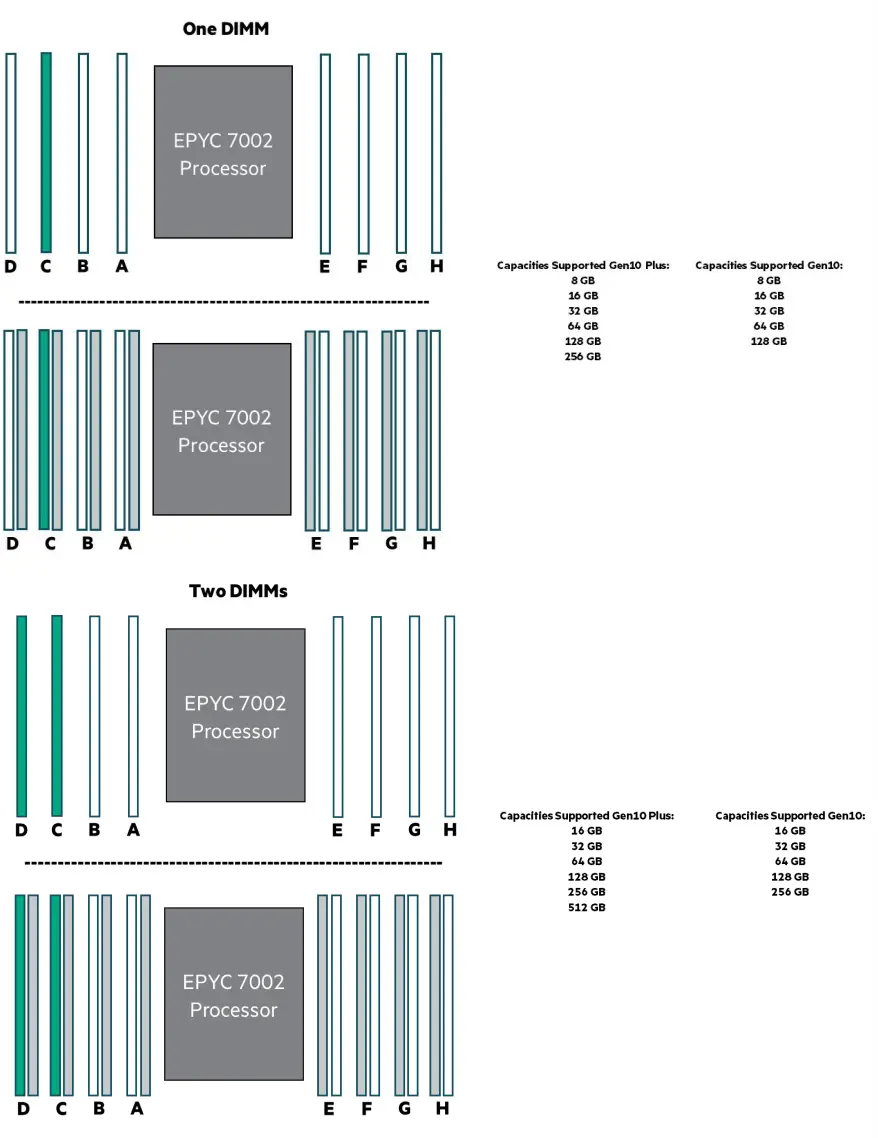
Resources General
HPE servers technical white papers library
Memory
HPE Server Memory
HPE Server Memory Configurator
HPE Smart Memory whiteboard video
Memory speed tables for HPE Gen10 Plus servers using AMD EPYC 7002 and 7003-series processors
LEARN MORE AT
hpe.com/info/memory
Make the right purchase decision.
Contact our presales specialists.
© Copyright 2017–2021 Hewlett Packard Enterprise Development LP. The information contained herein is subject to change without notice. The only warranties for Hewlett Packard Enterprise products and services are set forth in the express warranty statements accompanying such products and services. Nothing herein should be construed as constituting an additional warranty.
Hewlett Packard Enterprise shall not be liable for technical or editorial errors or omissions contained herein.
AMD is a trademark of Advanced Micro Devices, Inc. All third-party marks are property of their respective owners.
a00038346ENW, May 2021, Rev. 6
 Server Memory and SmartMemory Options & Upgrades | HPE