 FS22
FS22
EKOVERB
REVERB+DELAY
OwnerʹsManual
Precautions
Please read carefully before proceeding
Power Supply
Please connect the designated adapter to an AC outlet of the correct voltage, Please be sure the adapter supplies DC 9v 300mA, center negative. Unplug the adapter when not in use or during electrical storms
Important Safety Instructions
- Read these instructions
- Keep these instructions
- Heed all warnings
- Follow all instructions
- Do not use this apparatus near water
- Clean only with a dry cloth
- Do not install near any ventilation openings. Install in accordance with the manufacturer’s instructions
- Do not install near any heat sources such as radiators, heat registers, stoves, or other apparatus (including amplifiers)that produce heat
- Do not defeat the safety purpose of the polarized or grounding-type plug. A polarized plug has two blades one wider than the other. A grounding-type plug has two blades and a third grounding prong. The wide blade or the third prong is provided for your safety. If the provided plug does not fit into your outlet consult an electrician for replacement of the obsolete outlet
- Protect the power cord from being walked on or pinched particularly at plugs, convenience receptacles, and the point
FCC certification
This device complies with Part 15 of the FCC Rules. Operation is subject to the following two conditions:
- This device may not cause harmful interference
- This device must accept any interference received, including interference that may cause undesired operation
Features
- Dual-footswitch stereo delay & reverb effects
- 3 pairs of built-in delay & reverb effects
- Individual Tap Tempo function
- Freeze function for infinite trail
- The trail on function allows the effect to fade out naturally 6. True bypass
Top Panel
Instructions
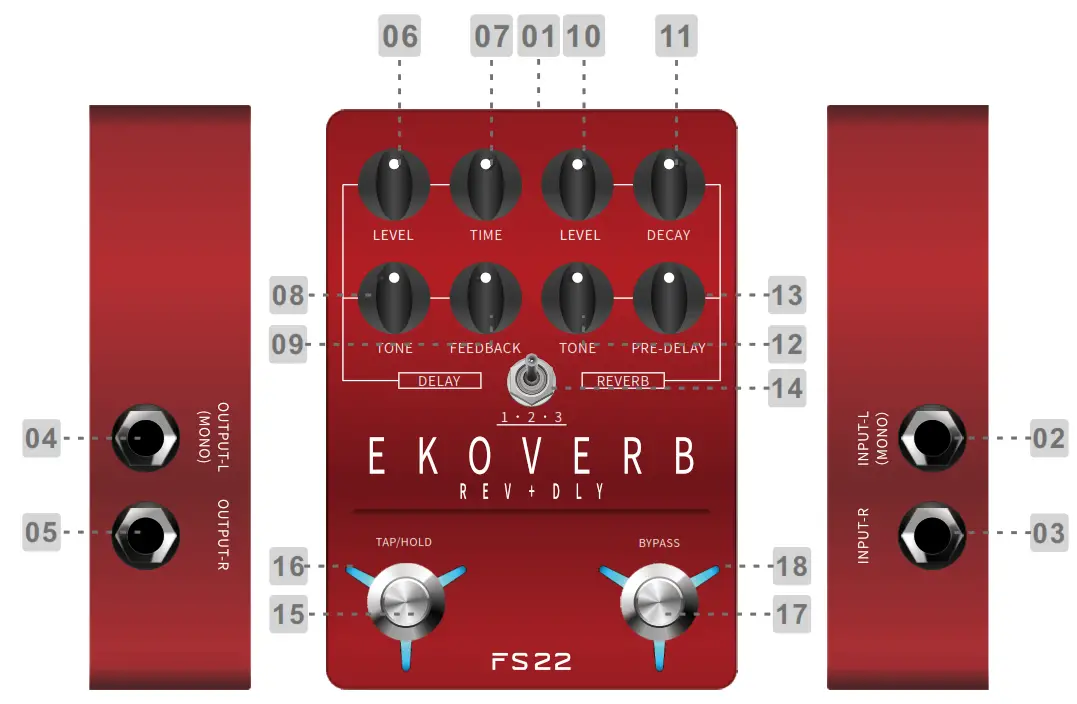
- DC 9V: Power supply
- INPUT-L (MONO): 1/4″unbalanced input jack (please use this jack for mono setup)
- INPUT-R: 1/4″unbalanced input jack
- OUTPUT-L(MONO): 1/4″unbalanced output jack (please use this jack for mono setup)
- OUTPUT-R: 1/4″unbalanced output jack
- LEVEL: Volume level of the delay effect
- TIME: Delay time of delay effect
- TONE: Tone color of the delay effect
- FEEDBACK: Feedback of delay effect
- LEVEL: The Volume level of the reverb effect
- DECAY: The decay time of the reverb effect
- TONE: The tone color of the reverb effect
- PRE-DELAY: Pre-delay time
- TYPE Switch: Switch between 3 different pairs of delay& reverb effects
Position 1: Reverse Delay + Swell Reverb
Position 2: Real Echo + Mod Reverb
Position 3: Analog Delay + Shimmer Reverb - TAP/HOLD Footswitch: Press the footswitch multi times to access the Tap Tempo function; When the effects are on, press and hold to access the Freeze function.
- LED of TAP/HOLD footswitch: The blinking rate of the LED indicates the current delay time of delay effect
- Bypass Footswitch: Press to turn on/off (bypass) the effects
- LED of Bypass Switch: The on/off of LED indicates the on/off(bypass) of the effects
Instructions
- ON/OFF Press the Bypass Footswitch to turn on/off(bypass) the pedal. The on/off of the footswitch LED will indicate the on/off(bypass) of the pedal.
- TAP TEMPO Press the TAP footswitch for multi times to access the Tap Tempo function. The blinking rate of the LED will indicate the delay time of the delay effect.
- FREEZE When the pedal is on, press and hold the BYPASS footswitch to activate the Freeze function. The trail will continue until manually switched off.
- Trial On ON/OFF: Power on the pedal, press and hold the Bypass switch to turn on/off the Trail function. When the Trail is on, the LED of the Bypass switch will turn blue and blink after pressing; when the Trail is off, the LED of the Bypass switch will turn red and blink after pressing.
Trail On will allow the effect to fade out naturally when it is switched off during playing.
Effect List
| Num | Effect Name | Descriptions |
| 1 | Reverse Delay Swell Reverb | Reverse delay combined with slow attack reverb effect |
| 2 | Real Echo Mod Reverb | Analog real echo delay combined with modulated reverb effect |
| 3 | Analog Delay Shimmer Reverb | Analog delay combined with Shimmer reverb effect |
Specifications
Input: 2*1/4″mono jack (Impedance value: 4.7M ohms)
Output: 2*1/4″mono jack (Impedance value: 100 ohms)
Power Supply: 9V DC center negative (Please do not use power supply over 9V or incorrect polarity)
Current Draw: 300mA
Dimension: 85x120x33mm
Weight: 0.367KG
Accessories: Safety Instruction & Warranty Card, Sticker, quick guide
Recommend to use isolated/individual power supply. Sharing power supply with other pedals may cause unexpected noise.
www.flammainnovation.com
Shenzhen Flamma Innovation Co., Ltd
Made in China