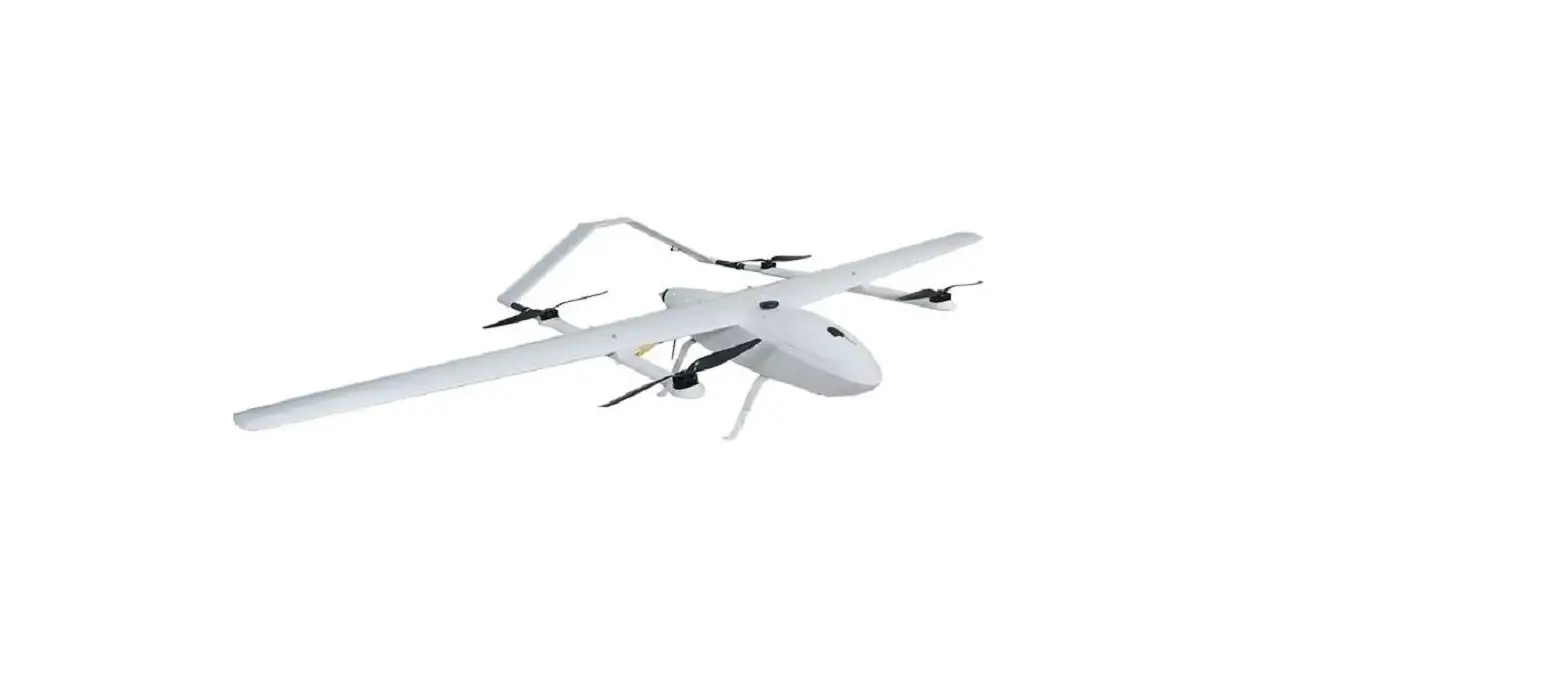
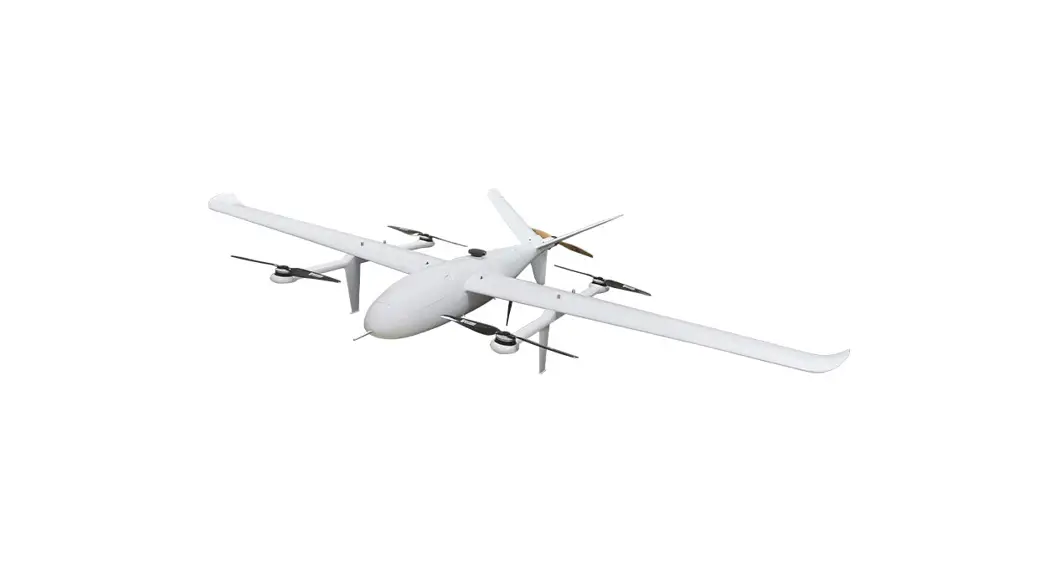
260 VTOL Baby Shark
FOXTECH BABY SHARK 260 VTOL User Manual
Specifications
| Aircraft Structure | |
|---|---|
| Item Name | FOXTECH BABY SHARK 260 VTOL RTF Combo |
| Version | V2.1 2019.07 |
| Material | Kevlar and High Density Composite Material |
| Shipping Dimension | 1260x440x460mm |
| Shipping Weight | 35kg |
| Wingspan | 2500mm |
| Length | 1440mm |
| Max. Flying Height | 3000m |
| Max. Flying Speed | 100km/h |
| Stall Speed | 15m/s-16m/s |
| Frame Weight(No Electric) | 2.68kg |
| Self Weight(No Payload, No Battery) | 5.5kg |
| Max. Take-off Weight | 12kg |
| Max. Payload | 6.5kg (Including Battery) |
| Suggested Battery | Foxtech 6S 12500mAh Li-ion Battery x3, 6S 5000mAh Lipo Battery x2 |
| Servo | DS135MG x4 |
| Flight Controller | Pixhawk 2.1 Standard Set with Here 2 GNSS x1 |
| Controller | DA16S+ Radio Controller x1 |
| Optional | -SEEKER-20 20X Optical Zoom Camera with 3-Axis Gimbal -SEEKER-30 Max 30X Optical Zoom Camera with 3-Axis Gimbal -FOXTECH 3DM V2 Oblique Camera for Mapping and Survey |
Basic Theory
The FOXTECH BABY SHARK 260 VTOL features a highly advanced
aerodynamic design. It is made of high density composite material,
which features high strength and very light weight. BABY SHARK VTOL
adopts quick-detach design which makes the plane easy to set up and
transport. The fuselage also has a big inner space to hold flight
controller, batteries or other equipment.
Setup and Calibration
Assembly
To assemble the BABY SHARK 260 VTOL:
- Connect the two motor cables.
- Fix the arm on the aileron with the two screws.
- Insert the two carbon fiber tubes and the signal cable in the
body. - Install the wings.
- Tighten the four screws for the aileron inside the body. (Two
screws are in the central section and two are in the front
section.) - Mount the cover.
- Assemble the tail.
- Tighten the tail with two screws.
- Connect the servo cable.
- Twist the tail part on the arm.
- Install the receiver antenna.
Check Radio Control
To check radio control:
- Check transmitter mode (left hand throttle or right hand
throttle). - Check channels on the transmitter.
Download Mission Planner
To download Mission Planner:
- Download the latest Mission planner online or copy it from the
SD card. Download link:
http://firmware.ardupilot.org/Tools/MissionPlanner/
Connect Baby Shark to Computer
To connect Baby Shark to a computer:
- Connect DA16S transmitter and computer with Bluetooth.
- Find the corresponding device and enter password.
- Enter the Device Manager interface and find its COM.
- Select correct Com port, and click CONNECT.
- Connection completed.
Connect the Datalink and Check Flight Controller
To begin accelerometer calibration:
- Click this button to begin accelerometer calibration. This
accelerometer trim can be used to level the HUD horizon.
Checklist before Every Flight
Before every flight, follow this checklist:
- Check the battery level.
- Check for any damage to the aircraft.
- Check all components are securely fastened and in place.
- Check that the control surfaces move freely and are in the
correct position. - Check the radio control connection.
- Check GPS signal strength.
Test Flight
To perform a test flight:
- Perform the checklist before every flight.
- Check wind conditions and choose a suitable location for
takeoff and landing. - Take off manually or use autopilot.
- Fly in a safe area and monitor the aircraft’s performance.
- Land safely and perform post-flight checks.
Autopilot
The BABY SHARK 260 VTOL features an autopilot system. To use
autopilot:
- Connect to Mission Planner.
- Select Flight Plan and create a new plan.
- Add waypoints and configure actions for each waypoint.
- Upload the plan to the aircraft.
- Arm the aircraft and switch to AUTO mode.
- The aircraft will fly the mission according to the plan.
Applications
The BABY SHARK 260 VTOL can be used for a variety of
applications, including:
- Aerial surveying and mapping
- Search and rescue
- Environmental monitoring
- Wildlife monitoring
- Security surveillance
Appendix
ESC Calibration
To perform ESC calibration:
- Connect the battery.
- Wait for the ESC initialization sound.
- Move the throttle stick to the maximum position.
- Wait for the confirmation sound.
- Move the throttle stick to the minimum position.
- Wait for the confirmation sound.
- The ESC calibration is now complete.
Servo Checking and Required Mode Modification
To check servo function and modify mode:
- Connect to Mission Planner.
- Select Initial Setup and choose Servo Output.
- Check each servo’s function.
- If required, modify the mode by selecting Config/Tuning, then
Full Parameter List, and changing the SERVOx_FUNCTION
parameter.
Angle Deviation Compensation Checking
To check angle deviation compensation:
- Connect to Mission Planner.
- Select Initial Setup and choose Mandatory Hardware.
- Check the Angle Deviation Compensation value.
Default Settings
The default settings for BABY SHARK 260 VTOL are:
- Throttle stick: Channel 3
- Aileron: Channel 1
- Elevator: Channel 2
- Rudder: Channel 4
Pixhawk Connections
The Pixhawk connections for BABY SHARK 260 VTOL are:
- PWM OUT 1: Aileron (servo)
- PWM OUT 2: Elevator (servo)
- PWM OUT 3: Throttle (ESC)
- PWM OUT 4: Rudder (servo)
- PWM OUT 5: Not used
- PWM OUT 6: Not used
BABY SHARK 260 VTOL
User Manual
V2.1 2019.07
Contents
FOXTECH BABY SHARK 260 VTOL User Manual
Specifications
2
Basic Theory
3
Setup and Calibration
4
Assembly
4
Check Radio Control
5
Download Mission Planner
5
Connect Baby Shark to Computer
5
Connect the Datalink and Check Flight Controller
8
Checklist before Every Flight
13
Test Flight
14
Autopilot
16
Applications
17
Appendix
18
ESC Calibration
18
Servo Checking and Required Mode Modification
20
Angle Deviation Compensation Checking
23
Default Setttings
24
Pixhawk Connections
27
©2019 FOXTECH All Rights Reserved 1
Specifications
Aircraft Structure Item Name Version Material Shipping Dimension Shipping Weight Wingspan Length Max. Flying Height Max. Flying Speed Stall Speed Frame Weight(No Electric) Self Weight(No Payload, No Battery) Max. Take-off Weight Max. Payload Suggested Battery
Servo Flight Controller Controller
FOXTECH BABY SHARK 260 VTOL User Manual
FOXTECH BABY SHARK 260 VTOL RTF Combo Kevlar and High Density Composite Material 1260x440x460mm 35kg 2500mm 1440mm 3000m 100km/h 15m/s-16m/s 2.68kg 5.5kg 12kg 6.5kg(Including Battery) Foxtech 6S 12500mAh Li-ion Battery x3 6S 5000mAh Lipo Battery x2 DS135MG x4 Pixhawk 2.1 Standard Set with Here 2 GNSS x1 DA16S+ Radio Controller x1
Optional -SEEKER-20 20X Optical Zoom Camera with 3-Axis Gimbal -SEEKER-30 Max 30X Optical Zoom Camera with 3-Axis Gimbal -FOXTECH 3DM V2 Oblique Camera for Mapping and Survey
©2019 FOXTECH All Rights Reserved 2
Basic Theory
FOXTECH BABY SHARK 260 VTOL User Manual
BABY SHARK 260 VTOL features a highly advanced aerodynamic design. It is made of high density composite material, which features high strength and very light weight. BABY SHARK VTOL adopts quickdetach design which makes the plane easy to set up and transport. The fuselage also has big inner space to hold flight controller, batteries or other equipments.
BABY SHARK can take off and land vertically in a small area, and fly like a multicopter. Self weight(no payload, no battery) is 5.5kg, and max take-off weight is 12kg, the stall speed of the BABY SHARK is 15m/s-16m/s, the highest speed is about 100km/h. In this Baby SHARK VTOL plane we suggest to use two 6S 5000mah lipo batteries for lifting motors, and 30000-40000mah Li-ion battery for cruising motor and propeller, so except the battery, motors, ESCs, propellers and other necessary equipments still has 1.5kg payload left for zoom or mapping cameras. BABY SHARK can perform most tasks like long range inspection, survey and mapping etc. This plane is painted in grey color, and if you need other colors, we also can customize the color for you.
©2019 FOXTECH All Rights Reserved 3
FOXTECH BABY SHARK 260 VTOL User Manual
Setup and Calibration
Assembly
1.Connect the two motor cables 2.Fix the arm on the aileron with 3.Insert the two carbon fiber tubes
and the signal cable.
the two screws.
in the body.
4.Install the wings.
5.Tighten the four screws for 6.Mount the cover. the aileron inside the body.(Two screws are in the central section and two are in the front section.)
7.Assemble the tail.
8.Tighten the tail with two screws. 9.Connect the servo cable.
10.Twist the tail part on the arm. 11.Install the receiver antenna.
©2019 FOXTECH All Rights Reserved 4
FOXTECH BABY SHARK 260 VTOL User Manual
Check Radio Control
1.Check transmitter mode(left hand throttle or right hand throttle). 2.Check channels on the transmitter.
Download Mission Planner
Download the latest Mission planner online or copy it from the SD card. Download link: http://firmware.ardupilot.org/Tools/MissionPlanner/
Connect Baby Shark to Computer
1. Connect DA16S transmitter and computer with bluetooth.
2. Find the corresponding device and enter password.
©2019 FOXTECH All Rights Reserved 5
FOXTECH BABY SHARK 260 VTOL User Manual
©2019 FOXTECH All Rights Reserved 6
FOXTECH BABY SHARK 260 VTOL User Manual 3. Enter the “Device Manager” interface and find its COM.
4. Select correct Com port, and click CONNECT.
©2019 FOXTECH All Rights Reserved 7
5. Connection completed.
FOXTECH BABY SHARK 260 VTOL User Manual
Connect the Datalink and Check Flight Controller
1.Calibrate the Accelerometer Although the accelerometer was calibrated already for the PNP version before shipping, please calibrate it again since it might be affected in the transportation. Under Initial Setup, select Accel Calibration from the left-side menu. Mission Planner will prompt you to place the vehicle each calibration position. Press any key to indicate that the autopilot is in position and then proceed to the next orientation. The calibration positions are: level, on right side, left side, nose down, nose up and on its back.
Click this button to begin accelerometer calibration. This accelerometer trim can be used to level the HUD horizon.
1.It is important that the vehicle is kept still immediately after pressing the key for each step. 2.The level position is the most important to get right as this will be the attitude that your controller considers level while flying.
©2019 FOXTECH All Rights Reserved 8
FOXTECH BABY SHARK 260 VTOL User Manual 2. Compass Calibration Baby Shark VTOL uses high sensitivity compass and it has to be re-calibrated when fly in a new place. Enter the compass setting page and click”start” , hold the plane and rotate it in order to hit all directions on a sphere to calibrate the compass, when it’s done, a new offset would be given to the flight controller, and a reboot is necessary.
Onboard calibration produces better results. 3. Radio Control Calibration Calibrating each of the transmitter controls/channels is a straightforward process – simply move each of the enabled sticks/switches through their full range and record the maximum and minimum positions.
©2019 FOXTECH All Rights Reserved 9
FOXTECH BABY SHARK 260 VTOL User Manual
©2019 FOXTECH All Rights Reserved 10
FOXTECH BABY SHARK 260 VTOL User Manual
4. Check Flight Modes. (Cruise, QHover, QLoiter, Loiter, Auto, RTL)
©2019 FOXTECH All Rights Reserved 11
FOXTECH BABY SHARK 260 VTOL User Manual 5. Calibrate the Airspeed Sensor It is critical that you calibrate airspeed meter to ensure that it is working correctly, and ensure that it is correctly zeroed. After you start up APM on your aircraft you should wait at least 1 minute for your electronics to warm up, preferably longer, and then do a pre-flight calibration of your airspeed sensor. Your ground station software should have a menu for doing this, usually called “Preflight Calibration”. You need to loosely cover your airspeed sensor to stop wind from affecting the result, then press the button. The calibration will take a couple of seconds.
Choosing that action will re-calibrate both your ground barometric pressure and your airspeed sensor. Next you should check that your airspeed sensor is working correctly before takeoff. To do that you should blow into the airspeed sensor and make sure that the “AS” airspeed sensor value in your HUD rises as you blow into it. 6. Check the Two Batteries Voltages If you find the voltages are not correct, Enter the voltages according to the hand-held volt meter in the “Measured Battery Voltage” field, Press tab or click out of the field and the “Voltage Divider (Calced)” value will update and the “Battery voltage (Calced)” should now equal the measured voltage.
7. Check Before Flight (1) Connect the internet and load the map. (2) The plane direction should be same with its direction in mission planner, if not, please calibrate again. (3) Check plane status, altitude, voltage airspeed meter working fine.
©2019 FOXTECH All Rights Reserved 12
FOXTECH BABY SHARK 260 VTOL User Manual
Checklist before Every Flight
Make sure all items are checked before every flight. 1. The aircraft connection is stable and normal. 2. All screws and nuts are not loose. 3. The propeller is in the normal direction and is fastened. 4. All the Rudders’ direction-correction are correct. 5. The airspeed meter reads correctly. 6. Aircraft voltage is normal. 7. The compass is toward the right direction. 8. More than 15 GPS satellites, or displays GPS FIX. 9. No warning words on the ground station. 10. Device SD card is normal. 11. Recording device is recording normally. 12. Aerial survey camera photo test is normal. 13. Exposure check is normal. 14. The remote controller power is normal. 15. Ground station power is normal. 16. Data connection strength is normal. 17. Aircraft H point positioning is normal. 18. Upload and download to check the routes. 19. The antenna is placed in the normal direction, the antenna of the aircraft is facing down or up, and the two antennas of the receiver are not in contact. 20. Ground device recording is on. 21. Aircraft onboard camera is turned on. 22. Height setting of Return Home Point is normal. 23. Out of control return-to-lanuch setting is normal. 24. Try to vertically take off and land, make sure the direction-correction and direction control are normal Start flying.
©2019 FOXTECH All Rights Reserved 13
FOXTECH BABY SHARK 260 VTOL User Manual
Test Flight
Before the first flight, it’s suggest to check if every component is well connected, Servos working properly, motors spinning to the correct direction and all control surfaces are moving to the desired directions. It’s suggested to use 3 modes, Cruise, Qhover and Qloiter as the labled modes on a three position switch. It’s suggested to do the first flight in a very open area with no buildings or big trees around, and a flat taking off area is necessary. Use the Qhover(or Qloiter) mode, start the motors by pushing the rudder all to the right with the throttle at the lowest position, the motors should start to spin, gradually increase the throttle until the plane is ready to lift from the ground, move aileron, elevator and rudder stick gently to check if the plane is moving as desired. Continue to push the throttle until the plane is lifted from ground, it may swing a bit since there should be big airflow hitting the wing, lift the plane to around 3 meters and try to fly it as a multicopter, it should not be a problem for anyone who can play a multicopter. When you are familiar with all controls, lift the plane to at least 50m from the ground and make sure there is not obstacle in front of the plane. Switch it to Cruise mode, the Baby Shark VTOL rear motor should work, once the speed is reaching at least 16m/s, the multicopter motors will stop spinning, then the Baby Shark is now transferred to fixed wing. It’s also suggested to active the short and long failsafe, the default action is respectively CIRCLE and RTH. So in case the plane lose RC control, it will go back all by itself.
You can fly a while and see if the plane could go straight, if you find the plane is tilting left for example, don’t try to trim the aileron with your radio, the trim to aileron(SERVO1) must be done in parameter setting. (If the elevator trim is necessary, please trim the SERVO2 and SERVO4 at the same time with the same trim amount.)
GCS FAILSAFE disabled as default setting for DA16(S) radio or the control range will be greatly affected.
©2019 FOXTECH All Rights Reserved 14
FOXTECH BABY SHARK 260 VTOL User Manual If everything goes well, you can try to land. First, reduce the altitude by pushing forward the elevator and when the altitude is around 50m above the ground, switch to Qhover(or Qloiter) Mode. Then become a multicopter again, then you can land it just as a normal multicopter.
©2019 FOXTECH All Rights Reserved 15
Autopilot
After the first flight, you can try to do autopilot.
FOXTECH BABY SHARK 260 VTOL User Manual
You can choose to take off and land either by manual control or automatically.
To use automatic taking off and landing, you can change the first waypoint to VTOL_TAKE OFF, and set an altitude like 50m for this action, then set the next waypoint a bit far (like 100m ) from the first waypoint, the Baby Shark will take off as a multicopter, when it reaches the wanted altitude, it will switch to fixed wing and fly waypoints or missions like a fixed wing.
The VTOL landing is also the similar, you can set the last waypoint to VTOL_LAND, but it’s suggested to set one waypoint which is around 100m from this one, since the plane will try to turn to multicopter before the last waypoint, if the waypoint before VTOL_LAND is too far, the Baby Shark will finish the final distance all in multicopter mode, the power consumption in mutlicopter mode is 5 times more than in fixed wing mode.
Q_RTL is enabled as default,if the VTOL land command is not added, then the VTOL will go back to HOME position and home altitude(default 50m)and performs automatical VTOL land.
©2019 FOXTECH All Rights Reserved 16
FOXTECH BABY SHARK 260 VTOL User Manual
Applications
– Survey – 3D Survey – Patrol – FPV – Air pollution detection More autopilot mode can be found in Mission planner manual, like circle survey, Grid, drop an object with hook at desired waypoint.
©2019 FOXTECH All Rights Reserved 17
FOXTECH BABY SHARK 260 VTOL User Manual
Appendix
The following calibrations are for Customers who bought Baby Shark VTOL Kit. For the customers who bought Baby Shark PNP combo, the following calibrations are done before shipping. Please donot change any settings. If the settings are changed by accident, please recover from the param. document in the SD card.
ESC Calibration
1. Cut off Baby Shark power supply and take off all propellers. Connect Pixhawk flight controller with Mission planner with USB cable. Change “Q_ESC_CAL” value to 1 and write params.
2. Long press GPS safety switch until the red light keeps on.
Safety Switch
3. Click Arm/Disarm, There will be a sound “Du~”
©2019 FOXTECH All Rights Reserved 18
FOXTECH BABY SHARK 260 VTOL User Manual
4. In the following demonstration, Take Left hand throttle as an example. Push throttle to Max.(Pic 4-1), connect Baby Shark with power, when there is “di di ~ di” sound quickly push throttle to Min.(Pic 4-2) When there is “di di di di ~di” sound, ESC calibration is successful. Then cut off power.
Pic 4-1
Pic 4-2
5. Connect Baby Shark with power again. Long press GPS safety switch. Radio throttle push to Min, direction stick push to right(Pic 5-1), disarm Baby Shark, you can adjust “Q_M_SPIN_MIN”in mission planner. The default value is 0.25. Write the value, it is complete.
Pic 5-1
©2019 FOXTECH All Rights Reserved 19
FOXTECH BABY SHARK 260 VTOL User Manual
Servo Checking and Required Mode Modification
Check the stick function of remote controller. (The follow example is demonstrated as transmitter Mode2 which means left hand is throttle.)
Please take off all propellers before the following calibrations in case any danger occurs. Under Manual Mode : 1. Make sure the aircraft is in centre position. 2. Push the throttle-stick the motor speed will increase,and pull back the throttle-stick, the motor speed will decrease. 3. Push the pitch-stick the two V-type tail will go down.
4. Pull back the pitch-stick the two V-type tail will go up.
5. Turn the aileron-stick to the left, the left aileron will go up, and the right one will go down.
6. Turn the aileron-stick to the right, the right aileron will go up, and the left one will go down.
©2019 FOXTECH All Rights Reserved 20
FOXTECH BABY SHARK 260 VTOL User Manual 7. Turn the direction-stick to the left,the left V-type tail will go up, and the right tail will go down.
8. Turn the direction-stick to the right,the right V-type tail will go up, and the left tail will go down.
Under the Q_STABLIZE Mode 1.Unlock the plane under the Q_STABLIZE mode. (Click safety switch, set the throttle at minimum speed and turn the direction stick to the far right.)
Safety Switch 2. Check the throttle stick: when you push the throttle-stick, the motors speed will increase, and pull back the throttle-stick, the motors speed will decrease. 3. Push the pitch-stick, the speed of the front motor will decrease and the back motor will increase, the two V-type tails will go down.
©2019 FOXTECH All Rights Reserved 21
FOXTECH BABY SHARK 260 VTOL User Manual 4. Pull the pitch-stick, the speed of the front motor will increase and the back motor will decrease, the two V-type tail will go up.
5. Turn the aileron-stick to the left, the left motor speed will decrease, and the right motor speed will increase left aileron goes up, and the right aileron goes down at the same time. 6. Turn the aileron-stick to the right, the right motor speed will decrease, and the left motor speed will increase left aileron goes down, and the right aileron goes up at the same time.
©2019 FOXTECH All Rights Reserved 22
FOXTECH BABY SHARK 260 VTOL User Manual
Angle Deviation Compensation Checking
Unlock the plane under the Q_STABLIZE mode: 1. Plane leans forward, the speed of the front motors will increase, the back motor-decrease,the two V-type tails go up.
2. Plane leans back, the speed of front motors will decrease, the back motor-increase, the two V-type tails go down.
3. Plane leans to the left, left aileron will go down, and the right aileron will go up, the speed of left motor increases, and the right motor decreases.
4. Plane leans to the right,left aileron will go down, and the right aileron will go up,the speed of left motor decreases, and the right motor increases;
©2019 FOXTECH All Rights Reserved 23
Default Setttings
Some default setttings in Pixhawk for Baby Shark. 1. Baby Shark Pixhawk Basic Settings for Reference.
FOXTECH BABY SHARK 260 VTOL User Manual
2. Suggested “Q_VFWD” is: 0.05 , this setting will increase anti-wind performance in QLOITER mode and Vtol-take off and landing.
3. Suggested “Q_WVANE_MINROLL” value is: 3
4. Suggested “ALT_HOLD_RTL” value is: 5000, default home altitude, 50m is a good number for Vtollanding.
5. Suggested “Q_RTL_MODE” value is: 1, if you prefer the plane go circles around the Home point instead of go into Vtol-landing during RTL ,change it to 0. 6. Suggested “BRD_SAFETYENABLE” value is: 1, always important to have the safety switch on after power on, you will need to press the safety switch on the GPS for 2 second to active the plane to fly.
©2019 FOXTECH All Rights Reserved 24
7. Suggested “Q_WP_SPEED_DN” is: 250 Suggested “Q_WP_SPEED_UP” is: 200
FOXTECH BABY SHARK 260 VTOL User Manual
8. Suggested “Q_LAND_FINAL_ALT” is: 10 Suggested “Q_LAND_SPEED” is: 50
9. Suggested “Q_TRAN_PIT_MAX” value is: 7
10. Suggested “WP_RADIUS” value is: 30
11. Suggested “BATT2_AMP_OFFSET” value is: 0.027 Suggested “BATT2_AMP_PERVLT” value is: 54.64481
12. Suggested “Q_ASSIST_ANGLE” value is: 30 Suggested “Q_ASSIST_SPEED” value is: 16 (For hall sensor only.)
13. Suggested “Q_VELZ_MAX” value is: 250 Suggested “Q_VFWD_ALT” value is: 4
©2019 FOXTECH All Rights Reserved 25
14. Suggested “BATT2″Values are as follows:
FOXTECH BABY SHARK 260 VTOL User Manual
©2019 FOXTECH All Rights Reserved 26
Pixhawk Connections
FOXTECH BABY SHARK 260 VTOL User Manual
This content is subject to change. Download the latest version from https://www.foxtechfpv.com/foxtech-baby-shark-vtol.html For everyday updates, please follow Foxtech Facebook page: https://www.facebook.com/foxtechhobby YouTube Channel: https://www.youtube.com/user/foxtechonline/featured?view_as=subscriber
©2019 FOXTECH All Rights Reserved 27
 ArduPilot firmware : /Tools/MissionPlanner