CHORD Hugo 2 DAC and Headphone
The Pumphouse, Farleigh Lane, East Farleigh, Kent, ME16 9NB. Great Britain. +44 (0) 1622 721 444 [email protected] chordelectronics.co.uk
Introduction
This manual describes all the features of the Hugo 2 DAC/headphone amplifier and contains important warranty, safety and usage information.
Safety
- Do not allow the device to come into contact with water or liquids.
- Do not spray cleaning products onto the device. Use a clean microfibre cloth to clean the casework.
- A further safety document is included in the box.
- The device does not contain any user-serviceable components. Do not attempt to open, dismantle or apply internal third-party devices to it. Doing so will void the warranty.
Registering
The Hugo 2 benefits from a three-year warranty covering defects in materials and workmanship through fair wear and tear. Batteries are covered for 18 months.
- Register your device online for the best aftersales support.: www.chordelectronics.co.uk/register-product
In the unlikely event of a claim, contact your supplying dealer.
Description
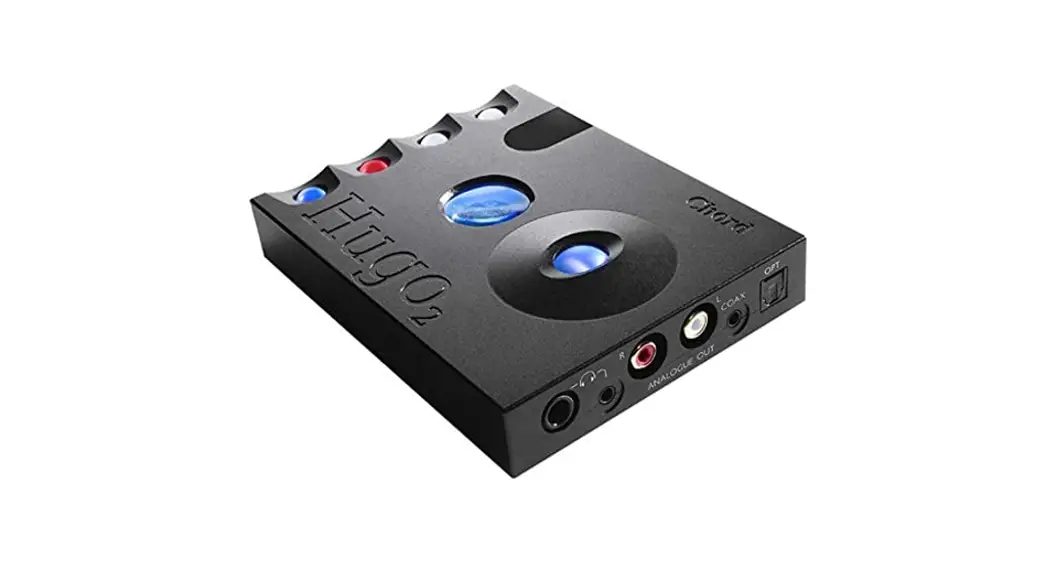
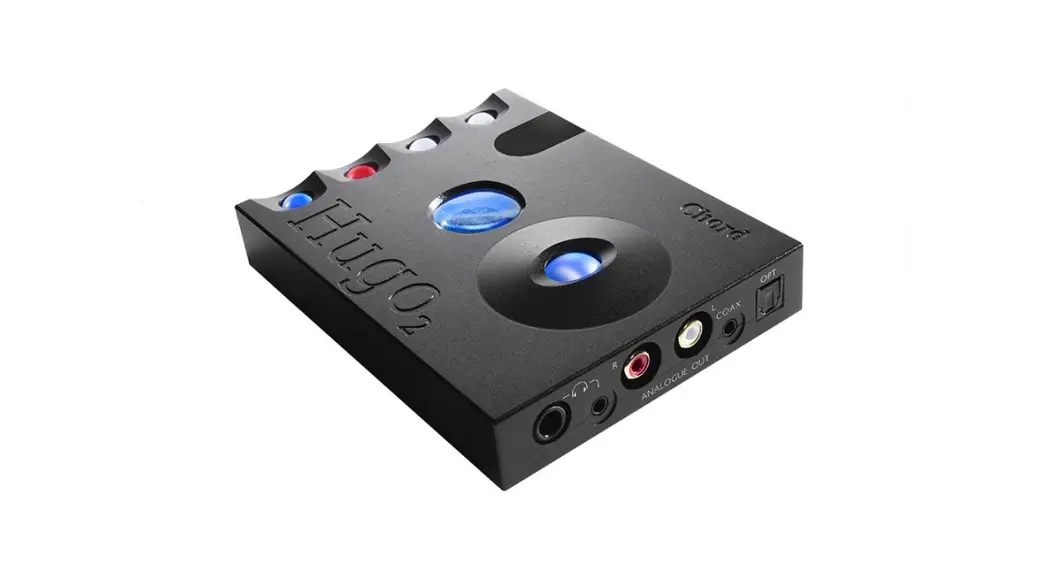
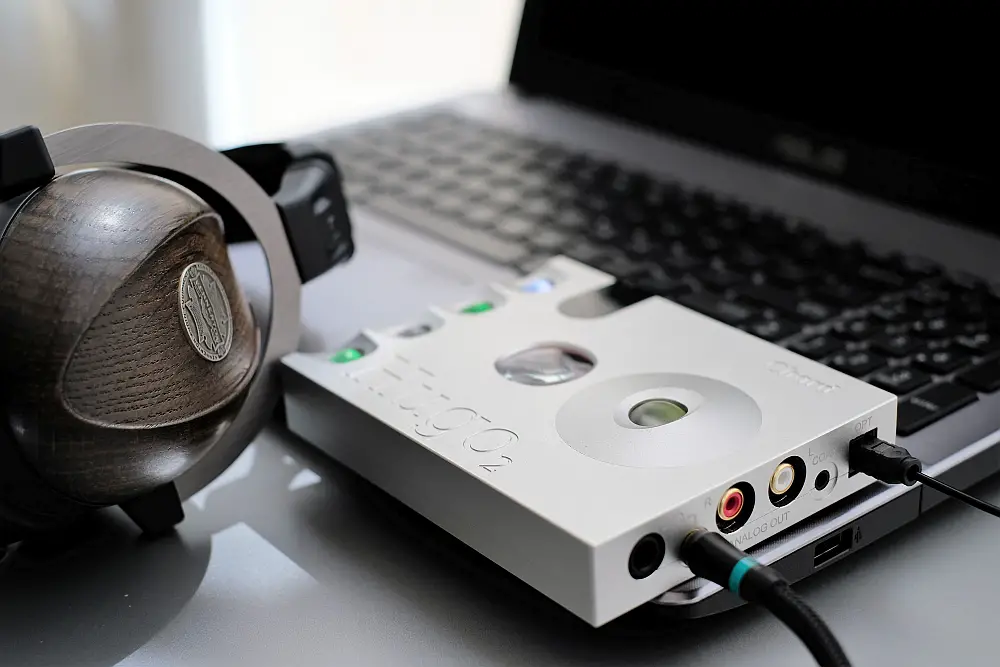
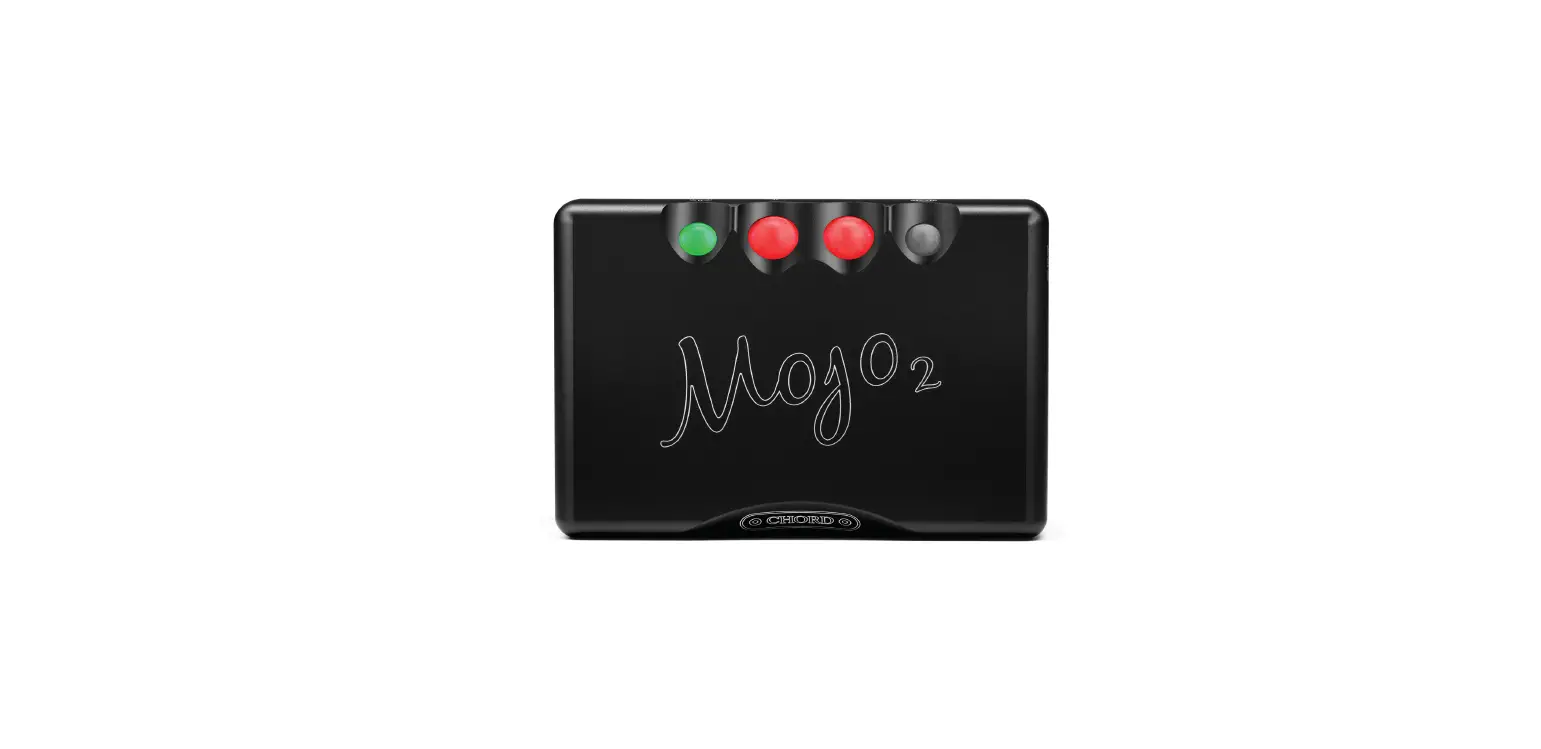
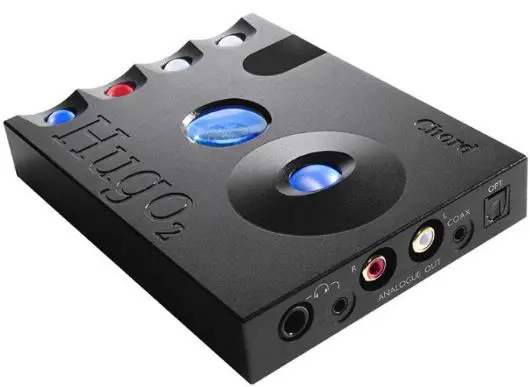
The Hugo 2 is an advanced transportable DAC and headphone amplifier. Designed for home or mobile use, the Hugo 2 transforms sound quality thanks to its cutting-edge proprietary digital audio technology.
Features
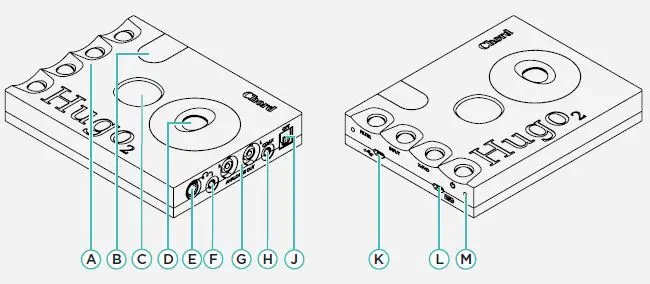
- A Menu buttons
- B IR remote window
- C Viewing window
- D Volume wheel
- E Headphone output (6.35 mm)
- F Headphone output (3.5 mm)
- G Analogue RCA outputs
- H Dual data coaxial input*
- J Optical input
- K Micro USB input (source)
- L Micro USB input (charging)
- M Connector holes (for 2go)
- Single coax: tip: signal, sleeve: ground. Dual data coax: tip: signal 1, ring: signal 2 sleeve: ground (for use with the Hugo M Scaler)
Powering up and charging
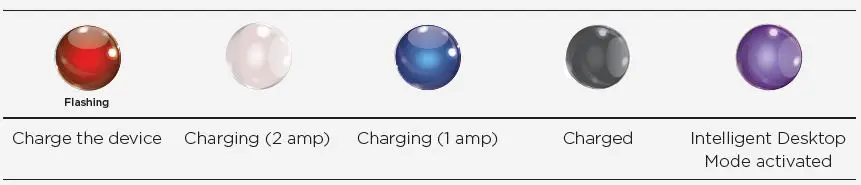
To switch the unit on, press and hold the power button. The device will perform a series of start-up checks and both the power button and viewing window LEDs will cycle through a range of colours. Once finished, the unit will click, indicating it is ready to use. To charge the device, connect the supplied 2 A Micro USB wall charger to a power source and then to the Micro USB charging port on the unit. The power button’s colour indicates the unit’s charging status when on charge, and battery level percentage at other times; use the colour charts below and opposite as a guide. A full charge is reached in approximately eight hours (approx) with the supplied 2 A charger. Note, charging times will be elongated considerably with lower current chargers. A minimum 1 A charger is required. It is possible to charge the unit and enjoy playback at the same time, plus the unit can be left connected to its wall charger at all times if desired. In this mode, after 24 hours of charging, the device automatically enters Intelligent Desktop Mode, which manages power efficiently. Use the table below for charge status colours:
- TIP After 15 minutes of inactivity, the device will will automatically shutdown, unless in Intelligent Desktop Mode.
- TIP If the batteries are fully depleted, the device will not turn on. Connect to a charger for 30 minutes.
To charge/connect to power:
- Insert the supplied Micro USB cable into the Micro USB charging port L .
- Connect the wall power adaptor to a suitable power outlet.
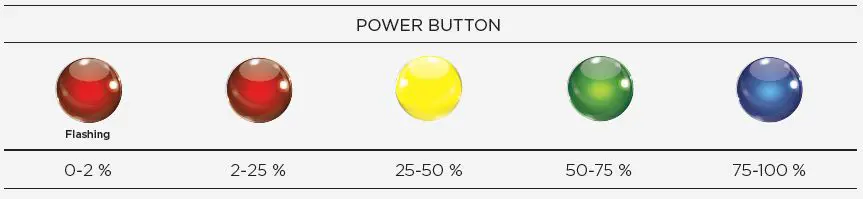
- Once charged and disconnected from a power source, the POWER BUTTON shows one of four colours to indicate the remaining battery level:

NOTE Windows devices will require a driver, downloadable from the Hugo 2 product page:
Connectivity
The Hugo 2 benefits from several digital inputs, including Micro USB, optical, coaxial, and for convenience, Bluetooth® wireless technology. The coaxial mini-jack input also supports ‘Dual data mode’ (with a dedicated cable), for use with the Hugo M Scaler (upscaler), enabling 768 kHz files to be input as two separate (L and R) 384 kHz data streams. The device offers RCA analogue outputs, plus two headphone outputs: 3.5 mm and 6.35 mm (1/4-inch).
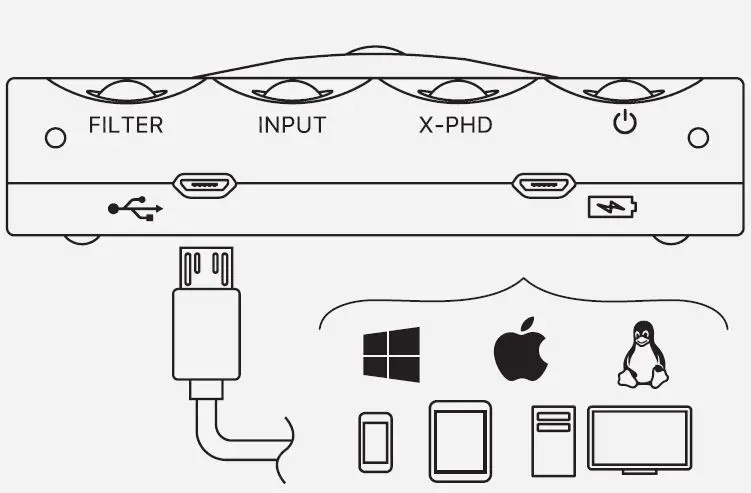
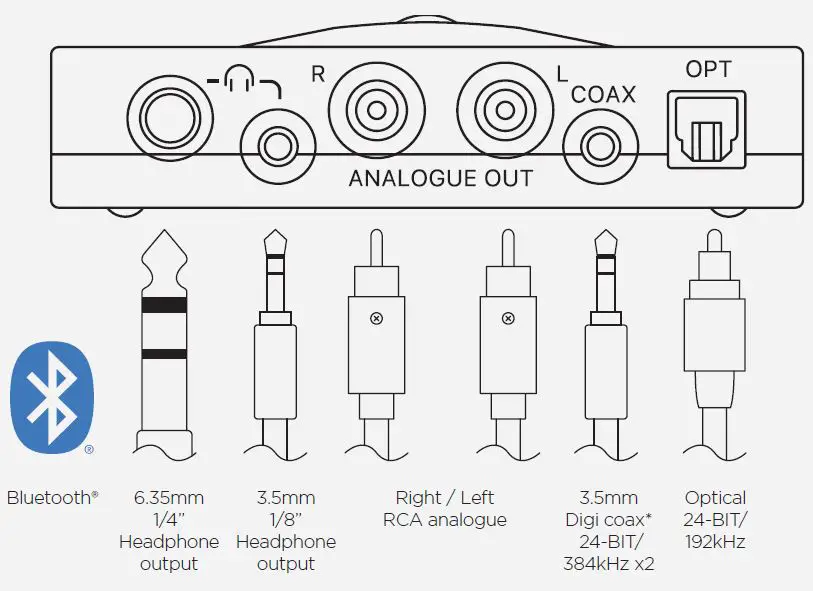
- 8Coax 1 configuration = Tip and sleeve, Coax 2 configuration = Ring and sleeve.
TIP To pair a Bluetooth® device once the input has been selected, use pairing code: 0000.
Volume and sample rate
The volume level is controlled using the top-mounted wheel (up/down) and displayed using colour as indicated below. Before playback, ensure that the volume level is at the lowest possible setting (rotate downwards) to avoid possible hearing or equipment damage.
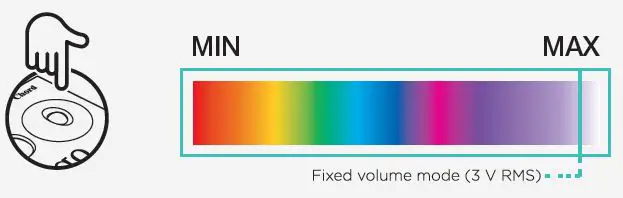
The Hugo 2’s volume can be preset (to a 3 V output) for connection to amplifiers etc. Preset volume mode can be initiated by pressing the X-PHD button when the device is first switched on. The volume wheel colour will then change to purple to indicate the mode is active. The device ‘remembers’ that present volume mode has been selected until it is deactivated. To deactivate fixed volume mode, lower the volume manually OR switch the device off. The Hugo2 will refer to the previously user-set volume when powered on, however, fixed volume mode will have to be manually selected each time the device is powered on.
NOTE WARNING: Do not activate preset volume mode when using headphones, damage to your equipment and/or hearing may occur.
Sample rate
The sample rate of the digital file being played is indicated using coloured LEDs and can be viewed through the viewing window on top of the unit. Use the colour chart below as a guide. Note, both PCM (44.1 kHz-768 kHz/16-bit to 32-bit) and DSD (Native DSD playback up to DSD512), both with automatic sample rate switching, are supported. Sample rate in kHz colour guide:

Control
The Hugo 2 has three main control buttons (L to R): FILTER, INPUT, X-PHD in addition to the POWER button. Each is explained below.
Filter
The Hugo 2 benefits from an advanced four-staged filtering system using proprietary technology to help reduce distortions by reducing high-frequency digital noise from the input. The filters are as follows:
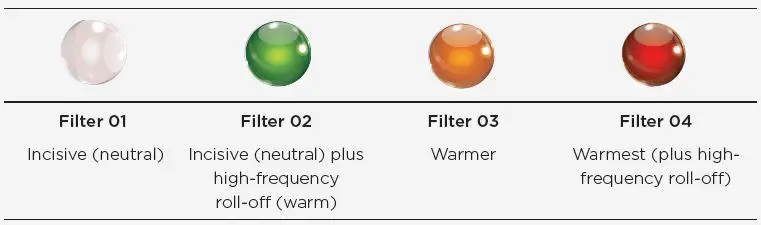
NOTE The filters are designed to reduce high-frequency noise generated by the input, they are not designed to edit the audio signature of the output like a DSP or Equaliser
Input selection
To select between the five digital inputs, press INPUT sequentially, noting the color change indicator. Note: Coax 1 should be used for Dual data mode with the Hugo M Scaler, (light changes to cyan).

- This mode is automatic and will only work with a (Dual-Data) digital coaxial 24-bit/384 kHz-capable cable.
Crossfeed
The three-stage crossfeed function emulates a speaker listening environment by blending the left and right channels by 3 dB, 6 dB and 9 dB based on setting. Please reference the graph below.

Brightness
The Hugo 2 has two user adjustable brightness settings for light or dark environments. To adjust, press the ‘dim’ button on the accompanying remote control. Alternatively, press both the ‘Filter’ and ‘X-PHD’ buttons simultaneously
Remote control
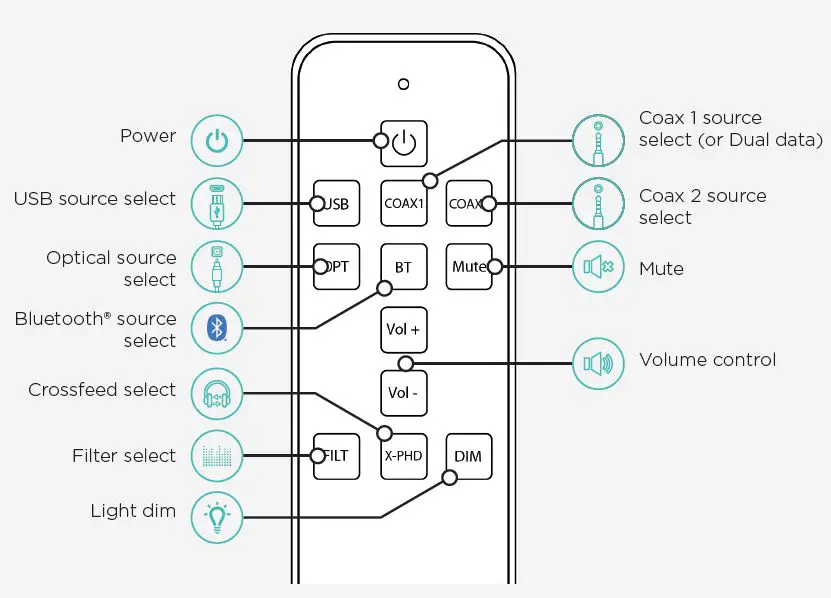
TIP The remote control requires 2x AAA batteries
Technical Specifications
Please go online for the most recent specifications: www.chordelectronics.co.uk
- Dimensions 2.1 cm (H) 10 cm (W) 13 cm (D)
- Weight 365 g
- Frequency response: 20 Hz–20 kHz +/- 0.2 dB
- Playback time Approx. 12+ hours
- Charging time Approx 8 hours
- Charging input 5V / 2A
- Total Harmonic Distortion <0.0001 % 1 kHz 3 V RMS 300 ohms
- THD and noise at 3 V RMS Ref 5.3 V 120 dB @ 1 kHz 300 ohms A Wt
Noise 2.6 uV A Wt No measurable noise floor modulation - Signal-to-noise ratio 126 dB A-weighted
- Channel separation 135 dB @ 1 kHz 300 ohms
- Maximum output level (to clipping at 1 % distortion) 94 mW 300 ohms; 740 mW 33 ohms; 1050 mW (8)
- Output impedance 25 milliohms (0.025 ohms)
- Filter guide 01: 256 FS; 02: 256 FS + HF roll-off; 03: 16 FS; 04: 16 FS + HF roll-off
 Chord Electronics - High-End Audio for Hi-Fi Enthusiasts & Professionals
 Chord Electronics - High-End Audio for Hi-Fi Enthusiasts & Professionals