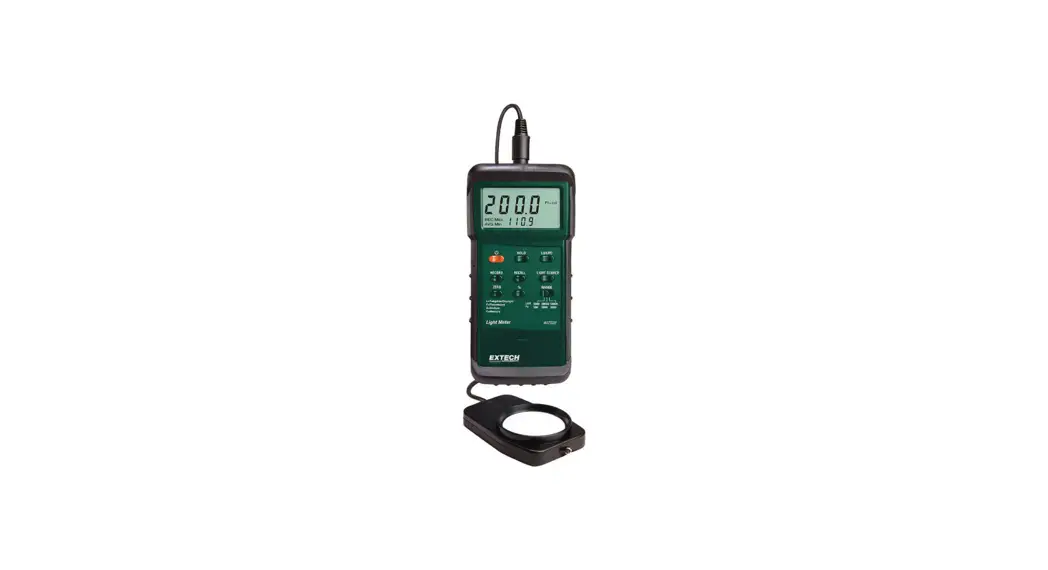
 407026 Heavy Duty Meter
User Guide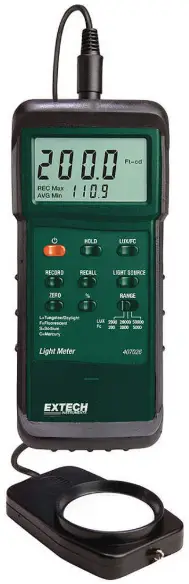
Introduction
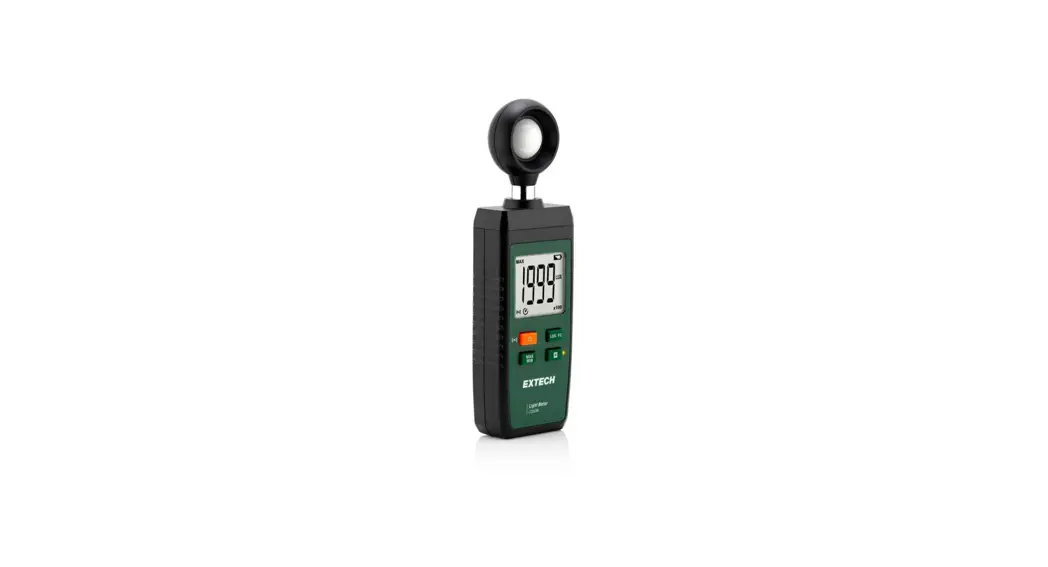
Congratulations on your purchase of the Extech Heavy Duty Light Meter. This light meter offers selectable lighting types, data record/recall, relative display mode, and PC interface. This professional meter, with proper care, will provide years of safe reliable service.
Specifications
General Specifications
| Circuit | Custom one-chip LSI microprocessor circuit |
| Display | 3-1/2 digit (2000 count) LCD display with contrast adjustment |
| Measurement ranges | LUX: 0 to 50,000 LUX (3 range); Fc: 0 to 5000 Fc (3 range); Relative mode: 0 to 1999% |
| Data Hold | Freezes displayed reading |
| Lighting Types | Sodium, Daylight/Tungsten, Fluorescent and Mercury |
| Sensor Structure | Cosine/color corrected photo-diode meets C.I.E. |
| Memory Store/Recall | Records/Recalls Max/Min/Avg readings |
| Sample rate | 0.4 seconds (approx.) per reading |
| Zero Adjust | Push-button procedure |
| Auto Power Off | After approx. 10 minutes |
| Data Output | RS-232 PC serial interface (optional software/cable PN 407001) |
| Operating conditions | 0 °C to 50 °C (32 °F to 122 °F); <80% RH |
| Power Supply | 9V battery |
| Power consumption | Approx. 5 mA DC. (approx. 200 hr battery life) |
| Weight | 320 g (0.71 lbs.) |
| Dimensions | Instrument: 180 x 72 x 32 mm (7.1 x 2.8 x1.3″) Sensor: 85 x 55 x 17.5 mm (3.3 x 2.2 x 0.7″) |
Range Specifications
| Measurement | Range | Display | Resolution | Accuracy |
| LUX | 2,000 LUX | 0-1,999 LUX | 1 LUX | ± (4% + 2 digits) of full scale |
| 20,000 LUX | 1,800-19,990 LUX | 10 LUX | ||
| 50,000 LUX | 18,000-50,000 LUX | 100 LUX | ||
| Foot Candles | 200 Fc | 0-186.0 Fc | 0.1 Fc | |
| 2,000 Fc | 167-1,860 Fc | 1 Fc | ||
| 5,000 Fc | 1,670-5,000 Fc | 10 Fc | ||
| Relative mode | 0-1999% | 1% | ||
Note: The accuracy specification above applies to calibration performed using a precision standard incandescent tungsten light source of 2856O K with meter on the tungsten setting.
Meter Description
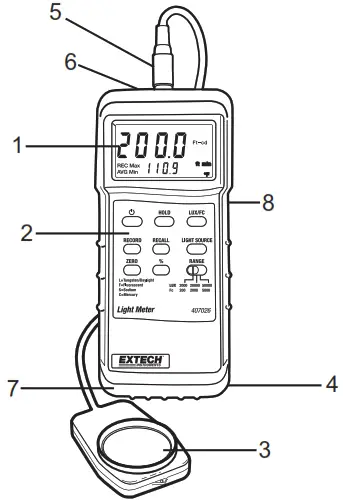
- LCD Display
- Keypad
- Light sensor
- Battery compartment (rear)
- Sensor input
- RS-232 PC Interface jack
- Protective Holster
- LCD Contrast Adjust
Operation
Meter Power and Automatic Power Off
- Press the POWER button to turn the meter on. If the display does not switch on, check the 9V battery.
- Press the POWER button again to turn the meter off.
- The meter has an automatic power off feature that conserves battery energy. After 10 minutes the meter automatically shuts off. To defeat this feature, press the RECORD button to put the meter in the recording mode.
Display ZERO Calibration
Please perform a zero calibration before each use. This will ensure the highest accuracy.
- Place the sensor cover over the light sensor, effectively blocking all light to the sensor.
- Select the 2,000 LUX range using the RANGE switch.
- Press the ZERO button. The reading should be zero.
- Remove the sensor cover from the light sensor and proceed.
Selecting the unit of measure
Press the LUX/Fc button to select the desired unit of measure. The display icons will reflect the current setting.
Selecting a light source
Select the type of lighting to be measured by pressing the LIGHT SOURCE button. The display will indicate the lighting type icon (see icon list below).
L = Tungsten/Daylight (use this setting when calibrating with a Tungsten lamp)
F = Fluorescent
S = Sodium
C = Mercury
Note: For Halogen and Metal Halide light use the Tungsten setting
Taking Measurements
Hold the light sensor in the area where light is to be collected. The light being measured must encompass the entire surface of the light sensor dome (pin point lighting such as with LED light cannot be measured).
The display will indicate the light intensity value in LUX or Foot candles (Fc). Note that since the main display area is limited to a reading of ‘1999’, the right-most digit in the 20,000 LUX and 5,000 Fc ranges appears on the lower LCD line. In the 50,000 LUX range, the last two digits appear on the lower LCD line
It may be necessary to adjust the display contrast due to a change in viewing angle or voltage drift. Use the LCD Contrast adjustment located on the right side of the meter to set the preferred contrast.
Display Range Selection
Take a measurement starting at the highest range and then work down using the RANGE switch. If the display shows dashes along the top of the reading area ( ¯ ¯ ¯), the input exceeds the maximum value for the selected range; select a higher range. If the display shows dashes along the bottom of the reading area ( – – – ), the input is too low; select a lower range.
Data Hold
While measuring, press the HOLD button to freeze the reading. The LCD will display D.H. indicating that the Data Hold function is engaged. Press HOLD again to return to normal operation.
Relative % Mode
In the RELATIVE mode of operation, the meter displays light level as a comparison to a reference value. The reference value is stored by pressing the ‘%’ button while the desired light level reference is on the display. When the button is pressed, ‘100%’ will be displayed and the ‘%’ icon will appear.
After the ‘%’ button is pressed, light measurements will be displayed as a percentage of the reference value. For example, if the light level reference is 1000 LUX, a display of 500 LUX will be represented as 50%. Further, a light level of 250 LUX will display as 25%. Use the equation below:

Press the ‘%’ button again to return to normal operation.
Maximum (MAX), Minimum (MIN), and Average (AVG) readings
The meter can keep track of the highest, lowest, and average readings for later recall.
- Press the RECORD button to start tracking the MAX, MIN, and AVG readings. The REC display will switch on.
- When desired, press the RECALL button.
- The MAX display icon appears next to the REC display icon. The reading shown is the highest reading encountered since the RECORD button was pressed.
- Press RECALL twice more to view the MIN and AVG readings.
- Press the RECORD button to return to normal operation.
RS-232 PC Interface
This meter is equipped with a RS-232 serial data port. For streaming of data to a PC via the RS232 Output jack, the optional 407001-USB kit (RS232 to USB cable and driver CD) along with the 407001 software (available free at www.extech.com) are required.
Battery Replacement
When the low battery indicator appears (LBT), replace the battery as soon as possible. Reliable readings can be obtained for several hours after the first appearance of the low battery indication.
To replace the battery:
- Remover the meter’s rubber protective holster.
- The battery compartment is located on the lower back of the meter. Pry the battery compartment cover off using a small coin or screwdriver and remove the battery.
- Replace the 9V battery and reinstall the cover.
- Ensure that the battery cover is secured after replacing the battery.
 You, as the end user, are legally bound (Battery ordinance) to return all used batteries and accumulators; disposal in the household garbage is prohibited!
You can hand over your used batteries/accumulators at collection points in your community or wherever batteries/accumulators are sold!
Disposal: Follow the valid legal stipulations in respect of the disposal of the device at the end of its life cycle
Typical Light Levels
| Lux | Foot Candles | Factories | Lux | Foot Candles | Home |
| 20-75 | 2-7 | Emergency Stairs, Warehouse | 100-150 | 10-15 | Washing |
| 75-150 | 7-15 | Exit/Entrance Passages | 150-200 | 15-20 | Recreational Activities |
| 150-300 | 15-30 | Packing Work | 200-300 | 20-30 | Drawing Room, Table |
| 300-750 | 30-75 | Visual Work: Production Line | 300-500 | 30-50 | Makeup |
| 750-1,500 | 75-150 | Typesetting: Inspection Work | 500-1,500 | 50-150 | Reading, Study |
| 1,500-3,000 | 150-300 | Electronic Assembly, Drafting | 1,000-2,000 | 100-200 | Sewing |
| Office | Restaurant | ||||
| 75-100 | 7-10 | Indoor Emergency Stairs | 75-150 | 7-15 | Corridor Stairs |
| 100-200 | 10-20 | Corridor Stairs | 150-300 | 15-30 | Entrance, Wash Room |
| 200-750 | 20-75 | Conference, Reception Room | 300-750 | 30-75 | Cooking\Dinning Room |
| 750-1,500 | 75-150 | Clerical Work | 750-1,500 | 75-150 | Show Window |
| 1,500-2,000 | 150-2000 | Typing, Drafting | |||
| Store | Hospital | ||||
| 75-150 | 7-15 | Indoors | 30-75 | 3-7 | Emergency Stairs |
| 150-200 | 15-20 | Corridor/Stairs | 75-100 | 7-10 | Stairs |
| 200-300 | 20-30 | Reception | 100-150 | 10-15 | Sick Room, Warehouse |
| 300-500 | 30-50 | Display Stand | 150-200 | 15-20 | Waiting Room |
| 500-750 | 50-75 | Elevator | 200-750 | 20-75 | Medical Exam Room |
| 750-1,500 | 75-150 | Show Window, Packing Table | 750-1,500 | 75-150 | Operating Room |
| 1,500-3,000 | 150-300 | Storefront, Show Window | 5,000-10,000 | 500-1000 | Eye Inspection |
Common Conversion Factors
| Illuminance (Visible Flux Density) | 1 lm/m² = | 1 lux (lx) |
| 10-4 lm/cm2 | ||
| 10-4 phot (ph) | ||
| 9.290 x 10⁻² lm/ft2 | ||
| 9.290 x 10⁻² foot-candles | ||
| Luminance (Visible Flux Density per Solid Angle) | 1 lm/m2/sr = | 1 candela/m2 |
| Luminous Intensity (Visible Flux per Solid Angle) | 1 lm/sr = | 1 candella |
| Luminous Flux ( Visible Flux) | 1 lumen (lm) = | 1.464 x 10⁻³ watts @ 555 nm |
Copyright © 2014 FLIR Systems, Inc.
All rights reserved including the right of reproduction in whole or in part in any form
www.extech.com
407026-EU-EN v2.6
3/14