
 Model:
TZT9F TZT16F
TZT12F TZT19F
Yamaha Helm Master EX
Instructions
Yamaha Helm Master EX
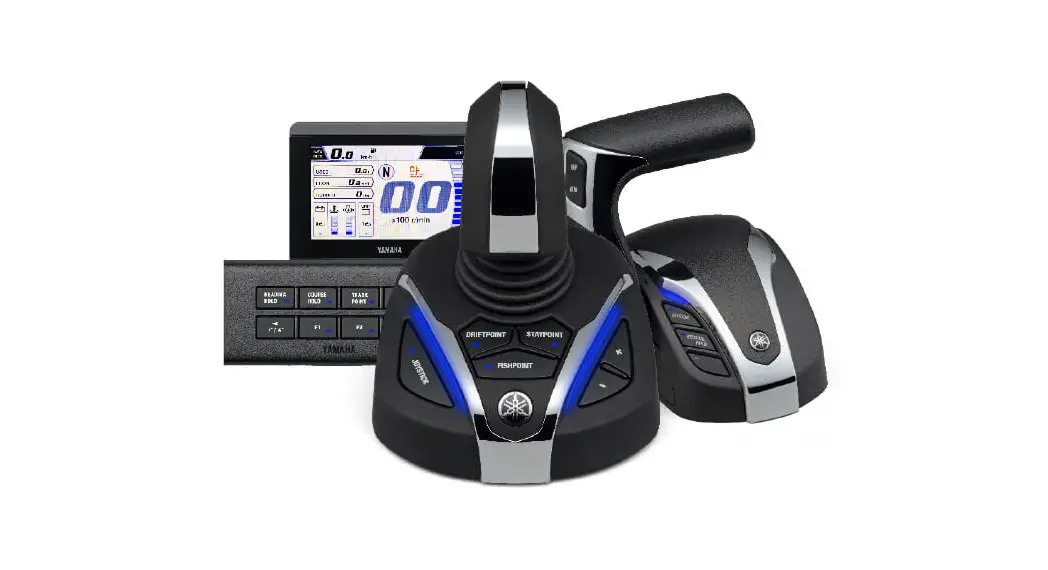
Yamaha Helm Master EX is an electrically controlled system for single to quad outboard engine(s) with over 150 HP for boats over 24 ft (approx.). It is a scalable system categorized into Levels 1 to 4, depending on available functions.
| No | Category | New Helm Master EX | Conventional Helm Master |
| 1 | Target | Single to Quad outboard(s) | Multiple outboards |
| 2 | Steering System | All electric: Electrical control and electrical actuator | Hydro-electric: Electrical control with hydraulic actuator |
| 3 | Shift Throttle | Electrical control | Electrical control |
| 4 | Joystick | Option for higher level | Standard |
| 5 | FishPoint Feature (simplified dynamic positioning) DriftPoint Feature (course keeping like SABIKI mode) | Available | Available |
| 6 | StayPoint Feature (dynamic positioning) | N/A for single engine Available for multiple engines | Available |
| 7 | Autopilot Function (straight, route, pattern steering) | Included for higher level (Level 3 and 4) | N/A |
Conventional Helm Master
Electrical Control
+ Hydraulic Pump
+ Hydraulic Actuator
(Hydro-Electric SBW)
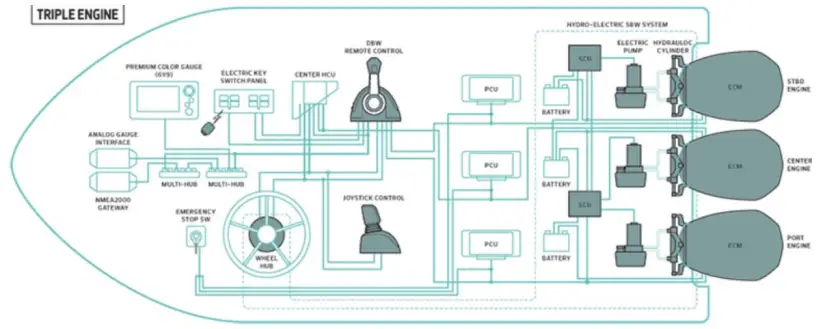
NEW Helm Master EX
Electrical Control + Electrical Actuator
Videos from Yamaha:
All-New Yamaha Helm Master® EX – YouTube
Helm Master® EX Owner Operation – StayPoint® – YouTube
(Electric Steering)

Scalable System – Categorized into Four (4) Levels
Depending on levels, the implemented functions are different and categorized in Levels 1 to 4. Make sure to consult with Yamaha representatives for the details on each level to cope with integration with MFDs described in the latter sections.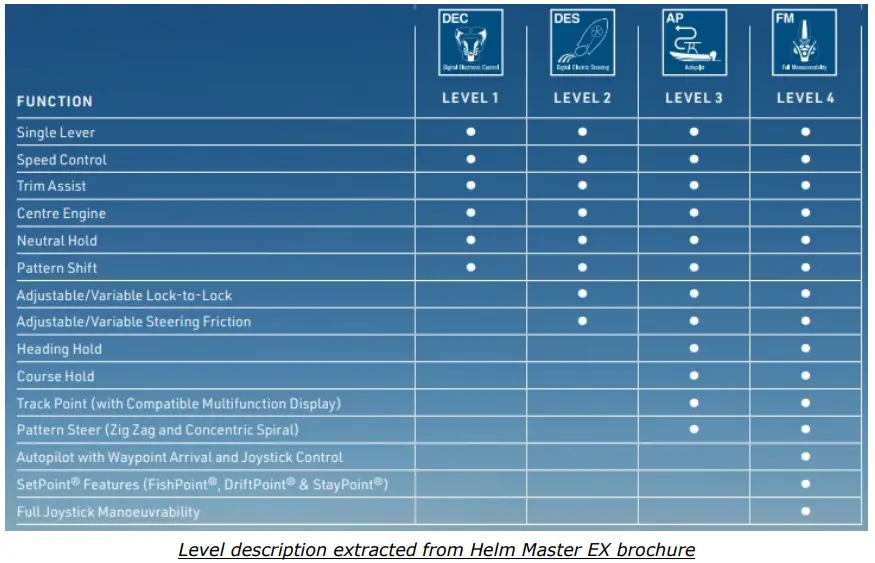
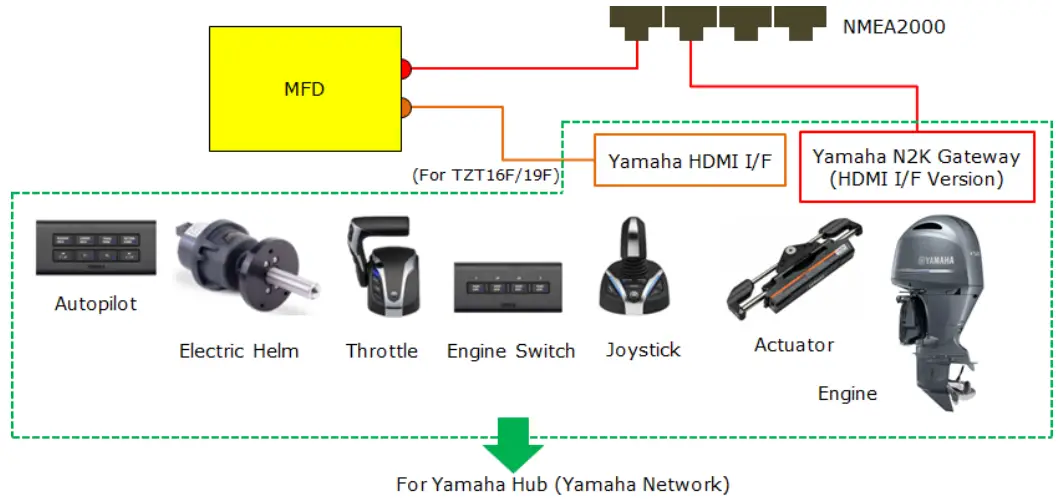
Example of Conceptual Wiring Diagram
MFD is added to the Yamaha Helm Master EX system to display engine gauges and output route data for autopilot. See Section 2 for details on required items to connect the MFD.
2.1. Interconnection
The TZT9F/12F/16F/19F v2.01 and above can be connected to the Yamaha Helm Master EX via the “HDMI I/F, Yamahpart # 6YM-8A201-01 and N2K gateway (HDMI I/F version)”, Yamaha part # 6YG-8A2D0-11 or by just using th“N2K gateway (HDMI I/F version)”.
| Via HDMI I/F and N2K Gateway (HDMI I/F Version) | Via N2K Gateway (HDMI I/F Version) |
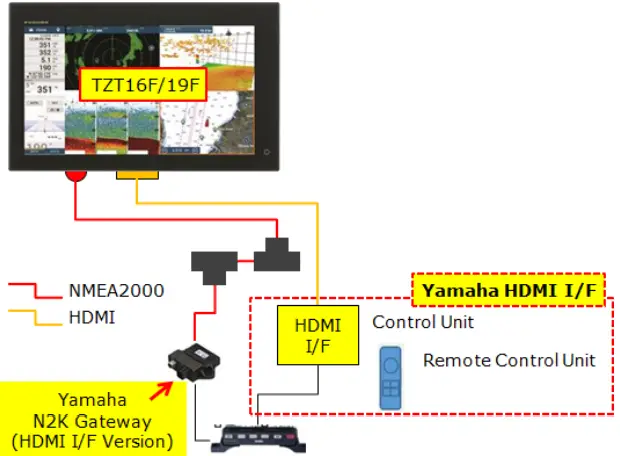 | 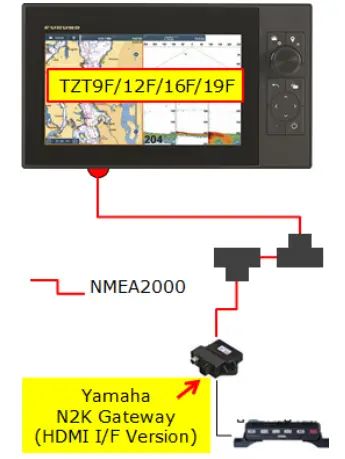 |
| The HDMI I/F is input to the HDMI IN port of TZT16F/19F to display gauge images on the TZT16F/19F – HDMI IN page. The N2K gateway (HDMI I/F version) is also connected for alarm, notification, route output, etc. | The N2K gateway (HDMI I/F version) is connected for engine data, as well as alarm, notification, route output, etc. |
Yamaha part description for each item is as follows.
HDMI I/F (also called HDMI BOX): 6YM-8A201-01, MFDI unit with Remote controller N2K Gateway (HDMI I/F version): 6YG-8A2D0-11, NMEA2000 Gateway (6YG)
2.2. Available Features by MFD Models
NavNet TZtouch3 MFDs are compatible with the following features of the Yamaha Helm Master EX.
| No | Feature | TZT9F | TZT12F | TZT16F | TZT19F |
| 1 | Display alarms and notifications on MFD | ✓ | ✓ | ✓ | ✓ |
| 2 | Output route information from MFD for the engine to slow down and stop at the destination | 1./ | ✓ | ✓ | ✓ |
| 3 | Display Yamaha (graphics) engine gauge data on MFD via HDMI I/F | N/A | N/A | ✓ | ✓ |
| 4 | Display engine data on MFD via N2K Gateway (HDMI I/F version) | ✓ | ✓ | ✓ | ✓ |
2.3. Alarm and Notification Indication
The indication related to Yamaha Helm Master EX will be shown on the message bar at the top of the screen.
The Alarm List shows the details of each alarm because the message bar has limited space.

2.4. Route Output
In addition to PGN: 129285 (Navigation – Route/WP information) for the origin and destination of the route, the next destination is also output.
2.5. Engine Gauge Display via Yamaha HDMI I/F
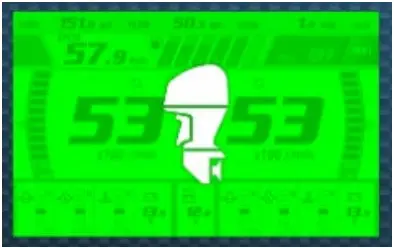
The Yamaha Helm Master EX internally generates graphic images of engine gauges and outputs the data via the HDMI I/F. TZT16F and TZT19F with the HDMI IN port can show the Yamaha generated engine gauge display. TZT9F and TZT12F do not have an HDMI-In port and cannot display Yamaha generated EX gauge information.
The engine gauge is controlled via a remote controller for EX.
Notes:
- Arrange the HDMI I/F through your local Yamaha dealer.
- The data content and operation (GUI) of the engine gauge display are designed by Yamaha, not Furuno. For details or questions on these items, please contact your local Yamaha dealer or representative.
- The Yamaha engine displays CL7/CL5 displays show engine gauges without the HDMI I/F. Most MFD manufacturersincluding Furuno NavNet TZtouch3 MFDs, use the HDMI I/F.
- While the engine gauge via the HDMI I/F is displayed on the TZT16F/19F, the HDMI source on the Camera page iNOT available because the HDMI IN port is being used by the HDMI I/F. This is currently true for every MFD on thnetwork.
2.6. N2K Gateway (HDMI I/F Version)
The N2K gateway (HDMI I/F version) is used to network with an MFD for alarm/notification, route output, and engine data. If the HDMI I/F is not in the network, the engine data will be shown on the conventionally available Yamaha page on the MFD (these Yamaha graphics are internal to the TZT3 MFDs)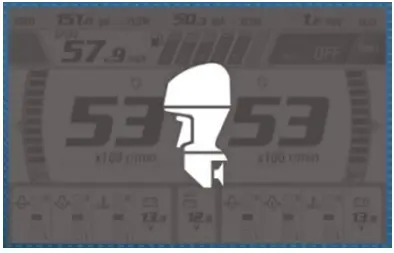
Note:
Make sure to arrange the N2K gateway (HDMI I/F version) through your local Yamaha representative.
2.7. Availability Table – With or Without HDMI I/F
The following table shows the available items with or without the HDMI I/F connected to the MFD.
| Item | HDMI I/F Connected | N2K Gateway (HDMI I/F Version) Only |
| Compatible MFD | TZT16F/TZT19F – HDMI IN port utilized | TZT9F/12F/16F/19F |
| Home Page Icon | | |
| Operation on MFD | N/A (control via remote controller only) | Available (switch display, troll mode, etc.) |
| Screen Mode | Full, 1/4-size (Quarter) | Full, 1/4-size (Quarter) |
Notes and Tips
3.1. Quarter Screen Mode
In the quarter split screen mode, only one of the screens can be assigned as aYamaha page.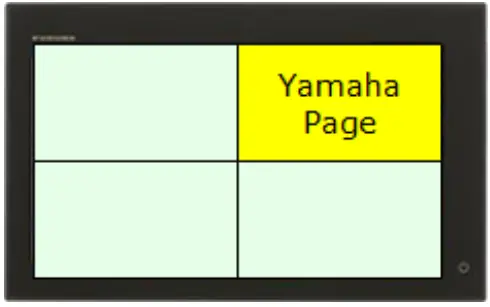
3.2. When HDMI I/F Not Detected…
When the HDMI I/F is not detected, the Home page will not show the bright green Yamaha page icon.
When the HDMI I/F is detected but the image is not available due to the HDMI I/F being powered off or a wiring failure, the Yamaha page will show a blue screen.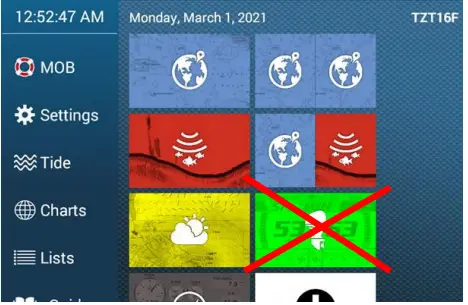
3.3. Limitations in Configuration with Multiple MFDs
No HDMI IN page available on other MFDs
While the HDMI I/F is connected to one of the MFDs in the network, other MFD(s) CANNOT show the HDMI IN page for an HDMI camera, etc.
Note:
For camera display requirement, use an analog or IP camera. Or use the video streaming feature.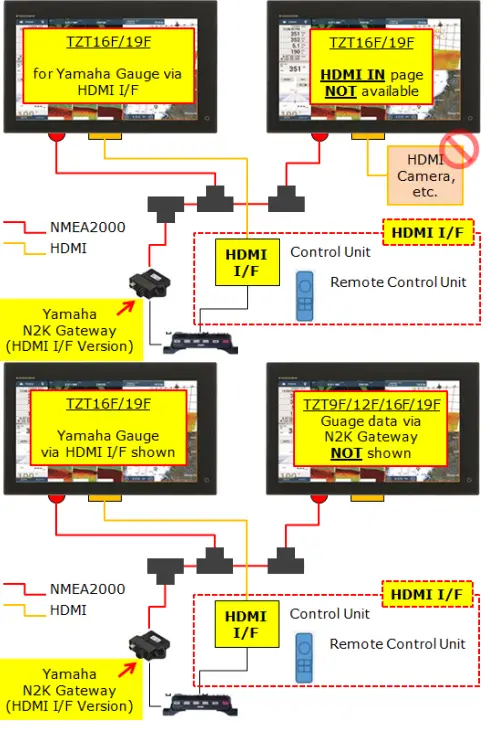
No mix of HDMI I/F and N2K gateway images
While the HDMI I/F is connected to one of the MFDs in the network, other MFD(s) CANNOT show engine data from N2K gateway. Mixture of HDMI and N2K gateway screens is not allowed.
Show engine gauges on all MFDs
As an example, if the Yamaha display CL7/CL5 is used to show and control engine data without the HDMI IF, MFDs in the network can show and control the engine data via the N2K gateway.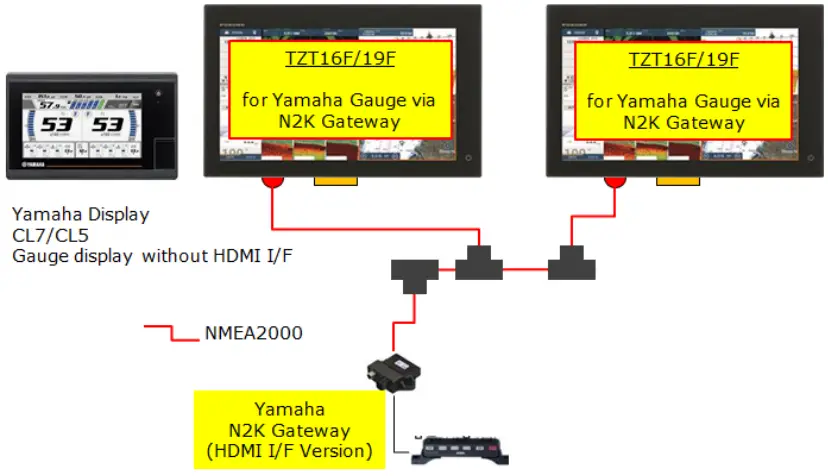
Engine data on Furuno Instrument page
The engine data from the N2K gateway can also be shown on the standard Instrument page in Furuno design. Note that some functions such as troll mode are not supported on the Furuno standard Instrument page.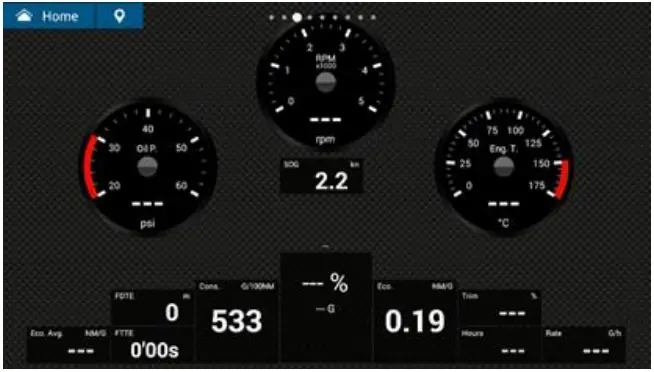
3.4. Tips
Official Approval by Yamaha:
NavNet TZtouch3 v2.01 was tested by Yamaha onboard for data display on MFD and autopilot control and has been officially approved since March 2021.
Note:
Connection with NAVpilot-711C or NAVpilot-300 with Helm Master EX is not verified. The EX engine with the autopilot implemented (Level 3 and 4) can be utilized for full control for arrival at the destination by route output from the MFD.
October 19, 2021
All brand and product names are registered trademarks, trademarks or service marks of their respective holders.