 SC 660 Smart Connect
User Manual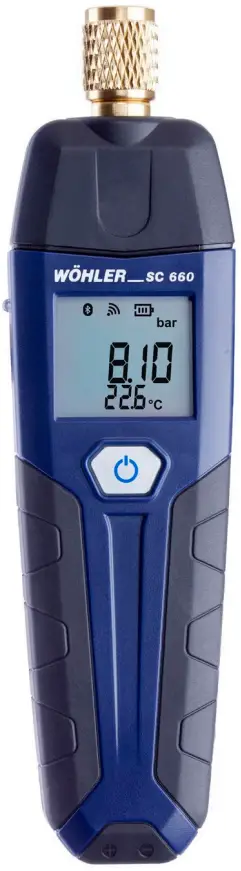
General information
1.1 Delivery with optional battery
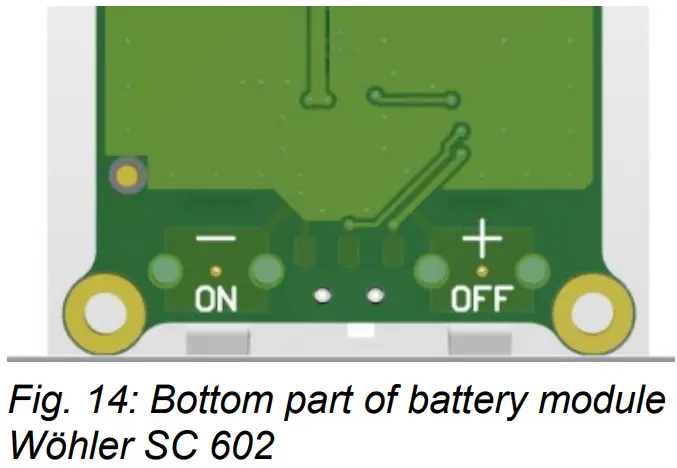
If your unit is operated with a rechargeable battery and not with batteries (optional), the transport lock is set when the unit is delivered, so that the unit cannot be switched on.
- In this case, open the battery compartment on the back of the unit.
- Move the small black lever at the bottom of the battery module from the off position to the on position.
This procedure is only necessary before using the unit for the first time.
1.2 Information on the operating instructions
These operating instructions enable you to operate the Wöhler SC 660 Smart Connect safely. Keep these operating instructions in a safe place.
The Wöhler SC 660 may only be used by qualified personnel for the intended purpose. We accept no liability for damage caused by failure to observe these operating instructions.
1.3 Notes in the operating instructions WARNING!
Indicates instructions which, if ignored, may result in injury or death.. ATTENTION!
Indicates hazards that may result in damage to the appliance or objects. NOTE!
NOTE!
Highlights tips and other useful information.
1.4 Intended Use
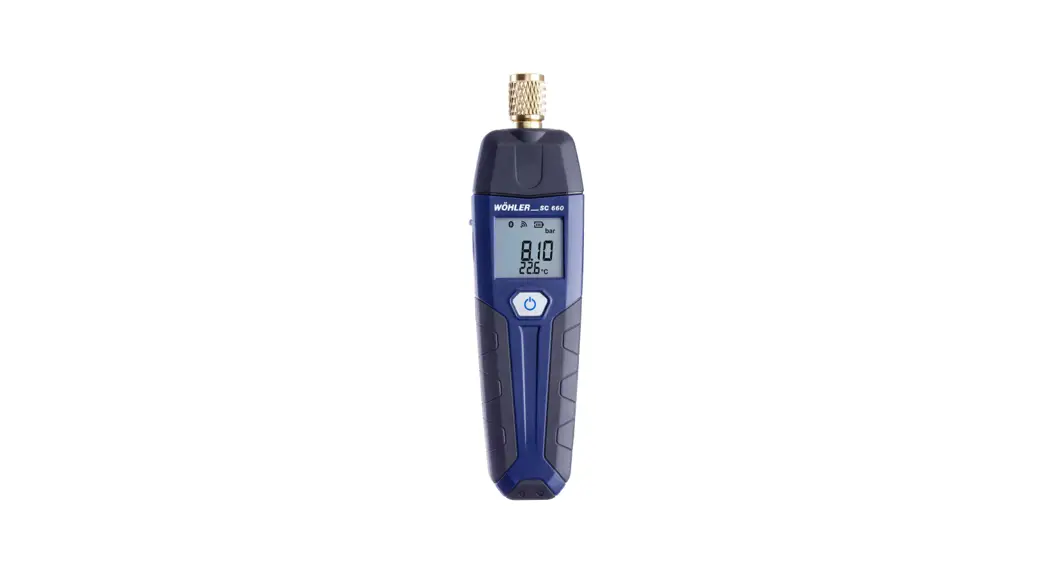
The Wöhler SC 660 is suitable for pressure measurements up to 60 bar on water pipes and air-conditioning units as well as for measuring the pipe temperature.
In conjunction with the Wöhler Smart Connect app or with the Wöhler 603 leak tester, the Wöhler SC 660 is suitable for leak tests on drinking water systems in accordance with DIN EN 806-4.
1.5 Basic equipment
| Device | Scope of delivery |
| Wöhler SC 660 | Smart Connect Manometer |
1.6 Accessories for measurements on water pipes and air conditioners
| Device | Scope of delivery |
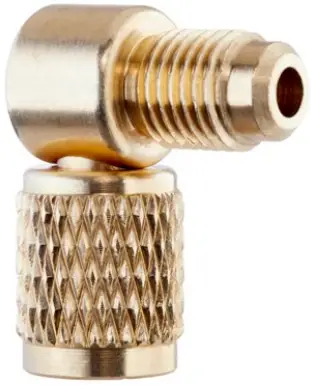 Article 8841 Article 8841 | Angle adapter ¼” SAE 90° |
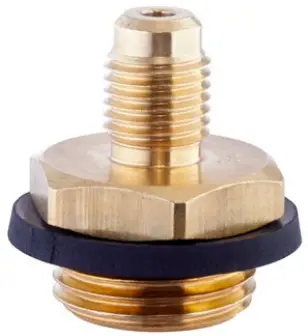 Article 8843 Article 8843 | High pressure plug G½ AG ¼” SAE Wall washer |
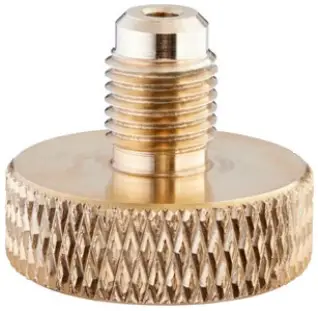 Article 8856 Article 8856 | Measuring adapter G¾ IG ¼” SAE Tap |
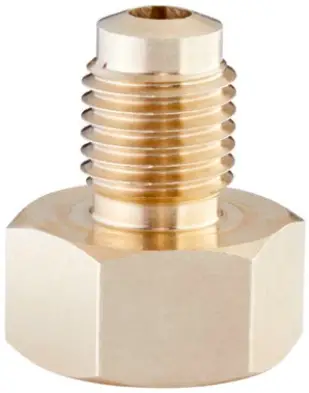 Article 8857 Article 8857 | Measuring adapter G3/8 AG ¼” SAE Angle valve |
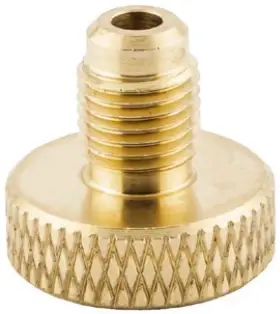 Article 11178 Article 11178 | Measuring adapter M22x1 IG 1/4″ SAE Shower hose |
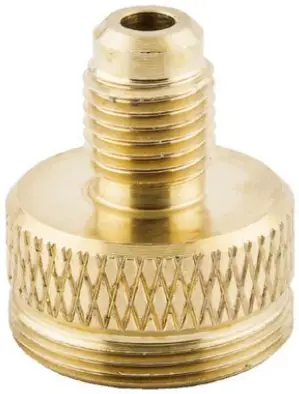 Article 11179 Article 11179 | Measuring adapter M24x1 ET 1/4″ SAE Perlator |
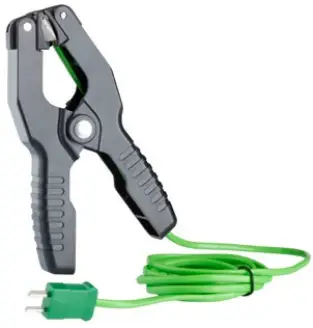 Article 62616 Article 62616 | Clamp temperature sensor type K with 1.5 m cable |
| Article 62694 | Connection valve ¼” SAE, for measurements on air conditioning systems |
| Article 62611 | Spare seals ¼” SAE for angle adapter and pressure connection Wöhler SC 660 |
1.7 Hand strap
The Wöhler SC 660 is supplied with a hand strap. If you want to use the hand strap, mount it as follows:
- Remove the battery cover on the back of the device.
- Hang the loop on the small hook below the batteries.
- Close the battery cover.
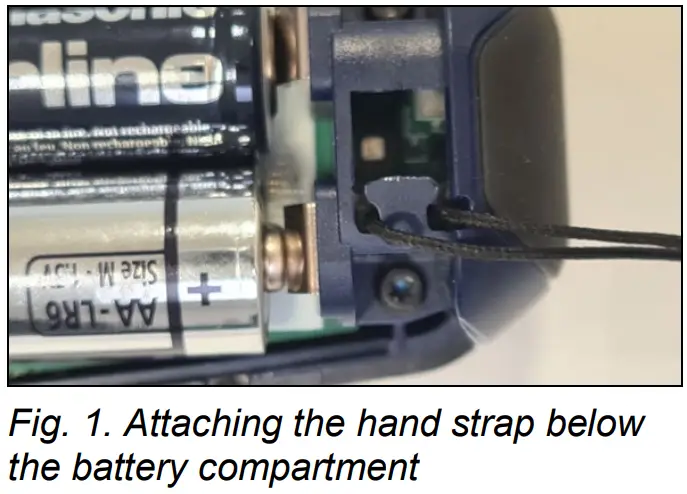
1.8 Transport ATTENTION!
Improper transport can damage the unit!
To avoid transport damage, the unit should always be transported in the bag or accessory case provided.
1.9 Disposal
Electronic devices must not be disposed of in household waste, but must be disposed of in accordance with the applicable environmental regulations.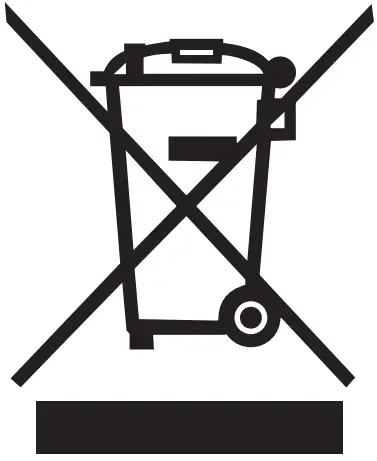 Defective batteries are considered hazardous waste and must be taken to the designated collection points for disposal.
1.10 Manufacturer’s address
Wöhler Technik GmbH
Wöhler-Platz 1
33181 Bad Wünnenberg
Tel.: +49 2953 73-100
Fax: +49 2953 73-250
E-Mail: [email protected]
Safety instructions
WARNING!
When connecting the Wöhler SC 660 to the line, ensure that the screw connection is tight: risk of injury from media under high pressure. ATTENTION!
Always store the unit in a frost-free place after measuring on a water pipe, as there may be water in the unit.
Specification
3.1 Measured values
Relative pressure
(differential pressure compared to the ambient pressure)
| Description | Indication |
| Measuring range | -1 bar to 60 bar |
| Permissible overload | 65 bar |
| Accuracy | < 3 % of measured value, in the range +/- 1 bar better than 0.03 bar |
| Resolution | 0,01 bar |
Temperature, internal
| Description | Indication |
| Measuring range | -20 °C to 60°C |
| Accuracy | < ± 1 °C |
| Resolution | 0,1°C |
Temperature, external e.g. with external temperature sensor type K
| Description | Indication |
| Measuring range Wöhler SC 660 | -20,0 °C to +800,0 °C |
| Range of application Clamp temperature sensor | -20,0 °C to +120,0 °C |
| Accuracy | < ± 1 °C in the range -20°C to 67°C, otherwise 1.5 % of measured value, according to EN 50379-1 |
| Resolution | 0,1°C |
Humidity
| Description | Indication |
| Measuring range | 0 % to 100 % rH (relative humidity), non-condensing |
| Accuracy | ± 5 % rF |
| Response time | up to 180 Min |
| Resolution | 0,1 % rF |
Ambient pressure
| Description | Indication |
| Measuring range | 300 hPa to 1100 hPa |
| Accuracy | ± 2 hPa |
| Resolution | 0,1 hPa |
3.2 Calculated values
(only in conjunction with the Wöhler Smart Connect App)
| Calculation size | Calculation |
| Pressure units | Conversion in hPa, kPa, MPa, mbar, bar, inWC, psi, mH2O, inHg according to the generally applicable conversion rules. |
| Temperature units | Conversion from °C to °F according to generally valid conversion rule |
3.3 Logger function
(only in conjunction with the Wöhler Smart Connect App)
| Description | Indication |
| Scope | 9000 measurements can be stored in the internal memory, each with pressure and humidity values as well as 2 tem- perature values (when an external sensor is plugged in). |
| Bluetooth data trans- mission | Online data, perma- nent, already during registration |
| Sampling intervals | Freely selectable in the range from 1 s to 24 h |
3.4 Technical data
| Description | Indication |
| Power supply | 2 batteries 1,5 V, AA LR6 |
| Power supply (optio- nal) | Lithium-polymer battery 3.7 V, 700 mAh, Charging via USB-C cable |
| Battery charge cyc- les (optional) | After 500 charging cycles, at least 70 % of the capacity is still available. |
| Battery charging time (optional) | 4 h |
| Battery life (optional) | 38 h |
| Automatic Switch off | After 1 hour (Can be deactivated in the settings) |
| Storage temperature Device, dry | -20 °C to + 50 °C |
| Device after meas- urement on water pipe | +5 °C to + 50 °C (Always store the unit in a frost-free place, as there may be water in the unit). |
| Operating temperature | +5 °C to 40 °C for compliance with the accuracies |
| Weight | 200 g |
| Dimensions | 173 x 47 x 29 mm |
| Data exchange | Bluetooth to the Wöhler Smart Connect App Bluetooth to the Wöhler M 603 Infrared to the printer |
Design and Functions
4.1 Measuring instrument
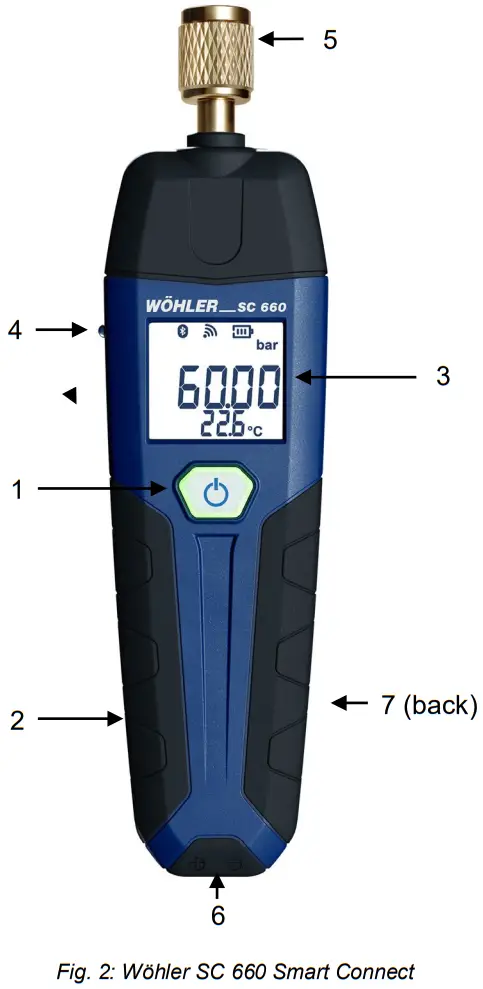
| Number | Function |
| 1 | Operating button |
| 2 | USB-C charging port (optional, only for battery opera- tion) |
| 3 | Display |
| 4 | Infrared interface to the thermal printer |
| 5 | Pressure connection |
| 6 | Plug-in connection for external temperature sensor or temperature clamp NiCr-Ni (type K) |
| 7 | Battery compartment on the back of the unit |
| Operating but- ton (1) | Keystroke | Functions |
 | long | On/off |
| short | Zero pressure sensor | |
| Double-click | Printout of the measured values on the thermo printer |
4.2 Display
After switching on, the unit performs a pressure zeroing for a few seconds. ATTENTION!
During zeroing, no hose may be connected and no differential pressure applied, as the unit stabilizes and determines its zero point.
The measurement display then appears.
Header:
– wireless connection via Bluetooth to the Wöhler Smart Connect App or to the Wöhler M 603 pressure gauge flashing: ready to connect permanent: connection established
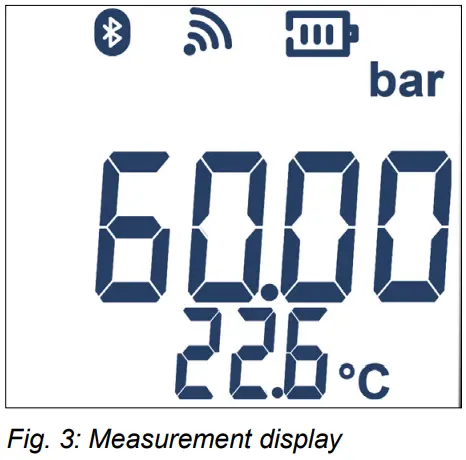
NOTE! The connection icon flashes on the display if a connection to the app or to the Wöhler M 603 has not yet been established. As soon as the connection is established, the connection icon lights up permanently and a Bluetooth icon also appears..
– Battery level indicator:
stable: high battery voltage
Flashing: very low battery voltage
Main display (middle row):
– Currently measured relative pressure or ambient pressure (selectable via Wöhler Smart Connect App, default: relative pressure)
– Units selectable via Wöhler Smart Connect App Footer:
– internally measured temperature or
– externally measured temperature (if external temperature sensor is connected)
– Further selection via Wöhler Smart Connect App: Relative humidity
Settings
- Immediately after switching on, as soon as the battery symbol appears in the display and be- fore the measured value display appears, double-click with the operating button.
This takes you to the settings mode.
5.1 Selecting the pressure unit
Press unit appears in the display.
- To select the pressure unit, press the operating key briefly.
The pressure units mbar, bar, inWC, psi, mmH2O, mH2O, in HG, Pa, hPa, kPa and MPa appear in succession.
- Accept the desired unit with a double click.
5.2 Selecting the pressure resolution
The display shows “reso” (resolution).
You can now set the displayed resolution for printing. The resolution refers to the previously selected print unit. There are 3 different resolutions to choose from.
- Press the operating key briefly to select the desired resolution.
- Confirm your selection with a double click.
5.3 Selecting the temperature unit
Temp. unit” appears in the display.
You can now select the temperature unit °C or °F.
- Press the operating button briefly to switch between °C and °F.
- Confirm your selection with a double click.
5.4 Switching the display illumination on/off
Light on appears in the display.
- Press the operating key briefly to switch the backlighting off or on again.
- Confirm your selection with a double click.
5.5 Deactivating the automatic switch-off function
Auto Off” appears in the display.
The unit switches off automatically after one hour if no key has been pressed. This auto-off function can be deactivated at this point.
- Press the operating key briefly to switch between “Auto Off” (automatic switch-off activated) and “Ever ON” (automatic switch-off deactivated).
- Confirm your selection with a double click.
The display then changes back to the start screen for a few seconds and then to the measuring mode.
Error Message
If the error message BLE appears in the display, the device does not recognize the Bluetooth module. In this case, the Wöhler SC device must be sent in for service.
Water connection components
- For better accessibility or readability, you can also use the 90° angle adapter (art. no. 8841).
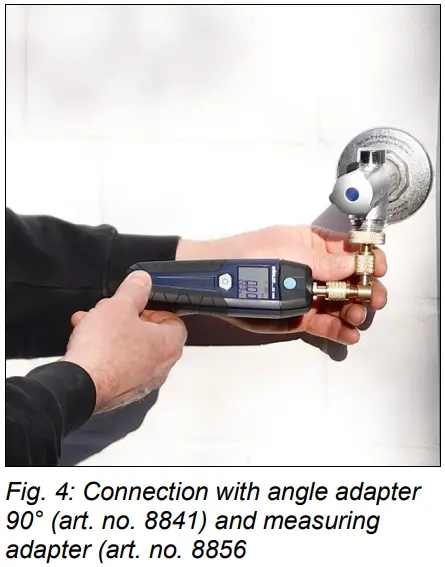
- To connect to a tap, first screw the angle adapter (art. no. 8841) onto the pressure connection of the unit (see fig. 3, part 5).
- Screw a measuring adapter suitable for the tap (Art. No. 8856 or 8857) onto the angle adapter.
- oder 8857) auf den Winkeladapter.
ACHTUNG!
Please always use the angle adapter. If the Wöhler SC 660 is mounted on the tap without the angle adapter, water may run over the unit during the disassembly.
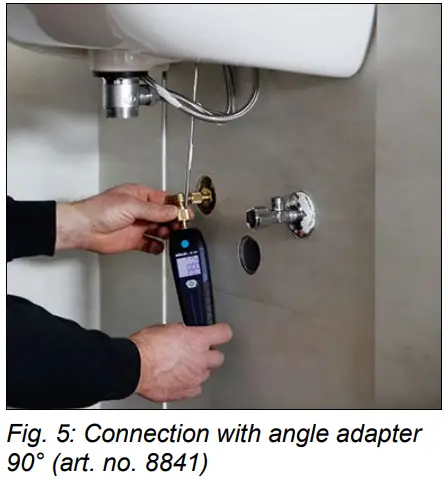
- You also have the option of connecting the measuring device to the lead behind the wall panel. For better accessibility or readability, you can also use the 90° angle adapter (art. no. 8841).
Pressure tests on water pipes
Connect the device to the Wöhler SC 660 app as described in the app instructions. Select the menu “Water.
- Call up the menu item “Pressure test”.
- Connect a temperature measuring clamp to the Wöhler SC 660 and measure the tempera- ture of the water pipe.
- Tap on the temperature value “Media temperature” in the app and then enter the measured temperature as the media temperature in the app.
- Tap on the blue field “Ambient temperature” to accept the measured temperature value or tap on the field of the temperature value to enter it.
- Enter the desired test pressure, stabilization time and measurement time if you want to change the pre-set values.
- Tap the icon for zeroing the pressure if you want to zero the pressure sensor.
- Tap on “Start measurement”.
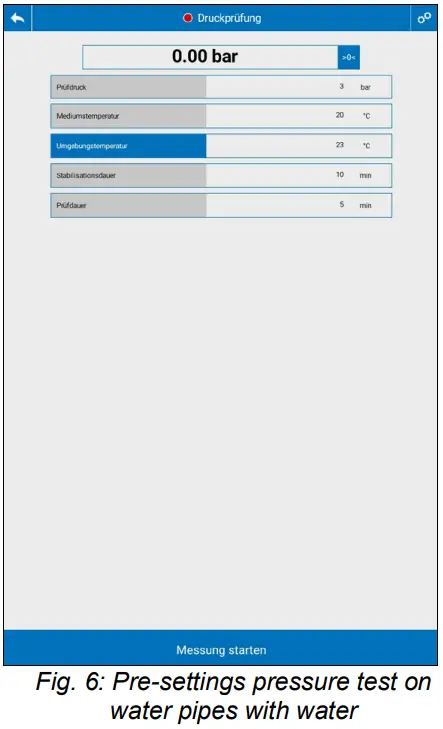
- Apply the desired test pressure to the water pipe.
- The stabilisation phase follows.
- After the stabilisation phase, the measurement starts automatically. During the measurement, the pressure curve can be followed in a graph.
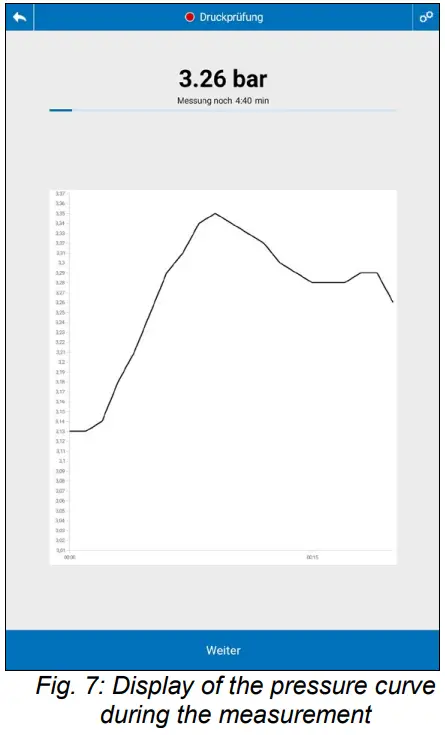
- After the measurement has been completed, the result display appears.
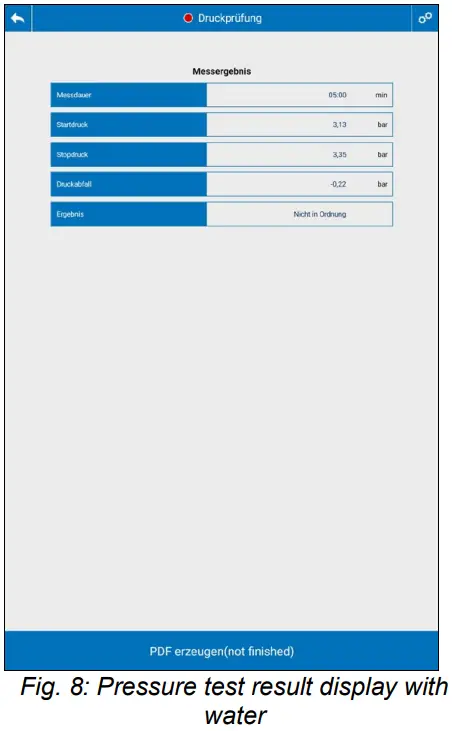
- Tap on “Generate PDF” if you want to generate one of the pressure measurements.
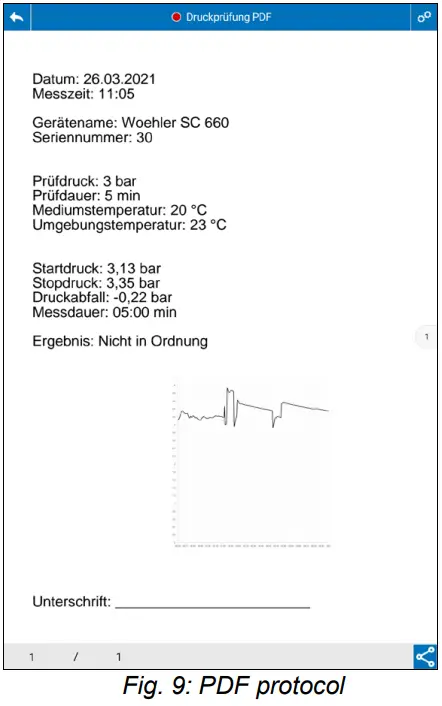
NOTE!
If you are working with Adobe Reader, you can directly download the PDF protocol in the display.
- In the PDF, tap the Share button in the footer if you want to send or save the protocol.
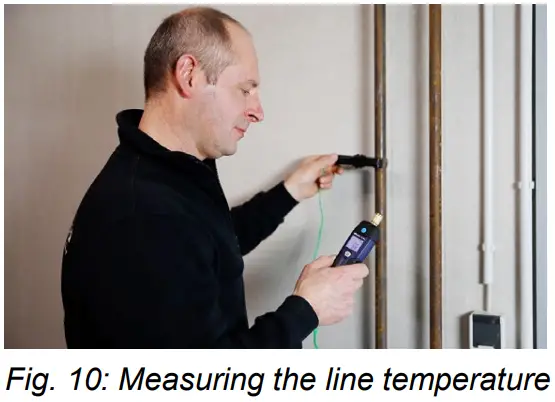
Connection for measuring the line temperature
- To measure the line temperature, connect the clamp temperature sensors to the underside of the Wöhler SC 660, see Fig. 3, No. 1.
Air-conditioning and refrigeration connection
- For pressure measurement on refrigeration systems use the Wöhler connection valve Art. No. 62694.
 NOTE!
NOTE!
The connection valve ensures that the refrigerant loss during the measurement is as low as possible. - Screw the connection valve onto the measuring socket.
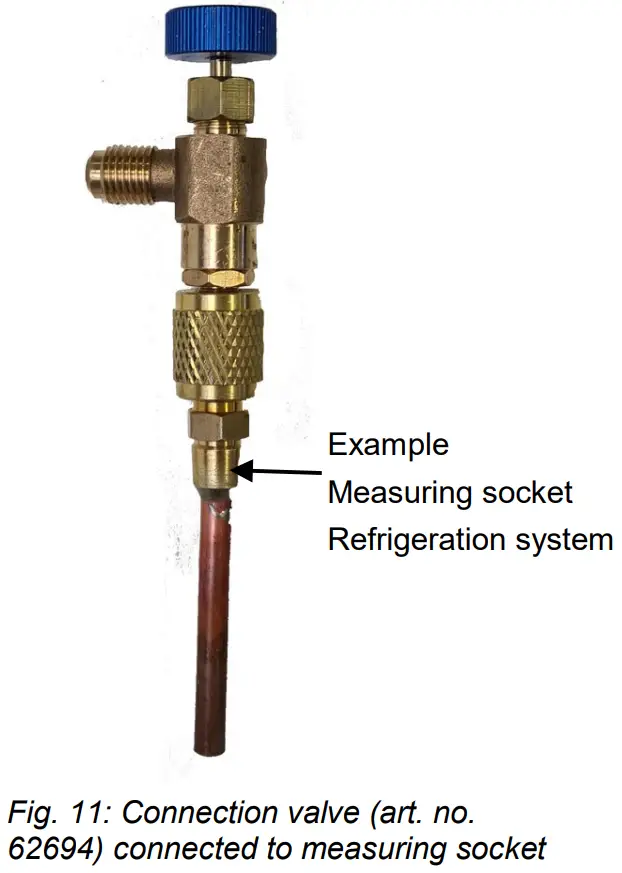
Air-conditioning and refrigeration connection
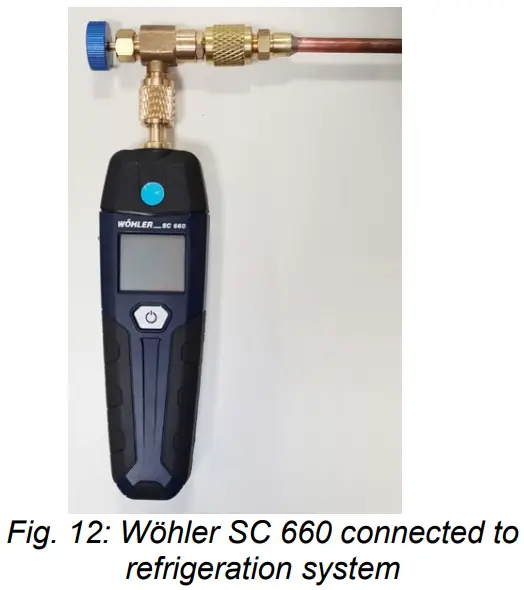
- Screw the Wöhler SC 660 tightly onto the ex- ternal thread of the connection valve so that the circuit is closed again.
- Screw in the blue knurled screw until the Schrader valve of the measuring nozzle is open.
- After the measurement, unscrew the blue knurled screw again so that the valve of the measuring connection closes again and no refrigerant escapes when the Wöhler connection valve is dismantled.
Power supply
The battery status is indicated at the top of the unit display by the battery symbol. If the battery voltage is low, proceed as follows
11.1 Changing the battery
- Switch off the unit.
- Remove the battery cover on the back.
- Replace the batteries with 2 new 1.5 V AA LR6 batteries.
- Observe the correct polarity according to the labelling in the battery compartment.
11.2 Charging the battery (optional)
- Charge the device via the USB-C charging port, see Fig. 3.
- During the charging process, the LED next to the charging port lights up yellow, after the charging process is finished it lights up green.
Maintenance
12.1 Maintenance list
To ensure the proper functioning of the Wöhler SC 660, the unit must be serviced regularly:
| Interval | Maintenance work |
| If required (user) | Clean the housing and the pressure connection with a damp cloth. |
| 1x per year (factory) | Send the unit to one of our service centres for checking and calibration. |
Accessories
Probes and sensors
| Probes and sensors | |
| Clamp temperature sensor type K with 1.5 m cable | Order no. 62616 |
| Connection adapter water pipe | |
| Angle adapter 90° | Order no. 8841 |
| High pressure stage plug with external thread | Order no. 8843 |
| Measuring adapter G3/4 IG 1/4″ SAE for tap | Order no. 8856 |
| Measuring adapter G3/8 IG 1/4″ SAE for angle valve | Order no. 8857 |
| Measuring adapter M22x1 IG 1/4″ SAE for shower hose | Order no. 11178 |
| Measuring adapter M24x1 ET 1/4″ SAE for aerator | Order no. 11179 |
| Connection adapter air conditioning/cooling | |
| Connection valve ¼ “ | Order no. 62694 |
| Extras | |
| Wöhler thermal high-speed printer TD 100 | Order no. 4160 |
| Thermal paper, 10 rolls | Order no. 4145 |
| Battery for Wöhler SC 603 and DM 602 | Order no. 8839 |
Warranty and service
14.1 Warranty
Every Wöhler SC 660 Smart Connect is tested in all its functions and only leaves our factory after a detailed quality check.
If used properly, the warranty period for the Wöhler SC 660 is twelve months from the date of sale. Batteries, the optional rechargeable battery and damage to the pressure sensor caused by overloading are excluded.
The costs for transport and packaging of the device in case of repair are not covered by this.
The warranty does not apply if repairs and modifications have been made to the unit by a third party without authorisation.
14.2 Service
SERVICE is very important to us. That’s why we are also there for you after the warranty period.
- You send the measuring device to us, we repair it within a few days and send it to you with our parcel service.
- You will receive immediate help from our technicians on the phone.
Declaration of conformity
The manufacturer: WÖHLER Technik GmbH
Wöhler-Platz 1, D-33181 Bad Wünnenberg
explains that the product:
Product name: Wöhler SC 660 Smart Connect
complies with the essential protection requirements laid down in Directive 2014/53/EU of the European Parliament and of the Council on the harmonisation of the laws of the Member States relating to the making available on the market of radio equipment..
The following standards were used to assess the product with regard to electromagnetic compatibility:
EN 61326-1 :2013
ETSI EN 301 489-1 V2.2.0
ETSI EN 301 489-17 V 3.1.1
ETSI EN 300 328 V2.2.2 (2019-07)
EN 62479 :2010
Bad Wünnenberg, 26.10.2022
Dr. Stephan Ester, Geschäftsführer/Managing Director
Points of sale and service
| Germany Wöhler Technik GmbH Wöhler-Platz 1 33181 Bad Wünnenberg Tel.: +49 2953 73-100 [email protected] www.woehler.de | Austria Wöhler GmbH Burgerfeld 16 3150 Wilhelmsburg Tel.: +43 2746 313 13 10 www.woehler.at |
| USA Wohler USA Inc. 208 S Main Street Middleton, MA 01949 Tel.: +1 978 750 9876 www.wohlerusa.com | Czech Republic Wöhler Bohemia s.r.o. Za Naspern 1993 393 01 Pelhrimov Tel.: +420 565 323 076 [email protected] |
| Italy Wöhler Italia srl Via Coraine 21 37010 Costermano VR Tel. +39 045 6200080 [email protected] www.woehler.it | France Wöhler France SARL 17 A impasse de Grousset 31590 Lavalette Tel.: +33 5 61 52 40 39 [email protected] www.woehler.fr |
| Netherlands Wöhler Nederland B.V. Nijverheidsweg-Noord 123 Unit A 3812 PL Amersfoort Tel.: +31 33207760-0 [email protected] www.woehler.nl | Your contact: ….. |
 Wöhler GmbH
 Wöhler Technik GmbH
 Wöhler France SARL
 Wöhler Italia SRL
 Wöhler Nederland B.V.
 Wohler USA Inc.